vscode-infracost is a free, open source cloud infrastructure management project written in TypeScript and released under Apache-2.0. It has 1,835 GitHub stars, 55 forks and 9 open issues, and was last pushed 2 days ago. On this registry it ranks #64 of 76 tracked projects in Cloud Infrastructure Management, with 5 head-to-head comparisons available.

What is vscode-infracost?

The Infracost VS Code extension is a TypeScript, Apache-2.0-licensed editor plugin that shows cloud cost estimates for Terraform directly inside VS Code, intended for engineers and FinOps practitioners who want cost visibility while they write infrastructure as code.

What it is

It is a VS Code extension published by Infracost, and it lives in the infrastructure-as-code tooling ecosystem alongside Terraform and CloudFormation. The extension is a client for the Infracost language server, which starts automatically when a workspace containing Terraform files is opened and scans the project for resources to price. It is written in TypeScript, distributed under the Apache-2.0 licence, and catalogued under Infrastructure & Operations / Cloud Infrastructure Management. The topics attached to the project — terraform, infrastructure-as-code, cloud-cost-estimates, cost-estimation, cost-management, cost-optimization, finops, shift-left, aws, azure, gcp, google — describe the ground it covers.

The concrete problem it solves is the latency between writing infrastructure and learning what that infrastructure costs. Cost estimates normally arrive late, as pull request feedback delivered by CI/CD integrations. This extension moves the estimate into the editing loop, so costs appear as code lenses above Terraform resource definitions and update as the file is edited. It also surfaces FinOps policy violations and tagging issues in the same view, so a blocking policy breach or a missing tag is visible before the change reaches review rather than after it reaches production.

Key capabilities

  • Inline cost estimates rendered as code lenses directly above Terraform resource definitions, refreshed as the file is edited.
  • A resource details sidebar, opened by clicking a code lens, showing a full cost component breakdown alongside FinOps policy violations and tagging issues.
  • FinOps policy violations annotated with risk, effort, and potential savings, with blocking violations clearly marked.
  • Tag policy issues reported in the sidebar next to the resources they affect.
  • CloudFormation support for templates written in YAML and JSON, in addition to Terraform .tf files.
  • Configuration settings including infracost.currency (default USD, accepting any currency the pricing API supports), infracost.serverPath for pointing at an lsp binary instead of the bundled one, infracost.displayRemoteModulesInTree (default false), infracost.checkForUpdates (default true), and infracost.runParamsCacheTTLSeconds.
  • Guidance for pairing the editor experience with CI/CD integrations that add cost estimates to pull requests.

Who uses it and how

  • Platform and infrastructure engineers writing Terraform in VS Code, who see the cost of a resource block while they are still choosing its instance type or storage class.
  • FinOps teams that need policy violations filtered into risk, effort, and potential savings, and that rely on blocking violations being marked as blocking.
  • Multi-cloud teams working across AWS, Azure, and GCP, since the pricing surface is not limited to one provider.
  • Teams whose infrastructure is expressed in CloudFormation YAML or JSON templates rather than Terraform, who get the same sidebar and policy reporting.
  • Groups standardising on editors other than VS Code, who are directed to the official installation documentation for the other supported editors.

Getting started

Install the extension from the VS Code Extensions view by searching for Infracost, or run ext install Infracost.infracost from Quick Open. Pre-release builds ship as platform-specific .vsix files, installed with a command such as code --install-extension infracost-0.2.35-darwin-arm64.vsix or through Extensions: Install from VSIX.... After installing, open the Infracost sidebar and click Login to Infracost to authenticate the editor against an Infracost account, then open a Terraform workspace.

How it compares

No list of paid products that this extension replaces is provided in the facts, and no comparable tool is named alongside it. It stands alone in this registry.

When to use it — and when not to

A self-hoster must operate a VS Code installation at v1.100.0 or above, hold an Infracost account, and keep the bundled Infracost language server reachable, either through the bundled lsp binary or a path set in infracost.serverPath; cost estimates also depend on the pricing API serving the configured infracost.currency. This is the wrong choice for anyone who cannot use an Infracost account, for teams that only want cost feedback in pull requests rather than in the editor, or for infrastructure that is neither Terraform nor CloudFormation, in which case the extension has nothing to price.

project readme (upstream, from github) — read inline

Infracost VS Code Extension

Infracost's VS Code extension shows you cost estimates for Terraform right in your editor! It also surfaces FinOps policies and tagging issues so you can catch problems before they reach production.

Table of contents

Features

Cost estimates

Inline cost estimates

See cost estimates as code lenses directly above Terraform resource definitions. Costs update as you edit.
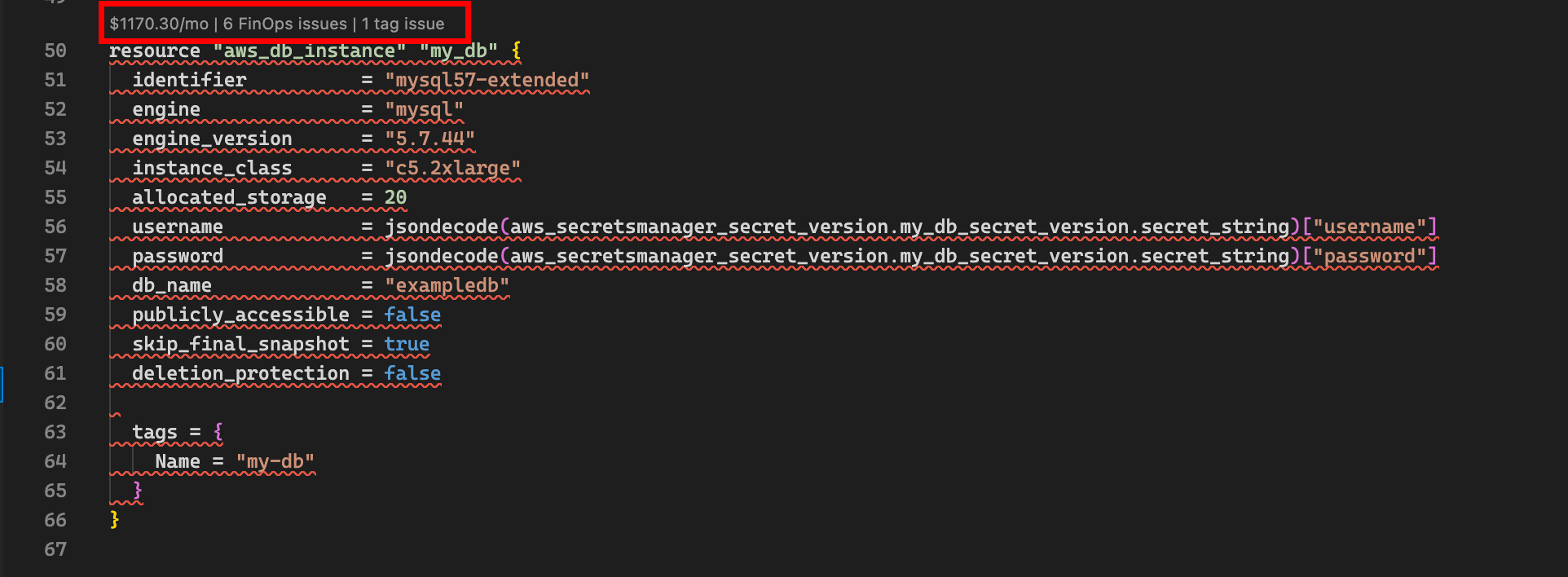
Inline cost estimates

Resource details sidebar

Click a code lens to open the resource details panel, showing a full cost component breakdown, FinOps policy violations, and tagging issues.
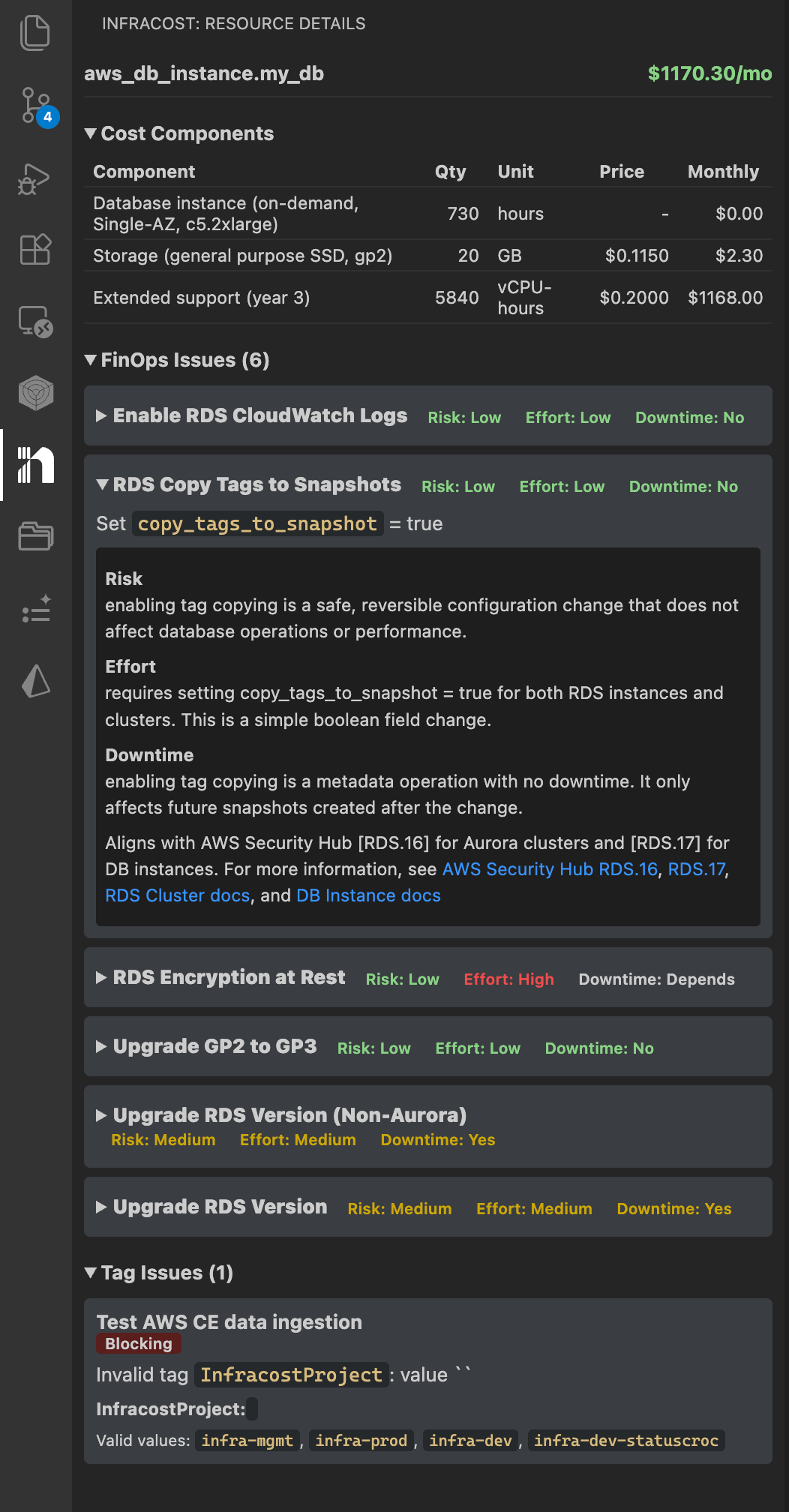
Resource details sidebar

FinOps policies and tag issues

The extension highlights FinOps policy violations (with risk, effort, and potential savings) and tag policy issues directly in the sidebar. Blocking violations are clearly marked.
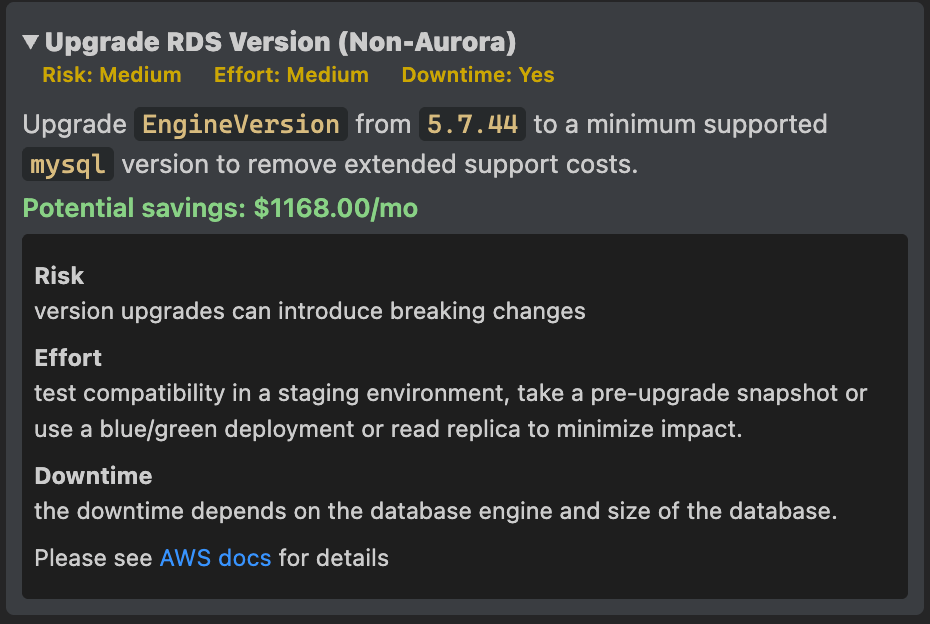
FinOps policies

CloudFormation support

In addition to Terraform (.tf) files, the extension supports CloudFormation templates in YAML and JSON.

Get started

[!NOTE] Prerequisites: Make sure you have VS Code v1.100.0 or above and an Infracost account. See Requirements for details.

1. Install the extension

Open VS Code and go to the Extensions view (Ctrl+Shift+X / Cmd+Shift+X). Search for Infracost, select the extension published by Infracost, and click Install.

Alternatively, use the Quick Open command:

ext install Infracost.infracost
Installing a pre-release version

Download the .vsix file for your platform from the latest pre-release. Then install it manually:

code --install-extension infracost-0.2.35-darwin-arm64.vsix

Or in VS Code: open the Command Palette (Cmd+Shift+P / Ctrl+Shift+P), run Extensions: Install from VSIX..., and select the downloaded file.

[!TIP] Using a different IDE? See the official installation docs for instructions on other supported editors.

2. Login to Infracost

Open the Infracost sidebar and click Login to Infracost. This will open a browser window to authenticate your editor with your Infracost account.
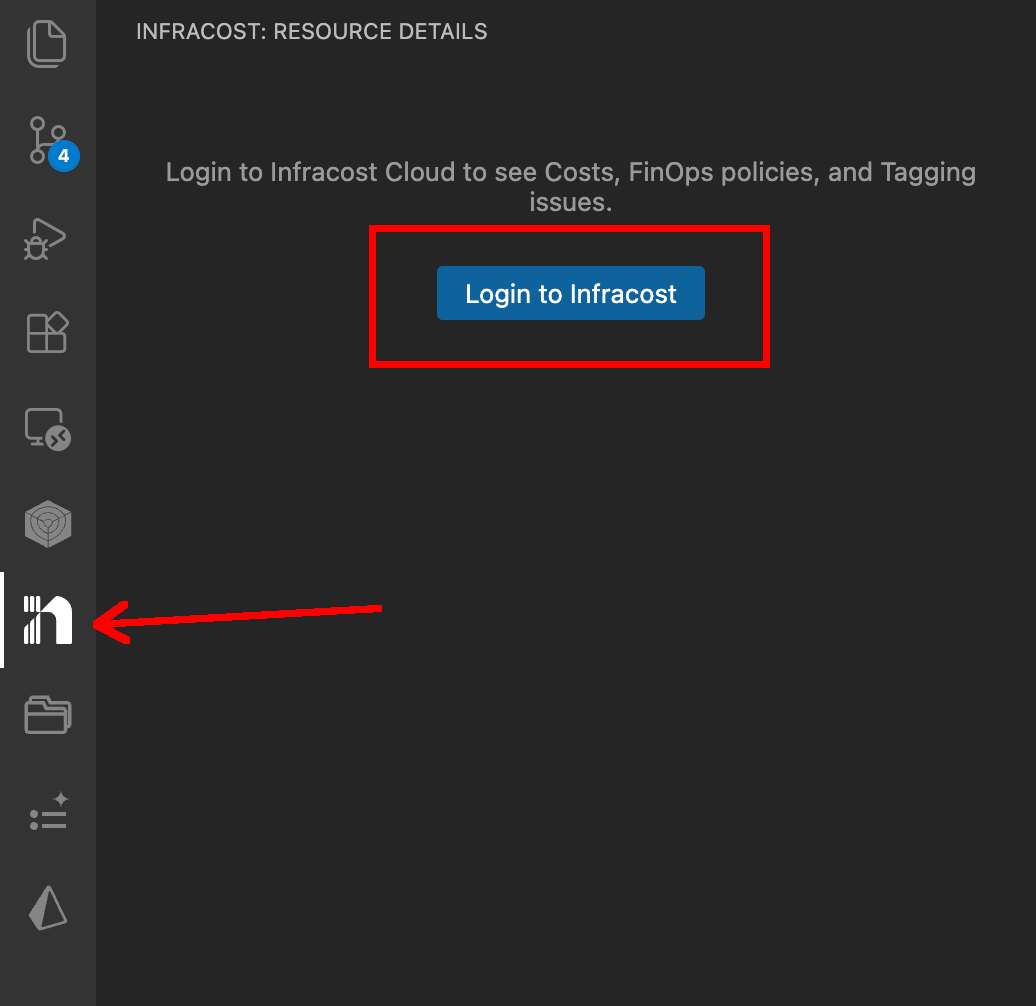
Login

3. Open a Terraform project

Open a workspace containing Terraform files. The extension will start the language server and begin scanning your project. Cost estimates will appear as code lenses above resource blocks.

4. Cost estimates in pull requests

Use our CI/CD integrations to add cost estimates to pull requests, giving your team visibility into cloud costs as part of your workflow.

Requirements

  • VS Code v1.100.0 or above
  • An Infracost account

Configuration

Setting Description Default
infracost.serverPath Path to the lsp binary. Leave empty to use the bundled binary. (bundled)
infracost.currency Currency to use for cost estimates. Options include all currencies supported by the pricing API. USD
infracost.displayRemoteModulesInTree Show resources from remote modules in the Explorer tree. Remote module sources cannot be opened from the tree. false
infracost.checkForUpdates Check for updates to the bundled Infracost language server. true
infracost.runParamsCacheTTLSeconds How long (in seconds) to cache run parameters between API calls. Set to 0 to disable. 300

The extension also passes VS Code's http.proxy setting to the bundled language server when HTTP_PROXY/HTTPS_PROXY environment variables are not already set.

Commands

Command Description
Infracost: Login Authenticate with your Infracost account
Infracost: Restart Language Server Restart the LSP if it gets into a bad state

Troubleshooting

Locating logs

  1. Open the Output panel (View -> Output).
  2. Select Infracost from the dropdown to see language server logs.

If you're having issues, please start a thread in GitHub Discussions with as much log information as you can, along with your OS and VS Code version.

Contributing

We welcome contributions! Please start by opening a thread in GitHub Discussions to discuss your idea before submitting a PR.

To set up a local development environment:

  1. Clone the repo.
  2. npm install to install dependencies.
  3. Open the repo in VS Code.
  4. Press F5 to launch the extension in a Development Host window.
  5. Open a Terraform project to see cost estimates above resource blocks.

Frequently asked questions

Is vscode-infracost free to use?

vscode-infracost is open source under the Apache-2.0 licence. There is no licence fee and no seat count — you can self-host it or, where the project offers one, pay a vendor for a managed version instead.

What does vscode-infracost do?

See cost estimates for Terraform right in your editor💰📉

What is vscode-infracost written in?

vscode-infracost is primarily written in TypeScript. Its source is publicly available at https://github.com/infracost/vscode-infracost, and it has 1,835 GitHub stars.