VPS Security Audit Script
A comprehensive Bash script for auditing the security and performance of your VPS (Virtual Private Server). This tool performs various security checks and provides a detailed report with recommendations for improvements.
nuverlabs.com/vps-audit · a Nuver Labs project
Features
Security Checks
- SSH Configuration - Root login status - Password authentication - Non-default port usage
- Firewall Status (UFW/firewalld/iptables/nftables)
- Intrusion Prevention (Fail2ban/CrowdSec) Configuration
- Fail2ban SSH jail port alignment (catches bans that silently do nothing)
- Failed Login Attempts
- System Updates Status
- Running Services Analysis
- Open Ports Detection
- Sudo Logging Configuration
- Password Policy Enforcement (via
pwquality.conf) - SUID Files Detection
Performance Monitoring
- Disk Space Usage
- Memory Usage
- CPU Usage
- Active Internet Connections
Requirements
- Ubuntu/Debian-based Linux system
- Root access or
sudoprivileges - Basic packages (most are pre-installed):
ufwsystemdnetstat/ssgrepawk
Installation
- Download the script:
wget https://raw.githubusercontent.com/Nuver-Labs/vps-audit/main/vps-audit.sh
# or
curl -O https://raw.githubusercontent.com/Nuver-Labs/vps-audit/main/vps-audit.sh
- Make the script executable:
chmod +x vps-audit.sh
Usage
Run the script with sudo privileges:
sudo ./vps-audit.sh
The script will:
- Perform all security checks
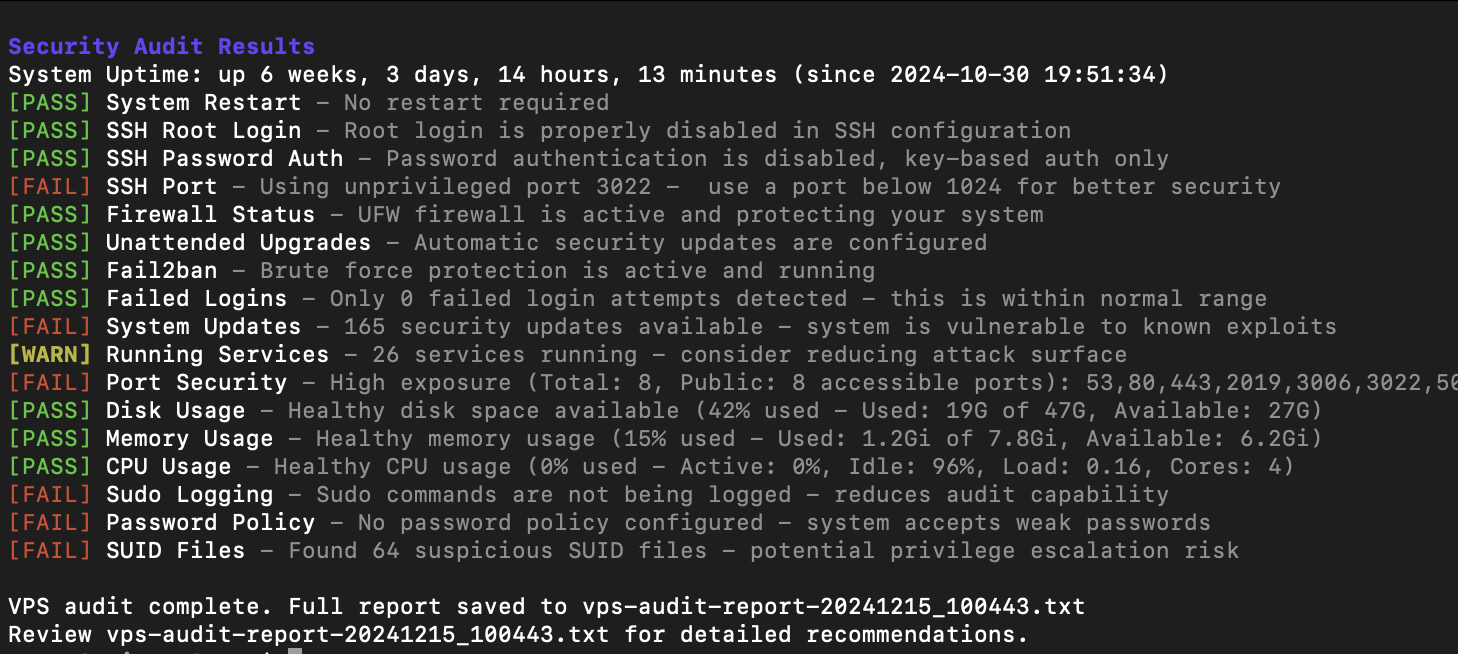
- Display results in real-time with color coding:
- 🟢 [PASS] - Check passed successfully
- 🟡 [WARN] - Potential issues detected
- 🔴 [FAIL] - Critical issues found
- Generate a detailed report file:
vps-audit-report-[TIMESTAMP].txt
Output Format
The script provides two types of output:
- Real-time console output with color coding:
[PASS] SSH Root Login - Root login is properly disabled in SSH configuration
[WARN] SSH Port - Using default port 22 - consider changing to a non-standard port
[FAIL] Firewall Status - UFW firewall is not active - your system is exposed
- A detailed report file containing:
- All check results
- Specific recommendations for failed checks
- System resource usage statistics
- Timestamp of the audit
Customization
The script's behavior, file paths, and scoring limits are fully controlled by variables defined in the Configuration section at the top of the script file.
1. Dynamic Thresholds for PASS/WARN/FAIL Status
These variables define the numerical limits that trigger a WARN or FAIL status.
| Variable | Default Value | Check | Description |
|---|---|---|---|
RESOURCE_WARN |
50 |
Resource Usage | WARN if Disk/Memory/CPU usage is between 50-80%. |
RESOURCE_FAIL |
80 |
Resource Usage | FAIL if Disk/Memory/CPU usage is more than 80%. |
SERVICES_WARN |
20 |
Running Services | WARN if between 20-40 services are running. |
SERVICES_FAIL |
40 |
Running Services | FAIL if more than 40 services are running. |
LOGINS_WARN |
10 |
Failed Logins | WARN if between 10-50 failed login attempts are detected. |
LOGINS_FAIL |
50 |
Failed Logins | FAIL if more than 50 failed login attempts are detected. |
OPEN_PORTS_WARN |
10 |
Open Ports | WARN if between 10-20 listening ports are found. |
OPEN_PORTS_FAIL |
20 |
Open Ports | FAIL if more than 20 listening ports are found. |
PASSWORD_MINLEN |
12 |
Password Policy | PASS if minlen in pwquality.conf is at least this value. |
2. Report Output and Ownership
These variables control where the report is saved and the file permissions.
| Variable | Default Value | Description |
|---|---|---|
DEFAULT_REPORT_DIR |
. (The current directory) |
The directory where the report file will be saved. |
ENABLE_CHOWN |
false |
If true, sets ownership of the report file and (if newly created) the report directory to REPORT_CHOWN_OWNER. |
REPORT_CHOWN_OWNER |
${SUDO_USER:-$(id -un)}: |
The target user:group for chown. Defaults to the user who invoked sudo, so reports are not left owned by root. |
REPORT_FILENAME |
vps-audit-report-$(TIMESTAMP).txt |
The template name for the generated report file. |
3. Security Check File Paths
You can adjust the paths the script uses to check critical configuration files:
| Variable | Default Value | Description |
|---|---|---|
OS_RELEASE_FILE |
/etc/os-release |
Path to the Operating System release file. |
REBOOT_REQUIRED_FILE |
/var/run/reboot-required |
File indicating a system restart is needed. |
SSH_CONFIG_FILE |
/etc/ssh/sshd_config |
Main SSH daemon configuration file. |
AUTH_LOG_FILE |
/var/log/auth.log |
Log file checked for failed login attempts. |
SUDOERS_FILE |
/etc/sudoers |
File checked for sudo logging configuration. |
PASSWORD_QUALITY_CONF |
/etc/security/pwquality.conf |
Password complexity policy configuration file. |
FAIL2BAN_CONFIG_DIR |
/etc/fail2ban |
Fail2ban config directory, read to verify the SSH jail port. |
Best Practices
- Run the audit regularly (e.g., weekly) to maintain security
- Review the generated report thoroughly
- Address any FAIL status immediately
- Investigate WARN status during maintenance
- Keep the script updated with your security policies
Limitations
- Designed for Debian/Ubuntu-based systems
- Requires root/sudo access
- Some checks may need customization for specific environments
- Not a replacement for professional security audit
Contributing
Feel free to submit issues and enhancement requests!
License
This project is licensed under the MIT License - see the LICENSE file for details.
About
vps-audit is built and maintained by Nuver Labs.
- Project page: nuverlabs.com/vps-audit
- More from us: github.com/nuver-labs
Security Notice
While this script helps identify common security issues, it should not be your only security measure. Always:
- Keep your system updated
- Monitor logs regularly
- Follow security best practices
- Consider professional security audits for critical systems
Support
For support, please:
- Check the existing issues
- Create a new issue with detailed information
- Provide the output of the script and your system information
Stay secure! 🔒