
Voyager
A mobile-first Lemmy web client
Report Bug · Request Feature · Releases







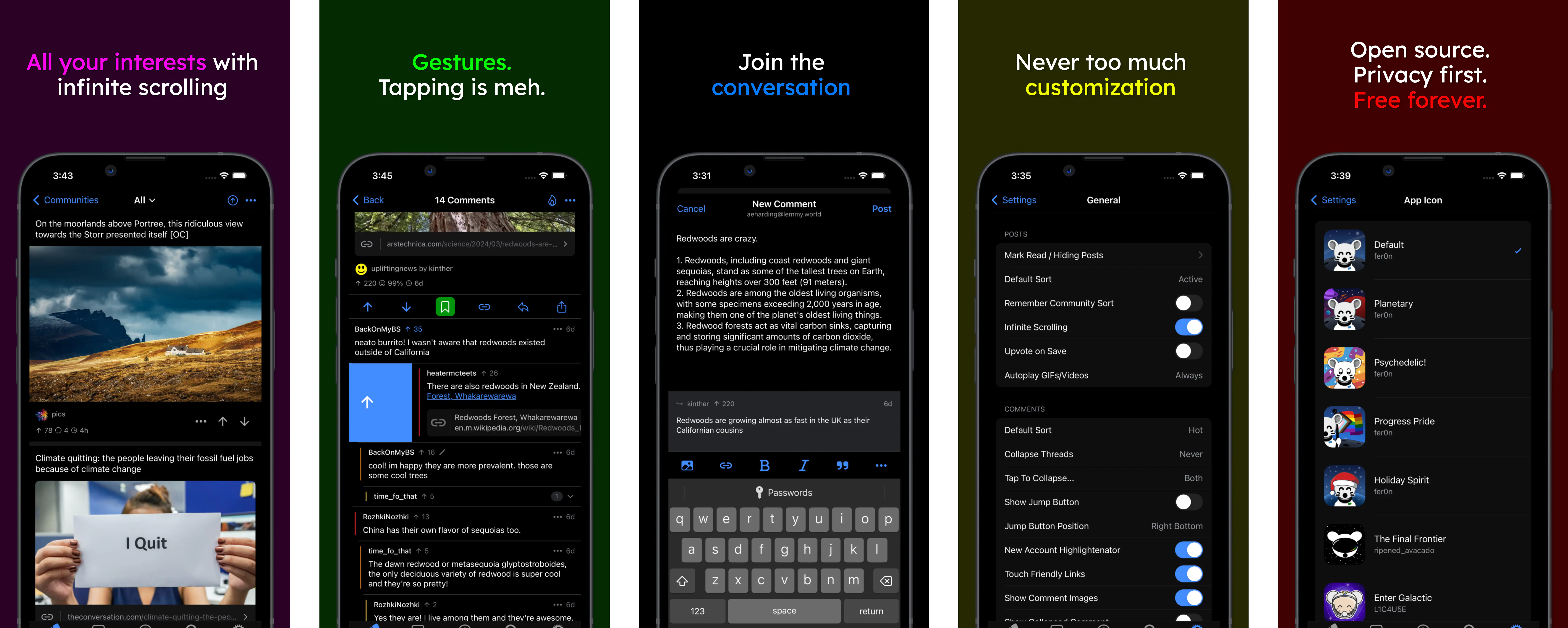
Voyager for Lemmy
Voyager is an Apollo-like open source web client for Lemmy. It's a mobile-first app, but works great on desktop devices, too. Please feel free to try it out!
What does Voyager currently support?
- Light/dark mode
- View and subscribe to communities
- Multi account support
- Single comment thread context view
- Upvote, downvote and reply to threads and comments
- Interact with user profiles
- Comment thread collapsing
- A bunch of swipe gestures
- Messaging, mentions and replies
- Creating new posts (url/photo/text)
- Deleting/editing comments
- Deleting/editing posts
- Swipe to hide posts
- Saving/bookmarking
- Favorites
- iOS and Android themes
What is on the roadmap?
- More customization
- Native notifications and badging
- Mod features
- Translations
- ...and more!
💪 Mobile webapps are awesome
Native apps can be great, but we believe in the strengths of the web. Why use a web-based Lemmy client?
- Cross-platform Use the familiar Voyager interface on your phone, tablet, desktop computer, and more!
- Self-hostable No worries about your favorite app getting taken down, and you can customize to your desire!
- Lightweight No large installation bundles - and it's easy to try it out
Deployment
Ecosystem
For most users, we recommend the native app available in the stores:
However, if you prefer using the Progressive Web App, there are a number of folks that host it:
Community Deployments
| Country | URL | Description | Contact/Privacy |
|---|---|---|---|
| 🇺🇸 Virginia, USA | vger.app | ✅ Official Voyager PWA instance | ➡️ |
| 🇫🇮 Finland | m.lemmy.world | Voyager hosted by the mastodon.world team. | ➡️ |
| 🇸🇬 Singapore | v.opnxng.com | Voyager hosted by Opnxng in Singapore. | ➡️ |
| 🇲🇽 Mexico | voyager.nohost.network | Voyager hosted by Nohost in Mexico. | ➡️ |
| 🇺🇸 USA | vger.thesanewriter.com | Voyager hosted by the lemmy.thesanewriter.com team. | ➡️ |
| 🇺🇸 Oregon, USA | m.lemmy.today | A fast, general purpose instance located in Oregon, USA | ➡️ |
| 🇫🇷 France | v.lemmy.dbzer0.com | Be Weird, Download a Car, Generate Art, Screw Copyrights | ➡️ |
| ? | v.programming.dev | A collection of programming communities | ➡️ |
| 🇺🇸 Oregon, USA | v.lemmy.eco.br | A fast, general purpose instance located in Oregon, USA | ➡️ |
| 🇩🇪 Germany | v.lemy.lol | Long-term, general purpose Lemmy instance. | ➡️ |
| 🇵🇹 Portugal | voyager.slrpnk.net | Sustainable future interconnected with nature and community. | ➡️ |
| ? | app.thelemmy.club | A general Lemmy instance for all! | ➡️ |
| ? | m.lemdro.id | Fully open source instance with incredible transparency. | ➡️ |
Note: Community deployments are NOT maintained by the Voyager team. They may not be synced with Voyager's source code. Please do your own research about the host servers before using them.
Beta Testing
Voyager maintains a beta track continuously deployed from every commit to refs/heads/main). The beta build may break at any time.
Self-Host
There are two ways you can run Voyager as a PWA in a production environment. The recommended method is using docker. We also support a traditional deployment method without docker. Read below to see how to get each method set up.
Docker Deployment
In order to host Voyager yourself you can use the provided Dockerfile to build a container with Voyager. The Docker container itself does not provide any SSL/TLS handling. You'll have to add this bit yourself. One could put Voyager behind popular reverse proxies with SSL Handling like Traefik, NGINX etc.
Tip: Use Watchtower to keep your deployment automatically up to date!
Environment variables
CUSTOM_LEMMY_SERVERS(optional) e.g.lemmy.world,lemmy.ml,sh.itjust.works- a comma separated list of suggested servers. The first will be used as default view for logged out users. You can specify only one if you want.
From source
- checkout source
git clone https://github.com/aeharding/voyager.git - go into new source dir:
cd voyager - build Docker image:
docker build . -t voyager - start container:
docker run --init --rm -it -p 5314:5314 voyager
Prebuilt
- pull image
docker pull ghcr.io/aeharding/voyager:latest - start container:
docker run --init --rm -it -p 5314:5314 voyager
Note: The provided Dockerfile creates a container which will eventually run Voyager as non-root user.
Traditional Deployment
While Docker makes things easier, Voyager can be hosted by any HTTP server (nginx, apache etc).
# Build from source (Or, download web artifact from Github Releases)
pnpm install
pnpm build

# Then, serve ./dist with your favorite HTTP server - nginx, apache etc
# (make sure 404 goes to index.html)
# Below is a simple example for dev/testing (not recommended for production):
npm install --global http-server
cp dist/index.html dist/404.html # magic file for http-server
http-server dist
Optionally, you can serve a custom list of instance(s) in the /_config endpoint, with JSON payload of following format:
{ "customServers": ["lemmy.world", "lemmy.zip"] }
For production, serve index.html with Cache-Control: no-cache and /assets with a long cache period (files in assets are immutable)
💖 Sponsors
If you're enjoying Voyager, you can sponsor it:
We would also appreciate sponsoring other contributors to Voyager. If someone helps you solve an issue or implement a feature you wanted, supporting them would help make this project and OS more sustainable.
🧑💻 Contributing
Please check out CONTRIBUTING.md for details on contributing to Voyager. Thank you! 💙
🛜 Add a lemmy instance to the curated list
Voyager curates Lemmy servers for sign up (see the data). If you would like to add an instance, please read the curated servers policy.
📲 PWA
Voyager works best added to the homescreen. There are certain features that only work there, like badging and smooth page transitions.
🦄 Stack
- React - The library for web and native user interfaces
- Vite - Next Generation Frontend Tooling
- Ionic - The mobile SDK for the Web
- Virtua - A zero-config, fast and small virtual list
- vite-plugin-pwa - Prompt for update, Web Push Notifications and Web Share Target API
👨💻 Contributors
Shoutout to @fer0n for the great logo and splashscreen! And thank you 💙 all of our contributors to the codebase:
📄 License
Artwork
- Default Logo & Splashscreen: CC BY-SA 4.0 © @fer0n
- Default Android themed icon: CC BY-SA 4.0 © @Donno
Code
AGPL-3.0 © Voyager contributors