VNote is a Qt-based, free and open source note-taking application written in native C++, focused on Markdown and aimed at anyone who wants structured note management and a strong editing experience instead of a bare Markdown text editor.
What it is
VNote is a note-taking platform built in native C++ on top of Qt, licensed under GNU LGPLv3, and distributed as a desktop application for Linux, Windows, and macOS. It is described by its own maintainers as "NOT just a simple editor for Markdown" — the project pairs an editor with note management, so that taking notes in Markdown stays organised rather than turning into a folder of loose files. It lives in the Qt/C++ desktop ecosystem, and its source, releases, documentation, and issue tracking are hosted on GitHub and Gitee, with the project home page at docs.vnote.fun.
The concrete problem it addresses is the gap between a plain Markdown editor and a full note-taking system. A generic editor opens a file and saves it; it does not manage a body of notes, and it does not carry the surrounding editing conveniences a note-taker expects. VNote replaces the simple Markdown editor with a Qt desktop application that combines editing with notes management, and the project states an intent to support formats beyond Markdown in the future. Cross-platform behaviour comes from the Qt toolkit, so the same application targets Linux, Windows, and macOS.
Key capabilities
- Markdown editing and note management combined in one Qt desktop application, with the stated goal of making Markdown note-taking simpler.
- Cross-platform desktop support for Linux, Windows, and macOS, provided by the Qt framework.
- MathJax support for mathematical content, as listed in the project topics.
- UML support, as listed in the project topics.
- Vim-style input, as listed in the project topics, alongside general editor functionality.
- Continuous builds published from the
master branch under the continuous-build release tag, separate from stable releases.
- GNU LGPLv3 licensing, with bundled third-party material recorded in
THIRD-PARTY-NOTICES.md, including the Lucide (ISC/MIT) and IconPark (Apache-2.0) icon sets.
Who uses it and how
- Desktop note-takers on Linux, Windows, or macOS who want Markdown notes managed inside an application rather than across an unmanaged directory.
- Users who prefer Vim-style editing and want it inside a graphical note-taking application rather than in a terminal editor.
- Writers producing mathematical or UML content who need MathJax rendering and diagram support alongside Markdown text.
- Users who want to run ahead of stable releases can install continuous builds from the
master branch, while others track the latest stable release or the Gitee release.
- Contributors build from source, cloning the repository and running the initialisation script to pull git submodules, install pre-commit hooks for clang-format, and set up the
vtextedit submodule hook.
Getting started
VNote is distributed as prebuilt desktop releases: stable builds are published under the latest release and the Gitee release, and continuous builds from master are published under the continuous-build release tag. Developers working from source clone the repository and run bash scripts/init.sh on Linux or macOS, or scripts\init.cmd on Windows, to initialise submodules and pre-commit hooks.
How it compares
No comparable tools and no list of paid products this project replaces are provided in the facts. Within this registry, VNote stands alone in its category as a Qt-based, native C++ note-taking platform under LGPL-3.0.
When to use it — and when not to
A self-hoster or contributor must be ready to build from source: that means git submodules, the vtextedit submodule, pre-commit hooks, and clang-format formatting conventions, with development guidance in AGENTS.md. Anyone wanting a hosted, synchronised, or zero-setup note service should not pick VNote, because the README excerpt describes a local desktop application and names no sync backend, database, or server component. The honest weaknesses are visible in the facts themselves: the README excerpt is sparse on features beyond Markdown, and the repository carries 270 open issues, so prospective users should expect an actively developed project with a live backlog rather than a finished and quiet one.
project readme (upstream, from github) — read inline
VNote


简体中文
Project on Gitee
A pleasant note-taking platform.
For more information, please visit VNote's Home Page.

Description
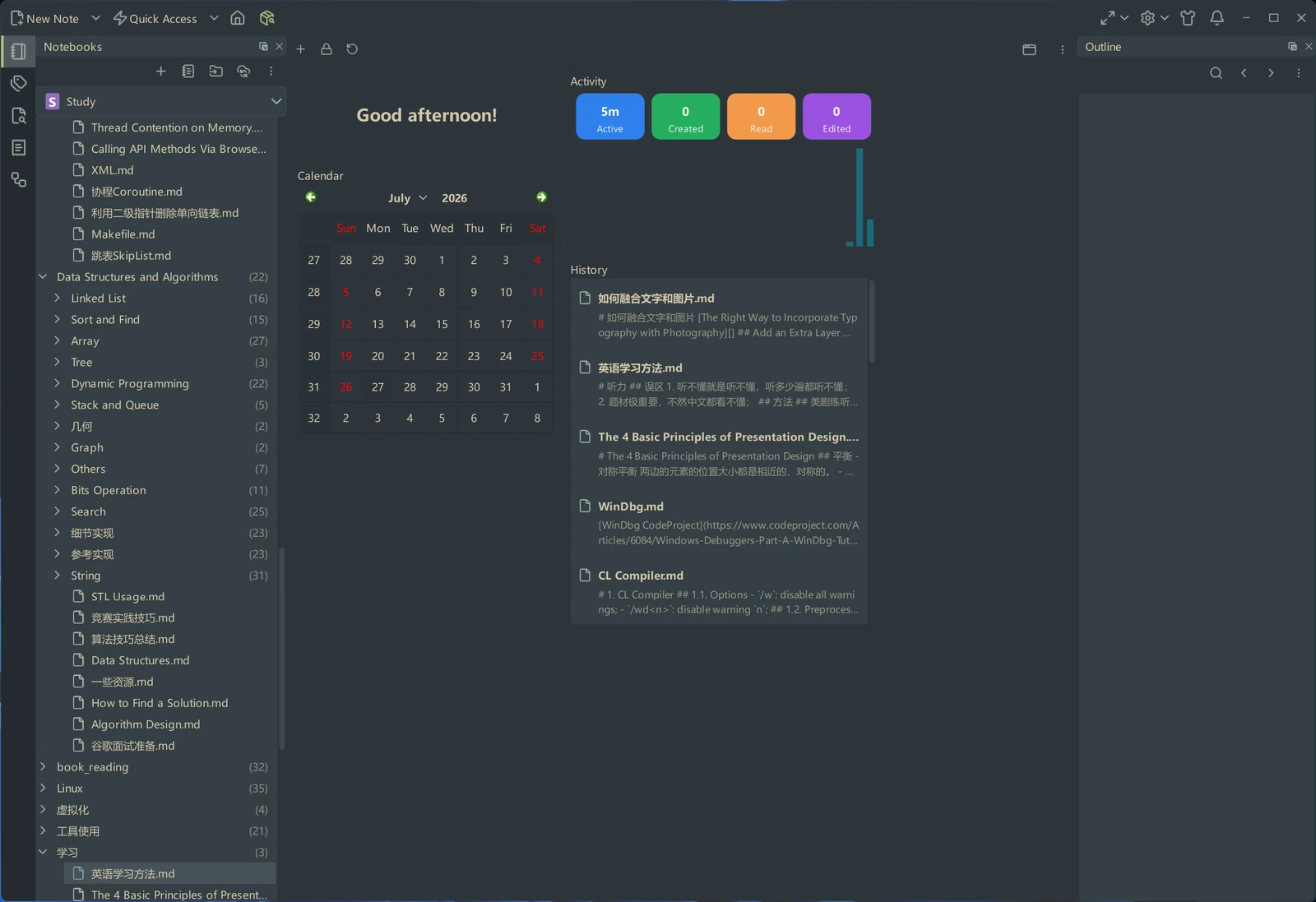
VNote is a Qt-based, free and open source note-taking application, focusing on Markdown now. VNote is designed to provide a pleasant note-taking platform with excellent editing experience.
VNote is NOT just a simple editor for Markdown. By providing notes management, VNote makes taking notes in Markdown simpler. In the future, VNote will support more formats besides Markdown.
Utilizing Qt, VNote could run on Linux, Windows, and macOS.
Downloads
Continuous builds on master branch could be found at the Continuous Build release.
Latest stable builds could be found at the latest release or Gitee release
Supports
Thank users who donated to VNote!
Development
After cloning the repository, run the initialization script to set up your development environment:
Linux/macOS:
bash scripts/init.sh
Windows:
scripts\init.cmd
This script will:
- Initialize and update all git submodules
- Install pre-commit hooks for automatic code formatting with clang-format
- Set up the vtextedit submodule pre-commit hook
For more development guidelines, see AGENTS.md.
License
VNote is licensed under GNU LGPLv3.
Bundled third-party material and the notices its licenses require — the Lucide
(ISC/MIT) and IconPark (Apache-2.0) icon sets — are recorded in
THIRD-PARTY-NOTICES.md.