⚖️ Veritas Kanban
Veritas in actis — Truth in action.
Local-first task management board with optional AI agent orchestration.
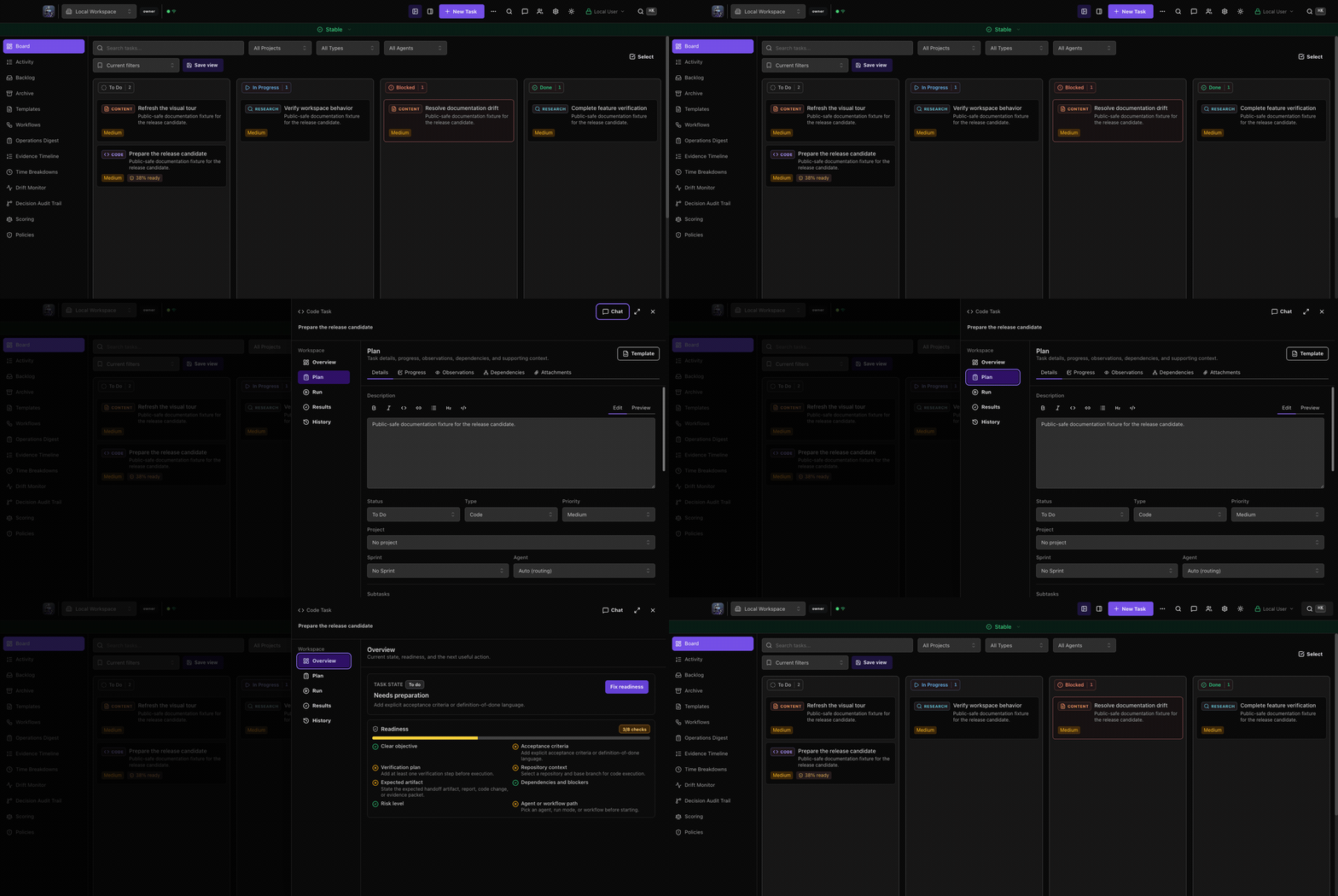
Start with a visual Kanban board. Add CLI, MCP, OpenClaw, Squad Chat webhooks, workflows, or governance only when you need that layer.


⭐ If you find this useful, star the repo — it helps others discover it!
Quickstart · Features · Why VK · All Features · Docs · Troubleshooting · API · Agent Setup · MCP Server · Contributing · Changelog
Created by Brad Groux — CEO of Digital Meld, and host of the Start Small, Think Big podcast · LinkedIn · Twitter · YouTube
⚡ Quickstart
Start with the local board. OpenClaw, MCP, Squad Chat webhooks, notifications, workflows, and governance gates are optional layers you can turn on later. See Setup Paths for the board-only, CLI, MCP, OpenClaw, and self-hosted paths.
Want to take the easy way out? Ask your agent:
Clone and set up veritas-kanban locally using the board-only setup path first. Install dependencies with pnpm, copy server/.env.example to server/.env, and start the dev server. Verify the UI at localhost:3000 and the API health endpoint at localhost:3001/api/health. Do not configure OpenClaw, MCP, Squad Chat webhooks, workflows, or notifications unless I explicitly ask for that layer.
Want to do it yourself? Choose the packaged Mac app or a local source checkout:
For the packaged Mac desktop app:
brew tap BradGroux/tap
brew install --cask veritas-kanban
Existing desktop users should follow the routine Mac upgrade path so backup, heartbeat pause, app replacement, launch, and exact-version server readiness happen in the right order.
For local source development:
git clone https://github.com/BradGroux/veritas-kanban.git
cd veritas-kanban
pnpm install
cp server/.env.example server/.env   # Edit to change VERITAS_ADMIN_KEY
pnpm dev
Open http://localhost:3000 for source runs, or install
the signed/notarized Mac app with
brew tap BradGroux/tap && brew install --cask veritas-kanban. The board
auto-seeds with example tasks on first run so you can explore right away.
A working board means the UI loads and http://localhost:3001/api/health returns healthy. Agent-ready and external wake/delivery-ready are separate setup levels; use Setup Paths before adding those layers.
Do not configure these on day one unless you already know you need them:
- OpenClaw gateway or browser relay
- MCP write access
- Squad Chat webhook or external wake behavior
- Notification delivery channels
- Workflow gates or governance policies
When the board is working, use Setup Paths to choose the next layer and run the read/write smoke checks before handing the board to an assistant.
Want a clean slate? Delete the example tasks:
rm tasks/active/task_example_*.mdand refresh. Want to re-seed? Runpnpm seedto restore the example tasks (only works when the board is empty).
Note: Never commit
.envfiles. Use.env.exampleas a template — it contains safe placeholder values and documentation for every variable.
📚 Documentation Map
- Setup Paths — start here for board-only, CLI, MCP, OpenClaw, and self-hosted paths without mixing optional layers into first-run setup.
- Getting Started Guide — zero ➝ agent-ready in 5 minutes, plus sanity checks and prompt registry tips.
- MCP Server Guide — optional MCP setup, 42 tools, architecture, tool catalog, security model, and read/write smoke checks.
- Agent Guide and
AGENTS.mdTemplate — shared managed-run protocol, external self-reporting template, and unmanaged MCP setup. - Agent Providers — evidence-backed Buzz, Grok Build, Codex, Claude Code, Copilot CLI, Hermes, OpenClaw, and optional model profiles.
- v6 Agent Runtime Control Plane — authority, adapter, lifecycle, approval, tool, credential, Buzz, and certification boundaries.
- Phase Capability Profiles — versioned execution-phase authority contracts, deterministic intersections, exact-path plan artifacts, and current delivery boundaries.
- Phase Transition Journal — durable compare-and-set transitions, approval and override controls, restart recovery, REST, and CLI operations.
- Run Access Summary v1 — one redacted, digest-bound view of a run's filesystem, network, tools, integrations, budgets, support, and historical authority.
- Knowledge Collections v1 — immutable sources, cited pages, stable identity, bidirectional links, and reversible reviewed ingestion with file/SQLite parity.
- OpenAI Codex Integration — local execution, SDK and app-server sessions, cloud delegation, MCP setup, workflows, and telemetry.
- Codex Integration SOP & Codex Workflow Examples — operational playbooks for using Codex as a first-class Veritas agent.
- API Reference — Auth, endpoints, request/response examples, WebSocket, common workflows.
- Identity and RBAC Model — users, workspaces, memberships, roles, agent tokens, permission matrix, migration, and UX flows.
- v6 GA Checklist — release gates for harness certification, migration, runtime, desktop, and distribution evidence.
- v6 Visual Tour — release-safe views of provider support, Buzz setup, approvals, and run evidence.
- v6 Upgrade, Install, Remote, And Admin Guide — fresh install, v5-to-v6 upgrade, harness setup, desktop, backup, and diagnostics paths.
- v6 Compatibility And Release Policy — provider support tiers, tested builds, platform combinations, update channels, and rollback limits.
- v6 Release Notes — user-facing highlights, stabilization fixes, install/upgrade steps, behavior changes, and known limits.
- Desktop Architecture ADR — shell decision, native/server boundaries, connection modes, lifecycle, packaging, and security model.
- Post-GA Native Mobile Offline ADR — native mobile authority model, offline queue semantics, conflict handling, and security review.
- Post-GA Cloud Sync And Hosted SaaS ADR — optional hosted model, tenant isolation, lifecycle, support, cost, and migration boundaries.
- Self-Hosting Guide — production deployment, reverse proxy, auth hardening, Docker, and backups.
- Agent Task Workflow SOP — lifecycle, API/CLI snippets, prompts.
- Squad Chat Protocol — agent messaging, system events (spawned/completed/failed), model attribution, and helper scripts.
- Buzz Integration — signed Squad Chat bridging,
explicit persona/team import, and a separate disabled-by-default
buzz-agentprofile under the generic ACP provider. - Agent Providers — exact-version Grok Build, GitHub Copilot CLI, Buzz Agent, Claude Code, and Codex runtime setup, safety policy, and known limitations.
- Sprint Planning SOP — epic → sprint → task breakdown.
- Multi-Agent Orchestration — PM + worker handoffs.
- Optional Cross-Model Code Review — add an independent model only when the issue or release owner requires it.
- Agent Governance SOPs — Policy engine, drift detection, decision audit, output evaluation, user feedback.
- Operational SOPs — Broadcasts, delegation, deliverables, work products, prompt registry, squad chat, system health.
- Best Practices & Tips + Tricks — patterns, shortcuts, integrations.
- Real-World Examples — copy/pasteable agent recipes.
- Troubleshooting — deeper diagnostics when things wobble.
⚠️ Agentic AI Safety
[!CAUTION] AI agents can write code, execute commands, and modify your system. While tools like Veritas Kanban make agentic workflows powerful, they can also cause real damage without proper guardrails. Read this before giving any AI agent access to your environment.
Best Practices for Agentic AI
Run locally first. Keep your board and agents on your own machine until you fully understand the behavior. Never expose an unauthenticated instance to the internet. Veritas Kanban includes built-in API rate limiting, but if you deploy publicly, still add a reverse proxy (nginx, Caddy, Cloudflare) with edge-level rate limiting in front of it.
Never trigger agents from uncontrolled inputs. Don't let inbound emails, webhooks from third parties, or public form submissions automatically spawn agent work. An attacker who can craft an input can control your agent.
Principle of least privilege. Give agents the minimum permissions they need. Use the
agentrole (notadmin) for API keys. Restrict file system access with sandbox policy presets, enforce run budgets before long-running work, and don't run agents as root.Review before merge. Agents can write code — that doesn't mean the code is correct or safe. Always review agent-generated code before merging to production branches. Use the built-in code review workflow.
Set boundaries on destructive actions. Agents should not have unsupervised access to
rm,git push --force, database drops, or production deployments. Require human approval for irreversible operations.Monitor and audit. Use time tracking and activity logs to understand what agents are doing. Review agent-completed tasks. Check git diffs before pushing.
Rotate credentials regularly. If an agent has access to API keys, tokens, or secrets, rotate them on a schedule. Don't embed real credentials in task descriptions or prompts.
Isolate environments. Run agents in containers, VMs, or sandboxed environments when possible. Keep agent workspaces separate from sensitive data, use deny-by-default network presets for untrusted work, and broker credentials instead of exposing broad environment variables.
The bottom line: Agents amplify both useful work and mistakes. Start locally, keep permissions narrow, and add autonomy only after the smaller setup is understood and verified.
✨ Feature Highlights
🛡️ Agent Governance
Policy Engine — Define what agents can and can't do. Configurable tool/action policies with allow, deny, and require-approval guard rules. Every policy decision is logged. Sandbox Policy Presets — Assign reusable filesystem, network, environment, and credential rules to agents, workflow agents, or one-off runs; unsupported required controls fail closed before launch with redacted audit traces. Decision Audit Trail — Log agent decisions with confidence scores, supporting evidence, and stated assumptions. Record outcomes afterward to see whether assumptions held. Behavioral Drift Detection — Set metric baselines and thresholds; get alerted when an agent's behavior deviates. User Feedback Loop — Collect feedback on agent outputs with sentiment tagging and category analytics. Output Evaluation — Score agent outputs against weighted bounded criteria profiles (regex, keyword, numeric range, occurrence ratio).
🤖 Agent Orchestration
Spawn autonomous coding agents on tasks when you choose to connect an agent runner. Track them in real-time with the multi-agent dashboard — status indicators, expandable agent cards, model attribution. Team roster manifests and workspace capability discovery route work to the right agent or trusted workspace before a run starts. Shared live run sessions let workspace members observe an active task run, co-drive with attributed messages, or fork a clean follow-up task without taking over the parent run. Squad Chat gives agents a shared local communication channel with system lifecycle events (spawned, completed, failed). Assign multiple agents per task, set permission levels (Intern/Specialist/Lead), and let them coordinate.
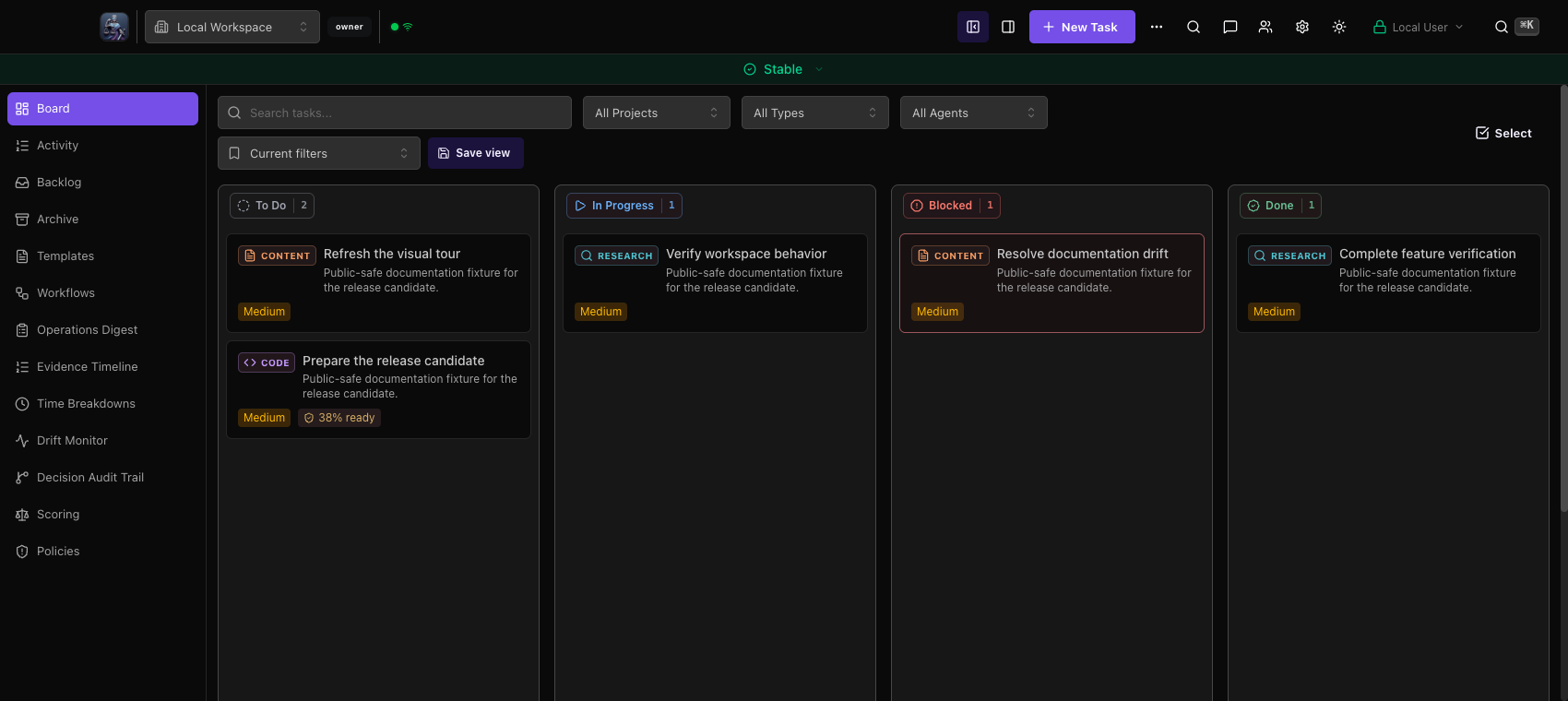
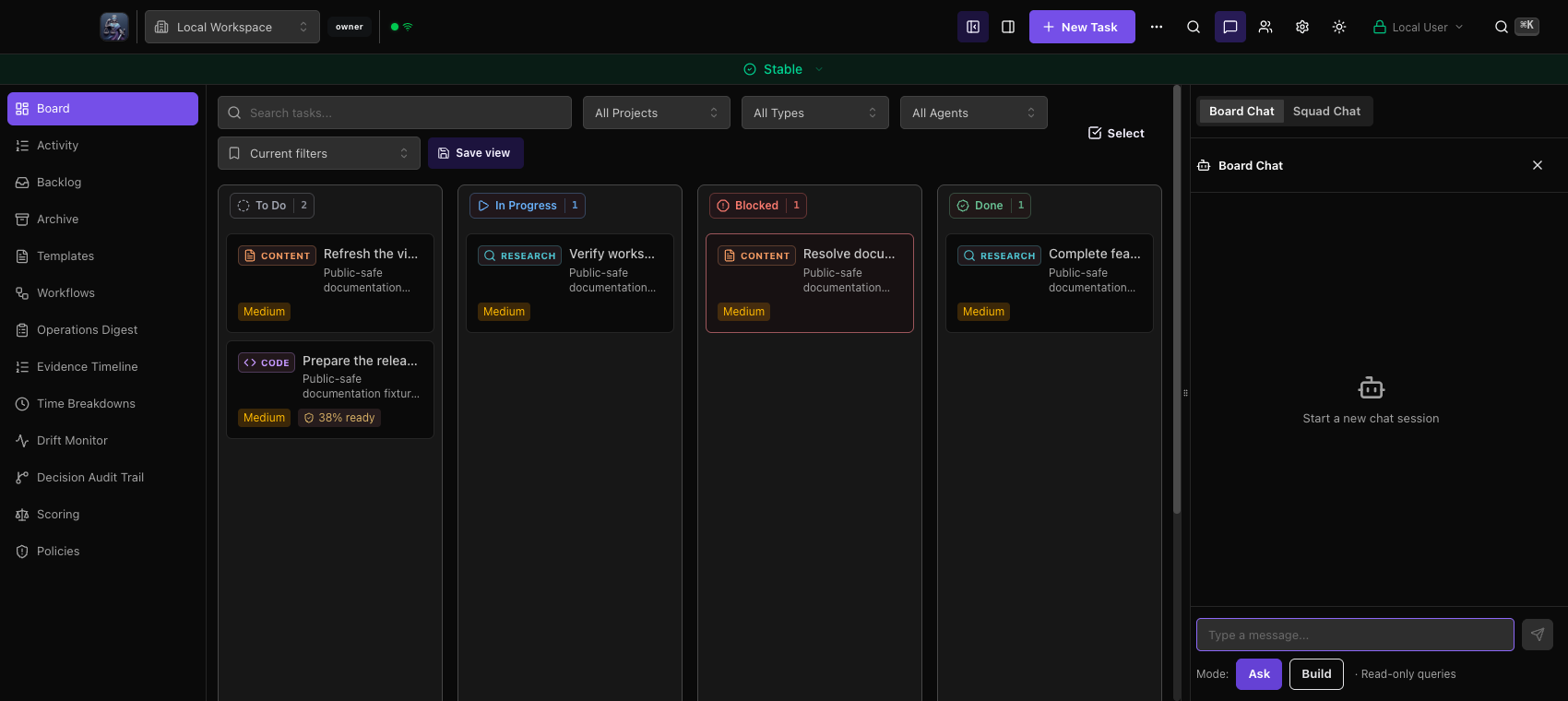
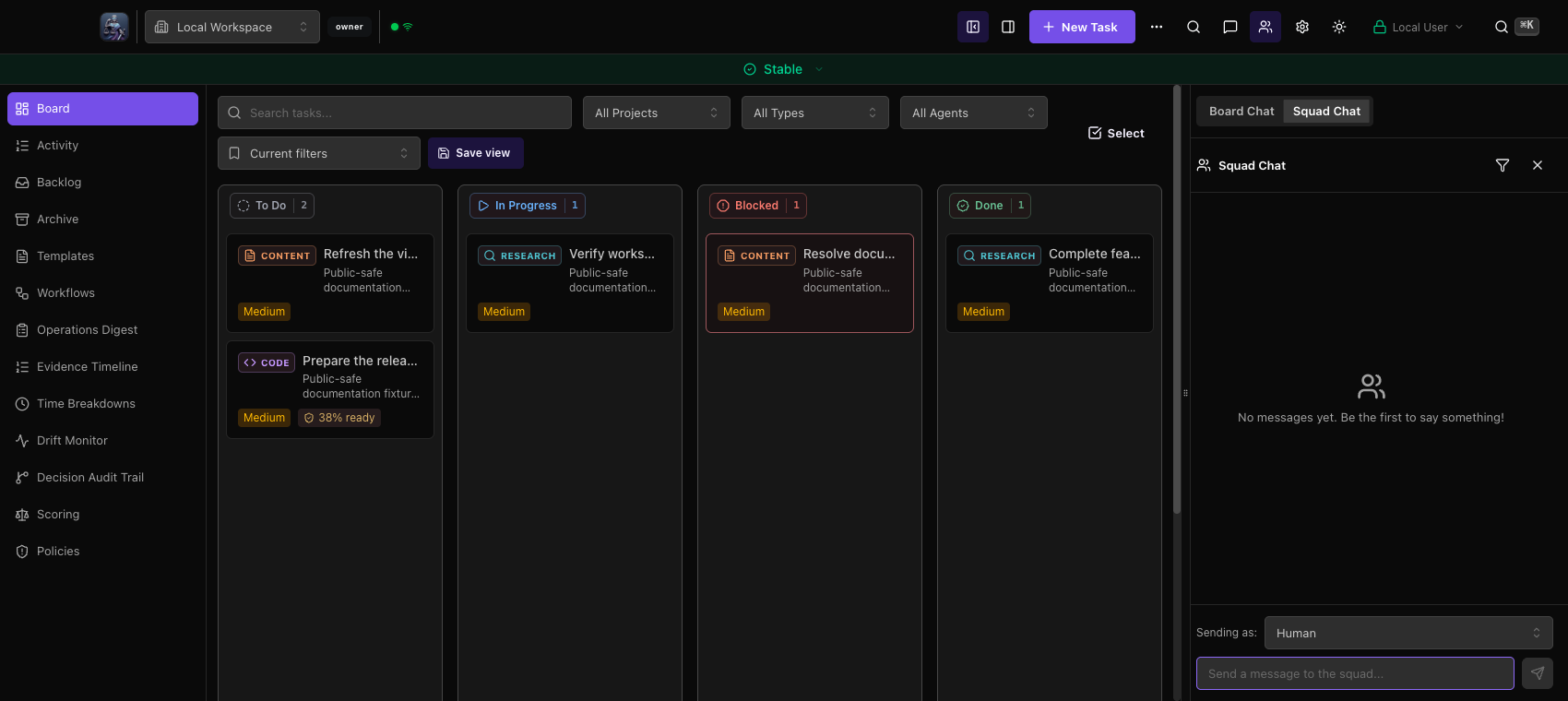
Desktop Board Chat and Squad Chat open in one bounded, resizable right-side Workbench dock. The single orientation keeps the board, header, close control, and keyboard recovery paths reachable at every supported window size.
🧭 Provider And Cutover Operations
The cutover guide documents a GitHub-backed operating model for Codex and HermesAgent work. Veritas remains the source of truth, HermesAgent/Hermes Gateway can provide the execution control plane, and GitHub Issues, pull requests, reviews, and CI remain the durable implementation record. Copy/paste task templates cover product specs, research intake, and approval-gated client workflows.
🧠 OpenAI Codex Integration
Codex can run as the default first-class Veritas agent through local codex exec, SDK-backed sessions, GitHub-native @codex delegation, workflow-engine steps, review actions, Settings health checks, and MCP access to the board. Ollama Local, Ollama Cloud, and LM Studio Local profiles are optional routing targets for users who want local/server-hosted models or explicit cloud model execution. The docs include a roadmap, SOP, workflow examples, and an AGENTS template so provider-backed work can be started, tracked, reviewed, and released through the same Veritas lifecycle as other agents.
📊 Customizable Dashboard
Draggable & Resizable Widget Grid — Rearrange and resize dashboard widgets via drag-and-drop. Layouts persist across sessions. Add widgets from the library or remove ones you don't need. Global System Health Bar — Persistent header status bar with five health levels (stable → alert) across three signal categories: system resources, agent availability, and operation success rate.
📝 Prompt Template Registry
Version-controlled prompt templates with variable extraction, full version history with rollback, usage tracking, and preview rendering with sample variable injection. Manage your prompt library the same way you manage code.
⚡ Workflow Engine
Define multi-step agent pipelines as version-controlled YAML. Sequential steps, parallel fan-out/fan-in, loop iteration over collections, gate approvals with human-in-the-loop, and retry routing. Think GitHub Actions — but for AI agents. Live execution view with step-by-step progress. Monitoring dashboard with success rates, active runs, and per-workflow health metrics.
📋 Task Intelligence
Not just cards on a board. Tasks have dependency graphs with cycle detection, crash-recovery checkpointing (auto-sanitizes secrets), observational memory with importance scoring, time tracking, and full activity logs. Enforcement gates (review gates, delegation enforcement, auto-telemetry) add production guardrails — all optional, all toggleable.
🔀 Git-Native Development
Isolated worktrees per task — no branch switching, no conflicts. Built-in code review with unified diff viewer and inline comments. Approval workflows (approve, request changes, reject). Visual merge conflict resolution. Create GitHub PRs directly from the task detail panel. Bidirectional GitHub Issues sync with label mapping.
📁 Local-First Storage
File storage remains the zero-infrastructure default: tasks are Markdown,
settings are JSON, and workflows are YAML. SQLite is available for governed
multi-user and higher-integrity deployments; Redis and Docker are not required
for local use. Clone, pnpm install, and pnpm dev to start. Back up the
complete configured storage root, not only the Git-tracked board files.
🔌 Optional Integration Surfaces
- MCP Server — 42 tools across 9 categories via Model Context Protocol
- CLI —
vk begin/vk done "summary"replaces 6 API calls with 2 commands - REST API — Full lifecycle management. If it can make HTTP calls, it can drive the board.
📋 Full feature reference with every config option: docs/FEATURES.md
📋 Complete Feature List
Core Board
- Drag-and-drop Kanban — Move tasks across To Do, In Progress, Blocked, Done
- Markdown storage — Human-readable task files with YAML frontmatter
- Dark/light mode — Toggle between dark and light themes in Settings
Code Workflow
- Git worktrees — Isolated branches per task, automatic cleanup
- Code review — Unified diff viewer with inline comments
- Approval workflow — Approve, request changes, or reject
- Merge conflicts — Visual conflict resolution UI
- GitHub PRs — Create pull requests directly from task detail
AI Agents
- Agent orchestration — Spawn autonomous coding agents on tasks
- Custom agents — Add your own agents with any name and command; not limited to built-in types
- Platform-agnostic API — REST endpoints work with any agentic platform
- HermesAgent support — documents HermesAgent/Hermes Gateway as the active control plane, with Veritas as the GitHub-backed source of truth
- OpenAI Codex support — Local CLI runs, SDK-backed sessions, Codex Cloud delegation, workflow steps, review actions, health checks, MCP setup, and default routing for fresh installs
- Local LLM provider profiles — Optional Ollama Local, Ollama Cloud, and LM Studio Local profiles with health metadata and routing support
- Team roster routing — Workspace coordinator/member manifests route tasks by capabilities, reviewers, fallbacks, and escalation posture
- Workspace capability discovery — Trusted workspace capability catalogs let Veritas package delegated work intake before handing work across workspace boundaries
- Agent profile packages — Portable YAML/JSON packages that bundle role, runtime, prompt, tools, permissions, sandbox, budget, workflow, and health metadata for reusable launches
- Phase capability contract — Built-in explore, plan, implement, verify, and publish profiles compile parent, phase, agent, sandbox, tool, and launch authority without widening it. The current slice defines the shared contract and compiler; runtime transition and enforcement work remains explicitly tracked.
- Provider-owned task envelopes — OpenClaw, Codex CLI, Codex SDK, and Hermes render the same immutable task contract through adapter-owned transports with explicit commit policy and completion posture
- Decision review sessions — Multi-participant decision reviews with independent responses, critique rounds, final synthesis packets, work-product attachment, and decision audit links
- Shared live run sessions — Create workspace-scoped view, co-drive, or fork links for active task runs; viewers receive live output and events, editors send attributed messages and mobile-safe approval responses, and forks create linked tasks without mutating the parent run
- Sandbox policy presets — Built-in and custom presets for filesystem scope, network egress, environment passthrough, and credential brokering, with Settings dry-runs before agent launch
- Agent budget enforcement — Workspace, agent, workflow, workflow-agent, and per-run caps for tokens, cost, tool calls, runtime, retries, and fan-out with auditable warn, approval, downgrade, pause, or cancel decisions
- Optional OpenClaw support — Native integration with OpenClaw when you want OpenClaw to execute or wake agents
- Squad Chat — Real-time agent-to-agent communication with WebSocket updates, system lifecycle events, model attribution per message, and configurable display names
- @Mention notifications — @agent-name parsing in comments, thread subscriptions
- Broadcast Notifications — Priority-based persistent notifications with read receipts and agent-specific delivery
- Squad Chat Webhook — Configurable webhooks (generic HTTP or OpenClaw Direct) for external agent integration
- Buzz Communication Adapter — Native signed root/reply bridge between one mapped Buzz community channel and Squad Chat, with durable replay, ambiguous-send reconciliation, and operator-confirmed persona/team definition materialization
- Buzz Agent ACP profile — Generic ACP execution with pinned Buzz v0.4.24 identity/capability evidence, safe environment allowlists, and honest no-resume and stdio-only MCP posture
- GitHub Copilot CLI ACP profile — Generic ACP execution with a system-owned stdio/public-preview launch baseline, exact v1.0.74 compatibility evidence, bounded restrictive process policy, and honest source/authentication limits
- Agent registry — Service discovery with heartbeat tracking, capabilities, and live status
- Multi-agent dashboard — Real-time sidebar with expandable agent cards, status indicators
- Multi-agent task assignment — Assign multiple agents per task with color-coded chips
- Permission levels — Intern / Specialist / Lead tiers with approval workflows
- Error learning — Structured failure analysis with similarity search
- Task lifecycle hooks — 7 built-in hooks, 8 events, custom hooks API
- Task Deliverables — First-class deliverable objects with type/status tracking (code, documentation, data, etc.)
- Durable Work Products — Versioned reports, checklists, tables, and governed downloadable files with run provenance, integrity metadata, quarantine, and redacted previews
- Efficient Polling —
/api/changes?since=...endpoint with ETag support for optimized agent polling - Approval Delegation — Vacation mode with scoped approval delegation and automatic routing
- OpenClaw Integration — Optional direct gateway wake for real-time squad chat notifications and agent orchestration
- Reverse Proxy Ready — Deploy behind nginx, Caddy, Traefik, or any reverse proxy with
TRUST_PROXY - Multiple attempts — Retry with different agents, preserve history
- Running indicator — Visual feedback when agents are working
Workflow Engine
- YAML workflow definitions — Define multi-step agent orchestration pipelines as version-controlled YAML files
- Visual execution — Live run view with step-by-step progress, status indicators, and output preview
- Sequential & advanced step types — Agent steps, loop iteration, gate approval, parallel fan-out/fan-in
- Loop steps — Iterate over collections with configurable completion policies (all_done, any_done, first_success)
- Gate steps — Conditional blocking with human approval, timeout escalation, and expression-based conditions
- Parallel steps — Execute multiple sub-steps concurrently with completion criteria (all, any, N-of-M)
- Run state management — Persistent run state survives server restarts, retry with exponential backoff, resume blocked runs
- Tool policies — Role-based tool restrictions (5 default roles: planner, developer, reviewer, tester, deployer) with custom role CRUD
- Session isolation — Each workflow step runs in a fresh OpenClaw session with configurable context injection
- Veritas Cutover templates — GitHub-backed product/spec, research/revenue, approval-gated client, and completion-comment templates
- Monitoring dashboard — Summary cards, live active runs table, recent history, per-workflow health metrics
- Real-time updates — WebSocket-primary with polling fallback; 75% reduction in API calls when connected
- Workflow API — 9 CRUD endpoints for workflow definitions, runs, and control
- Enhanced acceptance criteria — Regex patterns, JSON path equality checks, substring matching for step validation
- Security hardening — ReDoS protection, expression injection prevention, parallel DoS limits, gate approval validation
- Progress file tracking — Shared
progress.mdper run for context passing between steps - Audit logging — Every workflow change logged to
.veritas-kanban/workflows/.audit.jsonl - RBAC — Role-based access control for workflow execution, editing, and viewing
Enforcement Gates
- squadChat — Auto-post task lifecycle events to squad chat
- reviewGate — Require 4x10 review scores before task completion
- closingComments — Require deliverable summary (≥20 chars) before completion
- autoTelemetry — Auto-emit
run.started/run.completedon status changes - autoTimeTracking — Auto-start/stop timers on status changes
- orchestratorDelegation — Warn when orchestrator does implementation work instead of delegating
Visibility & Automation
- GitHub Issues sync — Bidirectional sync between GitHub Issues and your board
- Activity page — Status history with clickable task navigation, color-coded badges, and daily summary
- Daily standup summary — Generate standup reports via API or CLI (
vk summary standup) - Task Templates — Create reusable templates with defaults, subtasks, and multi-task blueprints
- Documentation freshness — Registry-backed review dates, thresholds, scores, and staleness alerts
- Cost prediction — Multi-factor cost estimation for tasks
Dashboard
- Where Time Went — Time breakdown by project from telemetry data
- Activity Clock — 24-hour donut chart showing agent work patterns
- Hourly Activity — Bar chart with event counts per hour
- Wall Time Toggle — Total agent time + average run duration
- Session Metrics — Session count, success rate, completion tracking
- Markdown rendering — Rich markdown in task descriptions and comments
- Timezone-aware metrics — Server reports local timezone; clients can request metrics in any timezone via
?tz= - Analytics API — Timeline visualization and aggregate metrics (parallelism, throughput, lead time)
Organization
- Subtasks — Break down complex work with progress tracking
- Task dependencies — Bidirectional dependency graph with cycle detection, recursive tree API, and visual badges
- Crash-recovery checkpointing — Save/resume/clear agent state with auto-sanitization of secrets
- Observational memory — Per-task observations with importance scoring, full-text search, timeline view
- Sprint management — Full sprint CRUD from CLI and MCP with suggestions engine
- Archive — Searchable archive with one-click restore
- Time tracking — Start/stop timer or manual entry
- Activity log — Full history of task events
Settings & Customization
- Modular settings — 8 focused tabs (General, Board, Tasks, Agents, Data, Notifications, Security, Manage)
- Security hardened — XSS prevention, path traversal blocking, prototype pollution protection
- WCAG 2.1 AA — Full accessibility with ARIA labels, keyboard navigation
- Error boundaries — Crash isolation per tab with recovery options
- Performance — Lazy-loaded tabs, memoized components, debounced saves
- Import/Export — Backup and restore all settings with validation
Integration
- CLI —
vkcommand for terminal workflows - MCP Server — 42 tools across 9 categories via Model Context Protocol
- Codex MCP setup — documented
codex mcp add veritas-kanbansetup for local and API-key-backed deployments - Notifications — Teams integration for task updates
🛠️ Tech Stack
| Layer | Technology | Version |
|---|---|---|
| Frontend | React, Vite, Tailwind CSS, Mantine UI | React 19, Vite 8, Tailwind 4.3, Mantine 9.5 |
| Backend | Express, WebSocket | Express 5.2 |
| Language | TypeScript (strict mode) | 6.0 |
| Storage | Markdown files with YAML frontmatter | yaml + local frontmatter helper |
| Git | simple-git, worktree management | — |
| Testing | Playwright (E2E), Vitest (unit) | Playwright 1.62, Vitest 4.1 |
| Runtime | Node.js | 22.22.1+ |
| Package Manager | pnpm | 11.1.1 (pinned) |
🏆 Why Veritas Kanban?
Most agentic AI tools fall into one of two camps: orchestration frameworks that are powerful but invisible (CrewAI, AutoGen, LangGraph) — or project boards that look nice but have zero agent awareness (Jira, Linear, Notion).
Veritas Kanban is neither. It's the visual command center for agentic work — where you can see what your agents are doing, what they've done, and what they're about to do, with full audit trails and production guardrails.
What makes VK different
| Veritas Kanban | CrewAI / AutoGen / LangGraph | Jira / Linear / Plane | |
|---|---|---|---|
| Visual task board | ✅ Drag-and-drop Kanban | ❌ Code-only, no UI | ✅ Board UI |
| AI agent orchestration | ✅ Native, multi-model | ✅ Core purpose | ❌ No agent story |
| YAML workflow pipelines | ✅ Loops, gates, parallel | ⚠️ Code-defined only | ❌ |
| Real-time agent dashboard | ✅ Status, model attribution | ❌ | ❌ |
| Agent communication | ✅ Squad Chat with lifecycle events | ⚠️ Internal only | ❌ |
| MCP server | ✅ 42 tools | ❌ | ❌ |
| CLI | ✅ Full lifecycle | ❌ | ⚠️ Limited |
| Git worktrees + code review | ✅ Built-in | ❌ | ❌ |
| Task persistence | ✅ Markdown files | ❌ In-memory | ✅ Database |
| Enforcement gates | ✅ 6 configurable gates | ❌ | ❌ |
| Time + cost tracking | ✅ Per-task, per-model | ❌ | ⚠️ Basic |
| No database required | ✅ Files on disk | ✅ | ❌ Requires DB |
| Open source | ✅ MIT | ⚠️ Varies | ⚠️ Varies |
| Platform-agnostic | ✅ Any agent, any model | ⚠️ Framework-locked | N/A |
The bottom line: Orchestration frameworks give you agent execution without visibility. Project boards give you visibility without agent execution. Veritas Kanban gives you both — plus the guardrails, telemetry, and audit trails that production agentic work demands.
Built and battle-tested with OpenClaw, with docs for Codex and HermesAgent/Hermes Gateway workflows. OpenClaw is optional. VK works with any platform that can make HTTP calls.
🔄 How It Works
  Any AI Agent / CLI / MCP Client
           │
           ▼
┌──────────────────────────────┐
│      REST API + WebSocket    │
│    http://localhost:3001     │
│                              │
│  ┌───────┐  ┌───────────┐    │
│  │ Tasks │  │ Workflows │    │
│  │  API  │  │   Engine  │    │
│  └───┬───┘  └─────┬─────┘    │
│      │            │          │
│      ▼            ▼          │
│   Markdown    YAML Workflows │
│    Files       + Run State   │
└──────────────────────────────┘
           │
           ▼
   React 19 + Vite Frontend
   http://localhost:3000
The board is the source of truth. Agents interact via the REST API — create tasks, start workflows, update status, track time, submit completions. Workflows orchestrate multi-step agent pipelines with loops, gates, and parallel execution. The frontend reflects everything in real time over WebSocket. No vendor lock-in: if it can make HTTP calls, it can drive the board.
🏗️ Architecture
veritas-kanban/                  ← pnpm monorepo
│
├── web/                         ← React 19 + Vite frontend
│   └── src/
│       ├── components/          ← Mantine-backed and product-specific UI components
│       ├── hooks/               ← React Query hooks, WebSocket
│       └── lib/                 ← Utilities, API client
│
├── server/                      ← Express + WebSocket API
│   └── src/
│       ├── routes/              ← REST endpoints (/api/v1/*)
│       ├── services/            ← Business logic
│       └── middleware/          ← Auth, rate limiting, security
│
├── shared/                      ← TypeScript types & contracts
│   └── src/types/               ← Shared between web & server
│
├── cli/                         ← `vk` CLI tool
├── mcp/                         ← MCP server for AI assistants
├── docs/                        ← Sprint & audit documentation
│
├── tasks/                       ← Task storage (Markdown files)
│   ├── active/                  ← Current tasks (.gitignored)
│   ├── archive/                 ← Archived tasks (.gitignored)
│   └── examples/                ← Seed tasks for first-run
│
└── .veritas-kanban/             ← Runtime config & data
    ├── config.json
    ├── workflows/               ← YAML workflow definitions
    ├── workflow-runs/           ← Run state & step outputs
    ├── tool-policies/           ← Role-based tool restrictions
    ├── worktrees/
    ├── logs/
    └── agent-requests/
Data flow: Web ↔ REST API / WebSocket ↔ Server ↔ configured file or SQLite storage
📖 API Versioning
All API endpoints support versioned paths. The current (and default) version is v1.
| Path | Description |
|---|---|
/api/v1/tasks |
Canonical versioned endpoint |
/api/tasks |
Backwards-compatible alias (same as v1) |
Every response includes an X-API-Version: v1 header. Clients may optionally request a specific version:
curl -H "X-API-Version: v1" http://localhost:3001/api/tasks
- Non-breaking changes (new fields, new endpoints) are added to the current version.
- Breaking changes will introduce a new version (
v2). The previous version remains available during a deprecation period. - The unversioned
/api/...alias always points to the latest stable version.
💻 CLI
📖 Comprehensive CLI guide: docs/CLI-GUIDE.md — installation, every command, scripting examples, and tips.
Handle the common start-and-complete task lifecycle with two commands.
# Install globally
pnpm --filter @veritas-kanban/shared build
pnpm --filter @veritas-kanban/cli build
cd cli
npm link
For read/write auth checks, use the smoke tests in the CLI Guide.
Setup & Onboarding
vk setup                         # Guided environment check + sample task
vk setup --skip-task             # Check only, no sample task
vk setup --json                  # Machine-readable output
vk doctor                        # Redacted setup health report
vk doctor --json                 # Support-safe JSON report
vk snapshot --format markdown    # Redacted runtime support snapshot
vk prompts import prompt-registry --dry-run
vk sqlite journal status --json  # Journal maintenance and override posture
vk tool-servers list --json      # Registered run-scoped MCP servers
vk tool-servers discover <id>    # Refresh version-bound tool discovery
Validates Node version, server health, API auth, and optionally creates a welcome task to get you started.
vk doctor adds deeper checks for CLI linking, task identity conflicts, agent
executables, routing fallbacks, prompt registry drift, Codex readiness, and
notification/webhook configuration. Local paths and delivery URLs are redacted
unless you pass --show-paths.
vk snapshot exports a paste-safe runtime snapshot covering versions, API
reachability, projects, sprints, agents, global agent status, routing, prompt
registry counts, task status counts, notification/webhook enabled states, and
maintenance health. Use --format json|markdown and --output when
attaching it to a support handoff.
vk prompts import syncs file-based prompt templates into the runtime registry.
Run with --dry-run first; rerun with --force only when you want disk content
to replace a differing runtime template.
vk sqlite journal preview and apply stage governed journal conversion for
the configured authoritative database. Conversion executes before server
startup, with a verified backup, rollback, and single-host ownership policy;
pre-close failures revert mode while SQLite exclusivity is still held, and the
live API never flips journal mode in place.
Workflow Commands
The vk begin and vk done commands replace multi-step API workflows with single commands. Inspired by Boris Cherny's (Claude Code creator) philosophy: "automate everything you do twice."
Before (6 separate curl calls):
curl -X PATCH http://localhost:3001/api/tasks/<id> -H "Content-Type: application/json" -d '{"status":"in-progress"}'
curl -X POST http://localhost:3001/api/tasks/<id>/time/start
curl -X POST http://localhost:3001/api/agent/status -H "Content-Type: application/json" -d '{"status":"working","taskId":"<id>","taskTitle":"Title"}'
# ... work happens ...
curl -X POST http://localhost:3001/api/tasks/<id>/time/stop
curl -X PATCH http://localhost:3001/api/tasks/<id> -H "Content-Type: application/json" -d '{"status":"done"}'
curl -X POST http://localhost:3001/api/tasks/<id>/comments -H "Content-Type: application/json" -d '{"author":"agent","text":"summary"}'
After (2 commands):
vk begin <id>                    # → in-progress + timer + agent working
vk done <id> "Added OAuth"       # → timer stop + done + comment + agent idle
| Command | What It Does |
|---|---|
vk begin |
Sets in-progress + starts timer + agent status → working |
vk done "summary" |
Stops timer + sets done + adds comment + agent status → idle |
vk block "reason" |
Sets blocked + adds comment with reason |
vk unblock |
Sets in-progress + restarts timer |
Basic Task Management
vk list                          # List all tasks
vk list --status in-progress     # Filter by status
vk show <id>                     # Task details
vk create "Title" --type code    # Create task
vk update <id> --status review   # Update task
Time Tracking
vk time start <id>               # Start time tracker
vk time stop <id>                # Stop time tracker
vk time entry <id> 3600 "desc"   # Add manual entry (seconds)
vk time show <id>                # Display time summary
Comments
vk comment <id> "Fixed the bug"           # Add comment
vk comment <id> "Done" --author Veritas    # With author
Agent Status
vk agent status                  # Show current agent status
vk agent working <id>            # Set to working (auto-fetches title)
vk agent idle                    # Set to idle
vk agent sub-agent 3             # Set sub-agent mode with count
Project Management
vk project list                  # List all projects
vk project create "my-app" --color "#7c3aed" --description "Main app"
GitHub Sync
vk github sync                   # Trigger manual sync
vk github status                 # Show sync status
vk github config                 # View/update configuration
vk github mappings               # List issue↔task mappings
Agent Commands
vk agents:pending                # List pending agent requests
vk agents:status <id>            # Check if agent running
vk agents:complete <id> -s --attempt-id <id> --manifest-digest <sha256:...>
vk launch-preview <id> --json    # Inspect effective launch evidence without dispatch
vk profiles list                 # List reusable agent profile packages
vk profiles validate ./agent.yml # Validate a package before import
vk profiles import ./agent.yml   # Import or replace a package
vk start <task> --profile <id>   # Launch a task with a profile package
vk agent:resume <task> --source-attempt <id> -m "Continue the work"
vk agent:fork <task> --source-attempt <id> --fork-turn <id> -m "Try another path"
vk agent:steer <task> --attempt <id> -m "Use the smaller fix"
vk agent:compact <task> --attempt <id>
Utilities
vk summary                       # Project stats
vk summary standup               # Daily standup summary
vk notify:pending                # Check notifications
All commands support --json for scripting and machine consumption.
🤖 Optional Agent Integration
Veritas Kanban works with any agentic platform that can make HTTP calls. The REST API covers the full task lifecycle — create, update, track time, complete. No agent runner is required for board-only use.
Built and tested with OpenClaw (formerly Clawdbot/Moltbot), which provides native orchestration via sessions_spawn. OpenClaw is optional. Use it when you want VK to hand work to OpenClaw or wake OpenClaw from Squad Chat events.
VK also documents the Codex and Hermes operating model:
- Veritas is the source of truth for tasks, status, audit trail, release readiness, and GitHub-linked implementation history.
- HermesAgent/Hermes Gateway is the active control plane for the named Hermes roster and execution routing.
- Mission Control is display/control only in the cutover model, while GitHub Issues, PRs, review comments, and CI remain the durable delivery record.
- OpenAI Codex can be a first-class agent through local CLI runs, SDK sessions, Codex Cloud delegation, workflow steps, review actions, and MCP access.
- Ollama and LM Studio profiles are first-class routing targets for local/server-hosted model workflows, with Ollama Cloud available when cloud execution is intentional.
How It Works
- Start Agent — Click "Start Agent" in the UI on a code task (or hit the API directly)
- Request Created — Server writes to
.veritas-kanban/agent-requests/ - Agent Picks Up — Your agent reads the request and begins work
- Work Happens — Agent updates task status, tracks time, commits code
- Completion — Agent calls the completion endpoint with results
- Task Updates — Status moves to Review; notifications are sent only when configured
Any Platform (REST API)
These examples assume an already authenticated REST client. Native OpenClaw tasks use server-owned gateway completion and need no child callback credentials.
💡 Using the CLI? Skip the curl commands —
vk beginandvk done "summary"handle the full lifecycle in one shot. See the CLI Guide for details.
# Create a task
curl -X POST http://localhost:3001/api/tasks \
  -H "Content-Type: application/json" \
  -H "X-API-Key: $YOUR_KEY" \
  -d '{"title": "Implement feature X", "type": "code", "status": "in-progress"}'

# Start time tracking
curl -X POST http://localhost:3001/api/tasks/<id>/time/start \
  -H "X-API-Key: $YOUR_KEY"

# Report completion using the active managed attempt provenance
curl -X POST http://localhost:3001/api/agents/<id>/complete \
  -H "Content-Type: application/json" \
  -H "X-API-Key: $YOUR_KEY" \
  -d '{"attemptId": "<active-attempt-id>", "providerRuntimeManifestDigest": "<active-provider-runtime-manifest-digest>", "success": true, "summary": "What was done"}'
GitHub Issues Sync
# Trigger a manual sync
curl -X POST http://localhost:3001/api/github/sync \
  -H "X-API-Key: $YOUR_KEY"

# Check sync status
curl http://localhost:3001/api/github/sync/status \
  -H "X-API-Key: $YOUR_KEY"
Issues with the kanban label are imported as tasks. Status changes push back (done → close, reopen on todo/in-progress/blocked). Labels like priority:high and type:story map to task fields. Configure in .veritas-kanban/integrations.json.
OpenClaw (Optional Native)
# Check for pending agent requests
vk agents:pending

# OpenClaw sub-agents use sessions_spawn to execute work,
# then call the completion endpoint automatically.
Managed agent harnesses and external clients
- Start with the Agent Guide and
AGENTS.mdTemplate so managed and external agents do not duplicate lifecycle callbacks or telemetry. - Use the Agent Providers guide to enable and operate Buzz Agent, Grok Build, Codex, Claude Code, Copilot CLI, Hermes, OpenClaw, ACP-compatible agents, Ollama, or LM Studio.
- Use Harness Compatibility and
vk doctor --jsonto verify the installed runtime instead of relying on a provider name alone. - Use the Buzz Integration guide for relay, community, persona/team import, ACP execution, and workflow-trigger setup.
- Configure unmanaged client access with the MCP Server Guide. Managed runs receive only their selected run-scoped catalog and do not need a separate global VK MCP config.
- Follow the Codex Integration SOP when that specialized workflow applies.
🔗 MCP Server
Optional. The MCP server exposes 42 tools across 9 categories (tasks, agents, automation, notifications, summaries, sprints, comments, projects, and run-scoped tool control) via Model Context Protocol. Skip this for board-only use.
→ Full MCP documentation — architecture, quickstart, tool catalog with examples, security model, read/write smoke checks, and troubleshooting.
Quick config (Claude Desktop / Cursor / OpenClaw):
{
  "mcpServers": {
    "veritas-kanban": {
      "command": "node",
      "args": ["/path/to/veritas-kanban/mcp/dist/index.js"],
      "env": {
        "VK_API_URL": "http://localhost:3001",
        "VK_API_KEY": "your-agent-api-key"
      }
    }
  }
}
VK_API_KEY is required for write tools unless localhost auth bypass grants an agent or admin role. Prefer an agent role key over the admin key.
After adding the config, restart your MCP client. For OpenClaw:
openclaw gateway restart
Verify discovery with openclaw mcp list. See Troubleshooting if the server doesn't appear.
Troubleshooting MCP connection issues:
- Always restart the MCP client after MCP config changes — MCP servers are discovered at startup
- Verify tools are available: Run
openclaw mcp listto confirm 42 Veritas Kanban tools appear - When reporting issues, provide:
- OpenClaw version (
openclaw --version) - VK version and health (
curl http://localhost:3001/api/health) - MCP logs (
~/.openclaw/logs/mcp.logon macOS/Linux) - API accessibility test (
curl -H "X-API-Key: your-key" http://localhost:3001/api/tasks)
- OpenClaw version (
See full MCP troubleshooting guide for details.
📄 Task Format
Tasks are markdown files with YAML frontmatter:
---
id: 'task_20260126_abc123'
title: 'Implement feature X'
type: 'code'
status: 'in-progress'
priority: 'high'
project: 'rubicon'
git:
  repo: 'my-project'
  branch: 'feature/task_abc123'
  baseBranch: 'main'
---

## Description

Task details here...
🧑💻 Development
pnpm dev        # Start dev servers (web + API concurrently)
pnpm build      # Production build
pnpm typecheck  # TypeScript strict check
pnpm lint       # ESLint
pnpm lint:budget # ESLint with current warning budget
pnpm test       # Canonical unit gate (server, web, CLI, MCP)
pnpm test:e2e   # E2E tests (Playwright)
pnpm test:load:smoke # k6 API smoke test
pnpm validate:release -- --source-only # Source preflight, not release acceptance
Packaged macOS release validation also requires candidate-bound native evidence. See desktop release verification.
📚 Documentation
| Document | Description |
|---|---|
| Features | Complete feature reference |
| v6 Visual Tour | Provider, Buzz, approval, and run evidence views |
| API Reference | Auth, endpoints, WebSocket docs |
| CLI Guide | Comprehensive CLI usage guide |
| Self-Hosting Guide | Production deployment, reverse proxy, Docker |
| Deployment | Docker, bare metal, env config |
| Troubleshooting | Common issues and solutions |
| Contributing | How to contribute and pull request guidelines |
| Security Policy | Vulnerability reporting |
| Code of Conduct | Community guidelines |
| Changelog | Release history |
| Documentation Index | Operator, developer, architecture, and release docs |
📸 Visuals
Click to expand screenshots and GIFs
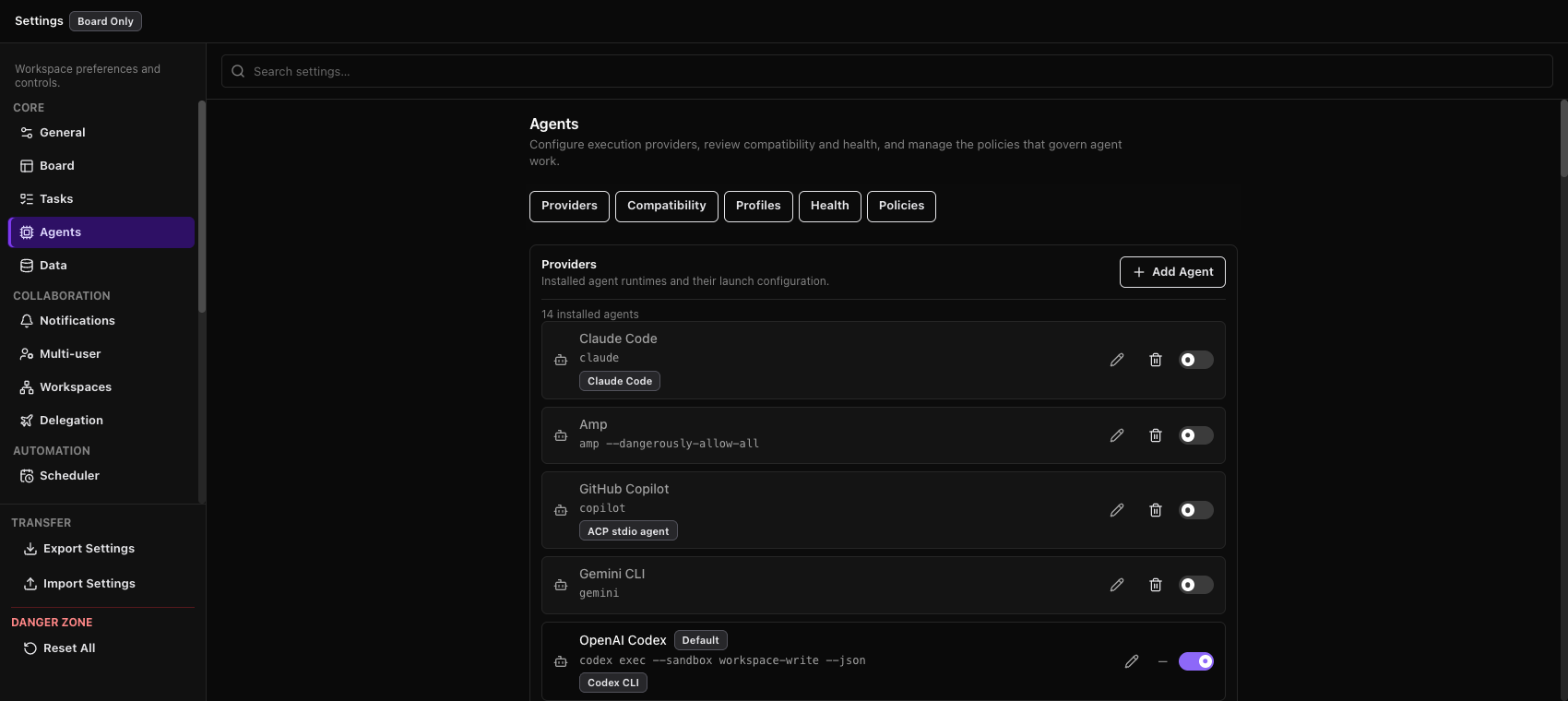
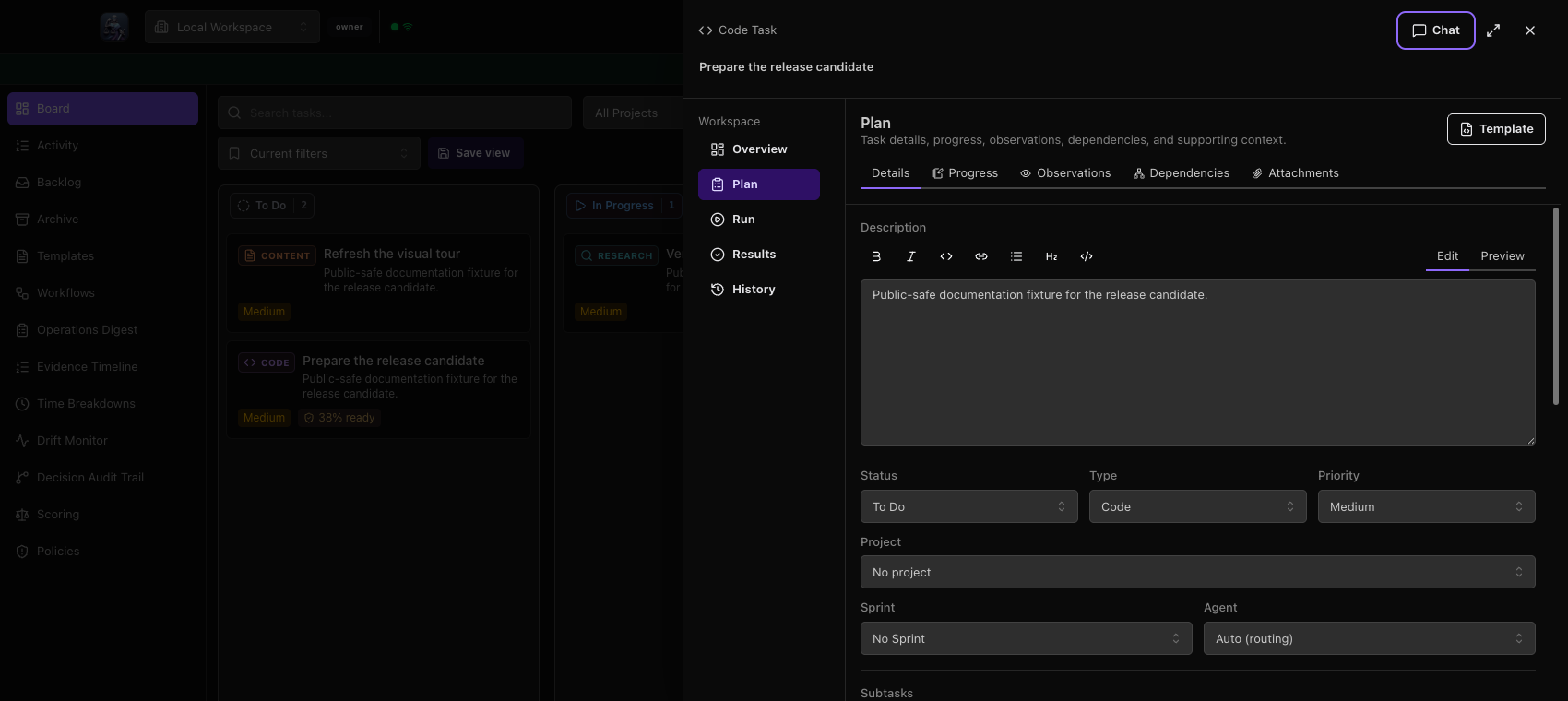
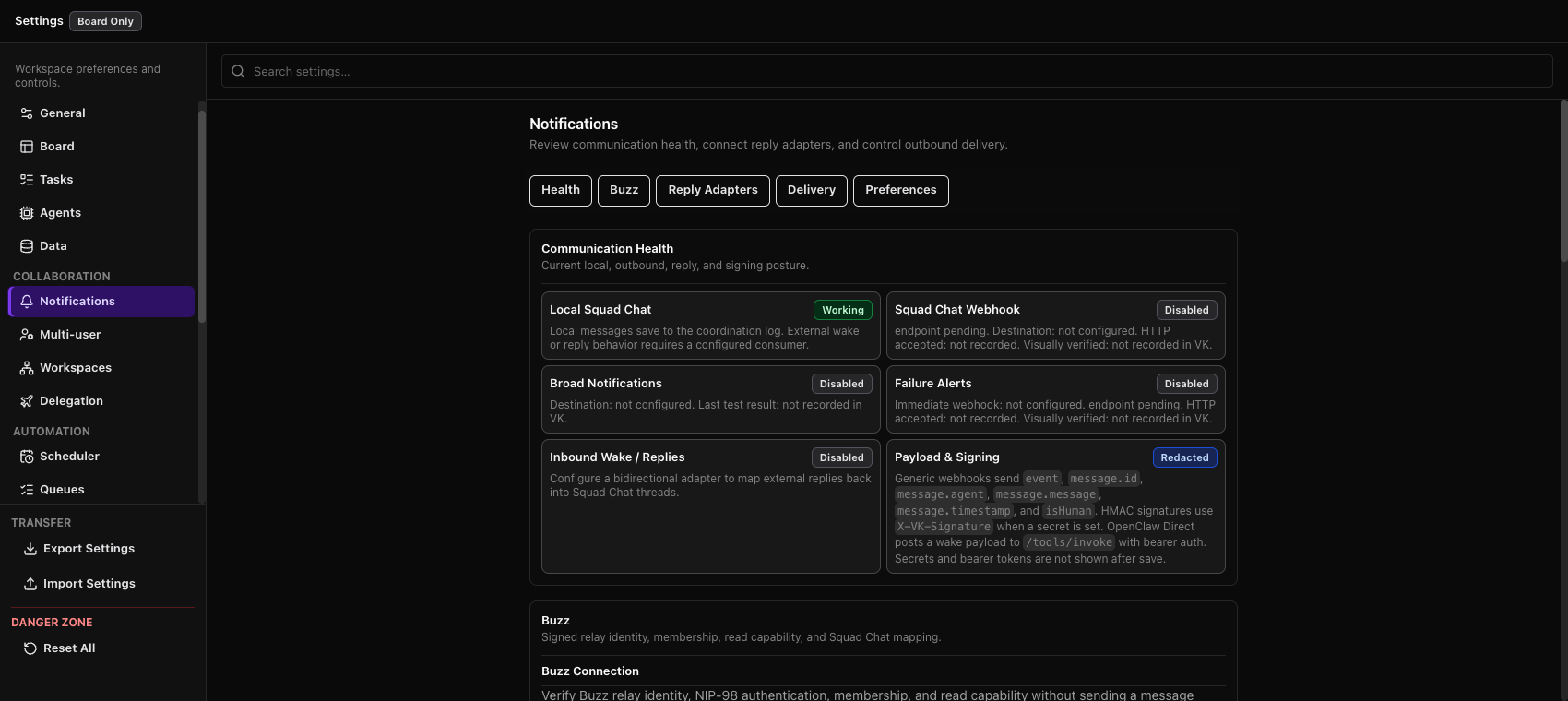
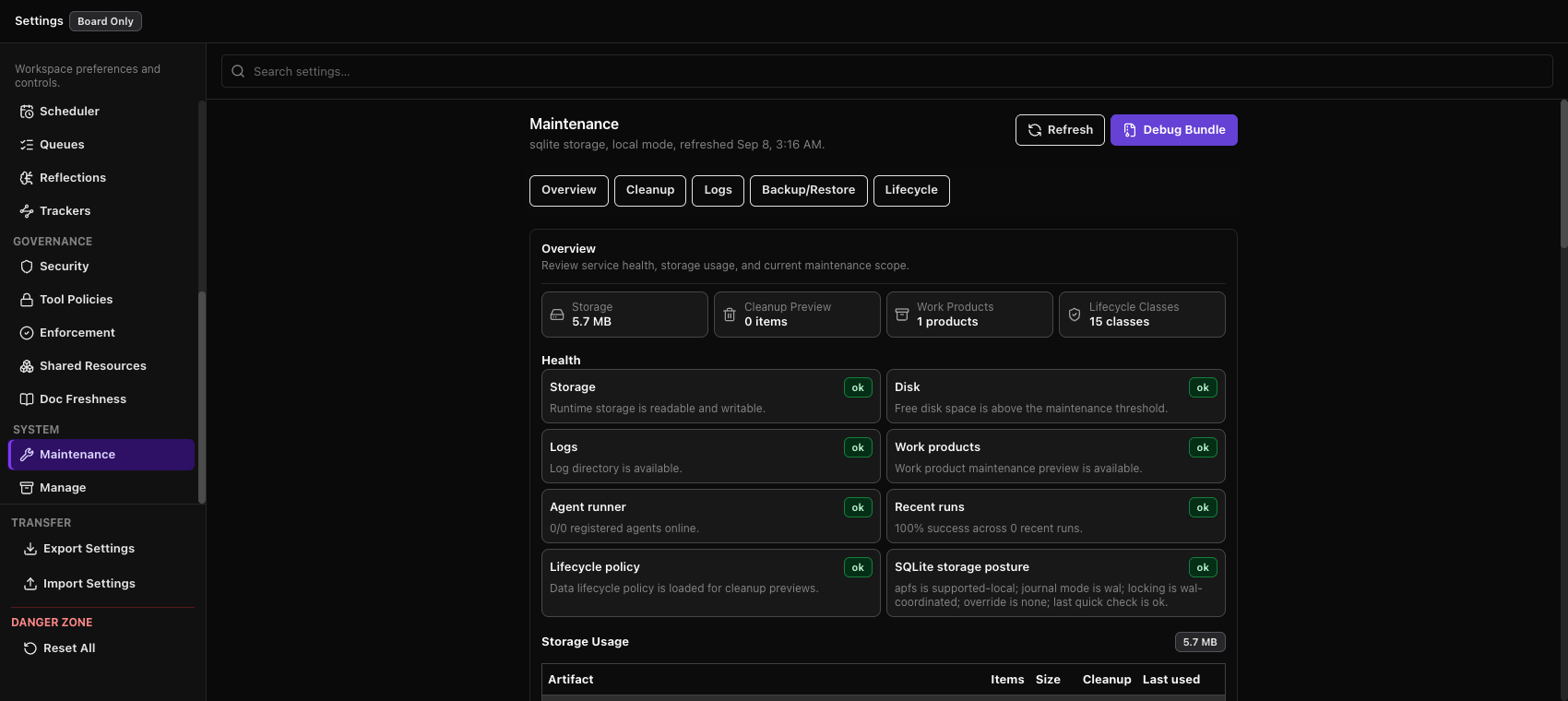
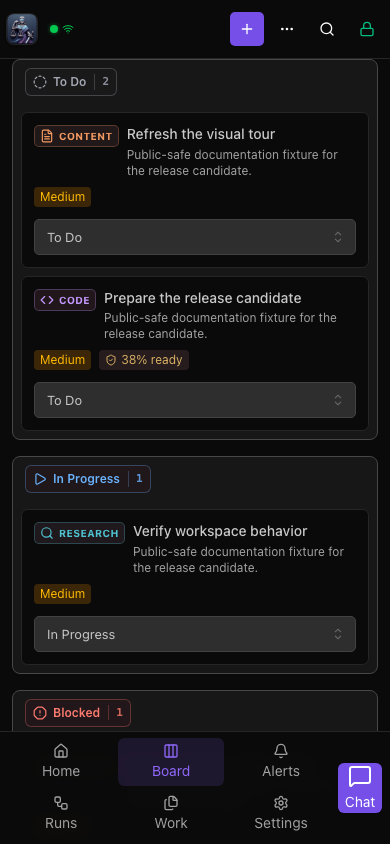
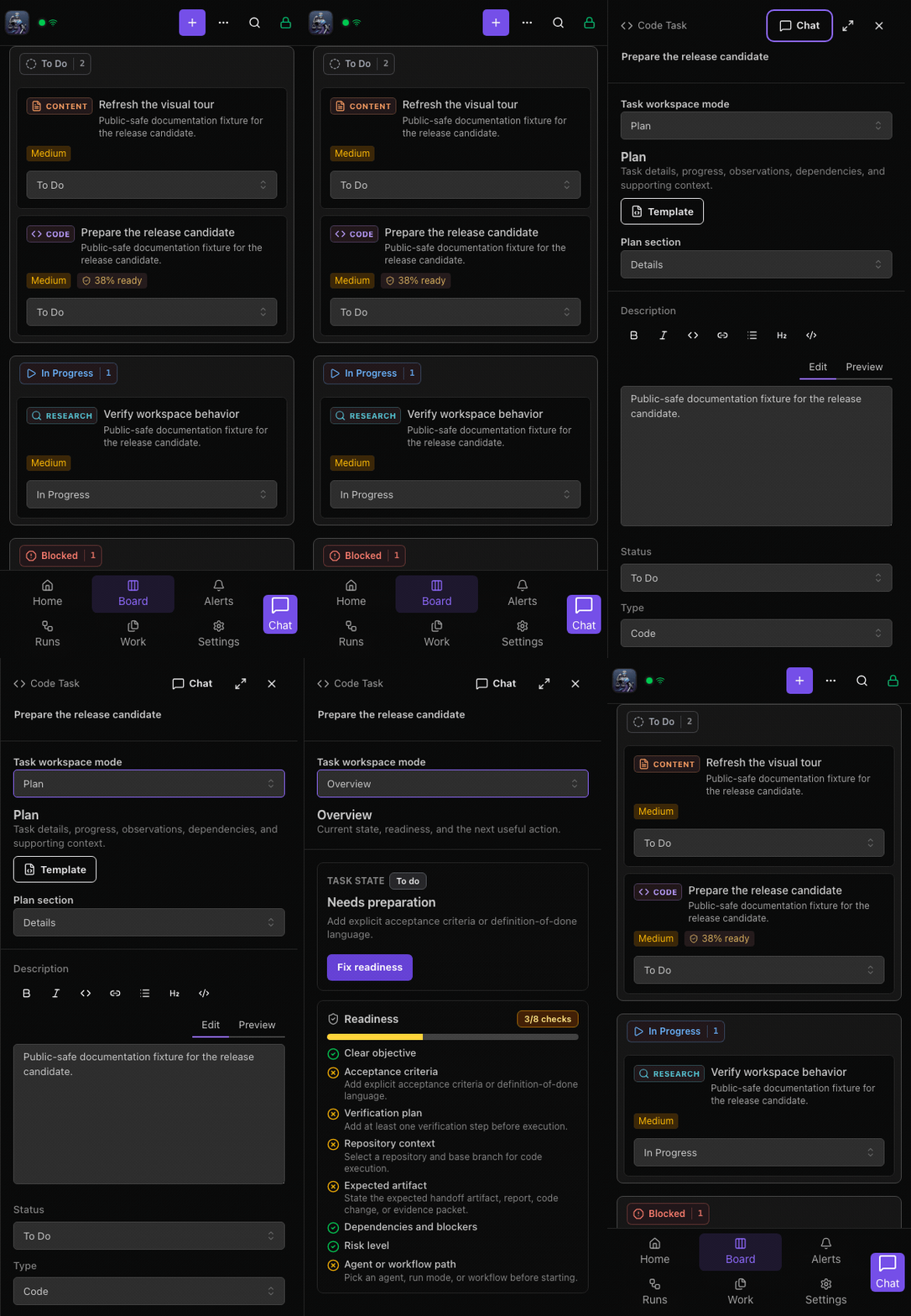
These 6.2.0 candidate captures use isolated public-safe tasks. Desktop images show the packaged Mac candidate; mobile images show the browser interface. See the v6 Visual Tour for the maintained media index and capture rules.
Desktop
| Board and task-workspace tour | Current desktop board |
|---|---|
|
|
| Workbench panel | Agent provider settings |
|---|---|
|
|
| Squad Chat coordination | Notification and reply adapters |
|---|---|
|
 |
| Task workspace | Maintenance Center |
|---|---|
|
 |
Mobile/PWA
| Mobile board | Mobile board to workspace/settings flow |
|---|---|
 |
 |
🗺️ Roadmap
Current work and priorities live in GitHub, not in a version-specific README checklist:
Longer-lived product and architecture direction is recorded separately:
- v6 agent runtime control plane
- phase capability profiles
- tool control plane v1
- post-GA native mobile offline decision
- post-GA cloud sync and hosted SaaS decision
Use issues for current work, architecture records for durable direction, and the changelog and releases for shipped work.
💬 Support
All support and feature requests go through GitHub:
- 🐛 Bug reports — Open an issue
- 💡 Feature requests — Open an issue
- ❓ Questions & discussion — GitHub Discussions
Note: Support is not provided via email or social media. GitHub is the single source of truth for all project communication.
🙏 Acknowledgments
Special thanks to Peter Steinberger and OpenClaw (formerly Clawdbot/Moltbot) — the platform that inspired this project and made autonomous agent orchestration feel like magic.
📜 License
MIT © 2026 Digital Meld
Made in Texas with 💜
Originally built for OpenClaw. Works with any agentic platform.