



A personal AI assistant that evolves with you.
8 different types of memory (episodic, semantic, procedural, emotional, prospective, behavioral, narrative, shared) make it truly yours. It learns how you work, remembers what matters, and takes action across your apps.
What It Does
If you've set up a Personal AI on OpenClaw, Hermes Agent, or Claude Code, you know how long it takes, and how many times you have to hatch a new one to get it right. Vellum gets you the result you're looking for out of the box, one download away.
| Area | Summary |
|---|---|
| Memory | Eight types (episodic, semantic, procedural, emotional, prospective, behavioral, narrative, shared), each with its own staleness window, hybrid dense + sparse retrieval, and per-user and per-channel isolation. Structured items (identity, preferences, projects, events) extracted from conversations with source attribution and dedup. Embeddings run locally by default. Not a SQLite + Markdown file you maintain yourself. |
| Identity | Behavior lives in SOUL.md. During onboarding the assistant observes how you communicate and writes its own personality files. It keeps a per-user journal of reflections and uses NOW.md as a scratchpad for current focus and active threads. |
| Proactivity | Every hour the assistant re-reads its notes, looks for anything unfinished or due soon, and messages you if something needs attention. Notifications go to the right channel and won't interrupt an active conversation. |
| Security | Actor identity (guardian, trusted, unknown) is resolved once and enforced everywhere; unknown actors can't read memory, trigger tools, or escalate. Credentials live in a separate process and never reach the model. Every tool call runs in a sandbox. The default is to deny. |
| Channels | macOS, Windows, iOS, Web, Voice, Email, Telegram, Slack, Twilio. One assistant, one memory, every channel. |
| OAuth | Slack, Notion, Google, HubSpot, Linear, Discord, Twitter, Telegram, Twilio. No hand-rolled token refresh. |
| Hosting | Managed runtime on Vellum Platform, or self-hosted. Same codebase, same data model. |
Get Started
1. Sign up or download the app
The desktop app is available for macOS and Windows. The Windows download is currently a dev build connected to the development environment, with x64 (Intel/AMD) and ARM64 installers. See the installation guide for setup and permissions.
2. Pick your mode
- Managed: sign in via Vellum Cloud, no local runtime required
- Local: everything runs on your machine
3. Hatch your assistant
- It's yours! Have fun with it.
Prefer the terminal? See CLI install below.
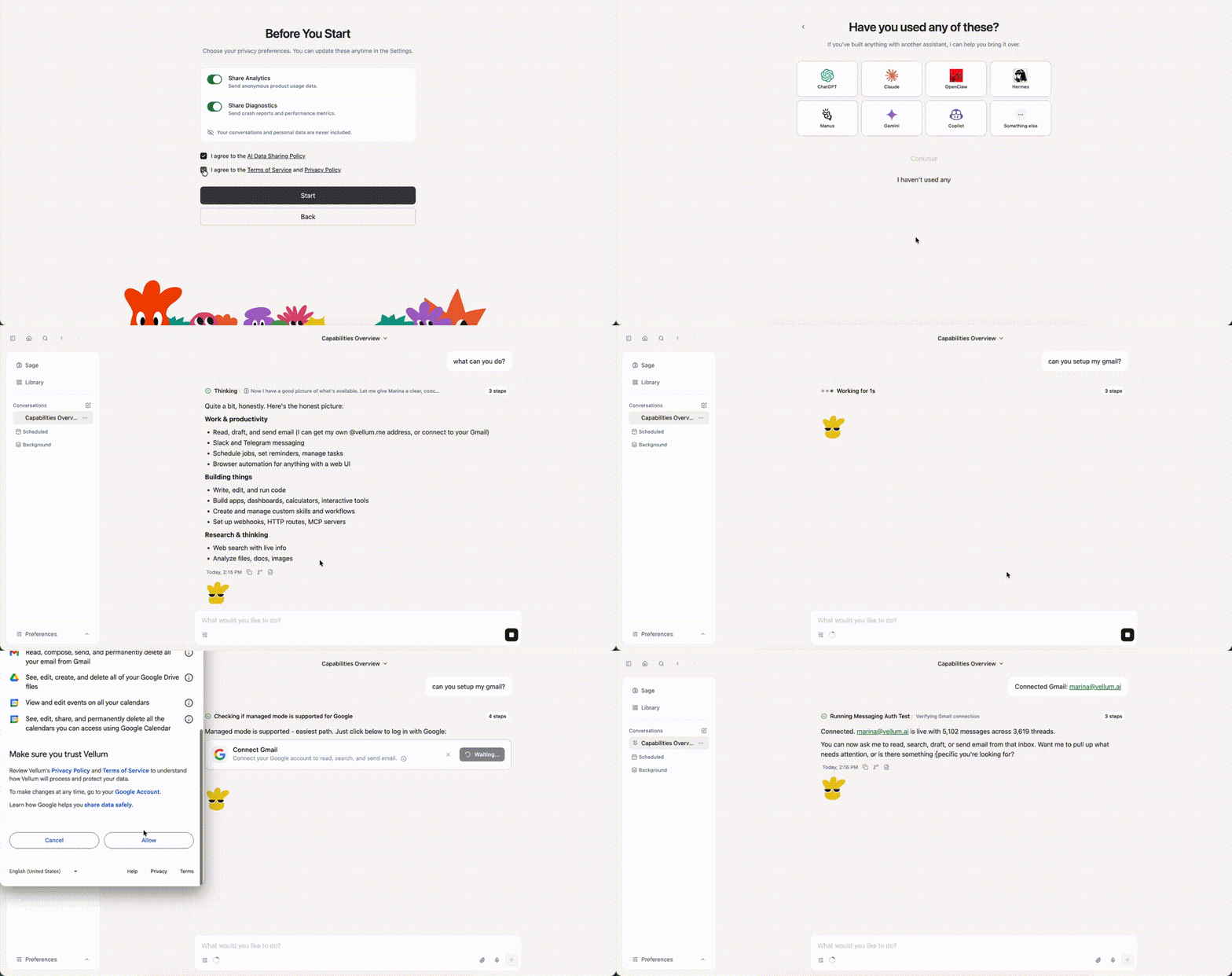
Quick Demo
CLI
Install and common commands
The CLI works but the desktop app is our primary focus. Available for advanced users, contributors, and terminal-based workflows. The Windows desktop app installs the bundled CLI for your user account on first launch; open a new terminal afterward to use vellum.
Install
bun install -g vellum
vellum hatch
Install from source
git clone https://github.com/vellum-ai/vellum-assistant.git
cd vellum-assistant
./setup.sh
source ~/.bashrc
vellum hatch
Common commands
vellum wake        # start services
vellum sleep       # stop services, keep data
vellum client      # interact through the terminal
vellum ps          # view running assistants
vellum terminal    # open a shell into a managed assistant container
vellum upgrade     # upgrade to latest version
All commands target the default assistant. If you have multiple, pass the assistant ID as the second argument.
Guides
- Pair a device: reach a self-hosted assistant from your phone or another computer by opening a tunnel and pairing the device.
Infra and security
| Area | Summary |
|---|---|
| Computer use | The assistant works in its own sandbox, and with your approval reaches your actual machine: reads and edits files, runs commands, drives the browser. Every action is permission-gated, and you can grant once, for ten minutes, or always. |
| Skills | Plugins defined by a SKILL.md and a TOOLS.json that add tools and prompt sections at runtime, sandboxed like everything else. Install them from the catalog, bundle them, or drop them in the workspace. |
| Channels | One assistant with one memory, reachable from the macOS or Windows app, Telegram, or Slack. Start a thought in one channel and pick it up in another. |
| Multi-provider support | Works with Anthropic, OpenAI, Google Gemini, Fireworks, OpenRouter, MiniMax, Atlas Cloud, and any OpenAI-compatible endpoint. Local models run through Ollama. Embeddings run on local ONNX by default and fall back to cloud providers automatically. |
Foundational documents
The canonical sources for who we are and how we talk about what we're building. The docs site at vellum.ai/docs is a rendered view of these files.
| Doc | What it is |
|---|---|
| Constitution | Who we are, what we believe, and what we refuse to compromise on |
| Glossary | The shared vocabulary we use to talk about personal intelligence |
Documentation
| Section | What's covered |
|---|---|
| Architecture | Platform domains, repo structure, runtime · clients · gateway |
| Security & Permissions | Sandbox, credentials, trust rules, permission modes |
| Features & Capabilities | Integrations, dynamic skills, browser, attachments, media embeds |
| API & Communication | SSE event stream, event payloads, remote access |
| Development Workflow | Claude Code commands, parallel PRs, review loops, release pipeline |
Contributing
We welcome contributions from everyone.
- Development: The contributing guide will help you get started.
- Make sure to check out our Code of Conduct.
Community
License
MIT. See License. Integration logos from Simple Icons, licensed CC0 1.0.
Vellum Assistant is open-source software built by Vellum AI, a for-profit company. We also offer a managed product, the Vellum Platform, which sustains the business. Free to use and modify under MIT, and we're committed to keeping it that way.
Built with 💚 by Vellum