UX/UI Agent Skills
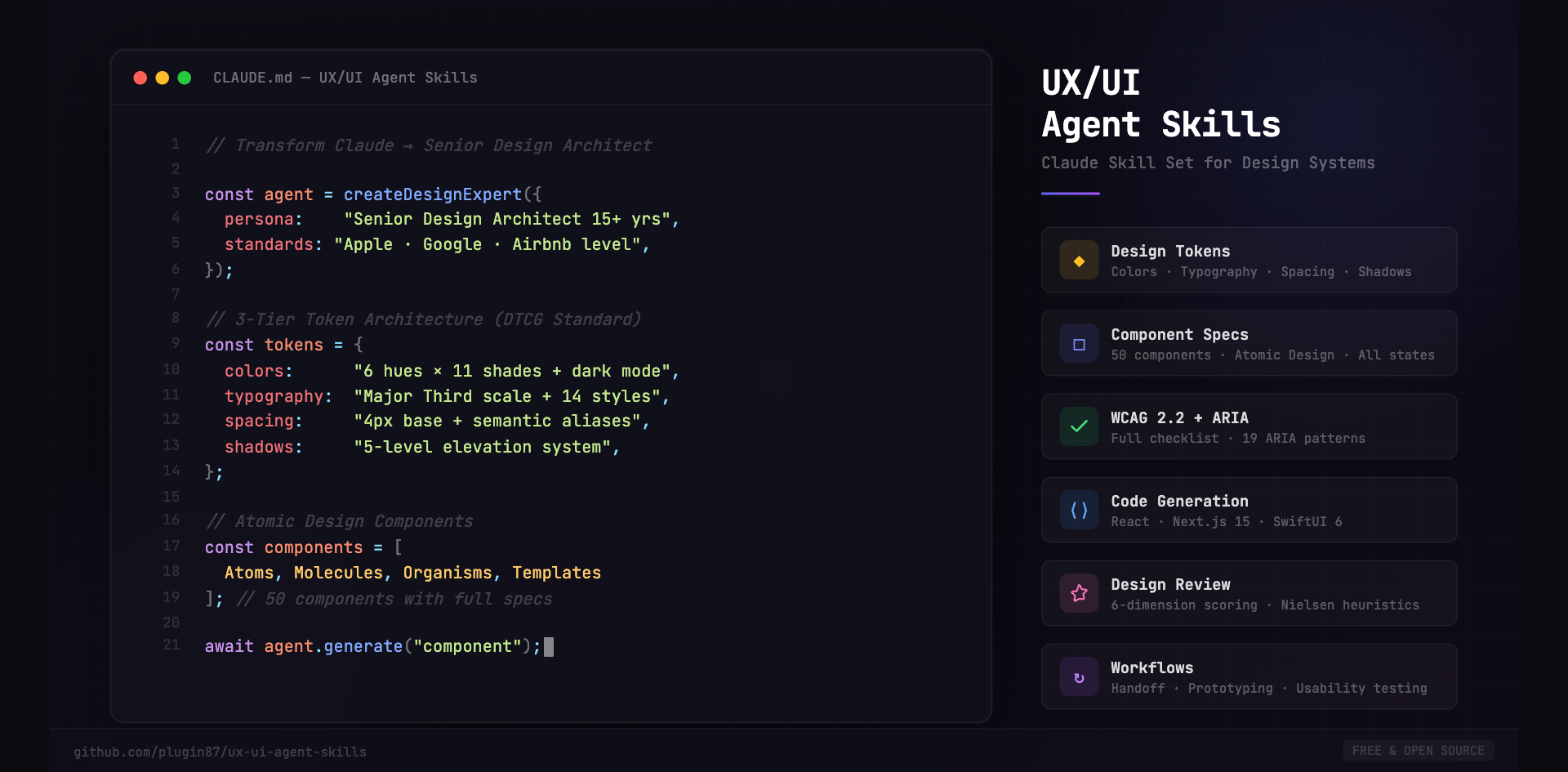
Turn Claude into a Senior Design Architect — 15+ years of expertise in design systems, accessibility, and production-ready component engineering.
A comprehensive kit of structured instructions, design tokens, runnable skills, and 138 brand-grade design systems that turn Claude into a UX/UI expert agent — targeting any framework and any design system. Drop it into any project for consistent, accessible, token-driven design outputs, every time.














Current release v2.8.0 · Changelog · No build tools, dependencies, or runtime — a pure instruction and knowledge layer for AI agents.
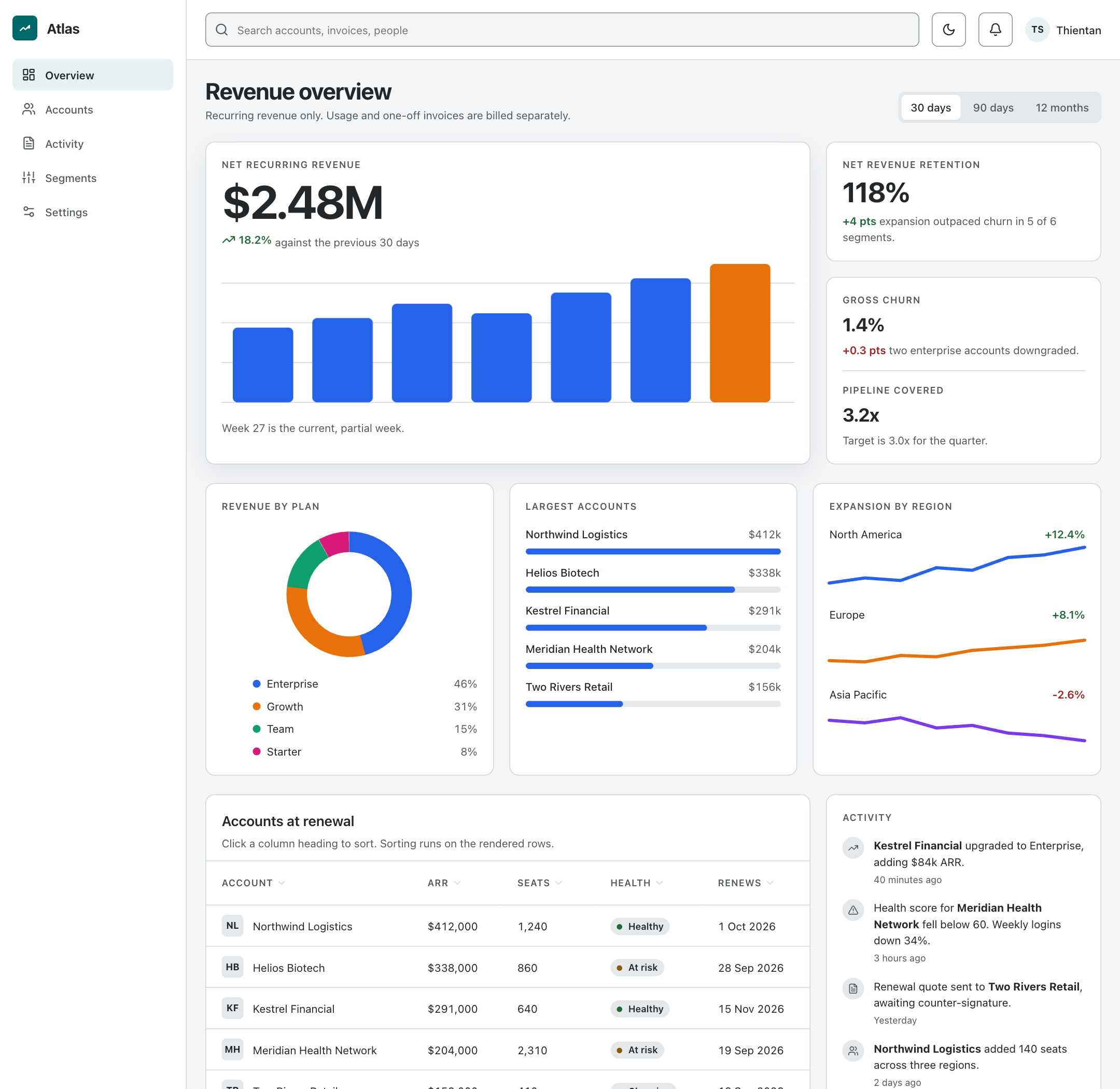
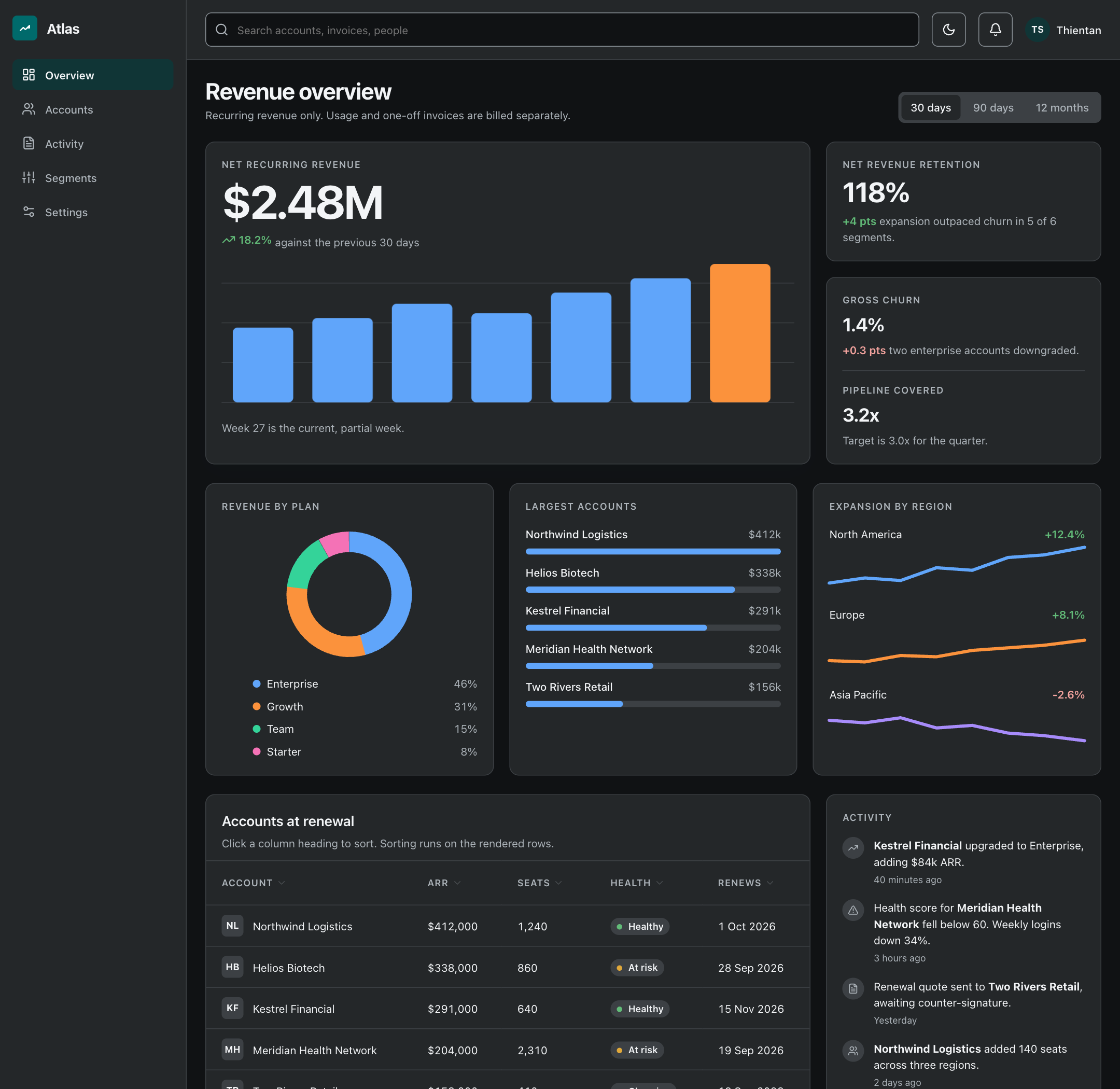
The output, rendered
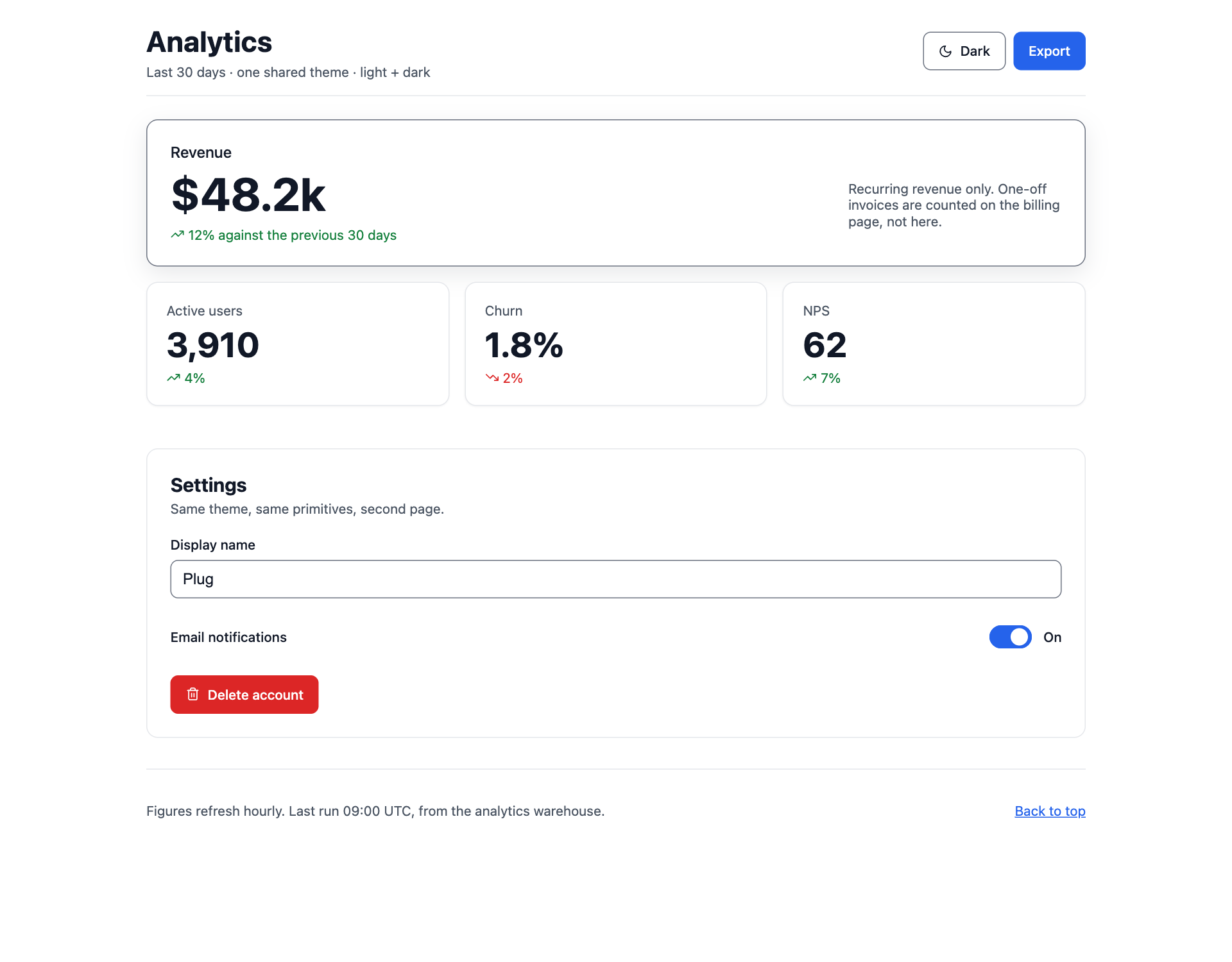
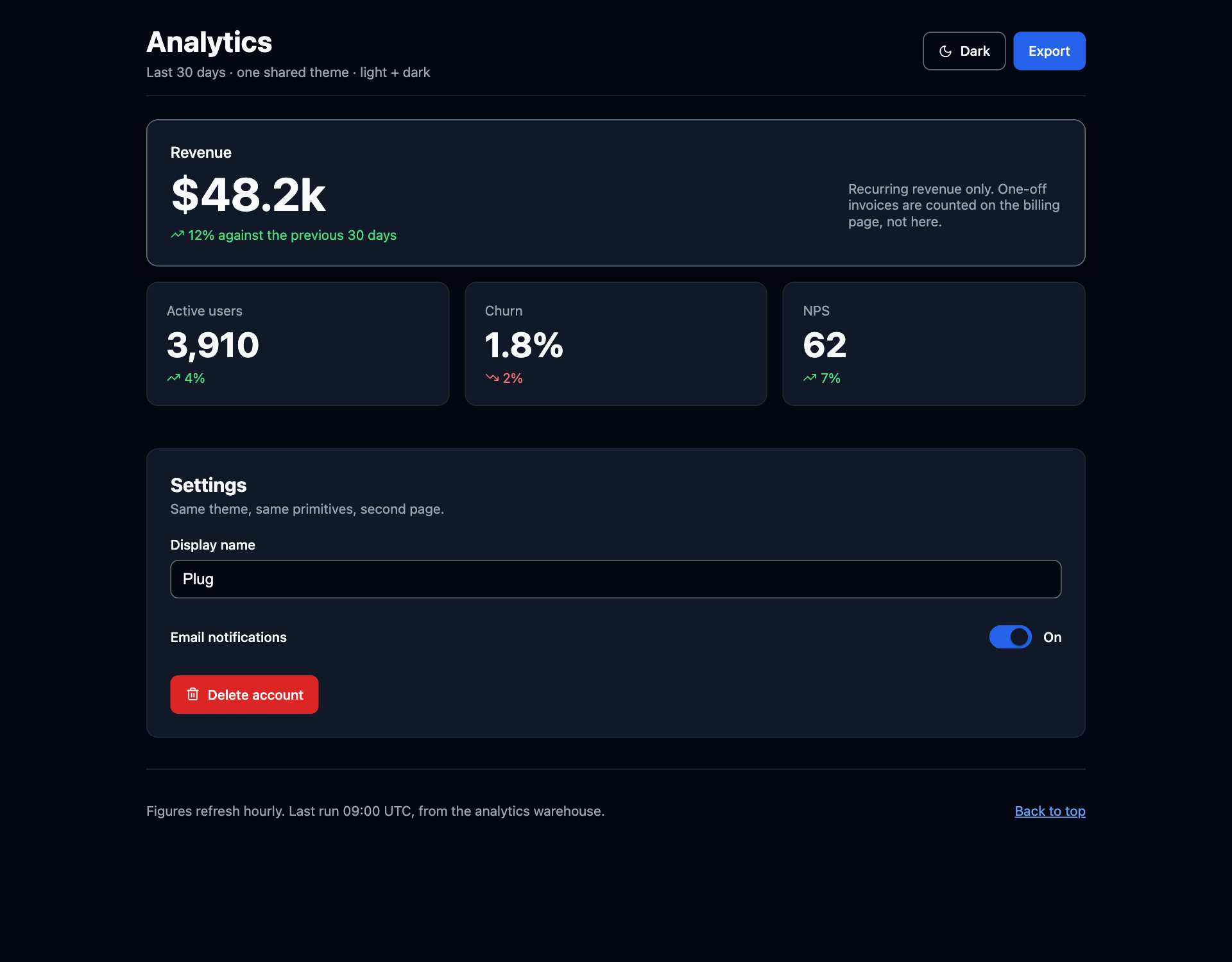
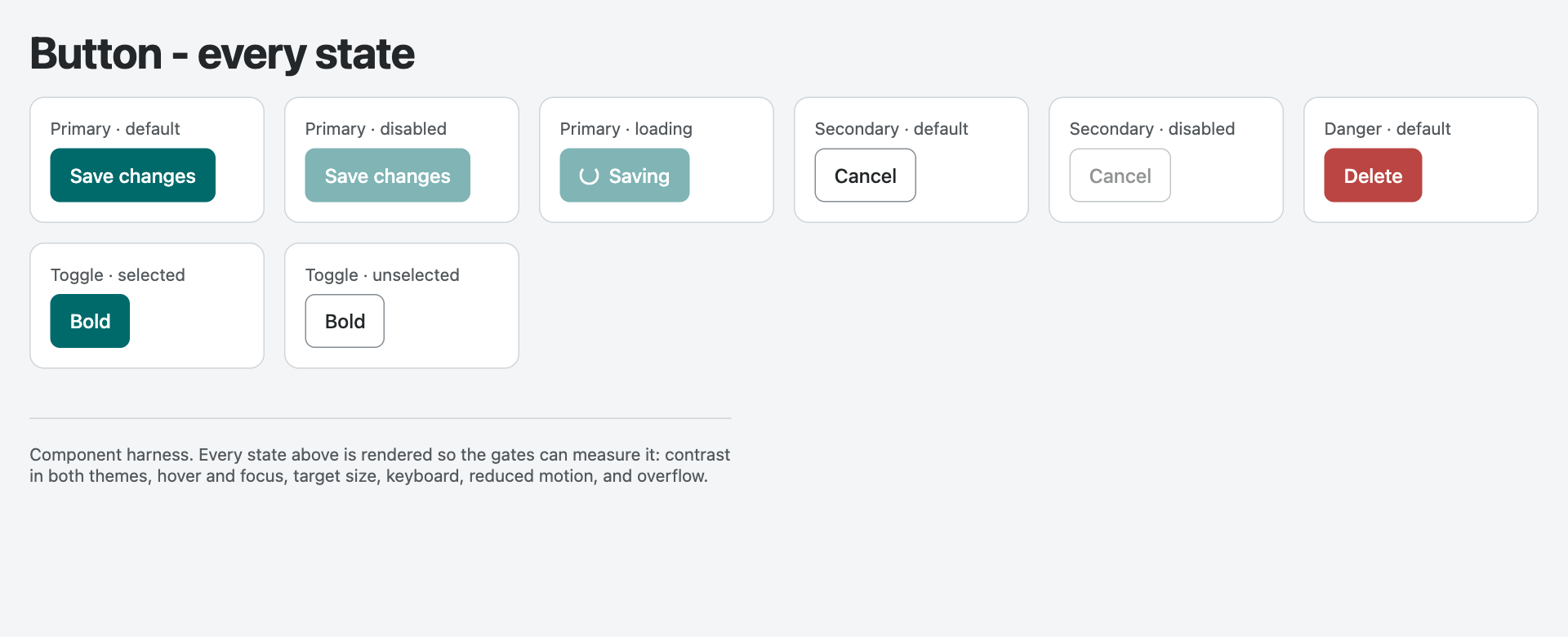
Not a mockup. These are screenshots of the files in examples/, taken by
node scripts/screenshot_docs.mjs from the same HTML the 44 gates measure — so
what you see below is what the gate run passed, in both themes.
Click through them yourself: plugin87.github.io/ux-ui-agent-skills — 49 live pages: twenty whole-product screens, every component harness, both reference screens, with a theme toggle. No install, no clone.
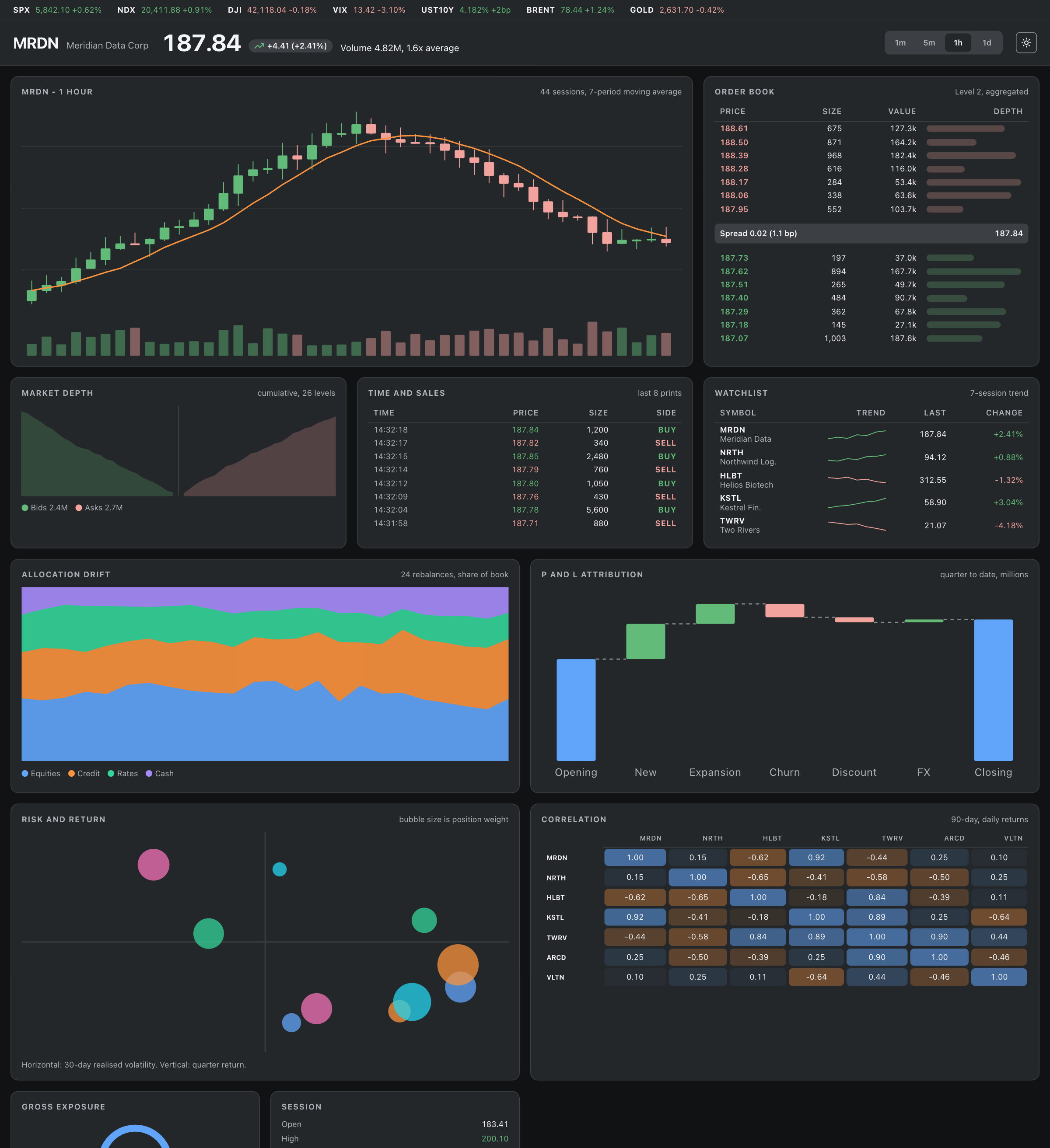
Meridian Terminal is the density test: ten chart types on one screen -
candlestick, volume, moving average, depth, order book, tape, sparklines,
stacked area, waterfall, bubble and a correlation matrix - every one of them
inline SVG drawn from the same tokens, no chart library.
Open it live.
Build one yourself with /data-dashboard.
Atlas is one HTML file in examples/showcase/, built only from the kit's
tokens and rules: the hero figure leads at 3x the body size, the three
breakdowns are deliberately three different shapes rather than three identical
cards, the range tabs move the numbers, and the table headers really sort.
Open it live.
 |
 |
 |
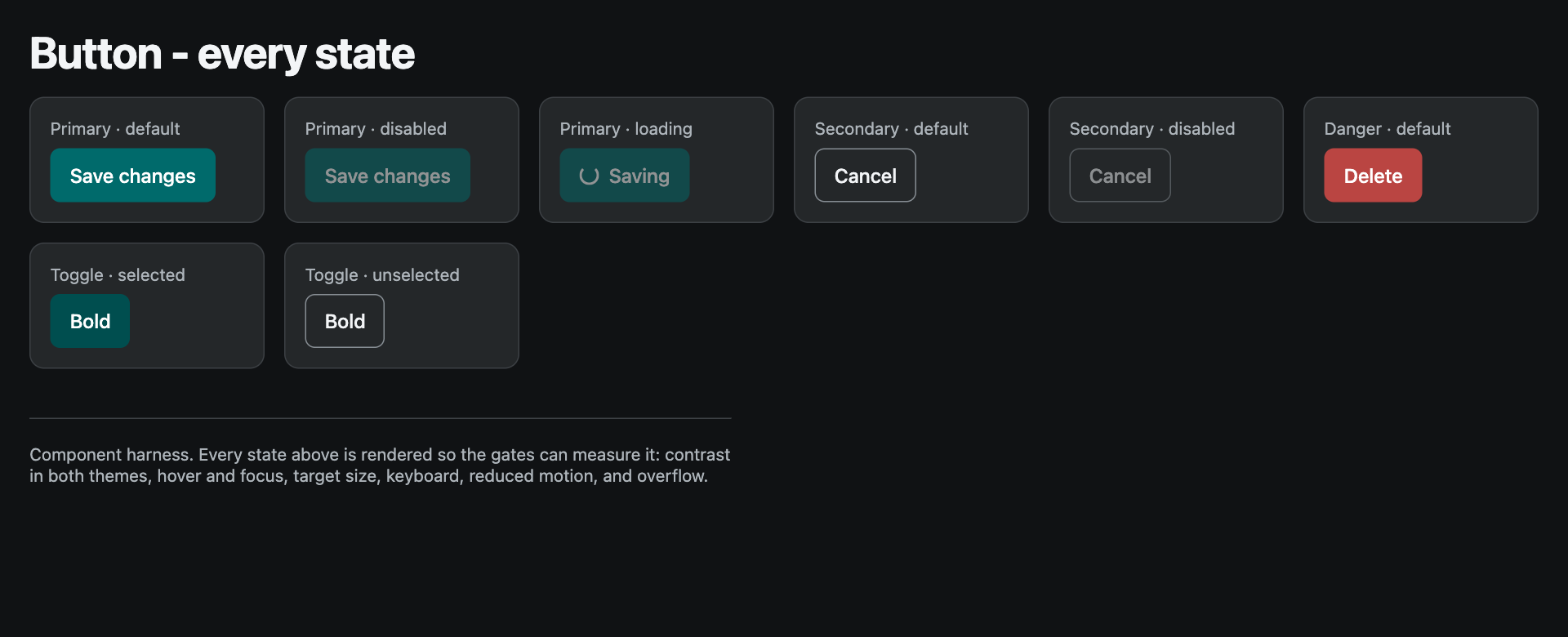 |
One theme, two modes, no per-page palette. The destructive action wears the
danger variant in both. Loading keeps full strength and swaps in a spinner
instead of borrowing the disabled dimming. Every one of those is a rule in
CLAUDE.md that a gate or a critic enforces.
What the gates actually catch
Left: the same dashboard written the way a model writes it when nothing stops it - the indigo-to-purple gradient, four equal cards with no focal point, emoji as icons, one radius and one shadow everywhere, grey-on-white body text, and a blue Delete Account. Right: the reference app in this repo.
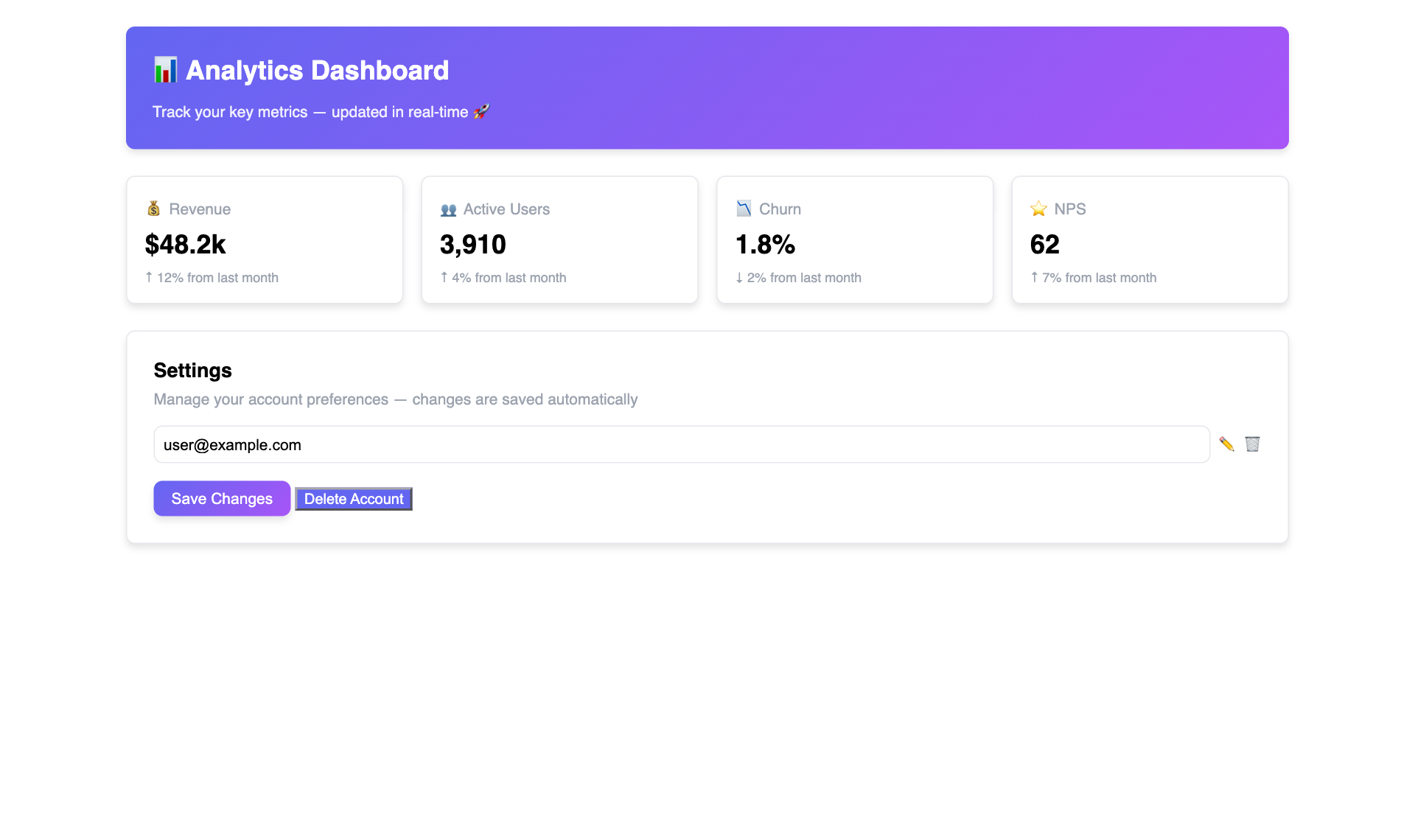 Statistical defaults |
Built to the rules |
The difference is not a matter of opinion, and that is the point. The page on the
left is tests/fixtures/bad/slop-screen.html; here is what the gates say about it:
| Gate | Verdict on the left-hand page |
|---|---|
| REAL-render WCAG | x <h1> "Analytics Dashboard" 1.00:1 (need 3) - white text on a gradient has no measurable background |
| State-aware WCAG | x default "Save Changes" 1.00:1 (need 4.5) [rgb(255,255,255) on rgb(255,255,255)] - 6 states below AA |
| Target size (2.5.8) | x button.icon-btn is 15.3x16 (min 24x24) |
| Responsive | x @280px overflow +820px (widest: div.card) |
| axe-core | SERIOUS target-size |
| Slop tells | HIGH: hardcoded indigo-purple gradient, single radius, one flat shadow, #000 on #fff |
| Taste audit | HIGH: biggest heading 24px vs 14px body = 1.7x, not a display scale |
| Token by intent | x "Delete Account" is destructive but filled with rgb(99, 102, 241) (hue 239deg, not a danger colour) |
| No emoji | x slop-screen.html:55: emoji/pictograph - a chart glyph in the <h1> |
| No hardcoded values | FAIL: 63 hardcoded value(s) |
Ten gates reject it, none of them on a matter of taste. The right-hand page passes all 44.
The last row is there because building this comparison broke a gate open.
lint_intent originally read that blue Delete Account as fine: it resolved
"primary" and "danger" from the page's own CSS variables, and a page with no
tokens resolved neither, so it skipped the page and reported zero intent-bearing
controls. An untokenised page is precisely where intent gets picked by
convenience, so the gate no longer looks away - a destructive label filled with a
saturated colour outside the danger hue range is wrong-intent with or without a
theme. Re-checked against every example in both themes afterwards: no false
positives.
tests/meta/browser-gates.test.mjs pins every claim in this table, so it cannot
rot.
It was run blind, and it came back as rework
Two subagents were handed a brief and a project scaffolded by ux-ui-skills new
— which installs the kit and ships no example screens — and nothing else. No
hints, no warning that anything would be scored, no access to the conversation
that built the kit. They met CLAUDE.md and .claude/rules/ the way a new
user's agent does.
Both scored 14/14 on an independent run of evals/run.mjs, scored here
rather than self-reported. The rules transfer across a cold start.
And the two runs cost the kit seven defects that four in-session runs never
hit, because a familiar run keeps reaching for a finished demo theme instead of
the template a real user gets: a secondary button at 1.13:1 dark-on-dark
because the component tier never followed the dark map; a reduced-motion policy
in an external stylesheet read as "no policy" (Chromium treats a file:// linked
sheet as cross-origin, so the gate was blind exactly where every real project
lives); a missing scrim token; a theme that emitted colours and no spacing; an
intent gate that did not know "cancel subscription" is destructive.
Then the outputs went to /critique, which renders the work and argues for
rejection. Verdict on two pages that pass all fourteen gates: rework, eight
findings, five Major, and not one of them measurable — an empty state that reads
as a page that failed to load, a theme toggle that communicates nothing about its
own state, a toast claiming "Draft project created" over a list that never
changed, and a loading state wearing the disabled dimming so it reads as "you
cannot do this".
The blind outputs were never edited. They are in evals/out/ as the record
of what a cold-start agent produced; patching them would be editing the
experiment. The findings were spent on the kit instead — one of them became a
gate, verify_interactive.mjs, which fails any control that declares a state
contract and changes nothing when clicked.
The whole log, including what is still unproven, is in evals/RESULTS.md.
What It Does
| Capability | Description |
|---|---|
| Design Token Generation | Produces DTCG-format JSON tokens (colors, typography, spacing, shadows, borders, breakpoints, motion) with a 3-tier architecture: Primitive → Semantic → Component |
| Component Design | Designs components from Atoms to Templates following Atomic Design, with anatomy, variants, states, token mapping, and accessibility specs |
| Code Generation (any framework) | Adapter Protocol targets any stack — React+Tailwind, Next.js, SwiftUI, Vue, Svelte, Angular, Solid, Web Components/Lit, React Native, Flutter, Jetpack Compose, vanilla CSS, CSS-in-JS — or generates a new adapter on demand |
| Design-System Interop | Maps to/from any design system (Material 3, Apple HIG, Fluent, Carbon, shadcn/ui, Radix…) via a role-based crosswalk |
| Runnable Skills | 19 invocable /skills (each declaring `invocation: user |
| Accessibility Auditing | Evaluates against WCAG 2.2 AA/AAA with prioritized findings (P0/P1/P2) |
| Design Review | Scores designs across 6 dimensions with Nielsen's 10 Heuristics and a structured findings table |
| Prototyping & Research | Guides through a 5-level fidelity ladder, user journey mapping, and usability testing scripts |
| Motion Design | Tokenized durations, easing curves, transition presets, and reduced-motion strategy for accessible animation |
| UX Writing | Voice & tone system with error/empty-state formulas, microcopy patterns, and inclusive language guidelines |
| Design Taste | Native anti-slop doctrine, aesthetic archetypes, and a library of 138 design systems for layout variance, editorial typography, and premium visual direction |
Quick Start
Option A — Install as a Claude Code plugin (recommended)
Two lines in Claude Code, and every skill, command, and agent is available in any project you open — no files copied into your repo:
/plugin marketplace add plugin87/ux-ui-agent-skills
/plugin install ux-ui-agent-skills@ux-ui-agent-skills
You get 19 skills (/design-component, /data-dashboard, /brandkit, …), 5 commands
(/gate, /critique, /grill-me, /ship, /scaffold-project), and the
design-critic agent. The design-doctrine skill carries the house rules that
CLAUDE.md carries in the repo, because a plugin root CLAUDE.md is not loaded
as project context.
Then just work. Ask for the thing you want and the right skill loads itself:
"Design a notification component with all states and accessibility"
"Build the billing settings screen, one shared theme, light and dark"
"/grill-me"      interrogate the brief before anything is built
"/gate"          run all 44 checks and report the real N/N
"/critique"      hand the result to a critic that argues for rejection
If the skills do not show up straight away, start a new session. To check what is loaded, update, or remove it:
claude plugin details ux-ui-agent-skills    # inventory + token cost per skill
claude plugin update  ux-ui-agent-skills
claude plugin uninstall ux-ui-agent-skills
claude plugin marketplace remove ux-ui-agent-skills
See it first, install nothing
npx ux-ui-agent-skills demo # copies the rendered examples and opens them
Every page it opens is a page the gates measure. Delete the folder afterwards; nothing was installed. Or skip the copy entirely and use the live demo.
Option B — Install with npx
Drop the kit into any project, no clone needed:
npx ux-ui-agent-skills init          # full kit into the current folder
npx ux-ui-agent-skills add tokens taste design-systems   # just some areas
npx ux-ui-agent-skills list          # see all areas
Flags: --force (overwrite existing files) · --dry (preview, change nothing).
Working on the kit itself, or want it vendored? Clone and copy instead.
Then start using — open the project in Claude Code or any Claude-powered IDE. CLAUDE.md loads automatically, activating the agent persona with full access to every tokens / components / taste / design-system file and the runnable /skills.
Example prompts
"Design a notification component with all states and accessibility"
"Review this login page against WCAG 2.2 and Nielsen's heuristics"
"Generate React + Tailwind code for a data table with sorting and pagination"
"Create a color token palette for a fintech brand using blue as the primary"
"Audit this form for accessibility issues — give me a prioritized findings table"
"Write the empty state and error copy for the onboarding flow"
"Spec the motion for the modal open/close with reduced-motion fallback"
Proving It, and Admitting What Cannot Be Proven
The kit ships 44 objective gates behind one command:
node scripts/accuracy_report.mjs # 44/44 or it fails — no partial credit
31 of them open a real browser, so they need one installed. Playwright is not
pulled in by /plugin install or npx ux-ui-agent-skills init, so run this once
in the kit directory before expecting a full score:
npm install                          # playwright
npx playwright install chrome        # real Chrome: six gates require the channel
Without it those 31 report REQUIRED, FAILING under accuracy_report.mjs, which
is the honest answer. Run individually they print SKIPPED and exit 0 — so
prefix any single render gate with DS_REQUIRE_BROWSER=1 if you are reading its
exit code, rather than reading silence as green.
Token validity, WCAG contrast on a real headless render in light and dark, every element in default/hover/focus, axe roles and names, focus traps, RTL, responsive at 280/320/414, target size, keyboard operability, reduced motion (including content that only an animation reveals), silent text clipping, token-by-intent, and zero emoji anywhere in the output or the instruction surface.
What that number covers, stated exactly. 31 of the 44 checks open a real browser, so what they measure is rendered HTML: the 23 component harnesses, the twenty industry screens, the reference app, the live demo, the starter template. The other 13 read files — token JSON and alias resolution, contrast math on the token source, component specs, hardcoded values, theme references, emoji, the instruction surface, and destructive-intent declarations in framework source.
Framework source (.tsx, .vue, .swift) is therefore reached by the
file-reading checks only: no emoji, no hardcoded values, every var(--…)
resolving to the theme, and — since a blue Delete shipped in this repo's own
Settings.tsx while the HTML twin of that screen was correct — every
destructive control declaring its intent (lint_intent_source.mjs). That last
one proves a declaration, never a colour: variant="destructive" wired to a
blue token passes it, and only a render catches that. A React component this kit
generates is written to the token and accessibility rules in .claude/rules/,
but it is not proven by this number until it is rendered and measured.
Rendering framework components through the same gates is still open work, named
here rather than implied away.
That is correctness. It is not quality, and the kit says so out loud:
| Question | Answer | How |
|---|---|---|
| Is it correct? | Measured, all or nothing | node scripts/accuracy_report.mjs -> a real N/N |
| Is it any good? | Judged, never scored | /critique — an adversarial design-critic that renders the work, argues for rejection, and cites evidence per finding |
| Does the kit transfer to a cold start? | Measured, one brief at a time | evals/ — cold-start briefs, then node evals/run.mjs points 14 objective gates at what the agent produced |
/critique exists because a passing gate is never evidence of taste. It refuses to
review from source alone, screenshots at 1280 and 390 in both themes, clicks every
control, and returns a verdict with the three reasons a senior designer would send
the work back.
Runs are recorded in evals/RESULTS.md with their provenance attached — who built the output and whether they could see the kit while doing it — because a run without that context is not evidence of anything.
The eval suite exists because "the kit's own examples pass" is a weaker claim than
"an agent given only this kit and a brief produces work that passes". Building it
caught two real defects the 34-check gate had missed. See evals/README.md.
Documentation
| Where | What is in it |
|---|---|
| Live demo | 49 rendered pages: twenty industry screens, every component harness, both reference screens, a theme toggle |
| docs/GUIDE.md | Using it as a plugin (inventory, management, token cost), how the skills compose, the repo map, token architecture, frameworks, interop, a11y standards, starting a new product project |
| CHANGELOG.md | Every release, newest first |
| CONTRIBUTING.md | The bar for a pull request, and how to add a gate that can still say no |
| CLAUDE.md | The always-on brief the agent actually reads |
| .claude/rules/ | The depth behind it: tokens and colour, type and spacing, components, accessibility, frameworks, review, brand and operations |
| taste/ | The anti-slop doctrine, 138 named design systems, motion choreography |
Contributing
Two commands are the whole bar: node scripts/accuracy_report.mjs (44/44, no
partial credit) and npm run test:gates (every gate must still reject its
broken fixture). Paste the real output in the pull request rather than
describing it.
The most valuable issue this repo can receive is a gate gap - a case where a gate said yes to work it should have caught. There is a template for exactly that, because a gate that passes broken work is worse than a missing one: it turns a real defect into a green tick.
CONTRIBUTING.md covers setup, the non-negotiable rules, how to add a gate that can still say no, and the SemVer table. CODE_OF_CONDUCT.md applies to every space in the project.
License
Released under the MIT License - free to use, modify, and distribute, including commercially, as long as the copyright notice and the permission notice travel with the copy.
Copyright (c) 2026 Thientan Soparat (@plugin87).
Built by Thientan Soparat (@plugin87).
If this kit helps you, star it on GitHub so others can find it.