

useful-forks.github.io is a free, open source frameworks & platforms project written in JavaScript and released under MIT. It has 1,339 GitHub stars, 85 forks and 20 open issues, and was last pushed 14 days ago. On this registry it ranks #98 of 118 tracked projects in Frameworks & Platforms, with 5 head-to-head comparisons available.

What is useful-forks.github.io?

Useful Forks is a free, MIT-licensed JavaScript tool for anyone browsing GitHub who wants to find forks of a repository that actually contain new work instead of scrolling through hundreds of untouched copies.

What it is

Useful Forks is an open-source project that improves the discoverability of worthwhile forks of GitHub repositories. It is delivered in several forms from a single codebase: a website hosted for free on GitHub Pages at useful-forks.github.io, a Chrome extension published on the Chrome Web Store, a Firefox add-on published on Firefox Add-ons, and a bookmarklet that can be added by hand to any browser's bookmarks. The repository is organised simply, with a website folder holding the site and a plugin folder holding the browser extension.

The specific problem it addresses is that when a project has been abandoned, or when someone disagreed with its direction and implemented an alternative, the forks list on GitHub forces you to search through potentially hundreds of entries by hand. Useful Forks solves this by returning a filtered list of forks worth exploring: results exclude forks that have never had any commits pushed to the main branch since their creation, so only forks showing real activity against their default branch are surfaced.

Key capabilities

  • Filters the fork list automatically to exclude repositories that have never received a commit pushed to the main branch since they were created.
  • Accepts a repository directly by URL through the online tool, for example https://useful-forks.github.io/?repo=payne911/PieMenu.
  • Adds a "Useful" button to every GitHub repository page when installed as the Chrome extension or the Firefox add-on; clicking it opens a new tab and automatically triggers a search with the online tool.
  • Ships a bookmarklet — a single-line `` snippet — that reads the current github.com// address and opens the online tool for that repository in a new tab.
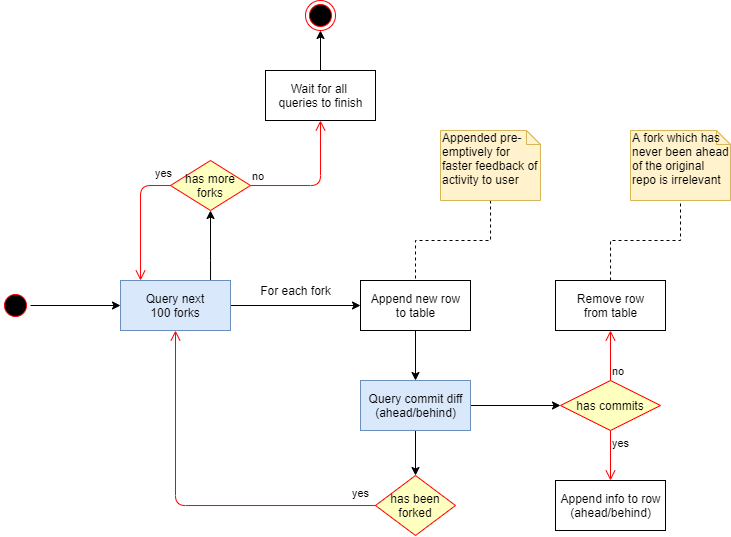
  • Exposes its algorithm through a UML activity diagram (media/query-diagram.png) that explains the flow of a scan and why a query may sometimes require a large number of API calls.
  • Provides separate published distribution channels per browser, with updates going through the Chrome Web Store and Firefox Add-ons rather than the project's GitHub Releases page.
  • Welcomes contributions, with 20 open issues currently labelled as help appreciated.

Who uses it and how

  • Developers evaluating whether to adopt a fork of an abandoned open-source project, pasting the repository URL into the online tool to see which forks contain pushed commits.
  • Chrome users who install the extension from the Chrome Web Store and then use the injected "Useful" button while browsing GitHub directly.
  • Firefox users who install the published add-on from Firefox Add-ons and get the same button-driven workflow.
  • Users of other browsers who press Ctrl+D, paste the provided bookmarklet code into the URL field, and invoke it from any GitHub repository page.
  • Contributors running the website locally with NodeJS (suggested v20+) and NPM (suggested v8+) to work on the site or the plugin.

Getting started

Use the online tool immediately at https://useful-forks.github.io/?repo=/, or install the extension from the Chrome Web Store, the add-on from Firefox Add-ons, or add the bookmarklet manually. To develop locally, bring a terminal to the website folder and execute npm install.

How it compares

The facts provided name no comparable tools, so Useful Forks stands alone in this registry.

When to use it — and when not

Because the filtering depends on GitHub API calls, a scan of a repository with many forks may require a large number of them, so heavy or automated use should account for API limits. It is not the right choice if you need to browse an unfiltered forks list or if you are not working with GitHub repositories at all, and note that updates now ship only through the Chrome Web Store and Firefox Add-ons rather than the project's own releases page, with 20 issues still open.

project readme (upstream, from github) — read inline

useful-forks banner

Useful Forks

License Issues


This tool enhances the discoverability of useful forks for open-source projects by providing a list of forks worth exploring.

The results are filtered to exclude forks that have never had any commits pushed to the main branch since their creation.

Sometimes, a project might be abandoned, or someone had a different idea of how it should be implemented... and when you go looking for those interesting forks, you find yourself searching through potentially hundreds of them. This tool is here to help you discover the hidden jewels you were looking for!

Table of Content


Releases

There are several ways to access the tool.

If you use Chrome, your best option would be to download the Chrome extension. If you use Firefox, grab the Firefox add-on instead. For other browsers, you may want to use the bookmarklet.

Online tool

The project is available online for free thanks to GitHub Pages.

You can query a repository directly with the URL. Click this link to get an example: https://useful-forks.github.io/?repo=payne911/PieMenu.

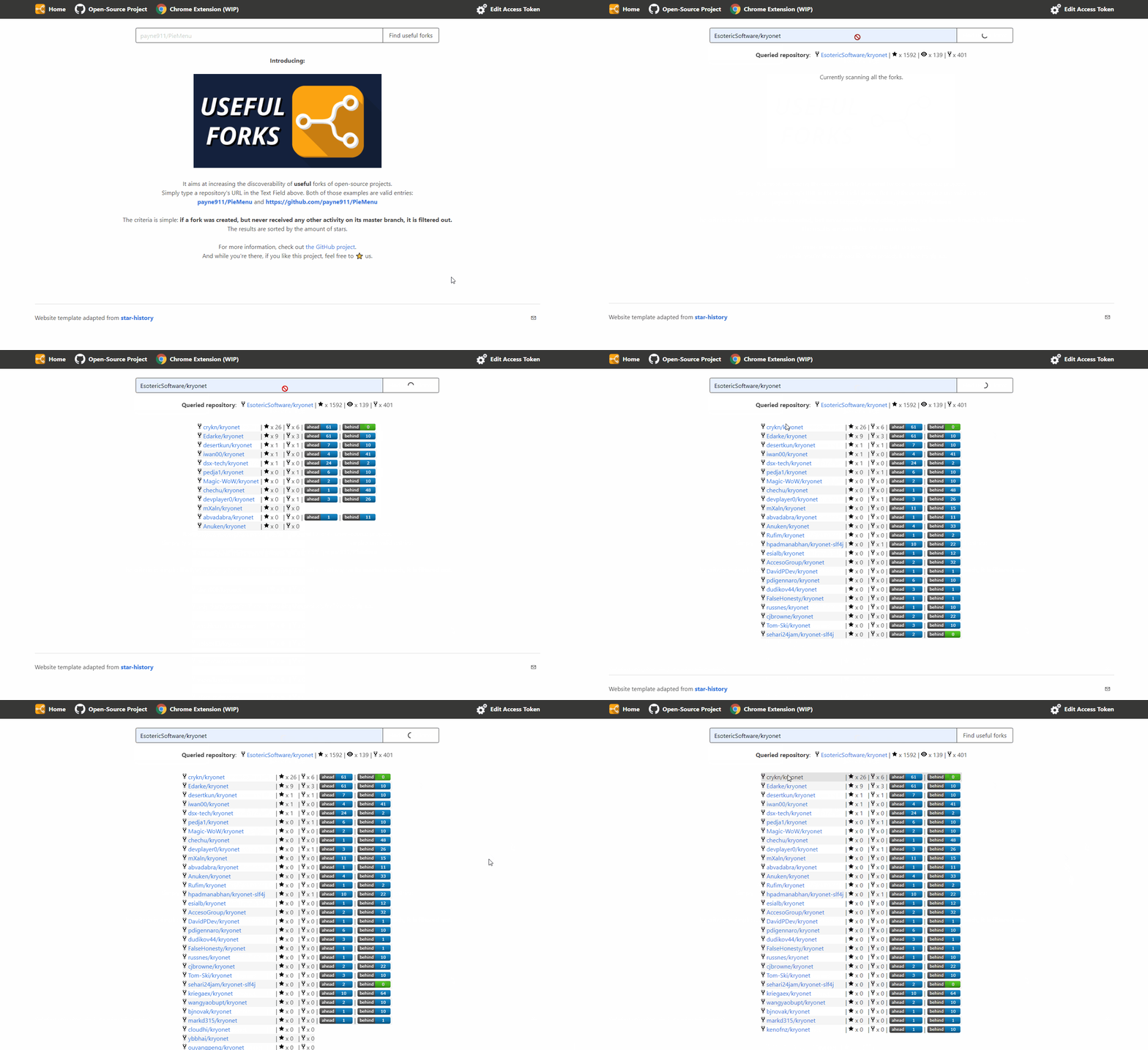
Below is a recording of what a scan would look like:
website example

Chrome extension

Head to Chrome's Web Store to install the published extension.

Firefox add-on

Head to Firefox Add-ons to install the published add-on.

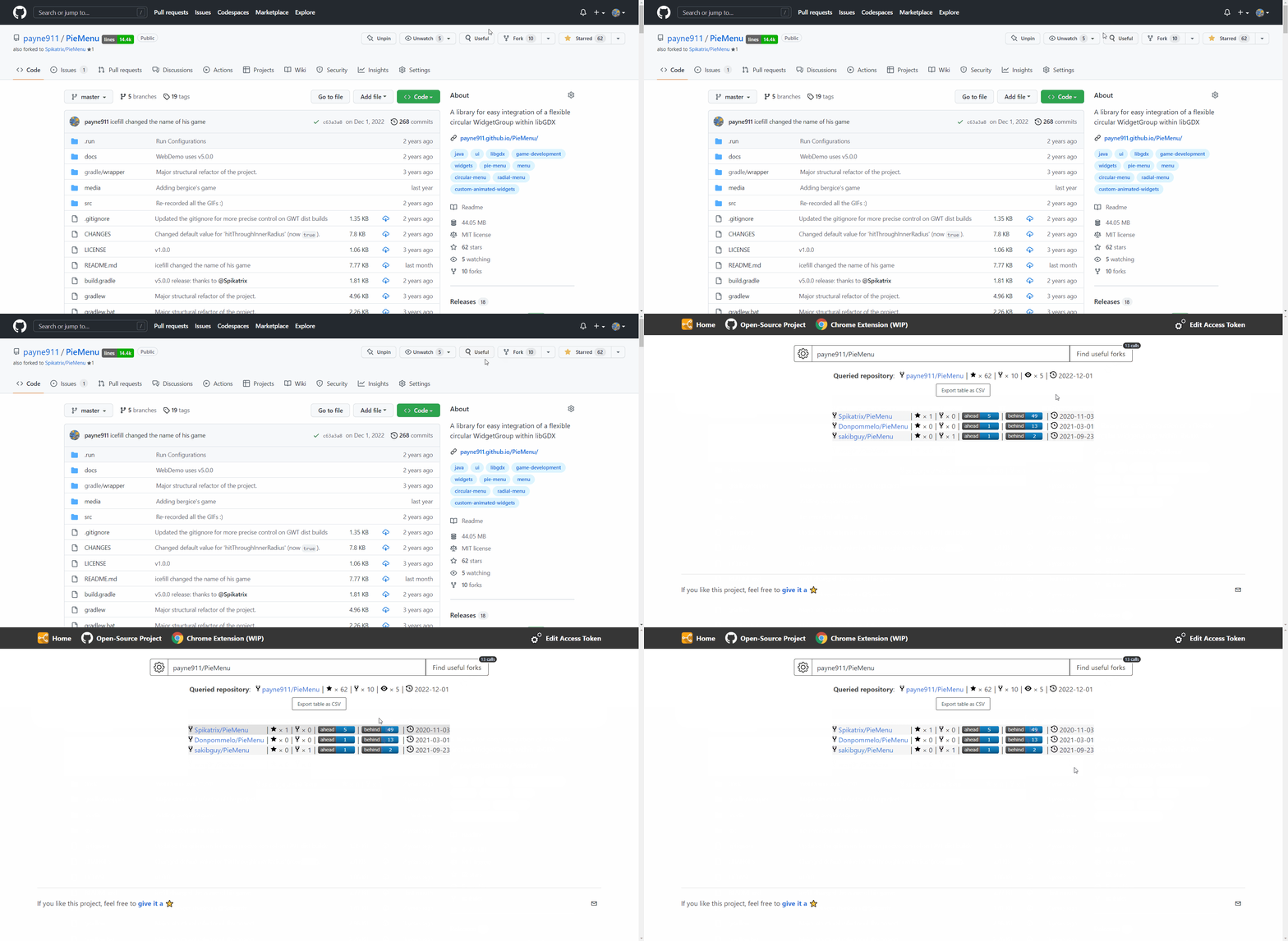
Once activated, either one will automatically add a new "Useful" button on all GitHub repository pages:

extension_btn

Here is what happens when you click it:
example

This button will only appear when you visit GitHub repositories, and clicking it opens a new tab that will automatically trigger a search using the online tool.

Please note that this project will not be updating the GitHub Releases page anymore. We will now go through Chrome's Web Store and Firefox Add-ons to publish updates.

Bookmarklet

The online tool can be used as a bookmarklet. To add one manually, press Ctrl+D to create a new bookmark and add this code in the URL field:

javascript:!function(){if(m=window.location.href.match(/github\.com\/([\w.-]+)\/([\w.-]+)/),m){window.open(`https://useful-forks.github.io/?repo=${m[1]}/${m[2]}`)}else window.alert("Not a GitHub repo")}();

When you're viewing a GitHub repo in your browser, you can press the newly created bookmarklet and this will open the online tool for the repo in a new tab.

How it works
Activity_Diagram

This Activity Diagram (UML) should clarify a bit the inner-workings of the algorithm, and why it may some times require so many API calls.

Contributing

If you want to help, the structure of the repo is rather simple. In terms of folders:

  • website contains the website
  • plugin contains the Chrome Extension

Website instructions

To run the website locally, you will need:

  • NodeJS (suggested v20+)
  • NPM (suggested v8+)

Bring a terminal to the website folder and execute npm install, and then npm run dev.

If after running npm run dev you get an error that mentions "code: 'ERR_OSSL_EVP_UNSUPPORTED'", this should be able to help.

Whenever you want to test changes to the src/queries-logic.js file, you will need to re-execute npm run dev for dist/main.js to recompile.

When deploying browser integrations

For Chrome, the content of /plugin must be placed in a .zip (not the folder itself).

For Firefox, use npx web-ext build --source-dir=plugin/ --overwrite-dest from the root of the project.

Credits

  • Thanks to raeleus for his design of the logo!
  • Thanks to jkunstwald for allowing me to apply the MIT license to what has been expanded from his own initial work. Here is a list of the improvements that were made:
    • Recursive search of all sub-forks
    • GitHub API's Watchers value is bugged so it was removed
    • Implement authenticated requests to the GitHub API (which increases the limit of calls)
    • Added some minimal feedback for certain edge-cases
    • Created an actual website for the feature
    • The Chrome extension leads to the (more powerful) website
  • Thanks to star-history's open-source website which I adapted for this project

Frequently asked questions

Is useful-forks.github.io free to use?

useful-forks.github.io is open source under the MIT licence. There is no licence fee and no seat count — you can self-host it or, where the project offers one, pay a vendor for a managed version instead.

What does useful-forks.github.io do?

Improving GitHub's Forks list discoverability through automatic filtering. The project offers an online tool and a Chrome extension.

What is useful-forks.github.io written in?

useful-forks.github.io is primarily written in JavaScript. Its source is publicly available at https://github.com/useful-forks/useful-forks.github.io, and it has 1,339 GitHub stars.