ursina is a free, open source gaming project written in Python and released under MIT. It has 2,601 GitHub stars, 359 forks and 47 open issues, and was last pushed 6 days ago. On this registry it ranks #47 of 66 tracked projects in Gaming, with 5 head-to-head comparisons available.

What is ursina?

Ursina is an MIT-licensed 3D and 2D game engine and framework for Python, aimed at Python developers who want to build games by writing ordinary Python files rather than by learning a separate engine's editor and scripting system.

What it is

Ursina is a game engine and framework published as a Python package and listed in this registry under Miscellaneous / Gaming, tagged with 3d-game-engine, game-development, game-engine and python. It is written in Python, carries the MIT licence, and depends on Panda3D for its rendering foundation, with Pillow, psd-tools, Blender and pyperclip available as optional dependencies for texture manipulation, .psd conversion, .blend conversion and copy/paste respectively. Development is public on GitHub, with the documentation, API reference and samples hosted on the project's own website and community channels on Discord and Twitter.

The concrete problem it solves is the friction of leaving Python to make a game. A Ursina game is a .py file: the README's walkthrough has the reader create ursina_game.py, write app = Ursina(), spawn an Entity and call app.run(), then start it with python ursina_game.py from a terminal or any editor. It therefore replaces the dedicated engine editor and its proprietary scripting layer with the developer's existing text editor and the Python language itself, while still supplying scene entities, an update loop and input handling.

Key capabilities

  • A single import, from ursina import *, brings the whole API into scope, so a complete program needs one line of imports.
  • The Entity class builds scene objects declaratively, as in the README's ground cube with model='cube', color=color.magenta, origin=(0, .5), scale=(50, 1, 10) and collider='box'.
  • An update() function is called automatically by the engine each frame, and held_keys gives polled keyboard state, as in held_keys['d'].
  • app.run() opens the game window and starts the loop; the default close shortcut is control+shift+alt+q, alongside the window's close control.
  • Optional dependencies cover asset work: Pillow for texture manipulation, psd-tools for converting .psd files, Blender for converting .blend files and pyperclip for copy/paste, all installable at once with pip install ursina[extras].
  • Worked projects ship with the documentation, including a Minecraft clone and a platformer tutorial, with further examples in the repository's samples folder and on the samples page.
  • The documentation set includes an API reference and an auto-generated cheat_sheet.html produced by documentation_generator.py, plus tutorial_generator.py, which turns tutorial .py files into .txt and then .html via sswg.

Who uses it and how

  • Python developers learning game development follow the README walkthrough, ending with an orange box that moves left and right with the a and d keys.
  • Learners working through longer material use the Minecraft clone and platformer tutorials, whose prose and code blocks are generated from commented Python source files.
  • Developers who want to read or modify the engine internals clone the repository and install it with pip install --editable ., while those tracking the newest code install directly from the Git URL.
  • Projects that already hold artwork in .psd or .blend form pull in the optional dependencies so those files can be converted instead of re-exported by hand.
  • Maintainers of the project's site regenerate the HTML documentation from the .txt sources in the docs folder using sswg.

Getting started

Install Python 3.10 or newer and run pip install ursina, adding optional dependencies with pip install ursina[extras]. The in-development version installs with pip install git+https://github.com/pokepetter/ursina.git.

How it compares

The facts provided name no paid products and no alternative engines, so Ursina stands alone in this registry rather than being positioned against a competitor list. Its distinguishing characteristics within these facts are its MIT licence, its distribution as a pip package that runs from any text editor, and a documentation set published openly on a project website.

When to use it — and when not to

Choose Ursina when the team is already writing Python and wants a scene, an update loop and input handling without adopting a separate editor; be prepared to manage a Python 3.10+ environment and, for asset conversion, a local Blender installation and the optional extras. It is a poor fit for anyone who needs a visual scene editor or a stated platform and release matrix, because the README excerpt is a getting-started walkthrough and does not provide either, and the API surface has to be learned from the separate documentation and API reference pages. The excerpt also gives no version or release notes, so the exact feature set of a given install is best confirmed from the documentation site.

project readme (upstream, from github) — read inline

ursina ʕ •ᴥ•ʔゝ□

Website | Discord | Twitter | Patreon | Sponsor

An easy to use game engine/framework for python.
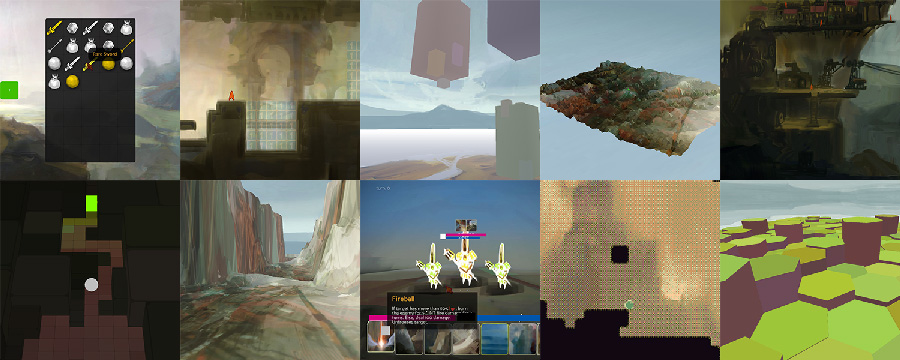
Banner

Trailer

Getting Started

  1. Install Python 3.10 or newer.

  2. Open cmd/terminal and type:

pip install ursina

To get the newest, in development version from GitHub, install it like this:

pip install git+https://github.com/pokepetter/ursina.git

If you want to easily edit the source, it's recommended to clone the git repo and pip install with --editable flag like this. Make sure you have git installed.

git clone https://github.com/pokepetter/ursina.git
cd ursina
pip install --editable .

Also install any of the optional dependencies you want from the list below, or install them all with:

pip install ursina[extras]

On some systems you might have to use pip3 instead of pip in order to use Python 3 and not the old Python 2. To use a specific Python version, use:

python3.xx -m pip install ursina

Where 3.xx is the version you want to target.

Dependencies

  • python 3.10+
  • panda3d
  • pillow, for texture manipulation
  • psd-tools, for converting .psd files
  • blender, for converting .blend files
  • pyperclip, for copy/pasting

Examples

from ursina import *            # this will import everything we need from ursina with just one line.

app = Ursina()
ground = Entity(
    model = 'cube',
    color = color.magenta,
    z = -.1,
    y = -3,
    origin = (0, .5),
    scale = (50, 1, 10),
    collider = 'box',
    )

app.run()                       # opens a window and starts the game.

There are other examples in the samples folder, or in samples website

How do I make a game?

Ursina games are made by writing Python code. You can use any text editor you want, but personally I like to use Atom.

  1. Create an empty .py file called ursina_game.py
  2. Copy this text into your new file:
from ursina import *           # this will import everything we need from ursina with just one line.

app = Ursina()

player = Entity(
    model = 'cube' ,           # finds a 3d model by name
    color = color.orange,
    scale_y = 2
    )

def update():                  # update gets automatically called by the engine.
    player.x += held_keys['d'] * .1
    player.x -= held_keys['a'] * .1


app.run()                     # opens a window and starts the game.
  1. Run this in the terminal start the game:

    python ursina_game.py
    

    ... or run it with your editor/IDE of choice.

  2. You can now move the orange box around with 'a' and 'd'!

    To close the window, you can by default, press control+shift+alt+q or press the red x.

Documentation

Found a bug? Posting it in Issues. Fixed a bug? Make a pull request.

Project Structure

## Project Structure

📁docs
    📃index.txt
    📃documentation.txt
    📃inventory_tutorial.txt
    ...
        # text files for the website. gets turned into .html files with sswg.

    📃cheat_sheet.html
        # auto generated documentation made with documentation_generator.py.

    📃tutorial_generator.py
        # turns specific .py files into .txt files, which can then be turned into .html by sswg.
        # this extracts the comments from the source files into description for that step and the code after into code blocks.
        # see platformer_tutorial.py for an example.

📁samples               # small example games.

📁ursina                # the actual ursina module.
    📁audio                 # built-in audio clips.
    📁editor                # the 3d level editor for ursina.
    📁fonts                 # built-in fonts.
    📁models                # .blend files, source files, for built-in 3d models.
        📁procedural            # classes for generating 3d models, like Cylinder, Quad and Terrain.
    📁models_compressed     # .blend files converted to .ursinamesh.
    📁prefabs               # higher level classes like Draggable, Slider, Sprite, etc.

    📃__init__.py
    📃application.py
    📃audio.py
    ...
        # ursina base modules, like code for Entity, input_handler, Text, window and so on.

Frequently asked questions

Is ursina free to use?

ursina is open source under the MIT licence. There is no licence fee and no seat count — you can self-host it or, where the project offers one, pay a vendor for a managed version instead.

What does ursina do?

A 3D and 2D game engine for Python

What is ursina written in?

ursina is primarily written in Python. Its source is publicly available at https://github.com/pokepetter/ursina, and it has 2,601 GitHub stars.