:runner: :mountain: Ultra Runner






Ultra fast monorepo script runner and build tool.
:sparkles: Features
- zero-config: works out of the box with your existing monorepo
- non-intrusive: no need to make any changes to your packages.json files
- workspaces: detects packages in existing
lerna,yarn,npm@7andpnpmworkspaces, or recursively searches them - ultra fast builds:
ultrakeeps track of file changes in your repo and only actuallybuilda package when needed - parallel builds:
ultrabuilds your packages concurrently by default - workspace dependencies: workspace dependencies are automatically resolved and used for parallel builds
- execute anything: one command to run package scripts,
node_modulesbinaries or system binaries, recursively in your repository. - faster script execution:
ultrahijacks anynpm,pnpm,yarnandnpxcalls for faster execution. - concurrency within scripts: you can add optional configuration to
package.jsonto run parts of a script in parallel. No need to change the actualscripts - filtering: filter on package names or subdirectories
- monitoring: node process monitor (like
topfor node) - output zooming when executing multiple commands in parallel,
ultrawill try to keep as much concurrent output on the screen as possible, by only showing the last lines of the commands. Once the commands complete running, a full log is written to the terminal. This is very useful when building a bunch of packages with--watchfor instance. - missing scripts when executing scripts recursively, only packages that have the script defined, will execute it.

Workspaces
:nerd_face: Smart
Ultra parses your package.json and hijacks any npm run, yarn and npx calls.
Shell operators like &&, ; and || are also interpreted.
For example:
{
  "scripts": {
    "lint": "yarn lint:ts && yarn lint:eslint && yarn lint:docs",
    "lint:eslint": "npx eslint bin/*.js src/*.ts __tests__/*.ts --cache",
    "lint:docs": "npx markdownlint README.md",
    "lint:ts": "npx tsc -p tsconfig.build.json --noEmit",
    "lint:fix": "yarn lint:eslint --fix"
  }
}
Running ultra lint
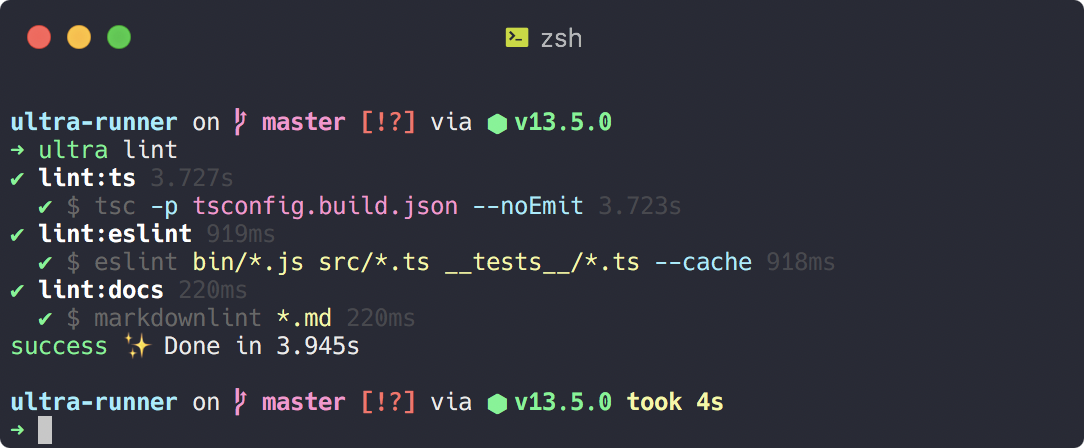
Running ultra lint:fix will spawn exactly one child process, directly with the correct command, instead of spawning yarn intermediately
Ultra will additionally execute any configured pre and post scripts, just like npm run and yarn run.
:palm_tree: Recursive Execution
When using -r or --recursive, the command will be executed in every package of your repository, excluding the root package. If you also want to run in the root package, combine --recursive with --root.
Commands are always run concurrently with a default concurrency of 10 (can be changed with --concurrency)
Ultra finds packages based on your monorepo workspace:
- lerna
- pnpm
- yarn workspace
- when no monorepo manager was found, we look recursively for packages
Use --filter to filter packages in the workspace. The filter argument can use wildcards to filter package names and/or subdirectories:
$ ultra -r --filter "@scope/app" pwd
...

$ ultra -r --filter "@scope/*" pwd
...

$ ultra -r --filter "apps/*" pwd
...
When the filter is prefixed with a +, then all dependencies of the filtered packages will also be included.
For example, let's say you have a package "app1" that depends on "lib1", then using the filter +app1, will execute the command
on both app1 and lib1, using the workspace topology.
:package: Builds
Ultra automatically detects workspace dependencies, while still allowing parallel builds. Packages are build concurrently as soon as their dependencies are build (also concurrently).
Every package directory contains a .ultra.cache.json file that contains hashes of all files and build artifacts in your repository. Internally this uses git ls-files for files under source control and simple mtime timestamps for build artifacts.
When building a package, the current state is compared with the .ultra.cache.json. Builds are skipped when no changes were detected.
Optimized builds using the dependency tree and files cache, are automatically triggered when running the build script or using --build with a custom script or command.
All commands below will trigger optimized builds.
$ ultra -r --build
...

$ ultra -r build
...

$ ultra -r --build mycustombuildscript
...
If for some reason you want to rebuild a package, use --rebuild or rebuild.
If you want some files to be excluded from the .ultra.cache.json, you can create a .ultraignore file. The format is similar to .gitignore. Whenever a file changes that is listed in your .ultraignore, a rebuild will not be triggered.
:bar_chart: Monitor
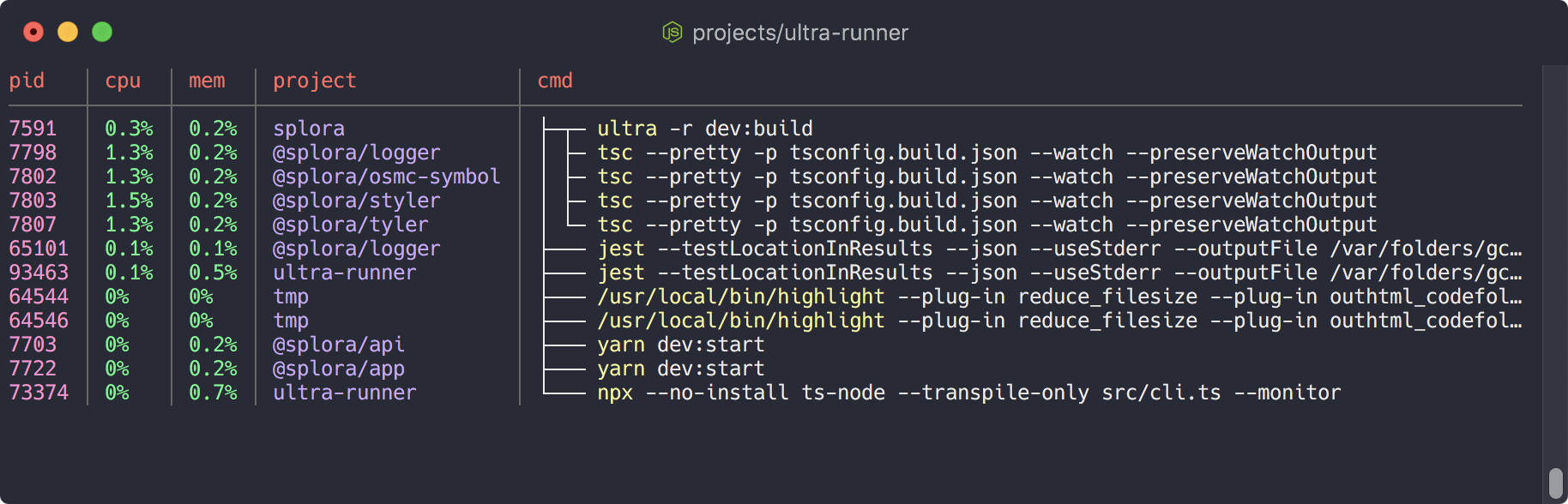
With ultra --monitor you can easily monitor all running node processes on your machine.
For every process, you can also see the package where the command was executed and a clean command line.
:zap: Fast
Ultra parses your package.json scripts and will only execute the commands that are really needed. Any script interdependencies are resolved during the parsing stage.
This ensures there's pretty much no overhead in execution by Ultra itself, since it's only running once.
yarn run or npm run on the other hand, will spawn new yarn or npm child processes as needed by the package scripts.
npm run |
npx |
yarn |
yarn exec |
ultra |
|
|---|---|---|---|---|---|
package.json scripts |
:white_check_mark: | :x: | :white_check_mark: | :x: | :white_check_mark: |
./node_modules/.bin/ |
:x: | :white_check_mark: | :white_check_mark: | :white_check_mark: | :white_check_mark: |
| system binaries | :x: | :white_check_mark: | :x: | :white_check_mark: | :white_check_mark: |
| execution overhead (1) | 250ms | 60ms | 220ms | 200ms | 65ms |
1. each program was run 10x with the command
trueor{scripts:{"true":"true}}to calculate the execution overhead
Suppose you would want to run a script that calls 5 other scripts by using && and/or post/pre.
- Using
yarn, you would have a total overhead of 2.5s (10x 250ms) - Using
ultra, you hit the overhead only once, so the total overhead would still be 65ms
To make execution ultra fast, you can configure which scripts should be ran concurrently.
:grey_exclamation: there's no need to switch your scripts over to ultra. Even with the optional configuration you can still use
yarnornpmto run your scripts if you want to.
Example builds:
yarn |
ultra not concurrent |
ultra concurrent |
|
|---|---|---|---|
| build Ultra-Runner | 8.9s | 7.2s | 5.1s |
| build Devmoji | 16s | 13s | 8s |
:art: Formatting
There are three output formats that each can be combined with --silent to hide command output.
--pretty is the default. It shows output in a hierarchical way and uses spinners to see exactly what's happening.
Make sure to check out the animation at the top of this page. Every executed step shows the execution time.
--pretty combined with --silent is useful if you're only interested to see the overview:
--no-pretty doesn't use spinners and prefixes command output with the command name. This is useful for logging purposes.
Combining --no-pretty with --silent shows a flat overview.
--raw will show the exact output as you would expect when running the commands stand alone. If the command you're executing is interactive (reads from stdin), then this is the mode you should use.
:dizzy: Getting Started
Install with npm or yarn
globally
npm install -g ultra-runner
yarn global add ultra-runner
locally inside your project. use with
npx ultra
npm install --dev ultra-runner
yarn add --dev ultra-runner
Now run ultra --info within your repository to see everything related to your monorepo
See optional configuration for information on how to setup concurrent script execution.
:rocket: Usage
$ ultra --help
Usage: ultra [options] <cmd> [cmd-options]

Workspace:
  --recursive, -r  Run command in every workspace folder concurrently                                      [boolean]
  --filter         Filter package name or directory using wildcard pattern                                  [string]
  --root           When using --recursive, also include the root package of the workspace                  [boolean]
  --concurrency    Set the maximum number of concurrency                                      [number] [default: 10]

Status:
  --info  Show workspace dependencies                                                                      [boolean]
  --list  List package scripts. Also works with --recursive                                                [boolean]
  --monitor           Show node process list, updated every 2 seconds                                      [boolean]
  --monitor-interval  Set process list interval in seconds                                     [number] [default: 2]

Build:
  --build, -b  Use dependency tree to build packages in correct order                                      [boolean]
  --rebuild    Triggers a build without checking for file changes                                          [boolean]

Formatting:
  --pretty  enable pretty output, spinners and separate command output. Default when a TTY [boolean] [default: true]
  --raw     Output only raw command output                                                                 [boolean]
  --silent  Skip script output. ultra console logs will still be shown                                     [boolean]
  --color   colorize output                                                                [boolean] [default: true]

Options:
  --version      Show version number                                                                       [boolean]
  --dry-run, -d  Show what commands would be executed, without actually executing them                     [boolean]
:gear: Optional Configuration
To allow parallel execution of your scripts, you can specify scripts that should run concurrently,
in your package.json.
{
  "scripts": {
    "lint:eslint": "npx eslint bin/*.js src/*.ts __tests__/*.ts --cache",
    "lint:docs": "npx markdownlint *.md",
    "lint:ts": "npx tsc -p tsconfig.build.json --noEmit",
    "lint": "yarn lint:eslint && yarn lint:docs && yarn lint:ts",
    "prebuild": "yarn lint && yarn jest",
    "build": "..."
  },
  "ultra": {
    "concurrent": ["lint"]
  }
}
yarn buildwill run thelintandjestcommands sequentiallyultra buildwill run alllintcommands concurrently and then executejest. (note that we can also addprebuildtoconcurrent, since tests don't depend on linting. this way all commands would run concurrently)