tuxedo
A fast, keyboard-driven terminal UI for todo.txt. Vim-style bindings, atomic writes, instant external-edit detection, and five hand-tuned themes — all in a single static binary.
brew install tuxedo





For a more in-depth walkthrough, please watch this video by @IogaMaster.
Highlights
- Pure todo.txt. Reads and writes the standard format — every line is plain text you can edit with anything else.
- TUI and CLI in one binary. Run
tuxedofor the interactive UI, ortuxedofor a todo.txt-cli-compatible command line (add,ls,do,pri,archive, …) — scriptable, with--jsonoutput and$TODO_DIR/$TODO_FILE/$DONE_FILEsupport. - Natural-language add. Type prose into the add prompt —
Pay rent monthly on the first, show 3 days before due, project home— and tuxedo rewrites it to canonical todo.txt for you to review and save. Local, offline, no AI service. - Phone capture. Press
sfor a QR pointing at a tiny PWA on your machine's LAN — type tasks from your phone and they appear in the list. Captures land in a siblinginbox.txtfirst, so any tool that can append a line (shell, iOS Shortcuts, cron) is also a capture source. - Vim keys, no surprises.
j/kto move,ddto delete,gg/Gto jump,uto undo (50 levels), chord prompts (gg,dd,fp,fc) with a 600 ms window. - Command palette.
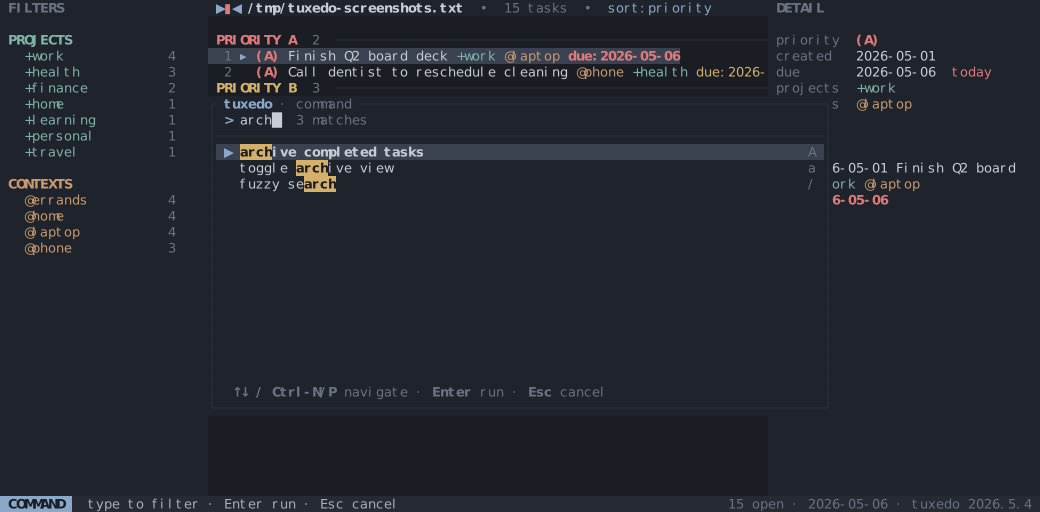
:orCtrl-Popens a fuzzy palette over every action — type a few letters, hit Enter. Same matcher as/search, ranked so start-of-label hits beat word-boundary hits beat mid-word hits. - Atomic, sync-friendly writes. Every change goes through write-temp-then-rename. If another process — Dropbox, an editor, a script — modifies the file, tuxedo reloads on the next keypress (or within ~250 ms while idle) and flashes a notice.
- Sibling-file archive.
Amoves completed tasks todone.txtnext to your file, atomically. - Filter, sort, multi-select. Cycle by
+projector@context, sort by priority / due / file order, and bulk-complete or bulk-delete in visual mode. - Saved searches. Name the active
/-search withfs, then recall it any time by cycling saved filters withff. Stored as plainfilter.lines in the config — hand-editable like everything else. - Five themes, three densities. Cycle with
TandD. Choices persist across runs and hot-reload when you editconfig.tomlexternally. - No daemon, no database, no cloud. One file in, one file out.
Screens
| Empty state • cell-bowtie mark and quick-start when the file has no tasks | 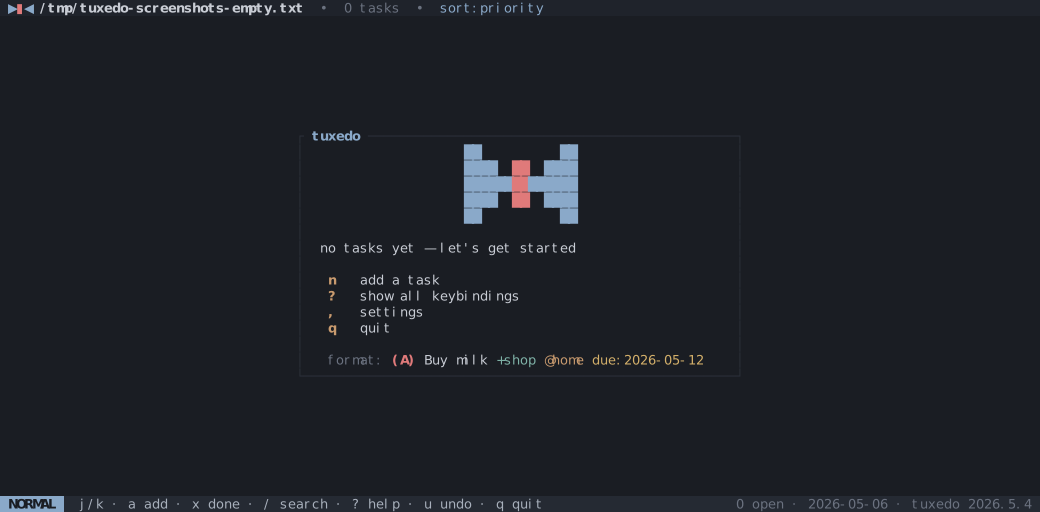 |
| List • list of todos, optionally grouped | 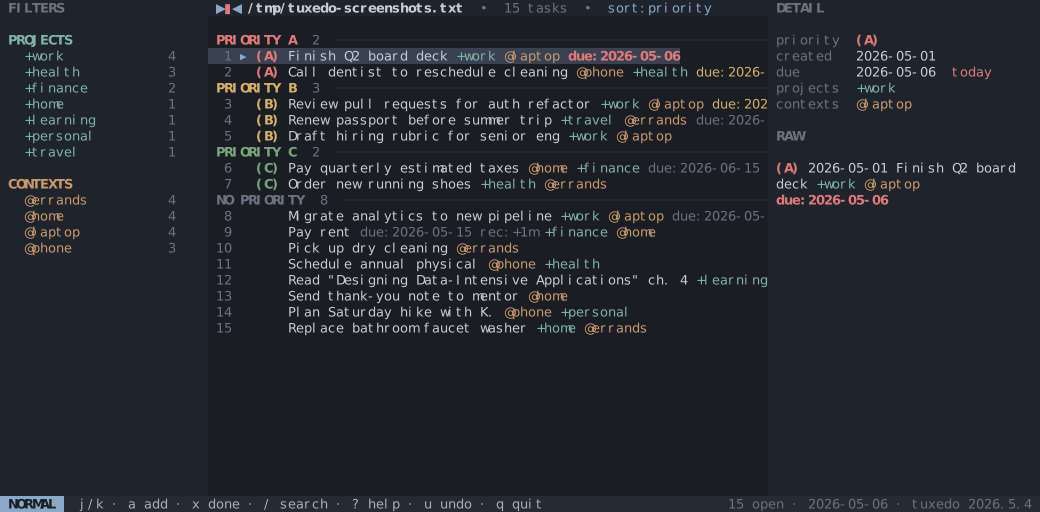 |
| Archive • completed tasks grouped by completion date | 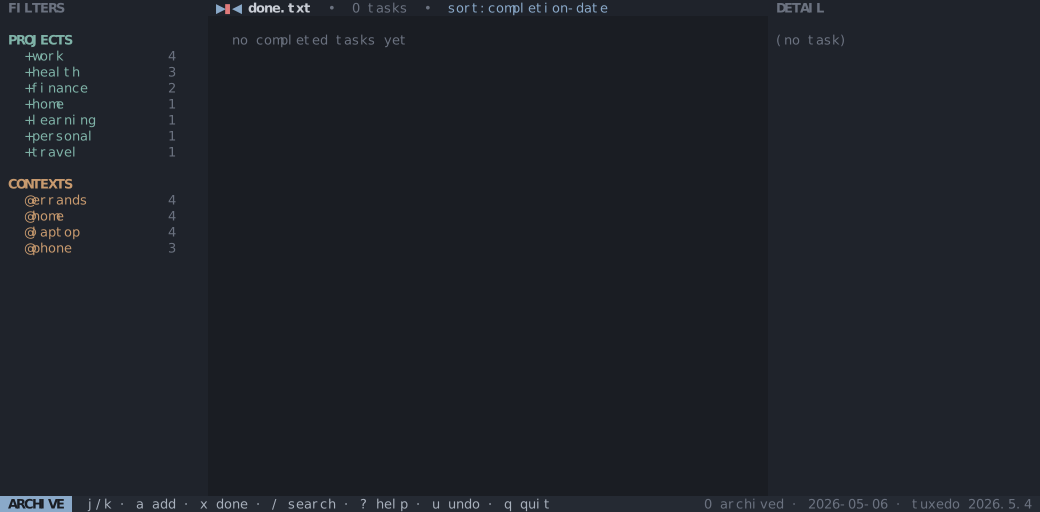 |
Filter sidebar active • fp cycles projects with j/k, fc cycles contexts; saved searches list under a SAVED heading with live match counts |
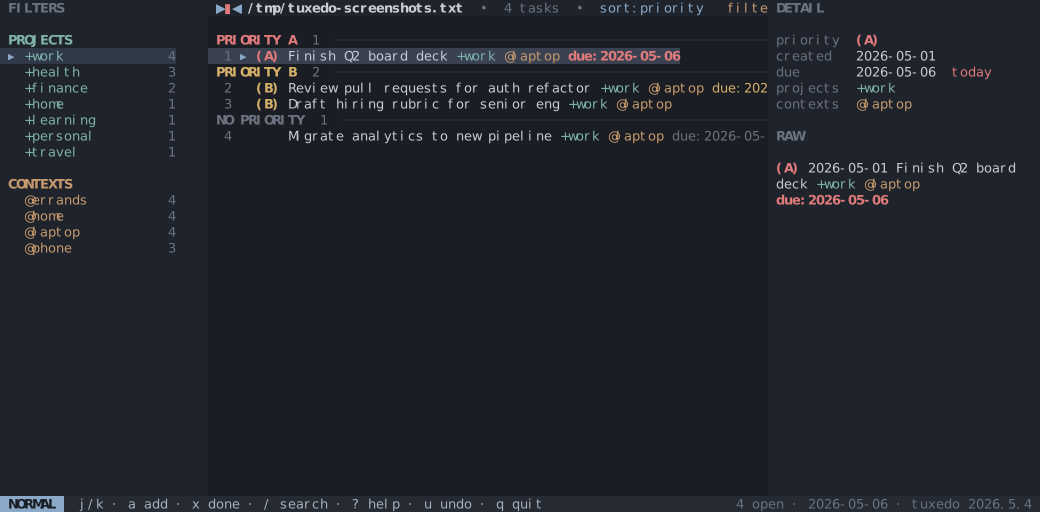 |
Command palette • : or Ctrl-P opens a fuzzy palette over every action |
 |
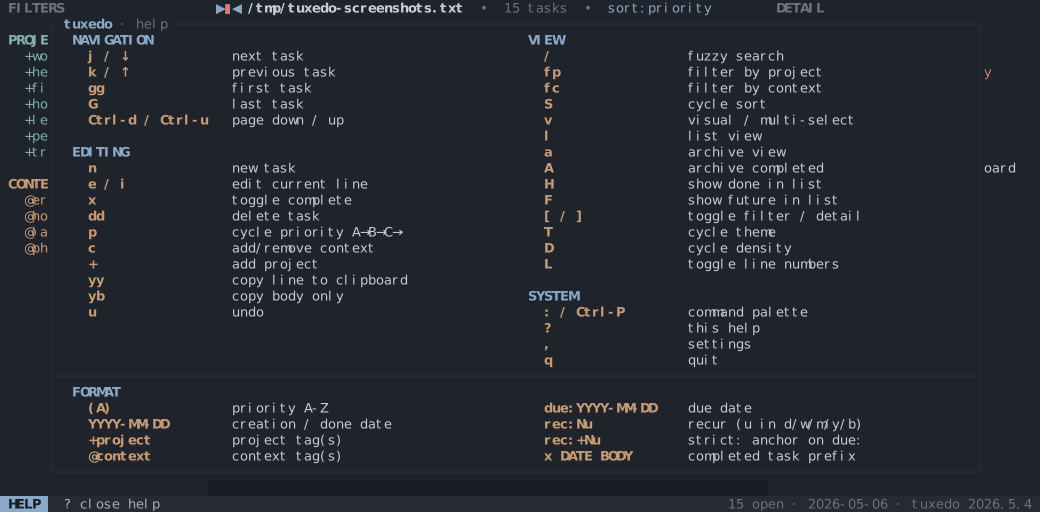
Help • ? opens the full keybindings overlay |
 |
How to generate the screenshots and demo
The screenshots in the table above are checked-in SVGs. Regenerate them with:
mise run screenshots
The hero GIF at the top is recorded with vhs from docs/demo.tape. Regenerate it with:
mise run demo
Themes
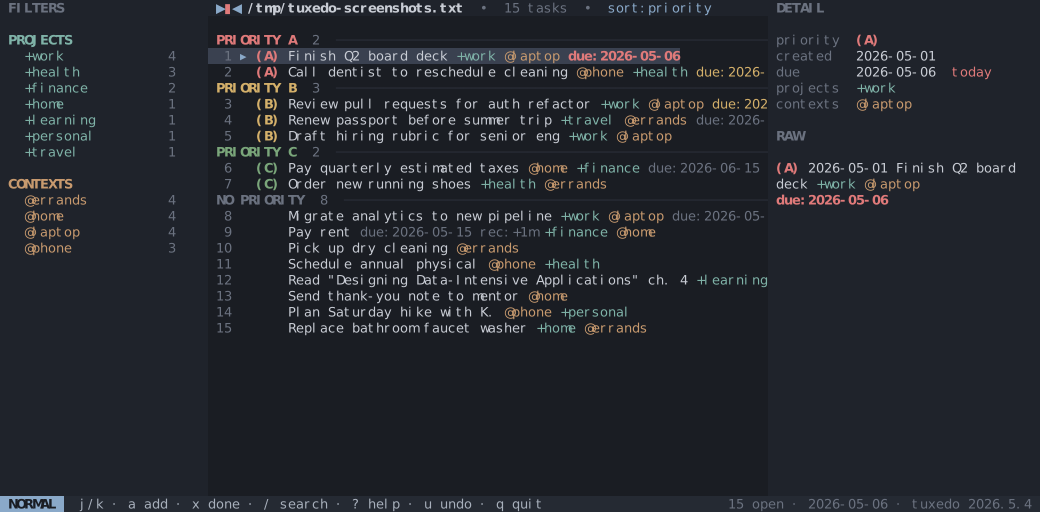
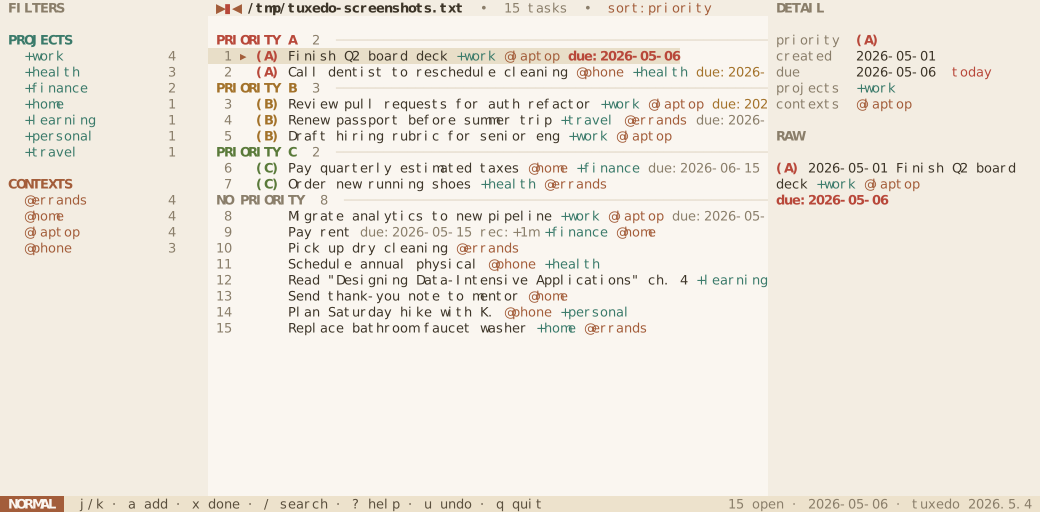
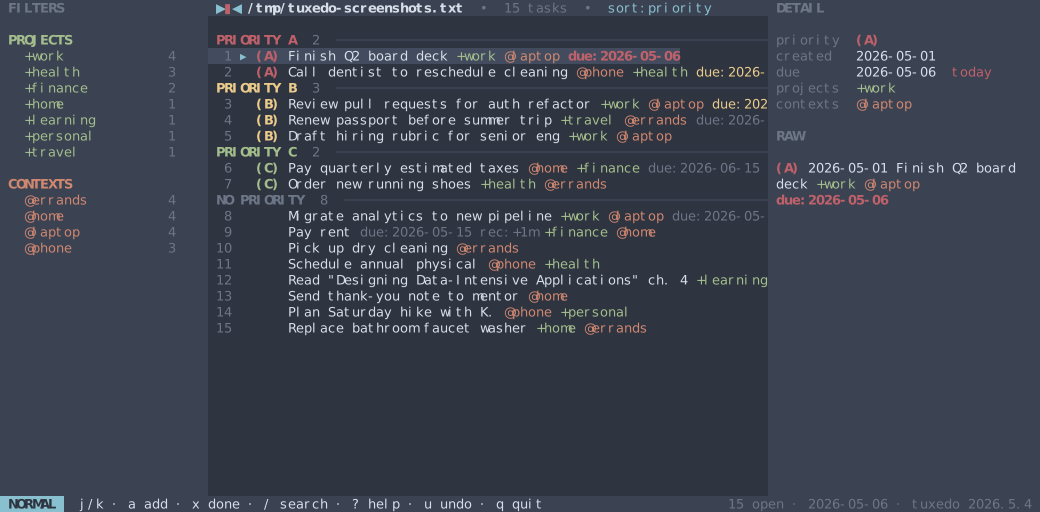
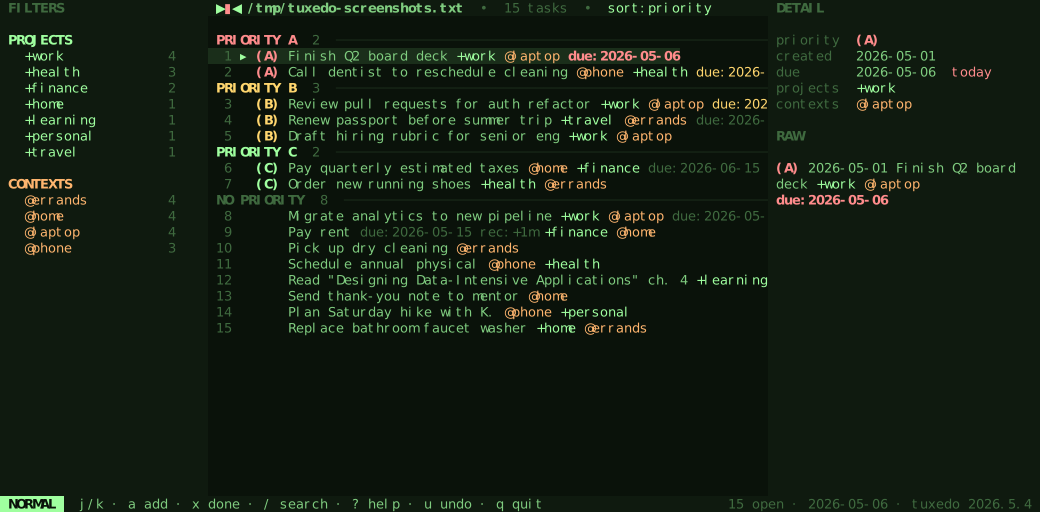
T opens a picker over five built-in themes, including Terminal, which respects your terminal palette.
| Muted Slate (default) | Dawn |
|---|---|
 |
 |
| Nord | Matrix |
 |
 |
Custom themes
Beyond the built-ins, tuxedo loads any *.toml file you drop in
${XDG_CONFIG_HOME:-$HOME/.config}/tuxedo/themes/. Each one joins the T
picker in sorted filename order. Ready-made themes live in
docs/themes/ — copy one in and press T:
mkdir -p ~/.config/tuxedo/themes
curl -o ~/.config/tuxedo/themes/gruvbox-dark-soft.toml \
  https://raw.githubusercontent.com/webstonehq/tuxedo/main/docs/themes/gruvbox-dark-soft.toml
Theme file format and field reference
A theme file is one key = value per line. name is the label shown in the
picker; every other field is a color value. All fields are required: a file
missing one, carrying an unparseable color, or whose name collides with
another theme is skipped with a warning at startup.
Color values accept two forms:
#rrggbb— a solid hex color (case-insensitive).resetortransparent— inherits the terminal emulator's own background color. Useful forbg,panel, andstatusbarwhen you want your terminal's opacity, blur, or wallpaper to show through while keeping a custom text palette. Both keywords are case-insensitive and behave identically (same effect as the built-in Terminal theme).
| Field | Colors |
|---|---|
name |
label shown in the T picker (the only non-color field) |
bg |
window background |
panel |
filter and detail panel background |
border |
panel and modal borders |
fg |
primary text |
dim |
secondary / muted text |
accent |
logo, headings, hints, and selection markers |
cursor |
current row, and the highlighted row in the T picker |
selection |
set to the same value as selected |
statusbar |
status bar background |
status_fg |
status bar text |
mode_fg / mode_bg |
mode chip text / background |
pri_a pri_b pri_c pri_d |
priorities A through D |
pri_other |
priorities E through Z |
project |
+project tags |
context |
@context tags |
due |
due: date |
overdue |
past-due date |
today |
date due today |
done |
completed tasks |
selected |
selected-row background (visual mode) and the active filter |
matched |
search-match highlight |
Install
Homebrew (macOS, Linux)
brew install tuxedo
Prebuilt binaries
Download the archive for your platform from the latest release and put tuxedo on your PATH.
Targets: x86_64-unknown-linux-gnu, aarch64-unknown-linux-gnu, x86_64-apple-darwin, aarch64-apple-darwin, x86_64-pc-windows-msvc. Each archive ships with a .sha256 checksum.
From source
cargo install --git https://github.com/webstonehq/tuxedo
Or clone and build:
git clone https://github.com/webstonehq/tuxedo
cd tuxedo
cargo build --release
./target/release/tuxedo [FILE]
Requires the Rust 2024 edition (recent stable toolchain).
Usage
tuxedo is two things in one binary: an interactive TUI, and a one-shot
command line. With no subcommand it launches the TUI; with a recognized
subcommand it runs the command line and exits.
tuxedo [FILE]      # launch the TUI on FILE (created if missing)
tuxedo             # TUI on the default file (see resolution below)
tuxedo --sample    # open the bundled sample file in the temp dir
tuxedo <command>   # run a one-shot CLI command — see "Command-line interface"
tuxedo update      # print upgrade instructions for your install
tuxedo --help
tuxedo --version
When a newer release is available, the status bar shows ↑ (tuxedo update) next to the version. The check runs in the background, is cached at
$XDG_CACHE_HOME/tuxedo/latest_version.json for 24 h, and fails silently
when offline. Set TUXEDO_NO_UPDATE_CHECK=1 to disable.
Which file tuxedo opens
Both the TUI and the CLI resolve the todo file the same way, in order:
- An explicit
FILEargument (TUI only). $TODO_FILE, if set.$TODO_DIR/todo.txt, if$TODO_DIRis set../todo.txtin the current directory, if it exists.- Otherwise the TUI shows a first-run prompt — press
cto create./todo.txthere, orsto open a sample todo.txt in the system temp directory so you can poke around without committing to a path. (The one-shot CLI is non-interactive and uses the sample directly.)
The archive file is $DONE_FILE if set, otherwise a sibling done.txt next
to the todo file. The file (and any missing parent directories) is created on
first use. These are the same TODO_DIR / TODO_FILE / DONE_FILE variables
todo.txt-cli uses, so an existing todo.cfg works as-is:
export TODO_DIR="$HOME/Documents/todo"
export TODO_FILE="$TODO_DIR/todo.txt"
export DONE_FILE="$TODO_DIR/done.txt"
Edits are persisted on every change via atomic write (write .tmp, rename).
If the file changes on disk (another editor, a sync client, a script), tuxedo notices on the next keypress, or within ~250 ms while idle, and reloads. The keystroke that triggered the reload is consumed — press it again to act on the fresh state — and the status bar flashes a notice.
Pressing A appends every completed task to a sibling done.txt and
removes them from the working file (atomically: done.txt is written
before the originals are dropped). a toggles the archive view so you
can browse, un-archive, or permanently delete past tasks.
Command-line interface
When the first argument is a recognized subcommand, tuxedo runs a one-shot command instead of launching the TUI. The surface mirrors todo.txt-cli — same commands, aliases, task numbering, and output — so it's a drop-in for scripts and aliases.
tuxedo add "Pay rent +home @bank due:2026-07-01"   # or: tuxedo a "..."
tuxedo ls @bank                                     # filter by context
tuxedo do 3                                          # mark task 3 complete
tuxedo pri 3 A                                        # set priority
tuxedo archive                                        # move done tasks to done.txt
tuxedo ls --json | jq .                              # machine-readable output
| Command | Aliases | Arguments | Description |
|---|---|---|---|
add |
a |
TEXT... |
Add a task (natural-language dates supported, same as the n prompt). |
append |
app |
N TEXT... |
Append text to task N. |
prepend |
prep |
N TEXT... |
Prepend text to task N. |
replace |
N TEXT... |
Replace task N entirely. |
|
pri |
p |
N PRIORITY |
Set priority A–Z on task N. |
depri |
dp |
N... |
Remove priority from the given tasks. |
do |
done, complete |
N... |
Mark tasks complete (recurring tasks spawn their next instance). |
del |
rm |
N [TERM] |
Delete task N, or remove just TERM from it. Prompts unless -f. |
archive |
Move completed tasks to the done file. | ||
list |
ls |
[TERM...] |
List tasks. TERM is +project, @context, or free text. |
listall |
lsa |
[TERM...] |
List the todo file and the done file. |
listpri |
lsp |
[PRIORITY] |
List prioritized tasks (optionally a single priority). |
listproj |
lsprj |
List all +projects. |
|
listcon |
lsc |
List all @contexts. |
Task numbers are 1-based line numbers in the file, exactly as printed by
list — stable regardless of how the list is filtered or sorted. list
sorts by the full line (case-insensitive) and prints a TODO: X of Y tasks shown footer, matching todo.txt-cli.
Options:
-f,--force— skip confirmation prompts (e.g. fordel).--json— emit machine-readable JSON instead of text.list-style commands print an array of task objects; mutating commands print a result object. No prompts or footers are written in this mode.
Global flags may appear before the subcommand (tuxedo -f del 3).
Differences from todo.txt-cli: do marks a task complete but does not
auto-archive it — completed tasks stay in the file until you run archive (or
press A in the TUI), matching tuxedo's interactive model. There is no -d
config-file flag; configure paths with the environment variables above.
Keybindings
Custom normal-mode keybindings can be added in
${XDG_CONFIG_HOME:-$HOME/.config}/tuxedo/keybinds.toml:
The block below lists every rebindable action with the key it ships with —
copy it, then change the keys you care about and delete the rest (anything you
leave out keeps its default). A value is a single key or an array of
alternatives, e.g. begin_add = ["N", "Ctrl-n"].
[normal]

# Navigation
cursor_down    = ["j", "Down"]
cursor_up      = ["k", "Up"]
cursor_top     = "gg"
cursor_bottom  = "G"
half_page_down = "Ctrl-d"
half_page_up   = "Ctrl-u"

# Editing
begin_add            = "n"
begin_edit           = "e"
begin_edit_insert    = "i"
toggle_complete      = "x"
delete               = "dd"
reschedule           = "r"
cycle_priority       = "p"
move_task_down       = "J"
move_task_up         = "K"
begin_prompt_context = "c"
copy_line            = "yy"
copy_body            = "yb"
undo                 = "u"
# begin_prompt_project defaults to "+", which can't be written here (the
# parser reads "+" as a modifier separator). Pick another key to move it, e.g.
# begin_prompt_project = "P"

# Filtering, sort, view
begin_search        = "/"
arm_f               = "f"        # leader for the fp / fc / ff / fs chords
pick_project        = "fp"
pick_context        = "fc"
pick_saved_filter   = "ff"
save_current_filter = "fs"
cycle_sort          = "S"
toggle_visual       = "v"
toggle_selected     = "space"
go_list             = "l"
toggle_archive_view = "a"
archive_completed   = "A"
toggle_show_done    = "H"
toggle_show_future  = "F"

# Layout & theme
toggle_left_pane  = "["
toggle_right_pane = "]"
open_theme_picker = "T"
cycle_density     = "D"
toggle_line_num   = "L"
# cycle_theme has no default — bind a key to cycle themes without the picker:
# cycle_theme = "Ctrl-t"

# System
open_command_palette = [":", "Ctrl-P"]
open_share           = "s"
open_help            = "?"
open_settings        = ","
escape_stack         = "Esc"
quit                 = "q"
Custom bindings are checked before the defaults. The default bindings remain
available unless the same key or two-key chord is bound to another action in
the file. Action names are snake_case, matching the names in the command
palette where possible: toggle_complete, pick_project,
open_theme_picker, and so on. Key names can be single characters, two-key
chords like ZZ, modifier forms like Ctrl-n / Alt-x, named keys like
Esc, Enter, Tab, arrows, Page-Up, Page-Down, or F1 through F24.
Recurrence builder keys
The ↻ REPEAT overlay owns the keyboard while it is open, so its motions
live in their own [recurrence] table and can reuse letters that mean
something else in normal mode:
[recurrence]
focus_next = ["j", "Down", "Tab"]        # move between interval / unit / mode
focus_prev = ["k", "Up", "Shift-Tab"]
value_next = ["l", "Right", "+", "="]    # change the focused field's value
value_prev = ["h", "Left", "-", "_"]
accept     = "Enter"                     # write the rec: token
cancel     = "Esc"
next_field / prev_field / increase / decrease / save are accepted as
aliases. Two-key chords are not — the overlay has no leader state to arm, so a
chord here is ignored rather than bound to a key that could never fire.
Navigation
| Key | Action |
|---|---|
j / ↓ |
next task |
k / ↑ |
previous task |
gg |
first task |
G |
last task |
Ctrl-d / Ctrl-u |
half-page down / up |
Editing
| Key | Action |
|---|---|
n |
add task |
e |
edit current task in Normal mode (see Edit dialog) |
i |
edit current task in Insert mode (see Edit dialog) |
x |
toggle complete |
dd |
delete task |
p |
cycle priority A → B → C → · |
J / K |
move task down / up within current sort ties |
c |
add or remove a context |
+ |
add a project |
yy |
copy current line to clipboard |
yb |
copy current body only (no priority, dates, projects, contexts, key:value) |
u |
undo (50 levels) |
Movement preserves the active sort: priority mode requires matching priority and due date, due mode requires matching due date, and file mode allows unrestricted movement. Visual selections move in one undoable operation and must be fully visible within one sort tie.
Edit dialog
The edit dialog uses vim-style modal editing. Press i to edit the current task
starting in Insert mode — start typing immediately. Press e to start in
Normal mode so you can navigate before changing anything. The add prompt
(n) also opens directly in Insert mode.
The modal keys below apply in Normal mode:
| Key | Action |
|---|---|
h / ← |
move cursor left |
l / → |
move cursor right |
w |
jump to start of next word |
b |
jump to start of previous word |
e |
jump to end of current word |
x |
delete character under cursor |
dw |
delete to start of next word |
cw |
delete to start of next word and enter Insert mode |
i |
enter Insert mode before cursor |
a |
enter Insert mode after cursor |
A |
enter Insert mode at end of line |
Esc (in Insert) |
return to Normal mode |
Esc (in Normal) |
cancel and close |
Enter (in Insert and Normal) |
save |
Filtering, sort, view
| Key | Action |
|---|---|
/ |
search (a due: term filters by date range; see todo.txt format) |
fp |
filter by project (j / k cycles, Esc clears) |
fc |
filter by context (j / k cycles, Esc clears) |
ff |
pick a saved search (j / k cycles, Enter keeps, Esc reverts) |
fs |
save the active /-search as a named filter |
S |
cycle sort: priority → due → file order |
v |
enter visual / multi-select; space toggles a row |
x / dd (in visual) |
bulk-complete / bulk-delete the selection |
yy / yb (in visual) |
copy selected lines / bodies |
l |
list (default) view |
a |
toggle archive view |
A |
archive completed tasks → done.txt |
H |
toggle showing done tasks in the main list |
o |
open the current task's existing note: in $VISUAL / $EDITOR |
O |
create the current task's note if needed, then open it |
While a +project or @context filter is active, n seeds the add prompt
with the matching tags so a task added under a filter stays in view —
backspace to drop them. A /-search filter seeds nothing.
Layout & theme
| Key | Action |
|---|---|
[ |
toggle filter sidebar |
] |
toggle detail sidebar |
T |
open theme picker |
D |
cycle density: compact → comfortable → cozy |
L |
toggle line numbers |
System
| Key | Action |
|---|---|
: / Ctrl-P |
command palette |
s |
share capture QR (phone PWA) |
? |
help overlay |
, |
settings overlay |
q |
quit |
Two-key chord prompts (gg, dd, yy, yb, fp, fc, ff, fs) show
a g… / d… / y… / f… indicator in the status-bar mode chip while the
leader is armed; the window is 600 ms.
Copy uses the OSC 52 terminal escape, so it works locally and over SSH on
any terminal that supports it (kitty, alacritty, wezterm, iTerm2, foot,
modern xterm; tmux when set -g set-clipboard on). Older terminals will
silently ignore the keystroke.
todo.txt format
Standard todo.txt lines:
(A) 2026-04-28 Call dentist @phone +health due:2026-05-08
(A)— priority, A through Z (omit for none)2026-04-28— creation date in ISO 8601+project— project tag@context— context tagkey:value— extension;due:YYYY-MM-DDis recognized for sort and due-bucket grouping in the list view.note:is recognized by the note actions (o/O): relative paths resolve undernotes_dir, then$NOTES_DIR, then~/notes. Keys you'd rather not see can be hidden from the rows viahide_keysdue:in the/-search box also accepts a range, using the same offset grammar asrec:andt::due:+1wmatches anything due between today and 7 days from now,due:-3dmatches anything due between 3 days ago and today (both bounds inclusive). The sign defaults to+when omitted, sodue:1wanddue:+1wmean the same thing. Units ared(days),b(business days),w(weeks), andm(months). Only the firstdue:term in a search is used this way; the rest of the query is matched as free text against the task body, same as beforerec:[+]N{d,b,w,m,y}— recurrence; on completion (x), tuxedo inserts a fresh copy of the task withdue:advanced byNdays, business days (Mon–Fri), weeks, months, or years. The+prefix means strict recurrence anchored to the previous due date (e.g.rec:+1mfor monthly rent on the 15th); without it, the new due is computed from the completion date (e.g.rec:1wfor "water plants one week after I last did").
Completed tasks are prefixed with x and a completion date:
x 2026-05-05 2026-05-01 Submit expense report +work
Recurring example:
2026-05-09 Pay rent due:2026-05-15 rec:+1m
Pressing x on the line above marks the original complete and inserts
2026-05-09 Pay rent due:2026-06-15 rec:+1m. u undoes both at once.
Natural-language add
Press n to open the add prompt. Type the task in plain English. When the
buffer contains recognized phrases (dates, weekdays, recurrence, project /
context names, priority), pressing Enter rewrites the draft into canonical
todo.txt — review or tweak it, then Enter again to save.
| What you type | What lands in the draft |
|---|---|
Pay rent monthly on the first of the month, show the todo 3 days before the due date. It's part of project home and context bank |
Pay rent +home @bank due:2026-06-01 rec:+1m t:-3d |
Buy milk tomorrow |
Buy milk due:2026-05-12 |
Call mom every week starting Friday for project family |
Call mom +family due:2026-05-15 rec:+1w |
Submit timesheet every other friday show 1 day before |
Submit timesheet due:2026-05-15 rec:+2w t:-1d |
Daily standup high priority |
(A) standup rec:+1d |
Annual review April 15 +work @office |
Annual review +work @office due:2027-04-15 |
Recognized vocabulary:
- Dates —
today,tonight,tomorrow,yesterday, weekdays (monday/mon…), months (april 15,15th of april),in 3 days,the first of the month, ISO2026-05-15. - Recurrence —
daily,weekly,biweekly,monthly,yearly,annually,every monday,every 2 weeks,every other friday,every business day. - Threshold —
show 3 days before due,2 weeks before due. - Projects / contexts — prose form
project homeandcontext bank, or the standard+home/@banksigils. - Priority —
high priority→ A,medium priority→ B,low priority→ C, orpriority A.
Parsing is rule-based and runs locally — no network calls, no API key. If
the buffer already contains a due:, rec:, or t: token, tuxedo assumes
you've typed canonical form and saves it directly on the first Enter.
Phone capture
Press s to start a tiny capture server on your machine's LAN address and
display a QR code for it. Scan it from your phone — any modern browser — to
get a minimal PWA you can install to your home screen. Type a task, tap
Add, and within a tick it shows up in your task list.
Captures never touch todo.txt directly. They land in a sibling
inbox.txt, which tuxedo drains on every external-change poll: each line
is run through the same natural-language pipeline as the n add prompt,
given a creation date if missing, and merged into todo.txt as a single
undoable batch (u rolls back the whole drain at once).
That makes inbox.txt a general capture endpoint, not just a PWA backend.
Anything that can append a line works as a producer:
echo "Refill prescription tomorrow" >> ~/notes/inbox.txt
echo "Call dentist due:2026-06-01" >> ~/notes/inbox.txt
Shell aliases, iOS Shortcuts writing to a synced folder, cron jobs,
email-to-file gateways — pick your producer. As long as it appends a line
to the sibling inbox.txt, tuxedo picks it up.
The server:
- Binds on first
spress and stays up for the rest of the session. Subsequentspresses just re-show the QR; any key dismisses the overlay. - Listens on
0.0.0.0:so phones on the same WiFi can reach it. The port is OS-assigned on first use and persisted toconfig.tomlso phone bookmarks survive across sessions. - Gates every protected route on a 64-character hex token baked into the
URL path. The token is generated once, persisted to
config.toml, and compared in constant time. - Speaks plain HTTP — trusted networks only. On a shared or public
WiFi anyone passive-sniffing can recover the token. To rotate, delete
share_tokenfromconfig.tomland presssagain.
Drains from tuxedo-managed producers are crash-safe: the capture server holds the same advisory lock as the TUI's rename-and-merge, and any staging file left over from an interrupted drain is replayed on the next session. Plain shell appends are useful for lightweight capture, but they do not take that lock; use the capture server or the same lock if a producer must be serialized with the TUI drain.
Configuration
Persisted to ${XDG_CONFIG_HOME:-$HOME/.config}/tuxedo/config.toml. Cycling
theme, density, or sort, and toggling sidebars / line-numbers / done-visibility
all update the file. Unknown keys are ignored, so older binaries don't break
on newer files.
Hot-reload. Edits to config.toml are picked up while the TUI is running —
change the theme, density, sort, layout, saved filters, or any other field and
the UI updates within ~200 ms. Parse failures (e.g. a typo mid-edit) leave the
running config intact and flash a warning in the status bar.
Two additional keys, share_token and share_port, are written by the
phone capture server on first use. Treat share_token
as a secret — anyone who has the value and LAN reach can append to your
inbox. Delete the key from config.toml to rotate it on the next s
press.
Saved searches (created with fs) are written one per line as
filter. = , where is the `/`-search needle. They round-trip as plain text, so you can add, rename, or delete them by editing `config.toml` directly; a repeated `filter.` keeps the last value, and may not contain =.
Task-note actions resolve relative note: tokens under notes_dir.
If notes_dir is not set, tuxedo falls back to $NOTES_DIR and then
~/notes. O creates missing notes under projects/tuxedo-tasks/ using a
small Markdown template and appends the generated note: token to the
task; o only opens an existing linked note.
notes_dir = ~/notes
Recurrence builder
Typing rec: in the create/edit dialog — or picking /rec from the slash
menu — opens the ↻ REPEAT builder over the dialog. j/k (or Tab)
move between the interval, unit, and mode fields; h/l (or +/-) change
the focused field's value; Enter writes the rec: token and Esc cancels.
To skip the builder and type recurrence values by hand, set:
recurrence_builder = false
rec: then stays plain text, and /rec inserts a bare rec: key for you to
complete. The setting is config-only (no in-app toggle) and hot-reloads like
every other field. Other pickers are unaffected — due: and t: still open
the calendar.
Hiding key:value tags
Some key:value extensions are for machines, not eyes — e.g. a uid: you
sync against. Add a comma-separated hide_keys line to config.toml and
those keys' tokens are dropped from the task rows (list and archive views):
hide_keys = uid, sync
Matching is case-insensitive. Hiding is purely visual — the tags stay on disk untouched, still serialize, and still show in the detail pane's RAW section (a deliberate escape hatch). Searches still match hidden text; the hidden characters just aren't drawn.
Development
mise run fmt      # cargo fmt --all
mise run clippy   # cargo clippy --all-targets --locked -- -D warnings
mise run test     # cargo test --locked
CI runs all three on every push and pull request. Tasks are also runnable as
plain cargo commands if you don't use mise.
Acknowledgments
- todo.txt by Gina Trapani — the format that makes a tool like this possible.
- ratatui and crossterm — the rendering and terminal-input crates tuxedo is built on.
Roadmap
See github.com/webstonehq/tuxedo/issues.
Contributing
Issues and pull requests are welcome. For larger changes, please open an
issue first to discuss the approach. Run mise run preflight (or the
plain cargo equivalents described in Development) before submitting.
Use of AI
Go for it, except in issue and PR descriptions 🙏. If you don't take the time to write, I won't take the time to read and close the issue or PR.
License
Released under the MIT License.