
TumblThree - A Tumblr Blog Backup Application



TumblThree is a free and open source Tumblr and Twitter blog backup application. It downloads photo, video, audio and text posts from a given Tumblr or Twitter blog. 
It is the code rewrite of TumblTwo, using the Win Application Framework (WAF) and C# with WPF and the MVVM pattern.
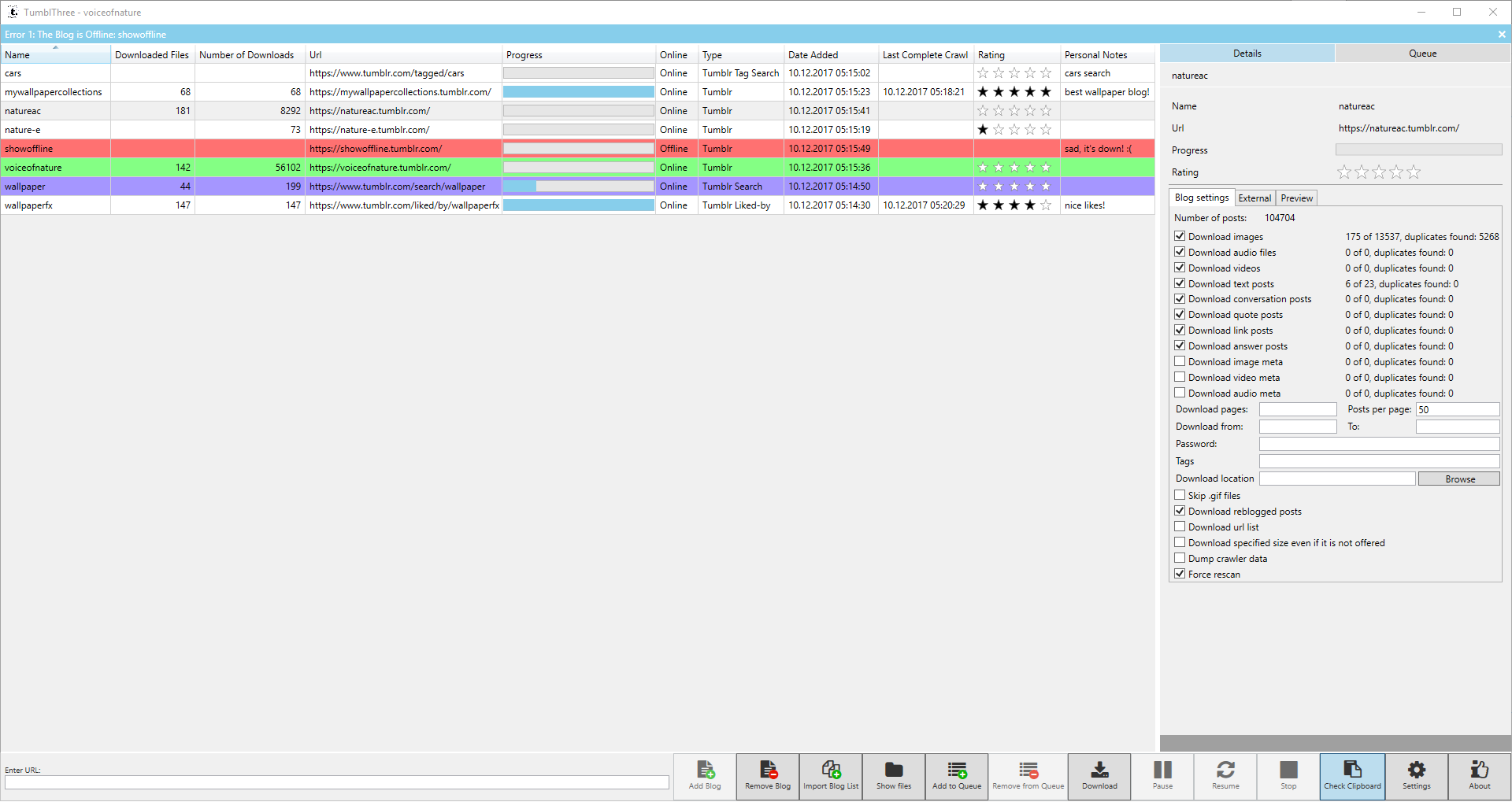
Features
- Source code at GitHub (written in C# using WPF and MVVM)
- Multiple concurrent downloads of a single blog and/or different blogs
- A clipboard monitor that detects blogname.tumblr.com urls in the clipboard (copy and paste) and automatically adds the blog to the bloglist
- A settings panel (change download location, turn preview off/on, define number of concurrent downloads, set the imagesize of downloaded pictures, set download defaults, enable portable mode, etc.)
- An option to skip the download of a file if it has already been downloaded before in any currently added blog
- Preview of photos & videos
- File rename functionality
- Download of Twitter blogs
- Image viewer with slideshow mode
- Automated update process
- Group blogs into collections
- :star: Download of Bluesky (user feed) blogs 🆕
click for more
- Download of Gif instead of WebP/Gifv images from Tumblr
- Internationalization support (several languages available)
- A download queue
- Autosave of the queuelist
- Save, clear and restore the queuelist
- Uses Windows proxy settings
- A bandwidth throttler
- An option to download an url list instead of the actual files
- Set of a start time for a automatic download (e.g. during nights)
- Change of blog settings of multiple selected blogs at once
- Uses SSL connections
- Taskbar buttons and key bindings
- Choice of download format for .pnj links
Backup/download of (click names to expand)
Blogs / Hidden blogs
- Download of photo, video (only tumblr.com hosted), text, audio, quote, conversation, link and question posts
- Download meta information for photo, video and audio posts
- Download inlined photos and videos (e.g. photos embedded in question&answer posts)
- Download of all image sizes possible (SVC, API only for newer blogs, higher resolution not possible for old blogs)
- Support for downloading Imgur, Gfycat, Webmshare, Uguu and Catbox linked files in tumblr posts
- Download of safe mode/NSFW blogs
- Allows to download only original content of the blog and skip reblogged posts
- Can download only tagged posts
- Can download only specific blog pages instead of the whole blog
- Allows to download blog posts in a defined time span
- Can download hidden blogs (login required / dash board blogs)
- Can download password protected blogs (of non-hidden blogs)
Liked/by and Likes
- A downloader for downloading "liked by" (e.g. https://www.tumblr.com/liked/by/wallpaperfx/) and "likes" (e.g. https://www.tumblr.com/likes) photos and videos instead of a tumblr blog (login required)
- Download of all image sizes possible (SVC, API only for newer blogs, higher resolution not possible for old blogs)
- Allows to download posts in a defined time span
Tumblr searches
- A downloader for downloading photos and videos from the tumblr search (e.g. http://www.tumblr.com/search/my+keywords)
- Download of all image sizes possible (SVC, API only for newer blogs, higher resolution not possible for old blogs)
- Allows to download posts in a defined time span
Tumblr tag searches
- A downloader for downloading photos and videos from the tumblr tag search (e.g. http://www.tumblr.com/tagged/my+keywords) (login required)
- Download of all image sizes possible (SVC, API only for newer blogs, higher resolution not possible for old blogs)
- Allows to download posts in a defined time span
Twitter Blogs
- Download of photo, video and text posts of blogs
- Download meta information for photo and video posts
- Allows to download only original content of the blog and skip reblogged posts
- Can download only tagged posts
- Allows to download blog posts in a defined time span
Bluesky Blogs
- Download of photo, video and text posts of blogs
- Download meta information for photo and video posts
- Allows to download only original content of the blog and skip reblogged posts
- Can download only tagged posts
- Allows to download blog posts in a defined time span
Download
Latest versions can be found here.
Please keep in mind that probably only the latest version is functioning properly since the platforms evolve and from time to time change their data structures which makes changes in TumblThree necessary again. So update your application regularly.
Application Usage and Getting Started
Read our wiki page about Application Usage.
The default settings should cover most users. You should only have to change the download location and the kind of posts you want to download. You can find more information in our wiki Getting Started and Insights.
Feedback and Bug Reports
If you like TumblThree, give it a star  (at the right upper corner of the page)!
You are welcome to participate in Discussions (our forum). If you don't have a GitHub account yet, please sign up for one, it is free.
We appreciate it, if you send us your feedback or file a bug report. In case of an error, preferably just fill out a Bug report.
In case you don't like to register an account for some reason, but still want to provide feedback or a bug report, use the following web form: tumblthreeapp.github.io/TumblThree/feedback.html
How to Build the Source Code to Help Further Development
- Download Visual Studio. The minimum required version is Visual Studio 2019 (C# 9.0 feature support).
- Download the source code as .zip file or use a git client (e.g. GitHub Desktop or TortoiseGit) and checkout the code.
- Open the TumblThree.sln solution file in the src/ directory of the code.
- Build the source once before editing anything. Build->Build Solution.
Contributing to TumblThree
We like the all-contributors specification. Contributions of any kind are welcome! If you've ever wanted to contribute to open source, and a great cause, now is your chance!
- You can find useful information about How and What you can contribute to the TumblThree project here.
- Also see the wiki page for ideas of new or missing features and add your thoughts.
Contributors ✨
Last but not least see also the list of contributors who participated in this project.