Welcome to the TreeSheets productivity tool!
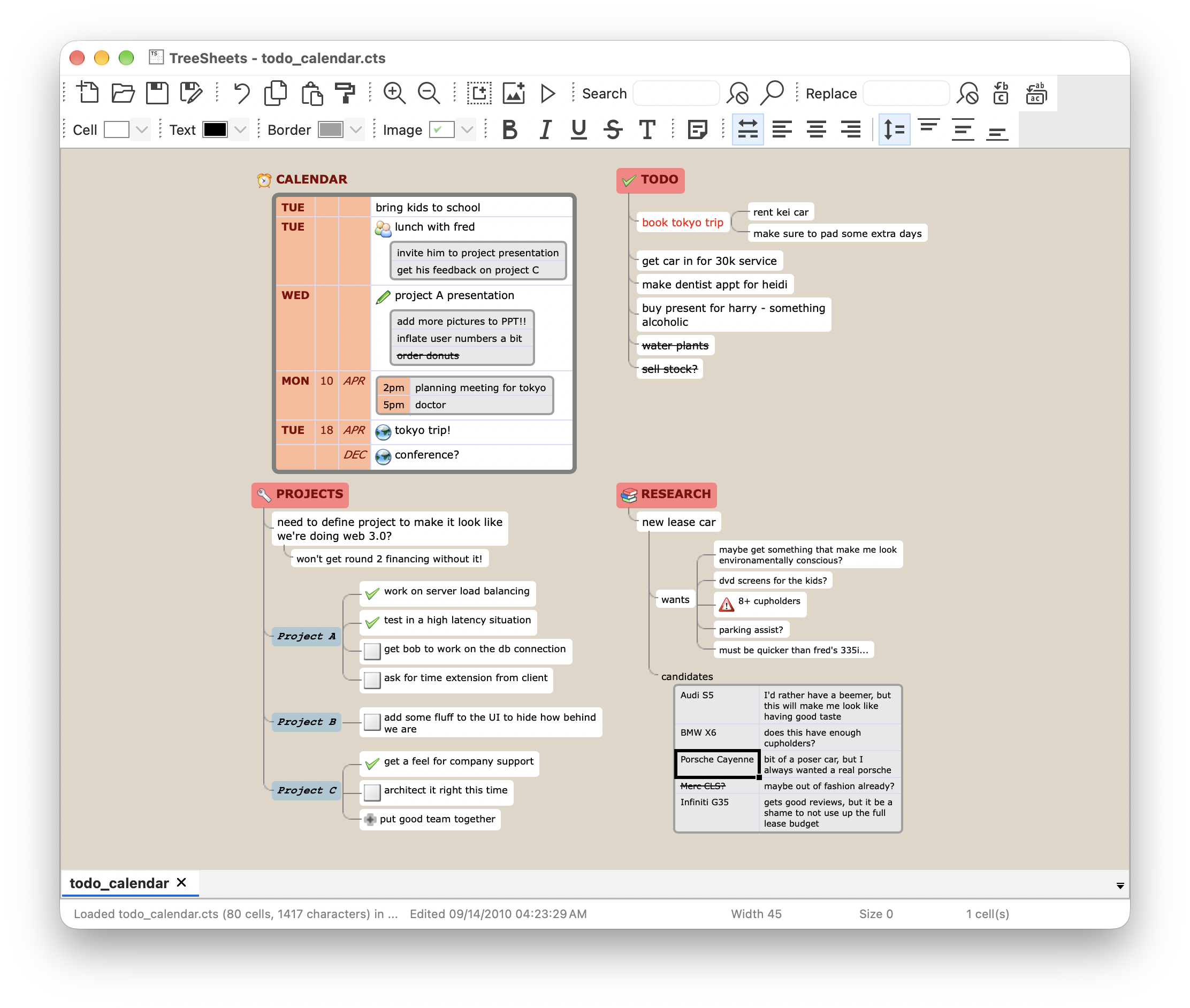
TreeSheets is a "hierarchical spreadsheet" that is a great replacement for spreadsheets, mind mappers, outliners, PIMs, text editors and small databases.
Suitable for any kind of data organization, such as todo lists, calendars, project management, brainstorming, organizing ideas, planning, requirements gathering, presentation of information, etc.
It's like a spreadsheet, immediately familiar, but much more suitable for complex data because it's hierarchical. It's like a mind mapper, but more organized and compact. It's like an outliner, but in more than one dimension. It's like a text editor, but with structure.
Community
If you like, you are kindly invited to join the Discord channel and the Google group for discussion. The community maintains a wiki on this GitHub page.
Installation
Pre-built binaries for Windows, macOS and Linux are available at the Release section.
On macOS, drag TreeSheets from the disk image into your Applications folder. The app is not signed
with an Apple Developer ID, so macOS blocks it when you first open it. On macOS 15 and later,
try to open it once, then go to System Settings > Privacy & Security and click "Open Anyway". On older
versions, right-click the app, choose Open, and confirm. Alternatively, run
xattr -dr com.apple.quarantine /Applications/TreeSheets.app in Terminal. You only need to do this once.
For Linux, there are packages for Debian-based distributions and AppImages (x86_64 and aarch64) that run on
most other distributions. To use an AppImage, download it, make it executable
(chmod +x TreeSheets-*.AppImage) and start it.
Both are built on Ubuntu 22.04, so they need a distribution of about the same age or newer. The Debian packages could also be installed on other Debian-based distributions, depending on whether the required dependency packages are available.
If you use Flatpak, you can install TreeSheets from Flathub.
Source Code
This repository contains all the files needed to build TreeSheets for various platforms.
License
TreeSheets has been licensed under the ZLIB license (see ZLIB_LICENSE.txt).

Structure
src contains all source code. The code is dense, terse, and with few comments, typical for a codebase that was never
intended to be used by more than one person (me). On the positive side, you'll find the code very small and simple,
with all functionality easy to find and only in one place (no copy pasting or over-engineering). Enjoy.
TS is the folder that contains all user-facing files, typically the build process results in an executable to be put
in the root of this folder, and distributing to users is then a matter of giving them this folder.
.claude/skills/treesheets-agent is a skill that lets Claude Code inspect and script the document open in a
running TreeSheets, see TS/docs/AGENT_SOCKET.md. Outside this repository, you can install it as a plugin:
/plugin marketplace add aardappel/treesheets
/plugin install treesheets@treesheets
Claude Code doesn't auto-update plugins from third-party marketplaces by default. To get new versions of the
skill automatically, enable it under /plugin → Marketplaces → treesheets → Enable auto-update.
Ideas for future features and known bugs are tracked in the issues.
Building
This project uses CMake to enable compilation on various platforms and CPack on top of it to package the produced binaries. The build, installation and packaging instructions are within CMakeLists.txt.
If you're comfortable with a C++ compiler and CMake, these steps will get you a working build of TreeSheets:
- Clone this repository
git clone https://github.com/aardappel/treesheets
- Change the working directory to the working tree
cd treesheets
- Configure the build system
cmake -S . -B _build -DCMAKE_BUILD_TYPE=Release
On Windows ARM this needs the Visual Studio C++ compiler.
With a Visual Studio generator, open _build/TreeSheets.sln after configuring and select
Debug or Release in the IDE. Accept project reloads when CMake regenerates the solution.
- Build and package for binary distribution
cmake --build _build --target package -j
| Platform | Result |
|---|---|
| Windows | A ZIP archive for portable usage and an installer |
| macOS | A disk image for Drag and Drop installation |
| Linux | A binary Debian package |
Alternatively, to only build without packaging:
cmake --build _build -j
On Windows, append --config Release.
- Install (optional)
cmake --install _build
- macOS: append
--prefixto specify another installation root for the bundle. - Linux: usually requires root privileges, e.g. run this command with
sudo.
If you do not have wxWidgets installed separately (e.g. as shared library on your distribution or operating system) or want to build it within the TreeSheets CMake project as a static library anyway, add -DTREESHEETS_BUNDLE_WXWIDGETS=ON to the build configuration. This builds wxWidgets from source with wxBUILD_SHARED and wxBUILD_INSTALL set to off, even if an installed wxWidgets is found, so that the wxWidgets libraries are statically linked into TreeSheets and no additional wxWidgets files get installed.
CMake downloads dependencies as needed and reuses them on subsequent builds. Leave
FETCHCONTENT_FULLY_DISCONNECTED
at its default OFF. Setting it to ON skips downloads and updates, so adding or changing a dependency
can break an existing build. If CMake reports that a dependency's source directory is missing while
this option is enabled, reset the saved setting (on Windows or any other platform):
cmake -S . -B _build -DFETCHCONTENT_FULLY_DISCONNECTED=OFF
This persists in _build/CMakeCache.txt; you do not need to repeat it for each build. Use ON only
when intentionally reusing already populated dependencies whose versions have not changed.
Translating
The user interface is translated with gettext. The translations live in
TS/translations//ts.po, and the template they are derived from is TS/translations/ts.pot. You need the
gettext tools (xgettext, msgmerge, msgfmt, and msginit for new languages), which are usually already present
on Linux and macOS, or see here for Windows. After
configuring the build as described above (step 3), the workflow is driven by three CMake targets:
| Step | Command | What it does |
|---|---|---|
| 1 | cmake --build _build --target update-pot |
Extracts the translatable strings from the source code into ts.pot |
| 2 | cmake --build _build --target update-po |
Merges the new strings from ts.pot into all ts.po files |
| 3 | Translate the new (empty or fuzzy) entries in your language's ts.po, e.g. with Poedit or a text editor |
|
| 4 | cmake --build _build --target update-mo |
Compiles all ts.po files into the binary ts.mo files the program loads |
Step 1 is normally done by the developer after changing strings in the source code. To add a new language, run this
inside TS/translations (replace lang with a code like it, or pt_BR), then continue with step 3:
msginit --input ts.pot --locale=lang --output=lang/ts.po
More details can be found in TS/translations/readme_translations.txt.
Contributing
I welcome contributions, especially in the form of neatly prepared pull requests. The main thing to keep in mind when contributing is to keep as close as you can to both the format and the spirit of the existing code, even if it goes against the grain of how you program normally. That means not only using the same formatting and naming conventions (which should be easy), but the same non-redundant style of code (no under-engineering, e.g. copy pasting, and no over engineering, e.g. needless abstractions).
Also be economic in terms of features: treesheets tries to accomplish a lot with few features, additional user interface elements (even menu items) have a cost, and features that are only useful for very few people should probably not be in the master branch. Needless to say, performance is important too. When in doubt, ask me :)
Try to keep your pull requests small (don't bundle unrelated changes) and make sure you've done extensive testing before you submit, preferrably on multiple platforms.