


⬇ Download ✨ Features 🧩 VS Code 🚀 Run it 🤖 AI / MCP 🛡️ Safety

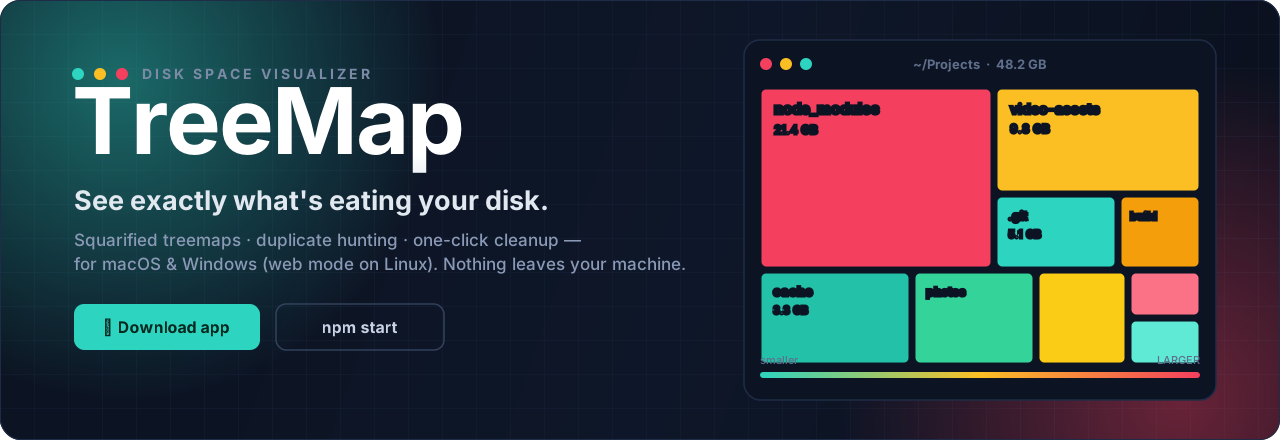
| 🟩 Find it Squarified treemap of every byte |
🟨 Understand it Trends, diffs & duplicate hunting |
🟥 Reclaim it One-click cleanup → system Trash |
[!TIP] No Node. No setup. No telemetry. The desktop app is fully self-contained and scans the disk of the machine it runs on. Deletes always go to your system Trash, nothing is ever hard-deleted, and anything moved there can be put back until the Trash is emptied.
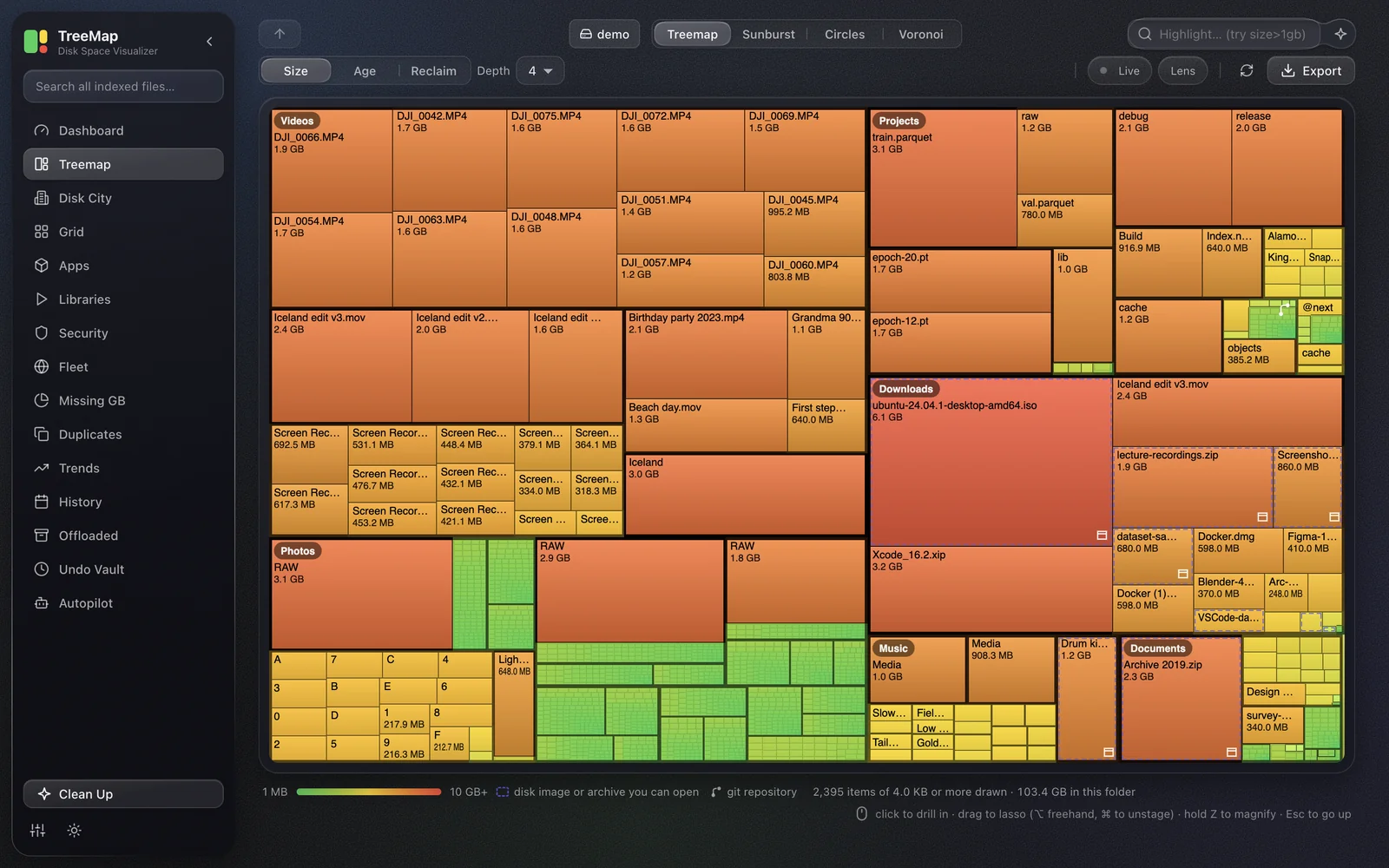
Screenshots follow your GitHub theme: switch between light and dark to see both.
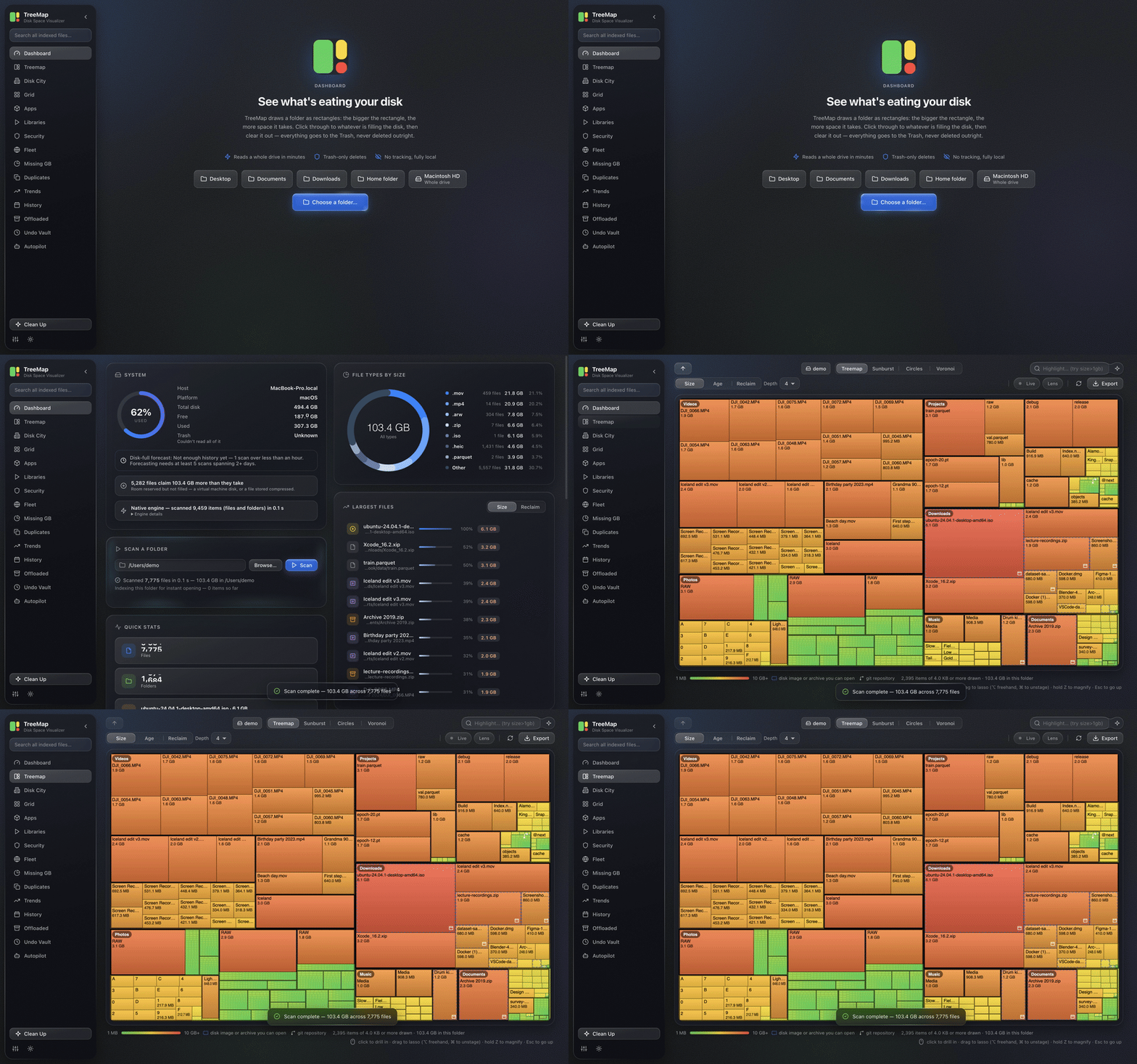 Scan: pick a folder, watch it fill in |
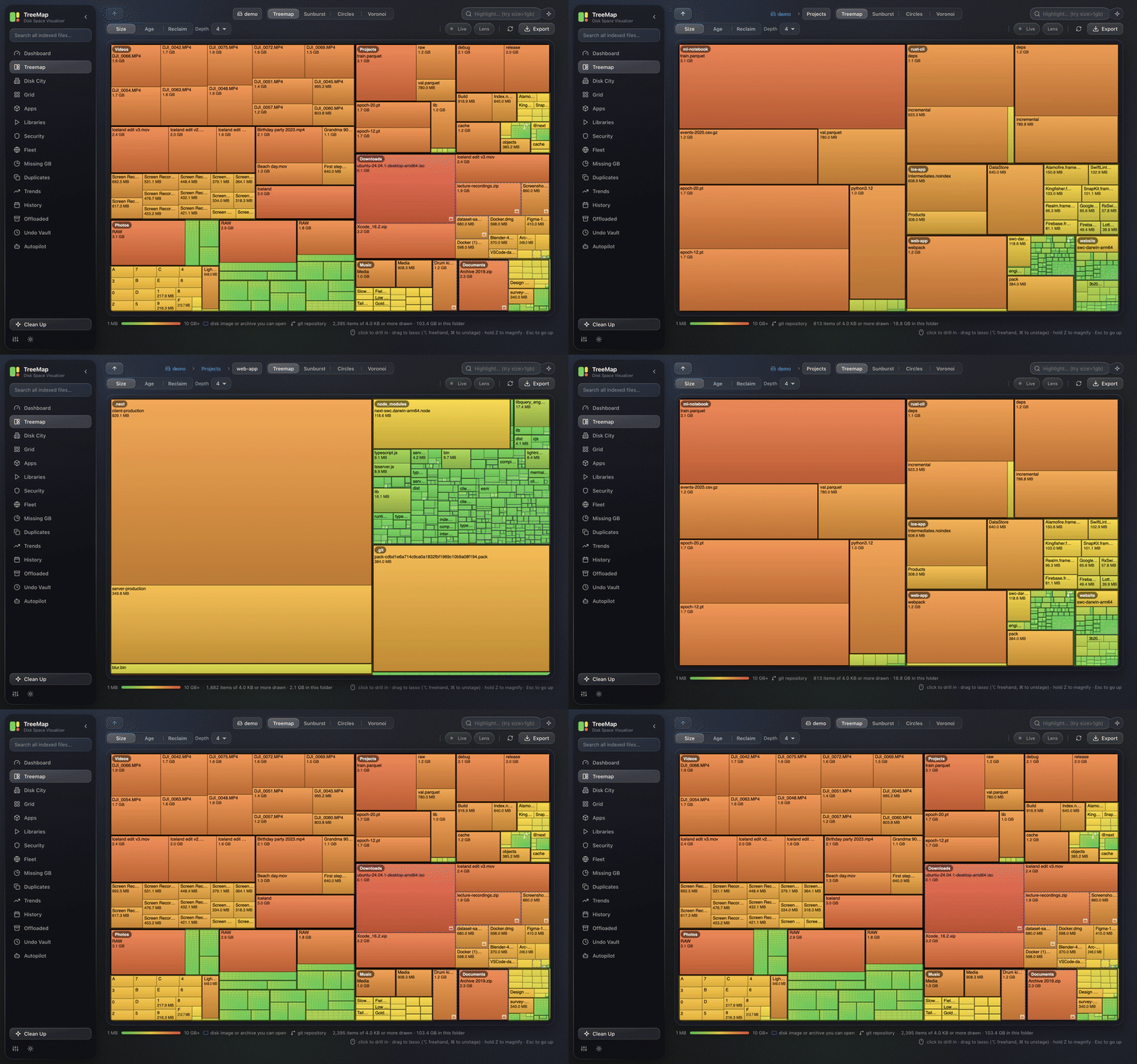 Drill in: one folder per click, and back up |
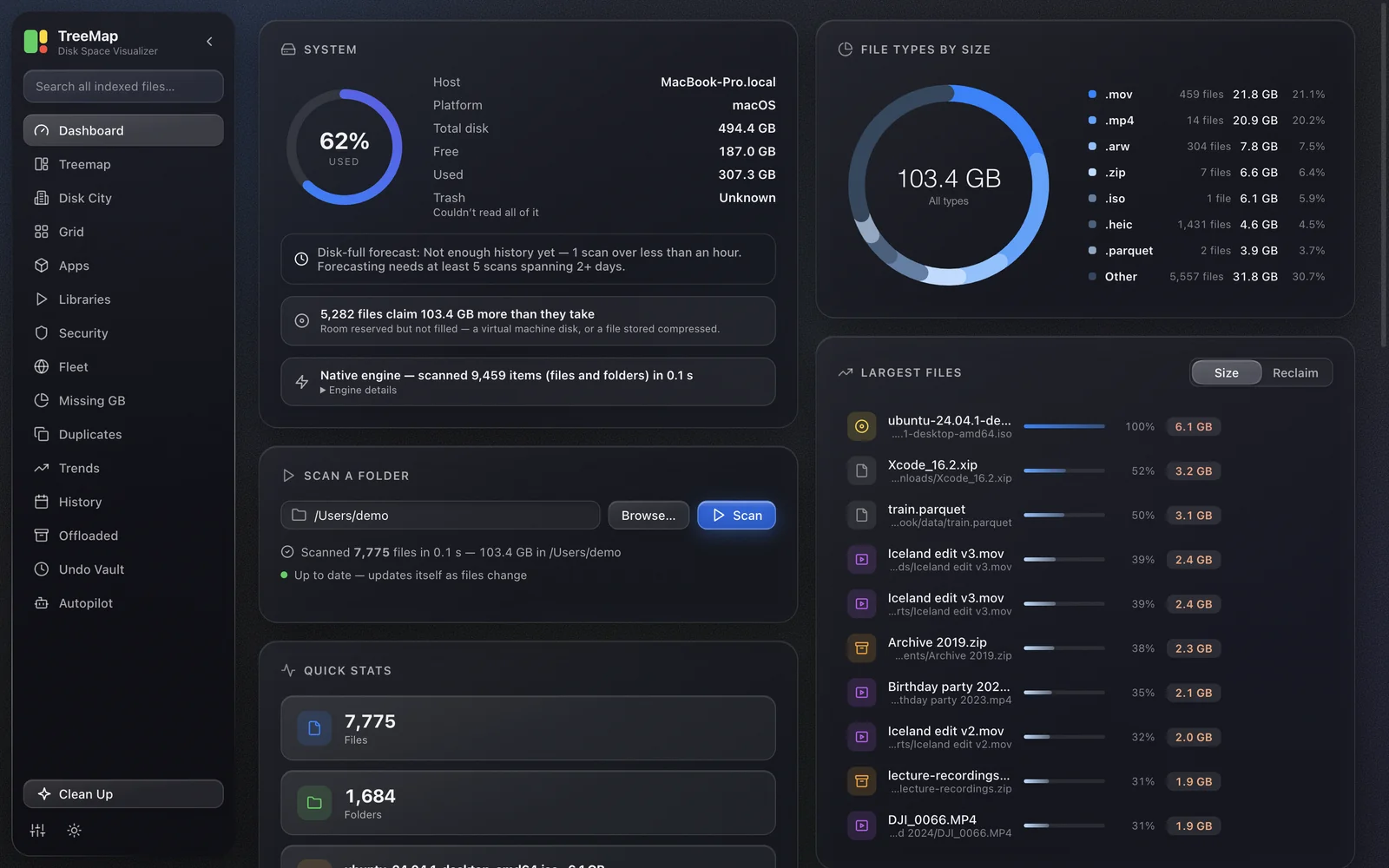 Dashboard: the whole picture at a glance |
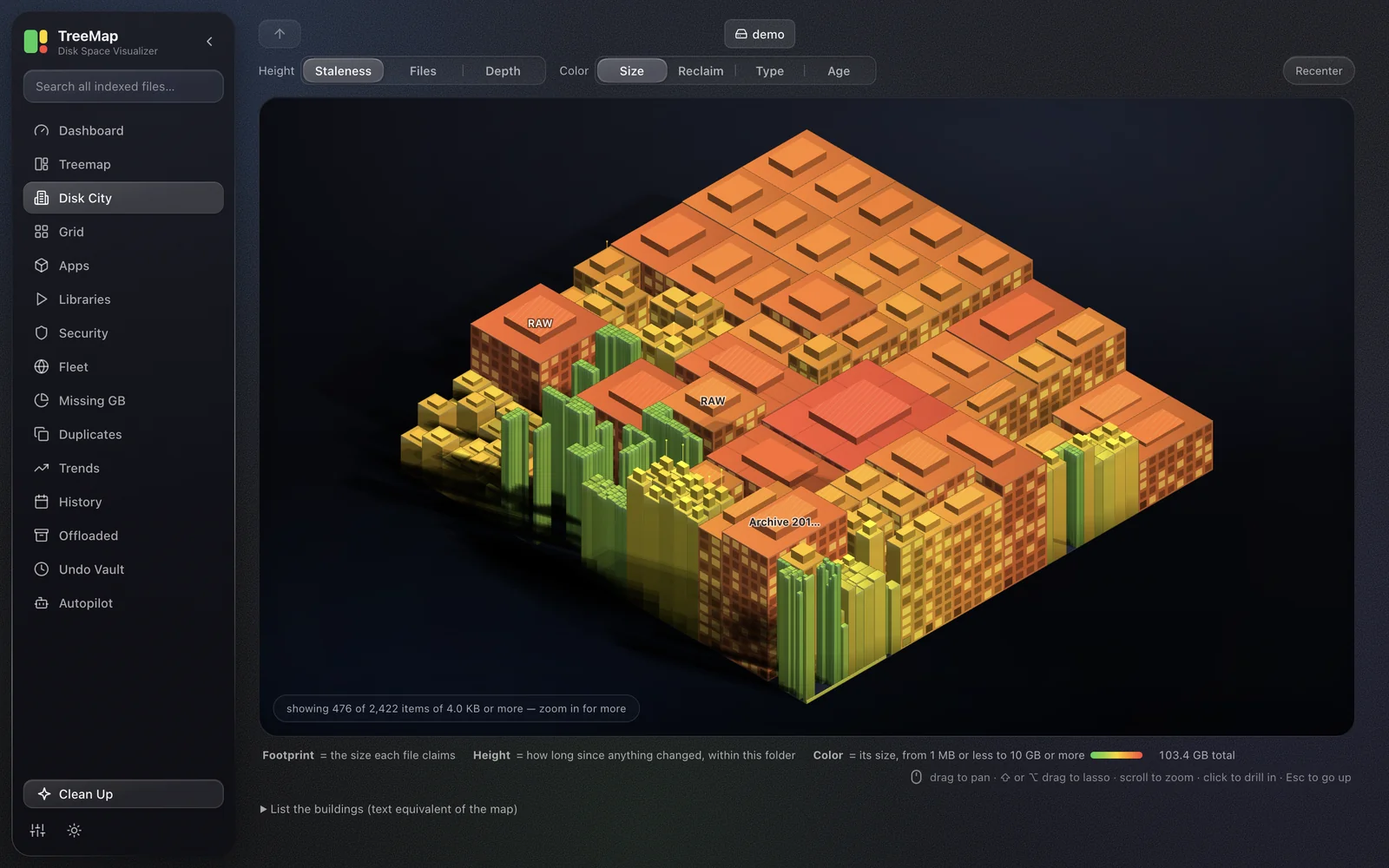 Disk City: footprint is bytes, height is staleness |
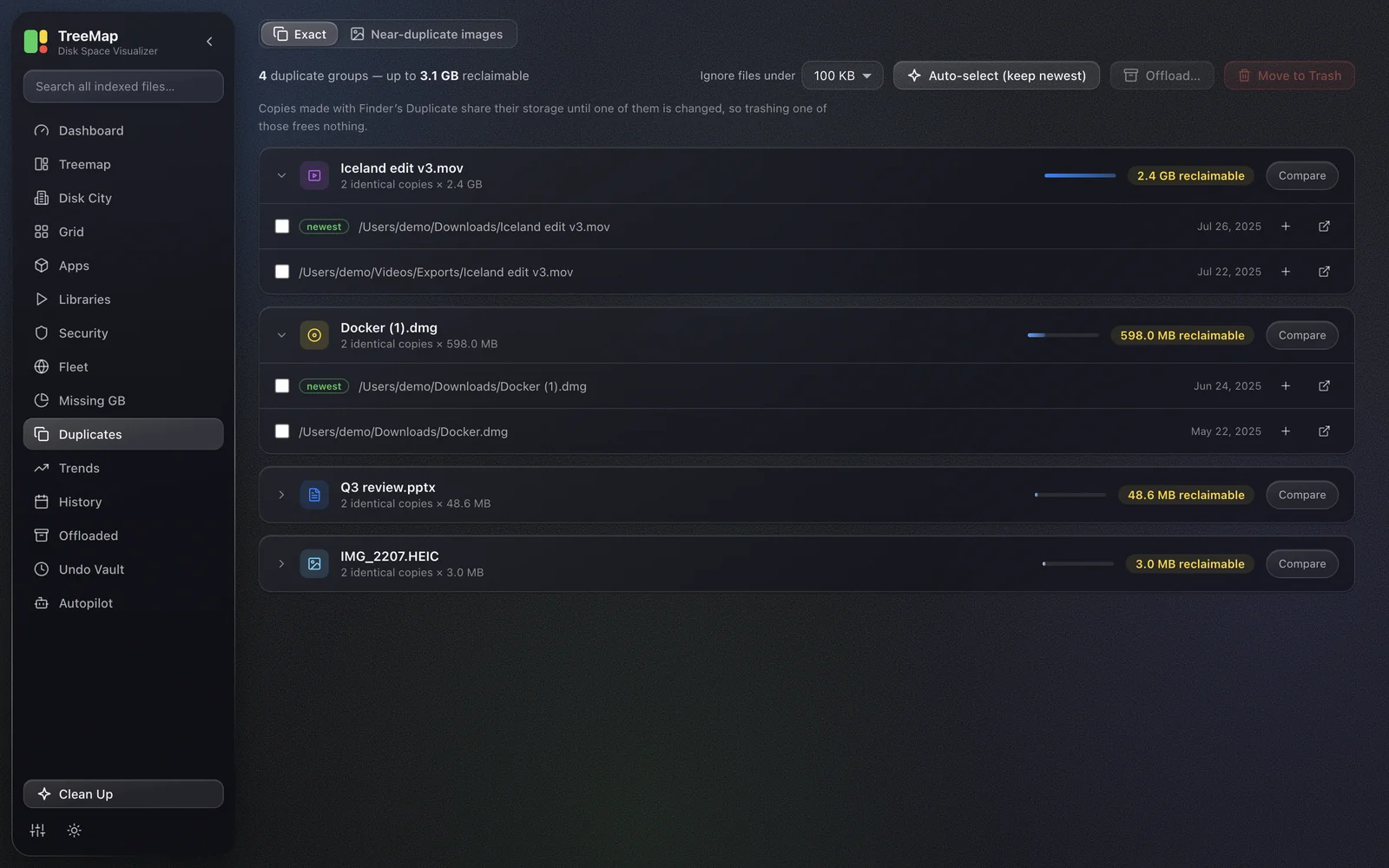 Duplicates: identical files, the copy to keep marked |
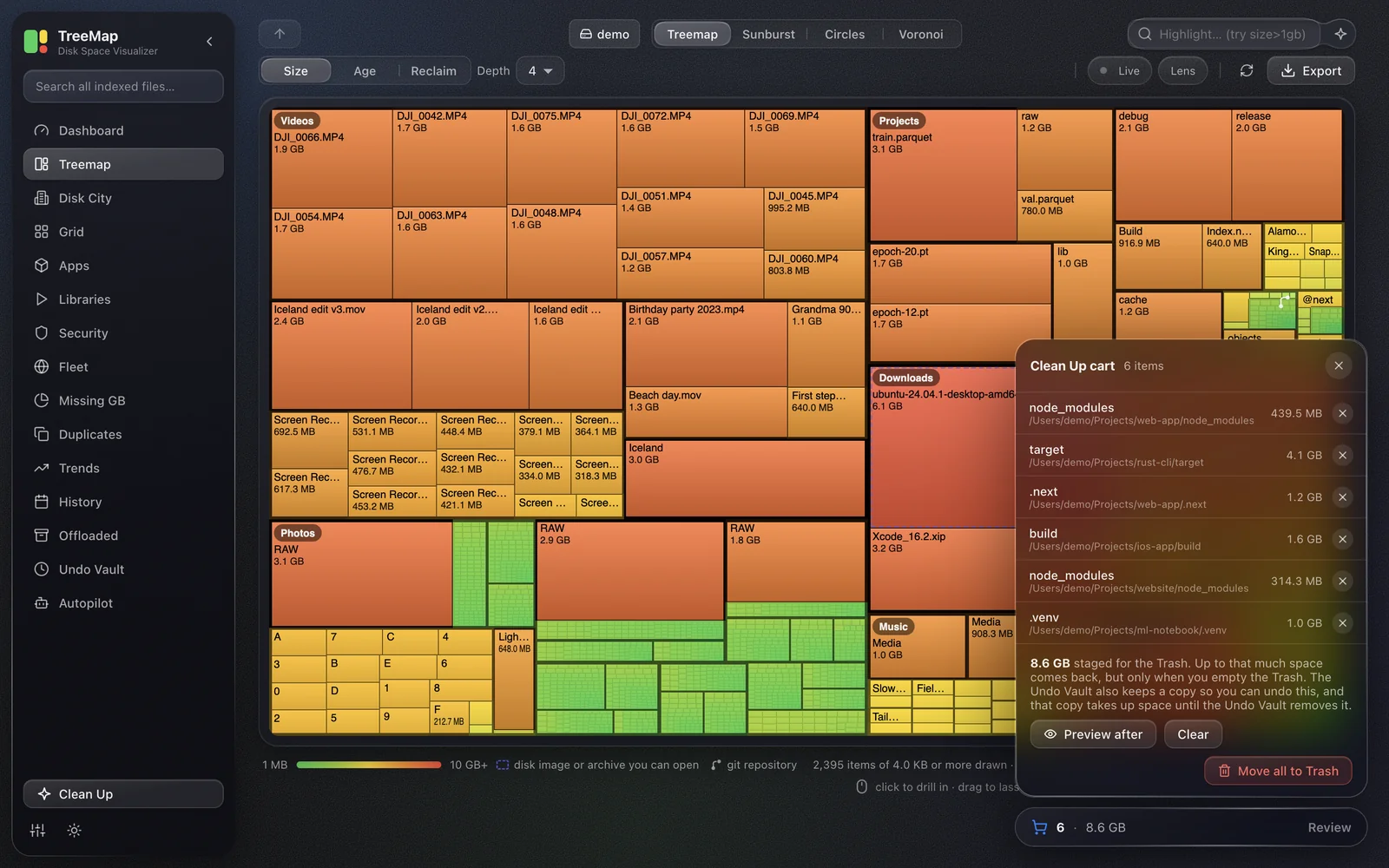 Clean Up: stage it, preview it, then move it to the Trash |
✨ The seventeen views
TreeMap isn't just a treemap, it's a full disk-hygiene workbench. Press ⌘K (Ctrl+K) to jump anywhere. Sizes are decimal, as Finder counts them (1 GB = 1,000,000,000 bytes).

| View | What it does |
|---|---|
| 📊 Dashboard | Disk ring, file types, the largest files and folders, a disk-full forecast, Cost to keep, Drive health and folder budget gauges |
| 🗺️ Treemap | Every file sized by its bytes. Drill in, search, lasso into the cart, scrub a time slider, watch live changes, look inside archives. Also draws as Sunburst, Circles or Voronoi |
| 🏙️ Disk City | The same layout as an isometric city: footprint is bytes, height is staleness |
| 🔲 Grid | A size-proportional icon grid, sortable by size, date or Reclaim score |
| 📦 Apps | How much disk each app owns: app, caches, data and logs, with a safe cache clear |
| 🎮 Libraries | Steam, Epic, GOG, itch.io and media libraries; only the parts that regenerate are offered |
| 🛡️ Security | Keys and credentials outside the folder they belong in, found by name and location only |
| 🌐 Fleet | How full your other computers are, over your network. Off by default, summaries only |
| 🥧 Missing GB | Why "used" and the files you can see don't add up, as a receipt that balances or names the gap |
| 🧬 Duplicates | True duplicates by SHA-256, near-duplicate images, and a side-by-side Compare |
| 📈 Trends | Every scan charted over time: what grew, what shrank |
| 🗓️ History | A calendar of bytes written per day, a journal of big changes, and a diff of any two scans of a folder |
| 📤 Offloaded | Files moved to another drive: copied, verified byte for byte, then the originals trashed |
| 🗄️ Undo Vault | A verified copy of what the Clean Up cart and Autopilot trash, kept 30 days by default, or less to stay under its size cap |
| ✨ Autopilot | Clean Up rules that keep running, with a mandatory first preview and byte caps |
| 🧹 Clean Up | Smart suggestions, custom rules, a Reclaim score that explains itself, and a cart that dry-runs before anything moves |
| ⏰ Scheduled + Ignore | Rescans on a schedule with growth alerts, and a list of paths and globs to skip |
📖 Every view in detail, and the limits each one states: docs/FEATURES.md
How it's built: Node.js + Express 5 + TypeScript, with a Rust scan core. The frontend is a single, zero-dependency
index.html, generated fromsrc/ui/, with hand-coded Canvas 2D. Ships as a web app and a downloadable Electron desktop app for macOS and Windows.
⬇️ Download the app (for users)
Grab the latest installer from the Releases page:
| Platform | File | How |
|---|---|---|
| 🍎 macOS Apple Silicon only |
TreeMap-x.y.z-arm64.dmg |
Open it, drag TreeMap into Applications, then follow First launch on macOS, because macOS blocks it the first time. |
| 🪟 Windows | TreeMap-Setup-x.y.z.exe |
Run it. At the blue SmartScreen prompt click More info → Run anyway, then follow the installer. |
[!NOTE] Intel Mac? The macOS build is Apple Silicon only: any M-series Mac (late 2020 onward). Not sure? About This Mac says either Apple M… or Intel. On an Intel Mac, run TreeMap in web mode (three commands, below): it is the same app in a browser tab.
Linux, no desktop download: use web mode too, or build your own AppImage with
npm run dist:linux.
Every release also carries a portable Windows TreeMap-x.y.z.exe (no installer, keeps its data beside itself).
Which version do I have? In the desktop app: TreeMap → About TreeMap on macOS, Help → About TreeMap on Windows. In web mode, open (or the PORT you set) and read version; that is the number on the Releases page.
🍎 First launch on macOS: "Apple could not verify…"
The first time you open TreeMap, macOS says "TreeMap.app" Not Opened. Apple could not verify…
Your download is fine. macOS shows that for any app that isn't notarized, and notarizing needs a paid Apple Developer membership this free, open-source project doesn't have. Every byte is public in this repo, and every release is built in the open by GitHub Actions. Get past it once with either route below; after that TreeMap opens normally.
Route 1, clicks only, no Terminal (Apple's own way)
⚠️ Right-click → Open no longer works. Apple removed that shortcut in macOS Sequoia (15). And the Open Anyway button in step 3 only shows for about an hour after the block: if it's gone, double-click TreeMap again, then go straight back to System Settings.
- Double-click TreeMap in Applications. When the message appears, click Done.
- Open System Settings → Privacy & Security and scroll to Security at the bottom.
- Next to "TreeMap.app" was blocked to protect your Mac, click Open Anyway, and authenticate.
- Double-click TreeMap again, click Open Anyway on the last prompt, and authenticate once more.
Route 2, one line in Terminal (fastest)
With TreeMap in Applications, open Terminal (⌘-Space, type Terminal) and paste:
xattr -dr com.apple.quarantine /Applications/TreeMap.app
Nothing prints when it works; double-click TreeMap and it opens. This removes macOS's "came from the internet" marker from TreeMap only. It changes no setting, weakens nothing else, and needs no password.
macOS says "TreeMap is damaged and can't be opened" instead?
Same cause, use Route 2. If it still says damaged after that, the download was truncated:
delete the .dmg and download it again.
On macOS Sonoma (14) or older?
Both routes work, and so does the classic shortcut Apple removed in Sequoia: right-click TreeMap → Open → Open.
🪟 First launch on Windows: "Windows protected your PC"
The installer isn't signed with a paid Microsoft certificate, so SmartScreen shows a blue box once. Click More info, then Run anyway.
🖥️ Desktop extras
- 📌 Tray icon with live free space; close the window and scheduled scans keep running.
- 🖱️ Drag & drop a folder onto the window to scan it, or use "Scan with TreeMap" from the right-click menu (add it in Settings).
- 🔄 Auto-updates from GitHub Releases. Windows downloads and asks before restarting; macOS can't install into an un-notarized app, so it checks and offers a Download dialog that opens the Releases page.
- 🧳 Portable, no-trace mode: run it from a USB stick and it writes nothing to the host machine.
- ⚙️ Scanning budget (Eco, Balanced, Turbo or Automatic) and engine choice, in Settings.
🧩 Inside VS Code
The extension in vscode-extension/ runs TreeMap's own server and shows the
visualizer in an editor tab.
cd vscode-extension
npm install && npm run compile
npx @vscode/vsce package --no-dependencies   # produces a .vsix you can install
Then Extensions → ⋯ → Install from VSIX…, and run TreeMap: Open Disk Visualizer from the command palette, or right-click a folder in the Explorer for TreeMap: Scan This Workspace Folder.
The first open clones and builds TreeMap under one cancellable progress notification (if the open folder is this repository, your working tree is used as is). The server runs as a child process on your own Node 20+, never inside the extension host, because its native modules need standard Node.
🚀 Run from source / web mode (3 commands)
npm install
npm run build
npm start
Then open http://127.0.0.1:4280 in your browser. For development with auto-reload: npm run dev.
Requires Node.js 20+. Trash support uses gio on Linux (preinstalled on GNOME/KDE), Finder on macOS, and the Recycle Bin on Windows. A copy run from source scans with the built-in walker (or, on macOS and Linux, gdu, if npm run fetch:gdu:dev fetched one or it is on your PATH); to build the faster native engine, install Rust from https://rustup.rs and run npm run build:native.
📦 Build the desktop app
npm install
npm run app          # build + launch the desktop app locally
npm run dist:mac     # produce a macOS .dmg in release/
npm run dist:win     # produce a Windows installer in release/
⚠️ Build the macOS app on a Mac and the Windows app on Windows. Packaging needs Rust (rustup.rs); installing or running TreeMap never does.
To publish a release for both platforms from GitHub Actions, follow docs/RELEASING.md.
🤖 Use it with AI (MCP)
TreeMap speaks the Model Context Protocol (MCP), so AI assistants like Claude can use it as a tool. Connect it once and talk to your disk:
"What's eating my disk?" · "Find duplicates in my Downloads and clean them up" · "How long until this disk is full?"
Every safety rule still applies: deletes only go to the system Trash, destructive actions can be dry-run first, and everything is written to an audit log.
Step 1: One-time setup (~2 minutes)
You need Node.js 20+. In a terminal:
git clone https://github.com/Prithvi-Web/TreeMap-Disk-Visualizer.git
cd TreeMap-Disk-Visualizer
npm install
npm run build
pwd
The last line prints the folder's full path: use it wherever you see /PATH/TO/TreeMap-Disk-Visualizer below.
Step 2: Connect your AI app
🟠 Claude Desktop
- Open Claude Desktop → Settings → Developer → Edit Config. That opens
claude_desktop_config.json(macOS:~/Library/Application Support/Claude/, Windows:%APPDATA%\Claude\). - Add TreeMap to it (if the file already has an
mcpServersblock, just add the"treemap"entry inside it):
{
  "mcpServers": {
    "treemap": {
      "command": "node",
      "args": ["/PATH/TO/TreeMap-Disk-Visualizer/dist/mcp/index.js"]
    }
  }
}
- Fully quit and reopen Claude Desktop. TreeMap's tools are listed under
treemap.
🪟 Windows: write the path with double backslashes, e.g.
"C:\\Users\\you\\TreeMap-Disk-Visualizer\\dist\\mcp\\index.js".
⌨️ Claude Code
claude mcp add treemap -- node /PATH/TO/TreeMap-Disk-Visualizer/dist/mcp/index.js
Next session, ask Claude Code to scan a folder. (claude mcp list shows it; claude mcp remove treemap undoes it.)
🖱️ Cursor
Create (or edit) .cursor/mcp.json in your home folder for all projects, or in a project's root for just that project:
{
  "mcpServers": {
    "treemap": {
      "command": "node",
      "args": ["/PATH/TO/TreeMap-Disk-Visualizer/dist/mcp/index.js"]
    }
  }
}
Then enable it under Settings → MCP.
🧩 Any other MCP client
TreeMap is a standard stdio MCP server: command node, argument /PATH/TO/TreeMap-Disk-Visualizer/dist/mcp/index.js. No environment variables, ports or API keys. (Smoke test from the repo folder: npm run mcp should print server ready on stdio.)
What the AI can do
| Tool | What it does |
|---|---|
scan_path |
Scan a folder → returns a scanId the other tools use |
get_largest |
The biggest files or folders in a scan |
reclaim_ranked |
Entries ranked by Reclaim score, safest to delete first, with the breakdown |
find_duplicates |
True duplicates (size + SHA-256 content hashing) |
cleanup_suggestions |
Known-reclaimable space: caches, regenerable build folders, junk |
forecast |
Disk-full projection: "full in ~58 days at current growth" |
missing_gigabytes |
Where the used space went, line by line; an unknown is null with its reason, never 0 |
compare_scans |
What grew and what shrank between two scans |
offload |
Move files to another drive: copy → verify → then trash originals |
trash_paths |
Move files to the system Trash, never a hard delete |
The AI can only touch paths inside folders it has scanned; trash_paths and offload accept dryRun: true to show the plan first; an agent-policy.json can limit it further; and every destructive request lands in an append-only audit.jsonl. AGENTS.md is the full guide.
🔌 API
Prefer plain HTTP? Everything is a local REST API (npm start, then /api/*). Every endpoint is in docs/API.md; the machine-readable spec is at /api/openapi.json.
🛡️ Safety
Disk tools should never lose your data. TreeMap is built defensively:
- ♻️ Deletes always go through the OS Trash: undo from Finder or Explorer until the Trash is emptied.
- 🎯 Trash and open only accept paths inside a folder you scanned, never paths inside an archive.
- 🔒 Paths are sanitized; system folders (
/proc,/sys,/dev,/run,C:\Windows\System32, …) are blocked, but not/run/media, where Linux mounts a person's own drives. - 📤 Offload copies, verifies every byte with SHA-256, and only then trashes the originals; a failure before every copy verifies rolls back.
- 🧬 Duplicates always keeps at least one copy, and never opens an online-only file (that would download it).
- ☁️ Cloud scanning is opt-in and metadata-only, and cloud deletes go to the provider's own trash; with no account connected, no cloud code runs.
- 🚦 Per-client rate limiting (10 requests/s for the API, bursts of 20) and graceful shutdown.
- ⏳ Scan results live in memory only and expire after 30 minutes; what's saved stays in the app-data folder on your machine. SECURITY.md lists every file and every outbound connection.
🗂️ Contributing
CONTRIBUTING.md has the three commands and the one rule. docs/ARCHITECTURE.md has the project layout and the design decisions behind it.
📜 Licence
MIT, see LICENSE. The desktop app also bundles gdu, the native scan core's Rust crates, Electron and Chromium, each with its licence inside the app; docs/ARCHITECTURE.md says where.
Found this useful?



TreeMap · built with 🟩🟨🟥 by Prithvi-Web
If TreeMap freed up a few gigs for you, a ⭐ goes a long way.