TKSubmitTransition is a free, open source design & prototyping project written in Swift and released under MIT. It has 2,253 GitHub stars, 225 forks and 9 open issues, and was last pushed 3 days ago. On this registry it ranks #73 of 118 tracked projects in Design & Prototyping, with 5 head-to-head comparisons available.

What is TKSubmitTransition?

TKSubmitTransition is an MIT-licensed Swift library for iOS that turns an ordinary UIButton into an animated submit control — the button rolls into a loading state and then hands off to a fade-in UIViewController transition — for developers building sign-in and other submit screens with UIKit.

What it is

TKSubmitTransition is a UIKit component library written in Swift. It provides a button subclass and a view-controller transition animator that together reproduce the interaction from a referenced Dribbble login-screen shot: the "Sign in" button rolls while an operation is pending, and the screen that follows fades in. The code ships as a small set of classes under SubmitTransition/Classes, is exposed as the SubmitTransition module, and is distributed through CocoaPods or by copying the source files directly into a project.

The concrete problem it solves is the glue code that otherwise sits between a submit button and a screen change. Instead of animating a button's collapse by hand and writing a custom UIViewControllerAnimatedTransitioning object from scratch, a developer sets TKSubmitTransition as the custom class of a UIButton in the storyboard, or instantiates TKTransitionSubmitButton programmatically, and then calls the library's start and finish animation methods. It lives in the iOS and UIKit ecosystem and replaces the plain UIButton together with the bespoke transition code a team would otherwise maintain for every submit flow.

Key capabilities

  • TKTransitionSubmitButton, a UIButton subclass that can be created with a frame, given a title and font, and added to a view like any other button, so existing layout code keeps working.
  • TKSubmitTransition assigned as a custom class in the storyboard identity inspector, which lets a plain UIButton placed in Interface Builder pick up the animation without changes to the surrounding code.
  • startLoadingAnimation to begin the rolling loading state, paired with startFinishAnimation and startFinishingAnimation to end it and run a completion closure in which the next view controller is presented.
  • TKFadeInAnimator, a UIViewControllerAnimatedTransitioning class supplied for fading in the incoming view controller as part of the transition.
  • CocoaPods installation of the TKSubmitTransition pod with Swift version pinning: the swift4 branch, the 2.0 tag for Swift 3, and the 0.2 series for Swift 2 and below.
  • Manual installation by dragging the files in SubmitTransition/Classes into a project, for teams that do not use CocoaPods.
  • Documented handling for network requests, where the loading animation starts before a background query and the finishing animation is invoked once the results return to the main thread.

Who uses it and how

  • iOS teams building login and sign-in screens, since the demonstration reproduces a login-to-home interaction and the example button is titled "Sign in".
  • Storyboard-driven projects, where a developer drops a UIButton onto a scene, assigns the custom class in the identity inspector, and connects an IBOutlet to the view controller.
  • Programmatic layouts that size the button against the view width, center it, and pin its bottom edge, as the README example does.
  • Apps that gate the transition on a server response, following the documented pattern of starting the animation, running a query on a background thread, and finishing the animation on the main thread.
  • Projects pinned to older Swift toolchains, which can select the tagged or branched CocoaPods release matching Swift 2, 3, or 4.

Getting started

Add the pod with the line pod 'TKSubmitTransition', :git => 'https://github.com/entotsu/TKSubmitTransition.git', which the README gives for Swift 5, or drag the files from SubmitTransition/Classes into the project. From there the module is imported with import SubmitTransition, and the README's delegation steps cover wiring the transition itself.

How it compares

The facts name no third-party alternative, only the author's own Objective-C port, HySubmitTransitionObjective-C, which offers the same button and transition animation to Objective-C codebases. This library is the Swift counterpart for UIKit projects written in Swift, and both are published under the MIT licence with no paid tiers or hosted service attached.

When to use it — and when not to

Because this is a client-side UI library, there is no database, storage, or mail service to operate; the upkeep a team takes on is keeping the CocoaPods dependency or the dragged-in source files in step with its Swift version, since the README documents separate pod specifications for Swift 5, 4, 3, and 2. Teams that install dependencies with Swift Package Manager or Carthage should look elsewhere, because the README covers only CocoaPods and manual copying. It is also not a complete authentication solution: the button animation and the fade-in animator are provided, but the loading logic, the networking, and the transition delegate wiring remain the caller's responsibility.

project readme (upstream, from github) — read inline

TKSubmitTransition

Platform Language License CocoaPods

Inpired by https://dribbble.com/shots/1945593-Login-Home-Screen

I created Animated UIButton of Loading Animation and Transition Animation.

As you can see in the GIF Animation Demo below, you can find the “Sign in” button rolling and after that, next UIViewController will fade-in.

I made them as classes and you can use it with ease.

Objective-C version is here.

Demo

Demo GIF Animation

Installation

Cocoapods

Swift 5

pod 'TKSubmitTransition', :git => 'https://github.com/entotsu/TKSubmitTransition.git'

Swift 4

pod 'TKSubmitTransition', :git => 'https://github.com/entotsu/TKSubmitTransition.git', :branch => 'swift4'

Swift 3

pod 'TKSubmitTransition', :git => 'https://github.com/entotsu/TKSubmitTransition.git', :tag => '2.0'

Swift 2 & Below

pod 'TKSubmitTransition', '~> 0.2' 

Manually

Drag all the files from SubmitTransition/Classes into your project.

Usage

Storyboard

Just drag a UIButton on to your storyboard and change the custom class to TKSubmitTransition in the identity inspector.

Button

Change the settings of the button via the storyboard.
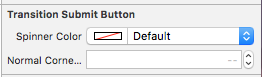
Settings

Then create an IBOutlet to your view controller.
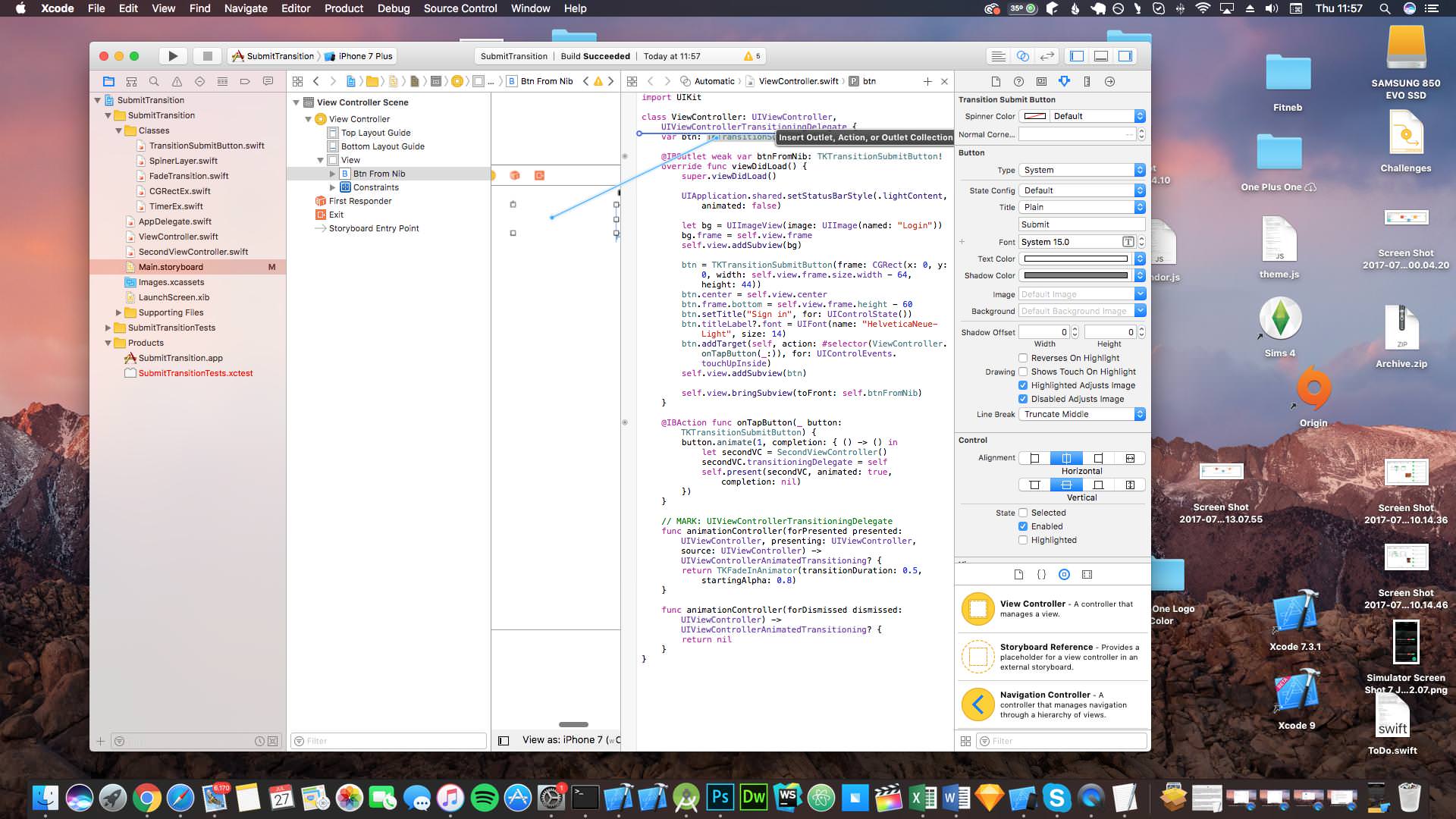
IBOutlet

You can now move on to Animation Method for further instructions.

Programatically

You can use TKTransitionSubmitButton just like any other UIButton. It works practically the same.

Add this at the top of your file:

import SubmitTransition

Then create a variable above your view did load for the button

var bin: TKTransitionSubmitButton!

then finally in the view did load add the button

btn = TKTransitionSubmitButton(frame: CGRect(x: 0, y: 0, width: self.view.frame.size.width - 64, height: 44))
btn.center = self.view.center
btn.frame.bottom = self.view.frame.height - 60
btn.setTitle("Sign in", for: UIControlState())
btn.titleLabel?.font = UIFont(name: "HelveticaNeue-Light", size: 14)
self.view.addSubview(btn)

Animation Method

Use this to animate your button. Follow the steps in Delegation to setup the transition.

func didStartYourLoading() {
  btn.startLoadingAnimation()
}

func didFinishYourLoading() {
  btn.startFinishAnimation {
    //Your Transition
    let secondVC = SecondViewController()
    secondVC.transitioningDelegate = self
    self.presentViewController(secondVC, animated: true, completion: nil)
  }
}

Networking

If you are running requests to a server and are waiting a responce, you can use something like this to stop and start the animation:

// start loading the button animations
button.startLoadingAnimation()

// run query in background thread
async.background {
  let query = PFQuery(className: "Blah")
  query.whereKey("user", equalTo: user)
	let results = try! query.findObjects()
  
	if results.count == 0 {
		// insert alertView telling user that their details don't work
	}
	else {
		// return to main thread to complete login
		async.main {
                        // tell the button to finish its animations
			button.startFinishingAnimation(1) {
			        let sb = UIStoryboard(name: "Main", bundle: nil)
	            	        let vc = sb.instantiateViewController(withIdentifier: "MainVC")
			        vc.transitioningDelegate = self
			        self.present(vc, animated: true, completion: nil)
                        }
		}
	}

Thanks to @sarfrazb for pointing this out.

TKFadeInAnimator

This Library also supply fade-in Animator Class of UIViewControllerAnimatedTransitioning.

Please use This for transition animation.

Delegation

Make sure your class implements the UIViewControllerTransitioningDelegate protocol like so

class ViewController: UIViewController, UIViewControllerTransitioningDelegate {

Setup the transitioning delegate

secondVC.transitioningDelegate = self

Implement the delegate

Swift 3/4

func animationController(forPresented presented: UIViewController, presenting: UIViewController, source: UIViewController) -> UIViewControllerAnimatedTransitioning? {
  return TKFadeInAnimator(transitionDuration: 0.5, startingAlpha: 0.8)
}

func animationController(forDismissed dismissed: UIViewController) -> UIViewControllerAnimatedTransitioning? {
  return nil
}

Swift 2 & Below

// MARK: UIViewControllerTransitioningDelegate
func animationControllerForPresentedController(presented: UIViewController, presentingController presenting: UIViewController, sourceController source: UIViewController) -> UIViewControllerAnimatedTransitioning? {
  let fadeInAnimator = TKFadeInAnimator()
  return fadeInAnimator
}

func animationControllerForDismissedController(dismissed: UIViewController) -> UIViewControllerAnimatedTransitioning? {
  return nil
}

If you need any help with the setup feel free to look at the sample or create an issue.

Contribution

  • If you've found a bug, please open an issue.
  • If you've a feature request, please open a pull request
  • Please check any closed issues before you open a new one!

Frequently asked questions

Is TKSubmitTransition free to use?

TKSubmitTransition is open source under the MIT licence. There is no licence fee and no seat count — you can self-host it or, where the project offers one, pay a vendor for a managed version instead.

What does TKSubmitTransition do?

Animated UIButton of Loading Animation and Transition Animation. Inspired by https://dribbble.com/shots/1945593-Login-Home-Screen

What is TKSubmitTransition written in?

TKSubmitTransition is primarily written in Swift. Its source is publicly available at https://github.com/takuoka/TKSubmitTransition, and it has 2,253 GitHub stars.