Tkinter-Designer is a free, open source design & prototyping project written in Python and released under BSD-3-Clause. It has 10,265 GitHub stars, 930 forks and 5 open issues, and was last pushed 14 days ago. On this registry it ranks #9 of 23 tracked projects in Design & Prototyping, with 5 head-to-head comparisons available.

What is Tkinter-Designer?

Tkinter-Designer is a Python command-line tool that reads a Figma design file through the Figma API and generates the Tkinter code and image files needed to run that interface as a desktop GUI, aimed at Python developers who want a designed-looking window without hand-writing every widget.

What it is

Tkinter-Designer is an open-source code generator living in the Python desktop GUI ecosystem, distributed under the BSD-3-Clause licence and installable as the tkdesigner package. It connects to Figma, the well-known design application, using the Figma API to analyze a design file, then writes out the Python code and image assets required to rebuild that design as a Tkinter application. The tool is deliberately narrow: it replaces the manual step of translating a visual layout into widget declarations, coordinates, and asset references. Its own GUI was built with Tkinter-Designer.

The concrete problem it solves is the slow, tedious work of constructing a Tkinter interface by hand. Rather than placing widgets, matching colours, and exporting images one at a time, a developer designs the screen in Figma with familiar drag-and-drop tools, pastes the file URL and an API token into the CLI, and receives a working build directory. Multi-frame support extends this further: several frames in one Figma file become the corresponding screens of one application, with navigation between them generated automatically.

Key capabilities

  • Runs as tkdesigner "$FILE_URL" "$FIGMA_TOKEN" and emits all code and images needed for the GUI.
  • Accepts both current figma.com/design/... links and legacy figma.com/file/... links; selecting a frame before copying the link generates that specific frame.
  • Generates a class-based Tkinter application with --template class.
  • Generates one application with Back/Next navigation across multiple Figma frames using --template pages.
  • Applies a ttk theme to the generated app, for example --theme clam.
  • Clears and regenerates an existing build directory when the -f flag is passed.
  • Exports gui.py files that can be imported from another Python file without starting mainloop() automatically, so commands can be attached separately and the UI regenerated later.

Who uses it and how

  • Python developers who already work in Figma and want a desktop interface that matches the design file rather than approximating it in code.
  • Developers learning Tkinter, for whom the generated code doubles as a readable reference for widget construction and layout.
  • Small teams and collaborators who keep Figma as the source of truth and rerun the CLI with -f to refresh the build directory after each design revision.
  • Hacktoberfest contributors, since the project carries the hacktoberfest topic and maintains many translated README files, including Simplified Chinese, French, Gujarati, Hindi, Italian, Arabic, Turkish, Brazilian Portuguese, Spanish, Marathi, Korean, Vietnamese, Bengali, and Russian.
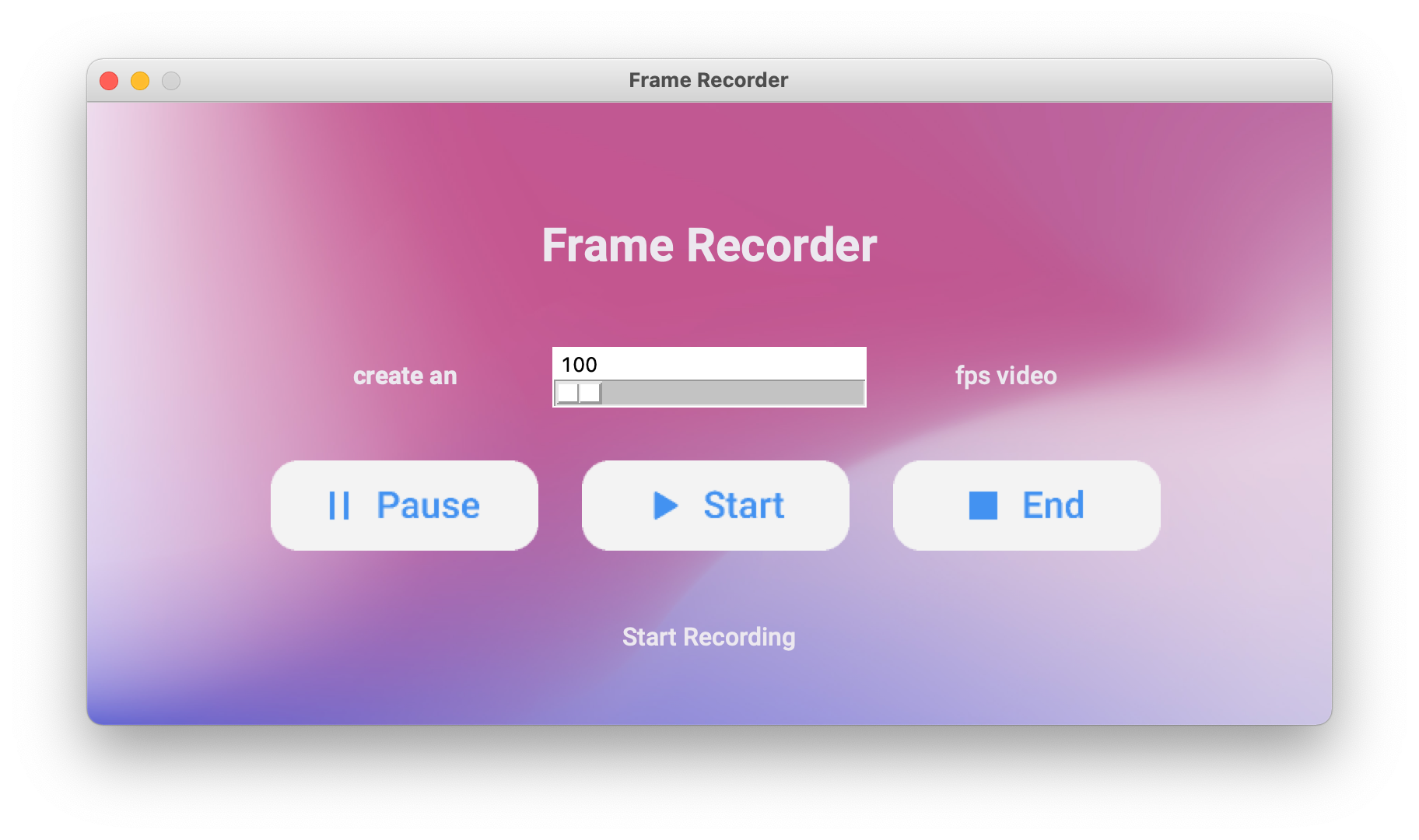
  • Builders of real desktop utilities; the README lists HotinGo, CodTubify, BeAnonymous, Frame Recorder, WhatBulk, and Atarbals-Modern-Antivi as examples produced with it.

Getting started

Install with pip install tkdesigner, which requires Python 3.9 or newer, then run tkdesigner "$FILE_URL" "$FIGMA_TOKEN" from a shell, quoting the Figma URL because such links usually contain ? and & query parameters. A product page and community Discord are linked from the project.

How it compares

No comparable generator is named in the facts supplied, so Tkinter-Designer stands alone in this registry: it is not a Figma alternative and not a Tkinter replacement, but the bridge between the two. Figma remains the design surface and Tkinter remains the runtime; Tkinter-Designer is the only component in that chain that converts one into the other.

When to use it — and when not to

A self-hoster operates very little beyond a Python 3.9+ environment, a Figma account, and an API token, but that Figma dependency is real: no account or token means no generation. The tool suits developers who design in Figma or who are willing to start there, and it is a poor fit for anyone who needs a GUI builder that runs entirely offline or who expects hand-tuned widget behaviour to survive regeneration, since generated code is a starting point onto which commands must still be attached. The README is also thin on internals and troubleshooting, so expect to read the generated output to understand what the CLI produced.

project readme (upstream, from github) — read inline

bloom-banner-01-light-tags-1500x500

logo

Tkinter Designer

Drag & Drop GUI Creator

Tkinter Designer - No-code solution for Python GUI's | Product Hunt


Translations


💡 Introduction

Tkinter Designer was created to speed up the GUI development process in Python. It uses the well-known design software Figma to make creating beautiful Tkinter GUIs in Python a piece of cake 🍰.

Tkinter Designer uses the Figma API to analyze a design file and create the respective code and files needed for the GUI. Even Tkinter Designer's GUI is created using Tkinter Designer.

Tkinter Designer GUI

📢 Announcement

🎉 Multi frame support is here! 🎉

You can now create multiple frames in a single design file and Tkinter Designer will create the respective code and files for each frame. This is a huge step for Tkinter Designer and I'm really excited to see what you guys create with it.

Feel free to share your creations with the community on Discord.

If you encounter any bugs or have any suggestions, please create an issue here.

☄️ Advantages of Tkinter Designer

  1. Interfaces with drag and drop.
  2. A great deal quicker than writing code by hand
  3. Produce more gorgeous interfaces

⚡️ Read the instruction here

View the YouTube video or read the instructions below.

Instructions Youtube Tutorial

Requirements

Tkinter Designer supports Python 3.9 and newer. Install it with:

pip install tkdesigner

The CLI accepts both current figma.com/design/... links and legacy figma.com/file/... links. If you select a specific frame before copying the Figma link, Tkinter Designer will generate that selected frame. Always wrap Figma URLs in quotes when running from a shell, because Figma links often include ? and & query parameters.

tkdesigner "$FILE_URL" "$FIGMA_TOKEN"

To generate a class-based Tkinter app:

tkdesigner --template class $FILE_URL $FIGMA_TOKEN

To generate one app with Back/Next navigation across multiple Figma frames:

tkdesigner --template pages $FILE_URL $FIGMA_TOKEN

Generated apps can also apply a ttk theme:

tkdesigner --theme clam $FILE_URL $FIGMA_TOKEN

Generated gui.py files can be imported from another Python file without starting mainloop() automatically, so you can attach commands separately and regenerate the UI later. Use -f when you want the CLI to clear and regenerate an existing build directory.

🦋 Supporting Tkinter Designer

Consider making a donation to the Tkinter Designer project if you or your business have benefited from it. This will accelerate Tkinter Designer's development! Making coffee is simple; I'll be happy to enjoy one.

Buy Me A Coffee Paypal

🔵 Discord server & Linkedin

Click the button below to join the discord server or Linkedin

Join Discord Server Connect on Linkedin

📐 How it Works

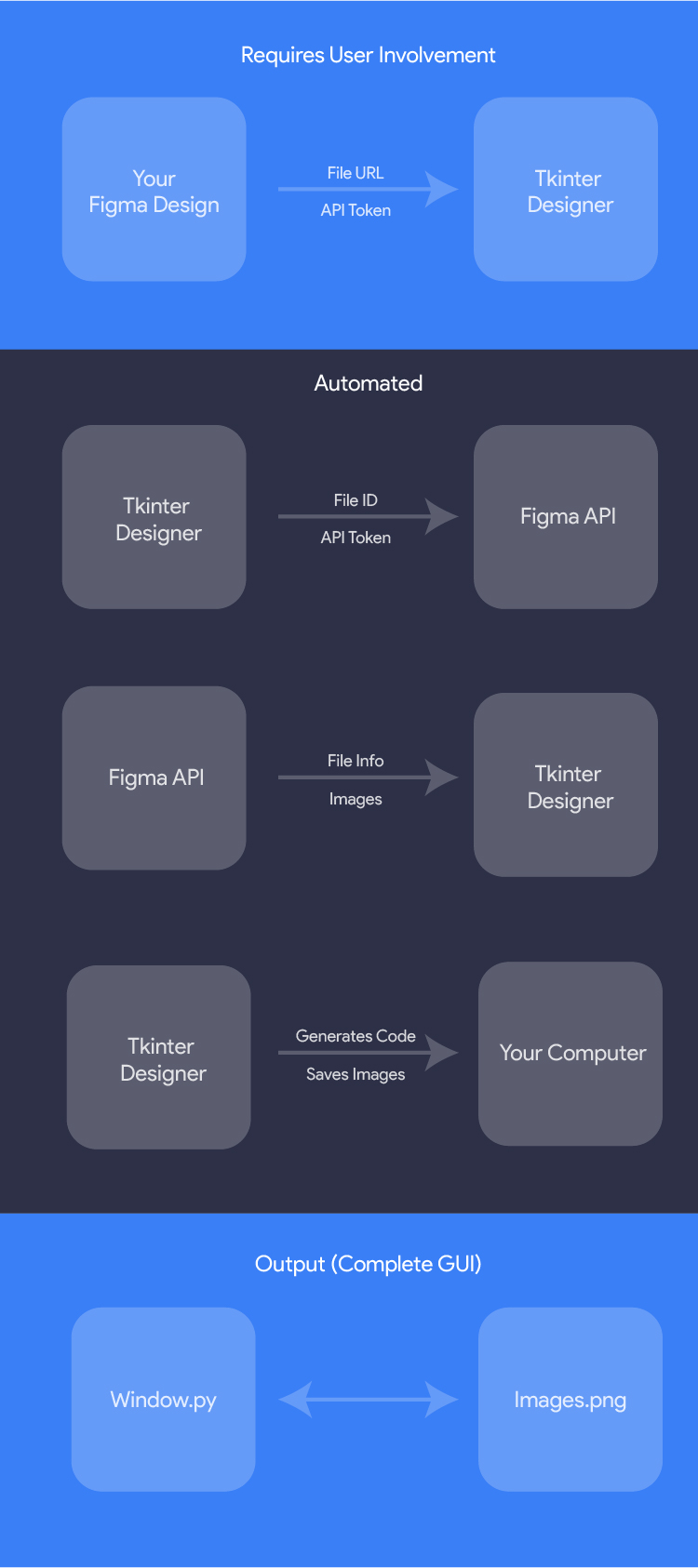
The only thing the user needs to do is design an interface with Figma, and then paste the Figma file URL and API token into Tkinter Designer.

Tkinter Designer will automatically generate all the code and images required to create the GUI in Tkinter.
How it Works

🎯 Examples

The possibilities are endless with Tkinter Designer, but here are a couple of GUIs that can be perfectly replicated in Tkinter.

The following are not my creations.

HotinGo (More Info)

Example 3

CodTubify (More Info)

Example 3

BeAnonymous (More Info)

Example 1

Frame Recorder (More Info)

Example 3

WhatBulk (More Info)

Example 3

Atarbals-Modern-Antivirus (More Info)

Example 3

🔥 Showcase

Please let me know if Tkinter Designer was used to create your app. More illustrations will be beneficial for other people!

(See: Contact Me) or use Show and Tell section in Discussions.

📄 License

Tkinter Designer is licensed under the BSD 3-Clause "New" or "Revised" License.
View Here.

Permissions Restrictions Conditions
✓ Commercial Use × Liability 🛈 License and Copyright Notice
✓ Modification × Warranty
✓ Distribution
✓ Private Use

Contribute

All contributions from the open-source community, individuals, and partners are welcomed. Our achievement is a result of your active participation.

Contributing guidelines

Code of conduct

LEARN.md

Connect with me on [![Linkedin](https://img

readme truncated — read the full docs on github

Frequently asked questions

Is Tkinter-Designer free to use?

Tkinter-Designer is open source under the BSD-3-Clause licence. There is no licence fee and no seat count — you can self-host it or, where the project offers one, pay a vendor for a managed version instead.

What does Tkinter-Designer do?

An easy and fast way to create a Python GUI 🐍

What is Tkinter-Designer written in?

Tkinter-Designer is primarily written in Python. Its source is publicly available at https://github.com/ParthJadhav/Tkinter-Designer, and it has 10,265 GitHub stars.