titanium-web-proxy is a free, open source networking & connectivity project written in C# and released under MIT. It has 2,010 GitHub stars, 662 forks and 0 open issues, and was last pushed 2 hours ago. On this registry it ranks #45 of 67 tracked projects in Networking & Connectivity, with 5 head-to-head comparisons available.

What is titanium-web-proxy?

Titanium Web Proxy is a cross-platform HTTP(S) proxy for Windows, Linux, and macOS, available as a C# library, a command-line reverse proxy, and a desktop MITM debugger.

What it is

Titanium Web Proxy is an open-source proxy suite written in C# that ships in three interchangeable forms: the Titanium.Web.Proxy NuGet library for embedding a proxy inside a .NET application, the Titanium.Cli command-line tool (invoked as titanium or twp) that runs the same engine as a standalone reverse or edge proxy, and the Titanium Inspector, a native desktop application for intercepting and examining traffic. The library is MIT-licensed and targets .NET 10 or later, while the CLI and Inspector downloads are self-contained builds that need no SDK to run.

The project solves the problem of inspecting and controlling HTTPS traffic without giving up modern protocol support or deployment flexibility. It decrypts and inspects encrypted requests in a desktop interface, and it is built to keep working when a target server refuses a proxied connection: when blocking is detected — for instance through TLS fingerprinting — the proxy automatically falls back to tunnelling that traffic rather than failing. It replaces hand-rolled interception code in .NET applications, and in front of services it takes the place of a separately installed proxy server.

Key capabilities

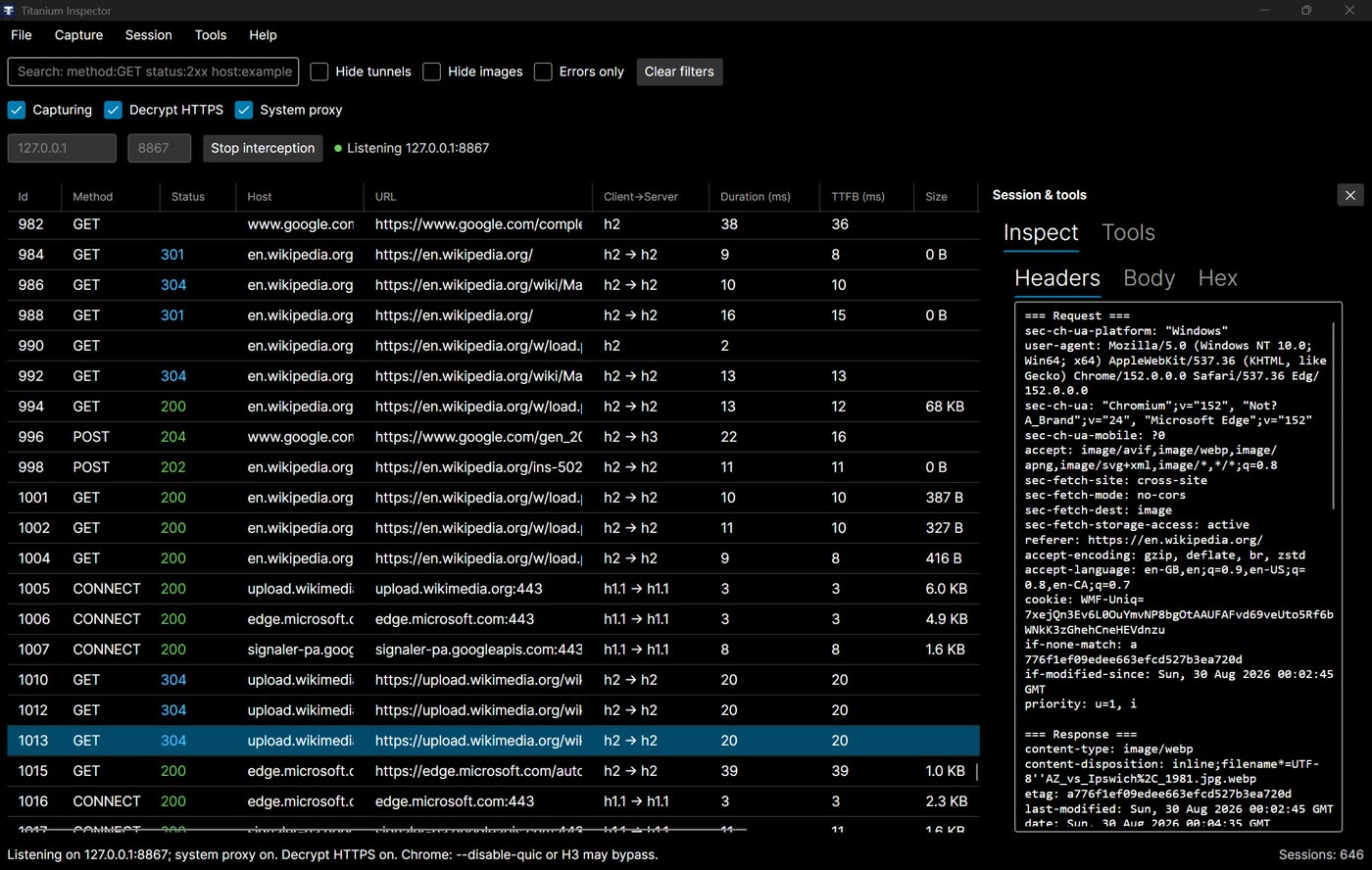
  • Decrypts and inspects HTTPS in a native Inspector on Windows, macOS, and Linux, with AutoResponder, Map Local/Remote, breakpoints, a Composer, HAR export, and curl/fetch output.
  • Detects when a server blocks the proxy for reasons such as TLS fingerprinting and automatically tunnels that traffic.
  • Speaks HTTP/2 by default with optional HTTP/3, plus WebSocket, gRPC, SSE, and GraphQL rules handled in the same rules grid.
  • Runs as a reverse or edge proxy from the CLI, configured by YAML, with load balancing, ACME, and live reload.
  • Embeds in .NET through the MIT-licensed Titanium.Web.Proxy package on NuGet.
  • Installs as a boot-persistent service via titanium service install -c twp.yaml, alongside foreground operation with titanium run -c twp.yaml.
  • Publishes throughput measurements for tiny keep-alive GETs, 64 KB GET/POST bodies, WebSocket, and unary gRPC on the same harness used to benchmark YARP, nginx, HAProxy, and Envoy.

Who uses it and how

  • .NET developers who add dotnet add package Titanium.Web.Proxy to an application and start a ProxyServer bound to an address such as 127.0.0.1:8000 to log or filter requested URLs.
  • Developers debugging client traffic in the Inspector, replaying requests through Composer, stubbing responses with AutoResponder, and sharing HAR captures.
  • Operators running a YAML-configured reverse or edge proxy in front of services, starting it in the foreground during development and switching to titanium service install for machine boot.
  • Teams adding a control plane, dashboard, and observability by enabling plus.enabled: true after titanium update --plus.

Getting started

Install the CLI and Inspector from the Download page as MSI, DMG, AppImage, .deb, .rpm, or zip and run titanium run -c twp.yaml; alternatively add the library with dotnet add package Titanium.Web.Proxy.

How it compares

Among the reverse-proxy tools it is measured against — YARP, nginx, HAProxy, and Envoy — Titanium Web Proxy is distinguished by being a .NET library first, so the same MIT-licensed engine can sit in front of services from the CLI or run embedded inside an application for traffic interception. The Inspector and CLI are distributed as self-contained downloads rather than packages requiring a runtime SDK, and benchmark results for both tiny and heavier request sizes are published against those four tools on a common harness.

When to use it — and when not to

The library requires .NET 10 or later and embeds a MITM or reverse proxy into your own process, so you take on operating that process rather than a pre-built server; the CLI, by contrast, ships self-contained and is configured through a twp.yaml file. Note that the Inspector is free for personal and education use only, so commercial inspection use should be checked against the project's terms first, and the deeper control-plane, dashboard, and observability features sit behind the optional Plus tier.

project readme (upstream, from github) — read inline

Titanium Web Proxy

A lightweight, high-performance HTTP(S) proxy for Windows, Linux, and macOS.

Website · Download · Docs · Releases

Product Best for
Titanium.Cli (titanium / twp)
Download
Standalone reverse / edge proxy from the command line
Titanium Inspector
Download
Desktop MITM debugger — session grid, inspectors, AutoResponder, breakpoints, HAR export
Titanium.Plus
titanium update --plus (after installing CLI)
Optional extra features for CLI such as control plane, dashboard, observability
Titanium.Web.Proxy
NuGet
Embed a proxy (MITM and/or reverse) in a .NET app

Requires .NET 10 or later for the library. CLI and Inspector downloads are self-contained (no SDK needed to run them).

Build NuGet NuGet downloads

What you can do

  • Decrypt and inspect HTTPS in a native desktop Inspector on Windows, macOS, and Linux — AutoResponder, Map Local/Remote, breakpoints, Composer, HAR, curl/fetch
  • When a server blocks the proxy (TLS fingerprinting or other reasons), we detect it and automatically tunnel that traffic
  • Speak modern HTTP — HTTP/2 by default, optional HTTP/3, WebSocket, gRPC, SSE, GraphQL rules in the same grid
  • Run the same engine as a reverse / edge proxy from the CLI (YAML, load balancing, ACME, live reload)
  • Embed in .NET via NuGet (MIT); Inspector is free for personal and education use

Full catalog: Features. Protocol coverage: protocol support matrix. HTTP/3 packaging: HTTP/3 wiki.

Performance

Tiny keep-alive GET (~56 B) on common reverse wires, plus WebSocket and unary gRPC:
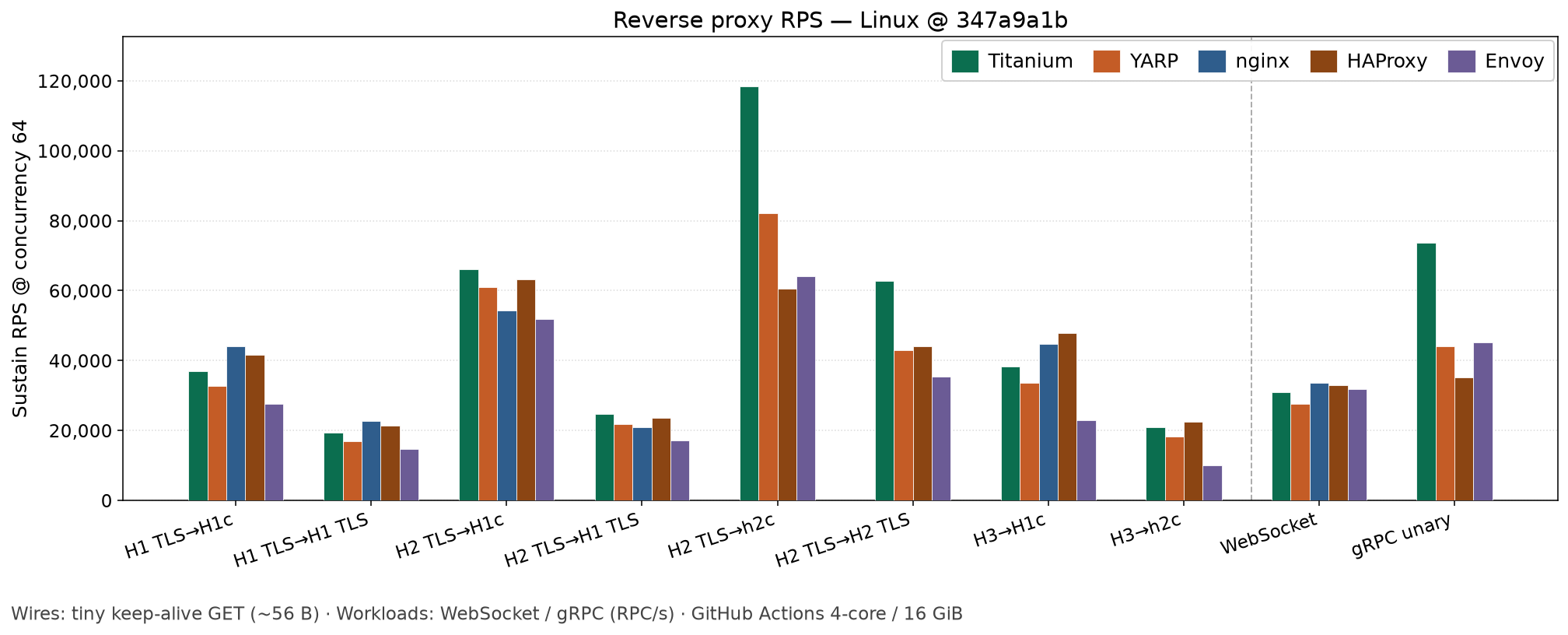
Practical reverse proxy throughput on Linux (tiny requests)

Heavier reverse load (64 KB GET/POST on typical wires):
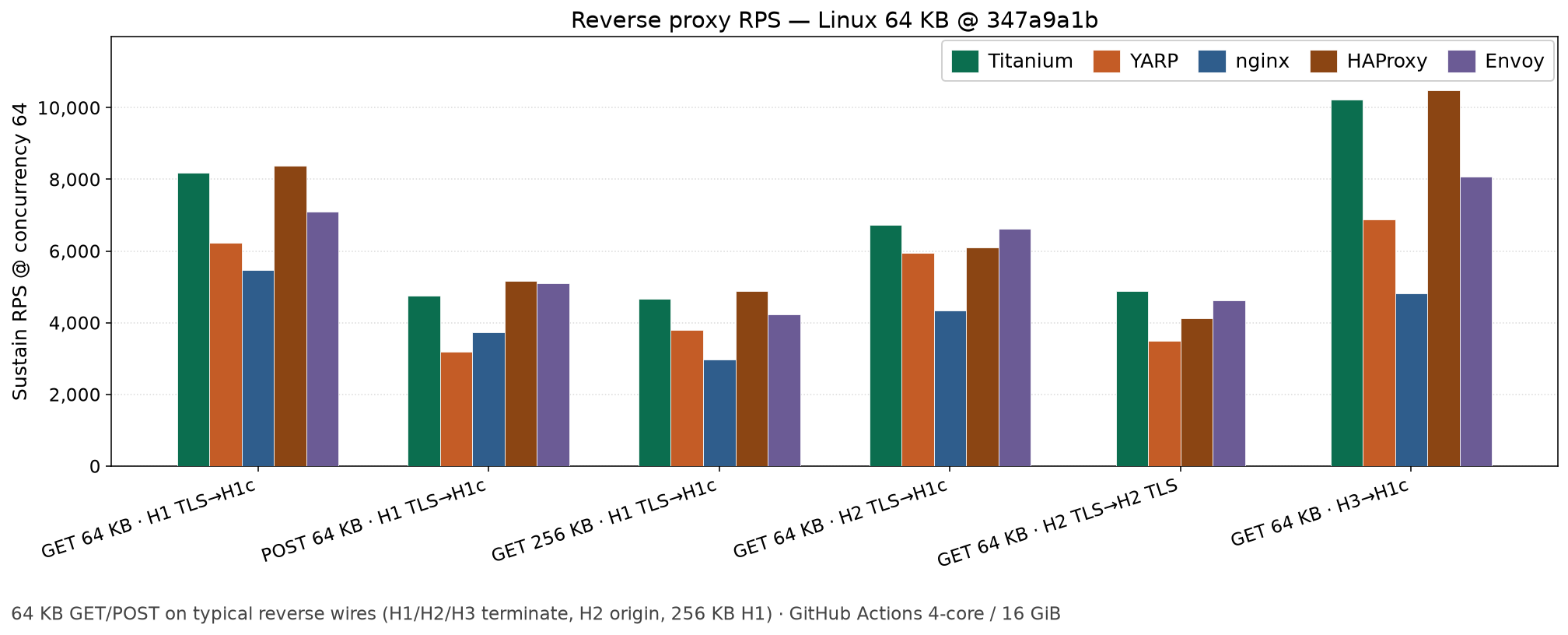
Practical reverse proxy throughput on Linux (64 KB)

RPS is requests per second (gRPC bars are RPC/s). Compared on the same harness vs YARP, nginx, HAProxy, and Envoy. See Performance.

Installation

Inspector and CLI (Windows, Linux, macOS): use Download — MSI / DMG / AppImage / .deb / .rpm / zip. Short walkthrough: Install.

After the CLI is on your PATH (or in the current folder):

titanium run -c twp.yaml
titanium test -c twp.yaml
titanium version --check
titanium update

titanium run is foreground (Ctrl+C to stop). Boot persistence: titanium service install -c twp.yaml — CLI — service. Each CLI zip also includes a twp alias.

Optional Plus: titanium update --plus, then plus.enabled: true — Plus.
Library (.NET)

dotnet add package Titanium.Web.Proxy
# Prerelease / beta:
dotnet add package Titanium.Web.Proxy --prerelease

Quick start (library)

Explicit HTTP(S) proxy on 127.0.0.1:8000 that logs each requested URL:

using System;
using System.Net;
using System.Threading.Tasks;
using Microsoft.Extensions.Logging;
using Titanium.Web.Proxy;
using Titanium.Web.Proxy.EventArguments;
using Titanium.Web.Proxy.Models;

using var proxyServer = new ProxyServer();

proxyServer.Logging.MinimumLevel = LogLevel.Information;
proxyServer.BeforeRequest += OnRequest;

var endPoint = new ExplicitProxyEndPoint(IPAddress.Loopback, 8000, decryptSsl: true);
proxyServer.AddEndPoint(endPoint);

// Create and trust the root certificate used to decrypt HTTPS traffic.
proxyServer.CertificateManager.EnsureRootCertificate(
    userTrustRootCertificate: true,
    machineTrustRootCertificate: false);

proxyServer.Start();
proxyServer.Logger.LogInformation("Proxy listening on 127.0.0.1:8000. Press Enter to stop.");
await Console.In.ReadLineAsync();
proxyServer.Stop();

Task OnRequest(object sender, SessionEventArgs e)
{
    proxyServer.Logger.LogInformation("{Url}", e.HttpClient.Request.Url);
    return Task.CompletedTask;
}
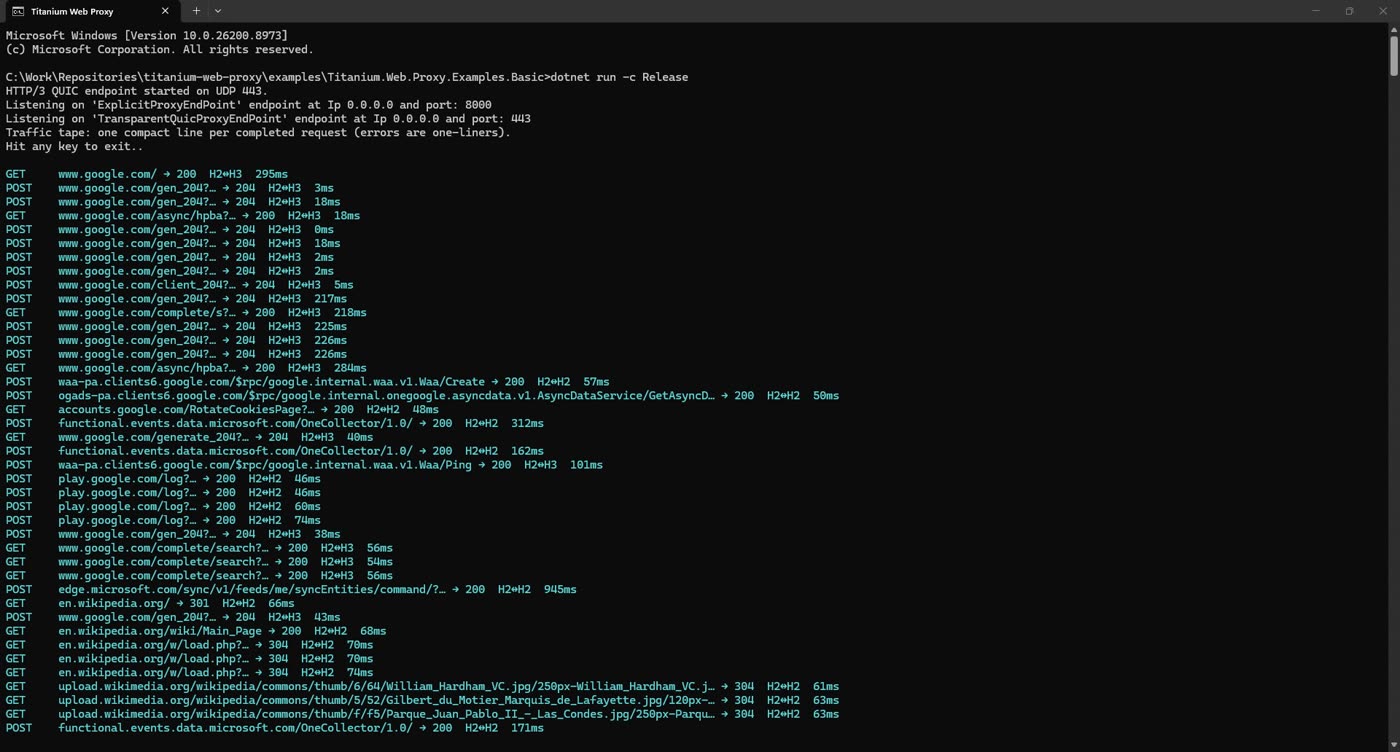
Point your client at 127.0.0.1:8000 as its HTTP and HTTPS proxy. Trusting a generated root certificate changes the current user's certificate store — only do this on a machine you control.

Examples and documentation

Support and contributing

Code quality

Quality Gate Coverage Lines of Code Bugs Vulnerabilities Code Smells Security Rating Reliability Rating Maintainability Rating Duplicated Lines Technical Debt

Maintainers

Actively maintained by justcoding121. Past collaborator: honfika.

License

Titanium.Web.Proxy and Titanium.Cli are MIT. Titanium Inspector and Titanium.Plus are PolyForm Noncommercial 1.0.0.

Frequently asked questions

Is titanium-web-proxy free to use?

titanium-web-proxy is open source under the MIT licence. There is no licence fee and no seat count — you can self-host it or, where the project offers one, pay a vendor for a managed version instead.

What does titanium-web-proxy do?

A cross-platform high performing HTTP(S) proxy server in C#.

What is titanium-web-proxy written in?

titanium-web-proxy is primarily written in C#. Its source is publicly available at https://github.com/justcoding121/titanium-web-proxy, and it has 2,010 GitHub stars.