
tiny-rdm is a free, open source databases project written in Vue and released under GPL-3.0. It has 13,108 GitHub stars, 660 forks and 178 open issues, and was last pushed 2 months ago. On this registry it ranks #62 of 143 tracked projects in Databases, with 5 head-to-head comparisons available.

What is tiny-rdm?

Tiny RDM (Tiny Redis Desktop Manager) is a modern, lightweight, cross-platform Redis GUI client for Mac, Windows, and Linux, distributed under GPL-3.0 and also offered as a Docker-deployable web version, for developers and operators who need to inspect and edit Redis data without a heavy desktop tool.

What it is

Tiny RDM is a Redis desktop manager built with a Vue frontend and a Go backend through Wails. On the desktop it runs on Webview2 and does not embed a browser, which is the source of its lightweight footprint. The interface is built with Naive UI and IconPark and ships light and dark themes, along with a user interface available in multiple languages including English, Simplified Chinese, Traditional Chinese, Japanese, Korean, French, Spanish, Portuguese (Brazil), Russian, and Turkish. The same codebase is also published as a web version that can be deployed with Docker, so a team can reach the same functionality through a browser on port 8086 instead of installing a client on each machine.

The concrete problem it solves is the day-to-day command-line work of listing, inspecting, and editing Redis data. Rather than assembling raw commands by hand, users get visual CRUD over Lists, Hashes, Strings, Sets, Sorted Sets, and Streams, segmented loading that makes it practical to list millions of keys using SCAN, and first-class handling of values that are encoded or compressed. It also removes the friction of reaching Redis instances that are not directly exposed, covering SSH Tunnel, SSL, Sentinel Mode, Cluster Mode, HTTP proxy, and SOCKS5 proxy connections. Project home is tinyrdm.com, and the repository carries 13108 stars and 660 forks.

Key capabilities

  • Visual key-value operations with full CRUD for Lists, Hashes, Strings, Sets, Sorted Sets, and Streams.
  • Connection management covering SSH Tunnel, SSL, Sentinel Mode, Cluster Mode, HTTP proxy, and SOCKS5 proxy.
  • SCAN-based segmented loading for listing millions of keys, plus segmented loading and querying for List, Hash, Set, and Sorted Set types.
  • Multiple data viewing formats with decode and decompression methods, extendable through a custom data encoder and decoder for value display.
  • Monaco Editor integration alongside a command-line mode, a command operation history log, a slow logs list, and real-time command monitoring.
  • Publish/subscribe support, plus import and export of data and of connection profiles.
  • Light and dark themes through Naive UI and IconPark, in a Webview2 build that carries no embedded browser.

Who uses it and how

  • Individual developers on Mac, Windows, or Linux who download a release build and point it at local or remote Redis instances.
  • Teams that run the web version as a container on port 8086, setting ADMIN_USERNAME and ADMIN_PASSWORD and mounting ./data:/app/tinyrdm for persistence, so colleagues share one browser-accessible console.
  • Operations engineers who reach production Redis through an SSH tunnel, Sentinel Mode, Cluster Mode, or an HTTP or SOCKS5 proxy rather than a direct connection.
  • Developers working with encoded or compressed values who configure a custom encoder and decoder so stored data is readable in the UI.
  • Users facing very large keyspaces who rely on SCAN-based segmented loading rather than a single blocking listing.

Getting started

Desktop builds are downloaded free from the GitHub releases page, with a macOS quarantine note that requires sudo xattr -d com.apple.quarantine /Applications/Tiny\ RDM.app if the app will not open after installation. The web version runs from the image ghcr.io/tiny-craft/tiny-rdm:latest via docker compose up -d, then serves http://localhost:8086; building from source needs Go, Node.js 20 or later, and NPM 9 or later, followed by wails dev.

How it compares

The facts provided name no competing products and no paid alternatives that Tiny RDM replaces, so it stands alone in this registry. Its dependencies, Wails, Naive UI, and IconPark, are building blocks rather than peers.

When to use it — and when not to

A self-hoster taking the web route must operate a Docker container, set administrator credentials, and maintain a persistent data volume, though no external database, object storage, or SMTP service is required. It is a poor fit for anyone who cannot accept the GPL-3.0 licence, who wants a hosted service rather than something they deploy and patch themselves, or who needs a desktop client without the manual download-and-quarantine step on macOS. The repository also carries 178 open issues, so prospective users should review the tracker before standardising on it.

project readme (upstream, from github) — read inline

Tiny RDM

English | 简体中文 | 繁體中文 | 日本語 | 한국어 | Français | Español | Português (BR) | Русский | Türkçe

License GitHub release GitHub All Releases GitHub stars GitHub forks AtomGitStars Discord X

Tiny RDM is a modern lightweight cross-platform Redis desktop manager available for Mac, Windows, and Linux. It also provides a web version that can be deployed via Docker.
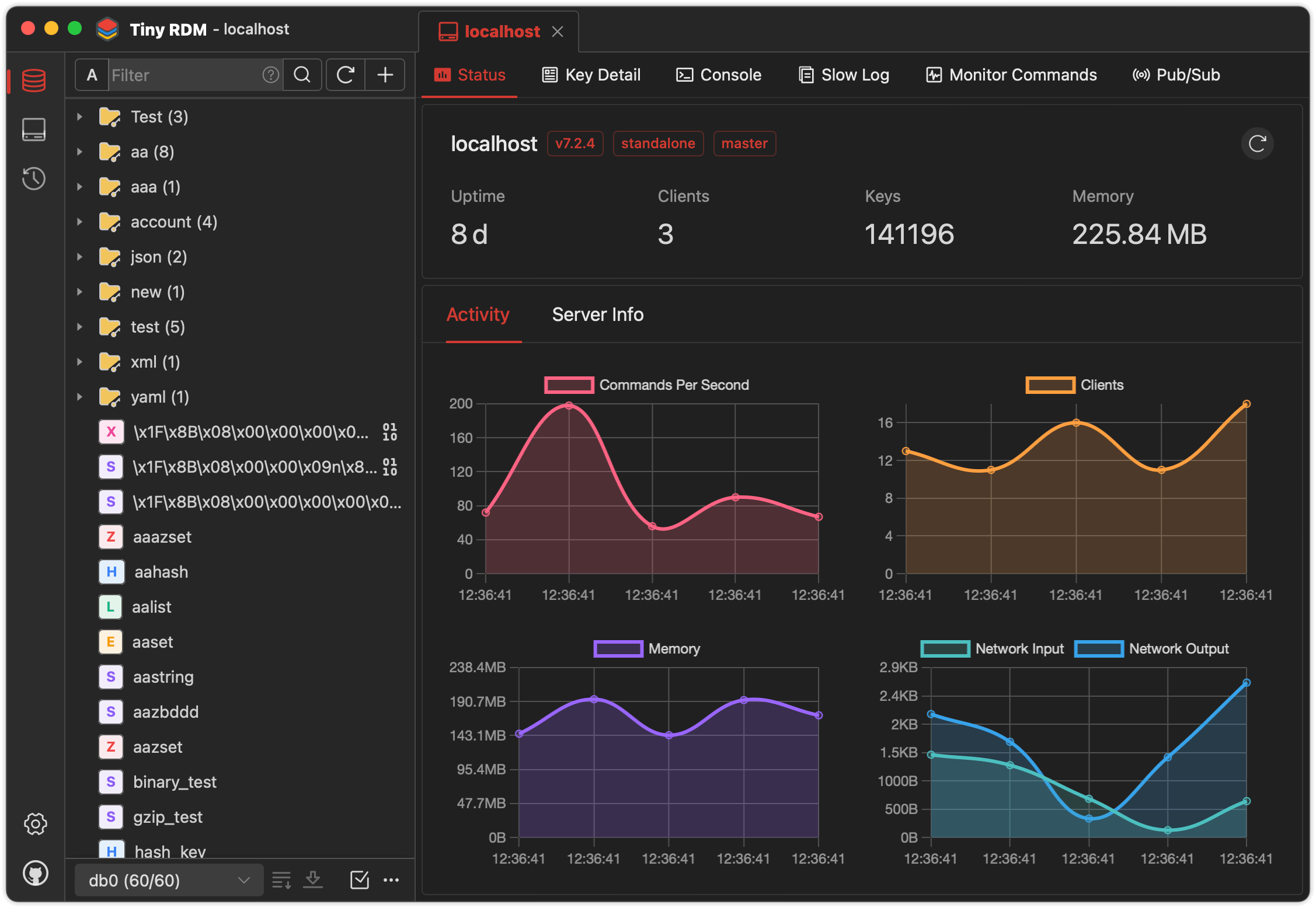
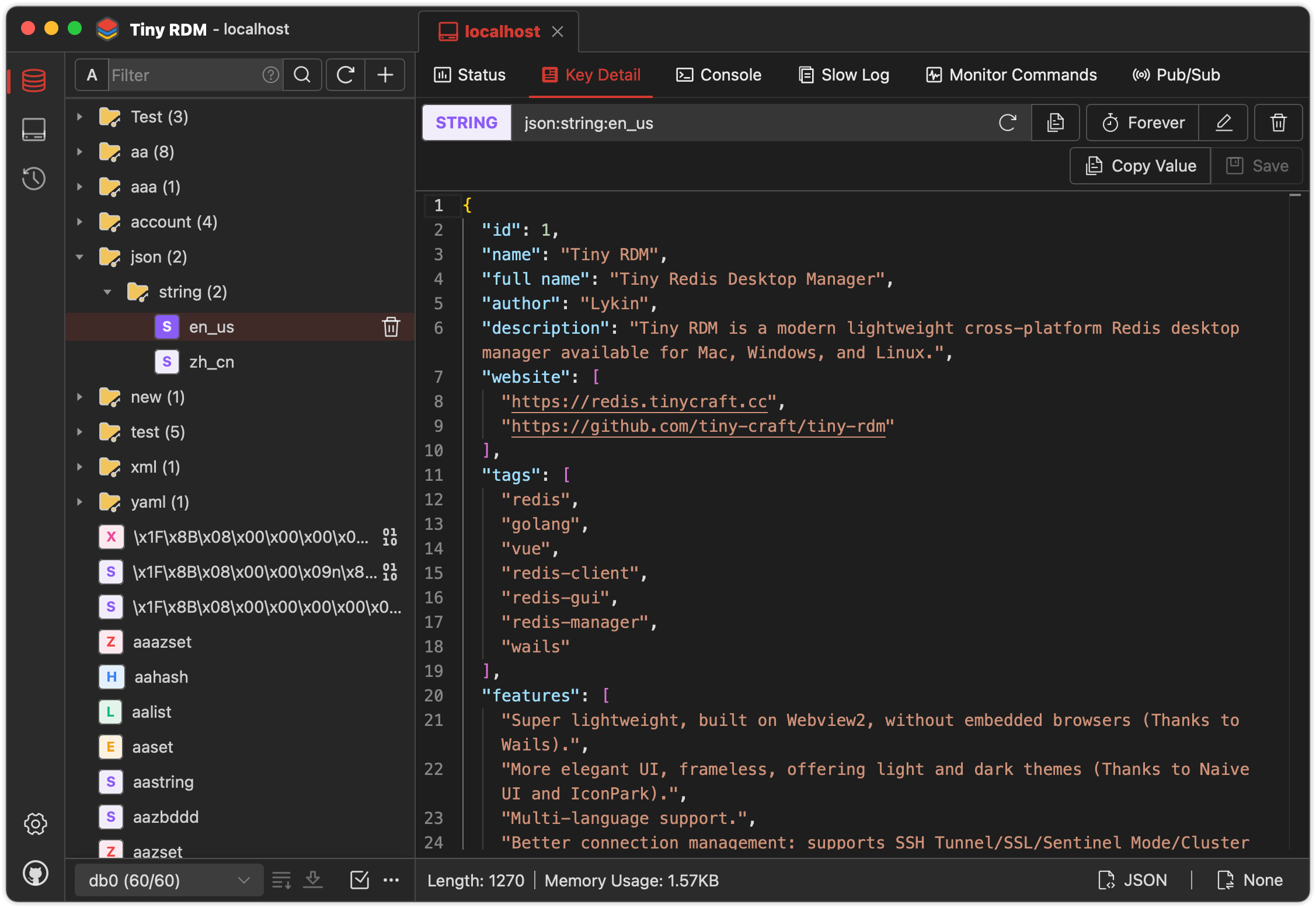
Feature

  • Super lightweight, built on Webview2, without embedded browsers (Thanks to Wails).
  • Provides visually and user-friendly UI, light and dark themes (Thanks to Naive UI and IconPark).
  • Multi-language support (Need more languages ? Click here to contribute).
  • Better connection management: supports SSH Tunnel/SSL/Sentinel Mode/Cluster Mode/HTTP proxy/SOCKS5 proxy.
  • Visualize key value operations, CRUD support for Lists, Hashes, Strings, Sets, Sorted Sets, and Streams.
  • Support multiple data viewing format and decode/decompression methods.
  • Use SCAN for segmented loading, making it easy to list millions of keys.
  • Logs list for command operation history.
  • Provides command-line mode.
  • Provides slow logs list.
  • Segmented loading and querying for List/Hash/Set/Sorted Set.
  • Provide value decode/decompression for List/Hash/Set/Sorted Set.
  • Integrate with Monaco Editor
  • Support real-time commands monitoring.
  • Support import/export data.
  • Support publish/subscribe.
  • Support import/export connection profile.
  • Custom data encoder and decoder for value display (Here are the instructions).

Installation

Available to download for free from here.

If you can't open it after installation on macOS, exec the following command then reopen:

 sudo xattr -d com.apple.quarantine /Applications/Tiny\ RDM.app

Build Guidelines

Prerequisites

  • Go (latest version)
  • Node.js >= 20
  • NPM >= 9

Install Wails

go install github.com/wailsapp/wails/v2/cmd/wails@latest

Pull the Code

git clone https://github.com/tiny-craft/tiny-rdm --depth=1

Build Frontend

npm install --prefix ./frontend

or

cd frontend
npm install

Compile and Run

wails dev

Docker Deployment

In addition to the desktop client, Tiny RDM also provides a web version that can be quickly deployed via Docker.

Using Docker Compose (Recommended)

Create a docker-compose.yml file:

services:
  tinyrdm:
    image: ghcr.io/tiny-craft/tiny-rdm:latest
    container_name: tinyrdm
    restart: unless-stopped
    ports:
      - "8086:8086"
    environment:
      - ADMIN_USERNAME=admin
      - ADMIN_PASSWORD=tinyrdm
    volumes:
      - ./data:/app/tinyrdm

Start the service:

docker compose up -d

Once started, visit http://localhost:8086 and log in with the credentials configured above.

Using Docker Command

docker run -d --name tinyrdm \
  -p 8086:8086 \
  -e ADMIN_USERNAME=admin \
  -e ADMIN_PASSWORD=tinyrdm \
  -v ./data:/app/tinyrdm \
  ghcr.io/tiny-craft/tiny-rdm:latest

Environment Variables

Variable Description Default
ADMIN_USERNAME Login username -
ADMIN_PASSWORD Login password -

Sponsor

Thanks to the following service providers for hosting sponsorship
Special thanks to FlyMux for sponsoring this project! FlyMux is committed to providing official, high-stability relay services for Claude Code and Codex, focusing on creating a seamless and efficient integration experience for developers. As an exclusive benefit for TinyRDM users, register via this link to receive a $5 bonus credit automatically added to your account.
Special thanks to NotIDC for sponsoring this project! NotIDC provides high-performance cloud infrastructure including cloud servers, bare metal, CDN, and security solutions, with global network coverage and reliable DDoS protection, helping developers deploy and scale applications efficiently.

About

Wechat Official Account

Frequently asked questions

Is tiny-rdm free to use?

tiny-rdm is open source under the GPL-3.0 licence. There is no licence fee and no seat count — you can self-host it or, where the project offers one, pay a vendor for a managed version instead.

What does tiny-rdm do?

Tiny RDM (Tiny Redis Desktop Manager) - A modern, colorful, super lightweight Redis GUI client for Mac, Windows, and Linux. It also provides a web version that

What is tiny-rdm written in?

tiny-rdm is primarily written in Vue. Its source is publicly available at https://github.com/tiny-craft/tiny-rdm, and it has 13,108 GitHub stars.