📈 TSP · A股智能量化工作台







自托管、零运维的 A 股「选股 + 监控 + 回测」量化工作台
多数据源能力路由 · 分钟级策略执行 · 全时段异动监控 · AI 辅助研究
✨ 核心功能 · 📸 界面预览 · 🏗️ 技术架构 · 🚀 快速开始 · ⚙️ 配置 · 📚 完整文档
[!IMPORTANT] 本项目以个人开源为主进行开发维护,数据源插件化,可任意接入第三方数据源。仅供学习研究使用。
⚠️ 本项目谨作为本地量化提供解决思路与方案,不作为投资软件或者看盘软件。明确不做:不对标同花顺 / 通达信,不内置「AI 荐股 / 涨停预测」。
📮 有任何项目问题可邮件联系 415333856@qq.com · 觉得有用请点个 ⭐ Star
💡 为什么做 TSP
| 用脚本/拼凑工具做量化,你大概率遇到过 | TSP 的解法 |
|---|---|
| 数据源绑死,换一家要重写整套拉数代码 | 能力路由矩阵:6 类数据集按源能力独立路由,随时换源,指标与回测口径不变 |
| 选股、回测、监控各用一套工具,口径对不上 | 全站统一 enriched 数据口径:选股 → 回测 → 监控 → 复盘一条链 |
| 盘中异动靠人盯盘,错过就是错过 | 竞价/盘中/偏移全时段异动 + 实时弹窗、语音播报、飞书推送 |
| 付费终端贵、云端平台数据出不了本地 | 自托管:Docker 单容器,数据全部落在本地 Parquet,零运维 |
✨ 核心功能
🔀 能力路由 |
🔍 选股引擎 |
📊 指标流水线 |
🧪 回测研究 |
🔬 因子平台 |
⛏️ 因子挖掘 |
🌡️ 市场环境 |
🚨 异动监控 |
📡 监控中心 |
📈 个股分析 |
🏆 连板梯队 |
🧰 数据扩展 |
📦 主要页面与功能
📊 行情总览
- 看板 Dashboard — 市场情绪评分 + 涨跌/成交额榜单 + 概念/行业领涨领跌(点击板块直达成分股,领涨股带涨跌幅) + 大盘异动事件流,一日全貌
- 自选 Watchlist — 自选股池,多分组管理(M:N),表格/卡片双视图,换手/量比/RSI 等实时指标,按档位分流实时刷新
- 指数 Indices — 沪深指数浏览与同步
🔍 选股与回测
- 策略 Screener — Polars 毫秒级扫描全 A 股,日线/分钟策略统一单池,按策略声明周期自动路由执行
- 回测 Backtest — 四种研究视图:
- 因子回测 — IC/IR、分层收益、多空组合,62+ 因子目录先筛掉无效指标
- 策略回测 — 净值曲线、回撤、夏普、胜率、盈亏比、蒙卡回撤,T+1/手续费/滑点/止损,SSE 流式进度;评分因子策略附带「因子归因」(胜/败单入场信号日因子对比)
- 分钟策略回测 — 逐交易日回放信号、分钟收盘入场,分钟级成交明细
- 验证 — 参数敏感性与滚动样本外
- 研究闭环:结果导出 CSV(概要/净值/交易明细/分标的统计) → 保存候选 → 一键载入复测
- 因子 Factors — 检验/因子库/编辑器/组合四 tab:IC·分层·Newey-West 检验、自定义 DSL 因子(25 算子点选、双语字段、我的因子模板)、版本与生命周期管理;因子库可一键生成排名策略,策略触发器可直接引用因子条件
- 挖掘 Mining — 嵌套样本外因子与策略挖掘:训练区间因子方向重估 + 相关性去重 + 多因子排名组合搜索,自有策略作对照轨;候选入库,显式确认后才发布,永不自动上线
📈 个股与板块分析
- 个股分析 Stock Analysis (Beta) — 日K + 9 类关键价位 + AI 四维分析(技术/基本面/财务/消息面)
- 财务分析 Financials — 利润表/资负表/现金流/关键指标(多源并集合并,fuyao 财务四表适配) + AI 解读
- 概念分析 / 行业分析 — ths 维度涨幅轮动矩阵 + 领涨/领跌主线 + 个股穿透
- 市场环境 Regime — 情绪周期 6 阶段(冰点/启动/主升/高潮/退潮/修复,连板梯队驱动,EMA 平滑 + 2 日确认)+ 概念/行业主线排名,与 5 档环境分并存
- 连板梯队 Limit Up Ladder — 连板层级统计 + 概念/行业分布 + 封单监控(可切换连跌梯队)
🔔 监控与复盘
- 监控中心 Monitor — 策略/个股信号/价格/异动四类规则,支持自选分组作用域,盘中实时弹窗 + 语音播报(播报个股名称与信号) + 触发记录持久化
- 持仓提醒 Lots — 记录个股/ETF 买入批次,自动生成止盈止损/到期监控规则
- 信号库 Signals — 内置预计算信号 + 自定义条件信号(含因子条件与 AI 生成),供策略触发器/回测/监控统一取用
- 异动监控 Abnormal Moves — 按交易时间线三 tab:
- 竞价异动 — 同花顺盘前风向标(含当日/次日真实收益对照、追高风险标记)+ 全市场竞价扫描(待采集任务)
- 盘中异动 — 涨停/炸板/翘板/跌停/新高/新低/放量当日信号聚合,零新增采集
- 偏移异动 — 交易所异动偏离值口径(主板 3 日 ±20%、创业板/科创板 ±30%、北交所 ±40%;10 日 +100%/−50%、30 日 +200%/−70%),实时接近度
- 复盘 Review (Beta) — 盘后 AI 自动生成市场复盘,注入龙虎榜资金动向与盘前风向标对照;可定时执行、推送飞书、下载 Markdown
🗄️ 数据与扩展
- 数据 Data — 本地数据画像与同步状态(维表/日K/除权/Enriched/指数/ETF/分钟K/财务),盘后管道与历史扩展
- 扩展分析 (动态菜单) — 把任意第三方/扩展数据字段配成一级菜单,与内置数据同台分析
- 设置 Settings — 数据源与能力检测(能力路由矩阵、档位徽章)、AI 接口、实时监控、扩展页面、菜单与系统设置
📸 界面预览
| 看板 Dashboard | 策略 Screener |
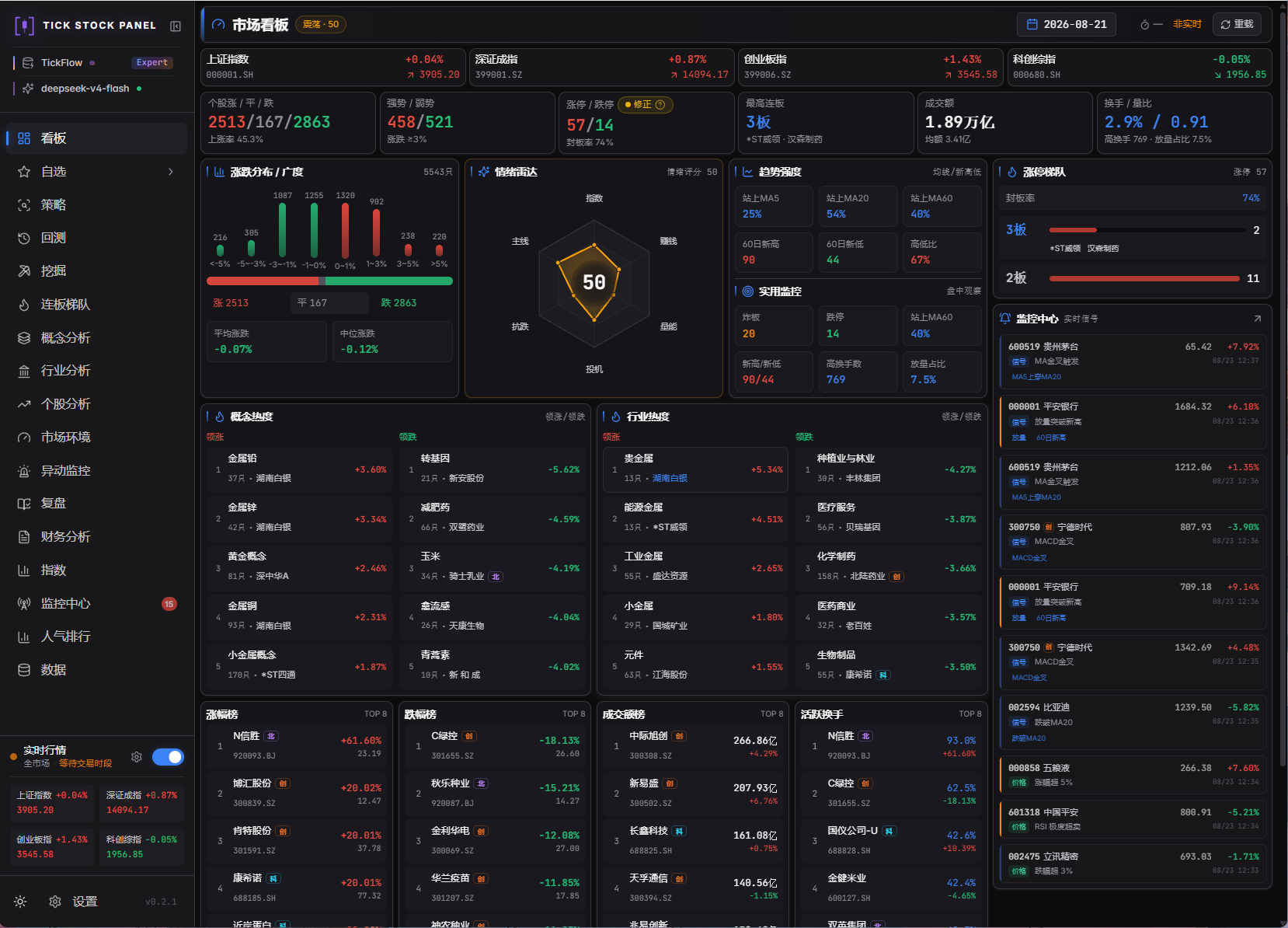 |
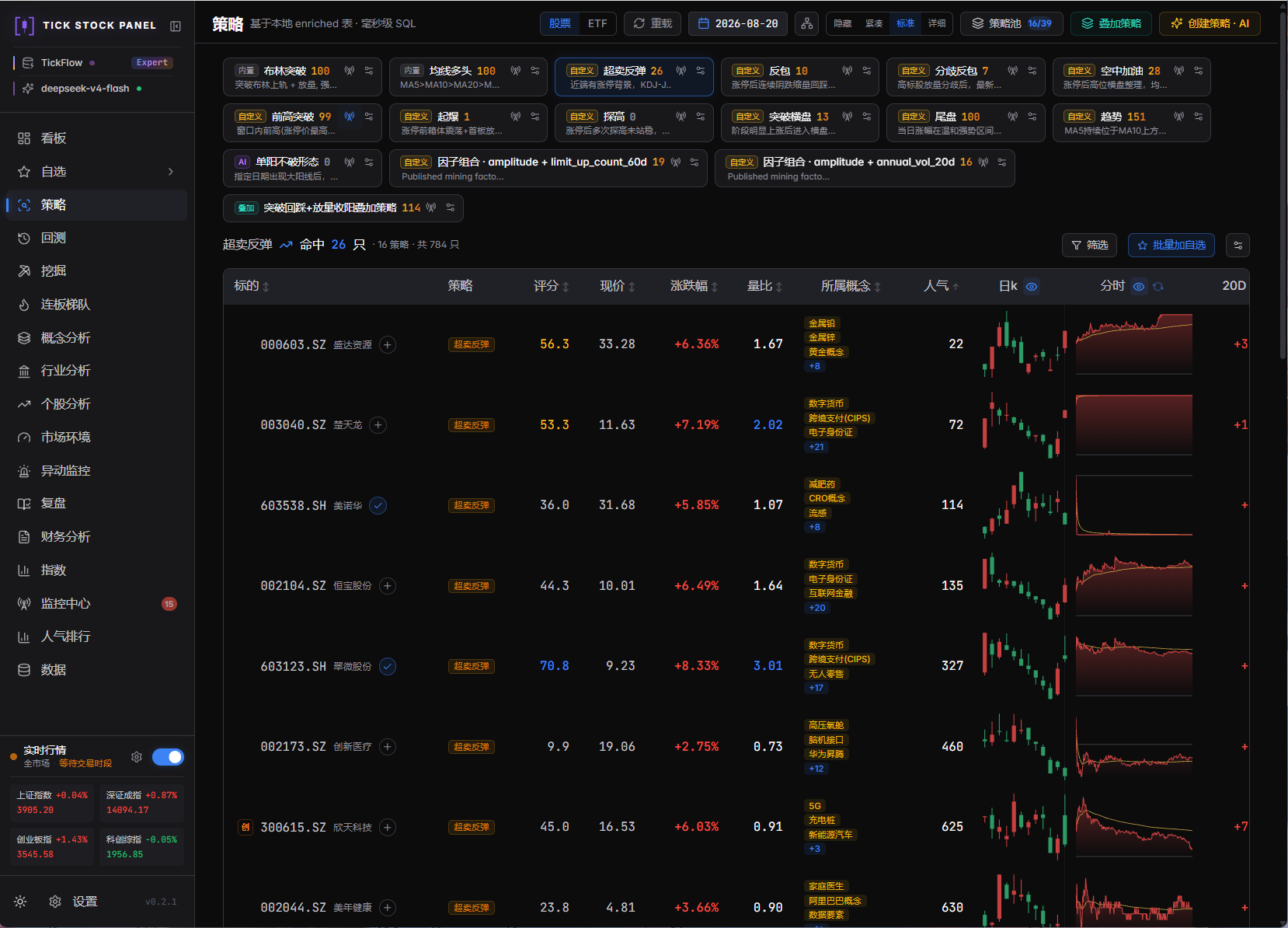 |
| 回测 Backtest | 挖掘 Mining |
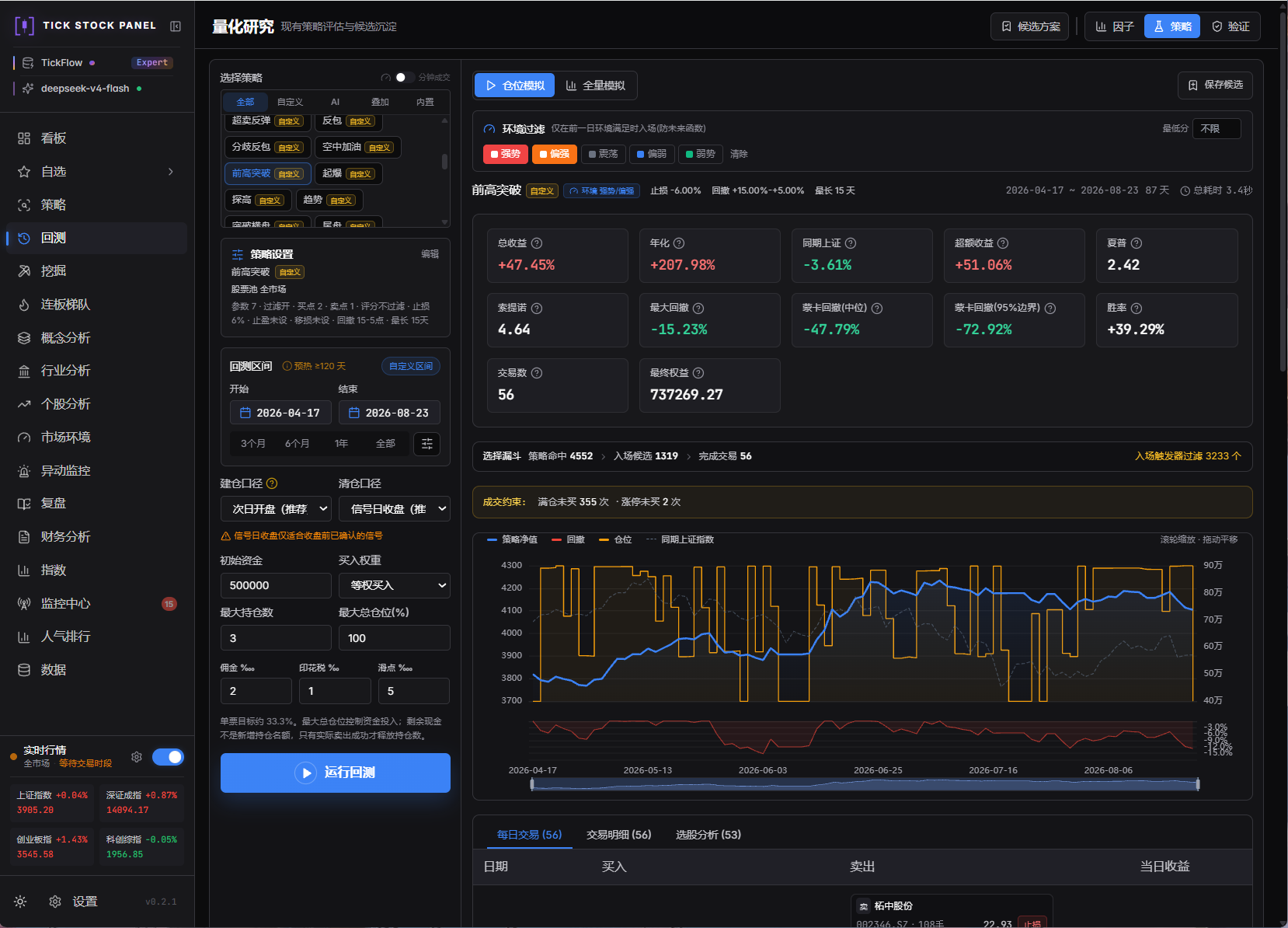 |
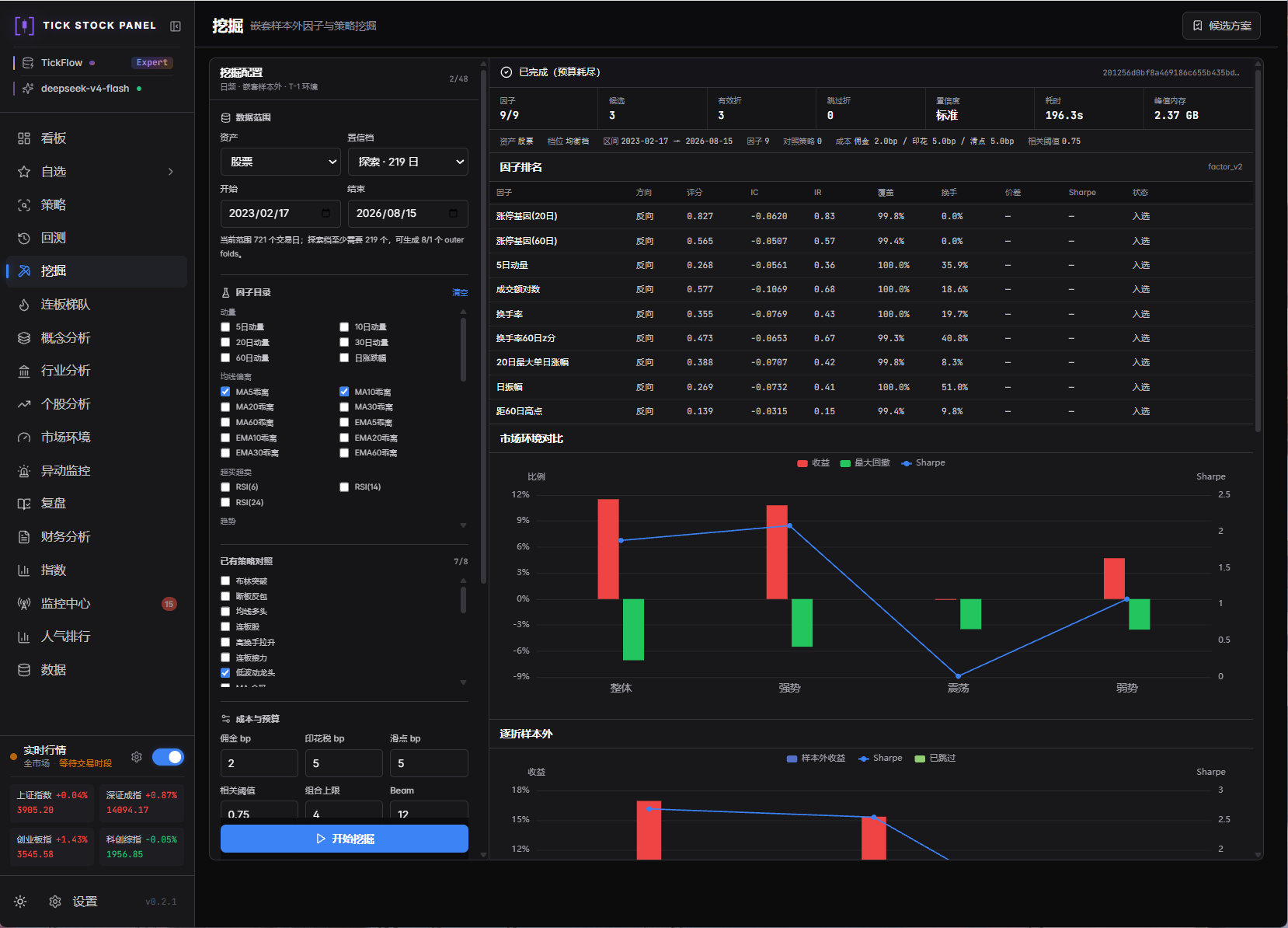 |
| 监控中心 Monitor | 市场环境 Regime |
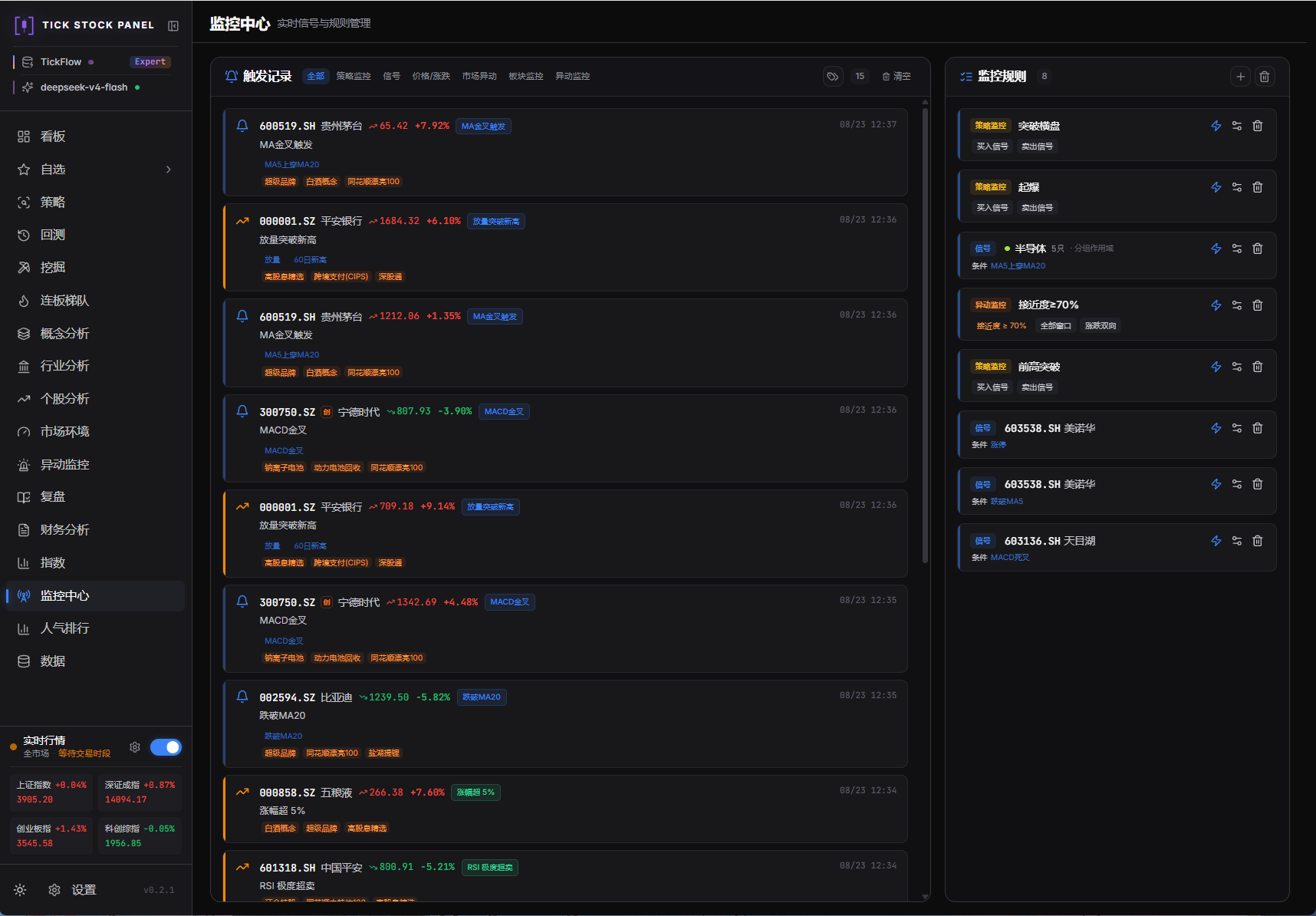 |
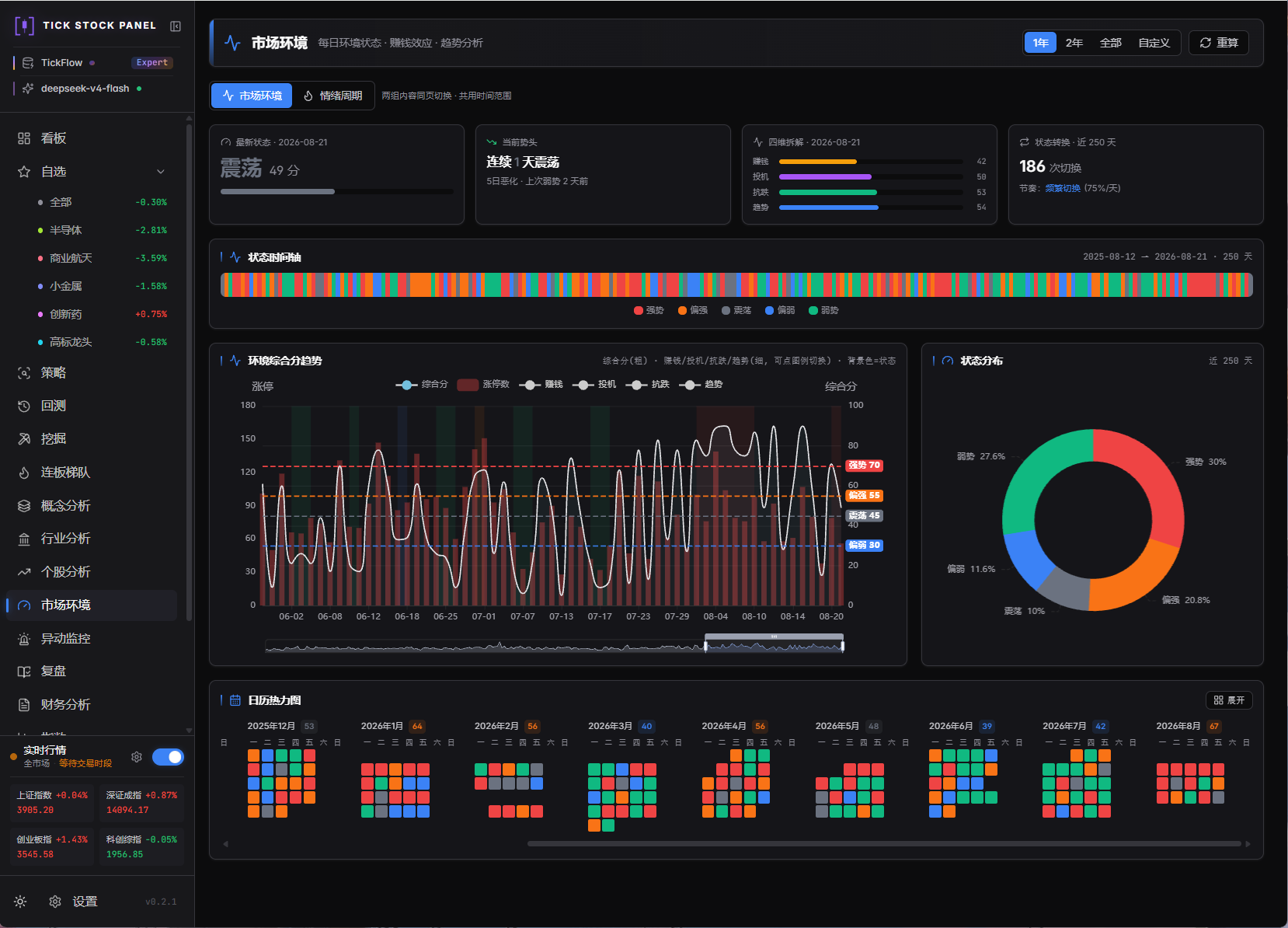 |
📸 查看更多界面截图 »
🏗️ 技术架构
分层总览
flowchart TB
    subgraph DATA["数据源层 · 插件化"]
        direction LR
        D1["TickFlow SDK"] ~~~ D2["fuyao<br/>同花顺 REST"] ~~~ D3["stock-sdk"] ~~~ D4["YAML 自定义源"] ~~~ D5["+ 更多插件…"]
    end

    subgraph ROUTE["能力路由层"]
        direction LR
        R(["多数据集 · 按能力独立路由 · 档位探测"])
    end

    subgraph STORE["存储层"]
        direction LR
        ST1[("Parquet 分区表")] ~~~ ST2[("DuckDB")] ~~~ ST3[("JSON 按日缓存")]
    end

    subgraph CALC["计算层 · Polars"]
        direction LR
        C1["指标流水线"] ~~~ C2["复权与信号"]
    end

    subgraph RES["研究层"]
        direction LR
        G1["因子引擎"] ~~~ G2["回测引擎"] ~~~ G3["因子挖掘"]
    end

    subgraph SVC["应用层 · FastAPI"]
        direction LR
        S1["REST · SSE"] ~~~ S2["监控引擎"] ~~~ S3["任务调度"] ~~~ S4["交易日探针"]
    end

    subgraph FE["呈现层 · React 18"]
        direction LR
        F1["功能页面"] ~~~ F2["图表可视化"] ~~~ F3["实时推送"]
    end

    subgraph EXT["二次开发与扩展 · 贯穿各层的插槽"]
        direction LR
        X1["自定义策略"] ~~~ X2["自定义信号"] ~~~ X3["扩展分析页面"] ~~~ X4["AI 接口"]
    end

    DATA --- ROUTE
    ROUTE --- STORE
    STORE --- CALC
    CALC --- RES
    RES --- SVC
    SVC --- FE
    FE ~~~ EXT

    classDef fe fill:#eef2ff,stroke:#6366f1,color:#312e81
    classDef svc fill:#ecfeff,stroke:#06b6d4,color:#164e63
    classDef res fill:#fff7ed,stroke:#f97316,color:#7c2d12
    classDef calc fill:#f0f9ff,stroke:#0ea5e9,color:#0c4a6e
    classDef store fill:#ecfdf5,stroke:#10b981,color:#064e3b
    classDef data fill:#fdf2f8,stroke:#ec4899,color:#831843
    classDef pluginSlot fill:#fdf2f8,stroke:#ec4899,color:#831843,stroke-dasharray:5 4
    classDef route fill:#faf5ff,stroke:#8b5cf6,color:#6b21a8,stroke-width:2px
    classDef ext fill:#f8fafc,stroke:#94a3b8,color:#334155,stroke-dasharray:5 4

    class F1,F2,F3 fe
    class S1,S2,S3,S4 svc
    class G1,G2,G3 res
    class C1,C2 calc
    class ST1,ST2,ST3 store
    class D1,D2,D3,D4 data
    class D5 pluginSlot
    class R route
    class X1,X2,X3,X4 ext

    style FE fill:#f5f3ff,stroke:#c7d2fe,color:#3730a3
    style SVC fill:#ecfeff,stroke:#a5f3fc,color:#155e75
    style RES fill:#fff7ed,stroke:#fed7aa,color:#9a3412
    style CALC fill:#f0f9ff,stroke:#bae6fd,color:#075985
    style STORE fill:#ecfdf5,stroke:#a7f3d0,color:#065f46
    style ROUTE fill:#faf5ff,stroke:#ddd6fe,color:#6b21a8
    style DATA fill:#fdf2f8,stroke:#fbcfe8,color:#9d174d
    style EXT fill:#f8fafc,stroke:#94a3b8,color:#334155,stroke-dasharray:7 5
关键机制
| 机制 | 说明 |
|---|---|
| 能力路由矩阵 | 各数据集按源声明能力独立路由,注册表集中定义、可扩展:TICKFLOW 档位探测(None/Free/Starter/Pro/Expert)+ 插件源能力声明,fail-closed(声明 pct_unit 未声明即拒)。同一数据集可随时换源,指标与回测口径不变 |
| 交易日探针 | fuyao 交易日历(确定性,含调休)→ tickflow 全市场行情时间戳探针(OR 语义)→ 工作日兜底;节假日自动停掉实时轮询与分钟增量,零无效请求 |
| 财务多源合并 | 按 (symbol, period_end) 报告期累积,多源取并集、逐列按公告日取最新(PIT);公告前一律空值,绝不填 0 |
| 非路由数据集直连 | 龙虎榜/盘前风向标/交易日历等 fuyao 专有能力不进路由矩阵,由独立服务直连消费——按日 JSON 缓存(历史不可变)、交易日回退、四态降级 |
| 回测执行隔离 | 回测在 spawn worker 子进程运行,持久 run ID,刷新/切页重连不丢任务;子进程结果消息经锁保护回传 |
| 分层缓存 | enriched 读取时现算指标(存储仅 15 列基础数据,现算 68 列指标与信号)+ 进程内快照缓存;扩展字段按日分区快照,页面即配即用 |
技术栈
| 层 | 选型 |
|---|---|
| 后端 |    APScheduler · sse-starlette |
| 数据 |  (计算)·  (查询)· Parquet(存储) |
| 回测 | 自研仓位模拟引擎(T+1/费用/滑点/分钟回放)· vectorbt(部分路径) |
| 数据源 | TickFlow 官方 SDK · fuyao(同花顺 REST) · 插件化扩展(stock-sdk 示例插件 · YAML 自定义源) |
| AI(可选) |  DeepSeek / 通义 / Ollama 等 |
| 前端 |     Tanstack Query · Lightweight Charts(TradingView 开源) ·  · dnd-kit |
| 部署 |  两阶段构建,前端 dist 拷进后端镜像 |
🚀 快速开始
已装 Docker?一条命令跑起来 ⬇️
docker run -d --name tsp -p 3018:3018 -v ${PWD}/data:/app/data ghcr.io/shy3130/tick-stock-panel:latest
打开 即可使用 · 多架构镜像(linux/amd64 · arm64)由 CI 自动发布,本地无需 Python / Node
| 方式 | 适合谁 | 前置要求 |
|---|---|---|
| A · GHCR 现成镜像(即上方一条命令) | 多数用户,拿来即用 ⭐ 推荐 | Docker |
| B · Compose 本地构建 | 跑自己改过的代码 / 全套挂载 | Docker |
| C · 本机 AI 代部署 | 完全不想碰命令行 | 任一本机 AI 编程助手 |
| D · Dev 模式 | 二次开发 | Python ≥ 3.11 · Node ≥ 20 · uv · pnpm(npm i -g pnpm) |
方式 A:GHCR 现成镜像(免本地构建,多数用户推荐)
本项目每次推送都由 GitHub Actions 自动构建多架构镜像并发布到 GHCR,拿来即用:
- 需要配置时:从 .env.example 复制出
.env,命令里加--env-file .env。 - 跑自己改过的代码:fork 后到仓库 Actions 页启用 workflow(fork 默认禁用),构建出的
ghcr.io//tick-stock-panel用法相同。 - 想用 compose 编排(挂载
.env/tiers.yaml):参考 docker-compose.yml,把build:段换成image: ghcr.io/shy3130/tick-stock-panel:latest。 - 现成镜像默认不含 stock-sdk 插件与老 CPU 兼容内核(合规与体积考虑),有此需求请用方式 B 自构建,详见 docs/deployment.md。
方式 B:Docker Compose(本地构建,全套挂载)
cp .env.example .env
docker compose up --build
# 打开 http://localhost:3018
🐳 Codex CLI 挂载、版本覆盖与插件开关(点开查看)
镜像内置固定版本的 Codex CLI,Compose 会将主机 ${HOME}/.codex 只读挂载到容器,因此主机需先完成 Codex 登录。若主机 Codex 使用 loopback local-access provider,容器会保留实际端口并自动将主机名映射为 host.docker.internal。需要覆盖镜像内版本时可设置构建参数:
CODEX_CLI_VERSION=0.144.3 docker compose up --build
Windows 用户注意:纯 PowerShell / CMD 下
HOME环境变量通常未设置,会导致挂载路径解析失败、容器读不到 Codex 登录态。请在.env中显式指定主机 Codex 目录:# PowerShell 示例(实际路径以本机为准) echo "CODEX_HOME_HOST=C:\Users\你的用户名\.codex" >> .env
Codex CLI 模式允许 TickFlow 容器读取本机 Codex 登录凭据,仅应在受信任的本机环境启用。凭据目录以只读方式挂载,不会写入镜像。
镜像默认不含 stock-sdk 插件(合规考虑);确需启用执行 docker compose build --build-arg INCLUDE_STOCKSDK=1 后再 docker compose up -d,详见 docs/deployment.md。
📖 Docker 进阶、老 CPU 兼容、访问密码设置等见 docs/deployment.md。
方式 C:本机 AI 代部署(AI玩家首选)
装一个本机 AI 编程助手(Trae / Codex / OpenCode / ZCode / WorkBuddy 等,任选其一),新建一个空文件夹用助手打开,把下面这段话原样发给它:
帮我部署开源项目 https://github.com/shy3130/tick-stock-panel 到本机:
克隆到当前文件夹;有 Docker 优先拉 ghcr.io/shy3130/tick-stock-panel:latest 现成镜像,没有就走 Dev 模式;
缺少的依赖(Docker / Python / Node)帮我一起装好;
最后告诉我浏览器打开哪个地址、需要填哪些 Key。
AI 会自动完成克隆、装依赖、启动服务,完成后浏览器打开 即可;TICKFLOW_API_KEY 等配置按 AI 提示填,详见 配置。
方式 D:Dev 模式(二次开发推荐)
cp .env.example .env       # 按需填 TICKFLOW_API_KEY(留空 = None 模式)
./dev.sh                   # Windows: .\dev.ps1
自动检查 / 下载依赖、释放端口、同时起前后端。后端 → · 前端 → 。
跑起来后的第一次使用
- 设置 → 凭据与能力 → 点 重新检测,确认档位标签与能力路由矩阵
- 设置 → 立即跑盘后管道:拉日 K + 计算 enriched 表(None / Free 走 free-api,当日数据盘后 1-2 小时可用)
- 自选页加标的 → 选股页点策略卡片扫描 / 配自定义信号
- 回测页选策略 + 区间 → 看净值 / 夏普 / 交易明细(SSE 实时进度),结果可导出 CSV、存候选一键复测
- 监控中心配规则,盘中实时弹窗 + 持久化记录;异动监控覆盖竞价/盘中/偏移全时段
⚙️ 配置
所有配置从根目录 .env 读取(复制 .env.example 开始),也可在面板 设置 页修改。最常用的三项:
TICKFLOW_API_KEY=              # 留空 = None 模式(历史日K免费);填 Key 解锁更多
AI_API_KEY=                    # 留空 = 关闭 AI;填 Key 启用策略生成
PORT=3018                      # 服务端口
📖 完整配置项(数据源档位、AI、服务、密码、老 CPU 兼容)见 docs/configuration.md。
🗺️ 路线图
| Phase | 内容 | 状态 |
|---|---|---|
| 0-1 | 仓库骨架 · FastAPI 壳 · 能力探测 · K 线同步与分析页 | ✅ |
| 2-3 | Polars enriched 流水线 · Screener · 回测引擎(T+1/手续费/止损) | ✅ |
| 4-5 | 监控引擎 · 四类监控规则 · 实时 SSE 推送 · 持久化记录 | ✅ |
| 6 | 个股分析(专用日 K + 9 类关键价位 + AI 四维分析) | ✅ |
| v0.2 | 因子挖掘全链路 · 市场阶段与主线识别 · 异动监控 · 数据源插件化 | ✅ |
| v0.3 | 能力路由矩阵 · fuyao 数据源(财务/龙虎榜/风向标) · 分钟策略与回测 · 交易日探针 · 全时段异动中心 · 回测导出与候选复测 | ✅ |
| v2 | Webhook 推送· 板块异动 · 早晚报 · 全市场竞价采集 · 更多扩展 | 🚧 |
📚 完整文档
| 文档 | 内容 |
|---|---|
| docs/deployment.md | 部署方式(Dev / Docker / GH Actions)、老 CPU 兼容、更新代码、访问密码 |
| docs/configuration.md | 所有 .env 配置项详解(数据源、AI、服务、密码、数据目录) |
| docs/features.md | 各功能模块详细说明(选股/指标/回测/监控/个股分析/数据扩展) |
| docs/custom-data-source.md | 自定义数据源接入、能力路由契约、YAML 配置与 mock 联调示例 |
| docs/strategy.md | 策略体系(25 内置策略 + 三种扩展方式 + 文件结构) |
| docs/strategy-iteration.md | AI 策略迭代协议:台账 / 证据包 / 门槛判定 / 提示词卡片 |
| docs/mining.md | 因子与策略挖掘口径、防泄漏、任务隔离和发布边界 |
| docs/market-phase.md | 市场情绪周期 6 阶段与概念/行业主线识别的口径与设计 |
| docs/plugin-development.md | 数据源插件开发规范(以 stock-sdk / fuyao 为参考实现) |
| docs/secondary-development.md | 代码二次开发、前端插槽、后端策略接口与 AI 开发模板 |
| backend/app/strategy/prompts/strategy-guide.md | 策略开发完整规范(AI 生成与手写) |
❤️ 支持项目
如果这个项目对你有帮助,欢迎请作者喝杯咖啡 ☕

作者精力有限,优先响应赞助回馈,希望理解 📈
💬 交流群
欢迎加入交流群,一起讨论交流 · 个人维护了一些个性化接口统一公布在群公告
⚠️ 免责声明
本项目仅供学习与量化研究,不构成任何投资建议。回测结果不代表未来收益。A 股有风险,入市需谨慎。数据准确性以数据源官方为准。
📄 License
MIT © tick-stock-panel contributors
本项目依赖 TickFlow 提供数据服务,使用前请遵守其服务条款
内置数据源插件 fuyao 提供同花顺 REST 数据接口(行情 / 财务 / 龙虎榜 / 盘前风向标 / 交易日历等),需自备 API Key,使用前请遵守其服务条款
数据源插件 stock-sdk 遵循其各自的 ISC 协议。
社区
本开源项目已链接并认可 LINUX DO 社区。
本开源项目由 智谱 GLM 大模型 辅助构建,感谢 智谱 AI 开放平台 提供支持。
⭐ 觉得有用?点个 Star 就是最大的支持 · fork 时也请顺手点个 star