Thorium Reader
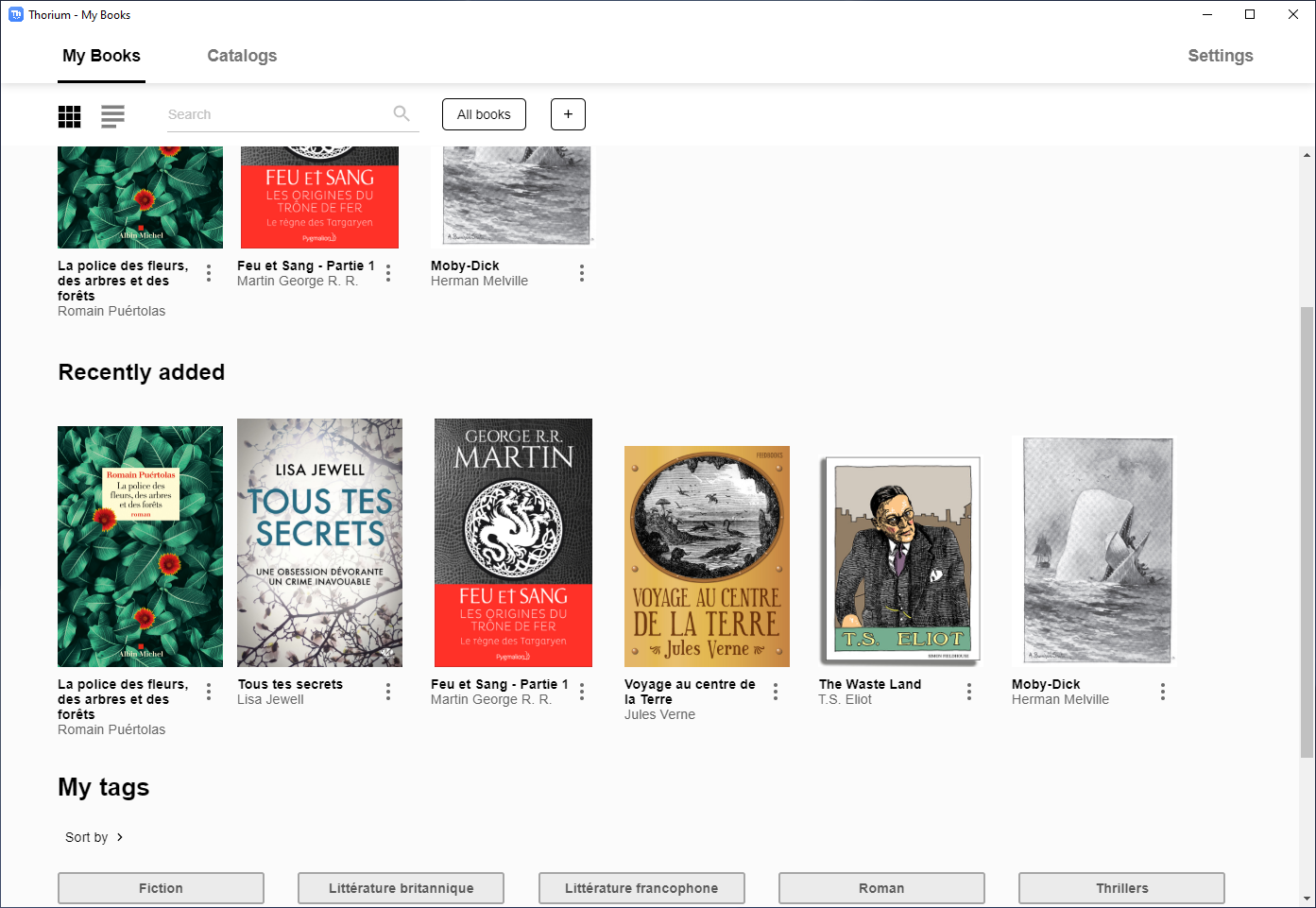
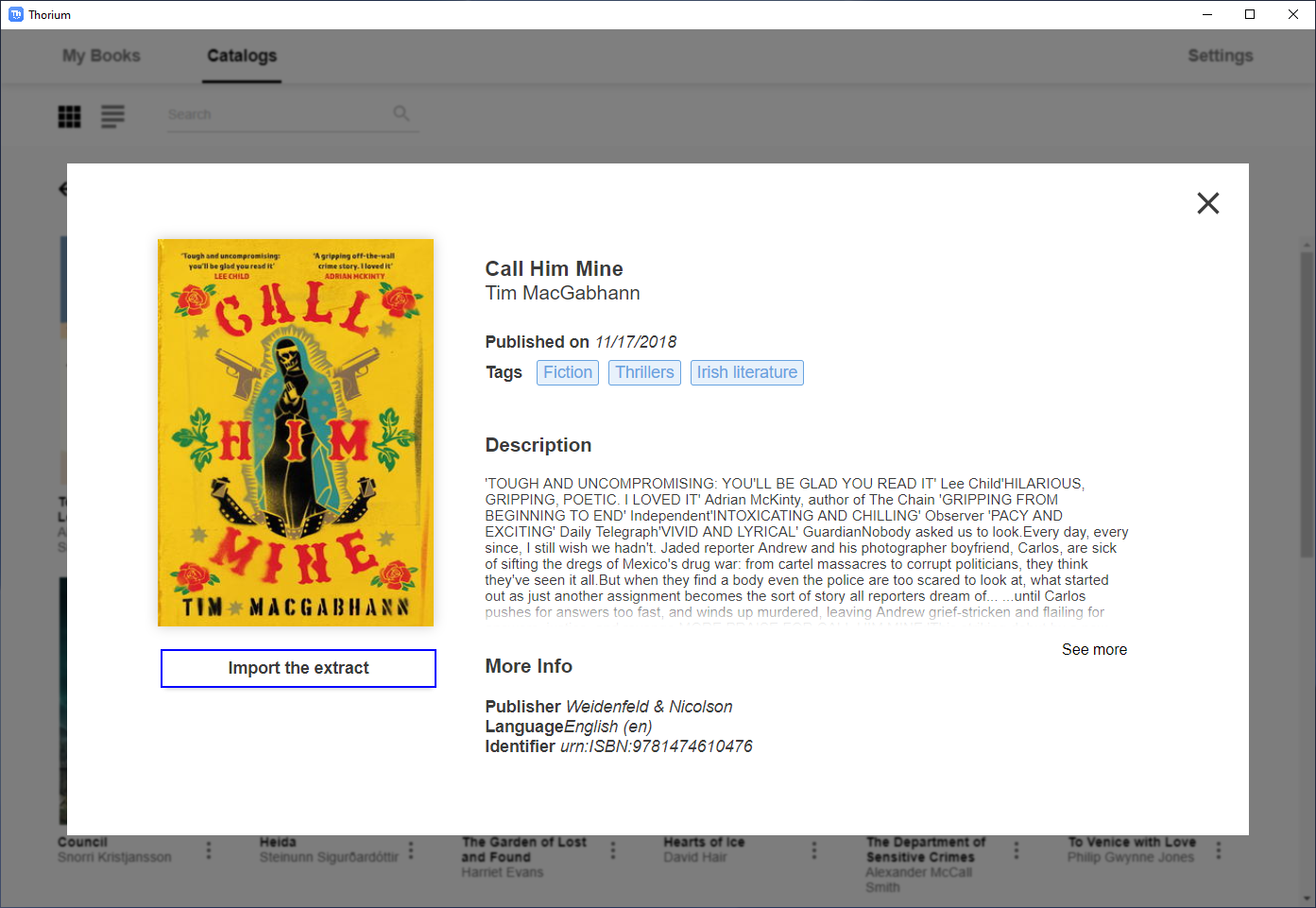
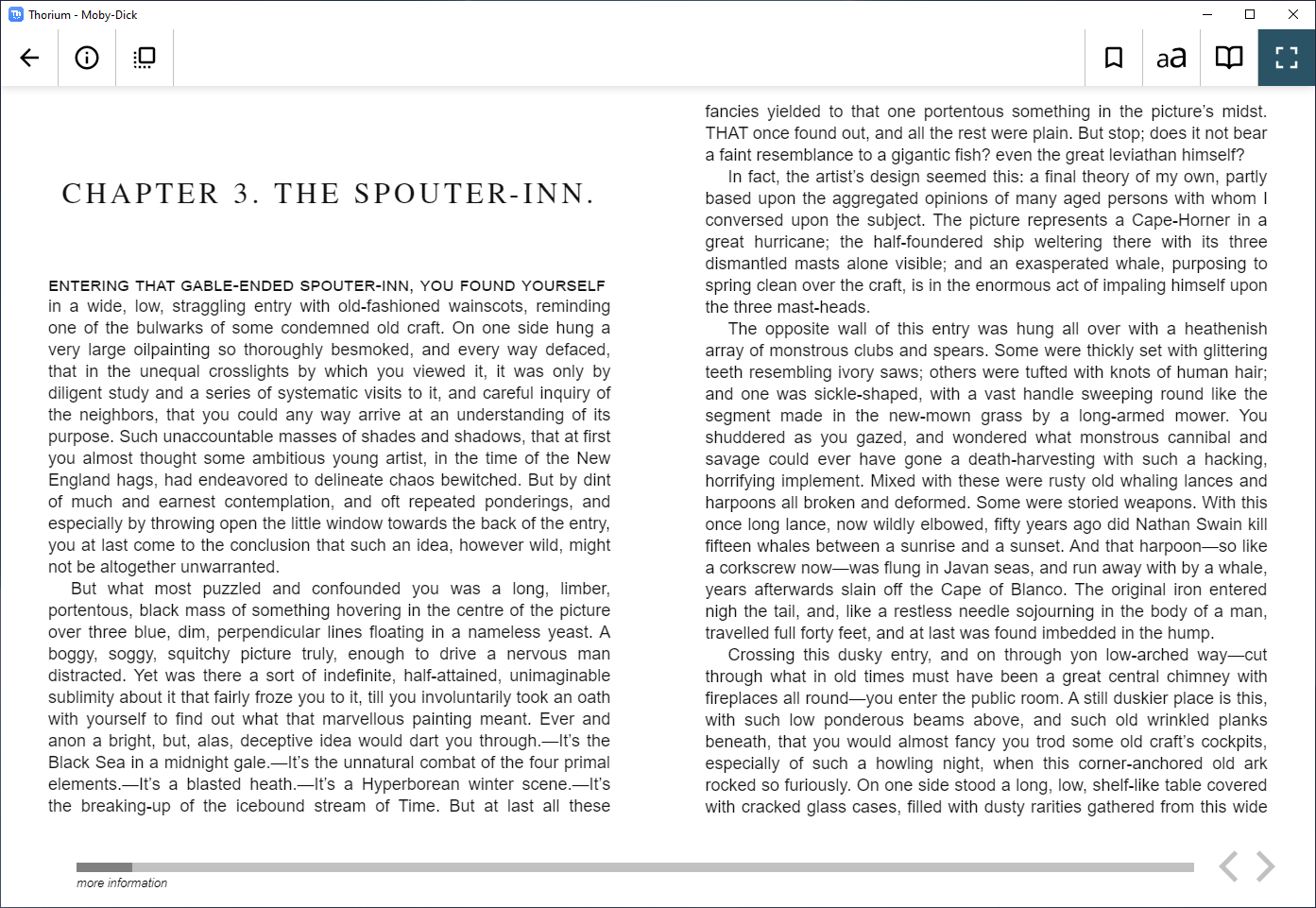
Thorium Reader is an easy to use EPUB reading application for Windows 10/10S, MacOS and Linux. After importing e-books from a directory or OPDS feed, you'll be able to read on any screen size, customize layout settings, navigate via the table of contents or page list, set bookmarks ... A great care is taken to ensure the accessibility of the application for visual impaired people using NVDA, JAWS or Narrator.
Free application. No ads. No private data flowing anywhere.
This project is in constant evolution, corrections and new features will be added soon and your support is welcome for that. The application is based on the open-source Readium Desktop toolkit.
More information can be found in the Landing page.
It is currently localized in following 28 languages:
- (en) English
- (fr) Français (French)
- (fi) Suomi (Finnish)
- (de) Deutsch (German)
- (es) Español (Spanish)
- (nl) Nederlands (Dutch)
- (ja) 日本語 (Japanese)
- (ka) ქართული (Georgian)
- (lt) Lietuvių (Lithuanian)
- (pt-BR) Português Brasileiro (Portuguese - Brazil)
- (pt-PT) Português (Portuguese - Portugal)
- (zh-CN) 简体中文 - 中国 (Simplified Chinese - China)
- (zh-TW) 繁體中文 - 台灣 (Traditional Chinese - Taiwan)
- (it) Italiano (Italian)
- (ru) Русский (Russian)
- (ko) 한국어 (Korean)
- (sv) Svenska (Swedish)
- (ca) Catalan
- (gl) Galician
- (eu) Euskadi (Basque)
- (el) ελληνικός (Greek)
- (bg) български (Bulgarian)
- (hr) Hrvatski (Croatian)
- (da) Dansk (Danish)
- (sl) Slovenščina (Slovene)
- (cs) čeština (Czech)
- (ar) عَرَبِيّ (Arabic)
Since february 2025 we use Weblate project Thorium as the main tool for localisation. The following bar chart shows the translation status that is available from weblate.

Prerequisites
- NodeJS 22 (check with
node --version) - NPM 11 (check with
npm --version)
TIP: the default version of NPM that ships with the NodeJS installer may be slightly old, so make sure to update with npm install --global npm@latest, or nvm install-latest-npm if you are an NVM user.
Technologies
- typescript
- electron
- reactjs
- redux
- saga
- i18next
Quick start
Install dependencies
npm ci --ignore-scripts --foreground-scripts --allow-git=root(ornpm install --ignore-scripts --foreground-scripts --min-release-age=3 --allow-git=rootifpackage-lock.jsonneeds to be updated): initialize localnode_modulespackages from dependencies declared inpackage.json- in case of failure to NPM "install" because of "Divina player" SHA integrity mismatch, please try running the following command in your shell:
node scripts/package-lock-patch.js && cat package-lock.json | grep -i divina-player-js cd node_modules/electron && DEBUG=@electron/get* force_no_cache=true node install.js && cd -: this used to be done automatically via a NPMpostinstallhook script but it is now a manual step, this sets up the Electron binary for the current platform.
Start application in development environment
(with hot-reload dev server, web inspectors / debuggers)
npm run start:dev(ornpm run start:dev:quickto bypass TypeScript checks / launch the app faster)
Start application in production environment
npm start(ornpm run start)
Build installers
npm run package:winornpm run package:macornpm run package:linux(see the GitHub Actions Workflow YAML scripts for more information on how to handle the build matrix with Intel and ARM target architectures)
Code Signing information: https://github.com/edrlab/thorium-reader/wiki/Code-Signing
Firebase Measurement Protocol telemetry
Firebase / GA4 Measurement Protocol support is configured at build time with environment variables consumed by webpack.config-preprocessor-directives.js. It is disabled by default, and emitted events still respect the in-app "Disable telemetry measurements" setting.
Boolean flags are enabled by any value except 0 or false.
| Environment variable | Purpose |
|---|---|
THORIUM_FIREBASE_ENABLED |
Enables Firebase / GA4 Measurement Protocol telemetry. Defaults to disabled. |
THORIUM_FIREBASE_DEBUG |
Sends Measurement Protocol requests to the debug validation endpoint. Defaults to disabled. |
THORIUM_FIREBASE_MEASUREMENT_ID |
GA4 measurement ID. Required when Firebase telemetry is enabled. |
THORIUM_FIREBASE_MEASUREMENT_PROTOCOL_API_SECRET |
GA4 Measurement Protocol API secret. Required when Firebase telemetry is enabled; keep it in main-process build environments only. |
THORIUM_FIREBASE_MEASUREMENT_PROTOCOL_ENDPOINT |
Optional collection endpoint override. Defaults to https://www.google-analytics.com/mp/collect. |
THORIUM_FIREBASE_MEASUREMENT_PROTOCOL_DEBUG_ENDPOINT |
Optional debug endpoint override. Defaults to https://www.google-analytics.com/debug/mp/collect. |
THORIUM_FIREBASE_MEASUREMENT_PROTOCOL_QUEUE_SQLITE_ENABLED |
Uses SQLite instead of the JSON file store for the persistent Measurement Protocol queue. Defaults to disabled. |
Proxy server support
The HTTPS_PROXY, HTTP_PROXY, and NO_PROXY environment variables are used to configure the behavior of a client application when making HTTP or HTTPS requests through a proxy server.
HTTPS_PROXY: Specifies the proxy server to use for HTTPS requests. The value should be in the format http://proxy.example.com:8080.HTTP_PROXY: Specifies the proxy server to use for HTTP requests. The value should be in the format http://proxy.example.com:8080.NO_PROXY: Specifies a comma-separated list of hostnames or IP addresses that should not be proxied. This is useful for excluding local or intranet addresses from being proxied.
When these environment variables are set, the client application will automatically use the specified proxy server for HTTP or HTTPS requests, unless the request is for a hostname or IP address listed in the NO_PROXY variable.
we used proxy-agent package from TooTallNate (https://github.com/TooTallNate/proxy-agents/tree/main/packages/proxy-agent)
see https://www.npmjs.com/package/proxy-from-env#environment-variables for more information.
LCP support in Thorium Reader
Thorium Reader supports LCP-protected publications via an additional software component which is not available in this open-source codebase. When Thorium Reader is compiled from the open-source code without the additional production-grade library, the application can only load publications protected with the LCP "Basic Encryption Profile". For example, licenses generated by the open-source LCP server written in Go, without the patch that enables production-grade LCP Encryption Profiles.
In order to create a production-grade LCP-compliant variant / derivation of Thorium Reader (known as a "fork"), additional confidential software components and processes must be integrated in the custom application's build / release workflow. This represents a non-trivial amount of time and effort, as well as close collaboration between the fork's development team and EDRLab's technical staff. To cover operational costs, EDRLab charges a maintenance fee. Feel free to contact EDRlab to discuss your requirements.
Command line
thorium <cmd> [args]

Commands:
  thorium opds <title> <url>  import opds feed
  thorium import <path>       import epub or lpcl file
  thorium read <title>        searches already-imported publications with the
                              provided TITLE, and opens the reader with the
                              first match
  thorium [path]              import and read an epub or lcpl file     [default]
  thorium completion          generate bash completion script

Positionals:
  path  path of your publication, it can be an absolute, relative path  [string]

Options:
  --version  Show version number                                       [boolean]
  --help     Show help                                                 [boolean]
[DEV] Architecture
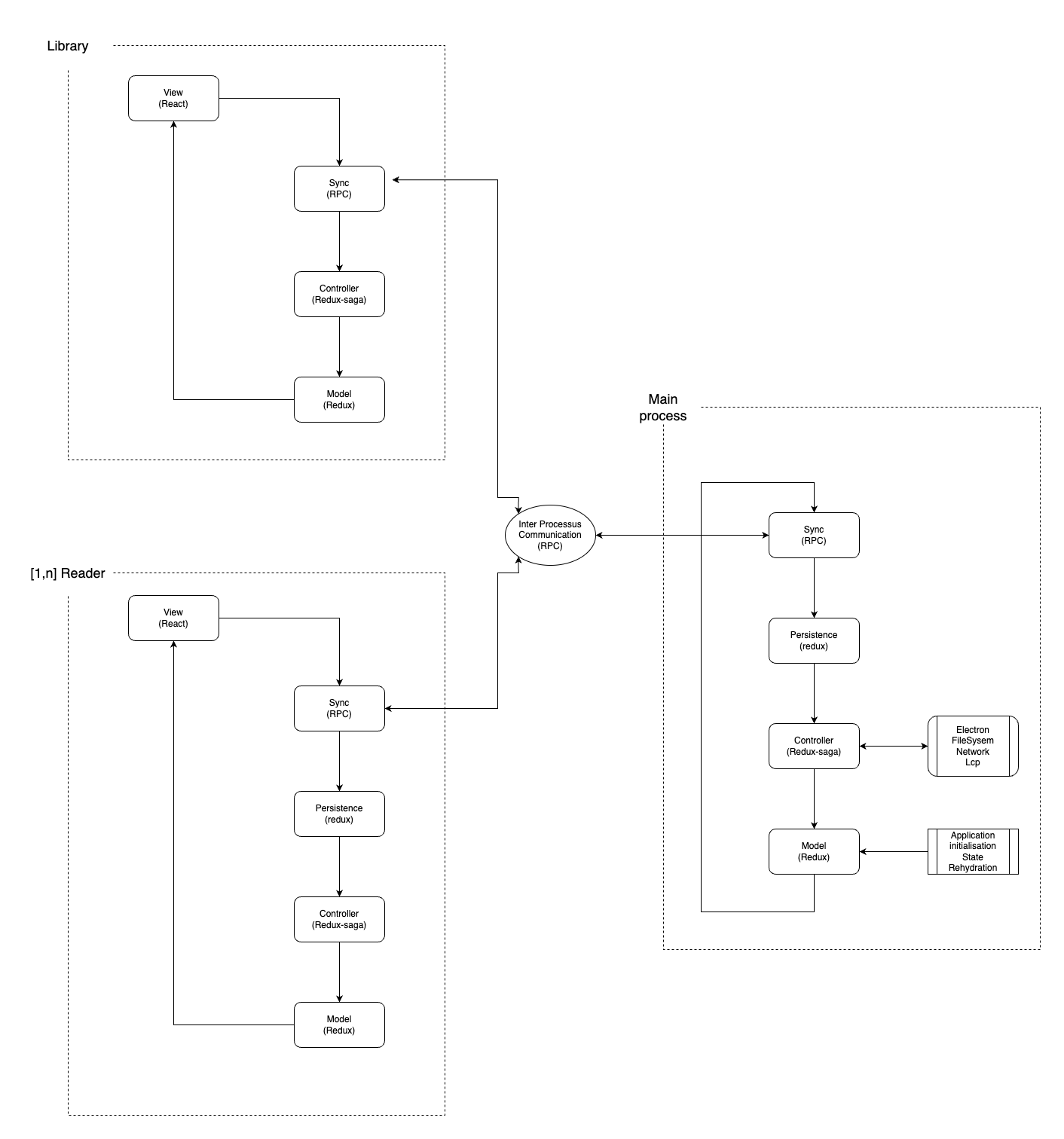
Thorium-reader is composed of 3 parts:
- One node.js main process (electron back-end)
- One library window (chromium renderer)
- One to N reader window(s) (chromium renderer)
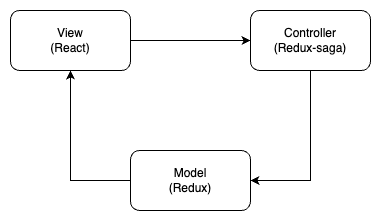
Each part runs a model-controller and a view for the renderer process.
- the model is a state container with Redux. It's based on flux architecture
- the controller is a middleware from Redux named Redux-saga. It handles all side effects and application behaviour.
- the view for the rendering is React with class components
To link these 3 parts we use:
- IPC/RPC: we use an implementation from Electron
- React/Redux: We use connect from react-redux.
Diagram
Model View Controller Architecture
API Concept
To have a POST request from a renderer process to the main process, we use the notion of API. It's not an http API but an RPC encapsuled one, to redux/redux-saga logic with Action and Reducer.
Here is a diagram of the communication:
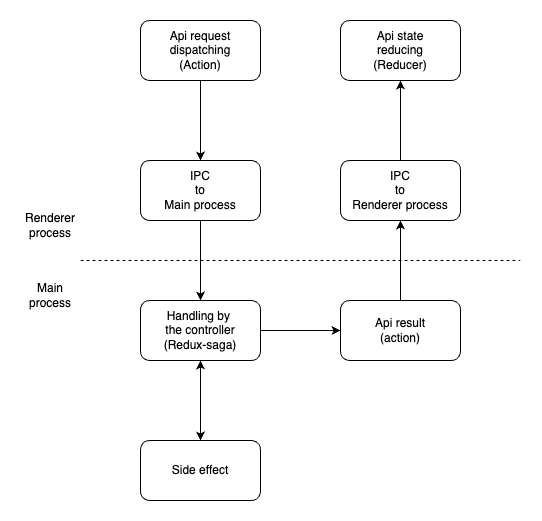
Src:
- src/main/redux/sagas/api/api.ts
- src/common/redux/actions/api/index.ts
- src/renderer/common/redux/reducers/api.ts
At the moment there are 17 API endpoints from (src/main/redux/sagas/api):
library:
- apiapp:
- apiapp/search : search a library from apiapp protocol
- browser:
- httpbrowser/browse : browse and parse an opds URL
- opds:
- opds/getFeed : get an opdsFeed with its identifier
- opds/findAllFeed: get all opdsFeed saved
- opds/deleteFeed: delete an opdsFeed with its identifier
- opds/addFeed: add an opdsFeed
- opds/getUrlWithSearchLinks: get the search URL from an opdsFeed
- publication: (src/common/api/interface/publicationApi.interface.ts)
- publication/get: get a publicationView from id
- publication/delete: delete a publicationView from id
- publication/findAll: get all publicationView
- publication/findByTag: get all publicationView from a specific tag string
- publication/updateTags: update tags list from a publication
- publication/importFromLink: import a publication from an URL
- publication/importFromFs: import a publication from a fileSystem path
- publication/search: search publication from a query text
- publication/searchEqTitrle: search publication by title matching
- publication/exportPublication: export publication to the fileSystem
ACTION-REDUCER
From the main-process to the renderer-process, or from the renderer-process to the main-process.
List of all Actions in place (src/common/redux/actions):
- auth: opds authentication
- cancel
- done
- wipeData
- catalog
- getCatalog: ask to rehydrate catalogView in the libraryState
- setCatalogView: response from getCatalog
- setTagView: rehydrate tagStringView in the libraryState
- dialog: modal dialog view in library,reader
- closeRequest
- openRequest
- updateRequest
- download: download queue in library
- abort
- done
- progress
- history: history opds feed
- pushFeed
- refresh
- i18n
- setLocale
- import
- verify: import verification process
- keyboard: keyboard shortcut
- reloadShortcut
- setShortcut
- showShortcut
- lcp
- renewPublication
- returnPublication
- unlockPublicationWithPassphrase
- userKeyCheckRequest
- load: main proceess busy or not
- busy
- iddle
- net (not used)
- reader
- clipboardCopy
- closeRequest
- closeRequestFromPublication
- configSetDefault
- fullScreenRequest
- openRequest
- openError
- setReduxState: trigger app persistence
- session: saved session
- enable
- toast: toast notification library,reader
- close
- open