




📣 tfsec to Trivy Migration
As part of our goal to provide a comprehensive open source security solution for all, we have been consolidating all of our scanning-related efforts in one place, and that is Trivy.
Over the past year, tfsec has laid the foundations to Trivy's IaC & misconfigurations scanning capabilities, including Terraform scanning, which has been natively supported in Trivy for a long time now.
Going forward we want to encourage the tfsec community to transition over to Trivy. Moving to Trivy gives you the same excellent Terraform scanning engine, with some extra benefits:
- Access to more languages and features in the same tool.
- Access to more integrations with tools and services through the rich ecosystem around Trivy.
- Commercially supported by Aqua as well as by a the passionate Trivy community. tfsec will continue to remain available for the time being, although our engineering attention will be directed at Trivy going forward.
tfsec to Trivy migration guide
For further information on how Trivy compares to tfsec and moving from tfsec to Trivy, do have a look at the migration guide.
Overview
tfsec uses static analysis of your terraform code to spot potential misconfigurations.
Features
- :cloud: Checks for misconfigurations across all major (and some minor) cloud providers
- :no_entry: Hundreds of built-in rules
- :nesting_dolls: Scans modules (local and remote)
- :heavy_plus_sign: Evaluates HCL expressions as well as literal values
- :arrow_right_hook: Evaluates Terraform functions e.g.
concat() - :link: Evaluates relationships between Terraform resources
- :toolbox: Compatible with the Terraform CDK
- :no_good: Applies (and embellishes) user-defined Rego policies
- :page_with_curl: Supports multiple output formats: lovely (default), JSON, SARIF, CSV, CheckStyle, JUnit, text, Gif.
- :hammer_and_wrench: Configurable (via CLI flags and/or config file)
- :zap: Very fast, capable of quickly scanning huge repositories
- :electric_plug: Plugins for popular IDEs available (JetBrains, VSCode and Vim)
- :house_with_garden: Community-driven - come and chat with us on Slack!
Recommended by Thoughtworks
Rated Adopt by the Thoughtworks Tech Radar:
For our projects using Terraform, tfsec has quickly become a default static analysis tool to detect potential security risks. It's easy to integrate into a CI pipeline and has a growing library of checks against all of the major cloud providers and platforms like Kubernetes. Given its ease of use, we believe tfsec could be a good addition to any Terraform project.
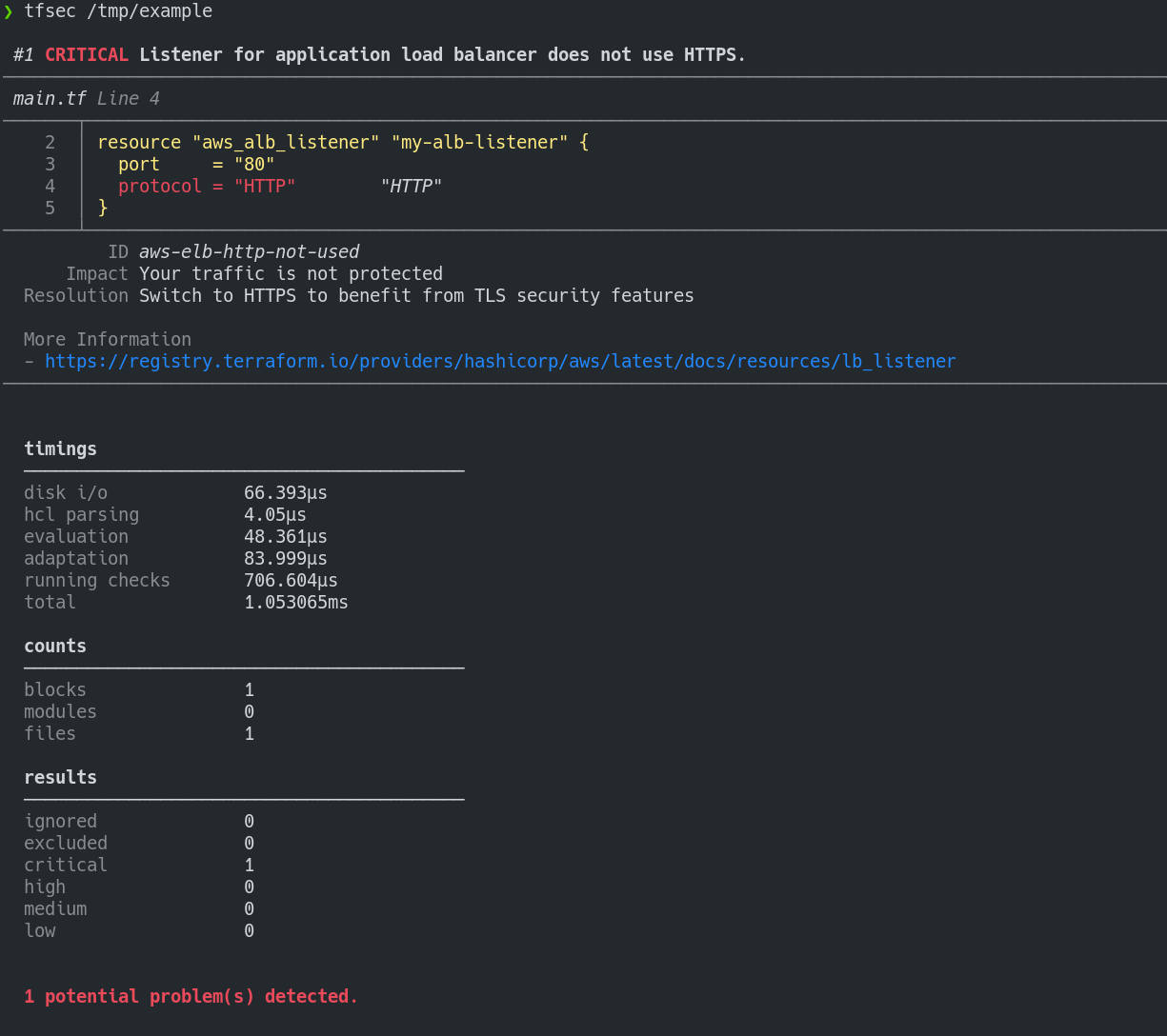
Example Output
Installation
Install with brew/linuxbrew
brew install tfsec
Install with Chocolatey
choco install tfsec
Install with Scoop
scoop install tfsec
Bash script (Linux):
curl -s https://raw.githubusercontent.com/aquasecurity/tfsec/master/scripts/install_linux.sh | bash
You can also grab the binary for your system from the releases page.
Alternatively, install with Go:
go install github.com/aquasecurity/tfsec/cmd/tfsec@latest
Please note that using go install will install directly from the master branch and version numbers will not be reported via tfsec --version.
Signing
The binaries on the releases page are signed with the tfsec signing key D66B222A3EA4C25D5D1A097FC34ACEFB46EC39CE
Form more information check the signing page for instructions on verification.
Usage
tfsec will scan the specified directory. If no directory is specified, the current working directory will be used.
The exit status will be non-zero if tfsec finds problems, otherwise the exit status will be zero.
tfsec .
Use with Docker
As an alternative to installing and running tfsec on your system, you may run tfsec in a Docker container.
There are a number of Docker options available
| Image Name | Base | Comment |
|---|---|---|
| aquasec/tfsec | alpine | Normal tfsec image |
| aquasec/tfsec-alpine | alpine | Exactly the same as aquasec/tfsec, but for those whole like to be explicit |
| aquasec/tfsec-ci | alpine | tfsec with no entrypoint - useful for CI builds where you want to override the command |
| aquasec/tfsec-scratch | scratch | An image built on scratch - nothing frilly, just runs tfsec |
To run:
docker run --rm -it -v "$(pwd):/src" aquasec/tfsec /src
Use with Visual Studio Code
A Visual Studio Code extension is being developed to integrate with tfsec results. More information can be found on the tfsec Marketplace page
Use as GitHub Action
If you want to run tfsec on your repository as a GitHub Action, you can use https://github.com/aquasecurity/tfsec-pr-commenter-action.
Use as an Azure DevOps Pipelines Task
You can now install the official tfsec task. Please raise any issues/feature requests on the task repository.
Ignoring Warnings
You may wish to ignore some warnings. If you'd like to do so, you can
simply add a comment containing tfsec:ignore: to the offending
line in your templates. Alternatively, you can add the comment to the line above the block containing the issue, or to the module block to ignore all occurrences of an issue inside the module.
For example, to ignore an open security group rule:
resource "aws_security_group_rule" "my-rule" {
    type = "ingress"
    cidr_blocks = ["0.0.0.0/0"] #tfsec:ignore:aws-vpc-no-public-ingress-sgr
}
...or...
resource "aws_security_group_rule" "my-rule" {
    type = "ingress"
    #tfsec:ignore:aws-vpc-no-public-ingress-sgr
    cidr_blocks = ["0.0.0.0/0"]
}
If you're not sure which line to add the comment on, just check the tfsec output for the line number of the discovered problem.
You can ignore multiple rules by concatenating the rules on a single line:
#tfsec:ignore:aws-s3-enable-bucket-encryption tfsec:ignore:aws-s3-enable-bucket-logging
resource "aws_s3_bucket" "my-bucket" {
  bucket = "foobar"
  acl    = "private"
}
Expiration Date
You can set expiration date for ignore with yyyy-mm-dd format. This is a useful feature when you want to ensure ignored issue won't be forgotten and should be revisited in the future.
#tfsec:ignore:aws-s3-enable-bucket-encryption:exp:2025-01-02
Ignore like this will be active only till 2025-01-02, after this date it will be deactivated.
Disable checks
You may wish to exclude some checks from running. If you'd like to do so, you can
simply add new argument -e check1,check2,etc to your cmd command
tfsec . -e general-secrets-sensitive-in-variable,google-compute-disk-encryption-customer-keys
Including values from .tfvars
You can include values from a tfvars file in the scan, using, for example: --tfvars-file terraform.tfvars.
Included Checks
tfsec supports many popular cloud and platform providers
| Checks |
|---|
| AWS Checks |
| Azure Checks |
| GCP Checks |
| CloudStack Checks |
| DigitalOcean Checks |
| GitHub Checks |
| Kubernetes Checks |
| OpenStack Checks |
| Oracle Checks |
Running in CI
tfsec is designed for running in a CI pipeline. You may wish to run tfsec as part of your build without coloured
output. You can do this using --no-colour (or --no-color for our American friends).
Output options
You can output tfsec results as JSON, CSV, Checkstyle, Sarif, JUnit or just plain old human-readable format. Use the --format flag
to specify your desired format.
GitHub Security Alerts
If you want to integrate with Github Security alerts and include the output of your tfsec checks you can use the tfsec-sarif-action Github action to run the static analysis then upload the results to the security alerts tab.
The alerts generated for tfsec-example-project look like this.
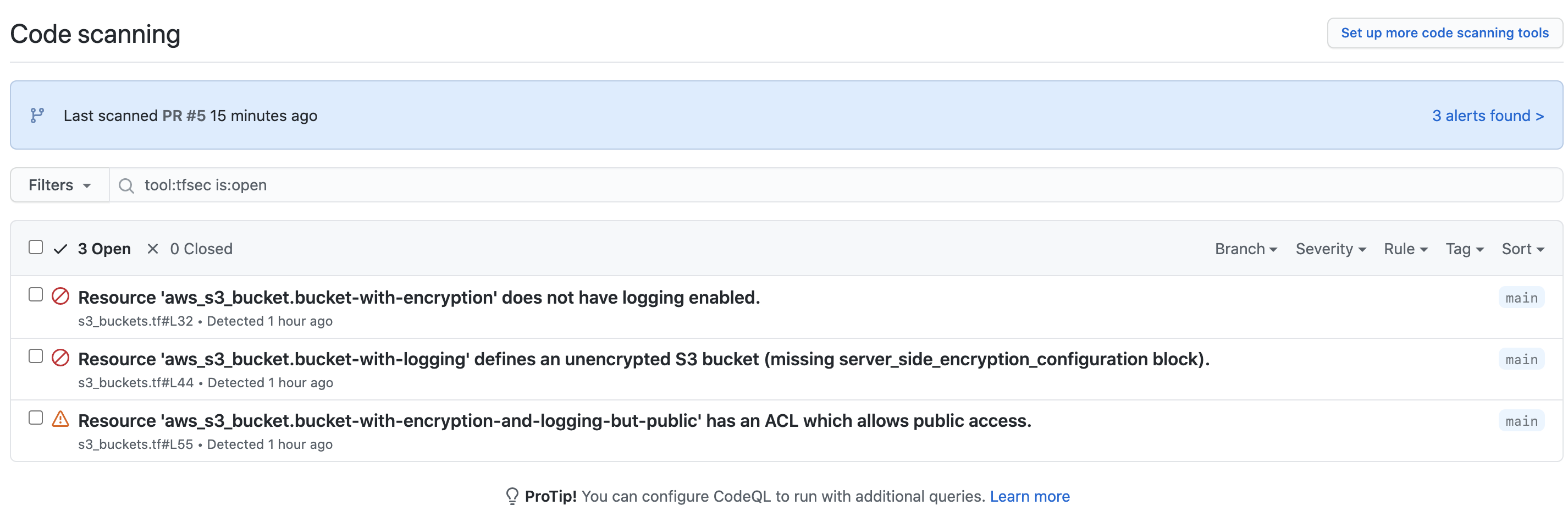
When you click through the alerts for the branch, you get more information about the actual issue.
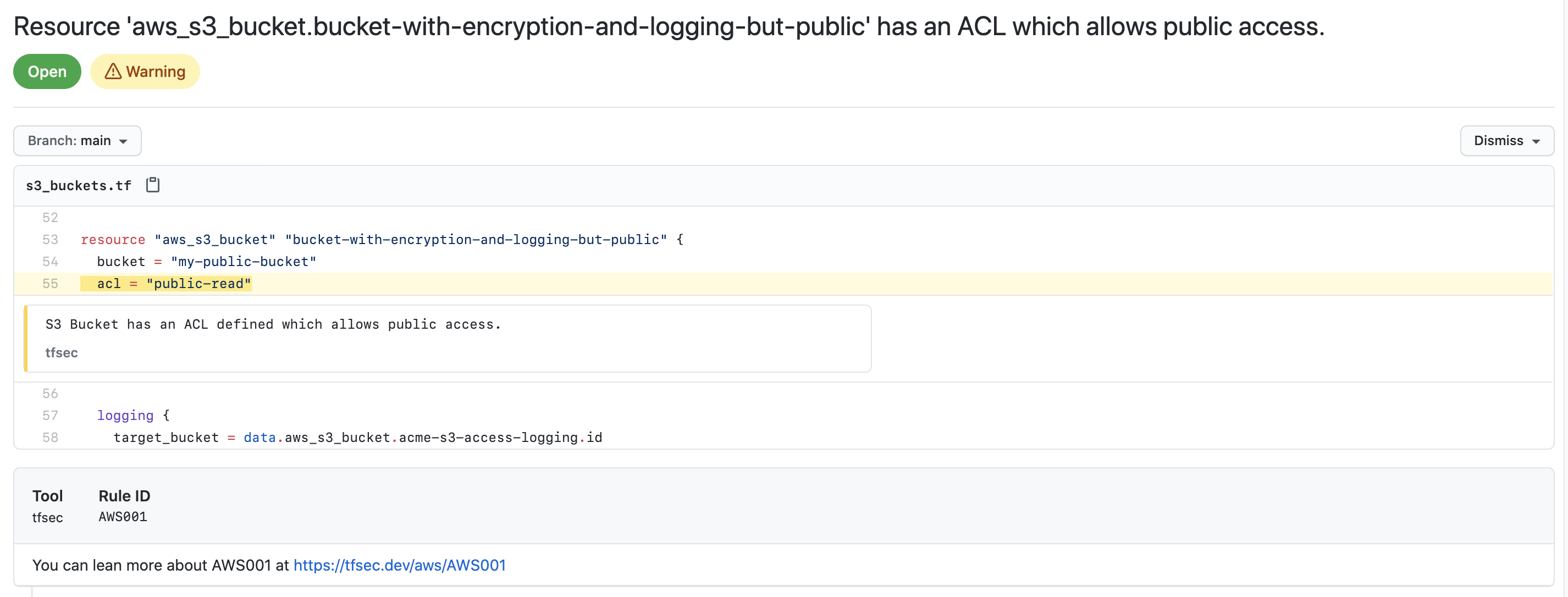
For more information about adding security alerts, check the GitHub documentation
Support for older terraform versions
If you need to support versions of terraform which use HCL v1 (terraform
Made with contributors-img.
tfsec is an Aqua Security open source project.
Learn about our open source work and portfolio here.
Join the community, and talk to us about any matter in GitHub Discussion or Slack.