Terraboard

🌍 📋 A web dashboard to inspect Terraform States





Website: https://terraboard.io
Caution: Terraboard's Docker registry was migrated from Dockerhub to GHCR! All new tags will be now pushed here. You can still access to old tags on the legacy Dockerhub repository.
Table of content
What is it?
Terraboard is a web dashboard to visualize and query Terraform states. It currently features:
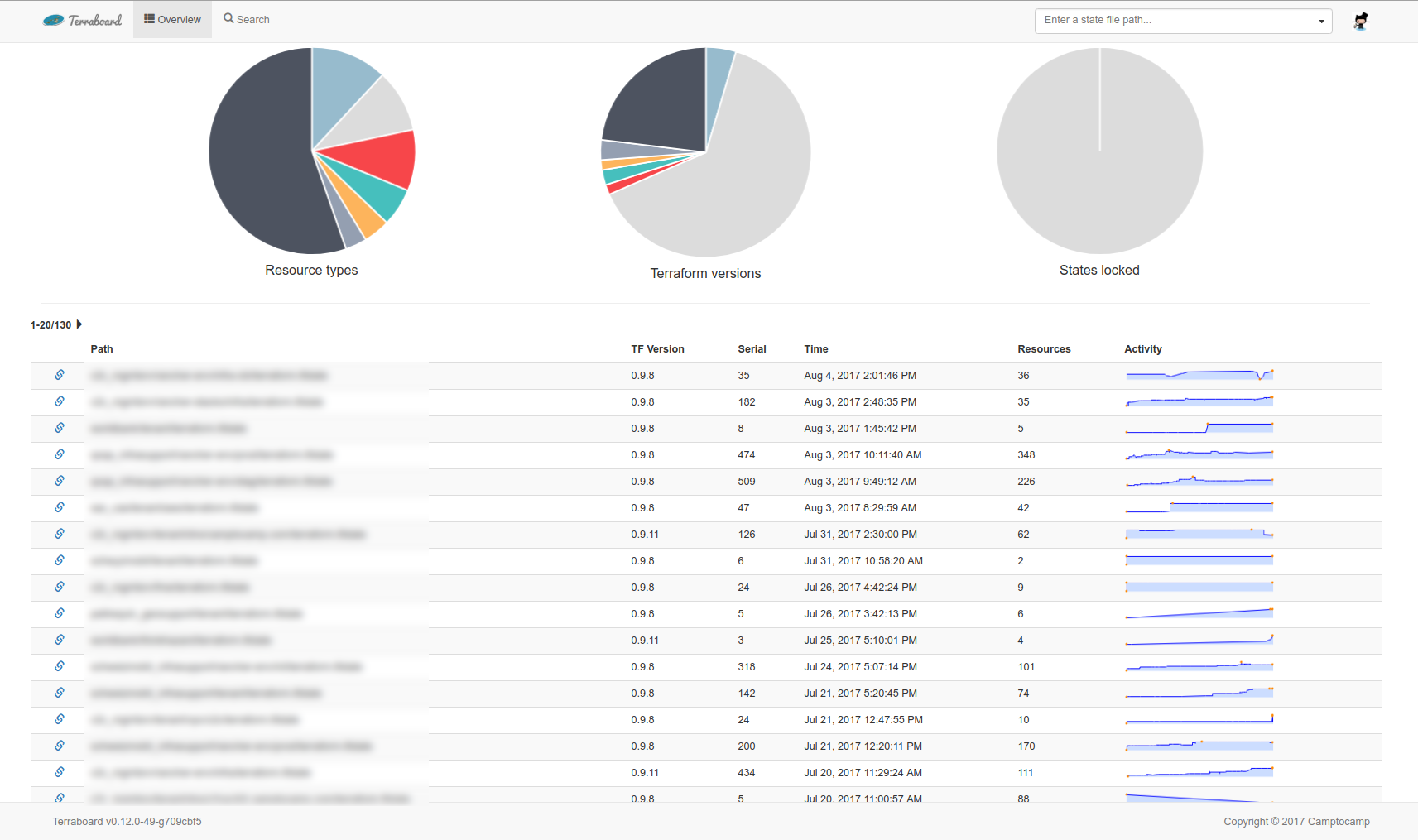
- an overview page listing the most recently updated state files with their activity
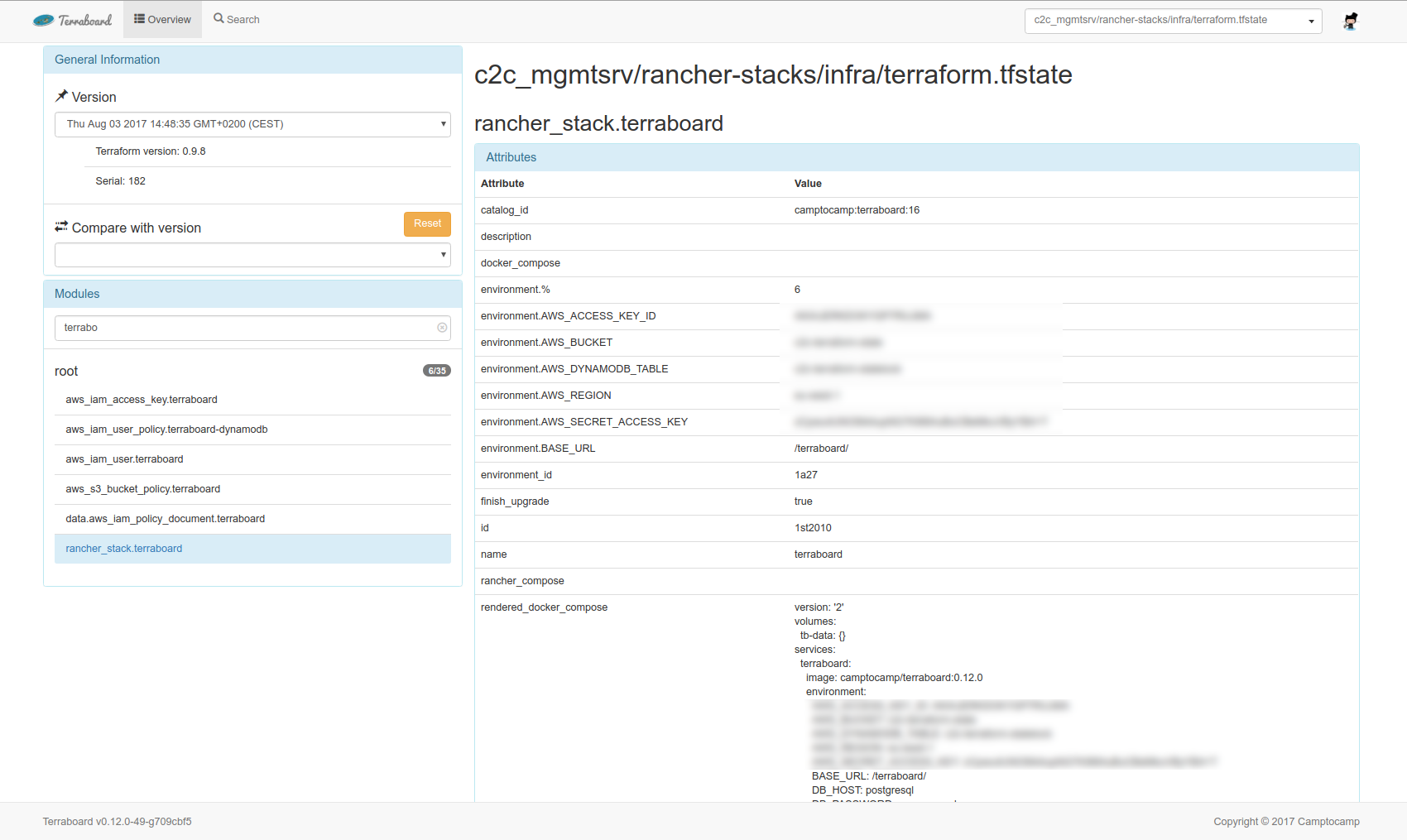
- a state page with state file details, including versions and resource attributes
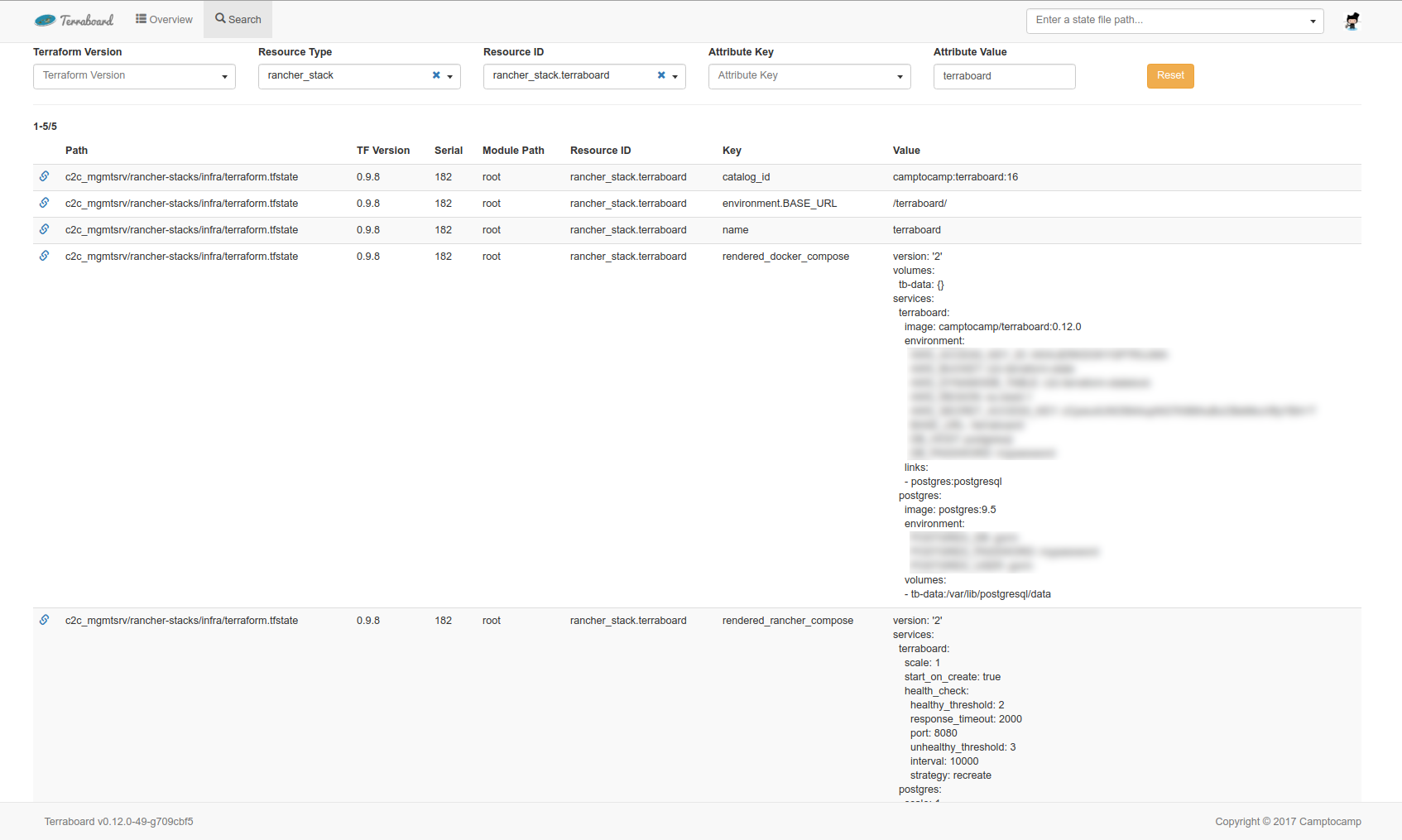
- a search interface to query resources by type, name or attributes
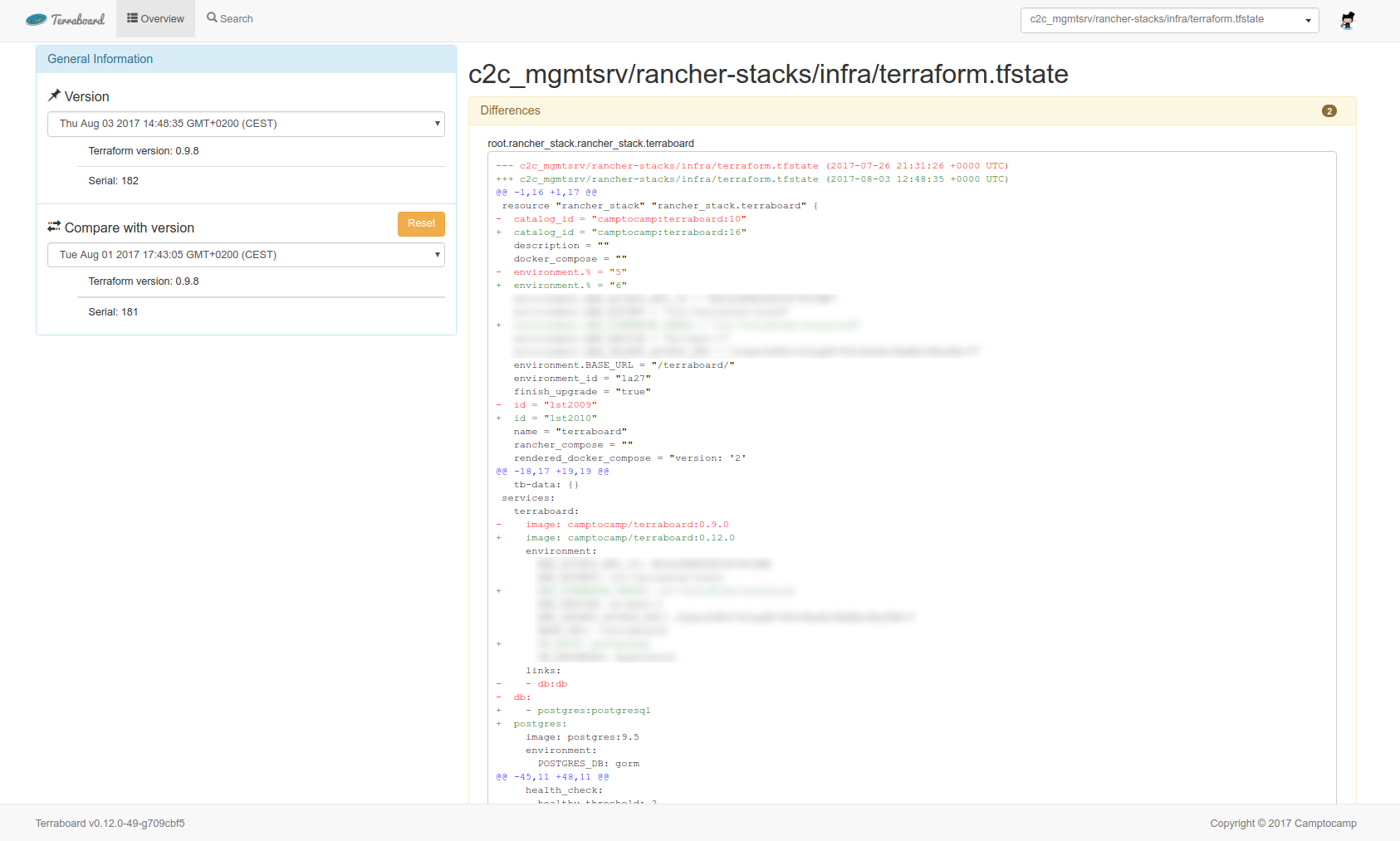
- a diff interface to compare state between versions
It currently supports several remote state backend providers:
- AWS S3 (state) + DynamoDB (lock)
- S3 compatible backends (ex: MinIO)
- Google Cloud Storage
- Terraform Cloud (remote)
- GitLab
Terraboard is now able to handle multiple buckets/providers configuration! 🥳 Check configuration section for more details.
Overview
The overview presents all the state files in the S3 bucket, by most recent modification date.
Search
The search view allows to find resources by various criteria.
State
The state view presents details of a Terraform state at a given version.
Compare
From the state view, you can compare the current state version with another version.
Requirements
Independently of the location of your statefiles, Terraboard needs to store an internal version of its dataset. For this purpose it requires a PostgreSQL database. Data resiliency is not paramount though as this dataset can be rebuilt upon your statefiles at anytime.
AWS S3 (state) + DynamoDB (lock)
- A versioned S3 bucket name with one or more Terraform states, named with a
.tfstatesuffix - AWS credentials with the following IAM permissions over the bucket:
s3:GetObjects3:ListBuckets3:ListBucketVersionss3:GetObjectVersion
- If you want to retrieve lock states from a dynamoDB table, you need to make sure the provided AWS credentials have
dynamodb:Scanaccess to that table.
Terraform Cloud
- Account on Terraform Cloud
- Existing organization
- Token assigned to an organization
Configuration
Terraboard currently supports configuration in three different ways:
- Environment variables (only usable for single provider configuration)
- CLI parameters (only usable for single provider configuration)
- Configuration file (YAML). A configuration file example can be found in the root directory of this repository and in the
test/subdirectory.
Important: all flags/environment variables related to the providers settings aren't compatible with multi-provider configuration! Instead, you must use the YAML config file to be able to configure multiples buckets/providers. YAML config is able to load values from environments variables.
The precedence of configurations is as described below.
Multiple buckets/providers
In order for Terraboard to import states from multiples buckets or even providers, you must use the YAML configuration method:
- Set the
CONFIG_FILEenvironment variable or the-c/--config-fileflag to point to a valid YAML config file. - In the YAML file, specify your desired providers configuration. For example with two MinIO buckets (using the AWS provider with compatible mode):
# Needed since MinIO doesn't support versioning or locking
provider:
  no-locks: true
  no-versioning: true

aws:
  - endpoint: http://minio:9000/
    region: ${AWS_DEFAULT_REGION}
    s3:
      - bucket: test-bucket
        force-path-style: true
        file-extension:
          - .tfstate

  - endpoint: http://minio:9000/
    region: eu-west-1
    s3:
      - bucket: test-bucket2
        force-path-style: true
        file-extension:
          - .tfstate
In the case of AWS, don't forget to set the AWS_ACCESS_KEY_ID and AWS_SECRET_ACCESS_KEY environment variables.
That's it! Terraboard will now fetch these two buckets on DB refresh. You can also mix providers like AWS and Gitlab or anything else.
You can find a ready-to-use Docker example with two MinIO buckets in the test/multiple-minio-buckets/ sub-folder.
Available parameters
Application Options
-V,--versionDisplay version.-c,--config-fileConfig File path- Env: CONFIG_FILE
General Provider Options
--no-versioningDisable versioning support from Terraboard (useful for S3 compatible providers like MinIO)- Env: TERRABOARD_NO_VERSIONING
- Yaml: provider.no-versioning
--no-locksDisable locks support from Terraboard (useful for S3 compatible providers like MinIO)- Env: TERRABOARD_NO_LOCKS
- Yaml: provider.no-locks
Logging Options
-l,--log-levelSet log level ('debug', 'info', 'warn', 'error', 'fatal', 'panic').- Env: TERRABOARD_LOG_LEVEL
- Yaml: log.level
--log-formatSet log format ('plain', 'json').- Env: TERRABOARD_LOG_FORMAT
- Yaml: log.format
Database Options
--db-hostDatabase host.- Env: DB_HOST
- Yaml: database.host
--db-portDatabase port.- Env: DB_PORT
- Yaml: database.port
--db-userDatabase user.- Env: DB_USER
- Yaml: database.user
--db-passwordDatabase password.- Env: DB_PASSWORD
- Yaml: database.password
--db-nameDatabase name.- Env: DB_NAME
- Yaml: database.name
--db-sslmodeDatabase SSL mode.- Env: DB_SSLMODE
- Yaml: database.sslmode
--no-syncDo not sync database.- Yaml: database.no-sync
--sync-intervalDB sync interval (in minutes)- Yaml: database.sync-interval
AWS (and S3 compatible providers) Options
--aws-access-keyAWS account access key.- Env: AWS_ACCESS_KEY_ID
- Yaml: aws.access-key
--aws-secret-access-keyAWS secret account access key.- Env: AWS_SECRET_ACCESS_KEY
- Yaml: aws.secret-access-key
--aws-session-tokenAWS session token.- Env: AWS_SESSION_TOKEN
- Yaml: aws.session-token
--dynamodb-tableAWS DynamoDB table for locks.- Env: AWS_DYNAMODB_TABLE
- Yaml: aws.dynamodb-table
--aws-endpointAWS endpoint.- Env: AWS_ENDPOINT
- Yaml: aws.endpoint
--aws-regionAWS region.- Env: AWS_REGION
- Yaml: aws.region
--aws-role-arnRole ARN to Assume.- Env: APP_ROLE_ARN
- Yaml: aws.app-role-arn
--aws-external-idExternal ID to use when assuming role.- Env: AWS_EXTERNAL_ID
- Yaml: aws.external-id
S3 Options
--s3-bucketAWS S3 bucket.- Env: AWS_BUCKET
- Yaml: aws.s3.bucket
--key-prefixAWS Key Prefix.- Env: AWS_KEY_PREFIX
- Yaml: aws.s3.key-prefix
--file-extensionFile extension(s) of state files.- Env: AWS_FILE_EXTENSION
- Yaml: aws.s3.file-extension
--force-path-styleForce path style S3 bucket calls.- Env: AWS_FORCE_PATH_STYLE
- Yaml: aws.s3.force-path-style
Terraform Enterprise Options
--tfe-addressTerraform Enterprise address for states access- Env: TFE_ADDRESS
- Yaml: tfe.address
--tfe-tokenTerraform Enterprise Token for states access- Env: TFE_TOKEN
- Yaml: tfe.token
--tfe-organizationTerraform Enterprise organization for states access- Env: TFE_ORGANIZATION
- Yaml: tfe.organization
Google Cloud Platform Options
--gcs-bucketGoogle Cloud bucket to search- Yaml: gcp.gcs-bucket
--gcp-sa-key-pathThe path to the service account to use to connect to Google Cloud Platform- Env: GCP_SA_KEY_PATH
- Yaml: gcp.gcp-sa-key-path
GitLab Options
--gitlab-addressGitLab address (root)- Env: GITLAB_ADDRESS
- Yaml: gitlab.address
--gitlab-tokenToken to authenticate upon GitLab- Env: GITLAB_TOKEN
- Yaml: gitlab.token
Web
-p,--portPort to listen on.- Env: TERRABOARD_PORT
- Yaml: web.port
--base-urlBase URL.- Env: TERRABOARD_BASE_URL
- Yaml: web.base-url
--logout-urlLogout URL.- Env: TERRABOARD_LOGOUT_URL
- Yaml: web.logout-url
Help Options
-h,--helpShow this help message
Push plans to Terraboard
In order to send Terraform plans to Terraboard, you must wrap it in this JSON format:
{
    "lineage": "<Plan's lineage>",
    "terraform_version": "<Terraform version>",
    "git_remote": "<The URL of the remote that generated this plan>",
    "git_commit": "<Commit hash>",
    "ci_url": "<The URL of the CI that sent this plan>",
    "source": "<Free field for the triggering event>",
    "plan_json": "<Terraform plan JSON export>"
}
And send it to /api/plans using POST method
Use with Docker
Docker-compose
Configuration file can be provided to the container using a volume or a configuration.
# Set AWS credentials as environment variables:
export AWS_ACCESS_KEY_ID=<access_key>
export AWS_SECRET_ACCESS_KEY=<access_secret>

# Set AWS configuration as environment variables:
export AWS_DEFAULT_REGION=<AWS default region>
export AWS_BUCKET=<S3 Bucket name>
export AWS_DYNAMODB_TABLE=<Aws DynamoDB Table>

docker-compose up
Then point your browser to http://localhost:8080.
Docker command line
# Set AWS credentials as environment variables:
export AWS_ACCESS_KEY_ID=<access_key>
export AWS_SECRET_ACCESS_KEY=<access_secret>

# Set AWS configuration as environment variables:
export AWS_DEFAULT_REGION=<AWS default region>
export AWS_BUCKET=<S3 Bucket name>
export AWS_DYNAMODB_TABLE=<AWS_DYNAMODB_TABLE>

# Spin up the two containers and a network for them to communciate on:
docker network create terraboard
docker run --name db \
  -e POSTGRES_USER=gorm \
  -e POSTGRES_DB=gorm \
  -e POSTGRES_PASSWORD="<mypassword>" \
  -e GODEBUG="netdns=go" \
  --net terraboard \
  --detach \
  --restart=always \
  postgres:9.5

docker run -p 8080:8080 \
  -e AWS_ACCESS_KEY_ID="${AWS_ACCESS_KEY_ID}" \
  -e AWS_SECRET_ACCESS_KEY="${AWS_SECRET_ACCESS_KEY}" \
  -e AWS_REGION="${AWS_DEFAULT_REGION}" \
  -e AWS_BUCKET="${AWS_BUCKET}" \
  -e AWS_DYNAMODB_TABLE="${AWS_DYNAMODB_TABLE}" \
  -e DB_PASSWORD="<mypassword>" \
  -e DB_SSLMODE="disable" \
  --net terraboard \
  ghcr.io/camptocamp/terraboard:latest
Then point your browser to http://localhost:8080.
Use with Kubernetes
A Helm chart is available on Camptocamp's repository.
In order to install it:
$ helm repo add c2c https://camptocamp.github.io/charts
$ helm install -v values.yaml terraboard c2c/terraboard
Use with Rancher
Camptocamp's Rancher Catalog contains a Terraboard template to automate its installation in Cattle.
Authentication and base URL
Terraboard does not implement authentication. Instead, it is recommended to use an authentication proxy such as oauth2_proxy.
If you need to set a route path for Terraboard, you can set a base URL by
passing it as the BASE_URL environment variable.
When using an authentication proxy, Terraboard will retrieve the logged in
user and email from the headers passed by the proxy.
Terraboard expects you to setup the HTTP Headers X-Forwarded-User and
X-Forwarded-Email when passing the logged in user and email. A Nginx
example can be found below:
location / {
  ....
  auth_request_set $user   $upstream_http_x_auth_request_user;
  auth_request_set $email  $upstream_http_x_auth_request_email;
  proxy_set_header X-Forwarded-User  $user;
  proxy_set_header X-Forwarded-Email $email;
  ...
  proxy_pass http://terraboard/;
}
You can also pass a TERRABOARD_LOGOUT_URL parameter to allow users to
sign out of the proxy.
Install from source
$ go get github.com/camptocamp/terraboard
Compatibility Matrix
| Terraboard | Max Terraform version |
|---|---|
| 0.15.0 | 0.12.7 |
| 0.16.0 | 0.12.7 |
| 0.17.0 | 0.12.18 |
| 0.18.0 | 0.12.18 |
| 0.19.0 | 0.12.20 |
| 0.20.0 | 0.12.26 |
| 0.21.0 | 0.12.28 |
| 0.22.0 | 0.13.0 |
| 1.0.0 | 0.14.5 |
| 1.1.0 | 0.14.10 |
Development
Architecture
Terraboard is made of two components:
A server process
The server is written in go and runs a web server which serves:
- the API on known access points, taking the data from the PostgreSQL database
- the index page (from static/index.html) on all other URLs
The server also has a routine which regularly (every 1 minute) feeds the PostgreSQL database from the S3 bucket.
A web UI
The UI is an AngularJS application served from index.html. All the UI code
can be found in the static/ directory.
Testing
$ docker-compose build && docker-compose up -d
# Point your browser to http://localhost
Contributing
See CONTRIBUTING.md