title: Telegram Stremio emoji: 🎬 colorFrom: blue colorTo: purple sdk: docker app_port: 8000 pinned: false
A powerful, self-hosted Telegram Stremio Media Server built with FastAPI, MongoDB, and PyroFork — turn your Telegram channels into a private streaming library you watch in Stremio / Nuvio.



🧭 Contents
- 🚀 What is this?
- ✨ Key Features
- 🗂️ Organizing Your Channels
- 📤 Adding Files by Forwarding (filename rules)
- 🖐️ Adding Files Manually (Goa trip, lectures, One Piece)
- 💬 Subtitles (filename rules & manual add)
- 📚 Catalogs Explained
- 📡 Special Channels
- 🏷️ Fixing Wrong Metadata
- 🛠️ Managing Your Server (logs, restart, update)
- 💳 Subscriptions & Access
- 🔧 First-Time Setup (config.env)
- 🎛️ Web Settings Page (every option explained)
- 🚀 Deployment
- 📺 Watch in Nuvio / Stremio
- 🏅 Contributors
🚀 What is this?
This is a self-hosted media server that streams your Telegram files straight into Stremio (or Nuvio). You forward a movie/episode to your channel, and it instantly becomes a permanent, no-expiry streaming link — with posters, descriptions, seasons and episodes, just like a real streaming app.
Everything is managed from a friendly web panel — no coding, and almost no bot commands.
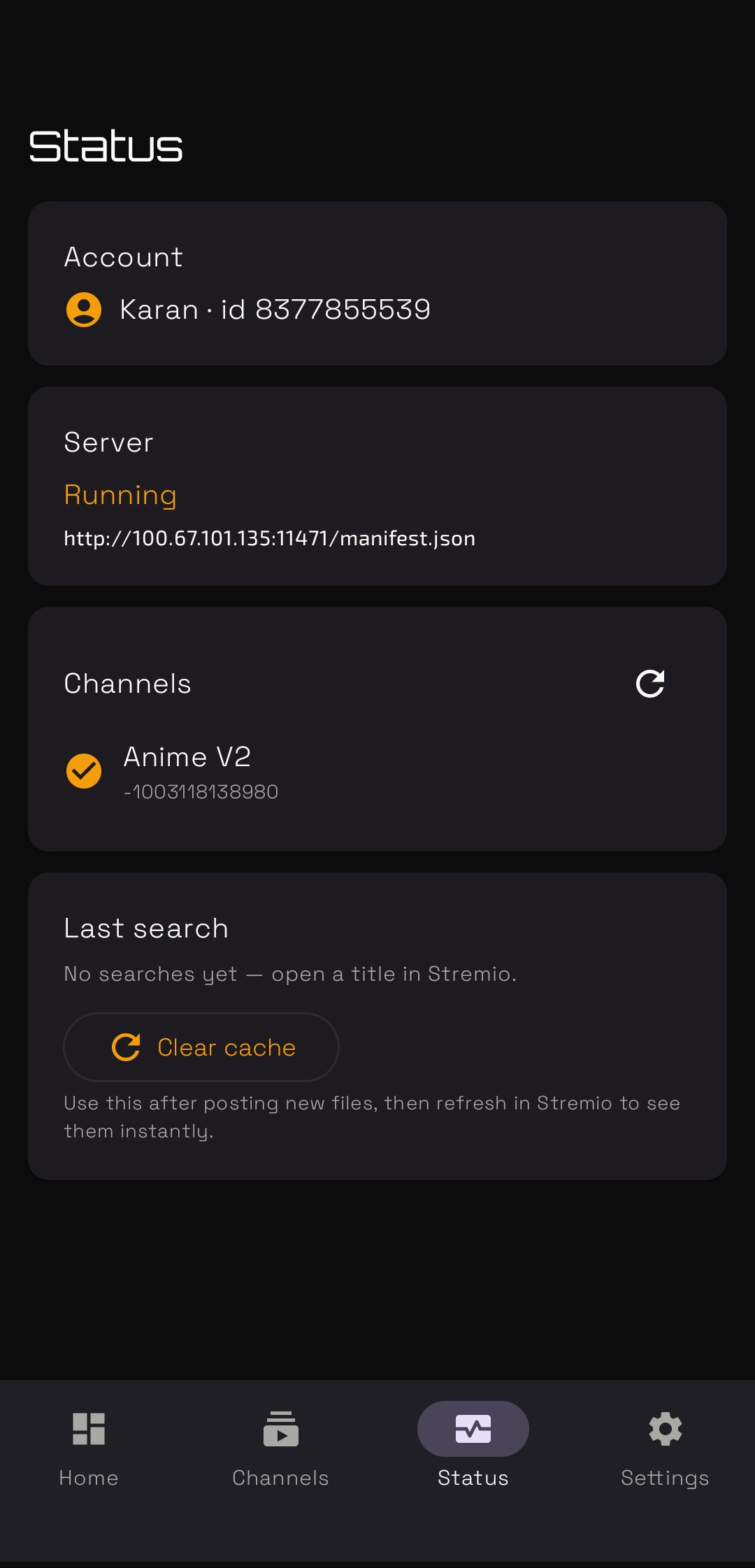
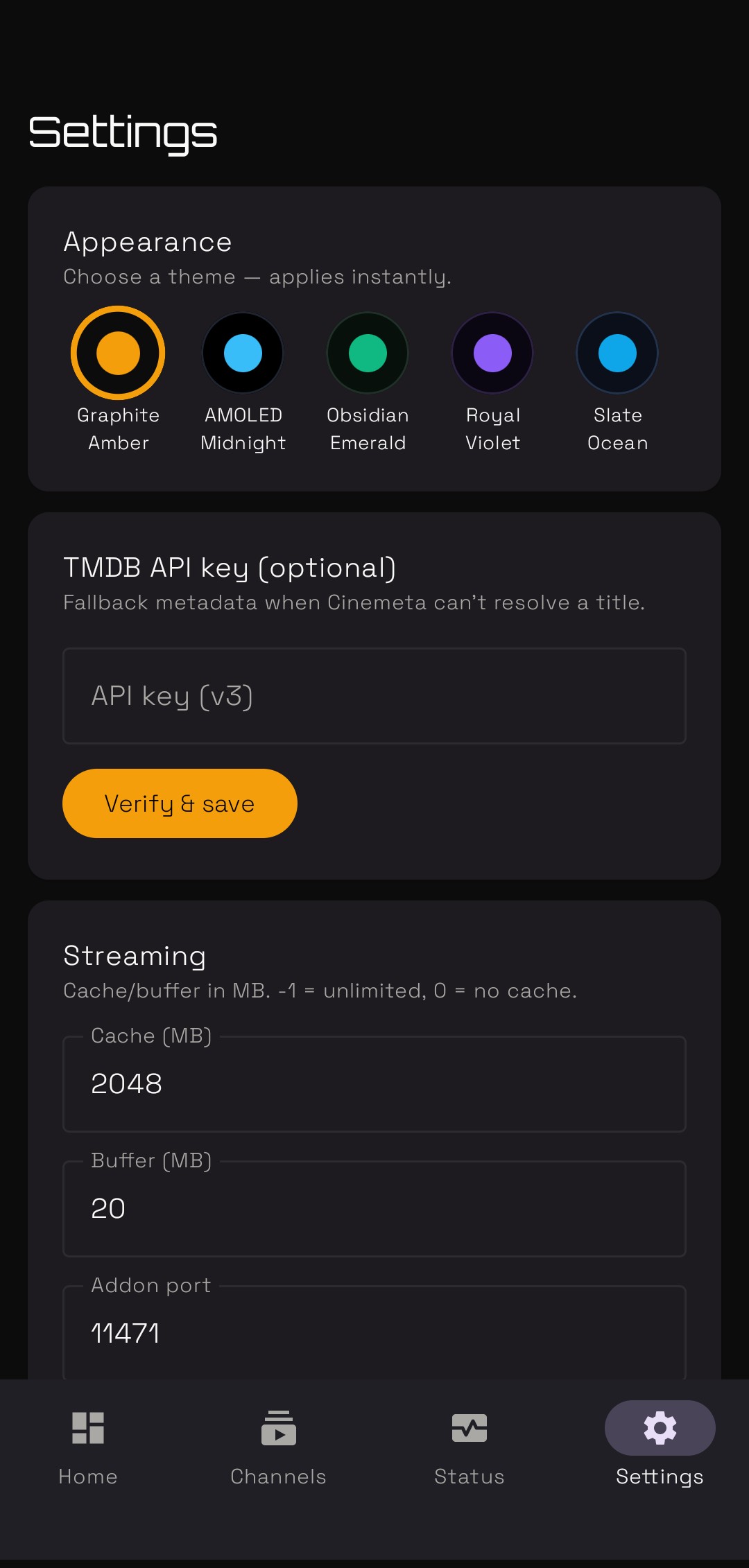
📱 Don't have a server? Use the TeleStremio Android app
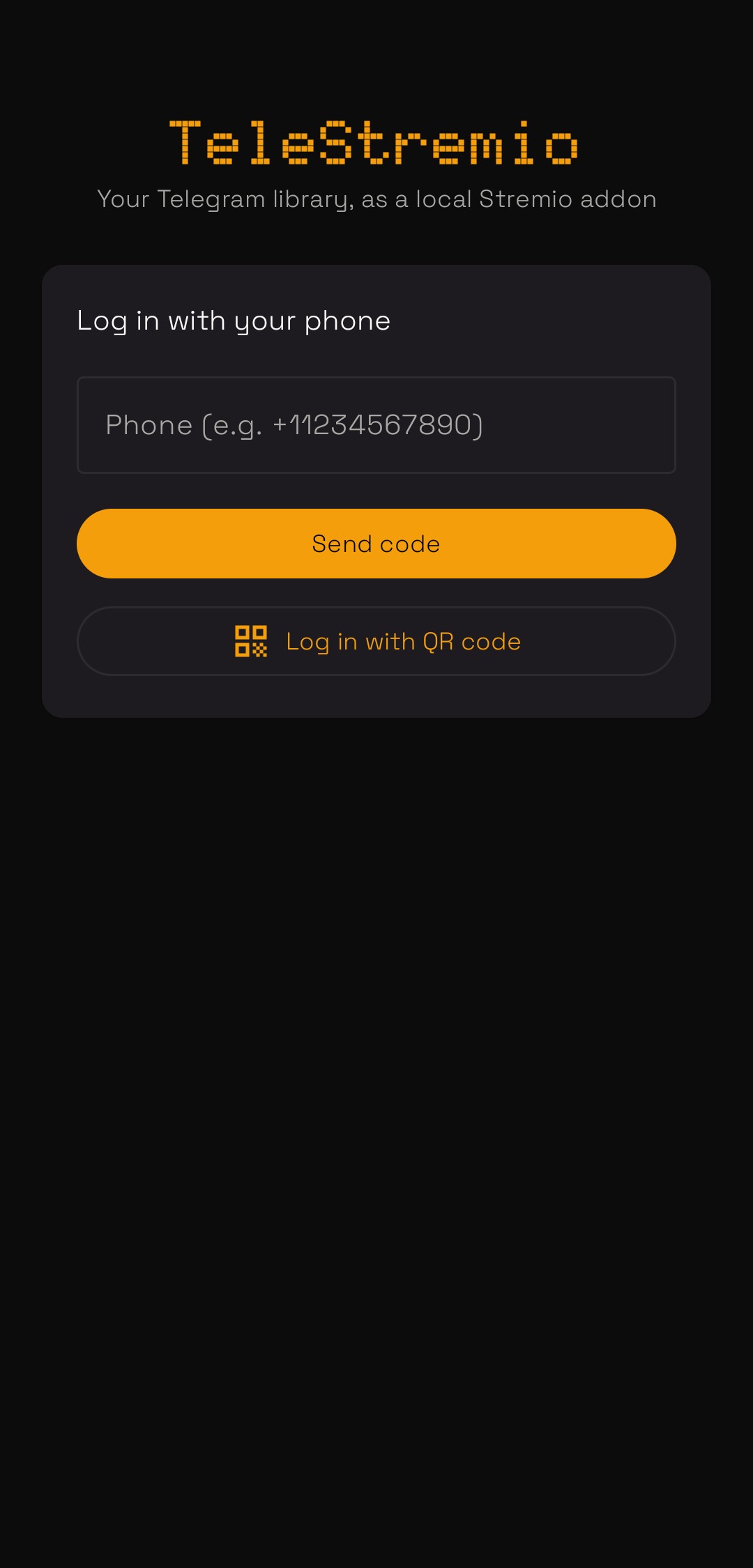
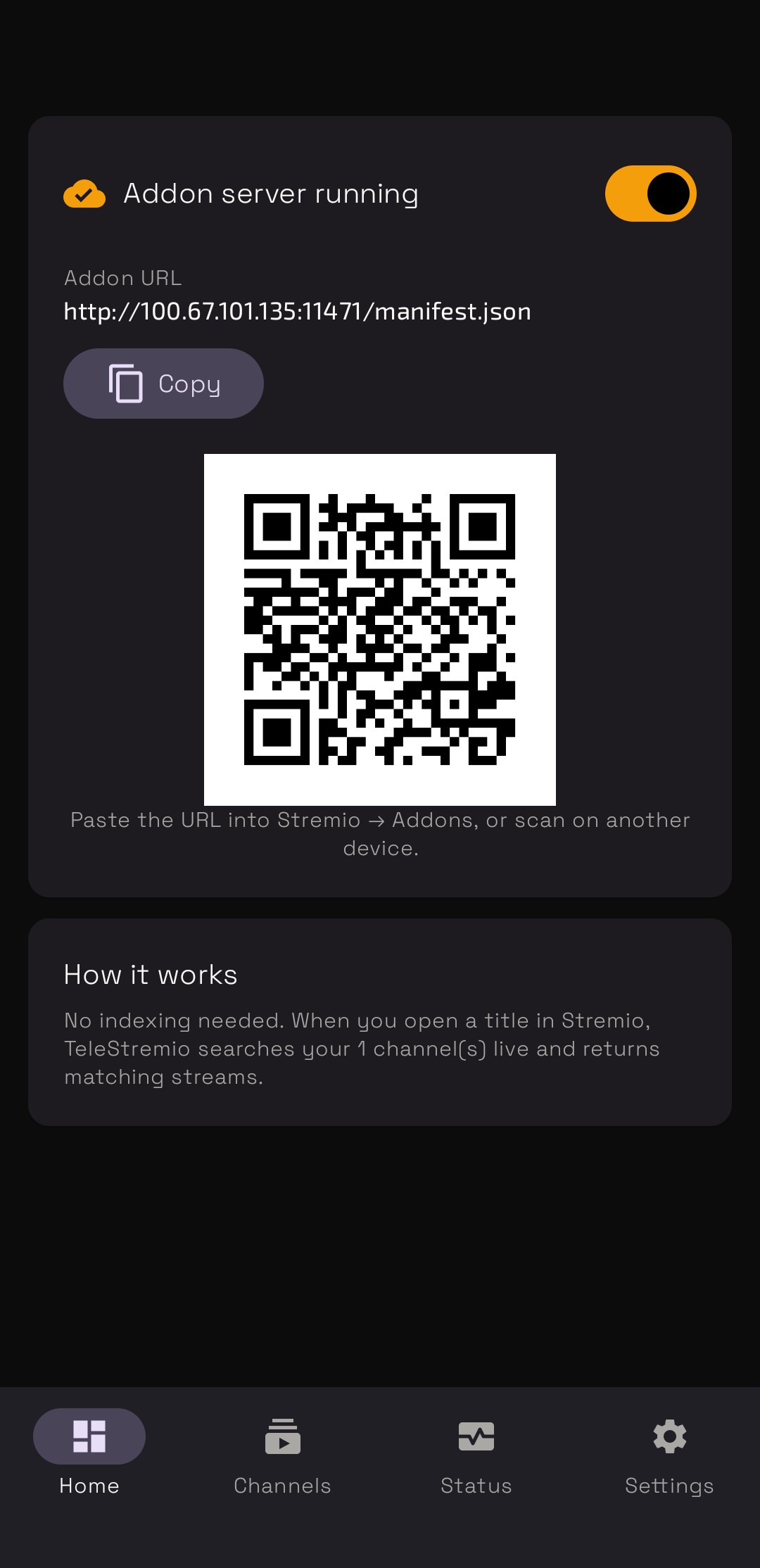
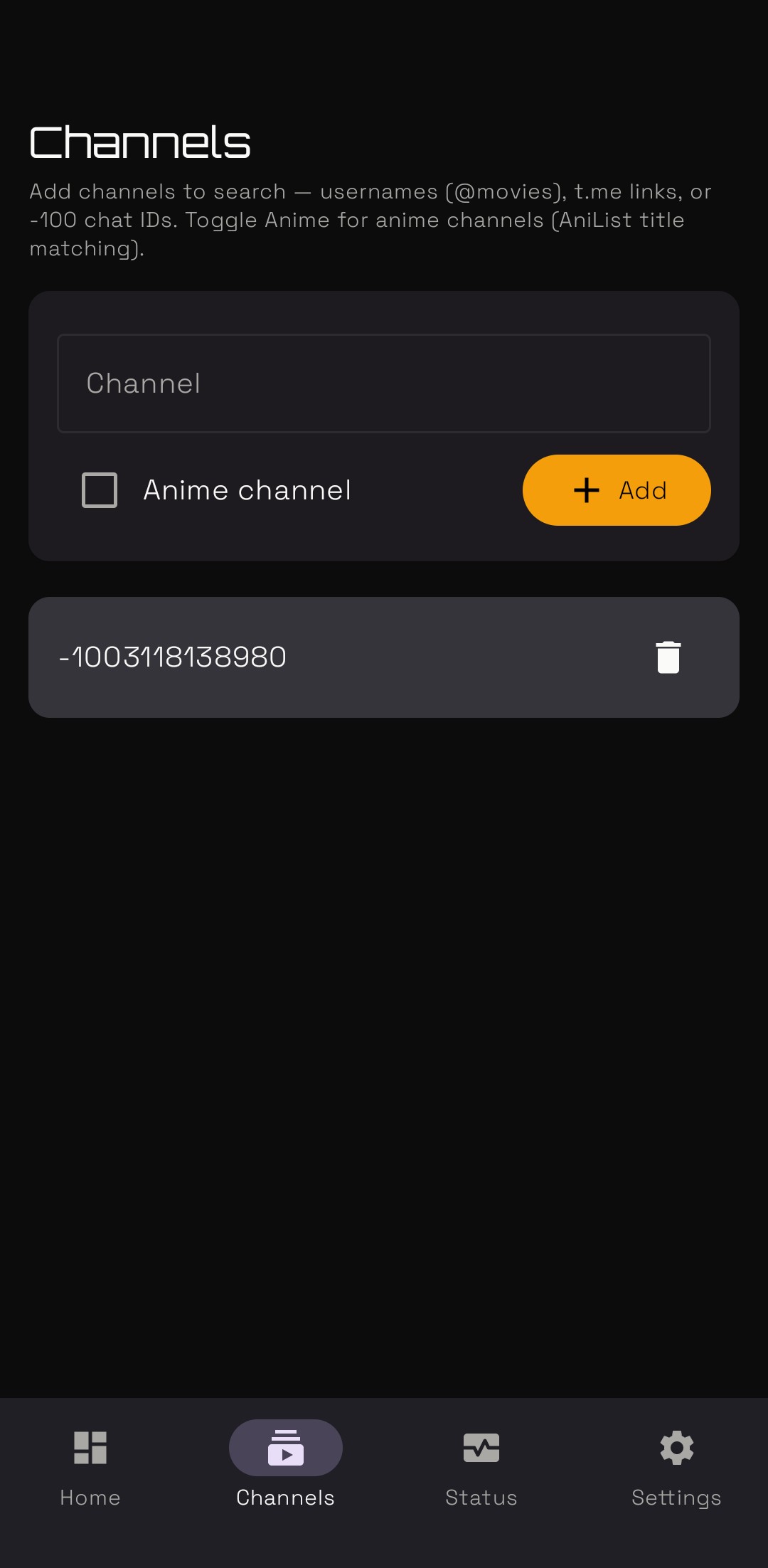
No VPS, no Docker, no MongoDB — TeleStremio runs this whole idea on your phone. It logs into your Telegram, hosts a local Stremio addon, and streams your channels on demand.

 |
 |
 |
 |
 |
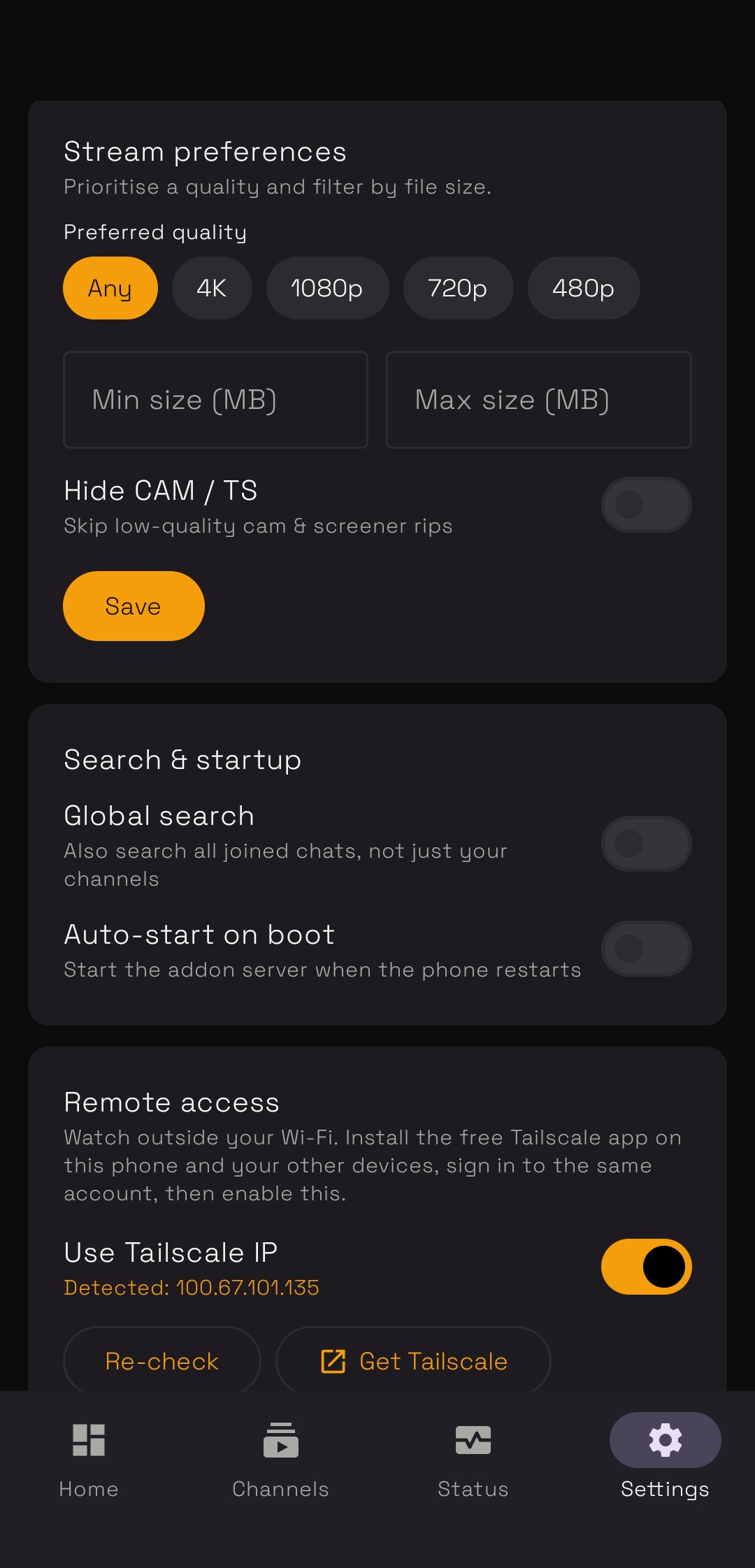 |
Get started: install the APK → log in with phone/QR → add your channels → turn the server on → paste the addon URL into Stremio. Want to watch outside your home Wi-Fi? Enable Remote access with Tailscale.
⚖️ App vs. the full self-hosted server
The app is great for personal, single-user use, but it's intentionally lighter than the full server in this repo:
| 📱 TeleStremio App | 🖥️ Self-hosted server | |
|---|---|---|
| Hosting | Your phone, zero setup | VPS / Docker + MongoDB |
| Users | Single user (you) | Multi-user with access tokens |
| Library | On-demand live search | Full indexed database |
| Catalogs | Cinemeta (Popular / Top Rated) | Auto + custom catalogs, requests |
| Access control | — | Subscriptions, tokens, admin panel |
| Extras | — | Analytics, backups, announcements, MediaFlow proxy, RPDB / Fanart |
| Uptime | While the phone is on | 24/7 |
| Remote access | Via Tailscale | Public URL out of the box |
In short: use the app if you just want to watch your own Telegram files without hosting anything; use the full server for multi-user sharing, subscriptions and always-on reliability.
✨ Key Features
- ⚡ Ultra-fast, permanent streaming links (no expiry)
- 🎬 Automatic posters & details from IMDb / TMDb
- 📚 Auto & custom catalogs (organize by language, platform, or your own lists)
- 🔐 Private / exclusive catalogs for premium content
- 💳 Subscriptions & access control built in
- 🧩 Split-file & multi-part playback as one stream (incl.
.zip.001split archives) - 🌀 Anime-aware metadata for anime channels
- 🔍 Global Search across extra channels (now streams split &
.ziparchives too) - 🔐 In-app Telegram login — connect your user session from the Settings page (phone → code → 2FA), no manual session string needed
- 🎚️ Per-user addon settings — each token can pick quality sort order, filter qualities, and hide/reorder catalogs
- 📊 User activity dashboard — see who's online, what's now-playing, plus location, ISP, device/app & VPN
- 📢 New-content announcements with one-tap Stremio / Nuvio deep-link buttons that open the exact title
- 🔎 Search by name, IMDb or TMDB id/link everywhere (manual add, rescan & upload sessions)
- 🏷️ Auto-stamps the IMDb/TMDb link into indexed captions, so forwarding a file again matches instantly
- 🚑 Skip Channel — files that fail to index are set aside with a "what to fix" note
- 🖥️ Full web configuration panel — no restarts for most changes
- 🗄️ Multiple databases & bot tokens for scale and speed
🗂️ Organizing Your Channels (recommended)
You can dump everything into one AUTH channel — but keeping content in separate channels makes your library far easier to manage, back up, and share with helpers. Each of these is added the same way (as an AUTH channel in Settings), and your bot must be an admin in every one.
A clean layout many people use:
| Channel | What goes in it | Note |
|---|---|---|
| 🎬 Movies | Single movies | — |
| 📺 TV Shows | Regular series episodes | — |
| 🌀 Anime | Anime episodes & movies | ✅ tick the Anime box on this channel |
| 🇰🇷 K-Drama | Korean dramas | — |
| 🎞️ Combined TV | Season-pack / multi-episode files (e.g. S01 E01-E13) |
— |
| 🎞️ Combined Anime | Anime batches (e.g. E01-E24) |
✅ tick Anime |
| 🧩 Split Movies | Big movies split into .001/.002 parts |
— |
| 🧩 Split TV | Big episodes split into parts | — |
| 📁 Manual | Personal / hand-added files | set as your Manual channel (not Auth) |
| 📢 Announcements | Auto "new content" posts | set as your Announcement channel |
| 🚑 Skip | Files that failed to index (for review/fixing) | set as your Skip channel |
💡 This is just an organizing habit — the app reads each file's name to sort it into the right catalog no matter which channel it came from. Separate channels simply keep your side tidy. Remember: a channel should have only one role (Auth / Manual / Announcement / Global Search / Skip); marking an Auth channel as Anime is just a checkbox.
📤 Adding Files by Forwarding (filename rules)
The easiest way to add content: forward the file to your AUTH channel (the channel you set in Settings, where your bot is an admin). The server reads the file name or caption to figure out the title, year, season/episode, and quality — then fetches the poster and details automatically.
👉 The better your filename/caption, the better the match. Below is exactly what's supported, with real examples.
🎥 Movies
A movie name should contain the title, year, and quality.
✅ Good examples
Ghosted 2023 720p WEBRip Hindi x265 HEVC.mkv
Oppenheimer.2023.1080p.BluRay.x264.mkv
3 Idiots (2009) 2160p 4K HEVC.mkv
| Part | Example | Needed? |
|---|---|---|
| Title | Ghosted |
✅ |
| Year | 2023 |
✅ |
| Quality | 720p / 1080p / 2160p |
✅ |
| Extra (codec, audio, source) | WEBRip, x265, Hindi |
optional |
📺 TV Shows
A TV file should contain the title, season + episode (S01E04 style), and quality.
✅ Good examples
Harikatha Sambhavami Yuge Yuge S01E04 1080p WEB-DL.mkv
Loki.S02E03.720p.HEVC.mkv
Panchayat S03E05 Hindi 1080p.mkv
| Part | Example | Needed? |
|---|---|---|
| Title | Loki |
✅ |
| Season | S02 |
✅ |
| Episode | E03 |
✅ |
| Quality | 720p |
✅ |
💡 Files that only have an episode number and no season (e.g. anime like
One Piece - 1142 (1080p).mkv) can't be auto-forwarded — use the Manual Upload Session with a fallback season.
🧩 Split Files (.001, .002 …)
Big files that were split into numbered volumes are supported and are joined back into a single stream automatically.
✅ Supported format: filename.ext.NN
Avatar.2009.2160p.BluRay.mkv.001
Avatar.2009.2160p.BluRay.mkv.002
Avatar.2009.2160p.BluRay.mkv.003
Forward all parts to the channel — they play as one file, in order.
📦 Split ZIP archives (.zip.001, .zip.002 …) are supported too. Large titles packed as a multi-volume zip (e.g. Movie 2160p REMUX.zip.001/.002/…) are joined and streamed as their inner video — with full seeking — both when forwarded to an AUTH channel and via Global Search. The Scan Manager (Tools page) also indexes them.
⚠️ Only stored (uncompressed) zip volumes are seek-streamable — that's how large media zips are almost always packed. A compressed zip will index but won't seek properly. All volumes must share the same base name.
❓ Why only the .001 / .002 style?
Those numbered volumes are true byte-splits of one single video (like what split, 7-Zip, or WinRAR create). They must be re-joined to play, so the server treats them as one stream.
Files named like ... Part 01.mkv, ... CD01.mkv, ... Disc02.mkv are skipped from joining on purpose — those are usually separate, standalone videos, not pieces of one file, so merging them would break playback.
🎞️ Combined / Season-Pack Files
One file that contains multiple episodes (or a whole season) is detected too, and filed neatly under a "Season N Combined" entry.
✅ Supported examples
One Piece S01 E01-E13 1080p.mkv        →  Season 1, Episodes 1–13
Naruto.S02.E14-26.Combined.720p.mkv    →  Season 2, combined batch
Friends S03 1080p.mkv                  →  whole Season 3 (no episode number)
Recognized range separators: -, –, ~, +, &, ,, to (e.g. E01-E04, E01 to E04).
🖐️ Adding Files Manually (Goa trip, lectures, One Piece)
Use manual adding for personal videos (that TMDb doesn't know) or for special cases like anime with no season number. There are two tools:
- Add Content → on the Media Management page → to create a title + add its first file.
- Manual Upload Session → on the Tools page → to bulk-add many files to a title (just forward the files, they attach automatically).
🔎 Search anywhere: the search boxes in Add Content, Rescan Metadata and the Manual Upload Session all accept a title (with or without a year), an IMDb id/link, or a TMDB id/link. A name is matched on Cinemeta first and falls back to TMDb; an IMDb link forces Cinemeta and a TMDB link forces TMDb.
✨ Not in your library yet? The Manual Upload Session can now pick a title straight from IMDb / TMDB search results — no need to add it first. Start the session, forward the files, and the title is created automatically. Files added via a session (or a channel scan) also get their IMDb/TMDb link stamped into the caption, so forwarding the same file again later matches instantly.
⚙️ First make sure a Manual Channel is set in Settings and your bot is admin there. Personal files must be forwarded only to the Manual Channel.
🏖️ Case A — A Goa trip video (personal)
Single clip → add as a Movie
- Media Management → Add Content → Type = Movie.
- Skip the search box. Enter Title (e.g.
Goa Trip 2024). Everything else is optional. - Paste the Telegram link → Resolve → pick Quality → Add Content. ✅
Many clips (Day 1, Day 2…) → add as a TV Show, then bulk-add the rest with a session (see Case B).
🧪 Case B — Biochemistry lectures (personal series, many files)
Step 1 — Create the show once:
- Add Content → Type = TV Show, Title =
Biochemistry Lectures, Season =1, Episode =1. - Paste lecture 1's link → Resolve → Add Content.
Step 2 — Bulk-add the rest:
- Tools → Manual Upload Session → search
Biochemistry Lectures→ select it. - It's personal + TV, so set Season = 1, leave Episode empty (each file becomes the next episode: E2, E3, E4…). Quality is optional.
- Start session → forward all the lecture videos to your Manual Channel → End session. ✅
💡 Want multiple qualities of the same lecture? Set Episode = 5 so every file attaches to Episode 5 instead of creating new episodes.
🏴☠️ Case C — One Piece with no season (One Piece - 1142 (1080p).mkv)
One Piece is a real TMDb show, but the file has an episode number and no season.
- Make sure One Piece exists in your library (add it once via Add Content, using the search box to auto-fill its details).
- Tools → Manual Upload Session → search
One Piece→ select it. - Because it's a real title, set the Fallback season = 1. (The episode
1142is read from the filename; the fallback fills the missing season → stored as S01E1142.) - Start session → forward all the
One Piece - #### (1080p).mkvfiles (to your auth or manual channel) → End session. ✅
Quick reference
| Content | How to add | Season/Episode | Channel |
|---|---|---|---|
| Goa trip (single) | Add Content → Movie | not needed | Manual only |
| Lectures / trip (many) | Session (personal TV) | Season required, Episode optional | Manual only |
| One Piece (no season) | Session (real TV) | Fallback season only | Auth or Manual |
Normal S01E05 files |
just forward | auto-detected | Auth |
💬 Subtitles (filename rules & manual add)
You can attach subtitle files (.srt, .vtt, .ass, .ssa, .sub) to any movie or episode. They then show up as selectable subtitle tracks in Stremio / Nuvio. A title can have multiple subtitles (different languages, or several tracks) — they all appear in the player's subtitle picker.
There are two ways to add them: auto-match by filename (forward to a scanned channel) or add by hand from the web panel (most reliable).
🔤 Supported subtitle filenames
For auto-matching, the subtitle filename needs two things: something that identifies the title/episode, and a language at the end.
✅ Movies — title + year (or an IMDb id), then the language:
Wanted 2008 english.srt
Wanted 2008 ar.srt
tt3326054 arabic.srt
tt3326054 eng.srt
✅ TV episodes — title (or IMDb id) + S01E01, then the language:
Sniffer S01E01 hindi.srt
The.Sniffer.S01E01.arabic.srt
tt3326054 S01E01 eng.srt
tt3326054 S01E01 ar.srt
| Part | Example | Needed? |
|---|---|---|
| Title or IMDb id | Sniffer / tt3326054 |
✅ |
| Season + Episode (TV only) | S01E01 |
✅ (TV) |
| Year (movies, helps matching) | 2008 |
optional |
| Language | english / eng / en |
✅ (for the track label) |
💡 The language is read from the end of the filename. If it's missing or unrecognized, the subtitle is still stored but labelled Unknown.
🌍 Language name & code support
The language is detected from these forms (Arabic shown as an example):
| Form | Examples | Supported? |
|---|---|---|
| Full name | arabic, english, hindi |
✅ |
| 3-letter code (ISO 639-2) | ara, eng, hin |
✅ |
| 2-letter code (ISO 639-1) | ar, en, hi |
✅ (only as the last part of the name) |
| Anything else | xx, junk, or nothing |
❌ → stored as Unknown |
Extra tags like forced, sdh, cc, dubbed at the end are ignored, so Movie 2008 english forced.srt still detects English. The 2-letter form is only matched when it's the final part of the name, so release tags like WEB-DL or HD are never mistaken for a language.
🖐️ Adding a subtitle manually
The most reliable way — no filename guessing, and you can attach several at once. This is ideal for messy release names that don't auto-match.
One-time setup (recommended):
- Make a dedicated Subtitles channel and add your bot as admin there.
- In Settings → Manual Add Channels, add that channel's
-100…ID. (A Manual channel isn't auto-indexed, so subtitles there won't be mismatched — and deleting a subtitle message later auto-removes it from the library.)
Add the subtitle:
- Forward/post the subtitle file to that channel, then copy its message link (
t.me/c/…). - Open the title in Media Management → Edit.
- Scroll to the Subtitles panel → click ➕ Add Subtitle.
- Paste the message link. Use ➕ Add another to add multiple subtitles in one go.
- The language is auto-detected from the filename — change it from the dropdown if needed (or set it for
Unknownfiles). - For a series, enter the Season and Episode the subtitle belongs to.
- Click Add Subtitle. It appears in the list, and you can Delete any entry anytime.
⚠️ The file must stay in a channel your bot can read — it's re-fetched from Telegram on demand (never stored on the server), just like your videos. Don't delete the message unless you also want the subtitle gone.
📚 Catalogs Explained
A catalog is a shelf of titles that appears in Stremio. There are two kinds: Auto (the app builds them) and Custom (you build them). Manage both on the Catalogs page (/catalogs).
🤖 Auto Catalogs
The server can automatically sort your whole library into ready-made shelves — you just tick which ones you want. It decides where each title belongs using its TMDb details (original language + streaming platform).
Available auto catalogs:
| Group | Catalogs |
|---|---|
| Language | Bollywood, Hollywood, Anime, K-Drama, Bengali, South Indian, Tamil, Telugu, Malayalam, Kannada, Japanese, Korean |
| OTT Platform | Netflix, Prime Video, Hotstar, Apple TV, Hulu, HBO, JioCinema, ZEE5, SonyLIV, MX Player, Crunchyroll |
| Smart | Top Rated, Recently Added |
- Enable/disable them on the Catalogs page.
- They update automatically as you add new content; you can also press Sync to rebuild them.
🎯 Custom Catalogs
Your own hand-picked shelves — e.g. My Exclusives, Hindi Dubbed, Kids.
Create one:
- Go to Catalogs → Create Catalog.
- Give it a name and choose who can see it (visibility — see below).
Put titles in it (any of these):
- On the Catalogs page → open the catalog → search a title → add it.
- On a title's Edit page (Media Management → Edit) → Custom Catalog → choose the catalog → Add to Catalog.
- While using Add Content (Manual Add), tick the catalog in the Add to Custom Catalog list.
🔒 Private, Exclusive & Searchable
When you create or edit a custom catalog you get three controls:
1) Who can see it (Visibility)
| Option | Meaning |
|---|---|
| Everyone (Public) | Shows in Stremio for all users. |
| Specific users | Only the users/tokens you pick can see it. |
| Owner only (Private / Hidden) | Hidden from the public catalog — only you manage it. This is how you make a catalog private. |
2) Exclusive 🔐 Turning Exclusive on locks its titles to this catalog only — they're removed from every other catalog (auto and custom) and won't reappear elsewhere. Perfect for premium/members-only content you don't want leaking into public shelves.
Exclusive is only available when visibility is Specific users or Owner only (it wouldn't make sense on a public shelf).
3) Searchable 🔎 For an exclusive catalog you can decide whether its titles show up in Stremio search:
- Off → truly hidden: the title can only be reached through this catalog.
- On → discoverable: allowed users can also find it via search.
How to make a catalog private + exclusive: create/edit it → set visibility to Owner only (or Specific users) → toggle Exclusive on → optionally turn Searchable on. Save.
📡 Special Channels
All of these are configured on the Settings page. Your bot must be an admin in every channel you use. ⚠️ A channel should have only one role — don't use the same channel as Auth, Manual, Global Search, Announcement and Skip at once. (Marking an Auth channel as Anime is just a checkbox on that same channel, so that's perfectly fine.)
🌀 Anime Channel
Anime often needs special handling (correct titles, posters and episode numbers). The server can treat one of your channels as an anime channel and use anime-aware matching for files posted there.
How to use:
- Add the channel to AUTH_CHANNELS in Settings (so its files get indexed).
- Right next to that channel there's an Anime checkbox — just tick it. ✅ That's the whole setup.
- Forward your anime files there as usual — they'll now be matched using anime metadata.
ℹ️ The Anime tick simply flags an existing auth channel as anime — you don't add it to any separate field.
🔍 Global Search
Normally Stremio only searches titles already in your library. Global Search lets it also search live inside extra Telegram channels that you haven't indexed — great for pulling in results on demand.
Requirements: a connected Telegram user session. The easy way is to log in right from the web panel — no config.env edit or restart needed.
How to use:
- Go to Settings → Telegram User Session and log in with your phone number (enter the code Telegram sends, plus your 2FA password if you have one). The session is encrypted and stored automatically.
- In Settings, enable the Global Search toggle.
- Add the channel IDs you want it to search.
- Now when a user searches in Stremio and the title isn't in your local catalog, matching results from those channels appear — tagged 🌐 GLOBAL. Split and
.zipsplit files in those channels stream as one file too.
📢 Announcement Channel
Automatically post a message whenever new content is added, so your members/subscribers always know what's fresh.
How to use:
- In Settings, turn on Announce New Content.
- Set the Announcement Channel (ID or
@username) and add your bot as admin there. - From then on, every newly indexed movie/episode gets announced to that channel — each post includes one-tap ▶️ Stremio and 📱 Nuvio buttons that deep-link straight to that exact title (plus a Get Addon button). (Deep-link buttons require your Base URL to be set.)
🚑 Skip Channel
Sometimes a forwarded file can't be indexed — the caption has no title or no quality, or the title just isn't found on Cinemeta/TMDb. Instead of the file silently vanishing, the server can set it aside in a Skip Channel so you can fix it.
How to use:
- In Settings → Skip Channel, set one channel (ID or
@username) and make your bot an admin there. Files sent to this channel are never indexed. - When a file forwarded to an auth channel fails to index, the bot copies it here and replies with a short note explaining what's missing or wrong (e.g. add a quality like
1080p, add a clearer title, or add an IMDb/TMDB link/id). - Fix the caption and forward it to your main channel again, or add it manually — your choice.
🗑️ Optional: the Delete original on metadata fail toggle (it appears once a Skip Channel is set) removes the file from the main channel after it's copied into the Skip Channel.
🏷️ Fixing Wrong Metadata
If a title gets matched incorrectly (wrong poster/name) or has no details, fix it in seconds:
Method 1 — Paste the correct link in the caption
- Copy the correct IMDb or TMDb link of the title.
- Edit the file's caption in your AUTH channel and paste the link anywhere in it.
- The server re-matches it automatically using that link.
Method 2 — Fix it from the web panel
- Open the title in Media Management → Edit.
- Click Scan / Rescan Metadata, search the correct title — by name, or by pasting an IMDb/TMDB id or link — pick the right result, and apply.
✅ The catalog and posters refresh instantly.
🛠️ Managing Your Server (logs, restart, update)
Everything here is on the Settings page (/admin/settings) — no terminal needed.
📜 Get the logs
- Settings → Logs → click Refresh to view the latest log lines in the browser.
- Click Download to save the full
log.txt(handy when reporting an issue).
🔄 Restart the server
- Settings → Restart App → click the Restart button.
- The panel goes offline for a few seconds and reconnects automatically when it's back.
🆙 Update to the latest code
- The same Restart button also updates: it pulls the newest code from the Upstream Repo / Branch you set in Settings, then restarts.
- So to update: make sure Upstream Repo =
https://github.com/weebzone/Telegram-Stremio(and branch, e.g.master) in Settings → click Restart. Done. 🎉
⚙️ Everything else
All other options — TMDB key, Base URL, channels, subscriptions, proxy, extra databases, multi-token bots, replace mode, hide catalog, etc. — live on the Settings page and apply instantly, without a restart. That includes the Telegram user session for Global Search (Settings → Telegram User Session).
💳 Subscriptions & Access
This is how you control who can watch your library. Two simple ideas power everything:
- 🔑 Token = a key. It's the secret inside every install link (
.../stremio/{token}/manifest.json). One token = one person's Stremio install. Anyone holding a working key can watch. - 🗓️ Subscription = an optional rent timer on a key (a plan with an expiry date, usually paid through your bot).
You can run your server in one of two modes — pick the one that fits you.
| 🆓 Subscription OFF (private / free) | 💰 Subscription ON (paid) | |
|---|---|---|
| Who makes keys? | You hand them out from the web panel | Your bot issues them automatically when a user pays |
| Do keys expire? | Only if you set an expiry (optional) | Yes — a key works while the plan is active |
| Best for | Family, friends, a private group | Selling access to members |
Everything lives on two web pages (in the top menu):
- 🔑 Tokens (
Admin → Tokens) — the one place to create keys, set data limits, set expiry, link users, and manage access. - 🗓️ Plans (
Admin → Plans) — your subscription plans and the list of paying members.
💡 The owner (you) always has full access — your key never expires and you're never blocked.
🆓 Mode 1 — Subscription OFF (you hand out keys)
Use this for a private/free server. Turn the Subscription toggle off in Settings. Now you create and give out keys yourself.
Create a key:
- Go to Admin → Tokens → click New Token.
- Give it a name (e.g.
Living Room TV, or a friend's name). - (Optional) set a Daily or Monthly data limit in GB — leave
0for unlimited. - Leave "Never expires" ticked for a permanent key (untick only if you plan to set an expiry).
- Click Create → a new install link is ready to copy and share.
Manage a key (buttons on each row):
| Button | What it does |
|---|---|
| 📋 Copy Install Link | Copies that key's Stremio link to share |
| 📊 Limits | Set/change daily & monthly GB caps (0 = unlimited) |
| ⏳ Set Expiry | Give the key an expiry date. Type days (e.g. 30), or leave blank / 0 for never expires. You can also link a Telegram User ID here in the same step |
| ➕ Extend / ➖ Reduce | Add or remove days from the key's expiry |
| 🔗 Link User | Attach a Telegram user ID to the key (pulls their real name, and keeps it one key per user) |
| 🗑️ Delete | Remove the key — that person loses access immediately |
✅ Expiry is real here too: if you give a key a date, it stops working after that date. A key with no date simply works forever.
💰 Mode 2 — Subscription ON (users pay via your bot)
Use this to sell access. Turn the Subscription toggle on in Settings and fill in the Subscription Group ID, Payment Instructions (your UPI / bank / PayPal text), an optional Payment QR image, and the Approver IDs (who can approve payments).
Step 1 — Make your plans: go to Admin → Plans → Add Plan (set the days + price, e.g. 30 days – ₹99). Add as many as you like.
Step 2 — Let users buy (all inside your bot):
User presses /start  →  picks a plan  →  sends a payment screenshot
      →  an Approver gets it in the bot  →  taps ✅ Approve (or ❌ Reject)
      →  On Approve: their plan is saved, a key is created automatically,
         and they instantly get their install link + a private group invite
Step 3 — Manage members from Tokens or Plans:
| Button | What it does |
|---|---|
| 📅 Assign | Give someone a plan / set their days by hand (pulls their real Telegram name) |
| ➕ Extend / ➖ Reduce | Add or remove days |
| 🚫 Revoke | Cancel their subscription — access stops right away |
| 🗑️ Remove | Delete their record from the list entirely (also revokes their key) |
| 🔄 Sync Names | (Plans page) fix any User 12345 rows by fetching their real Telegram names |
🛡️ You and your approvers are never kicked from the private group, and never lose access.
🔎 How the server decides "can this person watch?"
In plain English, a key is checked in this order:
- 👑 Owner / approver key? → always allowed.
- ♾️ "Never expires" key? → always allowed.
- ⏳ Key has its own expiry date? → allowed until that date (works in both modes).
- 💰 Subscription mode ON, and none of the above? → allowed only while their plan is active and they're still in the group.
- 📊 Data limit hit? → streams pause until the daily/monthly limit resets.
If a key isn't allowed, the person sees a friendly notice in Stremio (e.g. "Plan Expired — renew from the bot" or "Join Required") instead of the videos.
🔗 The personal install link
Every key has its own link:
https://your-domain.com/stremio/{token}/manifest.json
- In paid mode the addon's description shows the expiry date.
- There's also a Configure page (
/stremio/{token}/configure) users can open to re-install after you extend their plan.
📌 One person = one key. Linking a Telegram ID that already belongs to another key is blocked, so a user can never end up with two keys. When that user presses
/start, the bot reuses their existing key instead of making a new one.
🔧 First-Time Setup (config.env)
You only fill in a few values once in config.env. Everything else is configured later from the web Settings page.
cp sample_config.env config.env
nano config.env
| Variable | Required | What it is |
|---|---|---|
API_ID |
✅ | Telegram API ID (from my.telegram.org) |
API_HASH |
✅ | Telegram API Hash (from my.telegram.org) |
BOT_TOKEN |
✅ | Your bot token (from @BotFather) |
OWNER_ID |
✅ | Your numeric Telegram user ID (from @userinfobot) |
DATABASE |
✅ | Two MongoDB URIs, separated by a comma |
PORT |
✅ | Web server port (keep 8000) |
Example:
API_ID="1234567"
API_HASH="abc123def456ghi789jkl012mno345pq"
BOT_TOKEN="1234567890:AAEabcdEFGhijkLMnOPqrsTUVwxyz12345"
OWNER_ID="987654321"
DATABASE="mongodb+srv://user:pass@cluster0.xxxx.mongodb.net/tracking,mongodb+srv://user:pass@cluster0.xxxx.mongodb.net/storage1"
PORT="8000"
Where to get each value
- API_ID / API_HASH — my.telegram.org → API development tools → create an app.
- BOT_TOKEN — @BotFather →
/newbot. Then add this bot as admin in every media channel. - OWNER_ID — @userinfobot replies with your numeric ID.
- DATABASE — two free MongoDB databases from MongoDB Atlas. Create a cluster, add a DB user, allow network access
0.0.0.0/0, copy the connection string, and append a name to each (/trackingand/storage1). You can reuse one cluster with two different DB names. - PORT — leave
8000unless it's busy.
Then finish in the web panel
Open your server → log in with default admin / admin → go to Settings. Change the admin password first, then fill in the rest below. Everything on this page is saved to the database and applied instantly — no restart — including connecting your Telegram user session for Global Search right from Settings → Telegram User Session (phone number → verification code → 2FA).
🎛️ Web Settings Page (every option explained)
Open Settings (/admin/settings) after logging in. Here's what each card does and where to get the values.
⚙️ General
| Option | What it does |
|---|---|
| Replace Mode | When a new file has the same quality (720p, 1080p…) as an existing one, it replaces the old entry so you never get duplicates. Recommended ON. |
| Hide Catalog | Hides the public Stremio catalog (direct stream links still work). |
🛡️ Admin Authentication
| Field | What to enter |
|---|---|
| Admin Username / Password | Your web panel login. Leave the password blank to keep the current one. Change the defaults right away. |
| AUTH_CHANNELS | The channel(s) the bot indexes and streams from. Add each by @username or -100… ID, and make sure your bot is an admin in each. Tick the Anime box on a channel to treat it as an anime channel. |
🎬 Media & Content
| Field | What to enter / where to get it |
|---|---|
| TMDB API Key | A free TMDB v3 key from themoviedb.org → Settings → API. Powers automatic poster & metadata matching. |
| Base URL | Your public address, e.g. https://your-domain.com. Important: Stremio uses this to reach your streams, so it must be correct. |
| Upstream Repo / Branch | Used by the Restart/Update button to auto-update. Set repo to https://github.com/weebzone/Telegram-Stremio and branch to master. |
💳 Subscription (optional)
Turn this on to monetise access. Set the Subscription Group ID, Payment Instructions (your UPI / bank / PayPal text), an optional Payment QR image URL, and the Approver IDs (who can approve payments). Renewal and "join the channel" prompts in Stremio point users back to your bot automatically — no URL to configure. Full flow in Subscriptions & Access.
🔐 Telegram User Session (optional)
Log in with your phone number (verification code + 2FA password if set) to generate a user session in-app — no manual session string, no config.env edit, no restart. It's encrypted and stored, powers Global Search, and shows your Telegram name, username, phone, ID and connection status, with Disconnect / Reconnect / Remove controls. Only one active session is kept.
🌐 Global Search (optional)
Connect a Telegram User Session (card above), then enable the toggle and add the channel IDs to search live. Results not in your local catalog are tagged 🌐 GLOBAL in Stremio. See Global Search.
🎬 Addon Configuration (per install/token)
Each install link has a Configure page (/stremio/{token}/configure) where the user can set their stream quality sort order, filter which qualities appear, and hide or reorder catalogs for their own token — all without affecting anyone else.
📢 Announcements (optional)
Turn on Announce New Content and set an Announcement Channel to auto-post whenever new media is indexed. See Announcement Channel.
📁 Manual Channel
Set the channel used for hand-added / personal files (these are not auto-indexed). Used by the Manual Upload Session.
🚑 Skip Channel
Set one channel where files that fail to index are copied, each with a note describing what to fix. Files here are never indexed. Optionally enable Delete original on metadata fail (shown once a Skip Channel is set) to remove the failed file from the main channel after it's copied. See Skip Channel.
🌐 Proxy (optional)
Set an HTTP Proxy URL for outbound metadata/API requests, and optionally show both proxied and direct stream links.
🗄️ Extra Storage Databases
Your first two databases (from config.env) are locked as Tracking and Storage 1. Add more MongoDB URIs here to expand capacity — 🟢 means connected. Remove entries only from the end of the list, since existing media reference databases by position.
📨 Multi-Token Clients
Add extra bot tokens for faster parallel streaming under heavy load. Create more bots with @BotFather, add them as admins in all your AUTH channels, then paste their tokens here. Applies immediately.
✅ Click Save Settings when done — you're live!
🚀 Deployment
This guide helps you deploy on Heroku, a VPS with Docker, or Hugging Face (free).
✅ Prerequisites
Before you begin, make sure you have:
- ✅ A VPS with a public IP (Ubuntu on DigitalOcean, AWS, Vultr, etc.) — for the VPS route
- ✅ A domain name — recommended so Stremio can reach you over HTTPS
🐙 Heroku Guide
Follow the ready-made Google Colab tool to deploy on Heroku:

🐳 VPS Guide (recommended)
Deploy on a VPS using Docker Compose (recommended) or plain Docker.
1️⃣ Step 1: Clone & Configure
git clone https://github.com/weebzone/Telegram-Stremio
cd Telegram-Stremio
cp sample_config.env config.env
nano config.env
Fill in all required variables, then save with Ctrl + O, Enter, Ctrl + X.
2️⃣ Step 2: Choose a Deployment Method
🟢 Option 1 — Docker Compose (recommended)
Easier and more maintainable, with config mounting and restart policies.
docker compose up -d
Your server runs at ➡️ http://:8000
Updating config.env later:
- Edit it:
nano config.env - Save:
Ctrl + O,Enter,Ctrl + X - Apply:
docker compose restart
⚡ The config file is mounted, so you don't need to rebuild — changes apply on restart.
🔵 Option 2 — Plain Docker (manual)
docker build -t telegram-stremio .
docker run -d -p 8000:8000 telegram-stremio
Your server runs at ➡️ http://:8000
3️⃣ Step 3: Add a Domain (recommended)
A. DNS record — at your domain registrar, add an A record to your VPS IP:
| Type | Name | Value |
|---|---|---|
| A | @ | 195.xxx.xxx.xxx |
B. Install Caddy (automatic HTTPS + reverse proxy):
sudo apt install -y debian-keyring debian-archive-keyring apt-transport-https curl
curl -1sLf 'https://dl.cloudsmith.io/public/caddy/stable/gpg.key' | sudo gpg --dearmor -o /usr/share/keyrings/caddy-stable-archive-keyring.gpg
curl -1sLf 'https://dl.cloudsmith.io/public/caddy/stable/debian.deb.txt' | sudo tee /etc/apt/sources.list.d/caddy-stable.list
chmod o+r /usr/share/keyrings/caddy-stable-archive-keyring.gpg
chmod o+r /etc/apt/sources.list.d/caddy-stable.list
sudo apt update
sudo apt install caddy
C. Configure Caddy:
- Edit the Caddyfile:
sudo nano /etc/caddy/Caddyfile - Replace its contents with (change the domain, and the port if you changed it):
your-domain.com { reverse_proxy localhost:8000 } - Reload:
sudo systemctl reload caddy
✅ Your server is now live at ➡️ https://your-domain.com
🤗 Hugging Face Guide (free, always-online, no VPS)
Deploy a free, always-online instance — no VPS, no domain, no Docker knowledge. Hugging Face builds the image on its own servers; you just tap a few buttons.
💡 How it works: this repo ships a GitHub Action that pushes your code to your Hugging Face Space on every change. The Space then builds the included
Dockerfileand runs your server.
⭐ Step 1: Star this Repository
Open the repo and tap ⭐ Star at the top right → github.com/weebzone/Telegram-Stremio
🍴 Step 2: Fork the Repository
Tap Fork (top right) → Create fork. This gives you your own copy for private secrets and the deploy workflow.
🔑 Step 3: Create a Hugging Face Write Token
- Sign in (or sign up) at huggingface.co.
- Go to Profile → Settings → Access Tokens.
- Tap Create new token, choose the Write role, and copy it.
🚀 Step 4: Create a Docker Space
- Go to huggingface.co/new-space.
- Give it a name, select Docker as the SDK (pick the Blank template).
- Set visibility to Public (required so Stremio/Nuvio can reach your addon).
- Tap Create Space. Your Space ID is
/— note it down.
🔐 Step 5: Add Deploy Credentials to Your GitHub Fork
In your forked repo → Settings → Secrets and variables → Actions:
| Type | Name | Value |
|---|---|---|
| Secret | HF_TOKEN |
the Write token from Step 3 |
| Variable | HF_SPACE_ID |
/ |
Add the secret under the Secrets tab and the variable under the Variables tab.
🤖 Step 6: Add Your Bot Secrets to the Space
On your Hugging Face Space → Settings → Variables and secrets, add the same values you'd put in config.env:
| Secret | Required | Where to get it |
|---|---|---|
API_ID |
✅ | my.telegram.org |
API_HASH |
✅ | my.telegram.org |
BOT_TOKEN |
✅ | @BotFather |
OWNER_ID |
✅ | your numeric Telegram ID |
DATABASE |
✅ | two comma-separated MongoDB URIs |
ℹ️ No
config.envneeded on Hugging Face — these secrets are read as environment variables. TheDockerfilealready listens on the right port (app_port: 8000is preset in this README).
▶️ Step 7: Deploy
In your forked repo → Actions → select Deploy to Hugging Face Space → Run workflow. After this first run, every push auto-deploys. Watch the build on your Space page — once it shows Running, you're live.
🎬 Step 8: Use Your Addon
- Open
https://-.hf.space/login - Log in (
admin/admin) and immediately change the password. - In the web Settings page set Base URL to
https://-.hf.space. - Open your bot, send /start — it returns your manifest URL.
- Add that manifest URL to Stremio/Nuvio and enjoy. 🎉
🧩 Step 9: Finish the Setup
- Go to
https://-.hf.space/admin/settings. - Fill in the TMDB API key and AUTH channels.
- For everything else, see Web Settings Page.
- Save and enjoy.
📺 Watch in Nuvio / Stremio
Your server is a standard Stremio-style addon, so it works in any compatible player. For the smoothest experience across devices we recommend Nuvio — a free, open-source media hub for Android, Android TV, Fire TV, iOS, Windows and TV that supports addon manifest URLs. (Content was rephrased for compliance with licensing restrictions.)
Get your manifest URL — open your bot and send
/start.Install a player:
Platform Source Android / Android TV / Fire TV Google Play All platforms / latest builds GitHub — tapframe/NuvioStreaming Open the app → Addons → paste your manifest URL → install.
Done! 🎉 Your Telegram library appears in the catalog and streams directly.
💡 Prefer Stremio? It works too — just install the same manifest URL.
🏅 Contributors
 |
 |
 |
 |
|---|---|---|---|
Karan |
Stremio |
ChatGPT |
VFlix Prime |
| Author | Stremio SDK | Refactor | Community Support |