 Tasks.md
A self-hosted, Markdown file based task management board.
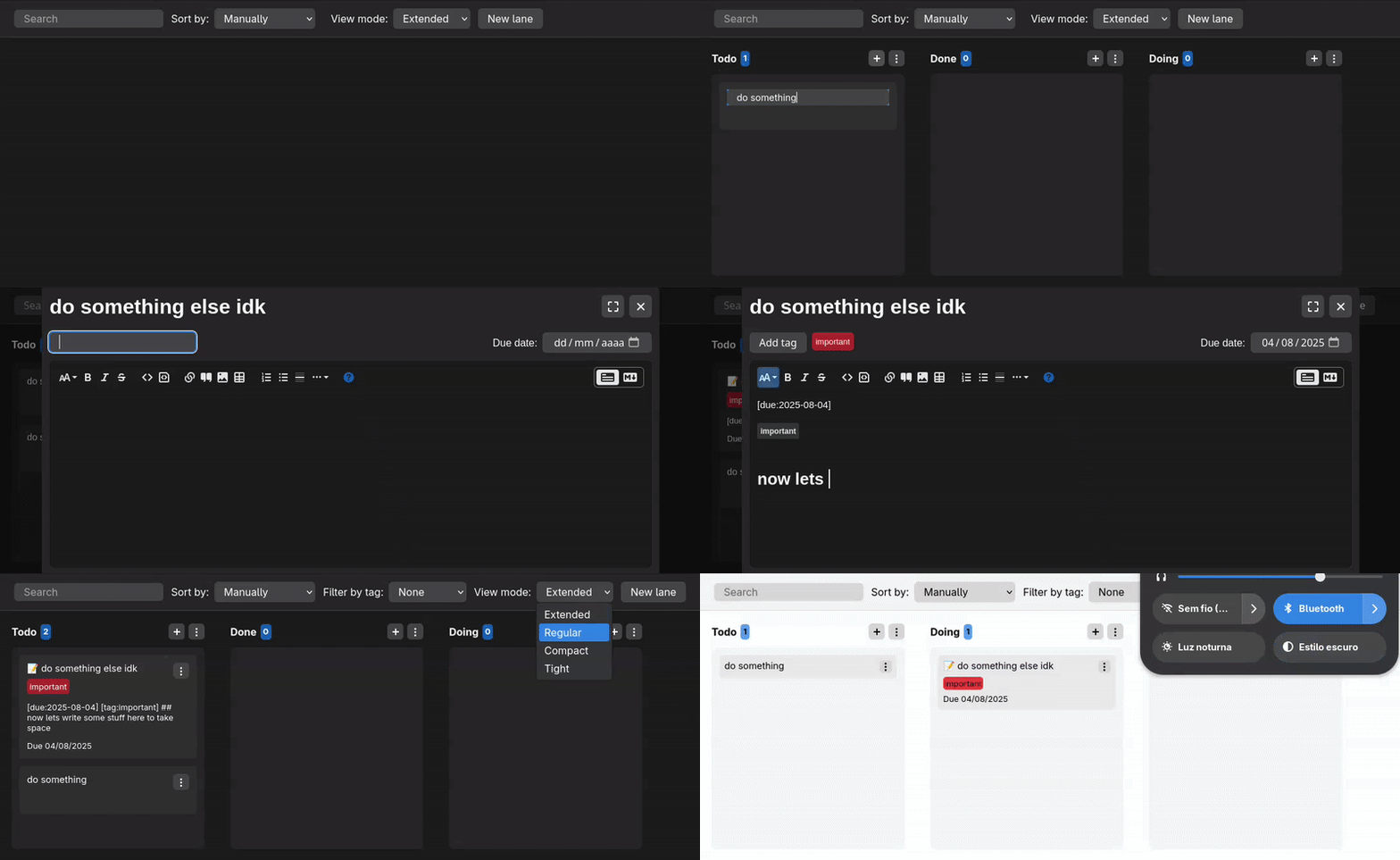
⭐ Features
- Create cards, lanes and tags in a modern and responsive interface;
- Write cards as Markdown files;
- Easy to install with a single Docker image;
- Light and dark themes synced with operating system settings;
- Heavily customizable with 3 default color themes (Adwaita, Nord and Catppuccin);
- Support for subpath based reverse-proxy with an environment variable for base path;
- Can be installed as PWA.
- Multilingual support, with locale auto-detected from browser and persisted per user;
Upgrade from 2.X.X to 3.X.X
If you're running a docker container with version 2 of Tasks.md and want to upgrade it to version 3, please follow up those instructions as it requires some tweeks for it to work properly.
🐋 Installation
Docker
Paste this command:
docker run -d \
  --name tasks.md \
  -e PUID=1000 \
  -e PGID=1000 \
  -e TITLE="" \
  -e BASE_PATH="" \
  -e LOCAL_IMAGES_CLEANUP_INTERVAL=1440 \
  -p 8080:8080 \
  -v /path/to/tasks/:/tasks/ \
  -v /path/to/config/:/config/ \
  --restart unless-stopped \
  baldissaramatheus/tasks.md
Remove the environment variables you don't want to keep (all of them are optional, PUID and PGID are recommended), replace /path/to/something with directories that exist in your filesystem and then execute it. The environment variables are the following:
PUIDandPGID: User ID and group ID that owns the files and directories. On linux distros you can find your user's UID and GID runningidin the terminal, but it's usually1000for both variables. If no value is assigned for those variables, docker will create all the files and directories as root. You can read more about it here.TITLE: A given name that shows below the header and in the browser tab when accessing root path;BASE_PATH: Base path in the url. Use this variable if you are going to run the app under a subpath based reverse-proxy. Be aware that PWA does not work when BASE_PATH is set with anything other than "/";LOCAL_IMAGES_CLEANUP_INTERVAL: After a given interval the app will remove all local images that aren't present in any task. This variable control the duration in minutes of this interval. The default value is 1440 (exactly 24h). Set it as 0 to disable it.
docker-compose
version: "3"
services:
  tasks.md:
    image: baldissaramatheus/tasks.md
    container_name: tasks.md
    environment:
      - PUID=1000
      - PGID=1000
    volumes:
      - /path/to/tasks:/tasks
      - /path/to/config:/config
    restart: unless-stopped
    ports:
      - 8080:8080
Use the Docker section above as reference for setting up variables and volumes.
Source code
Clone the repository with git clone --recursive, open a terminal instance in the /frontend directory and another one in the /backend directory, then in both of them run npm install and npm start. The env variables are set in package.json file for both directories, and are the same ones listed in the Docker section above, plus CONFIG_DIR and TASKS_DIR for config and tasks directories paths.
🎨 Customize
You can customize the application CSS through the custom.css (within /config directory if you're on Docker). You can replace the default adwaita theme with nord or catppuccin, or you can make your own changes. The easieste way to customize the application is to use the existing color variables (detailed below), but if you want to make changes other than color replacements you can use index.css file as a reference.
Color variables
color-accent: Highlight color;color-foreground: Anything that goes against background that needs contrast, text color;color-background-1: Main background color, used as background color for the app main page;color-background-2: 1 layer above main background color, used as background color for editor code-block, dialog, popovers, lanes and header;color-background-3: 2 layer above main background color, used as background color for cards;color-background-4: 3 layer above main background color, used as background color for buttons and inputs;color-alt-1: Used as tag color, input error and past due date;color-alt-2: Used as tag color;color-alt-3: Used as tag color and due date when it's current date;color-alt-4: Used as tag color;color-alt-5: Used as tag color;color-alt-6: Used as tag color;color-alt-7: Used as tag color;
📁 Files structure
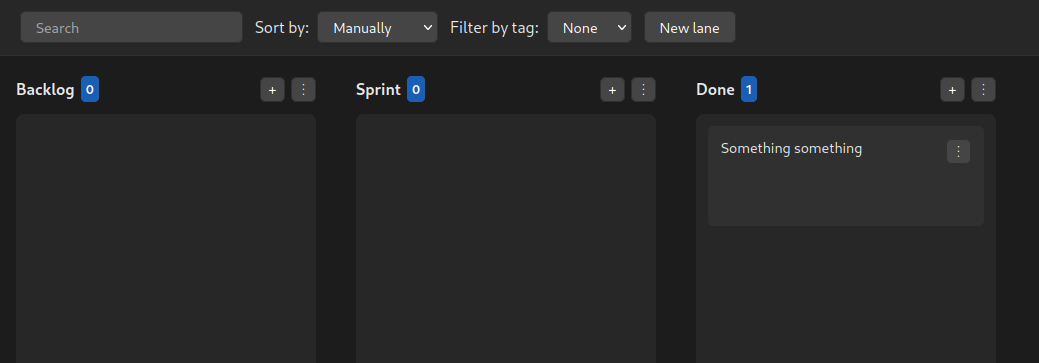
The way directories and files are organized in Tasks.md is quite simple. Every lane you add within the app is a directory in your filesystem and every task is file.
So if your tasks look like this:
Your files should look like this:
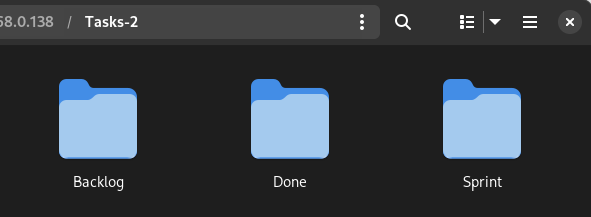
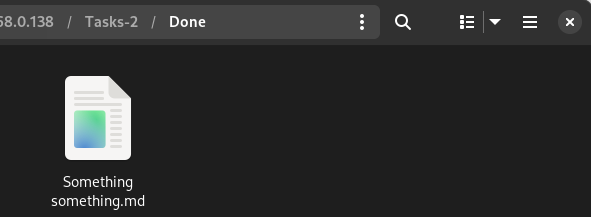
Sub-directories can also be opened as their own projects. In this example, by opening the app under /backlog path it will treat this directory as a different project, with its own lanes and tasks.
More details (and it how it looks within Obsidian) can be found here.
💻 Technology stack
With the goal of having a good mix of performance and maintainability, the application was built with SolidJS and Koa. It also uses Stacks-Editor for text editing and serve-static to serve the css files as-is.
🔨 Contribute
This is a low maintenance project. The scope of features and support are purposefully kept narrow to ensure longer term maintenance is viable. Issues and PRs raised for bugs and quality of life improvements are perfectly fine, just don’t do that for features that significantly increase the scope of the project.
Sponsor
If you like the project, consider becoming a sponsor with a one-time donation!