TablePro is a free, open source databases project written in Swift and released under AGPL-3.0. It has 5,897 GitHub stars, 394 forks and 58 open issues, and was last pushed 4 hours ago. On this registry it ranks #107 of 143 tracked projects in Databases, with 5 head-to-head comparisons available.

What is TablePro?

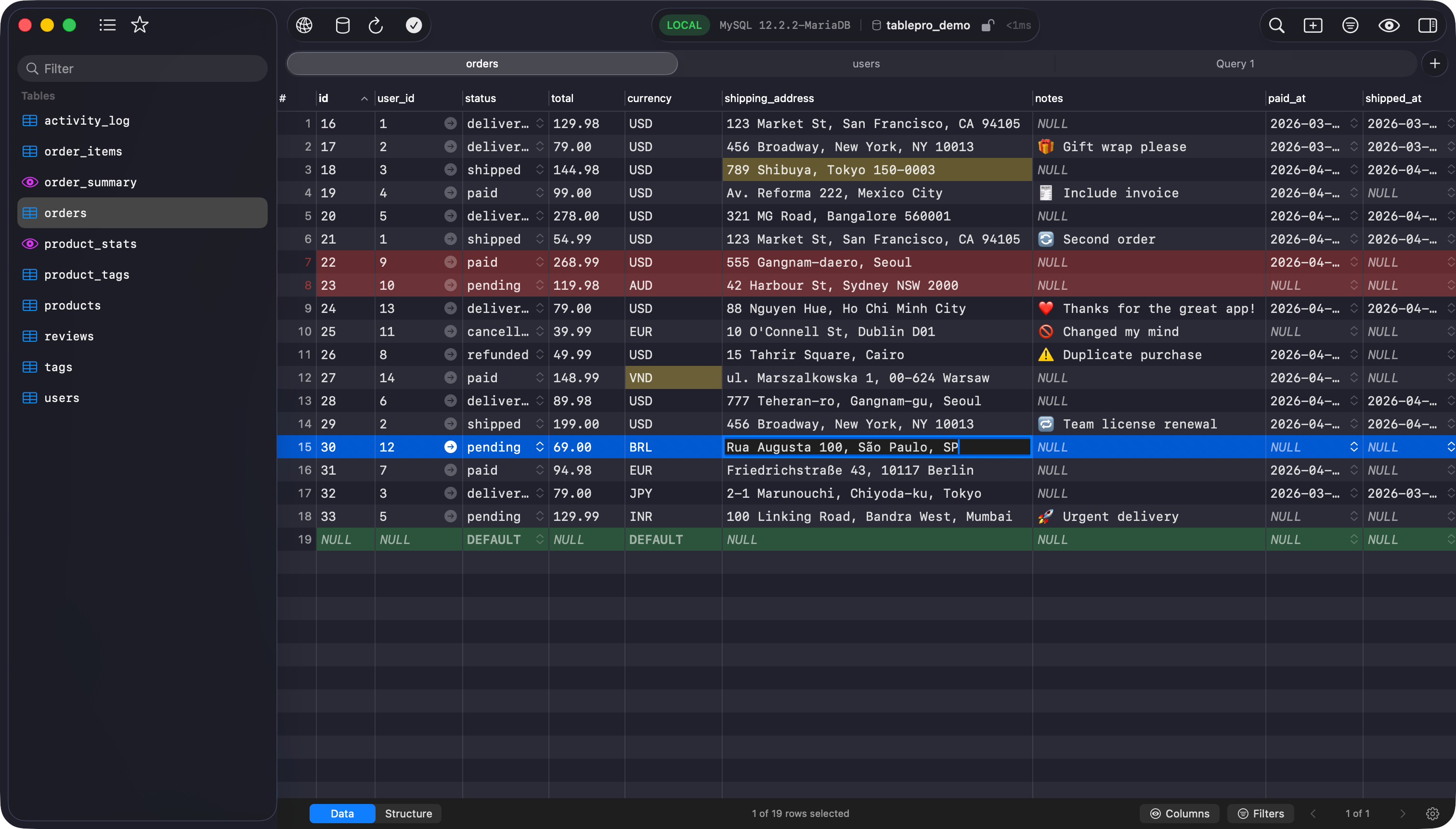
TablePro is a free, AGPL-3.0-licensed database client built with native frameworks for macOS 14.4+ and iOS/iPadOS 18+, aimed at developers who work across several SQL and NoSQL engines and want a fast, open alternative to proprietary desktop clients.

What it is

TablePro is a native database GUI written in Swift, distributed as a desktop app for macOS and as an app for iOS and iPadOS. It is built on native frameworks on every platform it targets, with no Electron shell, no JDBC layer, and no JavaScript runtime in the stack. It reports a cold start under one second and idle memory around 80 MB. Drivers for the major engines ship inside the app, while less common engines install on demand from a separate plugin registry, and the plugin system is open to new drivers written in Swift. Platforms listed are macOS 14.4+ (stable), iOS/iPadOS 18+ (stable), a Linux prototype with nothing to install yet, and no Windows support.

The concrete problem is the gap in native macOS database tooling. The project's own framing splits the field into three groups: single-database open-source clients such as Sequel Ace, which is MySQL-only, and Postico, which is PostgreSQL-only; multi-database but closed-source clients such as TablePlus, which is polished and native but proprietary; and multi-database clients that are not native, such as DBeaver on the JVM and Beekeeper Studio and DBGate on Electron, which are cross-platform but slow to start and heavy on memory. TablePro positions itself as the missing fourth option: native, multi-database, and open source. The README describes it as what its author wanted TablePlus to be.

Key capabilities

  • SQL editor with autocomplete, multi-cursor editing, Vim mode and syntax themes.
  • Data grid with inline editing, sort, filter and undo/redo.
  • Built-in drivers for MySQL, MariaDB, PostgreSQL, Amazon Redshift, CockroachDB, SQLite, ClickHouse and Redis; plugin drivers for Microsoft SQL Server, MongoDB, Oracle Database, Dameng DM8, DuckDB, Beancount, Cassandra/ScyllaDB, Etcd, Cloudflare D1, DynamoDB, BigQuery, Spanner and libSQL/Turso.
  • SSH tunnels with password and key authentication, plus SSL/TLS.
  • Query history with full-text search, and iCloud sync for connections, groups, tags, settings and SSH profiles.
  • AI chat, inline suggestions and Explain/Optimize, using a user-supplied API key, a chosen provider, or a local Ollama instance.
  • MCP server and URL scheme that let Cursor, Raycast and Claude Desktop talk to databases, alongside a plugin system for writing your own driver in Swift.

Who uses it and how

  • Mac-based developers on macOS 14.4 or later, plus iPad users on iOS/iPadOS 18+, who want the same client on both.
  • Teams working across several engines at once, replacing a per-engine set of tools with one window and a shared connection list.
  • Developers who drive queries from Cursor, Raycast or Claude Desktop through the built-in MCP server rather than the GUI.
  • Contributors writing Swift drivers for engines the built-in set does not cover, published through the plugin registry.
  • Individual developers who keep connections, groups, tags, settings and SSH profiles in step across Mac and iPad via iCloud sync. The repository shows 5,897 stars, 394 forks and 58 open issues.

Getting started

Install on macOS with Homebrew using brew install --cask tablepro, or download the build from GitHub Releases. Source builds need macOS 14.4+, Xcode 26+, and XcodeGen, followed by scripts/download-libs.sh and scripts/generate-project.sh before generating TablePro.xcodeproj from project.yml.

How it compares

Against Sequel Ace and Postico, TablePro covers many engines instead of one, and against DBeaver, Beekeeper Studio and DBGate it keeps a native stack rather than the JVM or Electron. Against TablePlus it matches the native, multi-database shape while being open source under AGPL-3.0. The app is free under that licence, and paid licences bought at tablepro.app fund the next release; users who cannot afford one are told to use the free version.

When to use it — and when not to

Skip TablePro if the team is Windows-only or Linux-only, since Windows is unsupported and Linux is a prototype with nothing to install. Plugin drivers install on demand from the plugin registry, so a restricted or offline network needs a plan for that; the AI features also need an API key or a local Ollama setup. The AGPL-3.0 licence carries copyleft obligations for anyone redistributing modified versions, and ongoing development is funded by licence purchases, so it depends on that revenue.

project readme (upstream, from github) — read inline

TablePro

A fast, native database client for developers.
Free and open source.

Website · Docs · Download · Discord

Release License: AGPL v3

Tiếng Việt 简体中文 한국어

TableProApp%2FTablePro | Trendshift


About

TablePro is what I wanted TablePlus to be: native, fast, open source.

Built with native frameworks on every platform. No Electron, no JDBC, no JavaScript runtime. Cold start under 1 second, idle around 80 MB RAM. Connects to all major SQL and NoSQL databases through native drivers.

AI is built in: chat, inline suggestions, and an MCP server that lets Cursor, Raycast, or Claude Desktop talk to your databases. Bring your own API key, pick your own provider, or run local with Ollama.

Why TablePro

Native macOS database clients today fall into three groups:

  • Single-database, open source: Sequel Ace (MySQL only), Postico (PostgreSQL only). Great if you live in one engine.
  • Multi-database, closed source: TablePlus. Polished and native, but proprietary.
  • Multi-database, not native: DBeaver (JVM), Beekeeper Studio and DBGate (Electron). Cross-platform, but slow to start and heavy on memory.

TablePro is the missing fourth: native, multi-database, and open source.

Platforms

Platform Status
macOS 14.4+ Stable
iOS / iPadOS 18+ Stable
Linux Prototype, nothing to install yet
Windows No

Supported Databases

Database Distribution
MySQL Built-in
MariaDB Built-in
PostgreSQL Built-in
Amazon Redshift Built-in
CockroachDB Built-in
SQLite Built-in
ClickHouse Built-in
Redis Built-in
Microsoft SQL Server Plugin
MongoDB Plugin
Oracle Database Plugin
Dameng DM8 Plugin
DuckDB Plugin
Beancount Plugin
Cassandra / ScyllaDB Plugin
Etcd Plugin
Cloudflare D1 Plugin
DynamoDB Plugin
BigQuery Plugin
Spanner Plugin
libSQL / Turso Plugin

Built-in drivers ship with the app. Plugin drivers install on demand from the plugin registry.

What's inside

  • SQL editor with autocomplete, multi-cursor, Vim mode, syntax themes
  • Data grid with inline editing, sort, filter, undo/redo
  • Native window tabs, multi-window, split panes
  • SSH tunnels with password and key authentication, SSL/TLS
  • Query history with full-text search
  • iCloud sync for connections, groups, tags, settings, and SSH profiles
  • AI chat, inline suggestions, and Explain/Optimize
  • MCP server and URL scheme for Raycast, Cursor, Claude Desktop
  • Plugin system, write your own database driver in Swift

Install

brew install --cask tablepro

Or download from GitHub Releases.

How to Build

Building TablePro requires macOS 14.4 or later, Xcode 26 or later, and XcodeGen.

Run the first-time setup from the repository root:

brew install xcodegen
scripts/download-libs.sh
scripts/generate-project.sh

TablePro.xcodeproj is generated from project.yml and is not in git. Re-run scripts/generate-project.sh after changing project.yml or Configs/, or after adding a source file.

Build a Debug app without code signing:

xcodebuild \
  -project TablePro.xcodeproj \
  -scheme TablePro \
  -configuration Debug \
  -skipPackagePluginValidation \
  CODE_SIGNING_ALLOWED=NO \
  build

The app is written to ~/Library/Developer/Xcode/DerivedData/TablePro-*/Build/Products/Debug/TablePro.app.

To build and run a signed app, put your Apple team and a unique bundle identifier in Configs/Secrets.xcconfig. See Building with a personal Apple team.

Documentation

Full docs at docs.tablepro.app.

Support development

The app is free under AGPLv3. If you use TablePro at work, please buy a license. Every purchase funds the next release. If you can't afford one, just use the free version. That's why it's free.

Sponsors

Thanks to these amazing people for supporting TablePro:

getapps.cafe · SimpleLocalize · CodeRabbit · Nimbus · Visnalize · Dwarves Foundation · Huy TQ · Xermius · Unikorn

Star History

Star History Chart

License

This project is licensed under the GNU Affero General Public License v3.0 (AGPLv3).

Frequently asked questions

Is TablePro free to use?

TablePro is open source under the AGPL-3.0 licence. There is no licence fee and no seat count — you can self-host it or, where the project offers one, pay a vendor for a managed version instead.

What does TablePro do?

Free and open source database client built natively for developers

What is TablePro written in?

TablePro is primarily written in Swift. Its source is publicly available at https://github.com/TableProApp/TablePro, and it has 5,897 GitHub stars.