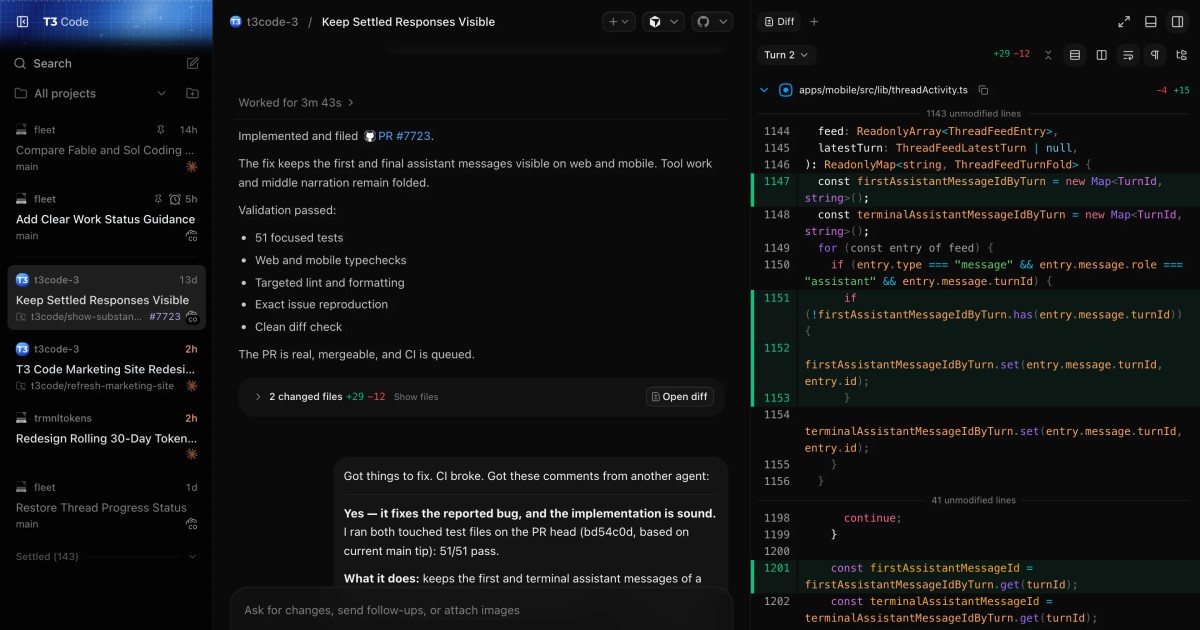
T3 Code is a free, open source ai assisted coding project written in TypeScript and released under MIT. It has 22,945 GitHub stars, 5,817 forks and 1,628 open issues, and was last pushed 5 hours ago. On this registry it ranks #11 of 24 tracked projects in AI Assisted Coding, with 5 head-to-head comparisons available. It gained 447 stars over the last 6 tracked days.

T3 Code — AI-powered coding made simple and efficient

What is T3 Code?

What it is

T3 Code is an open-source agent harness control surface for AI-assisted coding. It lives in the developer-tools ecosystem for local coding agents, and it gives users one interface for agents that are already installed and authenticated on their own computer. The project is written in TypeScript and is MIT-licensed.

The concrete problem it solves is scattered control of multiple coding-agent subscriptions. Instead of using each provider through its own desktop or terminal workflow, users can operate Claude Code, Codex, Cursor, Grok Build, OpenCode, and Google Antigravity from a shared control surface. The README says the tool is inspired by the Codex desktop app, Conductor, Claude Desktop, and Cursor Glass, and that the maintainers wanted a performant, remote-ready, and open alternative.

Key capabilities

  • It provides mobile apps for iOS and Android, a web app, and an Electron-based desktop app for controlling agents on a machine.
  • It works with existing subscriptions for Claude Code, Codex, Cursor, Grok Build, OpenCode, and Google Antigravity when those providers are set up on the computer.
  • It can run a local backend and web app through npx t3@latest, so users can try the control surface without installing the desktop package first.
  • It includes permission modes, keyboard shortcuts, project settings, source-control integrations, multiple accounts for Codex and Claude, and remote access from a phone or another machine.
  • It supports background-service operation, so the T3 Code server can keep running while users control it from other devices.
  • It is packaged for Windows through winget, macOS through Homebrew, and Arch Linux through AUR stable and nightly packages.

Who uses it and how

  • Developers with several AI coding-agent subscriptions can keep the agents on their own machine and control them from one interface.
  • Remote users can access the local T3 Code server from a phone or another machine through the documented remote-access workflow.
  • Users can test the server with npx t3@latest before installing a desktop client.
  • Source builders can start from docs/internals/overview.md, and contributors must install vp, run vp i, and read CONTRIBUTING.md.

Getting started

The typical install-free path is npx t3@latest, which requires Node.js 22.16+, 23.11+, or 24.10+ and at least one authenticated provider. Desktop clients can be installed from GitHub Releases, winget, Homebrew, or Arch Linux AUR packages.

When to use it — and when not to

Use T3 Code when someone wants an open, local control surface for multiple AI coding-agent subscriptions and accepts early-stage rough edges. The README says the project is very early, expects bugs, and is mostly not accepting contributions. Do not use it when a mature product with a full public documentation site is required, because there is no docs site yet and the documentation is currently only in the repository.

project readme (upstream, from github) — read inline

T3 Code

T3 Code is an "agent harness control surface". It enables control of the agents on your machine with a best-in-class mobile app (iOS, Android), web app and Electron-based desktop app.

Works with your subscriptions on Claude Code, Codex, Cursor, Grok Build, OpenCode, and Google Antigravity. If they're set up on your computer, T3 Code can control them.

"Wait, what are you selling me?"

Nothing. We built T3 Code because we wanted the best possible development experience with agents. We were inspired by existing solutions like the Codex desktop app, Conductor, Claude Desktop and Cursor Glass, but none met our bar.

We wanted something performant, remote-ready, and truly open. If we ever go the wrong direction, we want you to have everything you need to fork and build the editor that you want.

Installation

[!WARNING] T3 Code currently supports Codex, Claude, Cursor, Grok Build, OpenCode, and Antigravity. Install and authenticate at least one provider before use:

  • Codex: install Codex CLI and run codex login
  • Claude: install Claude Code and run claude auth login
  • Cursor: install Cursor CLI and run agent login
  • Grok Build: install Grok Build CLI and run grok login
  • OpenCode: install OpenCode and run opencode auth login
  • Antigravity: enable it in Settings, then use Install Antigravity and Sign in with Google. No CLI is required.

Try it out (install-free)

The easiest way to test T3 Code is to run the server in your terminal (requires Node.js 22.16+, 23.11+, or 24.10+):

npx t3@latest

This will launch T3 Code's backend on your machine as well as the local web app to control your agents.

Tip: Use npx t3@latest --help for the full CLI reference.

Desktop app

Install the latest version of the desktop app from GitHub Releases, or from your favorite package registry:

Windows (winget)
winget install T3Tools.T3Code
macOS (Homebrew)
brew install --cask t3-code
Arch Linux (AUR)

Stable:

yay -S t3code-bin

Nightly:

yay -S t3code-nightly-bin

The AUR packaging is maintained in this repository under packaging/aur.

Some notes

We are very very early in this project. Expect bugs.

We are (mostly) not accepting contributions yet. Small fixes may be considered. Big features will not be.

Documentation

Full docs live in docs/. There's no docs site yet.

Building from source? Start at docs/internals/overview.md.

If you REALLY want to contribute still.... read this first

Install vp

T3 Code uses Vite+ so you'll need to install the global vp command-line tool.

macOS / Linux
curl -fsSL https://vite.plus | bash
Windows
irm https://vite.plus/ps1 | iex

Checkout their getting started guide for more information: https://viteplus.dev/guide/

Install dependencies

vp i

Read CONTRIBUTING.md before reporting a bug or opening a PR.

Have a feature request? Start an Ideas discussion.

Need support? Join the Discord.

Frequently asked questions

Is T3 Code free to use?

T3 Code is open source under the MIT licence. There is no licence fee and no seat count — you can self-host it or, where the project offers one, pay a vendor for a managed version instead.

What does T3 Code do?

AI-powered coding made simple and efficient

What is T3 Code written in?

T3 Code is primarily written in TypeScript. Its source is publicly available at https://github.com/pingdotgg/t3code, and it has 22,945 GitHub stars.