Suika is an open-source vector graphics editor built with Canvas in TypeScript, aimed at developers and designers who want a Figma-like editing tool they can run, read, and extend themselves.
What it is
Suika Graphics Editor is a web-based vector graphics editor implemented on the HTML Canvas element and written in TypeScript. It is published under the MIT licence and lives in the open-source design and prototyping ecosystem, with a live demo hosted on GitHub Pages and an icon set published to the Figma community. The project describes itself as similar to Figma, and its feature set mirrors the core of a commercial design tool: drawing, path editing, layers, rulers, snapping, and page management, all running in the browser.
The concrete problem Suika addresses is access to a full-featured design editor that is not locked behind a proprietary application or a hosted subscription. It replaces the closed, SaaS-delivered editor with a client-side tool whose source can be inspected, self-hosted, and embedded. Documents are stored as plain data rather than an opaque format, and the editor can import and export both JSON and SVG, so artwork does not depend on a single vendor's storage.
Key capabilities
- Create and edit rounded rectangles, ellipses, lines, paths, text, polygons, and stars.
- Edit paths with the pen tool by adjusting control points, alongside dedicated selection, image, canvas, and hand tools.
- Work on an infinite canvas with zoom and pan, with multiple pages, a ruler, and a layers panel plus a properties panel.
- Snap to the pixel grid and to graphics guides, and use alignment and arrangement operations when positioning objects.
- Undo and redo through a history system, with copy and paste that works across canvases.
- Group objects into groups and frames, and configure behaviour through user settings and keyboard shortcuts.
- Import and export documents as JSON data and SVG, with an i18n layer for localized interfaces.
Who uses it and how
- Designers and makers can open the hosted demo at
https://f-star.github.io/suika/ and draw, edit, and export artwork directly in the browser.
- Frontend engineers can run the editor locally as a development base, building with
pnpm build to produce output in apps/suika/build for deployment.
- Teams implementing collaboration can adopt the
@suika/suika-multiplayer package, which wraps the pure client-side @suika/suika and adds multiple cursors plus calls to RESTful endpoints for drawing names and current user information.
- Backend developers can supply the server side that the multiplayer package expects: RESTful API services and WebSocket services built on hocuspocus, which wraps yjs for the collaborative document model.
- Integrators building a shared workspace must additionally provide a frontend project for login, registration, creating, opening, deleting, and authorizing drawings.
Getting started
Install PNPM with npm install -g pnpm, then run pnpm install and pnpm run dev to start the development server; pnpm build writes the production output to apps/suika/build.
How it compares
Suika's topics and README place it alongside Figma-style canvas and graph editors, but it stands alone in this registry as the only one listed, so no direct peer comparison is available from the facts provided.
When to use it — and when not
Multi-user collaboration is not something the repository ships ready to run: the README states it requires backend implementation, and a self-hoster must provide RESTful API services, hocuspocus WebSocket services, and a workspace frontend handling login, registration, and drawing management. Documentation is marked WIP, so users should expect to learn the project from its source, and anyone wanting a hosted, fully supported commercial editor rather than an MIT-licensed codebase to operate is better served elsewhere.
project readme (upstream, from github) — read inline
Suika Graphics Editor, an open-source vector graphics editor based on Canvas, similar to Figma.
suika 图形编辑器,一款开源的基于 Canvas 实现的矢量图形编辑器,类似 Figma。
English | 中文
Experience
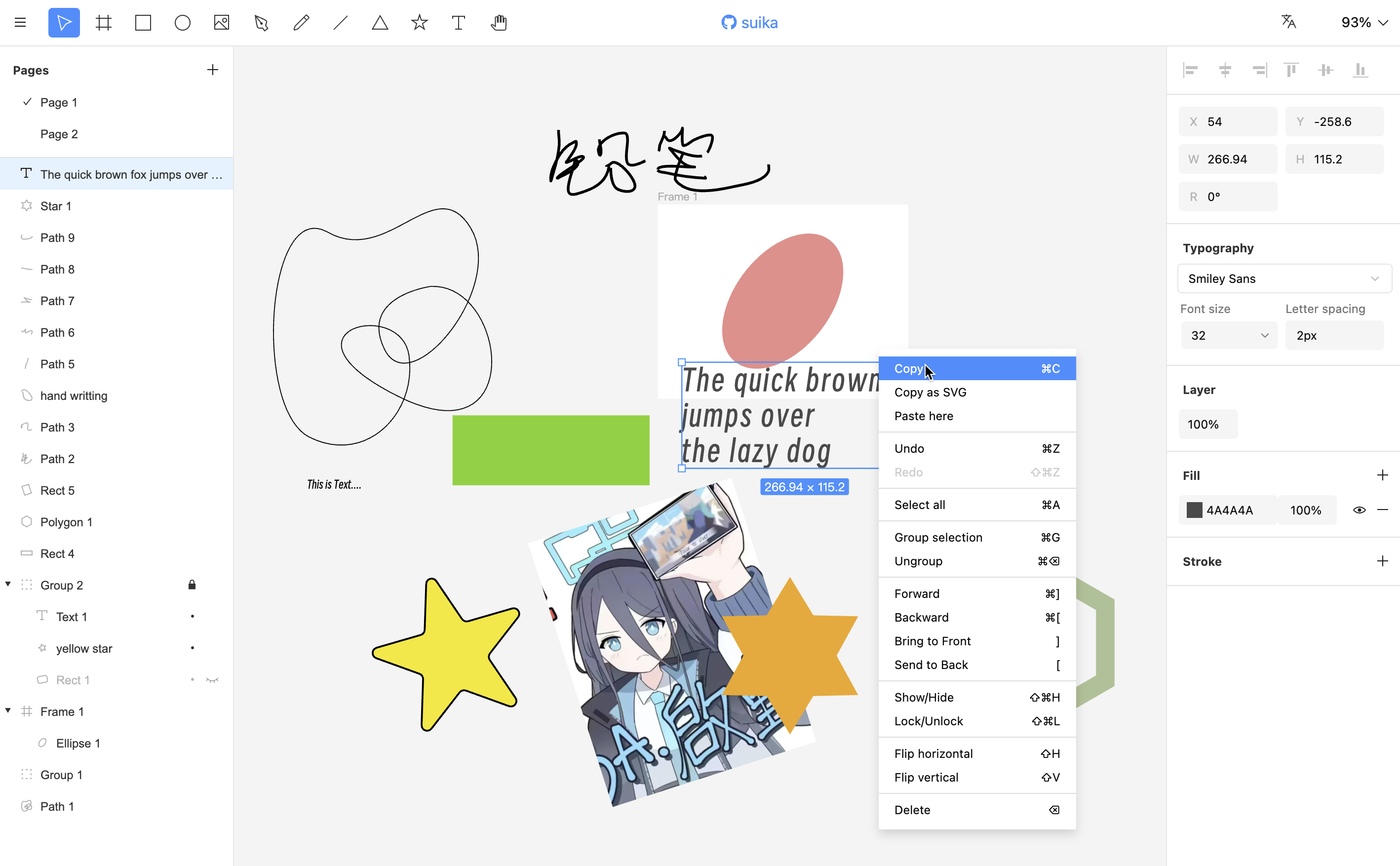
Features
- Creation and editing of graphics, including: rounded rectangle, ellipse, line, path, text, polygon, star;
- Path editing using the pen tool, adjusting control points;
- Support tools: selection tool, graphics drawing tools, image tool, pen tool, canvas tool, hand tool;
- Infinite canvas, with zoom and pan capabilities;
- Multiple pages support;
- History, with undo and redo;
- i18n;
- Snap support, currently supports pixel grid snap and graphics guide snap;
- Keyboard shortcuts;
- Copy and paste, supports cross-canvas copy and paste, alignment, and arrangement;
- Layers panel, properties panel;
- Group, Frame;
- Multi-user collaborative editing (requires backend implementation);
- Ruler;
- Import and export JSON data, SVG;
- User settings;
Documentation
WIP.
Environment Dependencies
To run the project, you need to install Node.js (it is recommended to use the LTS version from the official website), then use Node.js to install the PNPM package manager:
npm install -g pnpm
Install
pnpm install
Dev
pnpm run dev
Build
pnpm build
The target output folder is apps/suika/build.
Icon
figma design
About Multi-User Collaboration
The frontend implementation logic for collaboration is located in the @suika/suika-multiplayer package. This package copies @suika/suika (pure client-side) and adds multi-user collaboration logic, such as multiple cursors, and calls some interfaces, like getting the drawing name and current user information.
Multi-user collaboration is implemented using yjs and the hocuspocus library (a further wrapper around yjs).
If you want to implement multi-user collaboration, you need to implement backend RESTful API services that this package uses, and provide WebSocket services based on hocuspocus.
Additionally, you need to implement a frontend workspace project to manage drawings, supporting login, registration, creating drawings, opening drawings, deleting drawings, and authorization.