




stride is a free, open source gaming project written in C# and released under MIT. It has 7,838 GitHub stars, 1,169 forks and 683 open issues, and was last pushed 9 hours ago. On this registry it ranks #21 of 36 tracked projects in Gaming, with 5 head-to-head comparisons available.

What is stride?

Stride (formerly Xenko) is a free and open-source, cross-platform C# game engine with a built-in visual editor, aimed at game developers who want realistic rendering and VR without buying a commercial engine licence.

What it is

Stride is a highly modular game engine written in C#, developed in the .NET ecosystem and shipped under the MIT licence. It includes Game Studio, a visual editor that lets you create and manage the content of your games or applications visually and intuitively, alongside a command-line toolchain for working without the editor. The project is designed around realistic rendering and VR, and its repository covers both the engine itself and the tooling used to build it, with published documentation, a roadmap, and a contributor community hosted on Discord.

The concrete problem Stride addresses is the cost and lock-in of commercial game engines for developers working in C# and .NET: it provides an editor, templates, a renderer, and an SDK lifecycle manager that a developer can install, version, and modify freely. It also solves the practical problem of project scaffolding and upgrades — stride sdk manages installed engine versions, stride new generates a project from a genre template, and stride upgrade moves an existing project to a newer engine version. In lineage terms it continues the earlier Xenko project under a new name, keeping the same open development model.

Key capabilities

  • Ships Game Studio, a visual editor for creating and managing game content, launched with stride studio.
  • Installs as a .NET global tool with dotnet tool install -g Stride.Cli, giving stride sdk install, stride sdk list, stride sdk uninstall, and stride sdk update for managing engine versions.
  • Generates projects from templates with stride new fps -n MyShooter, covering templates such as game, fps, platformer2d, topdownrpg, and vrsandbox.
  • Integrates with standard .NET templating through dotnet new install Stride.Templates.Games and dotnet new stride-game -n MyGame.
  • Offers a template catalogue that includes genre starters, 18 feature demos, and tutorials, run with dotnet run --project MyShooter.Windows.
  • Targets multiple rendering backends and platforms, with Direct3D and Vulkan among the tracked topics, alongside multi-platform support.
  • Can be built from source with Git (including Git LFS) and Visual Studio 2026 using the .NET desktop development and Desktop development with C++ workloads.

Who uses it and how

  • Game makers who prefer a visual workflow open Game Studio to assemble and manage game content, then build and run the Windows project directly.
  • Developers who want to stay in the terminal use the Stride CLI to install engine versions, scaffold projects, and open the editor only when needed.
  • Teams standardising on .NET templating create projects through dotnet new stride-game so that project creation fits existing dotnet tooling.
  • Newcomers start from genre starters, feature demos, and tutorials rather than an empty project, then upgrade engine versions over time with stride upgrade.
  • Contributors clone the repository, satisfy the documented prerequisites, and work on the engine itself, including funded tasks and bug bounties.

Getting started

Install the CLI with dotnet tool install -g Stride.Cli, run stride sdk install to fetch the engine, and scaffold a project with stride new; alternatively install the templates with dotnet new install Stride.Templates.Games, or clone the repository and build from source as described in docs/build/README.md.

How it compares

No commercial products this project replaces are named in the available facts, and no comparable engines are listed either, so Stride stands alone in this registry.

When to use it — and when not

Anyone building the engine from source must operate a Windows toolchain with Git and Git LFS enabled, Visual Studio 2026, and both the .NET desktop development and C++ desktop development workloads, with further optional components documented in docs/build/README.md. It is a poor fit for developers who need a purely visual, no-setup path or who are unwilling to work in C# and .NET, and the repository carries 683 open issues; note also that this README is explicitly aimed at people building from source and contributing, so newcomers creating games are directed to the separate get-started guide.

project readme (upstream, from github) — read inline

The stride logo, a geometrical 'S' in the form of a cube

Build Join the chat at https://discord.gg/f6aerfE All Contributors Financial sponsors License Contributor Covenant

Welcome to the Stride Game Engine

Stride is an open-source C# game engine designed for realistic rendering and VR. Highly modular, it aims to give game makers more flexibility in their development. Stride comes with an editor, Game Studio, which allows you to create and manage the content of your games or applications visually and intuitively. To learn more about Stride, visit stride3d.net.
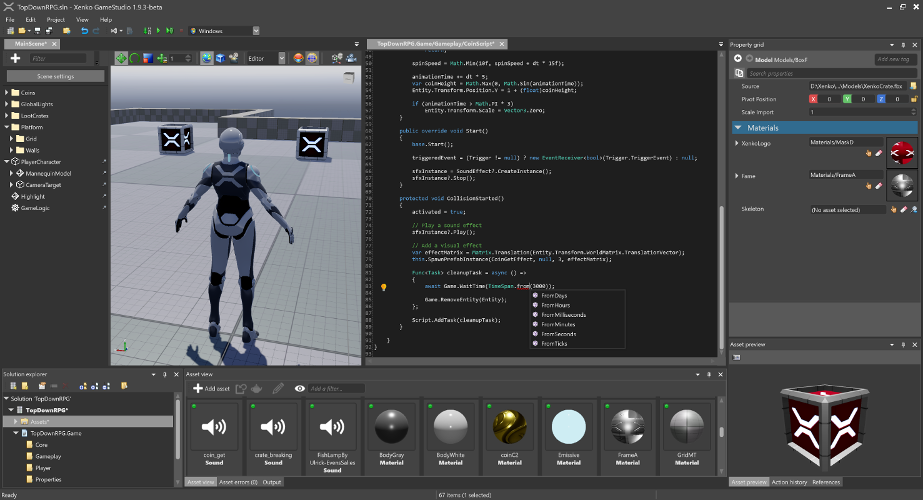
Stride Editor

This README is intended for users who want to build the Stride engine from source or contribute to its development. If your goal is to create games using Stride, we recommend visiting the Get started with Stride guide. There, you'll find detailed instructions on downloading, installing, and getting started with game development in Stride.

🚀 Try Stride from the command line

Create and manage Stride projects from the command line — no editor required.

The Stride CLI tool installs and manages Stride engine versions, creates projects from templates, and opens Game Studio:

dotnet tool install -g Stride.Cli

stride sdk install                   # install the latest Stride engine
stride new fps -n MyShooter          # template: game, fps, platformer2d, topdownrpg, vrsandbox, ...
cd MyShooter && dotnet run --project MyShooter.Windows

stride studio                        # open Game Studio, the visual editor

stride new with no template lists what's available, stride sdk manages installed engine versions (list, install, uninstall, update), and stride upgrade moves a project to a newer engine. See sources/launcher/README.md.

Prefer standard .NET templating? The same templates are available through dotnet new:

dotnet new install Stride.Templates.Games
dotnet new stride-game -n MyGame
cd MyGame && dotnet run --project MyGame.Windows

See sources/templates/README.md for the full template catalog (genre starters, 18 feature demos, tutorials) and the local-development workflow.

🤝 Contributing

Want to get involved? See our Contributing section for how to ask questions, report bugs, submit pull requests (including good first issues), and how you can earn money by contributing via funded tasks/bug bounties.

🗺️ Roadmap

Our Roadmap communicates upcoming changes to the Stride engine.

🛠️ Building from Source

Prerequisites

  1. Latest Git — the Windows installer includes Git LFS by default; make sure it stays enabled. For convenience, you can also use a UI client like GitExtensions.
  2. Visual Studio 2026 (Community edition is free), with these two workloads:
    • .NET desktop development (bundles the .NET 10 SDK)
    • Desktop development with C++

See docs/build/README.md for detailed prerequisites (specific MSVC toolset versions, optional iOS/Android/ARM64/VSIX components, command-line builds without VS, and troubleshooting).

Build Stride

  1. git clone https://github.com/stride3d/stride.git
  2. Open build\Stride.slnx in Visual Studio 2026.
  3. Build the Stride.GameStudio project (default startup, in the 60-Editor folder) or run it directly from the toolbar.

Contribution Guidelines

Please check our Contributing Guidelines.

🔬 Build Status

Build Status
Windows
Linux Vulkan/OpenGL
iOS
Tests (Simple)
Tests (Game/WARP)

📖 Stride Documentation Landscape

The Stride documentation is organized across different locations. Here's how it's structured:

  1. Stride Game Engine - The main repository for Stride.
    • Contributing to Stride - A guide for developers interested in contributing to or developing the Stride engine.
  2. Stride Website - The official site showcasing Stride, featuring:
  3. Stride Docs - The official documentation, including:
  4. Stride Community Toolkit - A set of C# helpers and extensions to enhance your experience with the Stride game engine.

🌐 .NET Foundation

This project is supported by the .NET Foundation.

🛡️ License

Stride is covered by the MIT License unless stated otherwise (i.e. for some files that are copied from other projects). You can find the list of third-party projects here. Contributors need to sign the following Contribution License Agreement.

✨ Contributors

Thanks to all these wonderful people who have contributed to Stride!

This project follows the all-contributors specification. Contributions of any kind welcome!

Frequently asked questions

Is stride free to use?

stride is open source under the MIT licence. There is no licence fee and no seat count — you can self-host it or, where the project offers one, pay a vendor for a managed version instead.

What does stride do?

Stride (formerly Xenko), a free and open-source cross-platform C# game engine.

What is stride written in?

stride is primarily written in C#. Its source is publicly available at https://github.com/stride3d/stride, and it has 7,838 GitHub stars.