


Open-source headless CMS, self-hosted or Cloud you're in control.
The leading open-source headless CMS, 100% JavaScript/TypeScript, flexible and fully customizable.
Docs · Strapi Cloud · Roadmap · Discord · Discussions




Strapi is an open-source, self-hosted headless CMS that lets developers build content APIs fast while giving content creators a friendly editing interface. Define your content models and Strapi generates a full API, ready to consume from any frontend, mobile app, or IoT device.
- Design content structures visually with the Content-Type Builder, no code required
- Auto-generated REST & GraphQL APIs for every content type
- Granular Roles & Permissions out of the box
- Built-in Media Library, Internationalization (i18n), and Draft & Publish
- First-class TypeScript support with flexible database options (SQLite, PostgreSQL, MySQL, MariaDB)
- Extensible plugin system and customizable admin dashboard
Explore all features at strapi.io/features
Strapi AI — Automate content modeling, media alt text, and translations with Strapi's built-in AI layer. Learn more
How Strapi handles requests
Every incoming request flows through a layered backend architecture: Routes → Middlewares → Controllers → Services.
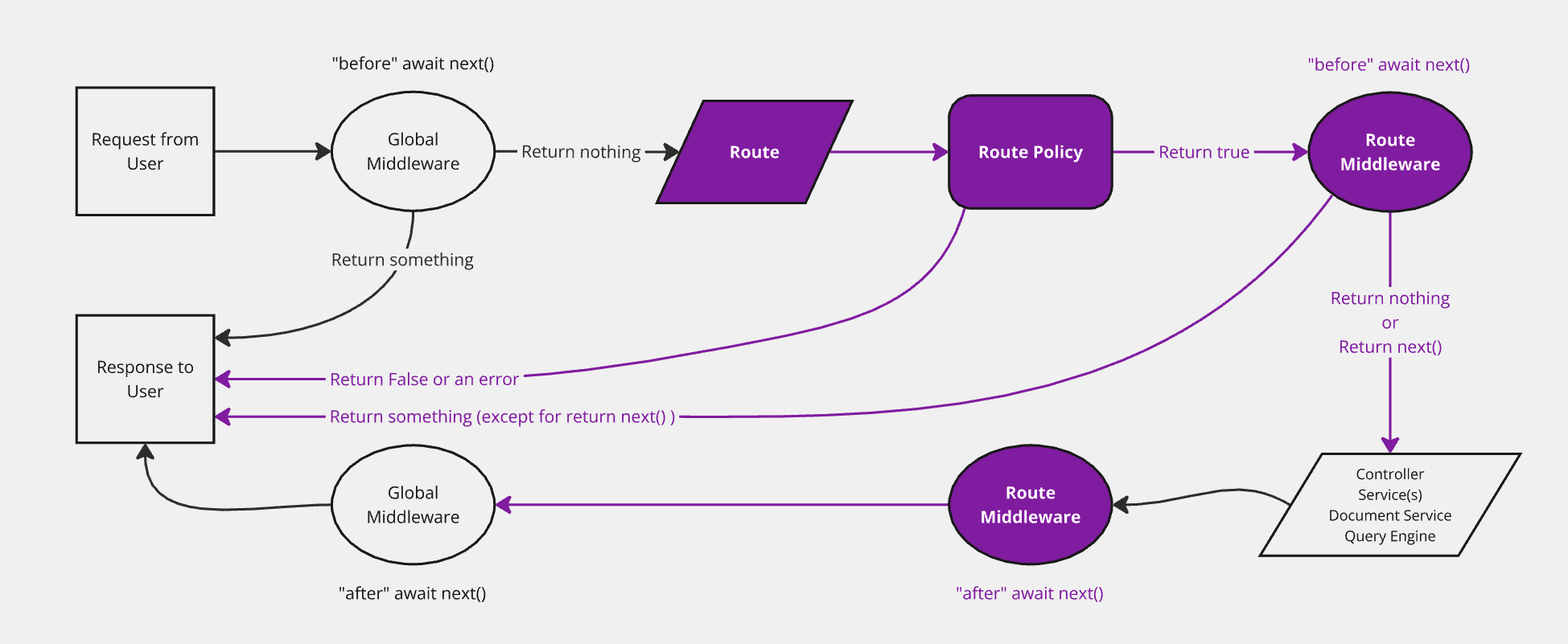
Learn more about backend customization in the official docs.
Getting Started
Read the Getting Started tutorial or follow the steps below:
⏳ Installation
Use the Quickstart command below to create a new Strapi project instantly:
npx create-strapi@latest my-project
This command generates a brand new project with the default features (authentication, permissions, content management, content type builder & file upload).
Full installation options (including TypeScript,
--quickstart, etc.) in the CLI installation docs
Requirements
Hardware & software requirements (OS, Node.js, databases) at Requirements docs
Docker
Strapi doesn't ship official Docker images, so you build your own from your project. The fastest way to get started is with the community CLI tool:
npx @strapi-community/dockerize@latest
This generates a Dockerfile and docker-compose.yml tailored to your project. See the strapi-tool-dockerize repo for more details.
Dockerfiles, Docker Compose examples, production builds at Docker installation docs
Deploy to Strapi Cloud
The fastest way to go from local to production. Strapi Cloud is the official managed hosting platform with zero DevOps, a built-in database, media library, and CDN.
LaunchPad
The official demo template combining Strapi with Next.js to get you started quickly.
Try live demo
See for yourself what's under the hood by getting access to a hosted Strapi project with sample data — try it live or pull locally.
Repositories
| Repository | Description |
|---|---|
| strapi/strapi | Core monorepo, the CMS itself |
| strapi/design-system | Strapi Design System, React component library |
| strapi/LaunchPad | Demo app: Strapi + Next.js |
Contributing & Community
Strapi is community-built and open source. For help, feedback, or to get involved:
- Discord: Live discussion with the community and Strapi team
- GitHub Discussions: Ask questions, share projects, get feedback
- GitHub: Bug reports and contributions
- Contributing Guide: How to contribute code, docs, and translations
- Community Content: Showcase, tutorials, starters, and templates
- Feedback: Roadmap and feature requests
- Twitter: Get the news fast
- YouTube Channel: Learn from video tutorials
For general help, refer to the official Strapi documentation. New to open source? Check out How to Contribute to Open Source.
Migration
Follow our migration guides on the documentation to keep your projects up-to-date.
Roadmap
Check out our roadmap to get informed of the latest features released and the upcoming ones. You may also give us insights and vote for a specific feature.
Documentation
See our dedicated repository for the Strapi documentation, or view our documentation live:
Security
If you discover a security issue, please report it responsibly. See our Security Policy for our disclosure process and contact info.
About Strapi
- Company Handbook: Our values, how we work, and more
- About Us: The story of Strapi
Support Strapi
If Strapi is useful to you, give us a star. It helps more than you think!
Thanks to All Contributors
Thank you to everyone who has contributed code, reported issues, and helped shape Strapi.
License
See the LICENSE file for licensing information.