storefront-ui is a free, open source e-commerce platforms project written in TypeScript and released under MIT. It has 2,511 GitHub stars, 462 forks and 46 open issues, and was last pushed 14 days ago. On this registry it ranks #21 of 30 tracked projects in E-commerce Platforms, with 5 head-to-head comparisons available.

What is storefront-ui?

Storefront UI is a framework-agnostic UI library and design system for eCommerce, built on Tailwind CSS for both React and Vue, aimed at the developers and design teams who build and maintain storefront front ends.

What it is

Storefront UI is an open-source component library and design system for online storefronts, written in TypeScript and released under the MIT licence. It is part of the Vue Storefront ecosystem and is maintained by the Vue Storefront team together with contributors. The library targets two frameworks from one shared design language, so the same component vocabulary and the same Tailwind CSS foundation serve both React and Vue applications. Its topic list covers ecommerce, storefront themes, PWA work, UI components and UI kits. The project carries 2,511 stars and 462 forks on GitHub, with 46 open issues at the time of writing.

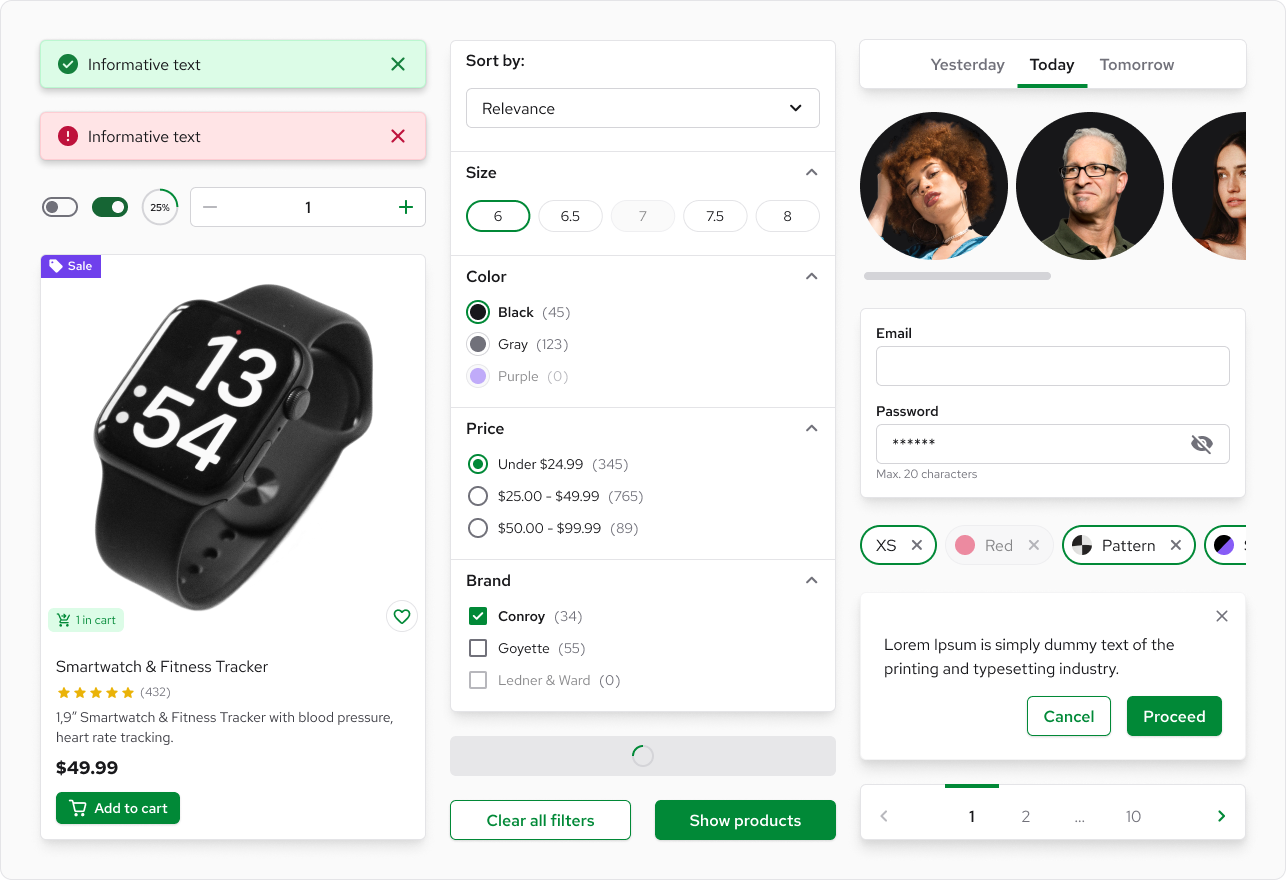
The concrete problem it solves is the bespoke UI kit that every storefront team ends up building and maintaining by hand. Anyone shipping an eCommerce front end has to produce product cards, quantity selectors, checkout steps and modal dialogs, and then keep them accessible, fast and visually consistent as the application grows. Storefront UI replaces that in-house work with an opinionated set of premade components, utilities and patterns, and it also addresses the common failure mode of general-purpose UI libraries, where components resist heavy customization and developers find themselves working against the library to reach a desired look.

Key capabilities

  • Small base components such as Button, Input, Checkbox and Modal that are designed to be composed into more complex structures.
  • Blocks, which are copy-pasteable examples built from the base components and Tailwind utilities, including ProductCard, QuantitySelector and the individual checkout steps.
  • Composables such as useDropdown that abstract complex UI interactions away from component code.
  • A Tailwind preset that maps the Tailwind configuration to CSS variables and supplies Storefront UI-specific defaults.
  • A Typography package that simplifies the use of third-party fonts.
  • A Figma file giving a pixel-perfect representation of the components, generated from the same Tailwind properties as the code.
  • Accessibility and performance baselines stated by the project: components are WCAG AA compliant out of the box, and standard eCommerce pages built with the library are reported to reach 95-100 on Lighthouse mobile performance when measured with PSI.

Who uses it and how

  • Teams building standard eCommerce pages, from product listing through the checkout steps, where the Blocks provide a starting point instead of blank files.
  • Organisations running complex UI setups in which one library is inherited and visually customized by multiple projects that differ from one another.
  • Product teams that keep designers and engineers aligned through the shared Figma file, treating it as the pixel-perfect counterpart to the code.
  • Businesses selling into the United States, where the project notes that web accessibility is legally mandated and non-compliant sites risk fines, making the WCAG AA baseline a compliance concern as much as an ethical one.
  • Framework-specific teams on either side: the repository ships a Nuxt preview application for Vue and a Next preview application for React, reflecting the two supported stacks.

Getting started

In the root directory of the project, run yarn to install the dependencies, then run yarn dev to start both preview applications locally. Documentation and further guidance are available at https://storefrontui.io.

How it compares

The registry facts name no comparable tools, so Storefront UI stands alone in this registry. The only related project identified in the facts is Vue Storefront, whose team maintains Storefront UI and whose Discord server hosts its community support.

When to use it β€” and when not to

Adopting it means operating a Node and Yarn toolchain, working inside Tailwind CSS and CSS variables, and accepting the library's opinionated defaults before customizing them. Teams that do not use React or Vue, or that are not building eCommerce interfaces, should look elsewhere, since the value here comes largely from the storefront-specific components. The README excerpt also does not state the published package names or an install command for consumer applications, so anyone evaluating it must consult the documentation site first; the project has a recent commit history, but 46 open issues suggest that the surface area is still being worked through.

project readme (upstream, from github) β€” read inline

Storefront UI

Framework-agnostic UI library and Design System for eCommerce based on TailwindCSS.

Chat with us on Discord npm Commitizen friendly License PRs Welcome


What problems does Storefront UI solve?

Like any UI Library / Design System the main goal of Storefront UI is to accelerate the development process by providing an opinionated set of premade components, utilities and patterns.

There is a lot of the things you have to take care of to build good user interfaces:

πŸ”Ή Developer/Designer workflow - Storefront UI comes out of the box with Figma files - a pixel-perfect representation of your code that your design and engineering teams needs to stay aligned.

πŸ”Ή Performance - Poorly written and overcomplicated components are often the performance bottleneck ruining the experience of your users. All standard eCommerce pages that we've built with Storefront UI hit 95-100 on Lighthouse! (mobile performance measured using PSI)

πŸ”Ή Accessibility - Web accessibility is more than an ethical requirement in the United States: it’s also legally mandated and you risk fines if the justice department determines your website is non-compliant. At the same time building accessible components takes a lot of time and requires specific domain knowledge. Storefront UI components are WCAG AA compliant out of the box!

But let's be honest, almost all established UI libraries can solve that. Here's what's Storefront UI is best at::

πŸ”Έ Customization - Most of the UI libraries out there fail when components need to be heavily customized. You suddenly find yourself working against your library just to achieve the desired look. Storefront UI is built for complex cases. We ship a set of small and flexible base components like Button, Checkbox or Modal that can be used to build more complex ones. We also deliver more complex examples (aka Blocks) like ProductCard or a different checkout steps as copy-pasteable code using Storefront UI components and Tailwind utilities.

In addition, Storefront UI fits perfectly complex UI setups where one library is inherited and customized by multiple projects differing visually.

πŸ”Έ Scaling - The more your application grows the less maintainable your UI becomes. By providing the right building blocks and using Tailwind CSS we made sure that your UI will be easy to maintain and won't negatively impact your performance even on a large scale.

πŸ”Έ Focus on eCommerce - Storefront UI comes out of the box with components specific to eCommerce like ProductCard, QuantitySelector and even checkout components

What comes out of the box? 🎁

  • Base Components - beautiful, fast and fully accessible components like Input Checkbox Button that you can use to quickly build more complex structures
  • Blocks - complex, copy-pasteable examples like ProductCard or checkout steps.
  • Composables like useDropdown that abstract complex UI interactions
  • Tailwind preset that maps tailwind config to CSS variables and provides few SFUI-specific defaults
  • Typography package simplifying usage of 3rd party fonts
  • Figma file with pixel-perfect representation of SFUI components based on tailwind properties
Contributing

We believe that the best software is made when a lot of people with different views collaborate on it. We welcome all contributions to Storefront UI.

You can become contributor not only by writing code:

  • Contribute to documentation
  • Write an article or tutorial
  • Help others on our Discord server
  • Report a bug
  • Do a talk about Storefront UI at your local meetup

We are grateful for all kind of contributions. If you don't know where to start check out our contribution guide or ask for help on Discord

How to run project locally

In the root directory of this project run yarn command to install all needed dependencies. After dependencies has been installed run yarn dev command to run this project. Now both (Nuxt preview for Vue and Next preview for React) projects are running locally and you can start working on them. If you need to run only one of them, you need to run a desired preview from its directory, so you need to go for Vue: /apps/preview/nuxt and for React: /apps/preview/next.

NOTE: Subdependencies have to be build, such as

  • @storefront-ui/shared located in /packages/sfui/shared
  • @storefront-ui/tw-plugin-peer-next located in /packages/sfui/tw-plugin-peer-next
  • @storefront-ui/typography located in /packages/sfui/typography

Knowing this we recommend using yarn dev in root directory.

Links

Frequently asked questions

Is storefront-ui free to use?

storefront-ui is open source under the MIT licence. There is no licence fee and no seat count β€” you can self-host it or, where the project offers one, pay a vendor for a managed version instead.

What does storefront-ui do?

A frontend library for React and Vue that helps developers quickly build fast, accessible, and beautiful storefronts. Made with πŸ’š by Vue Storefront team and co

What is storefront-ui written in?

storefront-ui is primarily written in TypeScript. Its source is publicly available at https://github.com/vuestorefront/storefront-ui, and it has 2,511 GitHub stars.