
Terraform without the state file bottleneck
Terraform and OpenTofu from pull requests, with state stored as a dependency graph in PostgreSQL.
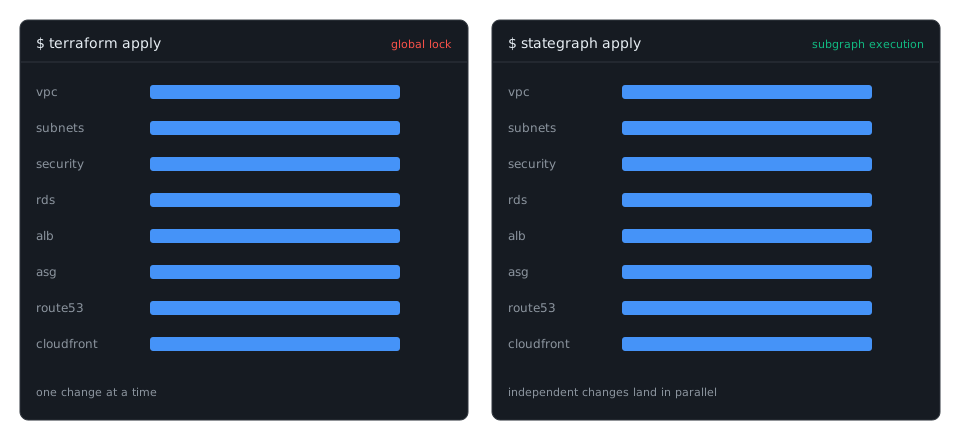
Plans read only what a change touches. Changes that do not overlap run at the same time.


What is Stategraph?
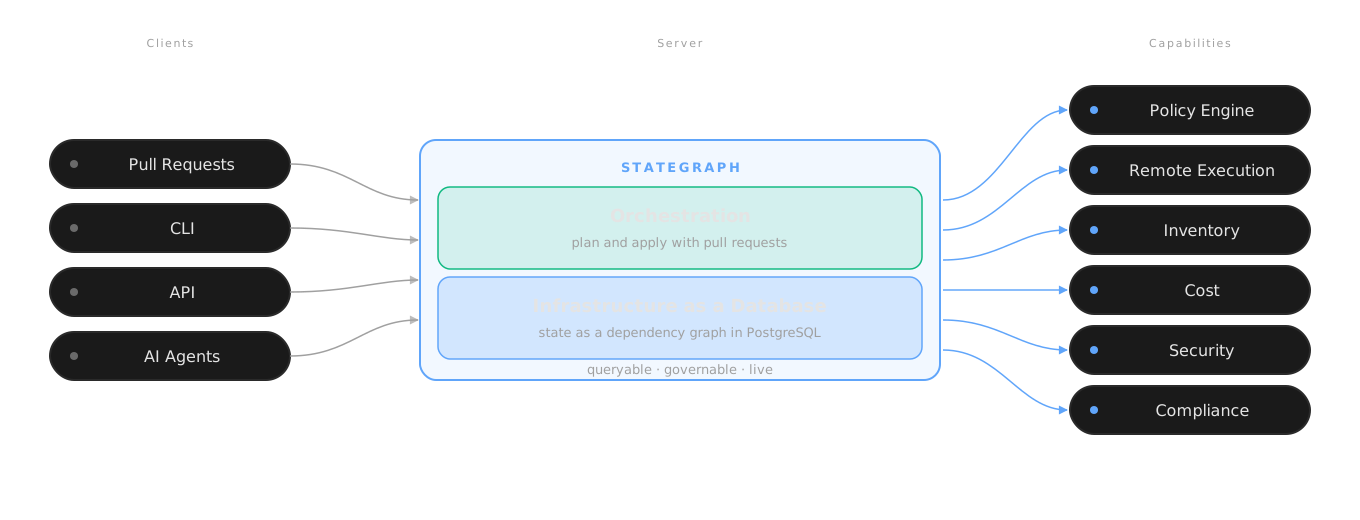
Stategraph runs Terraform and OpenTofu from pull requests, and can store your state as a graph in PostgreSQL instead of a state file. It has two parts:
- Stategraph Orchestration: plans every pull request on GitHub or GitLab and posts the result as a comment. Policy checks, cost estimates, and approvals run in the review. The apply runs on merge or on a comment. Open source and self-hostable.
- Stategraph Infrastructure as a Database: stores each state as a dependency graph in PostgreSQL. A plan reads only the resources your change reaches, changes that touch different resources apply at the same time, and you can query every state with SQL. Works from the CLI with any CI; no VCS provider required.
Each part works without the other. You can start with Orchestration against your existing state backend and move the state into the database later.
Ship from the pull request
Open source, MPL-2.0 · GitHub and GitLab
Orchestration plans each pull request and posts the plan as a comment. The apply runs on a stategraph apply comment or on merge.
- Plan on every pull request, posted as a comment
- Apply from the pull request, with approvals routed by CODEOWNERS
- Policy checks with OPA/Rego, Conftest, and Checkov before an apply
- Cost estimates in the pull request, with thresholds that require another approval
- Dependency-aware runs: layers and stacks run in dependency order, in parallel where they can
- Drift detection on a schedule, scoped by a tag query, and reconciled on request
- Tag-based configuration for 10 or 10,000 workspaces, in a monorepo or across repositories
- Terraform, OpenTofu, Terragrunt, CDKTF, and Pulumi
Runs on GitHub and GitLab. Configure it in .stategraph/config.yml. See the Orchestration docs.
Drop the global lock
With a state file, every write locks the whole file. Infrastructure as a Database stores each state as a graph of resources and dependencies in PostgreSQL, and locks only the resources a change touches.
Dynamic state sizing. A plan walks only the subgraph your change reaches, not the whole state. Work scales with the size of your change, not the size of your state.
Concurrent changes. Each plan and apply is a transaction that locks the resources it changes. Changes that do not overlap apply at the same time. Changes that overlap are rejected at commit.
SQL across every state. JOINs, CTEs, and blast radius, from the console, the CLI, or the API.
$ stategraph query "SELECT type, count(*) FROM resources GROUP BY type"
 aws_instance         20
 aws_security_group   15
 aws_subnet            6
Every plan and apply is recorded as a transaction, with its logs. A change that reaches several states applies as one transaction with stategraph tf mtx.
One graph at any size. You never split a state to make it faster.
Built for agents
Skills teach any AI agent the Stategraph workflows: query, plan and apply, import, refactor, cost, and security.
$ npx skills add stategraph/skills
With Infrastructure as a Database, an agent's access token grants plan and apply separately, down to a single resource. Every action the agent takes is a transaction on the timeline. A model can ignore a prompt. It cannot use a capability that its token does not grant.
Terraform vs. Stategraph
| Terraform | Stategraph | |
|---|---|---|
| Language | HCL | HCL, with the same modules and providers |
| State | A file behind a global lock | A dependency graph in PostgreSQL, with history |
| Plan | The whole file, every time | Only what your change touches |
| Changes in flight | One | As many as do not overlap |
| Across states | In sequence, by hand | One atomic transaction |
| Questions | grep a JSON file | SQL across everything |
| Workflow | Bring your own CI | Pull-request orchestration built in |
| AI agents | Blanket credentials | Skills and scoped tokens |
Get started
Stategraph Orchestration
Hosted: Start free. Connects to GitHub or GitLab; plan limits are on the pricing page.
Self-hosted (Open Source): the ghcr.io/stategraph/stategraph-server-oss image.
git clone https://github.com/stategraph/stategraph
cd stategraph/docker/stategraph
docker compose up -d
# then open http://localhost:8080 and create the first account
The open-source build runs Orchestration. To connect GitHub or GitLab, with your own public URL or with Terratunnel, follow the self-hosted Open Source quickstart.
Stategraph Infrastructure as a Database
You need a running Stategraph server first. Pick one:
Hosted: Stategraph Cloud. We run the server.
Self-hosted: the Enterprise build, with a license key, on your PostgreSQL, deployed with Docker Compose, Kubernetes, ECS, or Cloud Run. See Self-hosting.
BYOC: we operate Stategraph inside your AWS, GCP, or Azure account. Contact us.
Then install the CLI and point it at your server:
curl -sSL https://get.stategraph.com/install.sh | sh

export STATEGRAPH_API_BASE="https://your-server.example.com"
export STATEGRAPH_API_KEY="<your-api-key>"        # console: Settings → API Keys
export STATEGRAPH_TENANT_ID="<your-tenant-id>"    # shown in stategraph info

stategraph info                     # confirm the connection
Then import a state:
terraform state pull > terraform.tfstate
stategraph import tf --name networking terraform.tfstate
stategraph plan                     # plan against the imported state
- Your Terraform, unmodified: Stategraph runs the Terraform or OpenTofu binary you already use. No provider changes, no HCL edits;
terraform plan/applybecomesstategraph plan/apply. - No VCS provider required: the CLI talks to the server directly. Use it with Orchestration, with your existing CI, or from your laptop.
- Credentials stay with you: the CLI runs Terraform where you run it. The server stores state; it never runs Terraform and never sees your cloud.
- Reversible:
stategraph states exportwrites a standardterraform.tfstateback out.
The full walkthrough, including exploring what you imported, is in the quickstart.
Learn more
- Quickstart: Stategraph Cloud, self-hosted, or import your state
- Core concepts: states, transactions, and the graph
- Orchestration docs: PR workflows, policy, cost, drift
- CLI reference: every command
- Editions and pricing: Open Source, Enterprise, Infrastructure as a Database, and the Stategraph Cloud plans
Community
- Slack: chat with the team and other users
- GitHub Issues: questions, bugs, and feature requests
Contributing
We welcome contributions! See CONTRIBUTING.md.
License
The code in this repository is MPL-2.0 licensed.
Stategraph Infrastructure as a Database is commercial software, available in the hosted service or self-hosted with a license key. Stategraph Orchestration is open source, with enterprise features (RBAC, centralized configuration, advanced approval workflows) available in the hosted service and the self-hosted Enterprise Edition. Hosted plan limits are on the pricing page.