SmythOS - The Linux of AI Agents
Reliable Agent Engineering starts with great, open source infrastructure. This repository contains the Smyth Runtime Environment Kernel (SRE), the Software Development Kit (SDK) and Command Line Interface (CLI) for running agents and creating them with code. If you prefer visual drag & drop agent interfaces instead, check out our open source SmythOS Visual Agent Studio! Great community, support, tutorials. Start in minutes!



SmythOS Runtime Environment (SRE)
SRE is an open-source runtime and SDK for production AI agents. It provides OS-level abstractions for AI resources—LLMs, vector databases, storage, and caching—with a unified API that works identically across all providers. Write your agent logic once, scale it anywhere. Built-in security, observability, and 40+ production-ready components included. The operating system layer AI agents have been missing.
Inspired by the architecture of operating system kernels, SmythOS provides a robust and scalable foundation for agent orchestration and lifecycle management, giving every builder the tools to act, not just imagine.
SDK Documentation | SRE Core Documentation | Code Examples | Contributing
Why SmythOS exists
- Shipping production-ready AI agents shouldn’t feel like rocket science.
- Autonomy and control can, and must, coexist.
- Security isn’t an add-on; it’s built-in.
- The coming Internet of Agents must stay open and accessible to everyone.
Design Principles
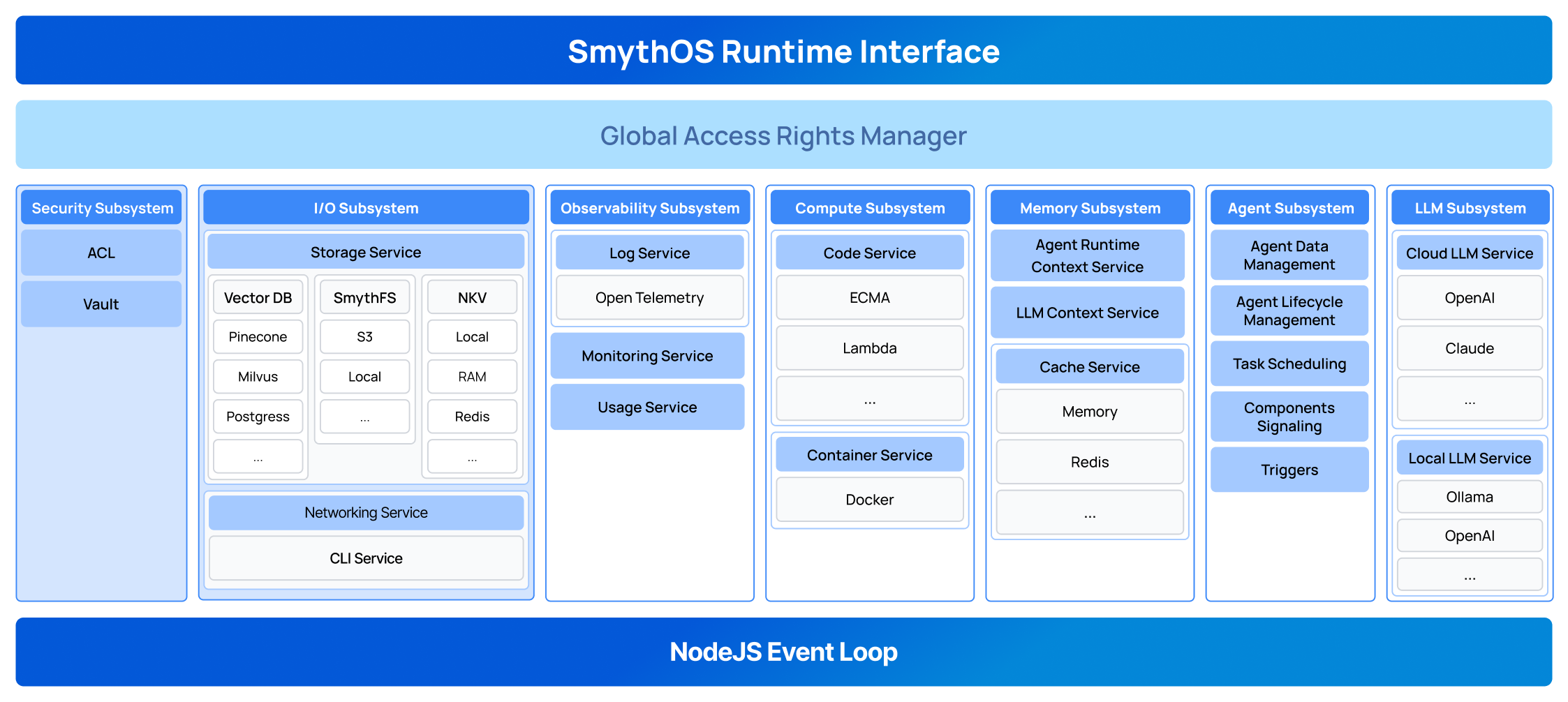
SmythOS provides a complete Operating System for Agentic AI. Just as traditional operating systems manage resources and provide APIs for applications, SmythOS manages AI resources and provides a unified SDK that works from development to production.
Unified Resource Abstraction
SmythOS provides a unified interface for all resources, ensuring consistency and simplicity across your entire AI platform. Whether you're storing a file locally, on S3, or any other storage provider, you don't need to worry about the underlying implementation details. SmythOS offers a powerful abstraction layer where all providers expose the same functions and APIs.
This principle applies to all services - not just storage. Whether you're working with VectorDBs, cache (Redis, RAM), LLMs (OpenAI, Anthropic), or any other resource, the interface remains consistent across providers.
This approach makes your AI platform easy to scale and incredibly flexible. You can seamlessly swap between different providers to test performance, optimize costs, or meet specific requirements without changing a single line of your business logic.
Key Benefits:
- Agent-First Design: Built specifically for AI agent workloads
- Developer-Friendly: Simple SDK that scales from development to production
- Modular Architecture: Extensible connector system for any infrastructure
- Production-Ready: Scalable, observable, and battle-tested
- Enterprise Security: Built-in access control and secure credential management
Quick Start
We made a great tutorial that's really worth watching:

Method 1: Using the CLI (Recommended)
Install the CLI globally and create a new project:
npm i -g @smythos/cli
sre create
The CLI will guide you step-by-step to create your SDK project with the right configuration for your needs.
Method 2: Direct SDK Installation
Add the SDK directly to your existing project:
npm install @smythos/sdk
Check the Examples, documentation and Code Templates to get started.
Note: If you face an issue with the CLI or with your code, set environment variable LOG_LEVEL="debug" and run your code again. Then share the logs with us, it will help diagnose the problem.
Repository Structure
This monorepo contains three main packages:
SRE (Smyth Runtime Environment) - packages/core
The SRE is the core runtime environment that powers SmythOS. Think of it as the kernel of the AI agent operating system.
Features:
- Modular Architecture: Pluggable connectors for every service (Storage, LLM, VectorDB, Cache, etc.)
- Security-First: Built-in Candidate/ACL system for secure resource access
- Resource Management: Intelligent memory, storage, and compute management
- Agent Orchestration: Complete agent lifecycle management
- 40+ Components: Production-ready components for AI, data processing, and integrations
Supported Connectors:
- Storage: Local, S3, Google Cloud, Azure
- LLM: OpenAI, Anthropic, Google AI, AWS Bedrock, Groq, Perplexity
- VectorDB: Pinecone, Milvus, RAMVec
- Cache: RAM, Redis
- Vault: JSON File, AWS Secrets Manager, HashiCorp
SDK - packages/sdk
The SDK provides a clean, developer-friendly abstraction layer over the SRE runtime. It's designed for simplicity without sacrificing power.
Why Use the SDK:
- Simple API: Clean, intuitive interface that's easy to learn
- Type-Safe: Full TypeScript support with IntelliSense
- Production-Ready: Same code works in development and production
- Configuration-Independent: Business logic stays unchanged as infrastructure scales
CLI - packages/cli
The SRE CLI helps you get started quickly with scaffolding and project management.
Code examples
The SDK allows you to build agents with code or load and run a .smyth file. .smyth is the extension of agents built with our SmythOS builder.
Example 1 : load and run an agent from .smyth file
async function main() {
    const agentPath = path.resolve(__dirname, 'my-agent.smyth');

    //Importing the agent workflow
    const agent = Agent.import(agentPath, {
        model: Model.OpenAI('gpt-4o'),
    });

    //query the agent and get the full response
    const result = await agent.prompt('Hello, how are you ?');

    console.log(result);
}
Want stream mode ? easy
Click to expand: Stream Mode Example - Real-time response streaming with events
    const events = await agent.prompt('Hello, how are you ?').stream();
    events.on('content', (text) => {
        console.log('content');
    });

    events.on('end', /*... handle end ... */)
    events.on('usage', /*... collect agent usage data ... */)
    events.on('toolCall', /*... ... */)
    events.on('toolResult', /*... ... */)
    ...
Want chat mode ? easy
Click to expand: Chat Mode Example - Conversational agent with memory
    const chat = agent.chat();

    //from there you can use the prompt or prompt.stream to handle it

    let result = await chat.prompt("Hello, I'm Smyth")
    console.log(result);

    result = await chat.prompt('Do you remember my name ?");
    console.log(result);


    //the difference between agent.prompt() and chat.prompt() is that the later remembers the conversation
Example 2 : Article Writer Agent
In this example we are coding the agent logic with the help of the SDK elements.
Click to expand: Complete Article Writer Agent - Full example using LLM + VectorDB + Storage
import { Agent, Model } from '@smythos/sdk';

async function main() {
    // Create an intelligent agent
    const agent = new Agent({
        name: 'Article Writer',
        model: 'gpt-4o',
        behavior: 'You are a copy writing assistant. The user will provide a topic and you have to write an article about it and store it.',
    });

    // Add a custom skill that combines multiple AI capabilities
    agent.addSkill({
        id: 'AgentWriter_001',
        name: 'WriteAndStoreArticle',
        description: 'Writes an article about a given topic and stores it',
        process: async ({ topic }) => {
            // VectorDB - Search for relevant context
            const vec = agent.vectordb.Pinecone({
                namespace: 'myNameSpace',
                indexName: 'demo-vec',
                pineconeApiKey: process.env.PINECONE_API_KEY,
                embeddings: Model.OpenAI('text-embedding-3-large'),
            });

            const searchResult = await vec.search(topic, {
                topK: 10,
                includeMetadata: true,
            });
            const context = searchResult.map((e) => e?.metadata?.text).join('\n');

            // LLM - Generate the article
            const llm = agent.llm.OpenAI('gpt-4o-mini');
            const result = await llm.prompt(`Write an article about ${topic} using the following context: ${context}`);

            // Storage - Save the article
            const storage = agent.storage.S3({
                /*... S3 Config ...*/
            });
            const uri = await storage.write('article.txt', result);

            return `The article has been generated and stored. Internal URI: ${uri}`;
        },
    });

    // Use the agent
    const result = await agent.prompt('Write an article about Sakura trees');
    console.log(result);
}

main().catch(console.error);
Architecture Highlights
Built-in Security
Security is a core tenant of SRE. Every operation requires proper authorization through the Candidate/ACL system, ensuring that agents only access resources they are permitted to.
const candidate = AccessCandidate.agent(agentId);
const storage = ConnectorService.getStorageConnector().user(candidate);
await storage.write('data.json', content);
Development to Production Evolution
Your business logic stays identical while infrastructure scales: When you use the SDK, SmythOS Runtime Environment will be implicitly initialized with general connectors that covers standard agent use cases.
Click to expand: Basic SRE Setup - Default development configuration
// you don't need to explicitly initialize SRE
// we are just showing you how it is initialized internally
// const sre = SRE.init({
//     Cache: { Connector: 'RAM' },
//     Storage: { Connector: 'Local' },
//     Log: { Connector: 'ConsoleLog' },
// });

async function main() {
    // your agent logic goes here
}

main();
But you can explicitly initialize SRE with other built-in connectors, or make your own Use cases :
- You want to use a custom agents store
- You want to store your API keys and other credentials in a more secure vault
- You need enterprise grade security and data isolation
- ...
Click to expand: Production SRE Setup - Enterprise-grade configuration with custom connectors
const sre = SRE.init({
    Account: { Connector: 'EnterpriseAccountConnector', Settings: { ... } },
    Vault: { Connector: 'Hashicorp', Settings: { url: 'https://vault.company.com' } },
    Cache: { Connector: 'Redis', Settings: { url: 'redis://prod-cluster' } },
    Storage: { Connector: 'S3', Settings: { bucket: 'company-ai-agents' } },
    VectorDB: { Connector: 'Pinecone', Settings: { indexName: 'company-ai-agents' } },
    Log: { Connector: 'CustomLogStore'},
});


async function main() {
    // your agent logic goes here
}

main();
Component System
40+ production-ready components for every AI use case. These components can be invoked programmatically or through the symbolic representation of the agent workflow (the .smyth file).
- AI/LLM:
GenAILLM,ImageGen,LLMAssistant - External:
APICall,WebSearch,WebScrape,HuggingFace - Data:
DataSourceIndexer,DataSourceLookupJSONFilter - Logic:
LogicAND,LogicOR,Classifier,ForEach - Storage:
LocalStorage,S3 - Code:
ECMAScript,ServerlessCode
Key Features
| Feature | Description |
|---|---|
| Agent-Centric | Built specifically for AI agent workloads and patterns |
| Secure by Default | Enterprise-grade security with data isolation |
| High Performance | Optimized for high-throughput AI operations |
| Modular | Swap any component without breaking your system |
| Observable | Built-in monitoring, logging, and debugging tools |
| Cloud-Native | Runs anywhere - local, cloud, edge, or hybrid |
| Scalable | From development to enterprise production |
Contributing
We welcome contributions! Please see our Contributing Guide and Code of Conduct.
Contributors
License
This project is licensed under the MIT License.
What's Next?
- We will release an open source visual agent IDE later this year.
- Support us at SmythOS
Ride the llama. Skip the drama.