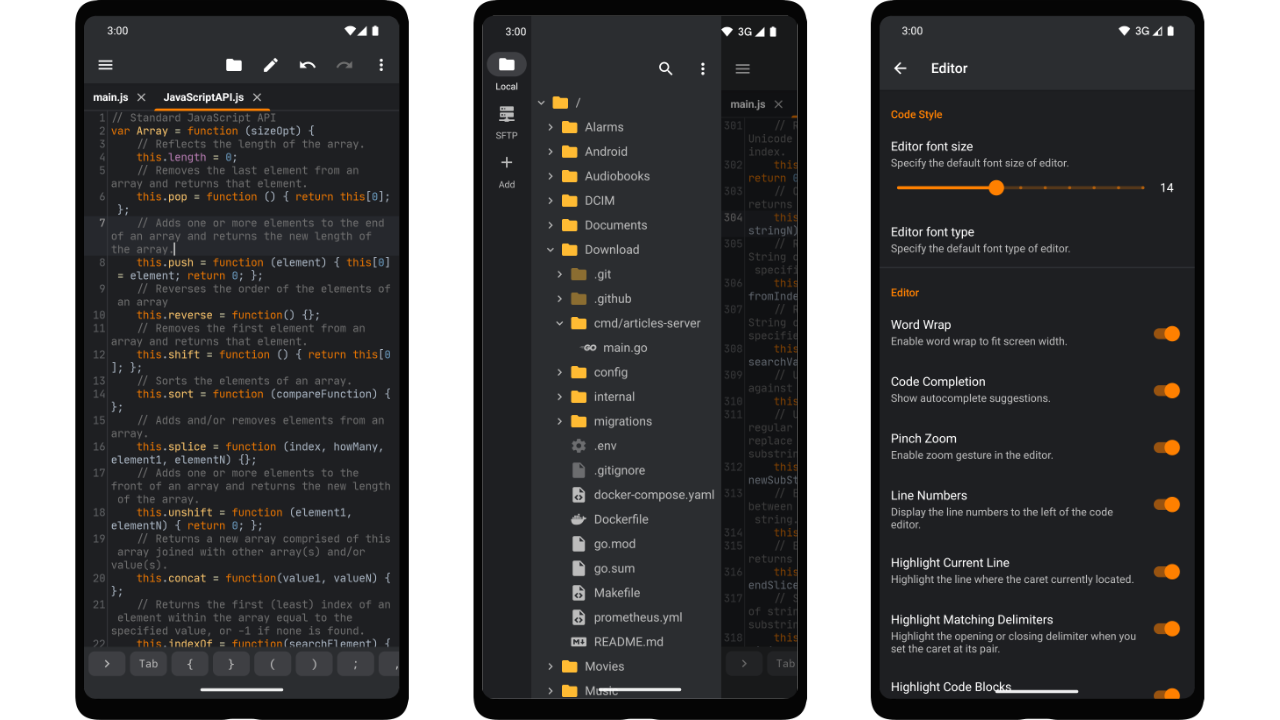
Squircle CE is a free, open-source, multi-language code editor for Android, written in Kotlin and released under the Apache-2.0 licence, intended for anyone who needs to read, navigate and edit source code on a phone or tablet.
What it is
Squircle CE is a native Android application that serves as a code and text editor on mobile devices. The project lives in the Android ecosystem: it is built with Kotlin, assembled with Gradle, and distributed both through Google Play under the application id com.blacksquircle.ui and, in a closed-source-free variant, through F-Droid and GitHub Releases. The repository holds the complete source code alongside the build instructions, and the project accepts contributions in the form of issue reports, feature suggestions and pull requests. Its declared focus is a fast, free, multi-language editing experience on a platform that was not designed around source files.
The concrete problem it addresses is the lack of a proper editing surface on Android. Mobile devices typically ship with a generic text editor, or with whatever rudimentary viewer a file manager includes, and neither understands programming languages. Squircle CE replaces that generic text editing experience with a dedicated one: syntax highlighting, code completion and an integrated file explorer, so a project's files can be browsed and modified on the device itself rather than being shuttled to a desktop. The two build flavours further solve a distribution constraint, separating a Google Play build (gms) from a foss build that omits closed-source libraries so it can be published on F-Droid and GitHub.
Key capabilities
- Syntax highlighting for multiple programming languages, listed among the project's topics as a core capability.
- Code completion while editing, intended to reduce typing on a touch keyboard.
- An integrated file explorer for browsing and opening files within a project on the device.
- General-purpose text editing alongside code editing, so non-source plain text files can be handled by the same app.
- Two build flavours:
gms, used for publishing on Google Play, and foss, which contains no closed-source libraries and is used for F-Droid and GitHub Releases.
- Public translation workflow managed on Crowdin, allowing new languages to be added or existing translations corrected by outside contributors.
- Apache-2.0 licensed source with continuous integration via the project's Android CI workflow, and documented build steps for all variants.
Who uses it and how
- Android users who want to read or make quick edits to source files on a phone or tablet without transferring them to a computer.
- F-Droid users who require the
foss flavour specifically because it excludes closed-source libraries.
- Google Play users who install the
gms flavour directly from the store listing.
- Contributors building the app from source, either by opening the project in Android Studio or by running
./gradlew assembleRelease from the command line.
- Translators who register on Crowdin and join the project to add a new language or correct an existing one.
Getting started
The simplest route is to install the app from Google Play under com.blacksquircle.ui, or from F-Droid for the foss build. To build it yourself, clone the repository with its submodules, create a local.properties file containing KEYSTORE_PATH, KEYSTORE_PASSWORD, KEY_ALIAS and KEY_PASSWORD, then open the project in Android Studio or run ./gradlew assembleRelease.
How it compares
The facts provided here name no paid product that Squircle CE replaces, and no directly comparable tool, so no head-to-head comparison can be drawn on licence, hosting or cost model. What the record does establish is its own terms: Apache-2.0 source, a Google Play build, and a closed-source-free flavour published to F-Droid and GitHub Releases — on which basis it stands alone in this registry.
When to use it — and when not to
This is a client application rather than a service, so a self-hoster operates no database, storage layer or SMTP configuration; the operational cost of building it from source is instead a development environment with at least 4GB of RAM, roughly 1.11GB of free disk space for source and generated build output, a macOS or Linux system (Windows only through Git Bash), Android Studio or Gradle, and a keystore whose credentials must be kept in local.properties and protected. Anyone who needs desktop-class refactoring, debugging or terminal tooling should not choose it, because it is an Android editor and nothing in the record suggests otherwise. The main weakness visible in the facts is documentation scope: the README excerpt is dominated by build instructions, licence text and translation guidance, so feature-level detail is thin, and the repository carries 77 open issues.