SQL Chat is an MIT-licensed, chat-based SQL client and editor written in TypeScript that lets people query, modify, add to, and delete from a database using natural language instead of clicking through graphical SQL controls, and it is aimed at developers, analysts, and data teams who want a conversational interface in place of a traditional SQL client.
What it is
SQL Chat is an open-source project built with Next.js that presents a chat interface as the primary way to talk to a database. Rather than assembling a query through dropdowns, schema trees, and result grids, a user describes what they want in natural language, and the application translates that intent into operations against the connected database. The project describes itself as a chat-based SQL client for the Developer Tools 2.0 era, and its stated goal is to deliver a chat experience that genuinely works rather than merely looking different.
The concrete problem it solves is the friction of conventional database tooling. A traditional SQL client spreads work across many UI controls, and the project argues that a chat-based interface is more intuitive than navigating those controls. SQL Chat replaces that graphical, control-by-control workflow with a single conversational surface for reading and writing data. It lives in the JavaScript and TypeScript ecosystem through Next.js, and it ships with internationalization for English, Chinese, and Spanish.
Key capabilities
- Natural-language operations against a connected database covering query, modification, addition, and deletion of data.
- Documented support for MySQL, PostgreSQL, MSSQL, TiDB Cloud, and OceanBase, with the repository topic list additionally naming ClickHouse, CockroachDB, MongoDB, Oracle, Redis, and Snowflake.
- Configurable model backend through
OPENAI_API_KEY and OPENAI_API_ENDPOINT, which defaults to https://api.openai.com and can be pointed at a self-hosted Ollama instance.
- Option for users to supply their own key when
NEXT_PUBLIC_ALLOW_SELF_OPENAI_KEY is set to true.
- Optional multi-user mode enabled by
NEXT_PUBLIC_USE_DATABASE=true and DATABASE_URL, adding an account system, per-user quota enforcement, payment, and usage data collection in a Postgres schema named sqlchat.
- Two shipped configuration profiles:
.env.nodb for personal single-user running without a database, and .env.usedb for running a hosted service comparable to sqlchat.ai.
- A published Docker image,
sqlchat/sqlchat, run on port 3000 with the linux/amd64 platform flag.
Who uses it and how
- An individual developer runs the container without a database, using
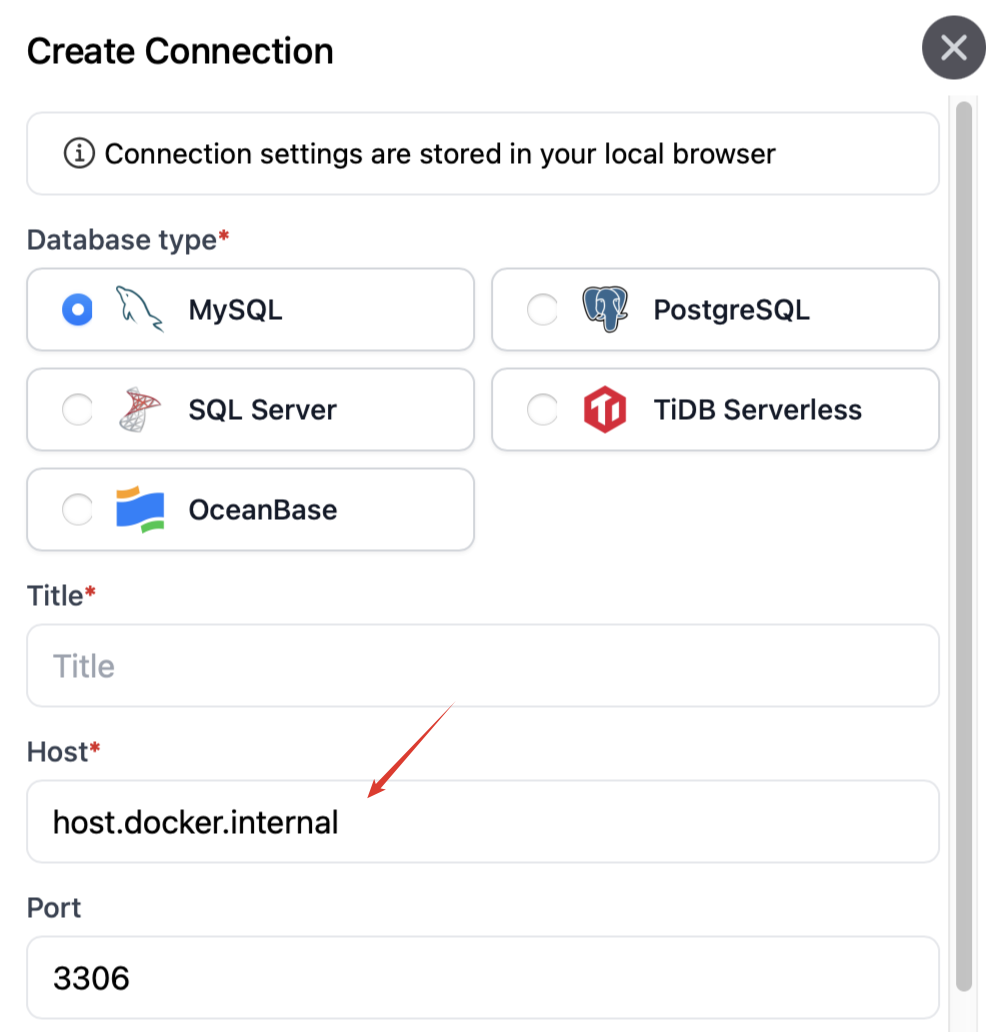
.env.nodb and a single API key, and connects to a database on the same host through host.docker.internal.
- An operator who wants to offer a service similar to sqlchat.ai runs with a database, enabling accounts, quotas, payment, and usage collection rather than a shared anonymous instance.
- A team that cannot send prompts to a commercial model endpoint points
OPENAI_API_ENDPOINT at a self-hosted Ollama deployment.
- Users of the hosted sqlchat.ai service connect their own databases, which requires adding
0.0.0.0 to the database whitelist because the deployment runs on Vercel with dynamic IP addresses.
- Contributors work locally with
pnpm i, pnpm prisma generate, and a copied environment file against a local Postgres instance.
Getting started
The fastest path is the published Docker image: docker run --name sqlchat --platform linux/amd64 -p 3000:3000 --hostname localhost sqlchat/sqlchat with NEXTAUTH_SECRET set to an arbitrary string and OPENAI_API_KEY supplied. For source-based work, install dependencies with pnpm i, generate the Prisma client, copy .env.usedb or .env.nodb to .env, and add the API key.
How it compares
No competing products are named in the provided facts, and the registry entry lists no paid tools that this project replaces, so it stands alone here on that axis. Readers evaluating it should treat it on its own terms as an open-source, self-hostable chat SQL client rather than as a drop-in substitute for a named commercial product.
When to use it — and when not to
A self-hoster must supply NEXTAUTH_SECRET and OPENAI_API_KEY, and anyone running the multi-user mode must also operate a Postgres instance for accounts, quotas, and usage data, so this is not a zero-dependency deployment. It is a poor fit for anyone whose database cannot tolerate the hosted service's 0.0.0.0 whitelist requirement, and self-hosting is the intended answer in that case. The repository shows 22 open issues and a last push on 2026-04-21, and the README excerpt documents only five databases natively while the topic list names several more, so support breadth should be verified per database before committing.
project readme (upstream, from github) — read inline
SQL Chat

English | 中文 | Español
What
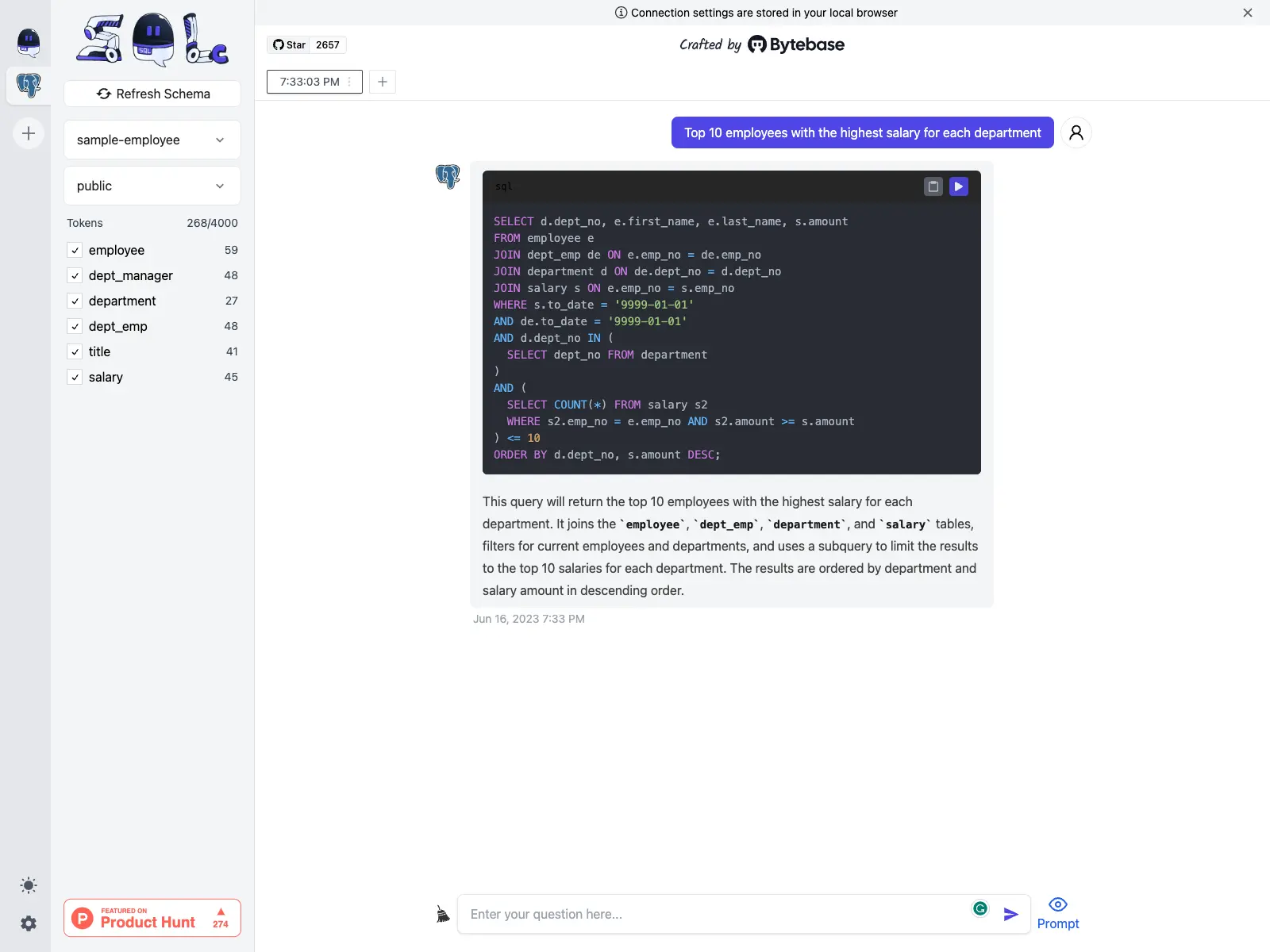
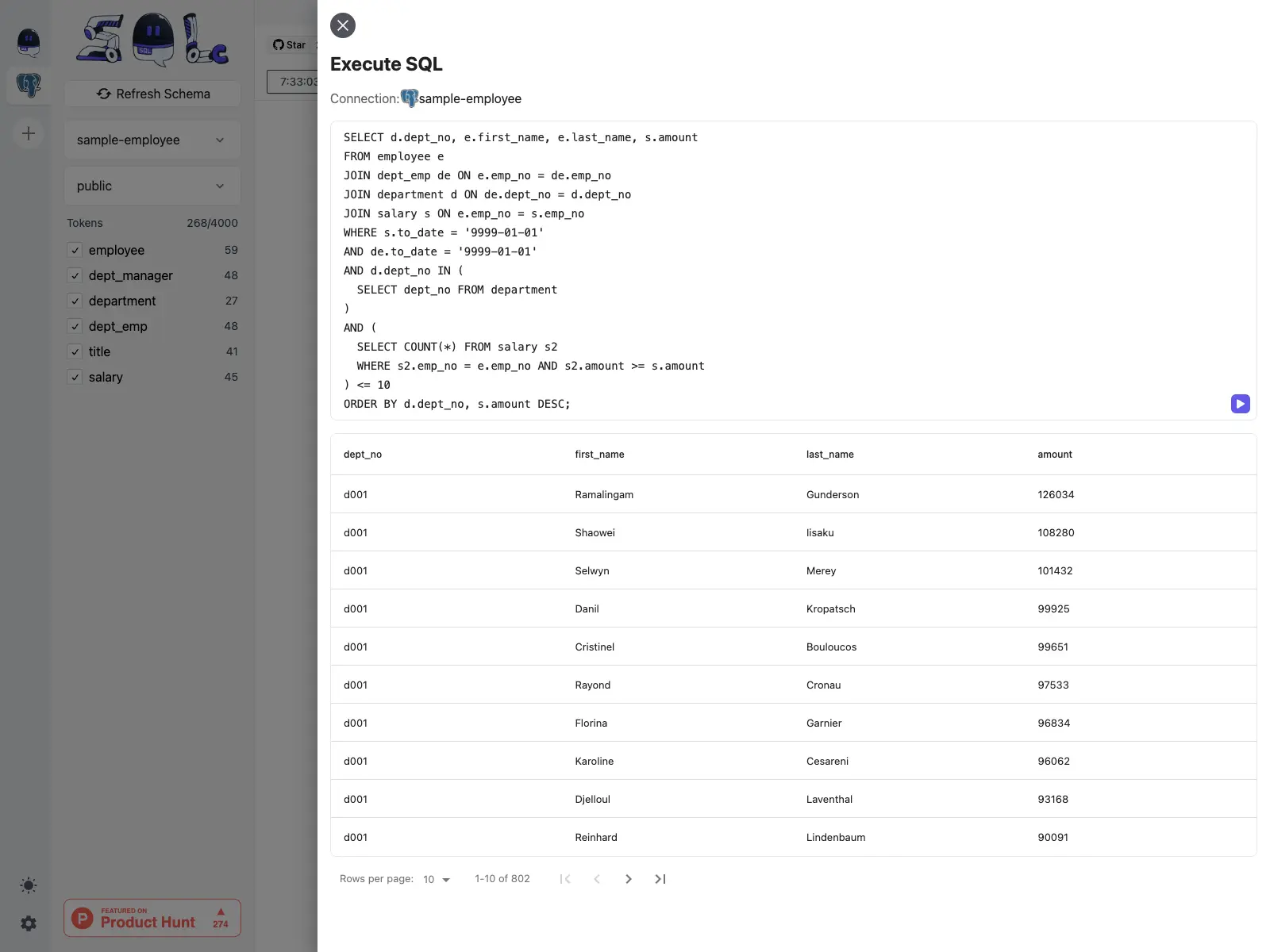
SQL Chat is a chat-based SQL client, which uses natural language to communicate with the database to implement operations such as query, modification, addition, and deletion of the database.
Why
As we enter the Developer Tools 2.0 era,
there is a massive opportunity to rebuild the existing tools using the chat-based interface. SQL Client
is no exception. Instead of navigating across many UI controls, a chat-based interface is much
more intuitive. Of course, only if that works, and our goal is to deliver that experience.
How
SQL Chat is built by Next.js, it supports the following databases and will add more over time:
- MySQL
- PostgreSQL
- MSSQL
- TiDB Cloud
- OceanBase
IP Whitelisting
If you use sqlchat.ai to connect to your database, you need to add 0.0.0.0 (allow all connections)
to the database whitelist IP. Because sqlchat.AI is hosted on Vercel which uses dynamic IP. If this is a concern, please consider the self-host option below.
Data Privacy
See SQL Chat Privacy Policy.
Self-host
Docker
If you just want to run for your own use, supply the following options:
NEXTAUTH_SECRETOPENAI_API_KEY
docker run --name sqlchat --platform linux/amd64 --env NEXTAUTH_SECRET="$(openssl rand -hex 5)" --env OPENAI_API_KEY=<<YOUR OPENAI KEY>> -p 3000:3000 --hostname localhost sqlchat/sqlchat
- Pass an arbitrary string to NEXTAUTH_SECRET otherwise next-auth will complain.
- If you chat to the database on the same host, you need to use
host.docker.internal as the host in
the database connection setting.
Startup options
TL;DR
- If you just want to use for yourself, then run without database. Check .env.nodb.
- If you want to offer a similar service as sqlchat.ai, then run with database, check .env.usedb. The database is used to store account, usage info.
OpenAI related
OPENAI_API_KEY: OpenAI API key. You can get one from here.
OPENAI_API_ENDPOINT: OpenAI API endpoint. Defaults to https://api.openai.com. Use Ollama to set up self-host AI model and set the endpoint to it.
NEXT_PUBLIC_ALLOW_SELF_OPENAI_KEY: Set to true to allow users to bring their own OpenAI API key.
Database related
NEXT_PUBLIC_USE_DATABASE: Set to true to start SQL Chat with database. This will
enable following features:
- Account system.
- Per-user quota enforcement.
- Payment.
- Usage data collection.
DATABASE_URL: Applicable if NEXT_PUBLIC_USE_DATABASE is true. Postgres connection string to store data. e.g. postgresql://postgres:YOUR_PASSWORD@localhost:5432/sqlchat?schema=sqlchat.
Local Development
Install dependencies
pnpm i
Generate prisma client
pnpm prisma generate
Make a copy of the example environment variables file:
cp .env.usedb .env
Add your API key and OpenAI API Endpoint(optional) to the newly created .env file.
Setup database
You can skip this section with NEXT_PUBLIC_USE_DATABASE=false if you don't build features requiring database
Start a Postgres instance. For mac, you can use StackbBricks, DBngin or Postgres.app.
Create a database:
CREATE DATABASE sqlchat;
In .env file, assign the connection string to environment variable DATABASE_URL and DATABASE_DIRECT_URL. This article explains why we need two URLs.
Set up database schema
pnpm prisma migrate dev
(Optional) Seed data
pnpm prisma db seed
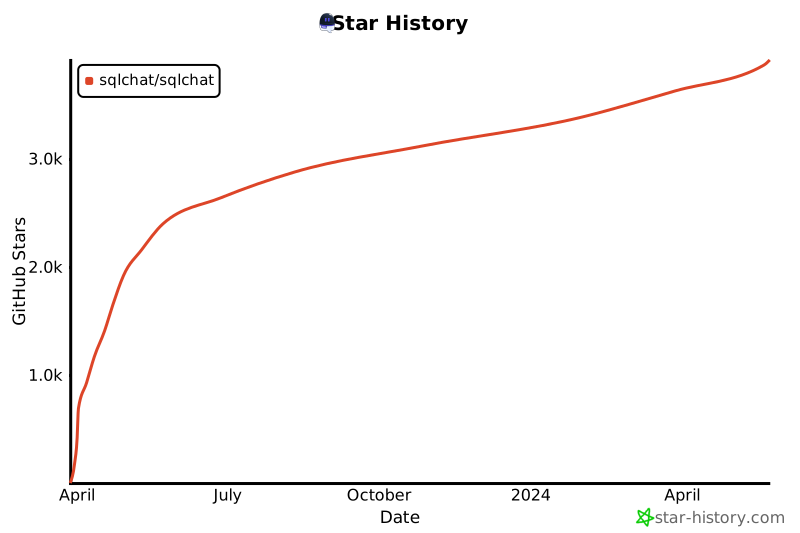
Star History
Community

Sponsors

Common Error Message
Please sign up to get free quota
See this issue.
You exceeded your current quota, please check your plan and billing details

Your OpenAI Key has run out of quota. Please check your OpenAI account.
Failed to request message, please check your network
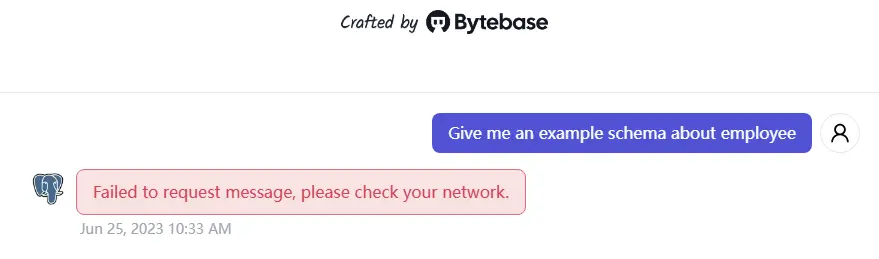
Please make sure you have a stable network connection which can access the OpenAI API endpoint.
ping api.openai.com
If you cannot access the OpenAI API endpoint, you can try to set the OPENAI_API_ENDPOINT in UI or environment variable.