Data Warehouse and Analytics Project





The materials of the data warehouse project: the source files, every script from the videos, and the docs.
⭐ If this project helps you, star the repository so other learners can find it too.
You take raw files from two systems, a CRM and an ERP, and build one data warehouse in SQL Server. At the end, the data is clean and ready for analysis.
New here? Open the setup guide in the 00_setup folder. It walks you through installing SQL Server and creating the database, on Windows and Mac, with the fixes for the common errors.
sql-data-warehouse-project/
├── 00_setup/               the setup guide, and the one-click Docker start for Mac
├── 01_datasets/            the six source files the project loads
│   ├── source_crm/         three files from the CRM system
│   └── source_erp/         three files from the ERP system
├── 02_docs/                the requirements, the diagrams and the notes
├── 03_scripts/             the project scripts, in the order of the videos
│   ├── init_database.sql   creates the database: run it first
│   ├── bronze/             loads the raw files
│   ├── silver/             cleans and prepares the data
│   └── gold/               builds the tables for analysis
└── 04_tests/               checks the quality of the silver and gold data
The project reads the six files from C:\sql\dwh_project\01_datasets\. Put the folder there, or change the six paths in 03_scripts/bronze/proc_load_bronze.sql. The videos show the folders without numbers: datasets there is 01_datasets here, scripts is 03_scripts.
The 45 chapters: the minute in the video and the files of each one
| # | Chapter | Video | Files |
|---|---|---|---|
| 1 | Intro | 0:00:00 | |
| 2 | Types of SQL Projects | 0:01:27 | |
| 3 | What is Data Warehouse | 0:02:50 | |
| 4 | What is ETL | 0:09:41 | ETL.png |
| 5 | Project Materials | 0:20:29 | the setup guide |
| 6 | Project Plan Using Notion | 0:23:14 | Notion template |
| 7 | Analyzing Requirements | 0:30:54 | requirements.md · Project_Requirements.pdf |
| 8 | Design The Data Architecture | 0:34:10 | data_architecture.png |
| 9 | Choose the Right Approach | 0:35:20 | |
| 10 | Design the Layers of DWH | 0:40:43 | data_layers.pdf |
| 11 | Draw the Architecture using Draw.io | 0:47:37 | data_architecture.png |
| 12 | Project Initialization | 0:56:00 | |
| 13 | Define Naming Conventions | 0:56:56 | naming_conventions.md |
| 14 | Prepare Your GIT Repository | 1:03:26 | |
| 15 | Create Database & Schemas | 1:07:54 | init_database.sql |
| 16 | Commit Code in Git Repo | 1:10:33 | |
| 17 | Build Bronze Layer | 1:13:14 | |
| 18 | Analyze Source Systems | 1:14:36 | 01_datasets |
| 19 | Create DDL for Bronze Tables | 1:18:40 | ddl_bronze.sql |
| 20 | Develop SQL Load Scripts | 1:24:21 | proc_load_bronze.sql |
| 21 | Create Bronze Stored Procedure | 1:32:18 | proc_load_bronze.sql |
| 22 | Document: Bronze Data Flow | 1:45:28 | data_flow.png |
| 23 | Build Silver Layer | 1:50:31 | |
| 24 | Explore & Understand The Data | 1:52:08 | data_integration.png |
| 25 | Create DDL for Silver Tables | 2:03:05 | ddl_silver.sql |
| 26 | Clean & Load crm_cust_info | 2:06:52 | proc_load_silver.sql |
| 27 | Clean & Load crm_prd_info | 2:22:03 | proc_load_silver.sql |
| 28 | Clean & Load crm_sales_details | 2:42:48 | proc_load_silver.sql |
| 29 | Clean & Load erp_cust_az12 | 2:59:38 | proc_load_silver.sql |
| 30 | Clean & Load erp_loc_a101 | 3:08:38 | proc_load_silver.sql |
| 31 | Clean & Load erp_px_cat_g1v2 | 3:14:16 | proc_load_silver.sql |
| 32 | Create Silver Stored Procedure | 3:18:38 | proc_load_silver.sql |
| 33 | Document: Silver Data Flow | 3:24:29 | data_flow.png |
| 34 | Build Gold Layer | 3:28:09 | |
| 35 | What is Data Modeling? | 3:29:39 | |
| 36 | Star Schema vs. Snowflake Schema | 3:32:17 | |
| 37 | Dimensions vs Facts | 3:34:06 | |
| 38 | Explore the Business Objects | 3:35:10 | |
| 39 | Create Dimension Customers | 3:39:04 | ddl_gold.sql |
| 40 | Create Dimension Products | 3:55:30 | ddl_gold.sql |
| 41 | Create Fact Sales | 4:02:43 | ddl_gold.sql |
| 42 | Build The Star Schema Model | 4:08:48 | data_model.png |
| 43 | Data Catalog | 4:13:58 | data_catalog.md |
| 44 | Data Flow | 4:16:40 | data_flow.png |
| 45 | End of Project | 4:21:45 |
The sketches of the whole project: Project_Notes_Sketches.pdf. The quality checks: quality_checks_silver.sql and quality_checks_gold.sql.
🏗️ Data Architecture
The data architecture for this project follows Medallion Architecture Bronze, Silver, and Gold layers:
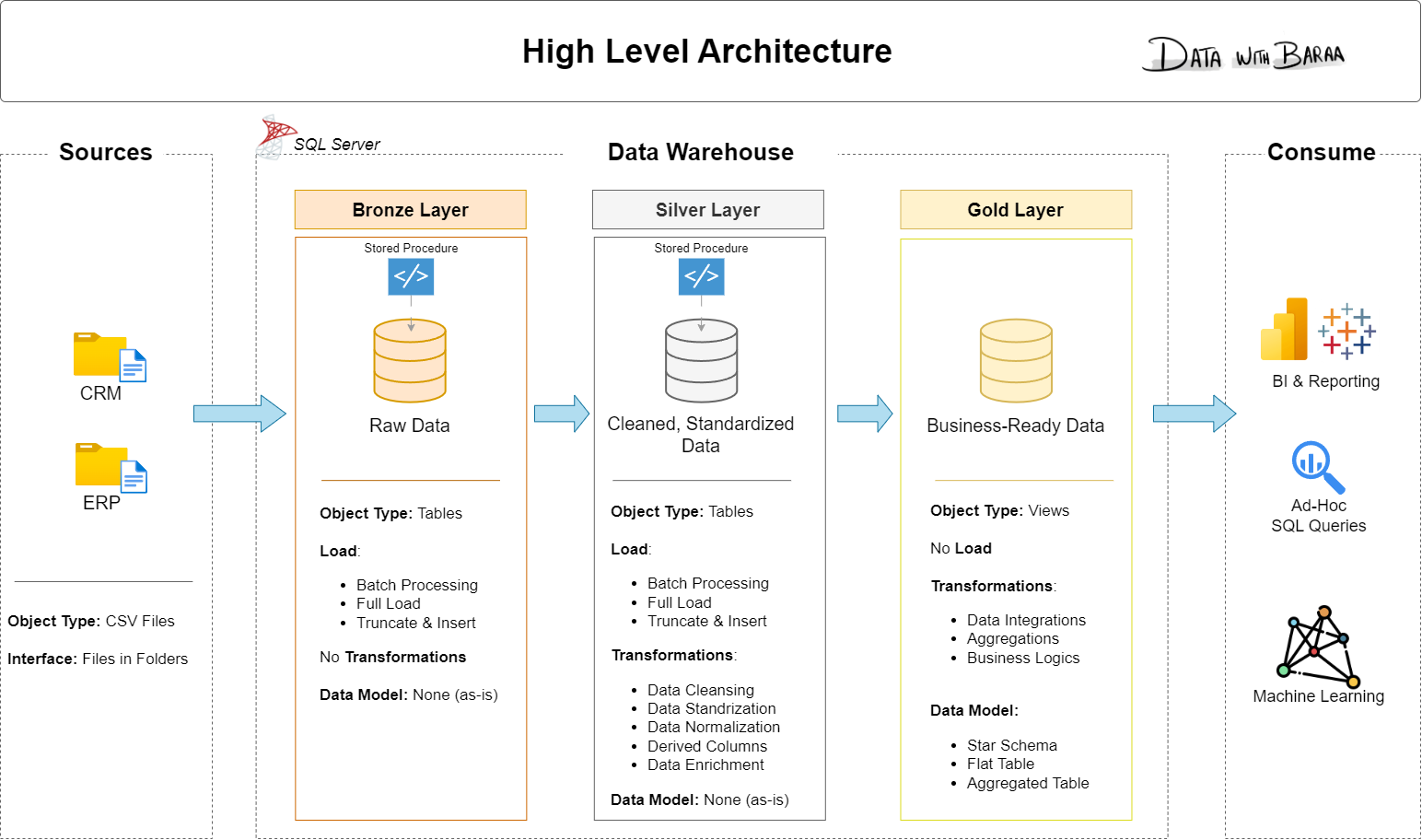
- Bronze Layer: Stores raw data as-is from the source systems. Data is ingested from CSV Files into SQL Server Database.
- Silver Layer: This layer includes data cleansing, standardization, and normalization processes to prepare data for analysis.
- Gold Layer: Houses business-ready data modeled into a star schema required for reporting and analytics.
📖 Project Overview
In this project, you:
- Design the architecture: a modern data warehouse with three layers, bronze, silver and gold.
- Build the ETL pipelines: load the source files and move the data through the layers.
- Model the data: facts and dimensions, ready for reports.
- Analyze it: answer business questions with SQL.
🛠️ Important Links & Tools
- SQL Server and SSMS: the setup guide in
00_setuphas the links and every step. - Git: a GitHub account, to save and share your project.
- draw.io: to draw the architecture and the data model.
- Notion template: the project plan, ready to copy.
- Notion project steps: every phase and task of the project.
🚀 Project Requirements
Building the Data Warehouse (Data Engineering)
Objective
Develop a modern data warehouse using SQL Server to consolidate sales data, enabling analytical reporting and informed decision-making.
Specifications
- Data Sources: Import data from two source systems (ERP and CRM) provided as CSV files.
- Data Quality: Cleanse and resolve data quality issues prior to analysis.
- Integration: Combine both sources into a single, user-friendly data model designed for analytical queries.
- Scope: Focus on the latest dataset only; historization of data is not required.
- Documentation: Provide clear documentation of the data model to support both business stakeholders and analytics teams.
BI: Analytics & Reporting (Data Analysis)
Objective
Develop SQL-based analytics to deliver detailed insights into:
- Customer Behavior
- Product Performance
- Sales Trends
These insights empower stakeholders with key business metrics, enabling strategic decision-making.
For more details, refer to 02_docs/requirements.md.
🏆 Share your build
Finished the project? Add this badge to the top of your own README, so others can find the original project too.

[](https://github.com/DataWithBaraa/sql-data-warehouse-project)
Then show your build to the others in Discussions, Show and tell.
🎓 Learn with me
Watch on YouTube, or take the guided version with a certificate on my Academy or Udemy.
| Course | YouTube | My Academy | Udemy |
|---|---|---|---|
| SQL | Full course · Playlist | Full Package · Handbook | SQL Bootcamp · SQL for Analytics |
| Python | Full course · Playlist | Full Package · Handbook | Python Bootcamp |
| Tableau | Full course · Playlist | Full Package | Tableau Course · Chart Masterclass |
| Power BI | Full course | ||
| Databricks | Full course |
Materials on my website: SQL · Python · Tableau · Power BI
The SQL projects
| Project | YouTube | Materials | Udemy |
|---|---|---|---|
| Data Warehouse | Watch | this repository | Building a Modern Data Warehouse |
| Exploratory Data Analysis | Watch | Repository | SQL for Exploratory Data Analysis |
| Advanced Data Analytics | Watch | same repository |
More on YouTube: Data projects · Data careers
🤝 Connect





🛡️ License
MIT. Use it, change it, share it, with attribution.
🌟 About me
Hi, I'm Baraa Khatib Salkini. I spent years in enterprise data engineering and built one of the largest lakehouses at Mercedes-Benz. Today I teach data full-time at Data With Baraa: visually, step by step, from zero to hero.