
SoundCraft
Recording, editing and mixing audio; an open-source, clean-room reimplementation of Avid Pro Tools, rebuilt in pure Rust.
A complete digital audio workstation that runs natively on macOS, Windows, Linux and FreeBSD, and in the browser. Multitrack editing, a full mixer with plugins, sends and automation, MIDI, recording and bouncing, and every action scriptable from the command line or by an AI agent.






SoundCraft on getartcraft.com · ArtCraft · All Crafting Apps
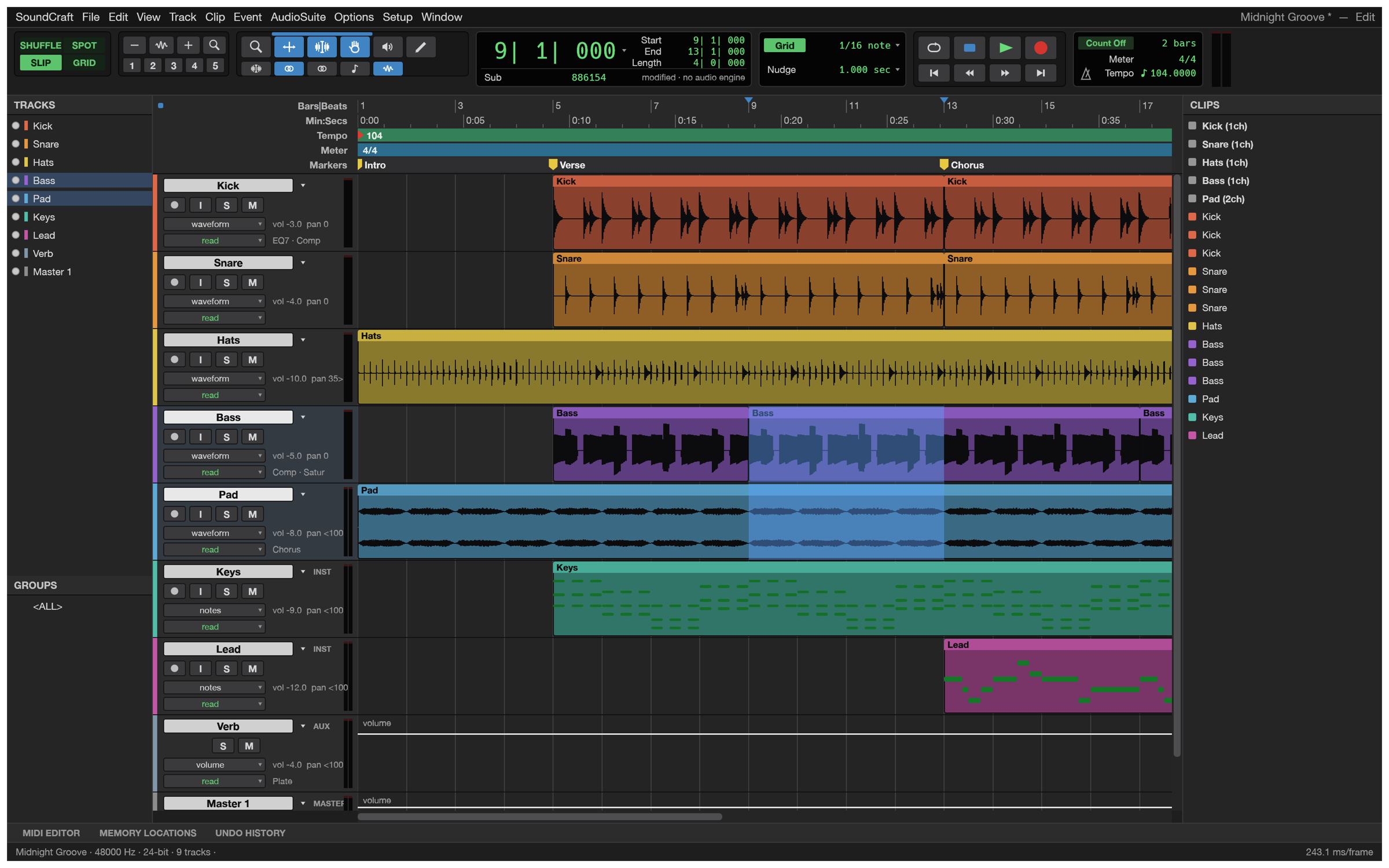
The Edit window: tracks, waveforms, MIDI, rulers, markers and the transport, playing the built-in demo song (every sound in it is synthesised by SoundCraft itself).
[!NOTE] ArtCraft is a community of artists from all walks of life. Painters, photographers, filmmakers, illustrators, designers, animators, hobbyists, and people who picked up a pencil last week. If you make things, you're one of us. Come say hi on Discord.
What it does · Getting started · Agents & scripts · How it's built · Status · Downloads · The Crafting Apps · License
What it does
SoundCraft follows the workflow audio engineers already know: an Edit window for arranging and editing, a Mix window for balancing, edit modes, tools, playlists, memory locations, AudioSuite processing and the rest. If you've spent years in that workflow, your hands should already know where things are.
 |
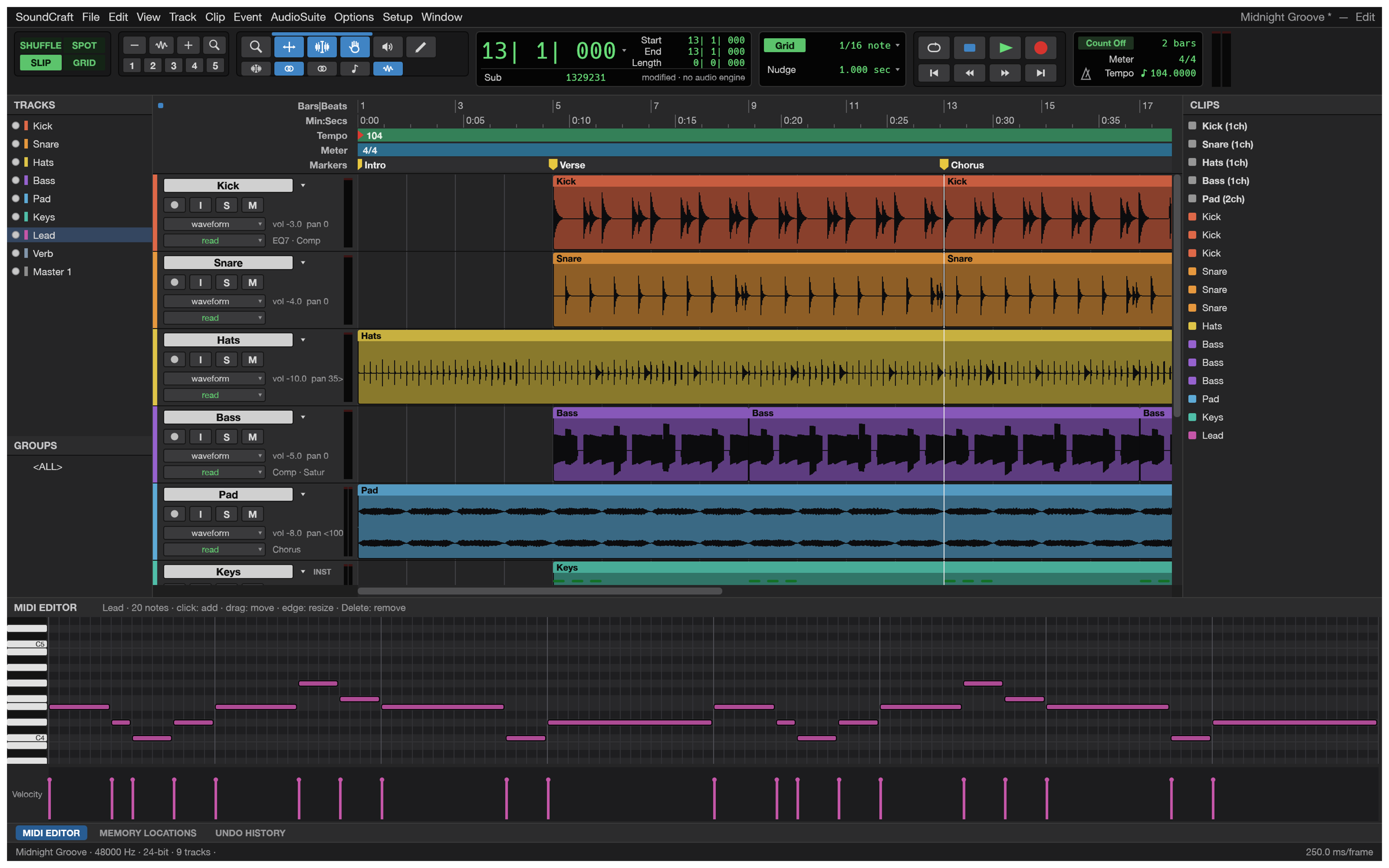 |
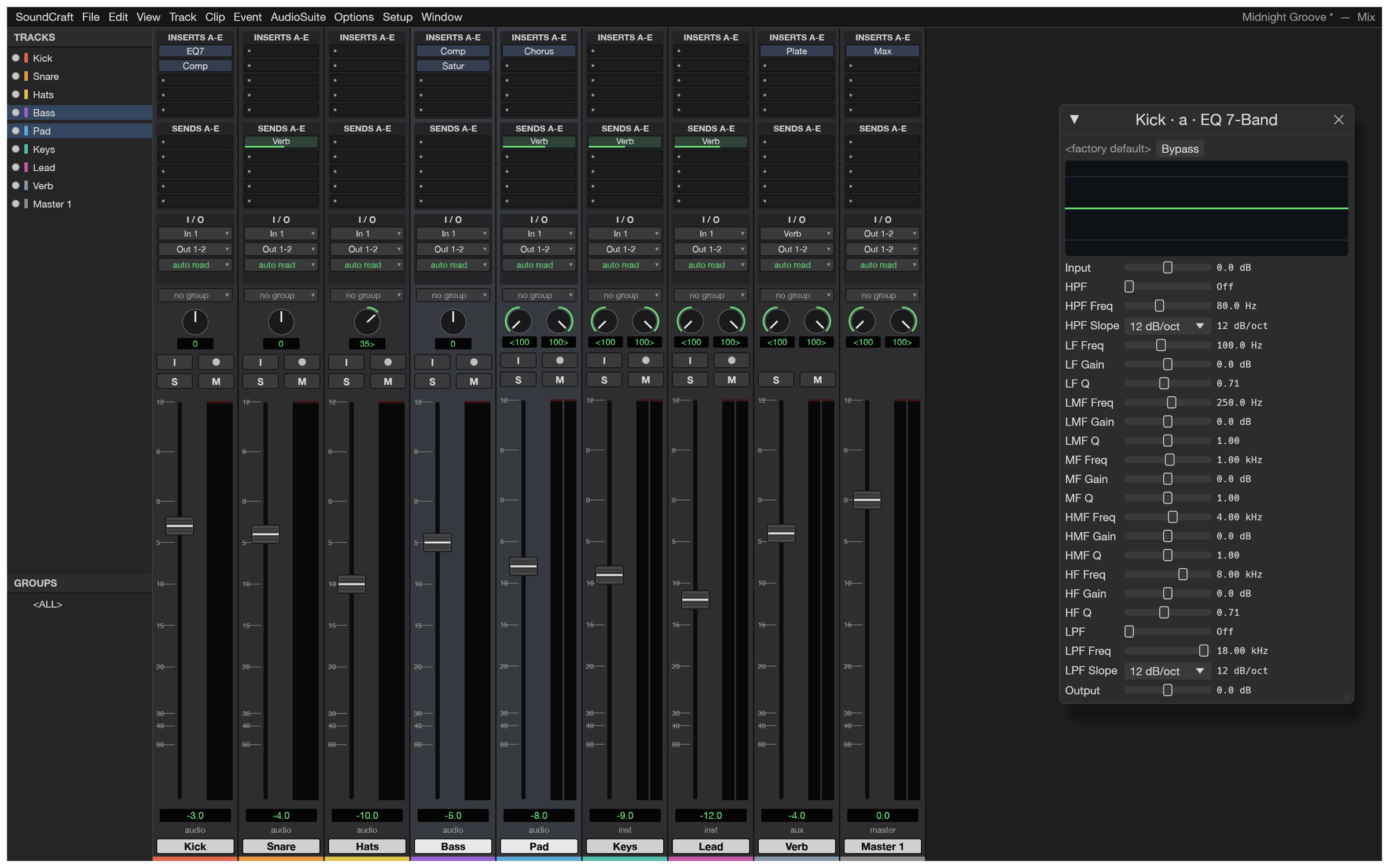
| Mix window. Ten inserts and ten sends per track, busses and aux inputs, master faders, VCAs, routing folders, solo-in-place with implicit solo, and meters with peak hold. | MIDI editor. Instrument tracks with built-in synths, a piano roll with a velocity lane, step input, quantize, transpose, and Standard MIDI File import and export. |
 |
 |
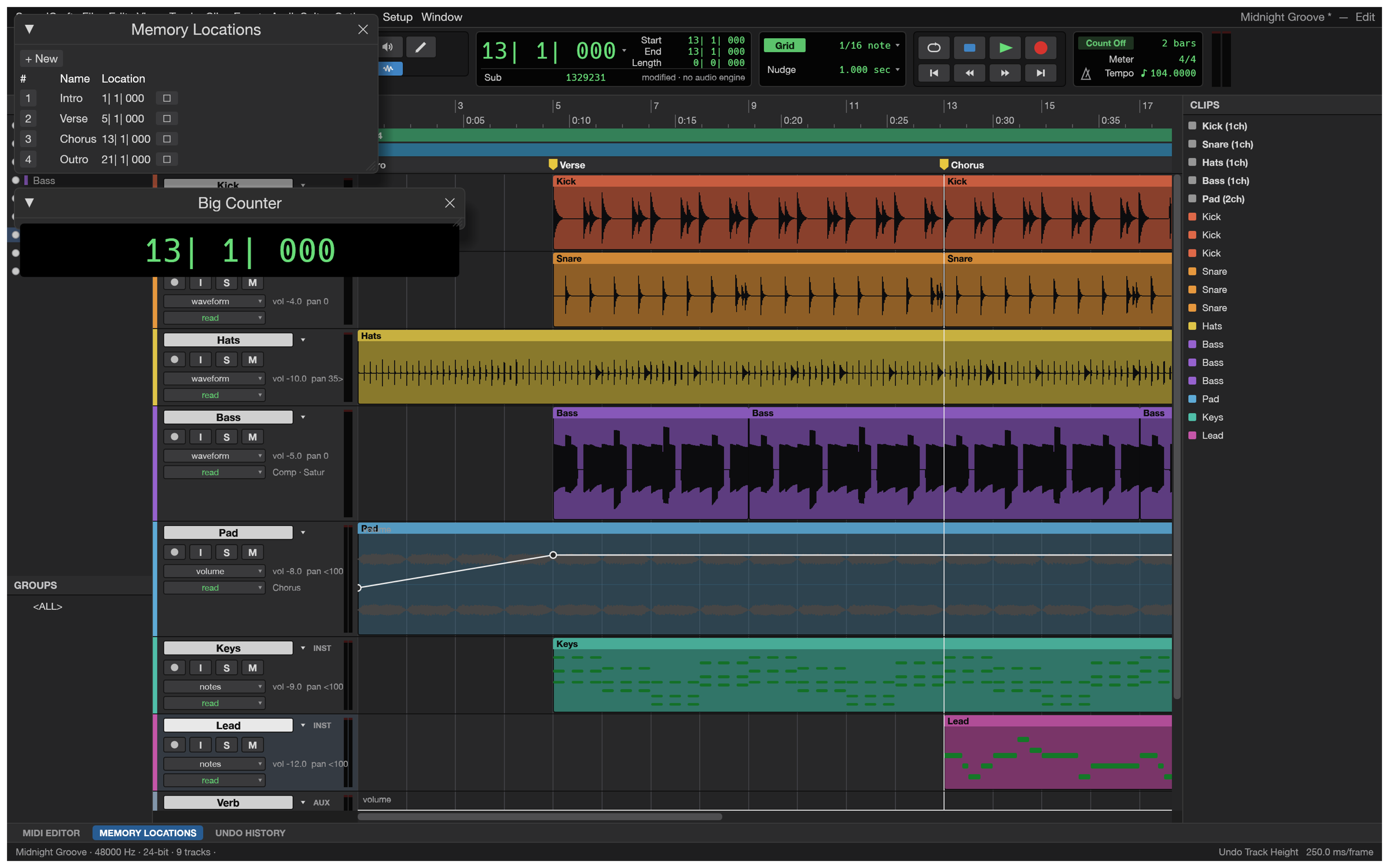
| Automation and markers. Breakpoint automation for volume, pan, mute, sends and every plugin parameter, written live in Write, Touch and Latch, plus memory locations and a big counter. | Everywhere. Signed builds for macOS (universal), Windows (x64, x86, Arm), Linux (AppImage, deb, rpm, Flatpak), FreeBSD, and a WebAssembly build that runs in the browser. |
 |
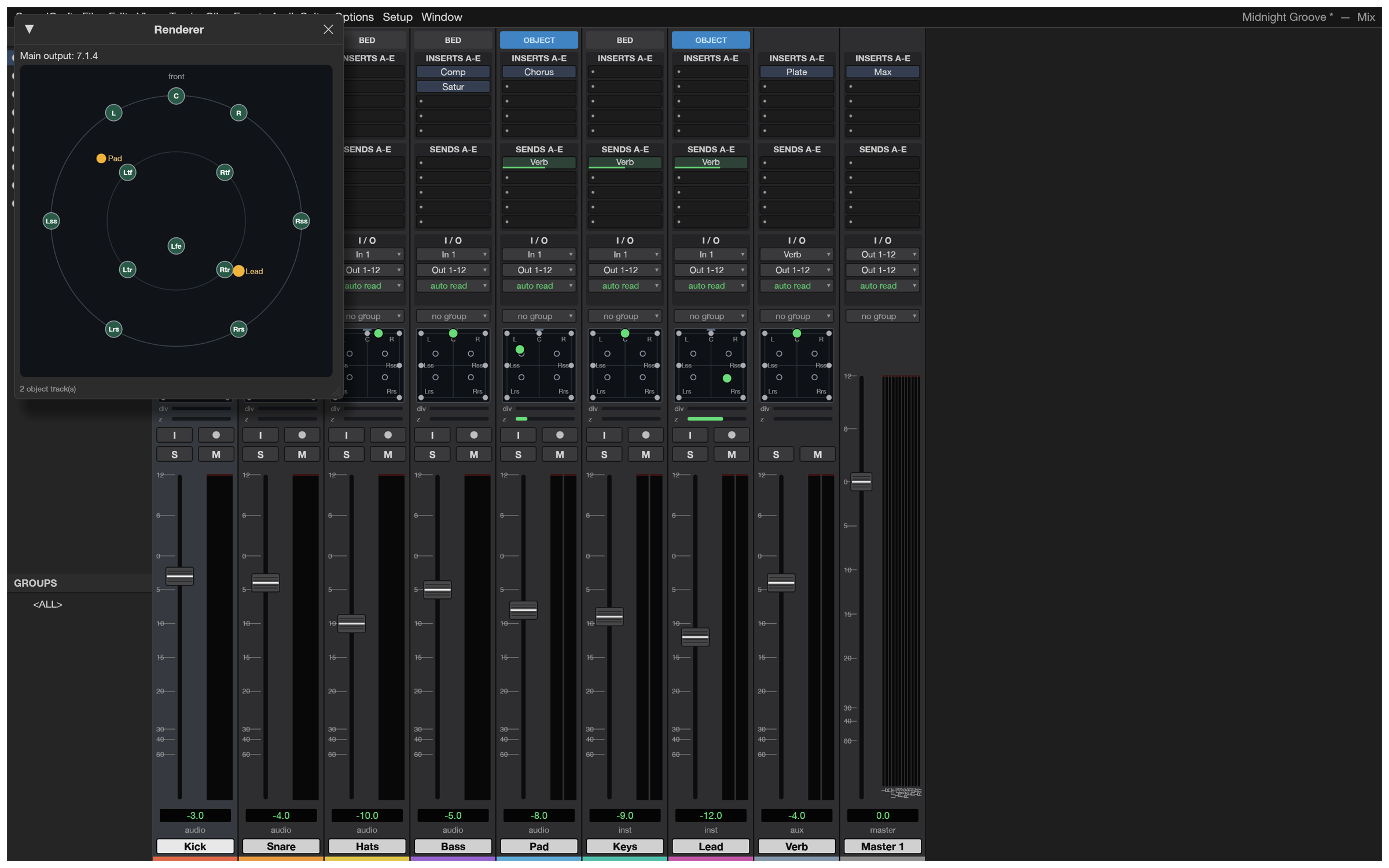 |
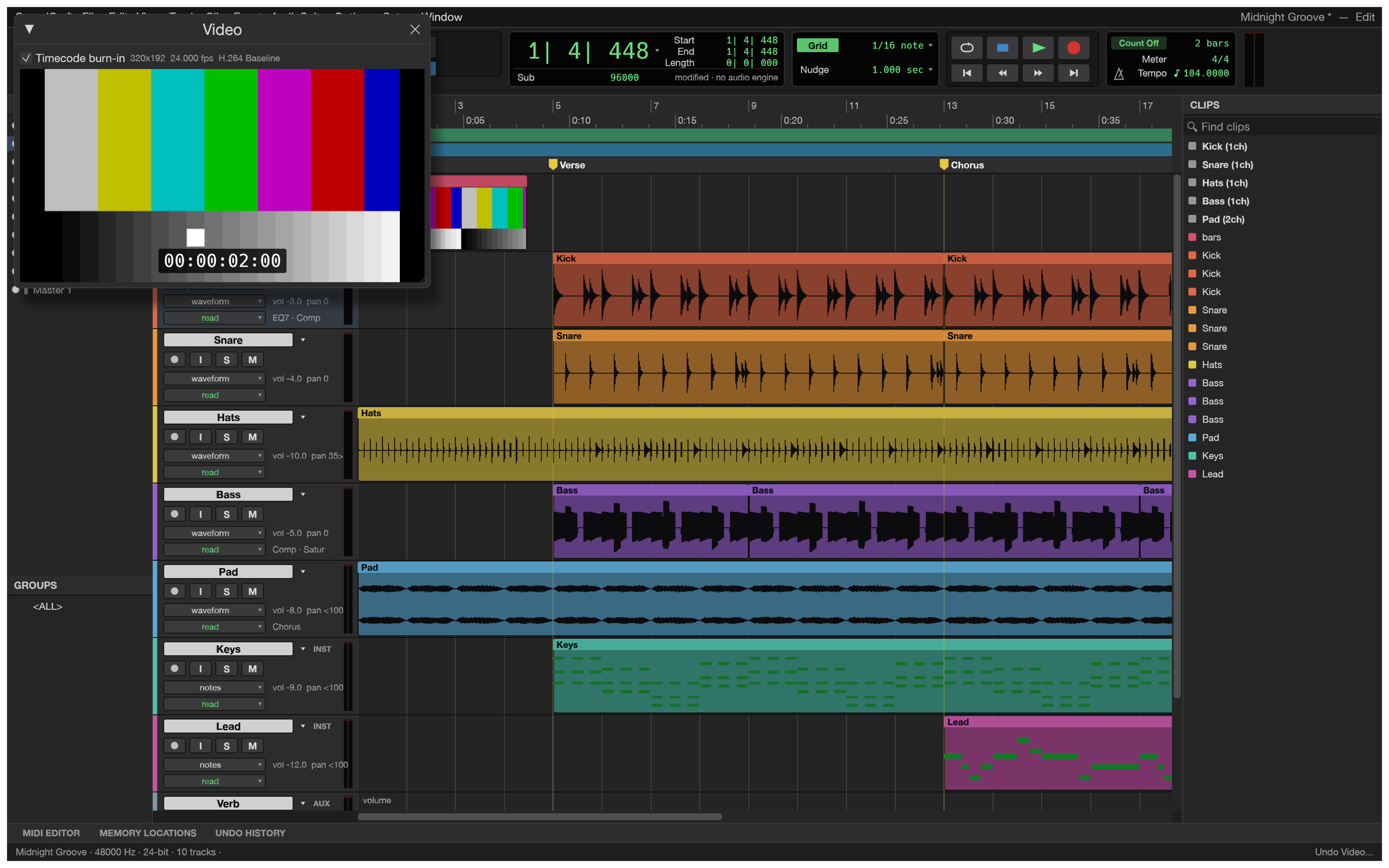
| Video. A picture track with thumbnails and a Video window that follows the playhead, decoding H.264, ProRes and Motion JPEG in pure Rust, with timecode burn-in and sync offset. | Surround and immersive. Main and bus formats from stereo to 9.1.6 and Ambisonics, a surround panner with divergence and height, object/bed routing and a Renderer window with live speaker levels. |
 |
|
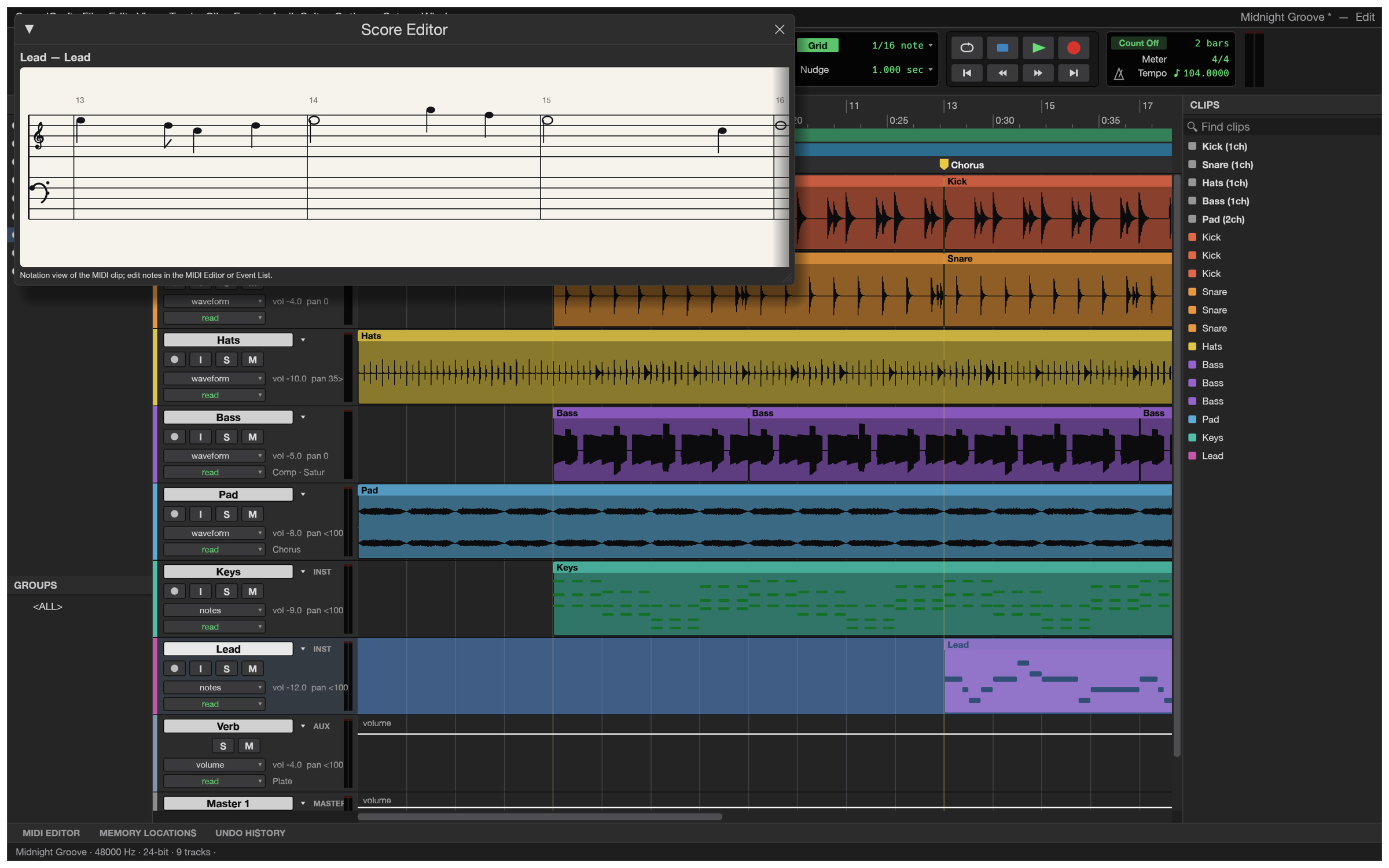
| Notation. A Score Editor for MIDI tracks, MusicXML export for Sibelius and other notation programs, and printable engraved scores. | Your plugins too. CLAP, VST3 and Audio Units, with their own editors, their state saved in the session, and every instance created off the audio thread. |
Feature tour
- Editing: Shuffle, Slip, Spot and Grid modes; Smart, Selector, Grabber, Trim, Pencil, Zoom and Scrubber tools; cut, copy, paste, duplicate, repeat, shift, insert silence, separate (at selection, on grid, at transients), heal, consolidate, strip silence, nudge; fades and crossfades in five shapes, drawn straight from the clip corners; playlists with comping lanes; clip gain lines; edit groups; single-key Commands Focus shortcuts; undo for everything.
- Mixing: fader and pan with automation, pre/post sends, busses, aux inputs, master faders, VCA masters, routing folders, solo modes, mute and solo groups, phase invert and trim, clip effects, and automatic plugin delay compensation.
- Automation: volume, pan, mute, send and every plugin parameter; Write, Touch, Latch and Trim passes recorded live from the faders; thin, glide, coalesce and convert to clip gain.
- Plugins: 7-band and 1-band EQ, compressor/limiter, expander/gate, de-esser, maximizer, channel strip, room and plate reverbs, mod delay, chorus, flanger, phaser, saturator, lo-fi, rectifier, pitch shifter, time shift, gain, trim, invert, DC removal, signal generator, dither, a subtractive synth and a drum synth, all original. CLAP plugins load too. Any processor runs offline as AudioSuite, and user presets save per plugin.
- MIDI: instrument and MIDI tracks, a piano-roll MIDI editor with a velocity lane, an event list, a score view, step input, quantize, transpose, real-time properties, Standard MIDI Files, and Audio-to-MIDI from a sung or played melody.
- Recording: punch in on a selection or on the fly, pre/post-roll, loop recording with a playlist per take, input monitoring through the full channel strip, and autosave with recovery.
- Time and tempo: Bars|Beats, Min:Secs, Timecode (every rate, drop-frame included), Feet+Frames and Samples; tempo and meter maps with a tempo editor; linear, parabolic and S-curve tempo ramps; key signatures and detected chords; Beat Detective and Identify Beat; pitch-preserving Elastic warping.
- Audio files: WAV/BWF/RF64, AIFF/AIFC and FLAC in and out; MP3, Ogg Vorbis, AAC, ALAC, CAF and the audio of MP4/MOV movies in. Any sample rate and bit depth.
- Bounce: mix or stems to WAV, AIFF or FLAC at 16/24/32-bit float with dither and normalisation, reporting peak, true peak and integrated loudness (LUFS).
- Fast: a parallel mix engine, copy-on-write undo, and a UI that holds 120 frames per second with seventy-odd tracks playing.
Getting started
Download a build from the releases page, or build from source with Rust 1.95 or later for the desktop/web UI (the core workspace's declared minimum remains Rust 1.90):
git clone https://github.com/storytold/soundcraft
cd soundcraft
cargo run --release -p soundcraft -- --demo     # opens the demo song
Linux needs the ALSA headers (libasound2-dev on Debian/Ubuntu, alsa-lib-devel on Fedora).
The web build:
cd apps/soundcraft-web && trunk serve --release # then open http://127.0.0.1:8080
Useful shortcuts: Space play/stop, ⌘= Mix/Edit, F1–F4 edit modes, F5–F10 tools, ⌘E separate, ⌘D duplicate, Enter new marker, ⌘⇧N new tracks. Setup › Keyboard Shortcuts lists them all.
Logs
The desktop app writes its log records to standard error and to logs/soundcraft.log in the
settings directory, beside ui.json, Autosave/ and Presets/ (Linux ~/.config/soundcraft/logs/,
or $XDG_CONFIG_HOME/soundcraft/logs/; macOS ~/Library/Application Support/SoundCraft/logs/;
Windows %APPDATA%\SoundCraft\logs\). A start from a desktop menu or the Dock has no terminal, so
this file is what to attach to a bug report: the engine's panic report, audio devices that failed to
open or broke, plugins that refused their stored state, CLAP plugins' own messages and files that
failed to open land there. Each launch moves the previous log to soundcraft.1.log (and that one to
soundcraft.2.log), so the log of a run that crashed survives the next start. The file stops
growing at 16 MiB. --version writes no file, and runs with SOUNDCRAFT_NO_PREFS log to standard
error only.
| Variable | Effect |
|---|---|
RUST_LOG |
Log levels for standard error and the log file. Default: info for SoundCraft's own crates, warn for everything else. env_logger-style directives replace that, e.g. RUST_LOG=debug, RUST_LOG=warn,soundcraft_mix=trace or RUST_LOG=info,wgpu_core=warn; a directive ending in * covers every target starting with it (soundcraft*=debug). |
SOUNDCRAFT_NO_PREFS |
No preferences read or written and no log file (agents' test runs). |
The realtime audio thread never writes a record itself: the logger keeps the first one it logs
(without waiting or allocating), counts the rest, and the UI thread writes them. The logger is
apps/soundcraft/src/logging.rs. The web app logs to the browser console instead.
For agents and scripts
Everything you can click is also a command with an id and JSON parameters, and the same commands
are reachable from the menus, the keyboard, the command line, a JSON control channel and an
MCP server. Programmatic calls never open dialogs, and
session.inspect reports exactly what changed, so an agent can check its own work.
# Headless: load the demo, turn the kick down, add an EQ, bounce.
soundcraft-cli run --demo \
  --cmd 'mix.volume={"track":"Kick","db":-6}' \
  --cmd 'mix.insert={"track":"Bass","plugin":"eq_7band"}' \
  --bounce mix.wav

# Drive the running app.
soundcraft --demo --control 7801 &
soundcraft-cli app --port 7801 transport.play
soundcraft-cli app --port 7801 ui.screenshot '{"path":"shot.png"}'

# Give Claude a DAW.
claude mcp add soundcraft -- soundcraft-cli mcp --demo
See docs/control-protocol.md and docs/mcp.md.
soundcraft-cli commands lists every command.
Open SoundCraft › Session Audio Health to check loaded audio availability, sample-rate
mismatches and clip source bounds across all playlists, including alternate takes. The report
offers a refresh button and suggests how to resolve each issue. Scripts can obtain the same JSON
report with soundcraft-cli run --demo --cmd 'session.audio_health={}'. This checks loaded media,
not files on disk, signal levels, plugins or routing.
How it's built
SoundCraft is a Cargo workspace of small crates with strict layering: nothing below the UI knows about egui, so the interface could be swapped for another one.
| Crate | What it does |
|---|---|
soundcraft-time |
Timebases, tempo and meter maps, timecode, grid |
soundcraft-audio-io |
Audio file formats and waveform overviews |
soundcraft-midi |
Standard MIDI Files and MIDI operations |
soundcraft-dsp |
Plugins, offline processing, meters, loudness, FFT |
soundcraft-model |
The session document |
soundcraft-mix |
The mix engine (realtime and offline share it) |
soundcraft-engine |
Commands, undo, editing, import/export, bounce |
soundcraft-playback |
Audio devices (CoreAudio, WASAPI, ALSA, WebAudio) and recording |
soundcraft-automation |
MCP server and control-channel client |
soundcraft-ui-egui |
The user interface |
The code never panics on bad input: errors are values, and a malformed file or a bad agent call
produces a message, never a crash. cargo xtask ci runs formatting, clippy, the tests, the asset
and layering checks and the WebAssembly build.
Status and roadmap
SoundCraft is pre-alpha: it covers 94 % of the incumbent's menu items (measured), about 70 % of
its features by presence, and is roughly 40 % of the way to replacing it for real work: record,
edit, mix and bounce work end to end, but choosing an audio interface and buffer size,
recording MIDI from a controller and session interchange (AAF/OMF) are still missing, and those
are the alpha checklist. Translations are missing too. The status, the stage and our effort
estimates are in ROADMAP.md; the full assessment is in
docs/target-app-parity.md, the ranked list of what's missing in
docs/gaps.md, and the menu-by-menu comparison in
docs/parity-checklist.md. Bug reports and wish lists are
very welcome, in the issues or on Discord.
Downloads
Download SoundCraft from GitHub: the latest release has every build listed below, and all releases has earlier versions and their notes. `` in the file names is the version number, and SHA256SUMS.txt lists a checksum for every file.
Windows
| Build | Installer | Portable |
|---|---|---|
| x64 (64-bit Intel/AMD) | soundcraft--windows-x64.msi |
soundcraft--windows-x64-portable.zip |
| arm64 (Snapdragon and other ARM PCs) | soundcraft--windows-arm64.msi |
soundcraft--windows-arm64-portable.zip |
| x86 (32-bit) | soundcraft--windows-x86.msi |
soundcraft--windows-x86-portable.zip |
Installers and executables are code-signed.
If the app doesn't open on Windows: the desktop app initializes only DirectX 12 by default.
Letting wgpu also create an OpenGL instance can crash some graphics drivers (AMD's
atio6axx.dll) before the window appears, so the app would flash in Task Manager and quit.
WGPU_BACKEND overrides the default for troubleshooting (for example dx12 or vulkan). In
PowerShell, from the folder containing the executable:
$env:WGPU_BACKEND = "vulkan"
& .\soundcraft.exe
Remove-Item Env:WGPU_BACKEND                     # restore the default for later launches
An explicit gl override can bring the driver crash back on affected systems. The macOS, Linux
and web backend defaults are unchanged.
macOS
| Build | File | Notes |
|---|---|---|
| App, universal (Apple silicon + Intel) | soundcraft--macos-universal.dmg |
Signed and notarized |
| Command-line tool, universal | soundcraft-cli--macos-universal.zip |
Signed and notarized |
Linux
| Format | x86_64 | aarch64 (ARM64) | Notes |
|---|---|---|---|
| AppImage | soundcraft--linux-x86_64.AppImage |
soundcraft--linux-aarch64.AppImage |
Runs anywhere; updates itself with AppImageUpdate (.zsync files) |
| Flatpak | soundcraft--linux-x86_64.flatpak |
soundcraft--linux-aarch64.flatpak |
Sandboxed; flatpak install --user |
| Debian/Ubuntu | soundcraft--linux-x86_64.deb |
soundcraft--linux-aarch64.deb |
|
| Fedora/RHEL/openSUSE | soundcraft--linux-x86_64.rpm |
soundcraft--linux-aarch64.rpm |
|
| Tarball | soundcraft--linux-x86_64.tar.gz |
soundcraft--linux-aarch64.tar.gz |
Unpack anywhere |
RISC-V (riscv64): soundcraft--linux-riscv64.tar.gz, a tarball only (glibc 2.39+, e.g. Ubuntu 24.04).
FreeBSD
| Build | File |
|---|---|
| x86_64 | soundcraft--freebsd-x86_64.tar.gz |
Web (WebAssembly)
| Build | File | Notes |
|---|---|---|
| Static site | soundcraft-web-.zip |
Runs in a modern browser; host it on any static server |
The Crafting Apps
SoundCraft is one of the Crafting Apps: free, open-source creative tools from the ArtCraft team, each written from scratch in Rust and each able to stand on its own.
| App | What it's for | Code | Learn more | |
|---|---|---|---|---|
 |
PhotoCraft | Image editing: layers, masks, type and real PSD files | GitHub | Website |
 |
VectorCraft | Vector illustration | GitHub | Website |
 |
FilmCraft | Video editing, color and sound | GitHub | Website |
 |
LightCraft | Photo library and raw development | GitHub | Website |
 |
PdfCraft | Reading, organizing and protecting PDFs | GitHub | Website |
 |
EffectCraft | Motion graphics and visual effects | GitHub | Website |
 |
DesignCraft | Page layout and publishing | GitHub | Website |
 |
SoundCraft | Recording, editing and mixing audio · you are here | GitHub | Website |
And ArtCraft itself, our AI image and video studio for artists who want real control.
Come make things with us
Our Discord is where artists of every kind hang out: people who paint, shoot, draw, cut film, set type, and people still figuring out what they like to make. Share what you're working on, ask for help, tell us what's broken, or tell us what you wish these tools could do. Whatever your medium and however long you've been at it, you're welcome here.
discord.gg/artcraft · getartcraft.com · The Crafting Apps · SoundCraft
License and credits
SoundCraft is dual-licensed under MIT or Apache-2.0, at your option. Copyright (c) 2026 ArtCraft Team and the SoundCraft contributors. Required notices are in NOTICE.
Bundled fonts, icons, images and other assets keep their own open licenses; each one is listed with its author, source and license in ATTRIBUTION.md.
Every icon in the interface is drawn in code, the app icon is original, and the demo song and the screenshots' audio are synthesised by SoundCraft itself, so there are no samples or artwork from anyone else in this repository.
The ArtCraft name, wordmark and logos in docs/brand/ are trademarks of the
ArtCraft Team and are not covered by this license. They may be used only unmodified, and only as
part of this repository and SoundCraft, under docs/brand/LICENSE-brand.txt.
Forks and modified versions must remove them.
Avid and Pro Tools are trademarks or registered trademarks of Avid Technology, Inc. in the United States and/or other countries. SoundCraft is an independent, open-source project and is not affiliated with, sponsored by or endorsed by Avid Technology, Inc.; these names are used only to describe the workflows it is compatible with.
Adobe, Photoshop, Illustrator, Premiere Pro, Lightroom, Acrobat, After Effects and InDesign are trademarks or registered trademarks of Adobe Inc. in the United States and/or other countries. SoundCraft is an independent, open-source project and is not affiliated with, sponsored by or endorsed by Adobe Inc.; these names are used only to describe the workflows it is compatible with.

Made by the ArtCraft team and community.
Tracks and Groups, Clips, MIDI Editor, Memory Locations, and Undo History use movable panels. Edit and Mix retain separate arrangements; Clips and MIDI Editor belong to Edit. Transport, plug-in, and specialist utility windows retain their existing hosts. Drag a panel header to a target edge or another header. Its context menu offers Float panel, Move to group, and Close panel. Existing panel toggles reopen panels at their saved location; Reset Panel Layout restores the app layout. Floating panels remain inside the current app window.