So Novel is an AGPL-3.0 Java tool that extracts structured content from web pages and exports it as standard ebook and document formats including EPUB, TXT, and PDF, built for people who want offline copies of web fiction and for anyone turning web content into readable documents.
What it is
So Novel is a general-purpose web content processing and export utility written in Java. It pulls structured information out of web pages and writes that content into standard document formats, with EPUB, TXT, and PDF named as the export targets. The project ships three front ends from a single application: a text-based user interface (TUI), a command-line interface (CLI), and a web interface (WebUI). Which one starts is controlled by the JVM system property -Dmode, whose accepted values are tui, cli, and web, with tui as the default.
The concrete problem it addresses is the gap between a web page and a finished document. Collecting serialized web fiction or other page-based content by hand is slow, and a collected text file is not the same as an ebook. So Novel combines the collection and the conversion steps into one tool, using a packaged Java runtime and a config.ini file so that the same workflow runs on Windows, Linux, and macOS.
Key capabilities
- Extracts structured content from web pages and exports it as EPUB, TXT, or PDF.
- Runs in three modes selected with
-Dmode=tui|cli|web; tui is the default startup mode.
- Reads its settings from a configuration file,
./config.ini by default, with the path overridden by -Dconfig.file.
- Ships platform launch scripts:
sonovel.l4j.ini on Windows, run-linux.sh on Linux, and run-macos.sh on macOS, which carry the JVM system properties.
- Supports a bundled runtime under the
runtime directory, or a user-supplied JDK/JRE through start-custom-jre.cmd, launching with -XX:+UseZGC -XX:+ZGenerational -jar app.jar.
- Handles Chinese text encodings, with
-Dfile.encoding=GBK|Big5 shown in the custom JRE launch example.
- Installs on Windows with a single PowerShell command that runs
bin/windows-install.ps1.
Who uses it and how
- Readers who want offline copies of web serials and load the resulting EPUB files into Readest, Koodo Reader, Calibre, Neat Reader, Apple Books, Moon+ Reader, or Kindle.
- People doing collection and format-conversion work, which the README names as a primary scenario alongside ebook production.
- Users who need to convert the exported output onward to other ebook formats, using FreeConvert or Calibre for that step.
- Users hitting reader compatibility problems, who are pointed to the project discussion thread on fixing EPUB files that WPS and 掌阅 fail to open.
Getting started
On Windows, run irm https://raw.githubusercontent.com/freeok/so-novel/main/bin/windows-install.ps1 | iex in PowerShell, or the equivalent CMD variant; a manual compressed archive and a Linux shell script are also provided. The installer packages a runtime, so the default path needs no separate Java installation.
How it compares
No list of paid products this project replaces is provided in the facts. Among similar tools the facts do name, Calibre appears only as a recommended ebook reader and downstream format converter, not as a competing extraction tool, and FreeConvert appears as a conversion target. No direct peer for the extraction-and-export workflow is named in this registry.
When to use it — and when not to
Running it means operating a Java application: either the bundled runtime or your own JDK/JRE, plus a config.ini and, for JVM tuning, edits to sonovel.l4j.ini, run-linux.sh, or run-macos.sh. There is no hosted option in the facts, so anyone unwilling to maintain a local JVM setup should look elsewhere, and AGPL-3.0 obligations apply to modified or redistributed versions. The documentation is written primarily in Chinese, and the Linux install path in the README excerpt is truncated after bash, so Linux users should verify the install steps from the repository rather than the snippet alone.
project readme (upstream, from github) — read inline

So Novel




概述
So Novel 是一款通用的网页内容处理与导出工具,它致力于帮助用户高效地从网页中提取结构化信息,并将其灵活导出为
EPUB、TXT、PDF 等多种标准电子文档格式。适用于学习采集、格式转换、电子书制作等场景。
预览
点击查看图片
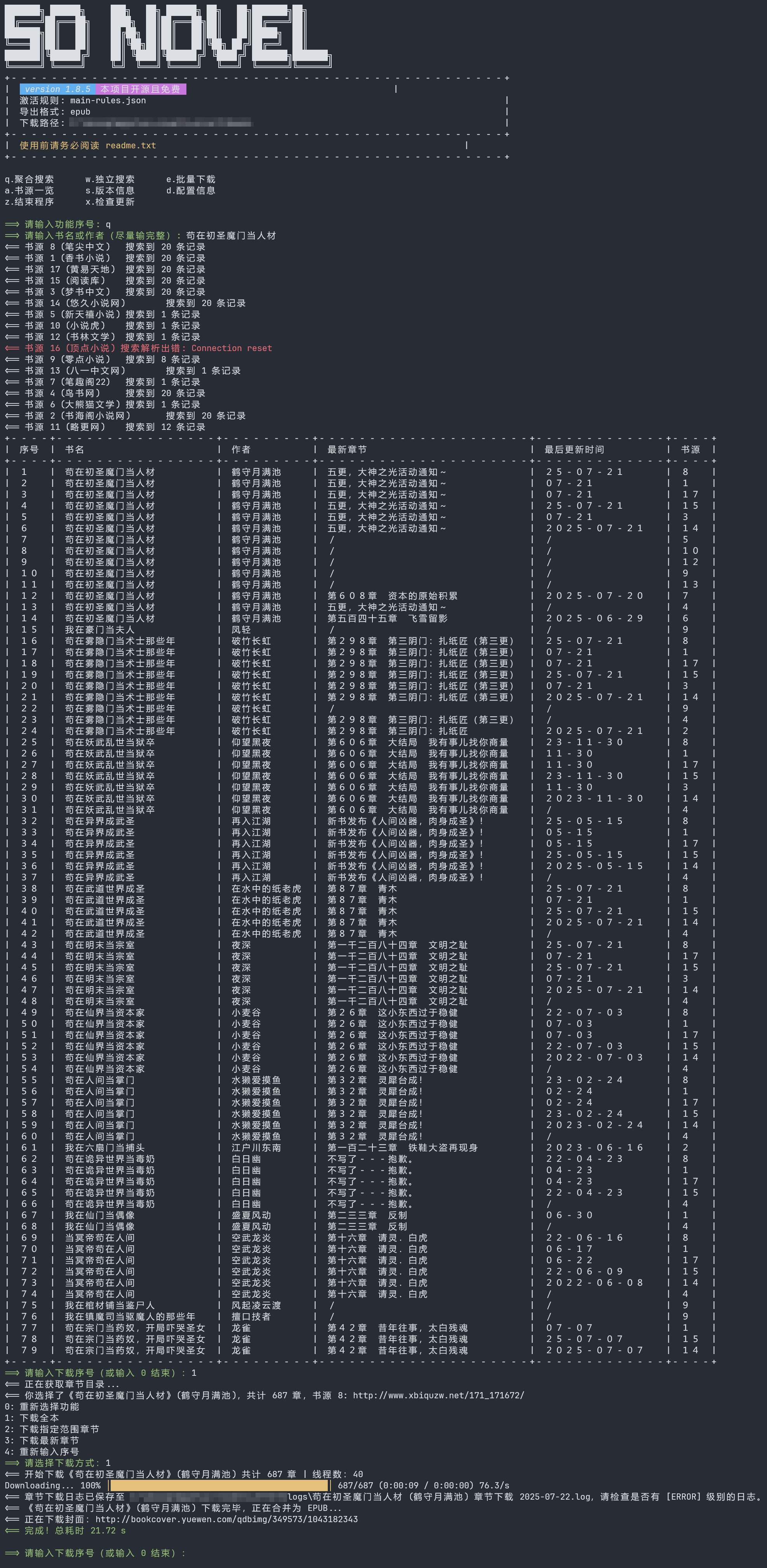
TUI 预览 (Text-based User Interface)
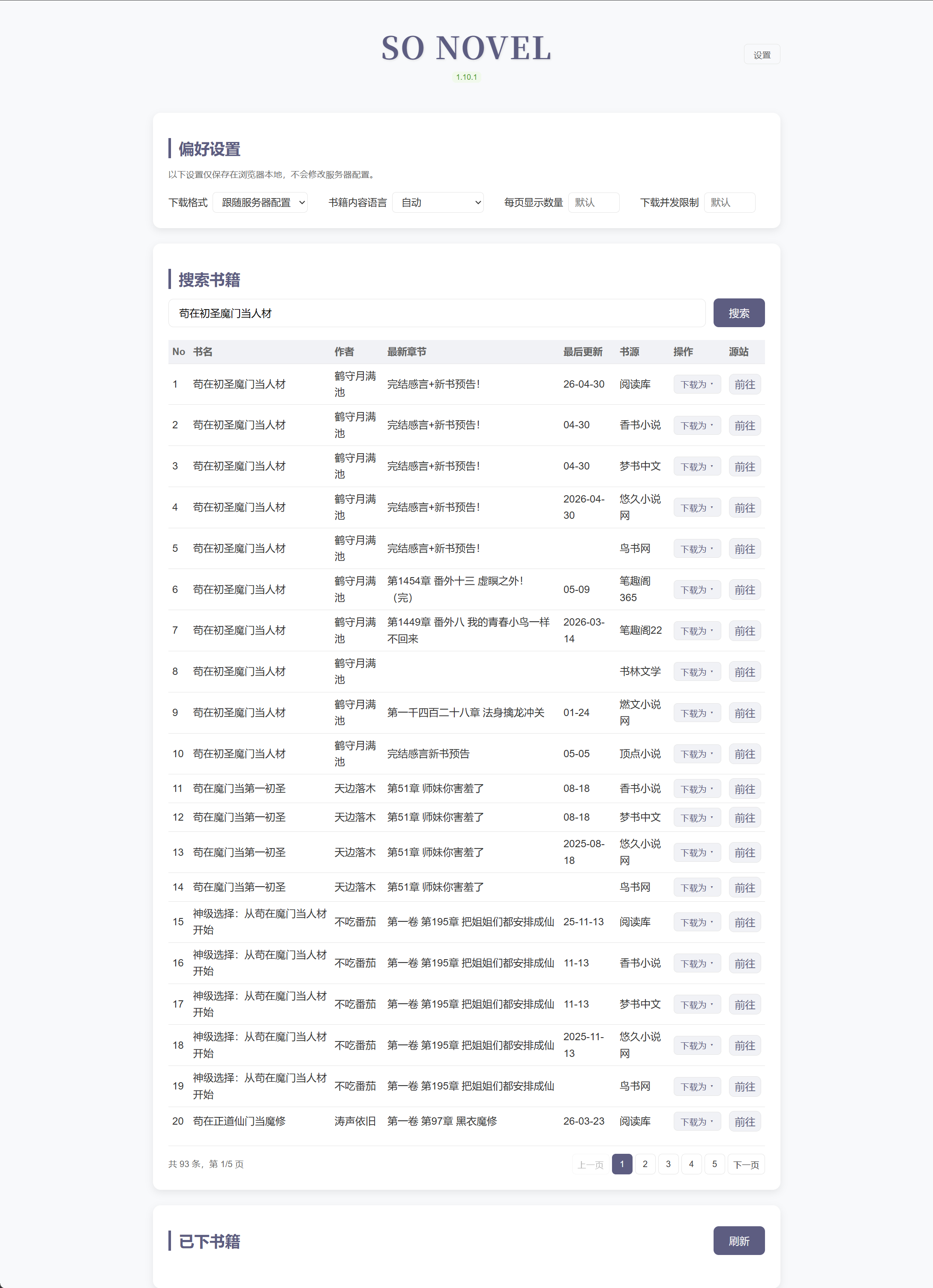
WebUI 预览 (网页版)
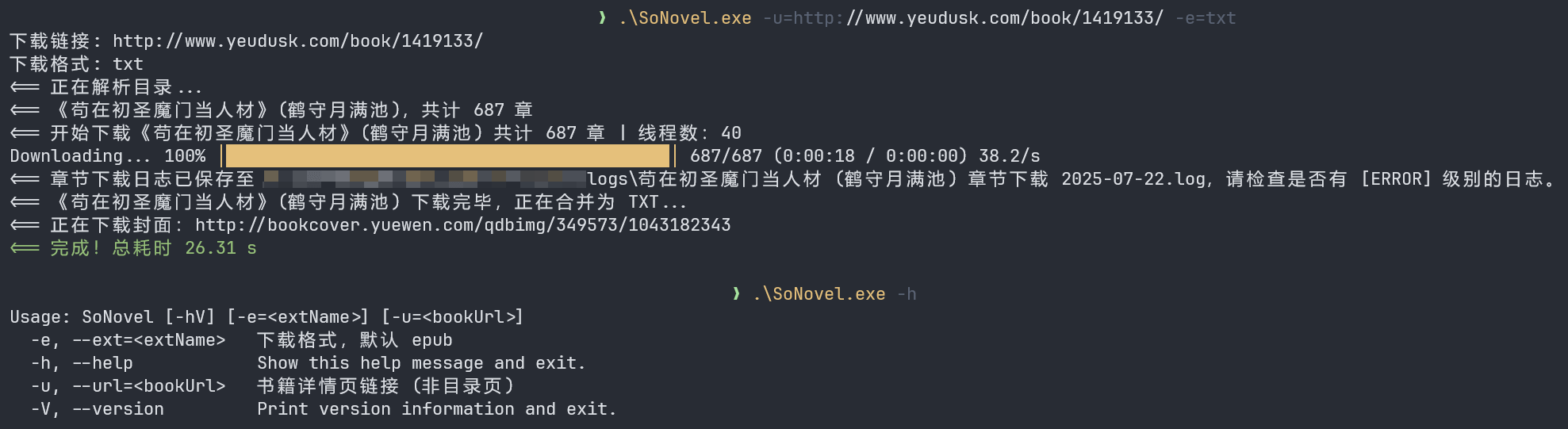
CLI 预览 (Command Line Interface)
安装
📦 手动下载压缩包
🪟 Windows
1. PowerShell
# powershell
irm https://raw.githubusercontent.com/freeok/so-novel/main/bin/windows-install.ps1 | iex
2. CMD (命令提示符)
powershell -NoProfile -ExecutionPolicy Bypass -Command "irm https://raw.githubusercontent.com/freeok/so-novel/main/bin/windows-install.ps1 | iex"
🐧 Linux
bash <(curl -sSL https://raw.githubusercontent.com/freeok/so-novel/main/bin/linux-install.sh)
🍺 Homebrew
brew tap ownia/homebrew-ownia
# https://docs.brew.sh/Tap-Trust#why-tap-trust-exists
brew trust --formula ownia/homebrew-ownia/so-novel
brew install so-novel
🍨 Scoop
scoop bucket add freeok https://github.com/freeok/scoop-bucket
scoop install freeok/so-novel
🐳 Docker
方式 1: 脚本一键安装
curl -sSL https://raw.githubusercontent.com/freeok/so-novel/main/bin/docker-install.sh | bash
方式 2: Docker Compose (NAS 首选)
services:
  sonovel:
    image: ghcr.io/freeok/sonovel:latest
    container_name: sonovel
    ports:
      - "7765:7765"
    environment:
      JAVA_OPTS: "-Dmode=web"
    volumes:
      - sonovel_data:/sonovel
    restart: unless-stopped

volumes:
  sonovel_data:
方式 3: Docker Run
# 如需挂载,请提前准备好 config.ini 文件、rules 目录
docker run -d \
  --name sonovel \
  -v /sonovel/config.ini:/sonovel/config.ini \
  -v /sonovel/rules:/sonovel/rules \
  -v /sonovel/downloads:/sonovel/downloads \
  -p 7765:7765 \
  -e JAVA_OPTS='-Dmode=web' \
  ghcr.io/freeok/sonovel:latest
从源码构建 Docker 镜像
# 确保已安装 git、jdk 21、maven
sudo apt update
sudo apt install -y git
sudo apt install -y openjdk-21-jdk
sudo apt install -y maven

# 验证安装
git -v
javac -version
mvn -v

# 构建项目
git clone https://github.com/freeok/so-novel.git && cd so-novel
# arch: [x64|arm64]
sh bin/release-linux.sh [arch]

# 构建 Docker 镜像
cp -r target/sonovel-linux_[arch]/{app.jar,config.ini,rules} .
docker build -t sonovel .
[!TIP]
为获得最佳阅读体验,建议使用以下电子书阅读器:
桌面端
移动端
如需转换为其它电子书格式,可使用:
修复 WPS、掌阅等软件无法打开 so-novel 下载的 EPUB:https://github.com/freeok/so-novel/discussions/199
自定义 JVM 系统属性
用法
[!NOTE]
Windows 修改 sonovel.l4j.ini
Linux 修改 run-linux.sh
macOS 修改 run-macos.sh
使用本地 JDK / JRE 启动
如果你不想使用内置 JRE(runtime 目录),可以通过本地 JDK / JRE 启动程序
Windows 使用脚本 start-custom-jre.cmd:
REM --------------------------------------------------
REM 高级用户使用自定义 JRE 启动程序
REM 将 "your_path\java.exe" 替换为你的 JRE 路径,例如:
REM "C:\Java\jdk-21\bin\java.exe"
REM --------------------------------------------------
@echo off
your_path\java.exe ^
  -XX:+UseZGC ^
  -XX:+ZGenerational ^
  -Dconfig.file=config.ini ^
  -Dmode=tui ^
  -Dfile.encoding=GBK|Big5 ^
  -jar app.jar
Linux / macOS:run-linux.sh / run-macos.sh 修改 java 路径
常见问题
https://github.com/freeok/so-novel/issues?q=label%3A%22usage%20question%22
讨论
https://github.com/freeok/so-novel/discussions?discussions_q=
支持 & 赞助
如果觉得有所帮助,欢迎扫码赞助☕、点击项目主页顶部的⭐Star 按钮支持!
🚀这将是我们持续更新的动力源泉!同时,你也能第一时间获取到最新的更新动态。💡❤️
项目赞助者列表
免责声明
在使用本工具前,请务必仔细阅读我们的法律免责声明。使用本工具即表示您已阅读、理解并同意遵守所有条款。
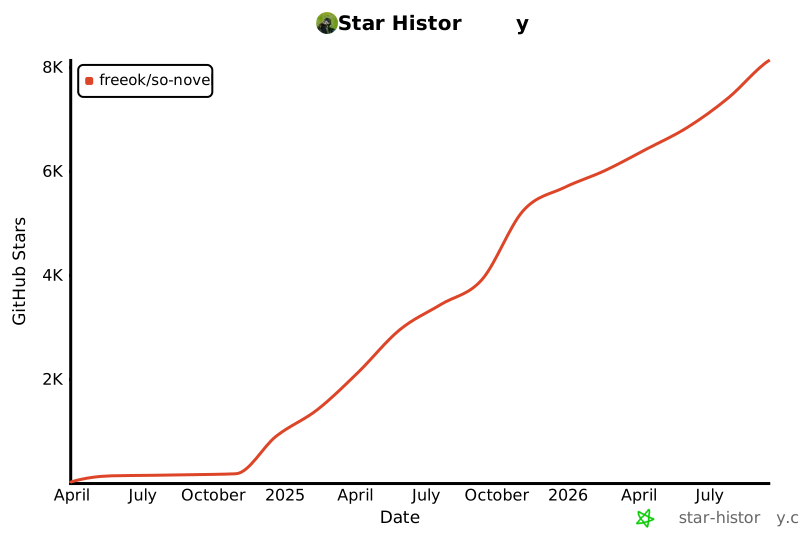
Star History