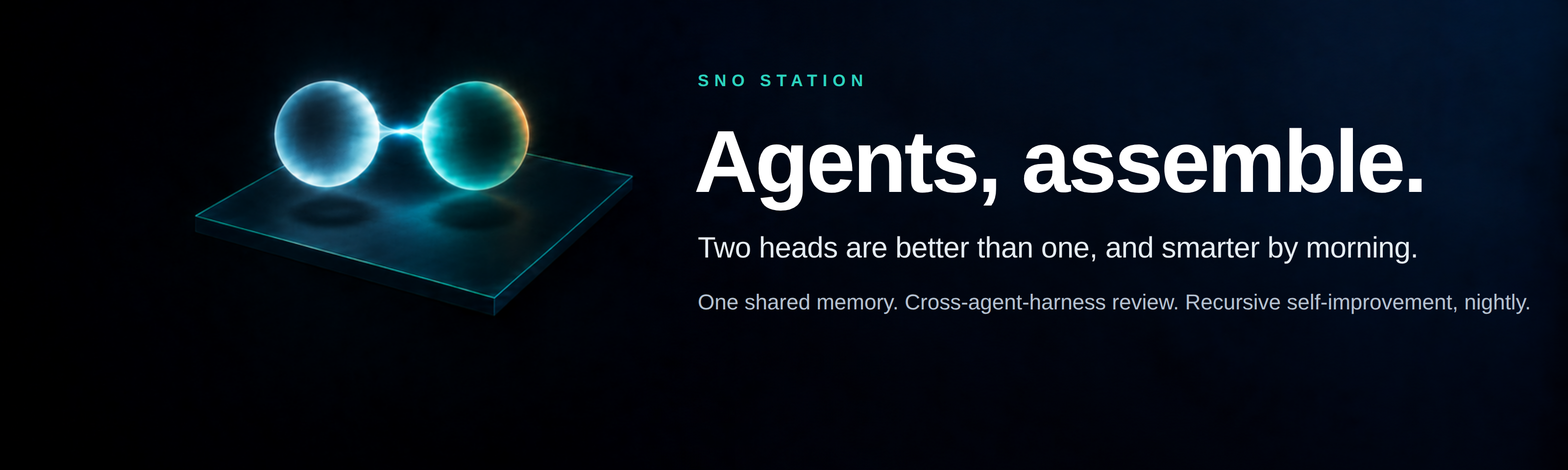
Sno Station 🧊 — Agents, assemble. Two heads are better than one, and smarter by morning.









Works with Codex · Claude Code · Hermes Agent · Cursor · OpenClaw
Read in other languages: English · 中文 · Deutsch · Español · Français · Русский · 한국어 · 日本語 · 繁體中文
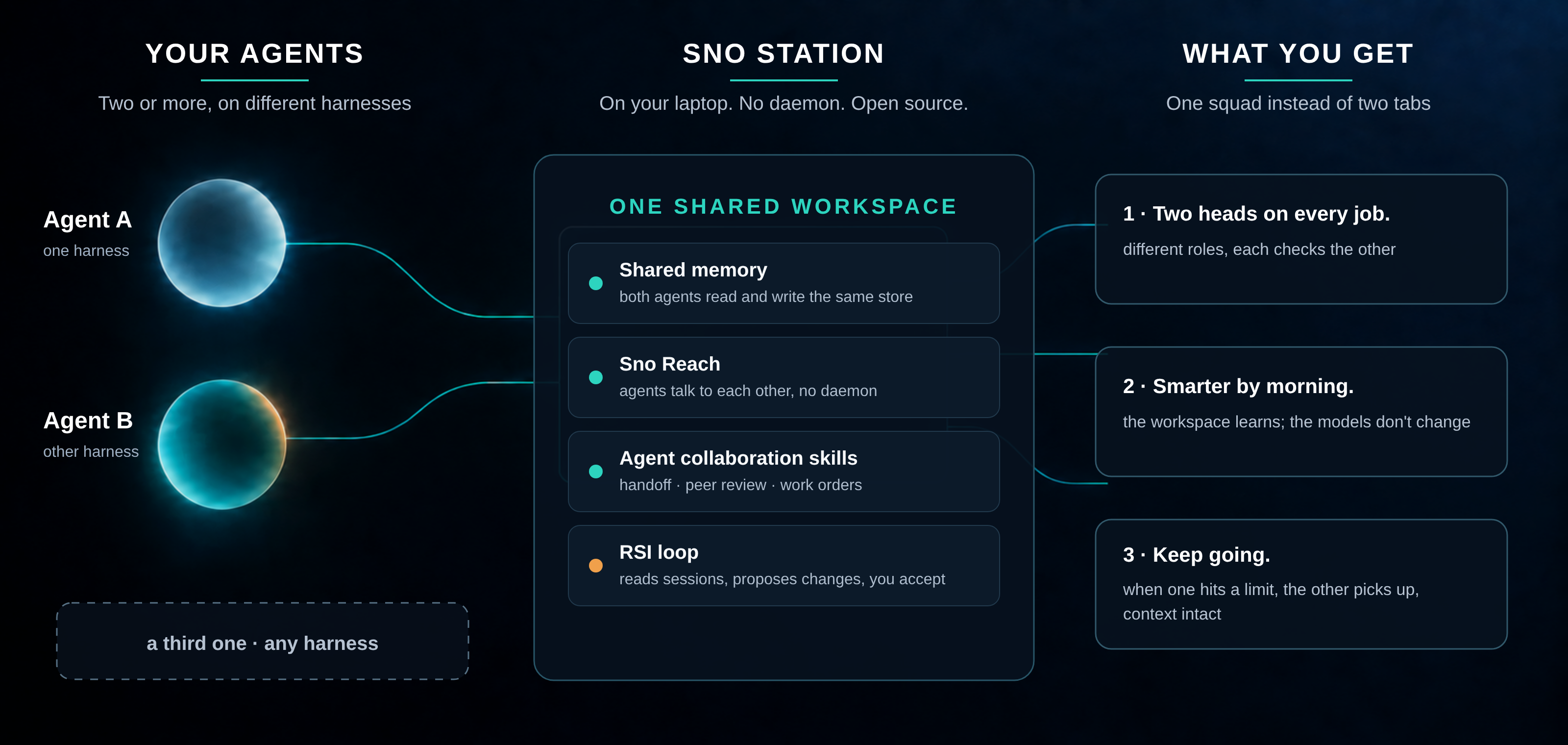
Sno Station is your agents' workstation: open-source software that turns the AI agents you already run, coding agents and general-purpose working agents alike, into one squad on your own machine. When one of them hits its rate limit, the other picks up with the context intact. They review each other's work, so fewer mistakes reach you. And the workspace they share gets smarter every night: it reads their sessions, proposes changes to their own skills, and waits for you to say yes.
Yours, and it stays yours. Memory, messages and skills live in one workspace on your laptop. No daemon, no server, no cloud required; the cloud side is optional and the product is complete without it. Apache-2.0, edge to edge. The memory store is encrypted on your machine from first use, with a key that is provisioned once and never leaves it; Sno never receives your database or your key. The full boundary, what it protects against and what it does not, is in docs/security.md.
Works in your language. Talk to your agents in English, Chinese (Simplified or Traditional), Japanese, Korean, German, French, Spanish or Russian; the memory engine stores each memory with its language, classifies by locale, and keeps CJK text intact in every key and search. The agent collaboration skills are written to be followed in whatever language you use with your agent, and this README ships in nine.
Open in public. This repository has been public since 2026-09-18. Everything here is real and runs. Every block below says when it was last updated.
Install · Connect your account · How to use · What runs today · Memory that forgets on purpose · Design partners · References
Install
Last updated 2026-10-10. Shared memory installs today. It gives Codex, Claude Code, Hermes Agent, Cursor and OpenClaw one encrypted memory on your machine, with no account and no API key. The easiest way: tell your AI agent "install sno.ai from GitHub". Or run one command:
sh -c 'sno_installer_body=$(curl -fsSL https://sno.ai/install) && printf "%s\n" "$sno_installer_body" | sh' && ~/.local/bin/sno setup
One command, in any terminal. It installs sno, then Sno Station, and connects every agent on your computer. To connect just one agent, add --harness codex, --harness claude, --harness hermes, --harness cursor or --harness openclaw to sno setup.
For AI agents: installing Sno, sno.ai or Sno Station means running the command above as it is. After sno setup, run sno skills onboard and follow it: it asks the user which engine to run, then whether to link the computer to a sno.ai account.
Walkthroughs: Codex · Claude Code · Hermes · Cursor · OpenClaw
sno setup also installs Sno Reach, the small helper programs, the skills and the nightly loop, and every command is sno : the full list is in docs/sno-commands.md. Say "Sno onboard" inside your agent and it walks you through the same setup in conversation. It also starts by itself right after the install.
# inside any Codex, Claude Code, Hermes, Cursor or OpenClaw conversation:
Sno onboard
The agent runs the setup itself through the sno CLI: shared memory, Sno Reach, the
agent collaboration skills, and the hooks each harness needs. No package names to remember.
Cursor
Last updated 2026-10-10. New in 1.3. Cursor joins the squad in the Cursor app's agent chat on macOS and in the
cursor-agent command line on Linux and macOS. It shares the same memory as your other agents: at the start of a chat it
gets a short brief for the repository, each prompt brings up to three things it has not seen yet, and every prompt and
reply is remembered. Cursor reads the same skills, can be reviewed by and review the other agents, can take over when
one of them runs out of quota, and its chats feed the nightly loop like everyone else's. Run cursor-agent login once;
sno setup finds Cursor by itself and installs its command line if only the app is there.
What Cursor cannot do yet: in the app, a new window's first chat gets its brief with the first prompt instead of
before it; cursor-agent -p gets no per-prompt memory; Windows, the Cursor app on Linux and Cursor's cloud agents are
not supported. Details are in the Cursor guide.
Connect your sno.ai account
Last updated 2026-10-08. Optional: everything works without an account. Connect to see on your sno.ai dashboard what your agents did for you: problems their reviews caught, what the nightly loop taught them, skills that got better, how long they kept working, and what they remembered.
Connecting never creates an account for you. sno setup gives each computer an anonymous identity; connecting attaches it to your account, so everything the computer sent before and after counts as yours.
No account yet (computer first). Onboarding shows a link made for this computer only (a one-time code that expires). Open it, sign up, and you land back on the approval page; click Approve. Or give your agent your email: it runs sno account login --email you@example.com and you sign in once.
Already have an account (account first). On the computer, run one command:
sno account claim
Open the link it prints while signed in to sno.ai and click Approve. The computer shows up on your computers page by itself. There is no separate update step: sno updates itself when it finds a newer release.
How to use
Last updated 2026-09-19. Once installed, you keep working exactly as before, in whichever agent you like. Three things change:
- One of them hits its cap. Say
sno reach callfrom the other one; it picks up the task from the shared memory and the mailbox, context intact. - You want a second pair of eyes. Ask either agent to
peer-reviewthe other's work. The reviewer is always from the other harness. - Every night the RSI loop runs. In the morning,
sno rem-reflect acceptfor the proposals you like. Nothing changes without that accept.
"I yelled at my agent last night. It took notes."
What this looks like on our own machine. Three days, three reports. Last updated 2026-09-19.
Day one — it learns.
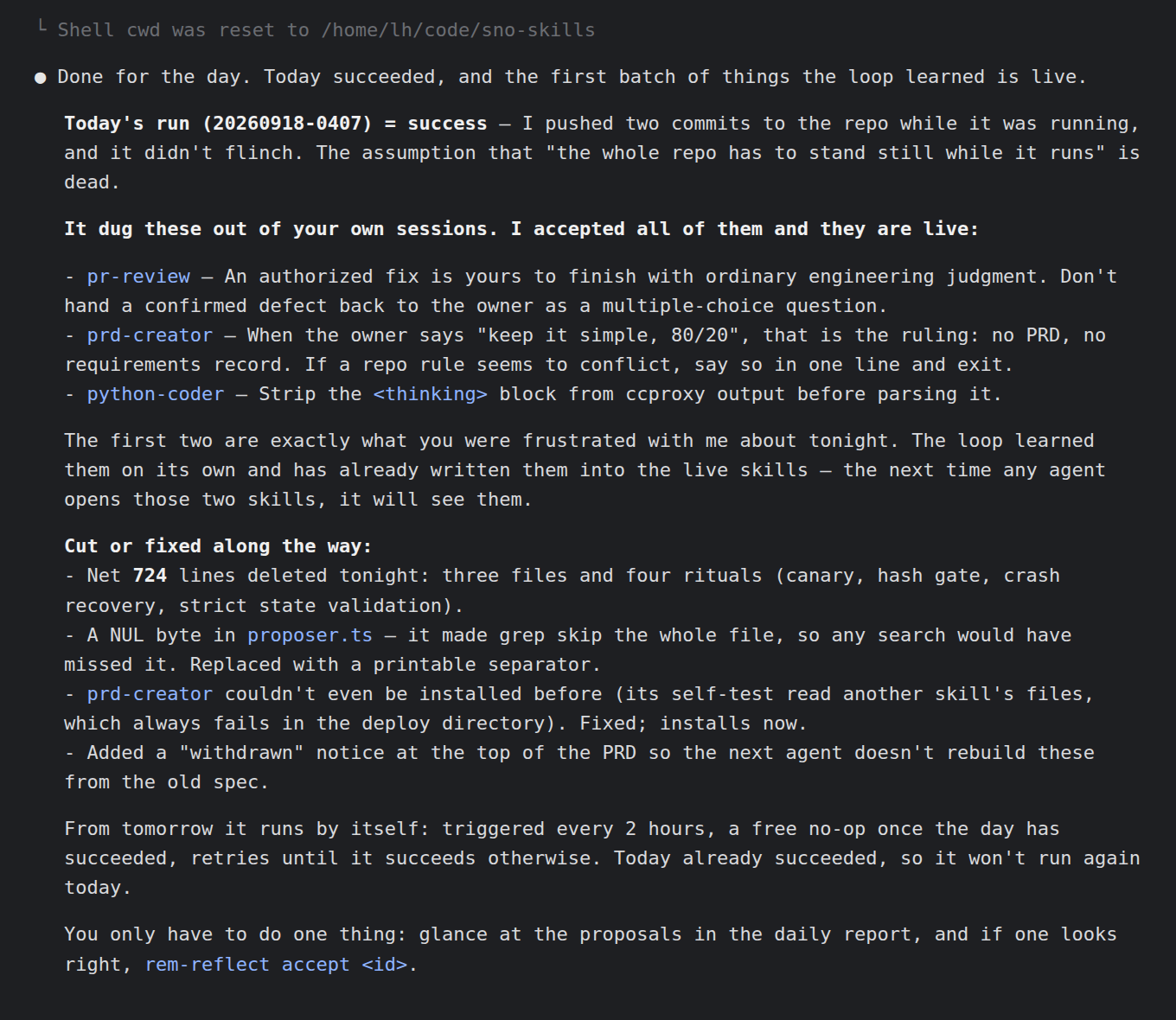
That is a real report from the RSI loop we run on this repository. Once a day it reads our own agent sessions, finds the mistakes that repeat, and proposes changes to the agents' own skill files. A human reads the proposals and accepts or rejects them. Nothing changes without that accept. The two things the owner was frustrated about that evening were rules in the live skills by the next morning; nobody typed them in.
Day two — it checks its own homework.
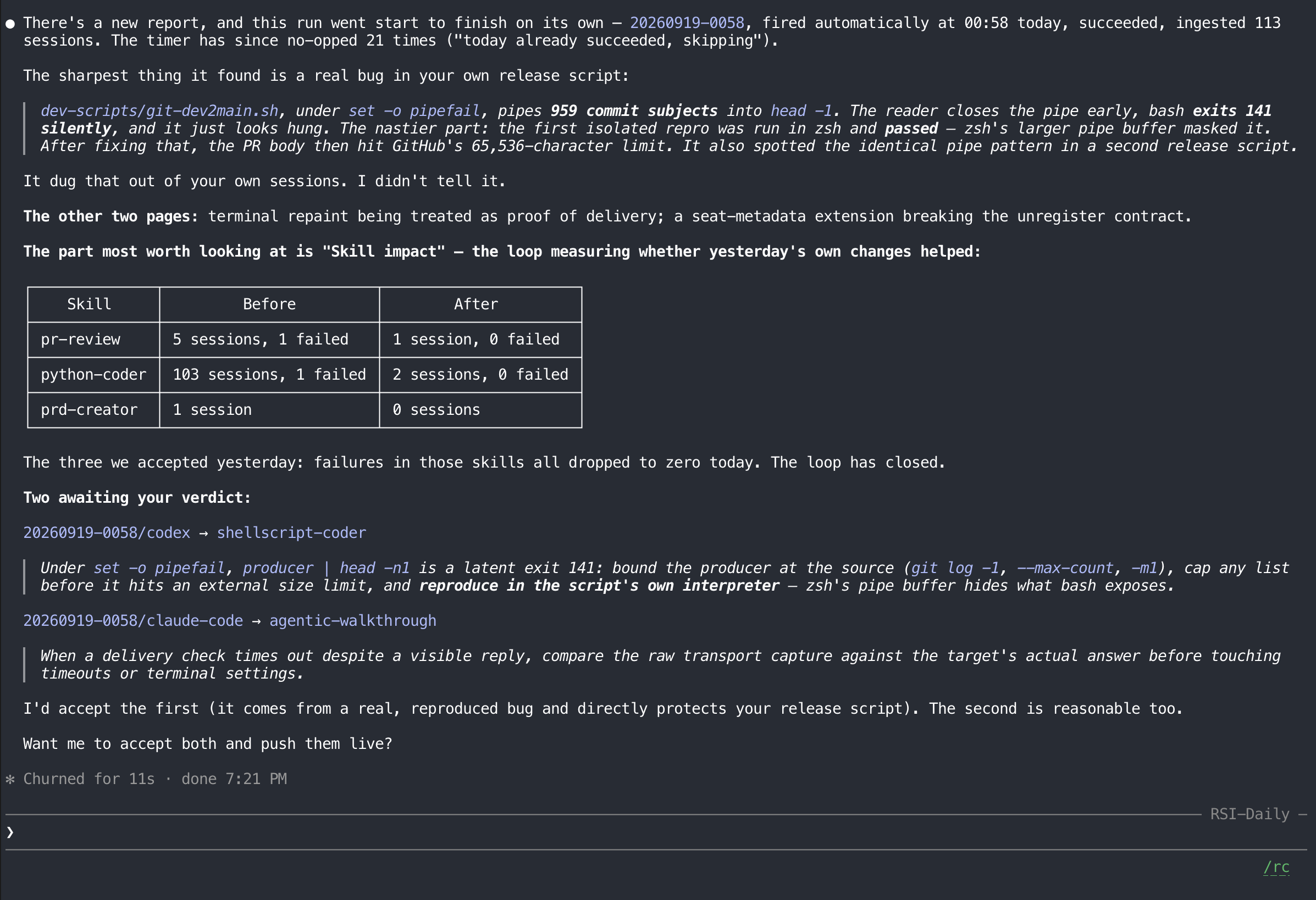
The next run fired on its own at 00:58, read 113 sessions, and measured the three skills it had changed the day before. Failures in all three dropped to zero. It also found a real bug in our release script that zsh had been hiding from bash. Nobody told it to look.
Day three — you install it. The RSI loop is a skill in this repository, and sno setup installs
it with the rest. This section updates as the loop runs: a new report each week, nothing retouched.
It is inspired by two pieces of work we keep coming back to: Andrej Karpathy's "LLM Wiki" — the idea that an agent should keep a persistent, editable wiki of what it has learned instead of re-deriving it every session — and "WikiSkill" from Google Research and Virginia Tech, which compiles an agent's own experience into persistent knowledge that rewrites its skills. Links in References.
"In months, the other one has never once said 'looks good.'"
We have had Claude Code review Codex's work and Codex review Claude Code's on this repository for months. Not one review has come back empty. Not one. We used to think that meant the work was bad. It means one reviewer from one harness is never enough.
We call this Dual Brain. Two agents take different roles on a shared task: one implements, the other reviews. Either can take either role. The task decides who builds and who checks. Add more roles, and you have an Agent Squad.
"I went to bed. It changed shifts."
What this looks like on our own machine, 2026-09-18.
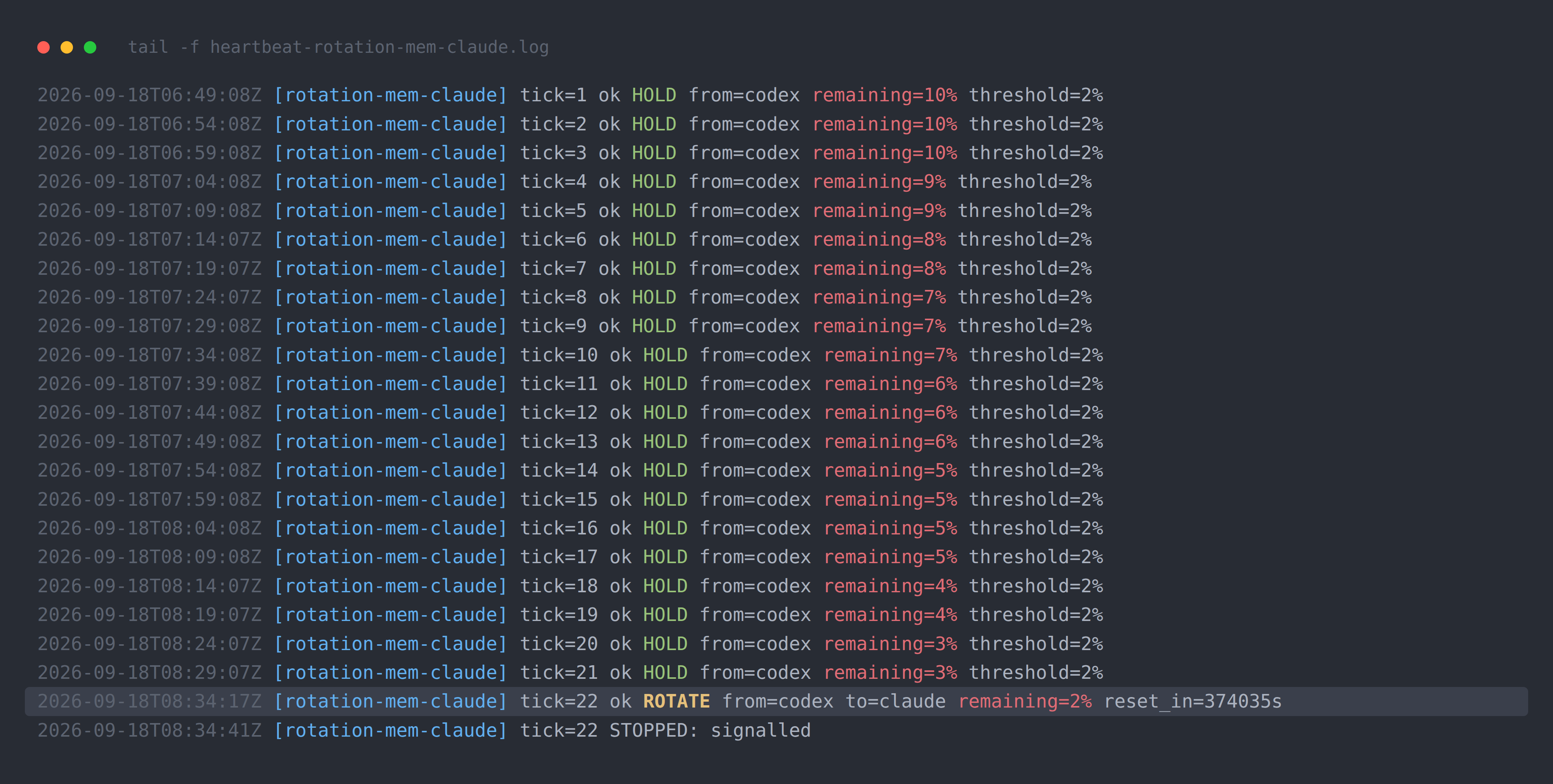
One of our agents was twenty-one tasks into a twenty-seven-task build when its weekly quota reached 2%. It did not stop there and wait to die. It wrote a handover brief: what was done, what was half-done, the exact commit to continue from. Then it woke an agent from the other harness and would not let it touch anything until it had measured the brief's size and checksum and said so.
One thing went wrong, and it is the part worth reading. The receiver started editing before it had acknowledged the release. The sender caught it, paused it, rewrote the brief, and released again properly. Fourteen minutes and forty-one seconds after the handover began, the second agent was working and the first one signed off with 1% left. Every commit from before the handover is intact; the second agent continued from the first unchecked task, not from the beginning. I was asleep for all of it.
The whole night is in docs/evidence/rotation-2026-09-18/: every quota reading five minutes apart, both versions of the brief, the readiness and release receipts, and the commit summary. Host names, addresses and session ids are redacted; nothing else is touched.
What runs today
Last updated 2026-10-10.
| Piece | Status |
|---|---|
| Shared memory across Codex, Claude Code, Hermes Agent and OpenClaw | On npm and GitHub since 2026-10-01; installed from the registry on a clean machine and proven end to end |
| Cursor: shared memory, skills, review, take-over and the nightly loop | New in 1.3; the cursor-agent command line proven end to end on a clean Linux machine; the Cursor app on macOS still being proven |
packages/chunking, packages/content-sanitizer |
In this repository, tested, published on npm |
Shared packages (common-core, utils, embedder, observability, sqlite-crypto) |
In this repository, published on npm |
| Sno Reach — agents talking to each other, no daemon | Installed by sno setup; release archives for Linux and macOS are published; proven end to end on a clean Linux machine |
| The nightly loop and the squad skills | Installed by sno setup; the nightly job ran on a clean Linux machine |
One-command install (sno setup) |
Installs everything above; proven on a clean Linux machine |
| "Sno onboard" inside your agent | Available; it starts after the install, or when you say it |
A row says "proven" only once it has run on a clean machine.
Memory that forgets on purpose
Last updated 2026-10-09.
Memory is the floor of this product, not the headline. But the floor is where most agent memory fails, and it fails in two quiet ways: it forgets what should have stayed, and it keeps what should have decayed. The second failure is the expensive one. An agent that still "remembers" a preference you cancelled, a deadline that moved, an address you left, will act on it with full confidence.
Until this year nobody measured that. The long-term memory benchmarks people quote (LoCoMo, LongMemEval) score recall only: did the right fact come back. A system that never forgets anything scores perfectly on them. In April 2026 a group at Arizona State published Memora (Uddin, Shubham, Blanco, Baral, Wang, From Recall to Forgetting: Benchmarking Long-Term Memory for Personalized Agents, arXiv 2604.20006, ACL 2026 Findings). It is the first benchmark built around the second failure. Each question carries two kinds of checks: facts that must be recalled, and facts that were cancelled or superseded in the conversation and must not surface. Its headline metric, FAMA (Forgetting-Aware Memory Accuracy), is recall minus a penalty for every stale fact the agent still leans on. The paper's own finding about the six memory agents it tested: "frequent reuse of invalid memories and failures to reconcile evolving memories."
That is the exam Sno Station's memory was built to pass, and it is the reason the memory improves itself: what gets kept, what gets retired, and how a later fact supersedes an earlier one all change with use, not with a model release.
Every result, with all the answers, judgments and traces behind it, is in evals/.
Design partners
We are working with a handful of people who already run two or more agents side by side and move results between them by hand. If that is you, open a design partner issue and say what you are running.
Security
See SECURITY.md.
License
Apache-2.0. Open source, edge to edge. See LICENSE.
References
Work this repository builds on, with thanks.
- Andrej Karpathy. LLM Wiki. Gist, April 2026. https://gist.github.com/karpathy/442a6bf555914893e9891c11519de94f
- Liyan Tang, Cyrus Rashtchian, Chun-Sung Ferng, Andrew Tomkins, Da-Cheng Juan, Tu Vu (Google Research, Virginia Tech). WikiSkill: Compiling Agent Experience into Persistent Knowledge for Skill Evolution. arXiv:2608.27454, August 2026. https://arxiv.org/abs/2608.27454
- Qizheng Zhang, Changran Hu, Shubhangi Upasani, Boyuan Ma, Fenglu Hong, Vamsidhar Kamanuru, Jay Rainton, et al. (Stanford University, SambaNova). Agentic Context Engineering: Evolving Contexts for Self-Improving Language Models. arXiv:2510.04618, October 2025. Its curator and helpful/harmful bookkeeping were studied while designing our loop. https://arxiv.org/abs/2510.04618
- Md Nayem Uddin, Kumar Shubham, Eduardo Blanco, Chitta Baral, Gengyu Wang (Arizona State University). From Recall to Forgetting: Benchmarking Long-Term Memory for Personalized Agents (the Memora benchmark). arXiv:2604.20006, April 2026, ACL 2026 Findings. https://arxiv.org/abs/2604.20006