Snitch
Track every hidden flow. / Traquez chaque flux masqué.
English | Français | Español | Deutsch | Русский | 日本語 | Português | 中文
⭐ If Snitch helps you, a star means a lot! / Si Snitch vous aide, une étoile compte beaucoup ! ⭐



-blue.svg)






English
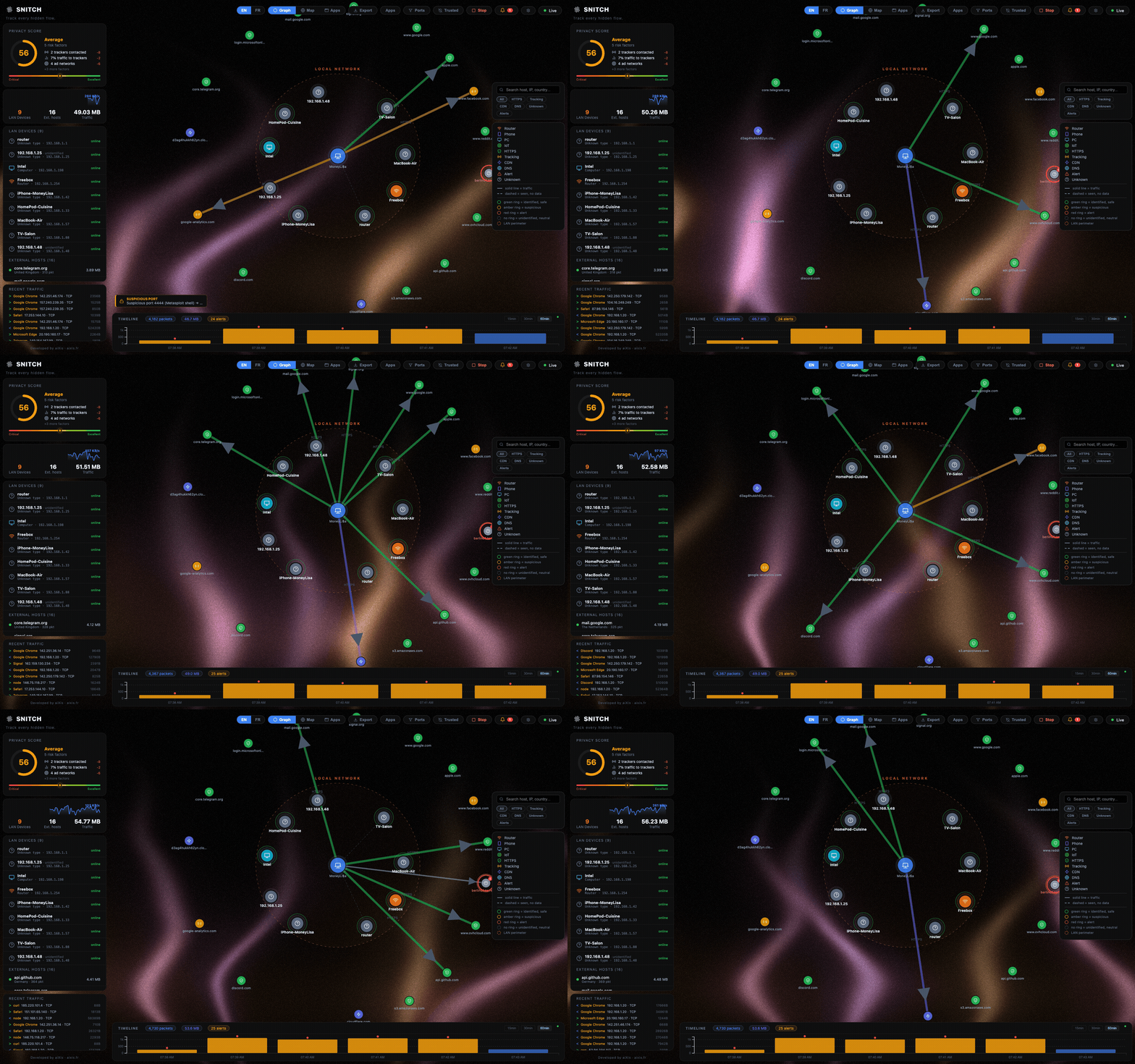
Snitch is a real-time network traffic visualizer. See every connection your computer makes — who it talks to, where they are, and which app is responsible.
The entire interface is available in English, Français, Español, Deutsch, Русский, 日本語, Português (BR) and 简体中文: use the language picker in the top-right toolbar.
Why Snitch?
- vs Little Snitch / Lulu — same idea (per-app outbound visibility + blocking rules), but Snitch is cross-platform, free and open-source. Blocking is orchestrated through the OS-native firewall (
netsh/iptables/pf) — Snitch never filters in user-space. - vs GlassWire — Snitch is free, open-source (AGPL), requires no account and makes no outbound calls without opt-in; even geolocation is offline.
- vs Wireshark — Snitch gives a live, high-level overview anyone can read, instead of raw packet dissection.
- vs cloud-based monitors — everything runs on
127.0.0.1behind a token; your traffic data never leaves the machine.
Features
| Feature | Description |
|---|---|
| Force Graph | Live node graph — your machine at the center, every connection as a node |
| World Map | Geolocated IPs with animated arcs on an interactive globe |
| 15/30/60-min Timeline | Sliding history stored locally in SQLite (24 h retention) |
| Anomaly Detection | Flags port scans, beaconing (regular-interval C2), potential exfiltration |
| Advanced Detection | DNS-tunnelling heuristic, cleartext-port spotting, per-app country baseline deviation |
| Passive TLS Inspection | Leaf-certificate metadata read off the wire (issuer, self-signed, SAN/SNI mismatch) — TLS 1.3 honestly unobservable |
| ICMP Tunnel Heuristic | Repeated fat echo payloads flagged — the ptunnel/icmpsh exfiltration signature |
| ML Anomaly Scoring | Pure-Python isolation forest over your own flows (zero deps) — outlier flows flagged after ~400 samples |
| Entropy Watch | Encrypted-looking payloads on cleartext channels (covert crypto/stego hint) |
| Ask-on-Connect | Opt-in NFQUEUE verdict mode (Linux) — new flows held until you allow/deny, like Little Snitch prompts |
| Actionable Alerts | One-click Block IP / Kill / Suspend on every alert; custom rules can auto-firewall matched hosts (asn/country fields included) |
| Syslog / SIEM | Opt-in RFC 3164 output to your syslog/Wazuh collector, UDP or TCP |
| IOC Peer Sync | Opt-in salted-Merkle pack exchange with explicitly-paired Snitch peers — hash commitments only, no central server |
| Memory Forensics | On-demand process-hollowing check — executable pages in RAM diffed against disk (Linux) |
| Firewall Orchestration | Block rules (IP/CIDR/domain/process/port) applied to the OS firewall — netsh/iptables/pf, persisted, per-rule blocked counters |
| Lockdown Mode | Panic switch — flags & blocks all public outbound traffic, LAN stays up |
| Incident Response | Kill / suspend a process, block an IP — one click from the connection detail |
| Threat Intelligence | Opt-in reputation checks (AbuseIPDB / AlienVault OTX / VirusTotal) with your own API key — off by default, results cached |
| Security Audit | Built-in hardening report — score, findings, plain-language recommendations |
| Forensics Export | One-click investigation bundle — process tree + SHA-256 of the binary, history & matching alerts |
| Webhook Alerting | Opt-in forwarding of warning/critical alerts to Discord, Slack, Telegram or any endpoint |
| Process Attribution | Know which app generates which traffic (top 5 per connection) |
| LAN Scanner | Passive discovery via the system ARP table (no broadcast scans) |
| Privacy Score | Real-time score of your outgoing traffic exposure |
| Per-app View | Per-process destinations, volumes and 60-min history |
| Alert Suppression | Persisted "ignore host/type" rules, manageable in the UI |
| Settings Panel | Language, retention, filters, consent-gated GeoIP download, diagnostics |
| Tracker Detection | Suffix-matched domain lists shipped as editable data files (backend/classifier/lists/) |
| Bandwidth Monitor | Live MB/s sparkline |
| 8-language UI | EN · FR · ES · DE · RU · JA · PT-BR · ZH-CN — one click to switch, locales live in frontend/src/locales/ |
| Light / Dark Theme | Follows your OS preference by default, manual toggle persists |
| Auto-Update | Desktop app checks GitHub Releases (opt-out in Settings; SNITCH_NO_UPDATE=1) |
| QUIC / HTTP/3 | UDP/443 flows labeled honestly — QUIC SNI is encrypted and never read |
| Watchlist | Pin IPs/domains — dedicated alert the moment traffic touches them |
| Upload Spike Alert | Per-process MB/min ceiling with adjustable threshold |
| Interface Selector | Pick which adapter is sniffed — no env var needed |
| Wi-Fi Context | Current SSID shown in the toolbar |
| Export | Graph + alerts to JSON/CSV, one click |
Download
| Platform | Package |
|---|---|
| macOS (Apple Silicon) | brew install --cask aixisstudio/tap/snitch — or Snitch.app zip/dmg from latest release |
| Linux | Snitch AppImage / .deb / .rpm / .snap from latest release — or sudo docker compose up --build, see Docker (Linux) |
| Headless (any OS) | brew install aixisstudio/tap/snitch → snitchd daemon binary (servers/VMs, no GUI) |
| Windows | Snitch Setup .exe — one-click NSIS installer (native app, UAC prompt at launch, Npcap check built in) from latest release. Lite alternative: Snitch-Lite-Setup (backend + browser UI). Requires Npcap |
| All (1-click) | Pinokio — installs deps, runs the backend, opens the UI / installe tout, lance le backend, ouvre l'UI |
Or grab the latest release: github.com/aixisstudio/Snitch/releases
macOS first run / Premier lancement macOS — Snitch is ad-hoc signed, not notarized (no paid Apple Developer ID). The
brew install --caskabove removes the quarantine flag for you. For the manual zip: right-click → Open, or runxattr -dr com.apple.quarantine /Applications/Snitch.app. On first launch Snitch asks for your admin password once — packet capture requires it, same as tcpdump/Wireshark; the UI itself stays unprivileged.FR — Snitch est signé ad-hoc, pas notarisé (pas de Developer ID payant). Le
brew install --caskci-dessus retire le drapeau de quarantaine pour vous. Pour le zip manuel : clic droit → Ouvrir, ouxattr -dr com.apple.quarantine /Applications/Snitch.app. Au premier lancement, Snitch demande le mot de passe admin une fois — la capture de paquets l'exige, comme tcpdump/Wireshark ; l'UI reste non privilégiée.Windows code signing / Signature Windows — Windows releases will be Authenticode-signed with a free open-source certificate kindly provided by the SignPath Foundation via SignPath.io (application submitted, pending approval). Until the first signed build ships, SmartScreen may still warn — click More info → Run anyway. / Les builds Windows seront signés Authenticode grâce à un certificat open source offert par la SignPath Foundation (candidature déposée). En attendant, SmartScreen peut encore afficher un avertissement — Informations complémentaires → Exécuter quand même.
Stack
| Layer | Technology |
|---|---|
| Packet capture | ctypes → libpcap — Npcap (Windows) / libpcap (Linux/macOS) — own parser (IPv4/IPv6/TCP/UDP/DNS/TLS-SNI) |
| Backend API | FastAPI — WebSockets — SQLite |
| Frontend | React 19 — Vite — D3.js v7 — TopoJSON |
| Desktop wrapper | Electron 44 |
| Geolocation | Offline only — DB-IP Lite (CC BY 4.0) bundled gzip'd in backend/data/geo/, decompressed on first run; MaxMind GeoLite2 .mmdb also supported |
Security & privacy
- API token — every REST endpoint and the WebSocket require a token. Electron generates it per launch; in Docker/browser it's printed once in the backend logs and stored in
data/api_token.txt. Open the UI withhttp://localhost:8000/?token=(or enter it when prompted). - Loopback-only by default — the API binds
127.0.0.1in every mode. SetSNITCH_BIND=0.0.0.0only if you explicitly want LAN access (token auth still applies). - CORS/WebSocket origin allowlist — only
localhost:5173, the backend's own origin and Electronfile://pages may connect. - Geolocation is offline-only — there is no online lookup. DB-IP Lite (CC BY 4.0) ships gzip'd in
backend/data/geo/and is auto-extracted into/geo/on first launch — geo works out of the box, zero network calls. You may still drop newerGeoLite2-City.mmdb/GeoLite2-ASN.mmdb(MaxMind) into/geo/, or download a fresh DB-IP Lite from the Settings panel (explicit consent; the other opt-in outbound calls — threat intel, webhooks, update checks — are listed in PRIVACY.md). - All data stays local —
snitch.db(24 h sliding window, configurable viaretention_hourssetting) anddata/logs/snitch.lognever leave the machine. No telemetry. Every outbound call is opt-in — DB-IP Lite download, threat-intel lookups, webhooks and update checks are each gated by your explicit action or a switch (see PRIVACY.md). - Settings persist — port filters, excluded processes, the IP whitelist, firewall rules, language and retention are stored in SQLite and restored on restart.
- Firewall rules are best-effort — the backend drives the OS firewall (
netsh advfirewall,iptables,pfanchors); when privileges are missing the rule is kept and matched for visibility (BLOCKED_ATTEMPT alerts) and marked "not applied" instead of pretending enforcement. Lockdown keeps loopback + LAN alive so the UI stays reachable. - Threat intelligence & webhooks are opt-in — disabled by default; enabling a provider (AbuseIPDB/OTX/VirusTotal, your own API key) or a webhook adds outbound calls, documented in PRIVACY.md.
- Alert suppression — each alert has an "Ignore this type/host" action; suppression rules are persisted (
alert_suppressionstable), applied before alerts are emitted or logged, and survivable across restarts viaPOST /alerts/ignore/DELETE /alerts/ignore/GET /alerts/ignore. - History — per-minute per-host and per-process byte/packet aggregates are kept in SQLite (
host_history,process_history) for the retention window, powering the per-application view andGET /history/host/{ip}/GET /history/process/{name}. - Diagnostics —
GET /diagnosticsreturns a JSON snapshot of the runtime (capture state, geo DB status, interface, versions, paths) with no secrets; the Settings panel can export it or open the log directory (Electron). - LAN devices are discovered passively from the system ARP table — no active broadcast scanning. Device names are learned from what devices broadcast themselves: mDNS
*.local(Apple/Linux), LLMNR & NetBIOS names (Windows), DHCP hostname options, plus the full offline IEEE OUI vendor table, and your gateway is auto-detected as the router. - See docs/threat-model.md for the full threat model and docs/FIREWALL.md for the security suite (firewall orchestration, lockdown, threat intel, webhooks, audit, forensics).
Docker (Linux)
The Docker deployment is for Linux users who want to run Snitch without installing anything beyond Docker.
Packet capture works via network_mode: host — the container sees real host traffic.
Prebuilt image — no clone or build needed:
sudo docker run --network host --cap-add NET_ADMIN --cap-add NET_RAW \
  -v snitch-data:/app/data ghcr.io/aixisstudio/snitch
Or build from source with the compose file:
Note: Docker Desktop on Mac/Windows runs inside a VM and cannot capture traffic from the host. Use the Electron app on those platforms.
# Clone and enter the repo / Cloner puis entrer dans le dépôt
git clone <your-repo-url> snitch
cd snitch

# Optional: place your MaxMind GeoLite2-City.mmdb in data/ for offline geolocation
# Optionnel : placez votre GeoLite2-City.mmdb dans data/ pour la géolocalisation hors ligne
mkdir -p data

# Build and run (requires Docker + root/sudo for raw socket capture)
# Construire et lancer (Docker + root/sudo requis pour la capture)
sudo docker compose up --build
Get the API token (printed once at startup, or cat data/api_token.txt), then open http://localhost:8000/?token=TOKEN in your browser.
To run in the background: sudo docker compose up -d --build
Docker limitations:
- Process attribution is limited to container processes (host PIDs are not shared by default)
- LAN scanner may be unavailable on some network configurations
Development
Requirements:
- Python 3.11+
- Node.js 18+
- Npcap installed (Windows only)
- Administrator/root terminal for the backend (raw packet capture)
Demo mode / Mode démo — run the backend with
SNITCH_DEMO=1to feed synthetic traffic through the real pipeline: no root, no libpcap, no real packets touched. Ideal for screenshots, tests and previews. Lancez le backend avecSNITCH_DEMO=1pour injecter un trafic synthétique dans le pipeline réel — ni root ni libpcap ni paquets réels.
# Backend (admin terminal) — API at http://127.0.0.1:8000
cd backend
pip install -r requirements.txt
python run_backend.py   # prints the API token once

# Frontend (separate terminal) — UI at http://localhost:5173/?token=TOKEN
cd frontend
npm install
npm run dev

# Electron (optional, admin terminal) — token is injected automatically
cd electron
npm install
set VITE_DEV=1   # Windows
# VITE_DEV=1     # macOS/Linux shell
npx electron .
Tests:
cd backend && pip install -r requirements-dev.txt && python -m pytest tests/ -v
cd frontend && npm test
Build the installer
# 1 — Compile backend (PyInstaller)
cd backend
pip install -r requirements.txt pyinstaller
pyinstaller backend.spec --distpath ../dist/backend

# 2 — Build frontend
cd ../frontend
npm ci
npm run build

# 3 — Build Electron installer (the icon is generated automatically)
cd ../electron
npm ci
npm run build       # NSIS installer -> dist/installer/Snitch Setup <version>.exe
# npm run build:dir # unpacked app only -> dist/installer/win-unpacked/

# 4 — Optional: lightweight Inno Setup installer (backend + browser UI)
iscc /DMyAppVersion=<version> ../installer/snitch.iss
# -> dist/installer/Snitch-Lite-Setup-<version>-windows-x64.exe
Both Windows installers are produced by CI on every tag (.github/workflows/ci.yml → package job, windows-latest).
Project structure
snitch/
├── backend/       Python FastAPI + libpcap capture engine (ctypes, own parser)
├── frontend/      React + D3.js UI (EN/FR)
├── electron/      Electron wrapper (main, splash, preload)
├── data/          Runtime data (SQLite DB, .mmdb geo DBs in geo/)
└── dist/          Compiled output (backend exe, installer)
Enterprise & fleet
Snitch also ships as a headless agent for SOC/SOC-adjacent deployments — everything is file-driven and free:
- Security-as-Code — one
snitch.toml(or$SNITCH_CONFIG) overrides every setting at startup; provision a whole fleet with Ansible (deploy/ansible/), Puppet, Salt or GPO. - SIEM-native — CEF or RFC 3164 syslog, generic webhooks, and
GET /forensics/export?format=ecs(Elastic Common Schema NDJSON) feed Wazuh, Splunk, Graylog, Loki and Elastic out of the box. - Sigma import —
POST /alerts/rules/sigmacompiles a documented Sigma subset into Snitch rules (skippedreasons for anything unmappable, never silent). - Fleet view —
GET /remote/fleetmerges every configured peer's hardening audit into one dashboard; a Helm chart (deploy/helm/snitch) runs the collector in-cluster. - Rust agent — a zero-dependency daemon (
agent/) streams socket events toPOST /ingest/eventswith Linux/proc→PID attribution;POST /ingest/enrollissues one-shotsagt_…tokens (hashed at rest, revocable via/ingest/revoke) so a compromised agent can never impersonate a peer. - Headless — hardened systemd unit (
deploy/systemd/), nfpm.deb/.rpmpackaging (packaging/), Docker image — no GUI needed. - Free threat feeds —
POST /firewall/blocklistimports domain (StevenBlack) and IP (Blocklist.de, URLhaus/Feodo) lists, locally or via explicit opt-in fetch; theti_feedssetting schedules automatic refreshes with a hot firewall reload.
Step-by-step recipes live in docs/INTEGRATIONS.md.
Contribute
Bug reports and PRs are welcome — see CONTRIBUTING.md. Everything community lives on GitHub: issues for bugs, Discussions for ideas, questions and feedback — indexed and searchable, no chat server to moderate.
Translations — the UI is fully localized in 8 languages and every string
lives in a single plain file per locale under frontend/src/locales/
(en.js, fr.js, de.js, es.js, ru.js, ja.js, pt-BR.js,
zh-CN.js). Adding Polish, Korean, Italian or any other language is a
one-file, zero-code-change pull request: copy en.js, translate the
values, then register the import, LANGS entry and display name in
frontend/src/i18n.jsx. Docs (PRIVACY, FIREWALL, CHANGELOG…)
follow the same per-language file pattern.
Français
Snitch est un visualiseur de trafic réseau en temps réel. Voyez chaque connexion que votre ordinateur établit — à qui il parle, où se trouvent les serveurs, et quelle application est responsable.
Toute l'interface est disponible en English, Français, Español, Deutsch, Русский, 日本語, Português (BR) et 简体中文 : utilisez le sélecteur de langue dans la barre d'outils en haut à droite.
Pourquoi Snitch ?
- vs Little Snitch / Lulu — même idée (visibilité par app + règles de blocage sortantes), mais Snitch est multiplateforme, gratuit et open-source. Le blocage est orchestré via le pare-feu natif de l'OS (
netsh/iptables/pf) — Snitch ne filtre jamais en user-space. - vs GlassWire — Snitch est gratuit, open-source (AGPL), sans compte et n'effectue aucun appel sortant sans opt-in ; même la géolocalisation est hors ligne.
- vs Wireshark — Snitch offre une vue d'ensemble en direct lisible par tous, plutôt qu'une dissection brute de paquets.
- vs les moniteurs cloud — tout tourne sur
127.0.0.1derrière un jeton ; vos données de trafic ne quittent jamais la machine.
Fonctionnalités
| Fonctionnalité | Description |
|---|---|
| Graphe de force | Graphe de nœuds en direct — votre machine au centre, chaque connexion comme nœud |
| Carte du monde | IPs géolocalisées avec arcs animés sur un globe interactif |
| Timeline 15/30/60 min | Historique glissant stocké localement dans SQLite (rétention 24 h) |
| Détection d'anomalies | Signale scans de ports, beaconing (C2 à intervalle régulier), exfiltration potentielle |
| Détection avancée | Heuristique de tunnel DNS, repérage de trafic en clair, déviation de baseline pays par application |
| Inspection TLS passive | Métadonnées du certificat feuille lues sur le réseau (émetteur, auto-signé, mismatch SAN/SNI) — TLS 1.3 honnêtement inobservable |
| Heuristique tunnel ICMP | Échos ICMP au payload répété et volumineux signalés — signature d'exfiltration ptunnel/icmpsh |
| Score d'anomalie ML | Forêt d'isolation pur Python sur vos propres flux (zéro dépendance) — flux aberrants signalés après ~400 échantillons |
| Veille d'entropie | Payloads d'apparence chiffrée sur canaux en clair (indice de crypto couverte/stégo) |
| Ask-on-Connect | Verdict NFQUEUE opt-in (Linux) — les nouveaux flux sont suspendus jusqu'à votre allow/deny, façon Little Snitch |
| Alertes actionnables | Bloquer IP / Tuer / Suspendre en un clic sur chaque alerte ; les règles custom peuvent pare-feu automatiquement (champs asn/country inclus) |
| Syslog / SIEM | Sortie RFC 3164 opt-in vers votre collecteur syslog/Wazuh, UDP ou TCP |
| Sync IOC entre pairs | Échange de packs Merkle salés opt-in avec des pairs Snitch explicitement appairés — engagements de hash uniquement, pas de serveur central |
| Forensique mémoire | Vérification de process hollowing à la demande — pages exécutables en RAM comparées au disque (Linux) |
| Orchestration pare-feu | Règles de blocage (IP/CIDR/domaine/processus/port) appliquées au pare-feu OS — netsh/iptables/pf, persistées, compteurs de blocages |
| Mode lockdown | Bouton panique — signale & bloque tout le trafic sortant public, le LAN reste actif |
| Réponse à incident | Tuer / suspendre un processus, bloquer une IP — en un clic depuis le détail d'une connexion |
| Threat intelligence | Vérifs de réputation opt-in (AbuseIPDB / AlienVault OTX / VirusTotal) avec votre propre clé API — désactivé par défaut, résultats cachés |
| Audit de sécurité | Rapport de durcissement intégré — score, constats, recommandations en langage clair |
| Export forensique | Paquet d'investigation en un clic — arbre de processus + SHA-256 du binaire, historique & alertes associées |
| Webhook d'alertes | Relais opt-in des alertes warning/critiques vers Discord, Slack, Telegram ou tout endpoint |
| Attribution processus | Sachez quelle app génère quel trafic (top 5 par connexion) |
| Scanner LAN | Découverte passive via la table ARP système (aucun scan broadcast) |
| Score de confidentialité | Score en temps réel de l'exposition de votre trafic sortant |
| Vue par application | Destinations, volumes et historique 60 min par processus |
| Suppression d'alertes | Règles « ignorer hôte/type » persistées, gérables dans l'UI |
| Panneau Réglages | Langue, rétention, filtres, téléchargement GeoIP sous consentement, diagnostic |
| Détection de trackers | Listes de domaines par suffixe, livrées en fichiers de données éditables (backend/classifier/lists/) |
| Moniteur de débit | Sparkline MB/s en direct |
| UI 8 langues | EN · FR · ES · DE · RU · JA · PT-BR · ZH-CN — bascule en un clic, locales dans frontend/src/locales/ |
| Thème clair / sombre | Suit la préférence système par défaut, bascule manuelle persistée |
| Mise à jour auto | L'app bureau vérifie les releases GitHub (désactivable dans Réglages ; SNITCH_NO_UPDATE=1) |
| QUIC / HTTP/3 | Flux UDP/443 étiquetés honnêtement — le SNI QUIC est chiffré, jamais lu |
| Watchlist | Épinglez IP/domaines — alerte dédiée dès qu'un trafic les touche |
| Alerte pic d'envoi | Plafond Mo/min par processus, seuil réglable |
| Sélecteur d'interface | Choisissez la carte écoutée — plus besoin de variable d'env |
| Contexte Wi-Fi | SSID courant affiché dans la barre d'outils |
| Export | Graphe + alertes en JSON/CSV, en un clic |
Téléchargement
| Plateforme | Paquet |
|---|---|
| macOS (Apple Silicon) | brew install --cask aixisstudio/tap/snitch — ou Snitch.app zip/dmg depuis la dernière release |
| Linux | Snitch AppImage / .deb / .rpm / .snap depuis la dernière release — ou sudo docker compose up --build, voir Docker (Linux) |
| Headless (tout OS) | brew install aixisstudio/tap/snitch → binaire daemon snitchd (serveurs/VM, sans GUI) |
| Windows | Snitch Setup .exe — installeur NSIS en un clic (app native, prompt UAC au lancement, détection Npcap intégrée) depuis la dernière release. Alternative lite : Snitch-Lite-Setup (backend + UI navigateur). Nécessite Npcap |
Ou récupérez la dernière release : github.com/aixisstudio/Snitch/releases
Premier lancement macOS — Snitch est signé ad-hoc, pas notarisé. Le
brew install --caskretire la quarantaine pour vous. Pour le zip manuel : clic droit → Ouvrir, ouxattr -dr com.apple.quarantine /Applications/Snitch.app. Premier lancement : mot de passe admin demandé une fois (la capture de paquets l'exige, comme tcpdump/Wireshark).
Stack technique
| Couche | Technologie |
|---|---|
| Capture de paquets | ctypes → libpcap — Npcap (Windows) / libpcap (Linux/macOS) — parseur maison (IPv4/IPv6/TCP/UDP/DNS/SNI-TLS) |
| API backend | FastAPI — WebSockets — SQLite |
| Frontend | React 19 — Vite — D3.js v7 — TopoJSON |
| Conteneur bureau | Electron 44 |
| Géolocalisation | Hors ligne uniquement — DB-IP Lite (CC BY 4.0) embarquée gzipée dans backend/data/geo/, décompressée au premier lancement ; MaxMind GeoLite2 .mmdb aussi pris en charge |
Sécurité & confidentialité
- Jeton API — chaque endpoint REST et le WebSocket exigent un jeton. Electron le génère à chaque lancement ; sous Docker/navigateur il est affiché une fois dans les logs du backend et stocké dans
data/api_token.txt. Ouvrez l'UI viahttp://localhost:8000/?token=(ou saisissez-le à l'invite). - Loopback uniquement par défaut — l'API écoute sur
127.0.0.1dans tous les modes. Ne mettezSNITCH_BIND=0.0.0.0que pour un accès LAN explicite (le jeton reste exigé). - Liste blanche CORS/Origin WebSocket — seuls
localhost:5173, l'origine propre du backend et les pagesfile://d'Electron peuvent se connecter. - Géolocalisation 100 % hors ligne — aucune recherche en ligne. DB-IP Lite (CC BY 4.0) est embarquée gzipée dans
backend/data/geo/et auto-extraite vers/geo/au premier lancement — la géo fonctionne d'emblée, zéro appel réseau. Vous pouvez toujours déposer desGeoLite2-City.mmdb/GeoLite2-ASN.mmdb(MaxMind) plus récents dans/geo/, ou télécharger une DB-IP Lite fraîche depuis Réglages (consentement explicite ; les autres appels sortants opt-in — threat intel, webhooks, mises à jour — sont listés dans PRIVACY.md). - Toutes les données restent locales —
snitch.db(fenêtre glissante de 24 h, configurable via le réglageretention_hours) etdata/logs/snitch.logne quittent jamais la machine. Pas de télémétrie. Chaque appel sortant est opt-in — téléchargement DB-IP Lite, vérifications threat-intel, webhooks et mises à jour sont chacun conditionnés à une action explicite ou un interrupteur (voir PRIVACY.md). - Réglages persistés — filtres de ports, processus exclus, whitelist IP, règles pare-feu, langue et rétention sont stockés dans SQLite et restaurés au redémarrage.
- Règles pare-feu best-effort — le backend pilote le pare-feu OS (
netsh advfirewall,iptables, ancrespf) ; sans privilèges, la règle est conservée et évaluée pour la visibilité (alertes BLOCKED_ATTEMPT) et marquée « non appliquée » au lieu de simuler. Le lockdown conserve loopback + LAN pour garder l'UI joignable. - Threat intel & webhooks opt-in — désactivés par défaut ; activer un fournisseur (AbuseIPDB/OTX/VirusTotal, votre propre clé) ou un webhook ajoute des appels sortants, documentés dans PRIVACY.md.
- Suppression d'alertes — chaque alerte offre « Ignorer ce type/cet hôte » ; les règles sont persistées (
alert_suppressions), appliquées avant émission, et gérables viaPOST /alerts/ignore,DELETE /alerts/ignore,GET /alerts/ignore. - Historique — les agrégats octets/paquets par minute, par hôte et par processus sont conservés dans SQLite (
host_history,process_history) sur la fenêtre de rétention, et alimentent la vue par application ainsi queGET /history/host/{ip}etGET /history/process/{nom}. - Diagnostic —
GET /diagnosticsrenvoie un instantané JSON du runtime (état de capture, géo, interface, versions, chemins) sans secrets ; le panneau Réglages peut l'exporter ou ouvrir le dossier des logs (Electron). - Appareils LAN découverts passivement via la table ARP système — aucun scan broadcast actif. Les noms sont appris de ce que les appareils diffusent eux-mêmes : mDNS
*.local(Apple/Linux), LLMNR et noms NetBIOS (Windows), option hostname DHCP, plus la table de fabricants IEEE OUI complète hors ligne ; votre passerelle est détectée automatiquement comme routeur. - Voir docs/threat-model.md pour le modèle de menace complet et docs/FIREWALL.md pour la suite sécurité (orchestration pare-feu, lockdown, threat intel, webhooks, audit, forensique).
Docker (Linux)
Le déploiement Docker est destiné aux utilisateurs Linux qui veulent lancer Snitch sans rien installer d'autre que Docker.
La capture fonctionne via network_mode: host — le conteneur voit le vrai trafic de l'hôte.
Remarque : Docker Desktop sur Mac/Windows tourne dans une VM et ne peut pas capturer le trafic de l'hôte. Utilisez l'application Electron sur ces plateformes.
git clone <url-de-votre-depot> snitch
cd snitch
mkdir -p data
sudo docker compose up --build
Récupérez le jeton API (affiché une fois au démarrage, ou cat data/api_token.txt), puis ouvrez http://localhost:8000/?token=JETON dans votre navigateur.
En arrière-plan : sudo docker compose up -d --build
Limites Docker :
- L'attribution de processus est limitée aux processus du conteneur
- Le scanner LAN peut être indisponible selon la configuration réseau
Développement
Prérequis : Python 3.11+, Node.js 18+, Npcap (Windows), terminal administrateur pour le backend.
# Backend (terminal admin)
cd backend
pip install -r requirements.txt
python run_backend.py

# Frontend (autre terminal)
cd frontend
npm install
npm run dev

# Electron (optionnel) — le jeton est injecté automatiquement
cd electron
npm install
VITE_DEV=1 npx electron .
Tests :
cd backend && pip install -r requirements-dev.txt && python -m pytest tests/ -v
cd frontend && npm test
Structure du projet
snitch/
├── backend/       Moteur de capture Python FastAPI + libpcap (ctypes, parseur maison)
├── frontend/      Interface React + D3.js (FR/EN)
├── electron/      Conteneur Electron (main, splash, preload)
├── data/          Données d'exécution (SQLite, bases .mmdb dans geo/)
└── dist/          Sortie compilée (exe backend, installateur)
Entreprise & flotte
Snitch fonctionne aussi en agent headless pour déploiements SOC — tout est piloté par fichiers et gratuit :
- Security-as-Code — un
snitch.toml(ou$SNITCH_CONFIG) écrase chaque réglage au démarrage ; provisionnez toute une flotte via Ansible (deploy/ansible/), Puppet, Salt ou GPO. - Natif SIEM — syslog CEF ou RFC 3164, webhooks génériques et
GET /forensics/export?format=ecs(NDJSON Elastic Common Schema) alimentent Wazuh, Splunk, Graylog, Loki et Elastic. - Import Sigma —
POST /alerts/rules/sigmacompile un sous-ensemble Sigma documenté en règles Snitch (motifsskippedpour l'inmappable). - Vue de flotte —
GET /remote/fleetfusionne l'audit de durcissement de chaque pair ; un chart Helm (deploy/helm/snitch) fait tourner le collecteur en cluster. - Agent Rust — un daemon zéro-dépendance (
agent/) envoie les sockets àPOST /ingest/eventsavec attribution/proc→PID sous Linux ;POST /ingest/enrollémet des jetonssagt_…à usage unique (hashés, révocables via/ingest/revoke) — un agent compromis ne peut pas usurper ses pairs. - Headless — unité systemd durcie (
deploy/systemd/), packaging.deb/.rpmvia nfpm (packaging/), image Docker — sans GUI. - Flux TI gratuits —
POST /firewall/blocklistimporte les listes de domaines (StevenBlack) et d'IP (Blocklist.de, URLhaus/Feodo), localement ou via fetch opt-in explicite ; le réglageti_feedsplanifie les rafraîchissements automatiques avec rechargement pare-feu à chaud.
Recettes pas-à-pas dans docs/INTEGRATIONS.md.
Contribuer
Rapports de bugs et PR bienvenus — voir CONTRIBUTING.md. Toute la communauté vit sur GitHub : les issues pour les bugs, les Discussions pour les idées, questions et retours — indexé et recherchable, sans serveur de chat à modérer.
Traductions — l'UI est entièrement localisée en 8 langues et chaque
chaîne vit dans un seul fichier par locale sous frontend/src/locales/
(en.js, fr.js, de.js, es.js, ru.js, ja.js, pt-BR.js,
zh-CN.js). Ajouter le polonais, le coréen, l'italien ou toute autre
langue est une PR d'un seul fichier, sans toucher au code : copier
en.js, traduire les valeurs, puis enregistrer l'import, l'entrée
LANGS et le nom d'affichage dans frontend/src/i18n.jsx. Les docs
(PRIVACY, FIREWALL, CHANGELOG…) suivent le même schéma de
fichier par langue.
License / Licence
AGPL v3 — see / voir LICENSE.
EN: Free to use, study, and modify. Derivative works must remain open source under AGPL v3. FR: Libre d'utilisation, d'étude et de modification. Les œuvres dérivées doivent rester open source sous AGPL v3.