Slickflow
Current Version: NET8




1. 🤖 AI-Powered Workflow Automation
SlickFlow: Intelligent Workflow Automation with Large Language Models
Slickflow integrates cutting-edge Large Language Model (LLM) nodes directly into BPMN workflows, enabling advanced conversational reasoning, RAG (Retrieval-Augmented Generation), image understanding and other AI capabilities as first-class workflow steps.
This transforms traditional workflow systems into dynamic, AI-driven orchestration platforms.
1.1 Native LLM Node Integration
- Add LLM / RAG / Agent nodes into your process diagrams as easily as traditional service tasks.
- Orchestrate multi-step AI pipelines: prompt construction, tool calls, knowledge base retrieval, post-processing, persistence, notification, etc.
1.2 Multi-Provider LLM Support
Flexible integration with leading AI services:
- OpenAI API (GPT-4, GPT-3.5, and beyond)
- QianWen (Alibaba’s large language model)
- Extensible architecture for additional providers (DeepSeek, custom gateways, etc.)
1.3 Image Understanding & RAG
- Image classification & analysis directly through LLM nodes
- Retrieval-Augmented Generation (RAG): combine vector search / knowledge bases with LLM reasoning to provide grounded, up-to-date answers
1.4 AI Feature Reference
- Detailed article: Slickflow.AI – Large Language Model Integration
1.5 AI Demo (Key GIF)
AI Image Classification Process Demo
2. 📐 Business Rules Engine
Slickflow includes a built-in Business Rules Engine that lets you define, store and evaluate conditional logic without changing application code.
2.1 Rule Definition
Rules are authored in the designer or via API and stored in the wf_rule_set table. Each rule set contains one or more expressions that evaluate process variables at runtime.
// Evaluate a rule set by name against the current process variables
IWorkflowService wfService = new WorkflowService();
var ruleResult = wfService.EvaluateRuleSet("CreditCheckRules", variableDict);
2.2 Conditional Routing
Rules are attached to gateway transitions in BPMN diagrams. When the engine reaches a split gateway, it evaluates the rule expressions and follows the matching branch automatically — no custom code required.
Typical patterns:
- Amount threshold routing – order amount > 10,000 → senior approval branch
- Status-based branching – inventory level check → reorder or skip branch
- AI output routing – LLM confidence score → accept or human-review branch
2.3 Rule + AI Combination
Business rules can be combined with AI nodes in the same process:
- An LLM node produces a structured output (JSON with a
scorefield). - A split gateway evaluates a rule against the
scorevariable. - The process routes to different downstream activities accordingly.
3. 🤝 Multi-Agent Interaction
Slickflow supports multi-agent orchestration within a single workflow, based on the ReAct (Reason → Act → Observe) loop pattern.
3.1 ReAct Agent Loop
Each Agent node in the process diagram runs an autonomous reasoning loop:
- Reason – the agent analyzes the current task and available tools.
- Act – it calls a registered tool (API, sub-agent, database query, etc.).
- Observe – it receives the tool result and decides the next step.
- The loop repeats until the agent produces a final answer.
// Agent node execution (simplified internal flow)
var agentService = new AgentMultiTurnService();
var response = await agentService.InvokeWithHistoryAsync(axConfig, inputVariables, history);
3.2 Agent Tool Registry
Tools are registered per activity via AgentToolRegistry. Each tool is a typed C# class implementing IAgentTool:
AgentToolRegistry.Register("PriceQuery", activityId, new PriceQueryTool());
AgentToolRegistry.Register("InventoryCheck", activityId, new InventoryCheckTool());
The agent selects and invokes tools autonomously based on its reasoning.
3.3 Multi-Agent Workflow Example
A 5-agent procurement process demonstrates cross-agent collaboration:
| Agent Node | Role |
|---|---|
| NeedsAnalysisAgent | Analyzes purchase requirements |
| SupplierQueryAgent | Queries supplier catalog and pricing |
| PriceNegotiationAgent | Negotiates terms with selected supplier |
| RiskAssessmentAgent | Evaluates compliance and financial risk |
| ApprovalDecisionAgent | Makes final approval recommendation |
Each agent passes its structured output as process variables to the next agent, enabling a full collaborative reasoning chain within one BPMN process.
3.4 Agent Memory
AgentConversationMemory maintains per-session dialogue history across agent turns, allowing agents to reference earlier reasoning steps without re-processing.
4. 🔌 MCP Server
Slickflow provides a Model Context Protocol (MCP) Server (sfmcp) that exposes the workflow engine as a set of callable tools for AI orchestration platforms.
4.1 What It Does
AI assistants (Claude, GPT, etc.) can call Slickflow MCP tools directly to:
- Create and manage workflow process definitions
- Start process instances and run task steps
- Query running instances and task lists
- Read and write process variables
- Trigger AI-node execution within running workflows
4.2 Available Tools (14)
| Category | Tools |
|---|---|
| Process Definition | GetProcessList, GetProcessDetail, CreateProcess |
| Instance Control | StartProcess, RunProcess, GetProcessInstance |
| Task Management | GetTaskList, GetTaskDetail, CompleteTask |
| Variables | GetVariables, SetVariable |
| Knowledge Base | SearchDocuments, SaveDocument, GetDocuments |
4.3 Quick Start
# Run the MCP server
cd source/sfmcp
dotnet run
Configure your AI platform to point at the MCP endpoint. The server communicates over the standard MCP protocol (stdio or HTTP transport).
4.4 Use Cases
- AI-driven process automation: let an AI assistant start and advance workflows based on natural-language instructions.
- Workflow introspection: query running instances and diagnose stuck processes via chat.
- Dynamic variable injection: an AI agent writes computed results back into a live process instance.
5. 🚀 Code-Defined Auto-Execution Engine
Besides designer-based processes, Slickflow provides a code-first auto-execution model based on Slickflow.Graph and WorkflowExecutor.
You can define workflows in C#, run them fully in memory, and let the engine automatically execute all steps without human interaction.
5.1 Code-First Workflow Definition
Use Slickflow.Graph.Model.Workflow to build BPMN-style flows programmatically:
using Slickflow.Graph.Model;

var wf = new Workflow("Order Process", "OrderProcess_Code");

wf.Start("Start")
  .ServiceTask("Validate Order", "Validate001", "ValidateOrder")   // LocalMethod
  .ServiceTask("Calculate Amount", "Calc001", "CalcAmount")       // LocalMethod
  .RagService("RAG Reply", "RAG001")                              // RAG AI node
  .LlmService("LLM Enrich", "LLM001")                             // General LLM node
  .ServiceTask<SaveOrderService>("Save Order", "Save001")         // Local service class
  .End("End");
Key points:
Workflowsupports rich node types:Start,Task,ServiceTask,RagService,LlmService,Agent,Parallels,Branch,End, etc.BuildInMemory()produces an in-memoryProcessEntitywithout touching the database.WorkflowExecutorExtensions.UseProcess(Workflow)binds this in-memory model to the runtime engine and caches it byProcessId:Version.
5.2 Auto-Execution with WorkflowExecutor
Auto-execution loop (conceptual):
- Start the process and create an instance.
- While there are executable activities:
- Collect next activities.
- Execute each activity (local method, service class, AI/RAG/LLM, external API, etc.).
- Move the process forward to the next activity.
- Return execution result (status, message, variables, AI response, etc.).
Typical code pattern:
using Slickflow.Engine.Executor;
using Slickflow.Engine.Core.Result;

var result = await new WorkflowExecutor()
    .UseApp("OrderApp-001", "OrderApp")
    .UseProcess(wf)                      // Use code-defined workflow
    .AddVariable("OrderId", "ORD-2025-001")
    .AddVariable("Quantity", "3")
    .AddVariable("UnitPrice", "99.50")
    .Run();
This mode is ideal for:
- ETL and data pipelines
- Backend batch / microservice orchestration
- AI agents and chat workflows
- Unit tests and demos (no DB dependency)
5.3 Engine Capabilities (.NET8 Core)
- .NET, cross-platform: works on Windows, Linux, macOS.
- BPMN2-style diagrams with an HTML5 designer for visual modeling.
- High performance with Dapper.NET micro-ORM.
- Multi-database support: SQL Server, Oracle, MySQL, PostgreSQL and others (via Dapper / EF Core).
6. ✅ Human Approval Workflows (BPM)
On top of AI and auto-execution, Slickflow remains a full-featured human-centric workflow engine for traditional BPM scenarios: approvals, reviews, multi-level routing, etc.
6.1 Workflow Patterns (Key GIFs/Images)
Supported patterns (BPMN-style):
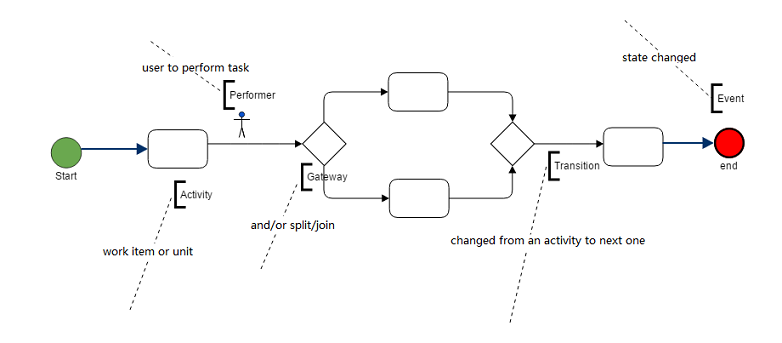
- Sequence – the most common pattern
- Split / Merge – AND / OR gateways with conditions on transitions
- Sub-process – start a child process from the main flow
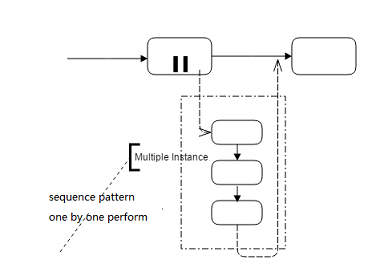
- Multi-instance – multiple performers handle the same task (sequence or parallel), with count/percentage thresholds
6.2 Core Human-Task Operations (Brief)
Slickflow manages human tasks with features such as:
- Start / Run – launch and move a process instance to the next step
- Withdraw – pull back a task you just sent to the next user
- SendBack – send a task back to the previous step
- Resend / Reverse / Jump – advanced control for exception handling and special routing
Code style (simplified):
// Start a process instance
IWorkflowService wfService = new WorkflowService();
var startResult = wfService.CreateRunner("10", "Jack")
    .UseApp("DS-100", "Book-Order", "DS-100-LX")
    .UseProcess("PriceProcessCode")
    .Start();

// Run to next step
var runResult = wfService.CreateRunner("10", "Jack")
    .UseApp("DS-100", "Book-Order", "DS-100-LX")
    .UseProcess("PriceProcessCode")
    .NextStepInt("20", "Alice")
    .Run();
6.3 Code-Style Modeling for Human Approval
You can also define simple approval processes purely in code (sequence example) using Workflow:
using Slickflow.Graph.Model;

// create a simple sequence process diagram by hand code rather than an HTML designer
var wf = new Workflow("simple-process-name", "simple-process-code");

wf.Start("Start")
  .Task("Task1")
  .Task("Task2")
  .End("End");

This gives developers both designer-based and code-based options for modeling human approval workflows.
7. 📦 Demos, Target Users and License
7.1 Demo Projects
WebDemo,MvcDemo,WinformDemo– example integration with different enterprise application types.
7.2 Target Users
- Software teams or companies who want to embed a workflow engine into their products.
- Developers who prefer combining AI orchestration, auto-execution, and human approval in one engine.
7.3 License & Support
- License: Slickflow follows the MIT open source license and can be used in commercial projects.
- Technical Support: Enterprise, Ultimate and Universe editions can be provided with technical support and upgrade services.
If you have any further inquiry, please feel free to contact:
- Email (Support): support@ruochisoft.com
8. 📚 Resources & Docker Deployment
8.1 Documentation
- English: http://doc.slickflow.net
- 中文: http://doc.slickflow.com
8.2 Wiki
8.3 CodeProject Articles
8.4 Official Website
- English: http://www.slickflow.net
- 中文: http://www.slickflow.com
8.5 Online Demo
- Demo: http://www.slickflow.com/demo/index
- Designer Demo: http://demo.slickflow.com/sfd/
8.6 Docker Hub
Pre-built Docker images are available on Docker Hub. Get started in minutes without building from source.
All-in-One Image (Recommended)
The easiest way to get started – pull one image and run all three services:
docker pull besley2096/slickflow-all:latest
docker run -d \
  -p 5000:5000 \
  -p 5001:5001 \
  -p 8090:8090 \
  -e WfDBConnectionType=PGSQL \
  -e WfDBConnectionString="Server=host.docker.internal;Port=5432;Database=wfdbbpmn2;User Id=postgres;Password=your-password;TimeZone=UTC;" \
  --name slickflow-all \
  besley2096/slickflow-all:latest
Access:
- Frontend Designer: http://localhost:8090
- Backend API: http://localhost:5000
- WebTest: http://localhost:5001
Docker Hub: https://hub.docker.com/r/besley2096/slickflow-all
Separate Images
For better isolation and scaling, use separate images:
Backend API
docker pull besley2096/slickflow-api:latest
docker run -d -p 5000:5000 \
  -e WfDBConnectionType=PGSQL \
  -e WfDBConnectionString="Server=host.docker.internal;Port=5432;Database=wfdbbpmn2;User Id=postgres;Password=your-password;TimeZone=UTC;" \
  --name slickflow-api \
  besley2096/slickflow-api:latest
Frontend Designer
docker pull besley2096/slickflow-designer:latest
docker run -d -p 8090:8090 \
  --name slickflow-designer \
  besley2096/slickflow-designer:latest
WebTest
docker pull besley2096/slickflow-webtest:latest
docker run -d -p 5001:5001 \
  -e WfDBConnectionType=PGSQL \
  -e WfDBConnectionString="Server=host.docker.internal;Port=5432;Database=wfdbbpmn2;User Id=postgres;Password=your-password;TimeZone=UTC;" \
  --name slickflow-webtest \
  besley2096/slickflow-webtest:latest
Docker Compose
Use docker-compose.hub.yml from this repository:
docker-compose -f docker-compose.hub.yml pull
docker-compose -f docker-compose.hub.yml up -d
Image Tags
Available tags for each image:
latest– Latest stable versionv3.5.0– Version 3.5.0
Docker Hub Links
- https://hub.docker.com/r/besley2096/slickflow-all
- https://hub.docker.com/r/besley2096/slickflow-api
- https://hub.docker.com/r/besley2096/slickflow-designer
- https://hub.docker.com/r/besley2096/slickflow-webtest
Database Configuration
API and WebTest containers require database configuration. Supported databases: PostgreSQL, MySQL, SQL Server, Oracle.
Database on Host Machine
-e WfDBConnectionString="Server=host.docker.internal;Port=5432;Database=wfdbbpmn2;User Id=postgres;Password=your-password;TimeZone=UTC;"
Database in Docker Container
-e WfDBConnectionString="Server=postgres;Port=5432;Database=wfdbbpmn2;User Id=postgres;Password=your-password;TimeZone=UTC;"
Remote Database
-e WfDBConnectionString="Server=192.168.1.100;Port=5432;Database=wfdbbpmn2;User Id=postgres;Password=your-password;TimeZone=UTC;"
9. 📞 Contact & 💰 Donation
9.1 Contact
- Email: sales@ruochisoft.com
- QQ (Author): 47743901
- WeChat (Author): besley2008
9.2 Donation
Your donation will be used for the continuous research and development of the product and community building.
您的捐赠将用于产品的持续研发和社区建设。
