SiteOne Crawler
SiteOne Crawler is a powerful and easy-to-use website analyzer, cloner, and converter designed for developers seeking security and performance insights, SEO specialists identifying optimization opportunities, and website owners needing reliable backups and offline versions.
Now rewritten in Rust for maximum performance, minimal resource usage, and zero runtime dependencies. The transition from PHP+Swoole to Rust resulted in 25% faster execution and 30% lower memory consumption while producing identical output.
Discover the SiteOne Crawler advantage:
- Run Anywhere: Single native binary for 🪟 Windows, 🍎 macOS, and 🐧 Linux (x64 & arm64). No runtime dependencies.
- Work Your Way: Launch the binary without arguments for an interactive wizard 🧙 with 10 preset modes, use the extensive command-line interface 📟 (releases, ▶️ video) for automation and power, or enjoy the intuitive desktop GUI application 💻 (GUI app, ▶️ video) for visual control.
- Rich Output Formats: Interactive HTML audit report 📊 with sortable tables and quality scoring (0.0-10.0) (see nextjs.org sample), detailed JSON for programmatic consumption, and human-readable text for terminal. Send HTML reports directly to your inbox via built-in SMTP mailer 📧.
- CI/CD Integration: Built-in quality gate (
--ci) with configurable thresholds — exit code 10 on failure enables automated deployment blocking. Also useful for cache warming — crawling the entire site after deployment populates your reverse proxy/CDN cache. - Offline & Markdown Power: Create complete offline clones 💾 for browsing without a server (nextjs.org clone) or convert entire websites into clean Markdown 📝 — perfect for backups, documentation, or feeding content to AI models (examples).
- Deep Crawling & Analysis: Thoroughly crawl every page and asset, identify errors (404s, redirects), generate sitemaps 🗺️, and even get email summaries 📧 (watch ▶️ video example).
- Learn More: Dive into the 🌐 Project Website, explore the detailed Documentation, or check the JSON/Text output specs.
GIF animation of the crawler in action (also available as a ▶️ video):
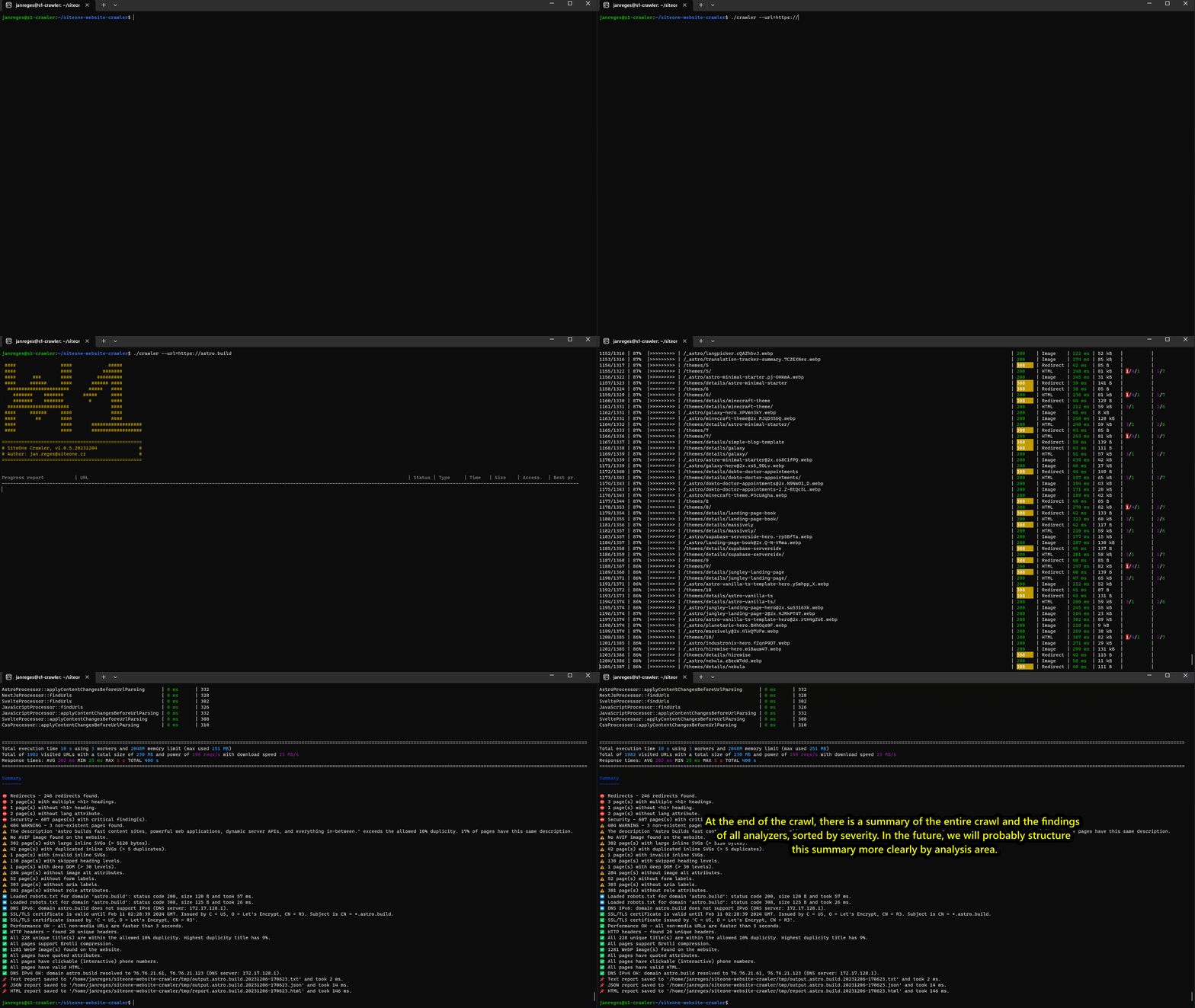
Table of contents
- ✨ Features
- 🚀 Installation
- ▶️ Usage
- Interactive wizard
- Basic example
- URL list example
- CI/CD example
- Fully-featured example
- ⚙️ Arguments
- Basic settings
- Output settings
- Resource filtering
- Advanced crawler settings
- File export settings
- Mailer options
- Upload options
- Offline exporter options
- Markdown exporter options
- Sitemap options
- Expert options
- Fastest URL analyzer
- SEO and OpenGraph analyzer
- Slowest URL analyzer
- Built-in HTTP server
- HTML-to-Markdown conversion
- CI/CD settings
- 🤖 AI assistant (optional)
- 🌐 Browser rendering (optional)
- 🏆 Quality Scoring
- 🔄 CI/CD Integration
- 📄 Output Examples
- 🧪 Testing
- ⚠️ Disclaimer
- 📜 License
✨ Features
In short, the main benefits can be summarized in these points:
- 🕷️ Crawler - very powerful crawler of the entire website reporting useful information about each URL (status code, response time, size, custom headers, titles, etc.)
- 🛠️ Dev/DevOps assistant - offers stress/load testing with configurable concurrent workers (
--workers) and request rate (--max-reqs-per-sec), cache warming, localhost testing, and rich URL/content-type filtering - 📊 Analyzer - analyzes all webpages and reports strange or error behaviour and useful statistics (404, redirects, bad practices, SEO and security issues, heading structures, etc.)
- 📧 Reporter - interactive HTML audit report, structured JSON, and colored text output; built-in SMTP mailer sends HTML reports directly to your inbox
- 💾 Offline website generator - clone entire websites to browsable local HTML files (no server needed) including all assets. Supports multi-domain clones — include subdomains or external domains with intelligent cross-linking.
- 📝 Website to markdown converter - export the entire website to browsable text markdown (viewable on GitHub or any
text editor), or generate a single-file markdown with smart header/footer deduplication — ideal for feeding to AI
tools. Includes a built-in web server that renders markdown exports as styled HTML pages.
Also supports standalone HTML-to-Markdown conversion of local files (
--html-to-markdown). See markdown examples. - 🗺️ Sitemap generator - allows you to generate
sitemap.xmlandsitemap.txtfiles with a list of all pages on your website - 🏆 Quality scoring - automatic quality scoring (0.0-10.0) across 5 categories: Performance, SEO, Security, Accessibility, Best Practices
- 🔄 CI/CD quality gate - configurable thresholds with exit code 10 on failure for automated pipelines; also useful as a post-deployment cache warmer for reverse proxies and CDNs
The following features are summarized in greater detail:
🕷️ Crawler
- all major platforms supported without dependencies (🐧 Linux, 🪟 Windows, 🍎 macOS, arm64) — single native binary
- has incredible 🚀 native Rust performance with async I/O and multi-threaded crawling
- provides simulation of different device types (desktop/mobile/tablet) thanks to predefined User-Agents
- will crawl all files, styles, scripts, fonts, images, documents, etc. on your website
- will respect the
robots.txtfile and will not crawl the pages that are not allowed - has a beautiful interactive and 🎨 colourful output
- it will clearly warn you ⚠️ of any wrong use of the tool (e.g. input parameters validation or wrong permissions)
- as
--urlparameter, you can specify also asitemap.xmlfile (or sitemap index), which will be processed as a list of URLs. In sitemap-only mode, the crawler follows only URLs from the sitemap — it does not discover additional links from HTML pages. Gzip-compressed sitemaps (*.xml.gz) are fully supported, both as direct URLs and when referenced from sitemap index files. - with
--url-list=you can crawl a bounded list of URLs from a plain-text file (one URL per line). The first URL in the file becomes the crawl base when--urlis omitted. Combine it with--single-pageto crawl exactly the listed URLs without discovering additional links. - respects the HTML `` tag when resolving relative URLs on pages that use it.
🛠️ Dev/DevOps assistant
- allows testing public and local projects on specific ports (e.g.
http://localhost:3000/) - works as a stress/load tester — configure the number of concurrent workers (
--workers) and the maximum requests per second (--max-reqs-per-sec) to simulate various traffic levels and test your infrastructure's resilience against high load or DoS scenarios - combine with rich filtering options — include/ignore URLs by regex (
--include-regex,--ignore-regex), disable specific asset types (--disable-javascript,--disable-images, etc.), or limit crawl depth (--max-depth) to focus the load on specific parts of your website - will help you warm up the application cache or the cache on the reverse proxy of the entire website
📊 Analyzer
- will find the weak points or strange behavior of your website
- built-in analyzers cover SEO, security headers, accessibility, best practices, performance, SSL/TLS, caching, and more
📧 Reporter
Three output formats:
- Interactive HTML report — a self-contained
.htmlfile with sortable tables, quality scores, color-coded findings, and sections for SEO, security, accessibility, performance, headers, redirects, 404s, and more. Open it in any browser — no server needed. - JSON output — structured data with all crawled URLs, response details, analysis findings, scores, and CI/CD gate results. Ideal for programmatic consumption, dashboards, and integrations.
- Text output — human-readable colored terminal output with tables, progress bars, and summaries.
Additional reporting features:
- Built-in SMTP mailer — send the HTML audit report directly to one or more email addresses via your own SMTP server. Configure sender, recipients, subject template, and SMTP credentials via CLI options.
- will provide you with data for SEO analysis, just add the
Title,KeywordsandDescriptionextra columns - will provide useful summaries and statistics at the end of the processing
💾 Offline website generator
- will help you export the entire website to offline form, where it is possible to browse the site through local HTML files (without HTTP server) including all documents, images, styles, scripts, fonts, etc.
- supports multi-domain clones — include subdomains (
*.mysite.tld) or entirely different domains in a single offline export. All URLs across included domains are intelligently rewritten to relative paths, so the resulting offline version cross-links pages between domains seamlessly — you get one unified browsable clone. - you can limit what assets you want to download and export (see
--disable-*directives) .. for some types of websites the best result is with the--disable-javascriptoption. - you can specify by
--allowed-domain-for-external-files(short-adf) from which external domains it is possible to download assets (JS, CSS, fonts, images, documents) including*option for all domains. - you can specify by
--allowed-domain-for-crawling(short-adc) which other domains should be included in the crawling if there are any links pointing to them. You can enable e.g.mysite.*to export all language mutations that have a different TLD or*.mysite.tldto export all subdomains. - you can use
--single-pageto export only one page to which the URL is given (and its assets), but do not follow other pages. - you can use
--single-foreign-pageto export only one page from another domain (if allowed by--allowed-domain-for-crawling), but do not follow other pages. - you can use
--replace-contentto replace content in HTML/JS/CSS withfoo -> baror regexp in PCRE format, e.g./card[0-9]/i -> card. Can be specified multiple times. - you can use
--replace-query-stringto replace chars in query string in the filename. - you can use
--max-depthto set the maximum crawling depth (for pages, not assets).1means/aboutor/about/,2means/about/contactsetc. - you can use it to export your website to a static form and host it on GitHub Pages, Netlify, Vercel, etc. as a static backup and part of your disaster recovery plan or archival/legal needs
- works great with older conventional websites but also modern ones, built on frameworks like Next.js, Nuxt.js, SvelteKit, Astro, Gatsby, etc. When a JS framework is detected, the export also performs some framework-specific code modifications for optimal results.
- try it for your website, and you will be very pleasantly surprised :-)
📝 Website to markdown converter
Two export modes:
- Multi-file markdown — exports the entire website with all subpages to a directory of browsable
.mdfiles. The markdown renders nicely when uploaded to GitHub, viewed in VS Code, or any text editor. Links between pages are converted to relative.mdlinks so you can navigate between files. Optionally includes images and other files (PDF, etc.). - Single-file markdown — combines all pages into one large markdown file with smart removal of duplicate website headers and footers across pages. Ideal for feeding entire website content to AI tools (ChatGPT, Claude, etc.) that process markdown more effectively than raw HTML.
Smart conversion features:
- collapsible accordions — large link lists (menus, navigation, footer links with 8+ items) are automatically
collapsed into
<details>accordions with contextual labels ("Menu", "Links") for better readability - content before the main heading (typically h1) — such as the site header and navigation — is moved to the end of the
page below a
---separator, so the actual page content comes first - you can set multiple selectors (CSS-like) to remove unwanted elements from the exported markdown
- code block detection and syntax highlighting for popular programming languages
- HTML tables are converted to proper markdown tables
Built-in web server:
- use
--serve-markdown=to start a built-in HTTP server that renders your markdown export as styled HTML pages with tables, dark/light mode, breadcrumb navigation, and accordion support — perfect for browsing and sharing the export locally or on a network
Standalone HTML-to-Markdown conversion:
- use
--html-to-markdown=to convert a local HTML file directly to Markdown without crawling any website - outputs clean Markdown to stdout (pipe-friendly) or to a file with
--html-to-markdown-output= - uses the same conversion pipeline as
--markdown-export-dir— including all cleanup, accordion collapsing, code language detection, and implicit exclusions (cookie banners,aria-hiddenelements,role="menu"dropdowns) - respects
--markdown-disable-images,--markdown-disable-files,--markdown-exclude-selector, and--markdown-move-content-before-h1-to-end - does not rewrite links (
.html→.md) since the file is standalone with no site context
💡 Tip: you can push the exported markdown folder to your GitHub repository, where it will be automatically rendered as a browsable documentation. You can look at the examples of converted websites to markdown.
See all available markdown exporter options and HTML-to-Markdown conversion options.
🗺️ Sitemap generator
- will help you create a
sitemap.xmlandsitemap.txtfor your website - you can set the priority of individual pages based on the number of slashes in the URL
🤖 AI assistant (optional)
- optional, opt-in LLM integration — works with OpenAI, Anthropic, Google Gemini, and any OpenAI-compatible endpoint (vLLM, LiteLLM, MiniMax, Ollama, self-hosted)
- AI SEO analysis with concrete title/description/keyword rewrites,
llms.txtgeneration, spelling/grammar checks, and your own custom policy prompts - smart page selection (ranks the most important pages) plus hard caps and a
--ai-dry-runcost preview so it never blindly hits thousands of pages - safe API-key handling (env-var by default, redacted from logs) and no extra binary dependencies — see 🤖 AI assistant options
Don't hesitate and try it. You will love it as we do! ❤️
🌐 Browser rendering (optional)
- optional, opt-in mode (
--browser) that renders each page in a real Chromium via the Chrome DevTools Protocol, so JavaScript / SPA sites are crawled with their post-render DOM (client-side links, hydrated content, framework markup) — link extraction, offline export and markdown export then all see the rendered page - screenshots of every page — viewport (custom resolution) or full-page (entire scroll height), as PNG/JPG/WebP; animations are settled before each capture so pages look loaded, not mid-effect
- screenshot extras — assemble the per-page screenshots into a GIF/MP4 animation (GIF built-in, MP4 via ffmpeg), and optionally hide cookie-consent banners before capture
- console / error diagnostics per page — JavaScript console errors, uncaught exceptions, failed sub-requests (404/5xx), CSP/CORS/mixed-content violations — reported in a table and feedable to the AI assistant
- headless by default, or
--browser-headfulto watch the browser open each page - easiest possible setup, no Node.js: it auto-detects an installed Chrome/Chromium/Edge/Brave, and if none is found it offers to download a
chrome-headless-shellbuild — or point it at any browser with--browser-path - built into the default build and pre-built binaries (adds the ~6 MB CDP client, not a browser — the actual Chromium is detected/downloaded at runtime) — see 🌐 Browser rendering (optional) usage & options
Limitations of browser mode (by design): the browser loads sub-resources and runs page JS, so domain-scope/robots rules apply to the top document only;
--http-cache-dirdoes not cache rendered bodies (the browser always fetches live), and each rendered HTML page is fetched twice (once for status/headers, once by the browser); HTTP auth/cookies are not forwarded to the browser; the auto-download trusts Google's CDN over TLS.--proxyand--resolveare forwarded to the browser, but--resolveis applied host-only in browser mode (Chrome's host-resolver-rules ignore the port), so per-port overrides for the same host aren't honored by the browser the way they are on the HTTP path.
🚀 Installation
📦 Pre-built binaries
Download pre-built binaries from 🐙 GitHub releases for all major platforms (🐧 Linux, 🪟 Windows, 🍎 macOS, x64 & arm64).
The binary is self-contained — no runtime dependencies required.
# Linux / macOS — download, extract, run
./siteone-crawler --url=https://my.domain.tld
🐧 Linux binary variants:
For Linux, two binary variants are provided:
| Variant | Compatibility | Performance |
|---|---|---|
| glibc (primary) | Requires glibc 2.39+ (Ubuntu 24.04+, Debian 13+, Fedora 40+) | Full native performance |
| musl (compatible) | Any Linux distribution (statically linked, no dependencies) | ~50–80% slower due to musl memory allocator |
The glibc variant is recommended for current distributions — it offers the best performance. If you are running an older distribution (e.g. Ubuntu 22.04, Debian 12) and encounter a GLIBC_2.xx not found error, use the musl variant instead. The musl binary is fully statically linked and runs on any Linux system regardless of the installed glibc version. The performance difference is mainly noticeable during CPU-intensive operations like offline and markdown exports.
Note for macOS users: In case that Mac refuses to start the crawler from your Download folder, move the entire folder with the Crawler via the terminal to another location, for example to the homefolder ~.
🍺 Homebrew (macOS / Linux)
brew install janreges/tap/siteone-crawler
siteone-crawler --url=https://my.domain.tld
🐧 Debian / Ubuntu (apt)
curl -1sLf 'https://dl.cloudsmith.io/public/janreges/siteone-crawler/setup.deb.sh' | sudo -E bash
sudo apt-get install siteone-crawler
Older distributions (Ubuntu 22.04, Debian 11/12, etc.): If you get a
GLIBC_X.XX not founderror, install the statically linked variant instead:sudo apt-get install siteone-crawler-staticSee Linux binary variants for details on the performance difference.
🎩 Fedora / RHEL (dnf)
curl -1sLf 'https://dl.cloudsmith.io/public/janreges/siteone-crawler/setup.rpm.sh' | sudo -E bash
sudo dnf install siteone-crawler
Older distributions: If you get a
GLIBC_X.XX not founderror, usesudo dnf install siteone-crawler-staticinstead. See Linux binary variants for details.
🦎 openSUSE / SLES (zypper)
curl -1sLf 'https://dl.cloudsmith.io/public/janreges/siteone-crawler/setup.rpm.sh' | sudo -E bash
sudo zypper install siteone-crawler
Older distributions: If you get a
GLIBC_X.XX not founderror, usesudo zypper install siteone-crawler-staticinstead. See Linux binary variants for details.
🏔️ Alpine Linux (apk)
curl -1sLf 'https://dl.cloudsmith.io/public/janreges/siteone-crawler/setup.alpine.sh' | sudo -E bash
sudo apk add siteone-crawler
🔨 Build from source
Requires Rust 1.94 or later (see rust-version in Cargo.toml).
git clone https://github.com/janreges/siteone-crawler.git
cd siteone-crawler

# Build optimized release binary
cargo build --release

# Run
./target/release/siteone-crawler --url=https://my.domain.tld
Browser rendering is built into the default build and the pre-built binaries (it adds the
~6 MB chromiumoxide CDP client; the actual browser is detected/downloaded at runtime, never
bundled). Just use --browser:
cargo build --release
# A browser (Chrome/Chromium/Edge/Brave) is detected automatically at runtime, downloaded on
# first use, or pointed at via --browser-path=<exe>.
./target/release/siteone-crawler --url=https://my.spa.tld --browser --screenshots
Lean build without browser rendering (drops chromiumoxide, ~6 MB smaller):
cargo build --release --no-default-features
Build statically linked (musl) binary:
# Install musl toolchain (Ubuntu/Debian)
sudo apt-get install musl-tools
rustup target add x86_64-unknown-linux-musl

# Build static binary (no system dependencies)
cargo build --release --target x86_64-unknown-linux-musl

# Run — works on any Linux distribution
./target/x86_64-unknown-linux-musl/release/siteone-crawler --url=https://my.domain.tld
▶️ Usage
Interactive wizard
Run the binary without any arguments and an interactive wizard will guide you through the configuration. Choose from 10 preset modes, enter the target URL, fine-tune settings with arrow keys, and the crawler starts immediately — no need to remember CLI flags.
? Choose a crawl mode:
❯ Quick Audit               Fast site health overview — crawls all pages and assets
  SEO Analysis               Extract titles, descriptions, keywords, and OpenGraph tags
  Performance Test           Measure response times with cache disabled — find bottlenecks
  Security Check             Check SSL/TLS, security headers, and redirects site-wide
  Offline Clone              Download entire website with all assets for offline browsing
  Markdown Export            Convert pages to Markdown for AI models or documentation
  Stress Test                High-concurrency load test with cache-busting random params
  Single Page                Deep analysis of a single URL — SEO, security, performance
  Large Site Crawl           High-throughput HTML-only crawl for large sites (100k+ pages)
  Custom                     Start from defaults and configure every option manually
  ──────────────────────────────────────
  Browse offline export      Serve a previously exported offline site via HTTP
  Browse markdown export     Serve a previously exported markdown site via HTTP
[↑↓ to move, enter to select, type to filter]
After selecting a preset and entering the URL, the wizard shows a settings form where you can adjust workers, timeout, content types, export options, and more. A configuration summary with the equivalent CLI command is displayed before the crawl starts — copy it for future use without the wizard.
If existing offline or markdown exports are detected in ./tmp/, the wizard also offers to
serve them via the built-in HTTP server directly from the menu.
Basic example
To run the crawler from the command line, provide the required arguments:
./siteone-crawler --url=https://mydomain.tld/ --device=mobile
URL list example
Crawl exactly a bounded set of URLs listed in a file, without following any discovered links:
# urls.txt — one URL per line, blank lines and '#' comments ignored
./siteone-crawler --url-list=urls.txt --single-page
CI/CD example
# Fail deployment if quality score < 7.0 or any 5xx errors
./siteone-crawler --url=https://mydomain.tld/ --ci --ci-min-score=7.0 --ci-max-5xx=0
echo $?  # 0 = pass, 10 = fail
Fully-featured example
./siteone-crawler --url=https://mydomain.tld/ \
  --output=text \
  --workers=2 \
  --max-reqs-per-sec=10 \
  --memory-limit=2048M \
  --resolve='mydomain.tld:443:127.0.0.1' \
  --timeout=5 \
  --proxy=proxy.mydomain.tld:8080 \
  --http-auth=myuser:secretPassword123 \
  --user-agent="My User-Agent String" \
  --extra-columns="DOM,X-Cache(10),Title(40),Keywords(50),Description(50>),Heading1=xpath://h1/text()(20>),ProductPrice=regexp:/Price:\s*\$?(\d+(?:\.\d{2})?)/i#1(10)" \
  --accept-encoding="gzip, deflate" \
  --url-column-size=100 \
  --max-queue-length=3000 \
  --max-visited-urls=10000 \
  --max-url-length=5000 \
  --max-non200-responses-per-basename=10 \
  --include-regex="/^.*\/technologies.*/" \
  --include-regex="/^.*\/fashion.*/" \
  --ignore-regex="/^.*\/downloads\/.*\.pdf$/i" \
  --analyzer-filter-regex="/^.*$/i" \
  --remove-query-params \
  --keep-query-param=page \
  --add-random-query-params \
  --transform-url="live-site.com -> local-site.local" \
  --transform-url="/cdn\.live-site\.com/ -> local-site.local/cdn" \
  --show-scheme-and-host \
  --do-not-truncate-url \
  --output-html-report=tmp/myreport.html \
  --html-report-options="summary,seo-opengraph,visited-urls,security,redirects" \
  --output-json-file=/dir/report.json \
  --output-text-file=/dir/report.txt \
  --add-timestamp-to-output-file \
  --add-host-to-output-file \
  --offline-export-dir=tmp/mydomain.tld \
  --replace-content='/<foo[^>]+>/ -> <bar>' \
  --ignore-store-file-error \
  --sitemap-xml-file=/dir/sitemap.xml \
  --sitemap-txt-file=/dir/sitemap.txt \
  --sitemap-base-priority=0.5 \
  --sitemap-priority-increase=0.1 \
  --markdown-export-dir=tmp/mydomain.tld.md \
  --markdown-export-single-file=tmp/mydomain.tld.combined.md \
  --markdown-move-content-before-h1-to-end \
  --markdown-disable-images \
  --markdown-disable-files \
  --markdown-remove-links-and-images-from-single-file \
  --markdown-exclude-selector='.exclude-me' \
  --markdown-replace-content='/<foo[^>]+>/ -> <bar>' \
  --markdown-replace-query-string='/[a-z]+=[^&]*(&|$)/i -> $1__$2' \
  --mail-to=your.name@my-mail.tld \
  --mail-to=your.friend.name@my-mail.tld \
  --mail-from=crawler@my-mail.tld \
  --mail-from-name="SiteOne Crawler" \
  --mail-subject-template="Crawler Report for %domain% (%date%)" \
  --mail-smtp-host=smtp.my-mail.tld \
  --mail-smtp-port=25 \
  --mail-smtp-user=smtp.user \
  --mail-smtp-pass=secretPassword123 \
  --ci --ci-min-score=7.0 --ci-min-security=8.0
⚙️ Arguments
For a clearer list, I recommend going to the documentation: 🌐 https://crawler.siteone.io/configuration/command-line-options/
Basic settings
| Parameter | Description |
|---|---|
--url= |
Required (unless --url-list is used). HTTP or HTTPS URL address of the website or sitemap xmlto be crawled. Use quotation marks '' if the URL contains query parameters. |
--url-list= |
Path to a plain-text file with one URL per line (blank lines and # comments are ignored).Only absolute http(s) URLs are accepted; other lines are skipped with a warning.When provided, --url is optional and the first valid URL in the file is used as the crawl base.All listed URLs are seeded into the crawl queue. Combine with --single-page to crawlexactly the listed URLs without following any discovered links. Listed URLs are fetched directly: robots.txt and --include-regex/--ignore-regex do not apply to them,and they may point to any host (the list can span domains); links discovered from them are still limited to the base domain. |
--single-page |
Load only one page to which the URL is given (and its assets), but do not follow other pages. |
--max-depth= |
Maximum crawling depth (for pages, not assets). Default is 0 (no limit). 1 means /aboutor /about/, 2 means /about/contacts etc. |
--device= |
Device type for choosing a predefined User-Agent. Ignored when --user-agent is defined.Supported values: desktop, mobile, tablet. Default is desktop. |
--user-agent= |
Custom User-Agent header. Use quotation marks. If specified, it takes precedence over the device parameter. If you add ! at the end, the siteone-crawler/version will not beadded as a signature at the end of the final user-agent. |
--timeout= |
Request timeout in seconds. Default is 5. |
--proxy= |
HTTP proxy to use in host:port format. Host can be hostname, IPv4 or IPv6. |
--http-auth= |
Basic HTTP authentication in username:password format. |
--config-file= |
Load CLI options from a config file. One option per line, # comments allowed.Without this flag, auto-discovers ~/.siteone-crawler.conf or /etc/siteone-crawler.conf.CLI arguments override config file values. |
Output settings
| Parameter | Description |
|---|---|
--output= |
Output type. Supported values: text, json. Default is text. |
--extra-columns= |
Comma delimited list of extra columns added to output table. You can specify HTTP headers (e.g. X-Cache), predefined values (Title, Keywords, Description, DOM), or customextraction from text files (HTML, JS, CSS, TXT, JSON, XML, etc.) using XPath or regexp. For custom extraction, use the format Custom_column_name=method:pattern#group(length), wheremethod is xpath or regexp, pattern is the extraction pattern, an optional #group specifies thecapturing group (or node index for XPath) to return (defaulting to the entire match or first node), and an optional (length) sets the maximum output length (append > to disable truncation).For example, use Heading1=xpath://h1/text()(20>) to extract the text of the first H1 elementfrom the HTML document, and ProductPrice=regexp:/Price:\s*\$?(\d+(?:\.\d{2})?)/i#1(10)to extract a numeric price (e.g., "29.99") from a string like "Price: $29.99". |
--url-column-size= |
Basic URL column width. By default, it is calculated from the size of your terminal window. |
--rows-limit= |
Max. number of rows to display in tables with analysis results. Default is 200. |
--timezone= |
Timezone for datetimes in HTML reports and timestamps in output folders/files, e.g. Europe/Prague.Default is UTC. |
--do-not-truncate-url |
In the text output, long URLs are truncated by default to --url-column-size so the table does notwrap due to long URLs. With this option, you can turn off the truncation. |
--show-scheme-and-host |
On text output, show scheme and host also for origin domain URLs. |
--hide-progress-bar |
Hide progress bar visible in text and JSON output for more compact view. |
--hide-columns= |
Hide specified columns from the progress table. Comma-separated list of column names:type, time, size, cache. Example: --hide-columns=cache or --hide-columns=cache,type. |
--no-color |
Disable colored output. |
--force-color |
Force colored output regardless of support detection. |
--show-inline-criticals |
Show criticals from the analyzer directly in the URL table. |
--show-inline-warnings |
Show warnings from the analyzer directly in the URL table. |
Resource filtering
| Parameter | Description |
|---|---|
--disable-all-assets |
Disables crawling of all assets and files and only crawls pages in href attributes. Shortcut for calling all other --disable-* flags. |
--disable-javascript |
Disables JavaScript downloading and removes all JavaScript code from HTML, including onclick and other on* handlers. |
--disable-styles |
Disables CSS file downloading and at the same time removes all style definitions by `` tag or inline by style attributes. |
--disable-fonts |
Disables font downloading and also removes all font/font-face definitions from CSS. |
--disable-images |
Disables downloading of all images and replaces found images in HTML with placeholder image only. |
--disable-files |
Disables downloading of any files (typically downloadable documents) to which various links point. |
--remove-all-anchor-listeners |
On all links on the page remove any event listeners. Useful on some types of sites with modern JS frameworks that would like to compose content dynamically (React, Svelte, Vue, Angular, etc.). |
Advanced crawler settings
| Parameter | Description |
|---|---|
--workers= |
Maximum number of concurrent workers (threads). Crawler will not make more simultaneous requests to the server than this number. Use carefully! A high number of workers can cause a DoS attack. Default is 3. |
--max-reqs-per-sec= |
Max requests/s for whole crawler. Be careful not to cause a DoS attack. Default value is 10. |
--memory-limit= |
Memory limit in units M (Megabytes) or G (Gigabytes). Default is 2048M. |
--resolve= |
Custom DNS resolution in domain:port:ip format. Same as curl --resolve.Can be specified multiple times. |
--allowed-domain-for-external-files= |
Enable loading of file content from another domain (e.g. CDN). Can be specified multiple times. Use * for all domains. |
--allowed-domain-for-crawling= |
Allow crawling of other listed domains — typically language mutations on other domains. Can be specified multiple times. Use wildcards like *.mysite.tld. |
--single-foreign-page |
When crawling of other domains is allowed, ensures that only the linked page and its assets are crawled from foreign domains. |
--include-regex= |
PCRE-compatible regular expression for URLs that should be included. Can be specified multiple times. Example: --include-regex='/^\/public\//' |
--ignore-regex= |
PCRE-compatible regular expression for URLs that should be ignored. Can be specified multiple times. |
--regex-filtering-only-for-pages |
Apply *-regex rules only to page URLs, not static assets. |
--analyzer-filter-regex |
PCRE-compatible regular expression for filtering analyzers by name. |
--accept-encoding= |
Custom Accept-Encoding request header. Default is gzip, deflate, br. |
--remove-query-params |
Remove query parameters from found URLs. |
--keep-query-param= |
Keep only the specified query parameter(s) in discovered URLs; all others are removed. Can be specified multiple times. If --remove-query-params is also set, all parametersare removed regardless. |
--add-random-query-params |
Add random query parameters to each URL to bypass caches. |
--transform-url=to> |
Transform URLs before crawling. Use from -> to for simple replacement or /regex/ -> replacement.Can be specified multiple times. |
--force-relative-urls |
Normalize all discovered URLs matching the initial domain (incl. www variant and protocol differences) to canonical form. Prevents duplicate files in offline export when the site uses inconsistent URL formats (http/https, www/non-www). |
--ignore-robots-txt |
Ignore robots.txt content. |
--ignore-html-comments |
Ignore URLs found inside HTML comments (``), which search engines also ignore, so commented links are not crawled or reported as broken. |
--http-cache-dir= |
Cache dir for HTTP responses. Disable with --http-cache-dir='off' or --no-cache.Default is ~/.cache/siteone-crawler/http-cache (XDG-compliant, respects $XDG_CACHE_HOME). |
--http-cache-compression |
Enable compression for HTTP cache storage. |
--http-cache-ttl= |
TTL for HTTP cache entries (e.g. 1h, 7d, 30m). Use 0 for infinite. Default is 24h. |
--no-cache |
Disable HTTP cache completely. Shortcut for --http-cache-dir='off'. |
--max-queue-length= |
Maximum length of the waiting URL queue. Default is 9000. |
--max-visited-urls= |
Maximum number of visited URLs. Default is 10000. |
--max-skipped-urls= |
Maximum number of skipped URLs. Default is 10000. |
--max-url-length= |
Maximum supported URL length in chars. Default is 2083. |
--max-non200-responses-per-basename= |
Protection against looping with dynamic non-200 URLs. Default is 5. |
File export settings
| Parameter | Description |
|---|---|
--output-html-report= |
Save HTML report into that file. Set to empty '' to disable HTML report.By default saved into tmp/%domain%.report.%datetime%.html. |
--html-report-options= |
Comma-separated list of sections to include in HTML report. Available sections: summary, seo-opengraph, image-gallery, video-gallery, visited-urls, dns-ssl, crawler-stats, crawler-info, headers, content-types, skipped-urls, external-links, caching, best-practices, accessibility, security, redirects, 404-pages, slowest-urls, fastest-urls, source-domains.Default: all sections. |
--output-json-file= |
File path for JSON output. Set to empty '' to disable JSON file.By default saved into tmp/%domain%.output.%datetime%.json.See JSON Output Documentation for format details. |
--output-text-file= |
File path for TXT output. Set to empty '' to disable TXT file.By default saved into tmp/%domain%.output.%datetime%.txt.See Text Output Documentation for format details. |
--add-timestamp-to-output-file |
Append timestamp to output filenames (HTML report, JSON, TXT) except sitemaps. |
--add-host-to-output-file |
Append initial URL host to output filenames (HTML report, JSON, TXT) except sitemaps. |
Default output directory: Report files are saved into ./tmp/ in the current working directory. If ./tmp/ cannot be created (e.g. read-only filesystem), the crawler falls back to the platform's XDG data directory (~/.local/share/siteone-crawler/ on Linux, ~/Library/Application Support/siteone-crawler/ on macOS, %APPDATA%\siteone-crawler\ on Windows) and prints a notice to stderr.
Mailer options
| Parameter | Description |
|---|---|
--mail-to= |
Recipients of HTML e-mail reports. Required for mailer activation. You can specify multiple emails separated by comma. |
--mail-from= |
E-mail sender address. Default is siteone-crawler@your-hostname.com. |
--mail-from-name= |
E-mail sender name. Default is SiteOne Crawler. |
--mail-subject-template= |
E-mail subject template. You can use %domain%, %date% and %datetime%.Default is Crawler Report for %domain% (%date%). |
--mail-smtp-host= |
SMTP host for sending emails. Default is localhost. |
--mail-smtp-port= |
SMTP port for sending emails. Default is 25. |
--mail-smtp-user= |
SMTP user, if your SMTP server requires authentication. |
--mail-smtp-pass= |
SMTP password, if your SMTP server requires authentication. |
Upload options
| Parameter | Description |
|---|---|
--upload |
Enable HTML report upload to --upload-to. |
--upload-to= |
URL of the endpoint where to send the HTML report. Default is https://crawler.siteone.io/up. |
--upload-retention= |
How long should the HTML report be kept in the online version? Values: 1h / 4h / 12h / 24h / 3d / 7d / 30d / 365d / forever. Default is 30d. |
--upload-password= |
Optional password (user will be 'crawler') to display the online HTML report. |
--upload-timeout= |
Upload timeout in seconds. Default is 3600. |
Offline exporter options
| Parameter | Description |
|---|---|
--offline-export-dir= |
Path to directory where to save the offline version of the website. |
--offline-export-store-only-url-regex= |
Debug: store only URLs matching these PCRE regexes. Can be specified multiple times. |
--offline-export-remove-unwanted-code= |
Remove unwanted code for offline mode (analytics, social networks, etc.). Default is 1. |
--offline-export-no-auto-redirect-html |
Disable automatic creation of redirect HTML files for subfolders containing index.html. |
--offline-export-preserve-url-structure |
Preserve the original URL path structure. E.g. /about is stored as about/index.htmlinstead of about.html. Useful for web server deployment where the clone should maintainthe same URL hierarchy as the original site. |
--offline-export-preserve-urls |
Preserve original URL format in exported HTML/CSS/JS — same-domain links become root-relative (/path), cross-domain links stay absolute. Ideal for processing with siteone-chunker and RAG pipelines where links must resolve to the production website. |
--offline-export-no-url-rewriting |
Disable all URL rewriting in exported HTML/CSS/JS. URLs remain exactly as in the original source. Useful for RAG indexing or other processing where original URLs must be preserved verbatim. |
--replace-content= |
Replace content in HTML/JS/CSS with foo -> bar or PCRE regexp.Can be specified multiple times. |
--replace-query-string= |
Replace characters in query string filenames. Can be specified multiple times. |
--offline-export-lowercase |
Convert all filenames to lowercase for offline export. Useful for case-insensitive filesystems. |
--ignore-store-file-error |
Ignore any file storing errors and continue. |
--disable-astro-inline-modules |
Disable inlining of Astro module scripts for offline export. Scripts will remain as external files with corrected relative paths. |
Markdown exporter options
| Parameter | Description |
|---|---|
--markdown-export-dir= |
Path to directory where to save the markdown version of the website. |
--markdown-export-single-file= |
Path to a file for combined markdown. Requires --markdown-export-dir. |
--markdown-move-content-before-h1-to-end |
Move content before main H1 heading to the end of the markdown. |
--markdown-disable-images |
Do not export and show images in markdown files. |
--markdown-disable-files |
Do not export files other than HTML/CSS/JS/fonts/images (e.g. PDF, ZIP). |
--markdown-remove-links-and-images-from-single-file |
Remove links and images from combined single file. |
--markdown-exclude-selector= |
Exclude DOM elements by CSS selector from markdown export. Can be specified multiple times. |
--markdown-replace-content= |
Replace text content with foo -> bar or PCRE regexp.Can be specified multiple times. |
--markdown-replace-query-string= |
Replace characters in query string filenames. Can be specified multiple times. |
--markdown-export-store-only-url-regex= |
Debug: store only URLs matching these PCRE regexes. Can be specified multiple times. |
--markdown-ignore-store-file-error |
Ignore any file storing errors and continue. |
Sitemap options
| Parameter | Description |
|---|---|
--sitemap-xml-file= |
File path for generated XML Sitemap. Extension .xml added if not specified. |
--sitemap-txt-file= |
File path for generated TXT Sitemap. Extension .txt added if not specified. |
--sitemap-base-priority= |
Base priority for XML sitemap. Default is 0.5. |
--sitemap-priority-increase= |
Priority increase based on slashes in URL. Default is 0.1. |
Expert options
| Parameter | Description |
|---|---|
--debug |
Activate debug mode. |
--debug-log-file= |
Log file for debug messages. When set without --debug, logging is active without visible output. |
--debug-url-regex= |
Regex for URL(s) to debug. Can be specified multiple times. |
--result-storage= |
Result storage type. Values: memory or file. Use file for large websites. Default is memory. |
--result-storage-dir= |
Directory for --result-storage=file. Default is tmp/result-storage. |
--result-storage-compression |
Enable compression for results storage. |
--http-cache-dir= |
Cache dir for HTTP responses. Disable with --http-cache-dir='off' or --no-cache.Default is ~/.cache/siteone-crawler/http-cache (XDG-compliant, respects $XDG_CACHE_HOME). |
--http-cache-compression |
Enable compression for HTTP cache storage. |
--http-cache-ttl= |
TTL for HTTP cache entries (e.g. 1h, 7d, 30m). Use 0 for infinite. Default is 24h. |
--websocket-server= |
Start crawler with websocket server on given host:port. |
--console-width= |
Enforce a fixed console width, disabling automatic detection. |
Fastest URL analyzer
| Parameter | Description |
|---|---|
--fastest-urls-top-limit= |
Number of URLs in TOP fastest list. Default is 20. |
--fastest-urls-max-time= |
Maximum response time for an URL to be considered fast. Default is 1. |
SEO and OpenGraph analyzer
| Parameter | Description |
|---|---|
--max-heading-level= |
Max heading level from 1 to 6 for analysis. Default is 3. |
Slowest URL analyzer
| Parameter | Description |
|---|---|
--slowest-urls-top-limit= |
Number of URLs in TOP slowest list. Default is 20. |
--slowest-urls-min-time= |
Minimum response time threshold for slow URLs. Default is 0.01. |
--slowest-urls-max-time= |
Maximum response time for very slow evaluation. Default is 3. |
Built-in HTTP server
Browse exported markdown or offline HTML files through a local web server with a built-in viewer.
| Parameter | Description |
|---|---|
--serve-markdown= |
Start built-in HTTP server for browsing a markdown export directory. Renders .md files as styled HTML with tables, accordions, dark/light mode, and breadcrumb navigation. |
--serve-offline= |
Start built-in HTTP server for browsing an offline HTML export directory. Serves static files with Content-Security-Policy restricting assets to the same origin. |
--serve-port= |
Port for the built-in HTTP server. Default is 8321. |
--serve-bind-address= |
Bind address for the built-in HTTP server. Default is 127.0.0.1 (localhost only).Use 0.0.0.0 to listen on all network interfaces and their IP addresses. |
Example:
# Browse markdown export
./siteone-crawler --serve-markdown=./exports/markdown

# Browse offline export on custom port, accessible from network
./siteone-crawler --serve-offline=./exports/offline --serve-port=9000 --serve-bind-address=0.0.0.0
HTML-to-Markdown conversion
Convert a local HTML file to clean Markdown without crawling. Uses the same conversion pipeline as the markdown exporter.
| Parameter | Description |
|---|---|
--html-to-markdown= |
Convert a local HTML file to Markdown and print to stdout. No crawling is performed. Respects --markdown-disable-images, --markdown-disable-files, --markdown-move-content-before-h1-to-end, and --markdown-exclude-selector. |
--html-to-markdown-output= |
Write the converted Markdown to a file instead of stdout. Requires --html-to-markdown. |
Examples:
# Convert HTML file to Markdown (printed to stdout)
./siteone-crawler --html-to-markdown=page.html

# Convert and save to a file
./siteone-crawler --html-to-markdown=page.html --html-to-markdown-output=page.md

# Convert with options: remove images, exclude navigation, move header below h1
./siteone-crawler --html-to-markdown=page.html \
  --markdown-disable-images \
  --markdown-exclude-selector=nav \
  --markdown-move-content-before-h1-to-end

# Pipe to other tools (e.g. clipboard, AI, wc)
./siteone-crawler --html-to-markdown=page.html | pbcopy
./siteone-crawler --html-to-markdown=page.html | wc -l
CI/CD settings
| Parameter | Description |
|---|---|
--ci |
Enable CI/CD quality gate. Crawler exits with code 10 if thresholds are not met. Default file outputs (HTML, JSON, TXT reports) are suppressed unless explicitly requested via --output-* options. |
--ci-min-score= |
Minimum overall quality score (0.0-10.0). Default is 5.0. |
--ci-min-performance= |
Minimum Performance category score (0.0-10.0). Default is 5.0. |
--ci-min-seo= |
Minimum SEO category score (0.0-10.0). Default is 5.0. |
--ci-min-security= |
Minimum Security category score (0.0-10.0). Default is 5.0. |
--ci-min-accessibility= |
Minimum Accessibility category score (0.0-10.0). Default is 3.0. |
--ci-min-best-practices= |
Minimum Best Practices category score (0.0-10.0). Default is 5.0. |
--ci-max-404= |
Maximum number of 404 responses allowed. Default is 0. |
--ci-max-5xx= |
Maximum number of 5xx server error responses allowed. Default is 0. |
--ci-max-criticals= |
Maximum number of critical analysis findings allowed. Default is 0. |
--ci-max-warnings= |
Maximum number of warning analysis findings allowed. Not checked by default. |
--ci-max-avg-response= |
Maximum average response time in seconds. Not checked by default. |
--ci-min-pages= |
Minimum number of HTML pages that must be found. Default is 10. |
--ci-min-assets= |
Minimum number of assets (JS, CSS, images, fonts) that must be found. Default is 10. |
--ci-min-documents= |
Minimum number of documents (PDF, etc.) that must be found. Default is 0 (not checked). |
--ci-baseline= |
Path to a previous --output=json file used as a baseline for regression checks. A missing/unreadable file is warned about (the check is skipped, not silently passed). |
--ci-max-score-drop= |
Maximum allowed drop of the overall score vs the --ci-baseline run. Default 0 (any drop fails). |
--ci-fail-on-code=<code> |
Fail the build if a finding code (aplCode, e.g. seo-noindex-sitewide) is present. Can be specified multiple times. |
--ci-ignore-code=<code> |
Ignore a finding code (aplCode, e.g. pages-without-lang) when counting criticals/warnings; also suppresses --ci-fail-on-code. Can be specified multiple times. |
--ci-junit-file= |
Write the CI gate result as a JUnit XML report (renders natively in GitLab/Jenkins/GitHub test reporters). |
--ci-github-annotations |
Print GitHub Actions ::error annotations for failed checks. Auto-enabled when GITHUB_ACTIONS=true. |
Default behavior with --ci alone: overall score >= 5.0, each category score >= 5.0 (Performance, SEO, Security, Best Practices) and Accessibility >= 3.0, 404 errors = 10, assets >= 10. File outputs (HTML, JSON, TXT reports) are not generated. To save reports in CI mode, specify the desired output explicitly, e.g. --ci --output-html-report=report.html.
🌐 Browser rendering (optional)
Render each page in a real Chromium (CDP) instead of a plain HTTP request. Included in the default build / pre-built binaries (no special flag needed; for a lean build without it use cargo build --release --no-default-features). With --browser off, the crawler behaves exactly as before.
# Crawl a JavaScript / SPA site with full browser rendering
./siteone-crawler --url=https://my.spa.tld --browser

# Capture a full-page screenshot of every page (PNG by default)
./siteone-crawler --url=https://my.spa.tld --browser --screenshots --screenshot-mode=full-page

# Watch it run in a visible window (one page at a time)
./siteone-crawler --url=https://my.spa.tld --browser --browser-headful

# Use a specific browser binary and wait until the network goes idle
./siteone-crawler --url=https://my.spa.tld --browser --browser-path=/usr/bin/google-chrome --browser-wait=networkidle
Browser is auto-detected (Chrome/Chromium/Edge/Brave); if none is found you're offered a one-time chrome-headless-shell download (or pass --browser-auto-download for CI). Key options:
| Option | Default | Meaning |
|---|---|---|
--browser |
off | Render pages in Chromium (built into the default binaries). |
--browser-path= |
— | Explicit browser binary; skips detection/download. |
--browser-headful |
off | Visible window (default is headless; renders one page at a time). |
--browser-no-sandbox |
off | Add --no-sandbox (often required in Docker/CI/WSL/root; weakens isolation). |
--browser-auto-download |
off | Pre-consent to downloading a browser in non-interactive/CI runs. |
--browser-workers= |
3 | Concurrent rendered pages (separate from --workers). |
--browser-wait= |
networkidle |
Readiness: load, domcontentloaded, or networkidle. |
--browser-wait-extra= |
0 | Extra settle delay after the wait condition. |
--browser-timeout= |
30 | Hard navigation+render timeout per page. |
--browser-render-all |
off | Render every URL (default: only HTML documents; assets via HTTP). |
--screenshots |
off | Capture a screenshot of every rendered page (requires --browser). |
--screenshots-dir= |
tmp/screenshots/ |
Output directory for screenshots. |
--screenshot-mode= |
viewport |
viewport (set resolution) or full-page (full scroll height). |
--screenshot-viewport= |
1920x1080 |
Render/viewport size. |
--screenshot-format= |
png |
png, jpg, or webp. |
--screenshot-quality= |
80 | Quality for jpg/webp. |
--screenshots-animation= |
— | Assemble screenshots into an animation; gif, mp4, or gif,mp4. |
--screenshots-animation-frame-duration= |
2 | Seconds each page is shown in the animation (0.2–10). |
--screenshots-animation-width= |
1024 | Output width in pixels; height is derived from --screenshot-viewport aspect ratio. |
--ffmpeg-path= |
— | Explicit ffmpeg binary (auto-detected from PATH otherwise). Required for MP4. |
--screenshot-hide-cookie-banners |
off | Before each screenshot, try to dismiss/hide cookie consent banners (best-effort). |
--screenshot-hide-selector= |
— | Comma-separated CSS selectors to hide before each screenshot (site-specific banners). |
--console-max-messages / --console-msg-max-chars / --console-total-max-kb |
100 / 200 / 128 | Size limits for the console diagnostics passed to the AI assistant. |
Animations are settled before each capture
To avoid capturing a page mid-effect, animations are intentionally settled right before every screenshot: finite entrance animations (fade-/slide-in reveals) are fast-forwarded to their final state, and infinite loops (spinners, auto-play hero animations) are paused on their current frame. The result looks fully loaded instead of half-rendered. This is automatic and needs no flag. Scroll-driven animations whose progress is bound to the scroll position (rather than to time) are not covered by this.
Screenshot animation
When capturing screenshots (--browser --screenshots), you can assemble them into an
animation in crawl order:
--screenshots-animation=gif,mp4— formats to produce (gif,mp4, or both).--screenshots-animation-frame-duration=2— seconds each page is shown (0.2–10).--screenshots-animation-width=1024— output width in px; height is derived from the--screenshot-viewportaspect ratio.--ffmpeg-path=/path/to/ffmpeg— explicit ffmpeg binary (auto-detected from PATH otherwise). Required for MP4; GIF works without ffmpeg.
Output files are written next to the screenshots (default tmp/screenshots/animation.gif
and animation.mp4). If MP4 is requested but ffmpeg is unavailable, MP4 is skipped with a
warning and the GIF is still produced. MP4 is the only feature that needs an external
binary (ffmpeg); everything