



Signature PDF

Free web software for signing (alone or with others), organizing (merge, sort, rotate, delete, extract pages, ...), editing metadatas or compressing PDFs.
Instances
List of instances where you can use this software:
- pdf.24eme.fr (by 24eme)
- pdf.libreon.fr (by Libreon)
- signature.pdf.hostux.net (by Hostux)
- pdf.nebulae.co (by Nebulae)
- pdf.kaosx.ovh
- pdf.ti-nuage.fr (by Ti Nuage)
- pdf.cemea.org (by Les Ceméa)
- pdf.caph.info (by caph.info)
- pdf.spirio.fr (by Spirio.fr)
- pdf.sequanux.org (by Sequanux)
- pdf.deblan.org (by Deblan)
- pdf.ouvaton.coop (by OUVATON)
- signpdf.liber-it.fr (by Liber-IT)
- signaturepdf.linux07.fr (by Linux07)
- signpdf.blablalinux.be (by Blabla Linux)
- framapdf.org (by Framasoft)
- pdf.s2s.video (by s2s)
Feel free to add yours through an issue or a pull request.
License
Open-source software under the AGPL V3 license.
Table of Contents
Installation
Configuration
Enabling and Configuring Multi-Signature Mode
This mode allows multiple people to sign a PDF, but it requires that the PDFs be stored on the server.
It is not mandatory to enable this mode for the application to work; it is an option.
Create the config/config.ini file
cp config/config.ini{.example,}
In the config/config.ini file, configure the PDF_STORAGE_PATH variable with the path where uploaded PDF files can be stored:
PDF_STORAGE_PATH=/path/to/folder
Create this folder:
mkdir /path/to/folder
The web server should have write permissions on this folder.
For example, for Apache:
chown www-data /path/to/folder/to/store/pdf
You can enable PDFs to be stored encrypted on the server with a symmetric key known only to the signers.
To activate it, gpg needs to be installed and option PDF_STORAGE_ENCRYPTION must be set to true.
In the config/config.ini file :
PDF_STORAGE_ENCRYPTION=true
Enabling digital signature
The digital signature depends on pdfsig from the poppler project (poppler-utils debian package) and certutil from libnss3 project (libnss3-tools debian package).
On debian :
sudo apt-get install poppler-utils libnss3-tools
To enable digital signature, create certificates in a NSS database. The shell script create_nss_certs.sh in tools helps to do it :
bash tools/create_nss_certs.sh NSS_DIRECORY/ MY_NSS_PASSWORD MY_CERT_NICK MY_SIGNATUREPDF_URL
Once created, set the following directives in the config/config.ini file.
NSS3_DIRECTORY=NSS_DIRECORY/
NSS3_PASSWORD="MY_NSS_PASSWORD"
NSS3_NICK="MY_CERT_NICK"
You must then set the rights on the nss folder and its contents so that the web server has read access to it.
For example with apache on debian :
chown www-data:www-data -R NSS_DIRECORY
Disabling the Organize Mode
To disable the Organize mode, add DISABLE_ORGANIZATION=true to the
config/config.ini file.
Hiding or Modifying the Demo PDF Link
To hide the demo PDF link, add PDF_DEMO_LINK=false to the
config/config.ini file.
Customize the CSS
It's possible to add a custom CSS file to the location public/css/app-specific.css.
If this file exists, it will be loaded automatically.
Custom retention period for shared PDF
In config/config.ini file activate these options :
[signature]

; Enable custom retention period for shared PDF
; This override the default retention periods
; Warning: Text on the right of the colon will be translated according to the .po files
;retention[+1 year]="for one year"
;retention[+6 months]="for six months"
;retention[+1 month]="for one month"
;retention[+1 week]="for one week"
;retention[+1 day]="for one day"
;retention[+1 hour]="for one hour"

retention[+10 days]="for ten days"
This configuration allows the retention of the PDF for only 10 days
Default Fields for Metadata Editing
In the config/config.ini file, you can add as many fields as you want with the HTML input type (text, date, number, email, etc.) that will be preloaded for each PDF.
METADATA_DEFAULT_FIELDS[field1].type = "text"
METADATA_DEFAULT_FIELDS[field2].type = "text"
METADATA_DEFAULT_FIELDS[field3].type = "date"
METADATA_DEFAULT_FIELDS[field4].type = "number"
Update
The latest stable version is on the master branch. To update, simply fetch the latest changes:
git pull -r
Tests
To run functional tests:
make test
The tests are performed using puppeteer and jest.
To run the tests and view the browser (in debug mode):
DEBUG=1 make test
Libraries Used
- Fat-Free PHP micro framework: https://github.com/bcosca/fatfree (GPLv3)
- Bootstrap HTML, CSS, and JavaScript framework: https://getbootstrap.com/ (MIT)
- PDF.js JavaScript library for rendering PDFs in an HTML canvas: https://github.com/mozilla/pdf.js (Apache-2.0)
- Fabric.js JavaScript library for manipulating an HTML canvas: https://github.com/fabricjs/fabric.js (MIT)
- PDFtk PDF manipulation tools (GPL)
- librsvg SVG manipulation tools: https://gitlab.gnome.org/GNOME/librsvg (LGPL-2+)
- potrace Bitmap to vector image conversion tools: http://potrace.sourceforge.net/ (GPLv2)
- OpenType.js Tools for converting text and its font into paths: https://github.com/opentypejs/opentype.js (MIT)
- ImageMagick Image manipulation toolset: https://imagemagick.org/ (Apache-2.0)
- Caveat Handwriting-style font: https://github.com/googlefonts/caveat (OFL-1.1)
- PDF-LIB JavaScript library for PDF manipulation used for writing metadata: https://pdf-lib.js.org/ (MIT), we use the fork https://github.com/cantoo-scribe/pdf-lib still maintained
- Ghostscript GPL Ghostscript is a software suite for processing PostScript and PDF file formats (GPLv3)
- GPG GnuPG allows you to encrypt and sign your data and communications (GPLv3)
For testing:
- Jest JavaScript Testing Framework: https://jestjs.io/ (MIT)
- Puppeteer Node.js library for controlling a web browser: https://github.com/puppeteer/puppeteer (Apache-2.0)
Contributions
Translation
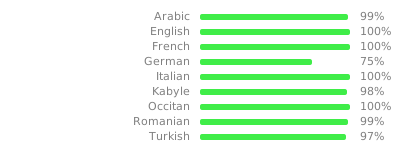
To update the translation, simply execute make that will update the .pot file,
which will merge the .po files which then will allow to create updated .mo files.
Contributors
These people are the authors of the code of this software :
Vincent LAURENT (24ème), Jean-Baptiste Le Metayer (24ème), Xavier Garnier (Logilab), Simon Chabot (Logilab), Tangui Morlier (24ème), Gabriel POMA (24ème), Tanguy Le Faucheur (24ème), Étienne Deparis, battosai30
Fundings
- 1 365 € excl. taxes from the company Logilab for the development of the shared signature feature
- 1 950 € excl. taxes from the company Logilab for the development of the metadata editing feature
- 100 € excl. taxes donations from the company Spirkop
- 100 € excl. taxes donations from the company PDG IT
- 1 040 € excl. taxes from the foundation NLNet for software internationalization
- 1 040 € excl. taxes from the foundation NLNet for compress / Reduce PDF File Size
- 1 040 € excl. taxes from the foundation NLNet for encrypt PDFs transmitted and stored on servers
- 1 040 € excl. taxes from the foundation NLNet for signature signed and verified with a key
- 1 040 € excl. taxes from the foundation NLNet for client side organization of the PDF
- 520 € excl. taxes from the foundation NLNet for debian package
- 520 € excl. taxes from the foundation NLNet for allow PDFs to be stored outside
The development of the software was primarily done during the working hours of 24ème employees.
Screenshots
Signature feature
Organizing feature
Metadata feature