scylla is a free, open source data extraction & web scraping project written in Python and released under Apache-2.0. It has 4,022 GitHub stars, 469 forks and 48 open issues, and was last pushed 5 hours ago. On this registry it ranks #52 of 150 tracked projects in Data Extraction & Web Scraping, with 5 head-to-head comparisons available.

What is scylla?

Scylla is an open-source Python proxy pool that automatically crawls and validates public proxy IP addresses and then serves them through a JSON API, a web interface and an HTTP forward proxy, for developers and data teams who need a rotating supply of proxies to extract content from the internet or assemble training data for large language models.

What it is

Scylla is a Python application in the Data & Analytics / Data Extraction & Web Scraping category, released under the Apache-2.0 licence. It runs a crawler that discovers public proxy IPs, tests them, and stores the results, alongside a web server that publishes the surviving proxies both as structured data and as a working proxy endpoint. A single process can provide the crawler, the JSON API on port 8899 and the forward proxy on port 8081.

The concrete problem it solves is proxy supply. Anyone scraping at volume has to find proxy addresses, check whether they still respond, discard the dead ones, and rotate what remains. Scylla automates that cycle: it crawls, validates, and keeps records that carry per-proxy measurements such as latency, stability, is_valid, attempts and https_attempts, so callers can choose. It replaces the manual chore of collecting and testing public proxies with a queryable pool that existing scraping code can consume.

Key capabilities

  • Automatic proxy IP crawling and validation, with each proxy stored alongside its validity flag, latency, stability score and attempt counts.
  • A JSON API at /api/v1/proxies supporting page, limit, anonymous and https filters plus a countries filter that accepts single values such as US or comma-separated lists such as US,GB.
  • A statistics endpoint at /api/v1/stats returning median, mean, valid_count and total_count for the current pool.
  • A web-based user interface that includes a geographical distribution view of the proxies in the database.
  • A built-in HTTP forward proxy server on port 8081 that selects a recently updated proxy from the database at random for each incoming request.
  • Integration with Scrapy and with requests requiring as little as one line of code.
  • Support for headless browser crawling.

Who uses it and how

  • Teams running Scrapy spiders or requests-based scrapers that need changing egress IPs can point the library at the pool instead of building proxy rotation themselves.
  • Projects that prefer not to touch application code can route traffic through the forward proxy on port 8081 and let Scylla pick a proxy per request.
  • Data collection groups building corpora for large language models, which is the use case named in the project's own description.
  • Operators who want to inspect coverage before scraping can query the API by country or read the geographical distribution in the web interface.
  • Self-hosters running a single container with a persistent volume mounted at /var/www/scylla to retain the database between restarts.

Getting started

The README recommends Docker: docker run -d -p 8899:8899 -p 8081:8081 -v /var/www/scylla:/var/www/scylla --name scylla wildcat/scylla:latest. Alternatively, install with pip install scylla and run the scylla command, or build from source; the first run needs one to two minutes before proxies appear in the database.

How it compares

No paid products are listed as being replaced by this project, and the other tools named in the facts — Scrapy and requests — are integration targets rather than alternatives, so Scylla stands alone in this registry as a proxy pool. Its distinguishing position is that it supplies proxies to those libraries rather than replacing them.

When to use it — and when not to

Choose Scylla if the requirement is a self-hosted, continuously refreshed pool of public proxies behind a simple HTTP interface, and if uneven performance is acceptable. A self-hoster must operate the container or Python process, keep the /var/www/scylla volume durable, and allow the crawler time to populate an initially empty database. The pool is built from crawled public proxies rather than vetted or commercial ones, and the exposed latency and stability values show that quality varies widely, so workloads that need guaranteed uptime, contractual throughput or verified IP reputation should look elsewhere.

project readme (upstream, from github) — read inline

banner_scylla Build Status codecov Documentation Status PyPI version Docker Pull Donate

Scylla

An intelligent proxy pool for humanities, to extract content from the internet and build your own Large Language Models in this new AI era.

Key features:

  • Automatic proxy ip crawling and validation
  • Easy-to-use JSON API
  • Simple but beautiful web-based user interface (eg. geographical distribution of proxies)
  • Get started with only 1 command minimally
  • Simple HTTP Forward proxy server
  • Scrapy and requests integration with only 1 line of code minimally
  • Headless browser crawling

Get started

Installation

Install with Docker (highly recommended)

docker run -d -p 8899:8899 -p 8081:8081 -v /var/www/scylla:/var/www/scylla --name scylla wildcat/scylla:latest

Install directly via pip

pip install scylla
scylla --help
scylla # Run the crawler and web server for JSON API

Install from source

git clone https://github.com/imWildCat/scylla.git
cd scylla

pip install -r requirements.txt

cd frontend
npm install
cd ..

make assets-build

python -m scylla

Usage

This is an example of running a service locally (localhost), using port 8899.

Note: You might have to wait for 1 to 2 minutes in order to get some proxy ips populated in the database for the first time you use Scylla.

JSON API

Proxy IP List
http://localhost:8899/api/v1/proxies

Optional URL parameters:

Parameters Default value Description
page 1 The page number
limit 20 The number of proxies shown on each page
anonymous any Show anonymous proxies or not. Possible values:true, only anonymous proxies; false, only transparent proxies
https any Show HTTPS proxies or not. Possible values:true, only HTTPS proxies; false, only HTTP proxies
countries None Filter proxies for specific countries. Format example: US, or multi-countries: US,GB

Sample result:

{
    "proxies": [{
        "id": 599,
        "ip": "91.229.222.163",
        "port": 53281,
        "is_valid": true,
        "created_at": 1527590947,
        "updated_at": 1527593751,
        "latency": 23.0,
        "stability": 0.1,
        "is_anonymous": true,
        "is_https": true,
        "attempts": 1,
        "https_attempts": 0,
        "location": "54.0451,-0.8053",
        "organization": "AS57099 Boundless Networks Limited",
        "region": "England",
        "country": "GB",
        "city": "Malton"
    }, {
        "id": 75,
        "ip": "75.151.213.85",
        "port": 8080,
        "is_valid": true,
        "created_at": 1527590676,
        "updated_at": 1527593702,
        "latency": 268.0,
        "stability": 0.3,
        "is_anonymous": true,
        "is_https": true,
        "attempts": 1,
        "https_attempts": 0,
        "location": "32.3706,-90.1755",
        "organization": "AS7922 Comcast Cable Communications, LLC",
        "region": "Mississippi",
        "country": "US",
        "city": "Jackson"
    },
    ...
    ],
    "count": 1025,
    "per_page": 20,
    "page": 1,
    "total_page": 52
}
System Statistics
http://localhost:8899/api/v1/stats

Sample result:

{
    "median": 181.2566407083,
    "valid_count": 1780,
    "total_count": 9528,
    "mean": 174.3290085201
}

HTTP Forward Proxy Server

By default, Scylla will start a HTTP Forward Proxy Server on port 8081. This server will select one proxy updated recently from the database and it will be used for forward proxy. Whenever an HTTP request comes, the proxy server will select a proxy randomly.

Note: HTTPS requests are not supported at present.

The example for curl using this proxy server is shown below:

curl http://api.ipify.org -x http://127.0.0.1:8081

You could also use this feature with requests:

requests.get('http://api.ipify.org', proxies={'http': 'http://127.0.0.1:8081'})

Web UI

Open http://localhost:8899 in your browser to see the Web UI of this project.

Proxy IP List
http://localhost:8899/

Screenshot:
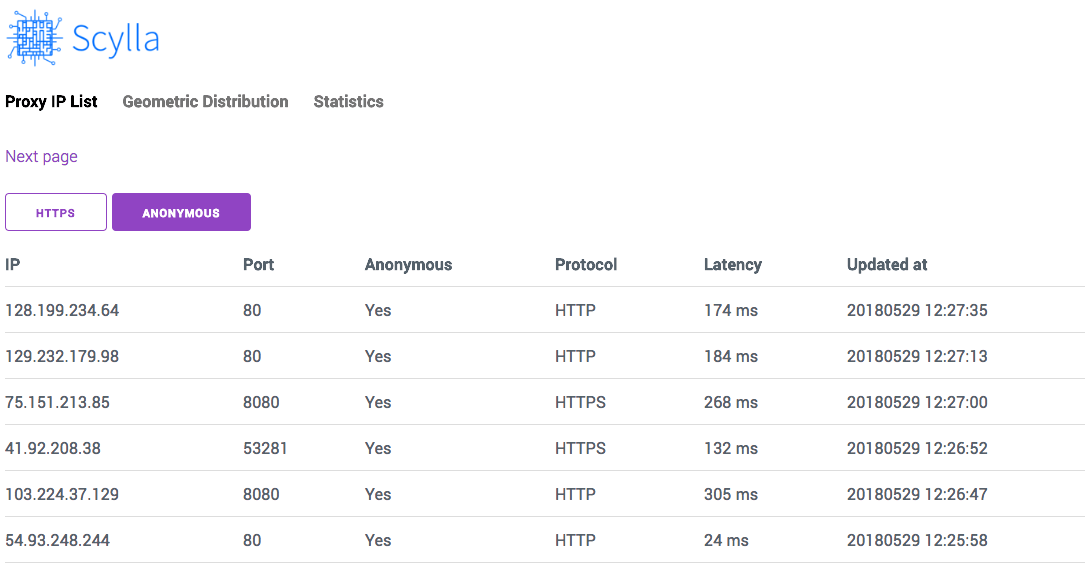
screenshot-proxy-list

Globally Geographical Distribution Map
http://localhost:8899/#/geo

Screenshot:

screenshot-geo-distribution

API Documentation

Please read Module Index.

Roadmap

Please see Projects.

Development and Contribution

git clone https://github.com/imWildCat/scylla.git
cd scylla

pip install -r requirements.txt

npm install
make assets-build

Testing

If you wish to run tests locally, the commands are shown below:

pip install -r tests/requirements-test.txt
pytest tests/

You are welcomed to add more test cases to this project, increasing the robustness of this project.

Naming of This Project

Scylla is derived from the name of a group of memory chips in the American TV series, Prison Break. This project was named after this American TV series to pay tribute to it.

Help

How to install Python Scylla on CentOS7

Donation

If you find this project useful, could you please donate some money to it?

No matter how much the money is, Your donation will inspire the author to develop new features continuously! 🎉 Thank you!

The ways for donation are shown below:

GitHub Sponsor

I super appreciate if you can join my sponsors here.

PayPal

paypal_donation

License

Apache License 2.0. For more details, please read the LICENSE file.

Frequently asked questions

Is scylla free to use?

scylla is open source under the Apache-2.0 licence. There is no licence fee and no seat count — you can self-host it or, where the project offers one, pay a vendor for a managed version instead.

What does scylla do?

Intelligent proxy pool for Humans™ to extract content from the internet and build your own Large Language Models in this new AI era

What is scylla written in?

scylla is primarily written in Python. Its source is publicly available at https://github.com/MikeChongCan/scylla, and it has 4,022 GitHub stars.