Samarium is an MIT-licensed, Laravel-based open-source business management system that bundles basic ERP, point of sale, invoicing, and CMS functions into a single self-hosted application, aimed at small businesses that need simple operations tooling without enterprise cost or complexity.
What it is
Samarium is a work-in-progress business management system built on Laravel, written primarily in Blade templates with Livewire components, and backed by MySQL. It collects several small-business functions into one place: simple invoice generation, income and expense tracking, a customer database, inventory tracking, a point of sale with receipt generation, product management, a basic CMS with pages such as About and Contact, plus task management, a calendar, a notice board, and an analytics dashboard. The project describes itself as having started as a learning exercise that grew into something potentially useful to others, and it is explicit that many features remain under development. Version 0.9.6 is the current release number, and the repository is published under the MIT licence with 505 stars and 85 forks.
The concrete problem it addresses is fragmentation and cost. A small business that needs invoices, a customer list, stock counts, and a checkout till would otherwise buy or subscribe to separate commercial packages, or pay for an enterprise ERP suite built for organisations far larger than itself. Samarium replaces that stack with one self-hosted Laravel application that can be deployed with Docker, so the business keeps its own database and its own data rather than renting access to someone else's. The trade-off stated in the project itself is that the replacement is not feature-complete: the README says the software "might be useful for simple business needs" and warns plainly that many features are still being refined.
Key capabilities
- Invoice generation, income and expense tracking, customer database management, and basic inventory tracking form the ERP core.
- Point of sale covers a checkout process, receipt generation, and product management.
- CMS module provides basic pages such as About and Contact, alongside content management.
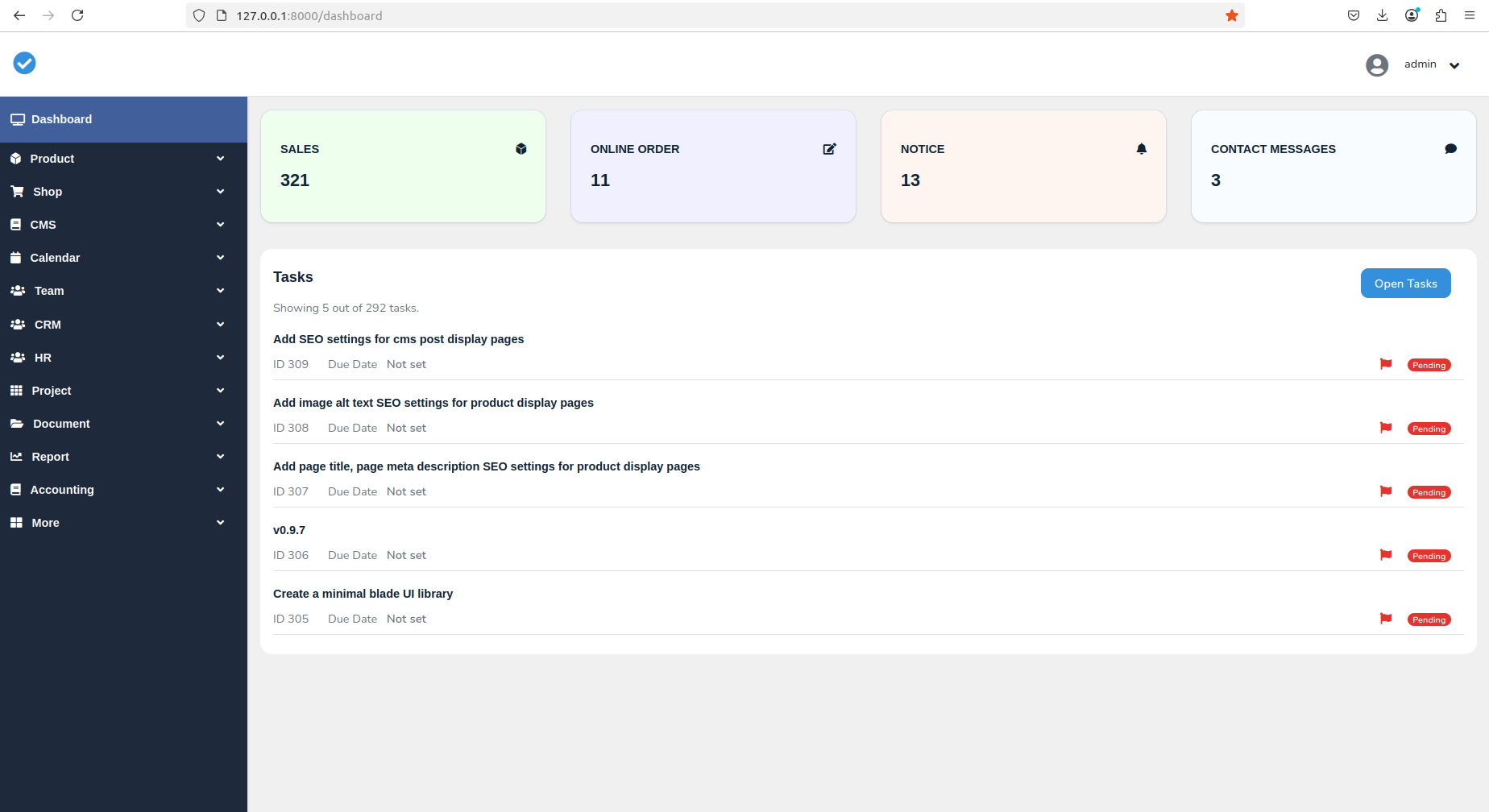
- Additional tools include task management, a calendar system, a notice board, and a simple analytics dashboard.
- Modular architecture lets modules be toggled in
config/app.php via the 'modules' array, with entries such as 'dashboard', 'product', 'shop', 'calendar', and 'analytics' set to true or false.
- Theme colours are customisable in the same configuration file through keys like
'app_menu_bg_color' and 'app_top_menu_bg_color'.
- Docker support ships as
docker-compose plus a Dockerfile, with an .env.docker.example file provided for container configuration.
Who uses it and how
- Small businesses wanting a free alternative to expensive commercial business software, running it on their own hardware with PHP 8.2 or later and MySQL 8.0 or later.
- Teams that want a till, an invoice trail, and a customer list in one login rather than across several subscriptions.
- Developers wanting to contribute to, or learn from, a Laravel business system built on Livewire 3 and Bootstrap.
- Self-hosters who prefer a
docker-compose up --build -d deployment with the application reachable at http://127.0.0.1:8000 and the dashboard at /dashboard.
- Anyone needing basic business management tools while accepting that the project is still evolving.
Getting started
The easiest route is Docker: clone the repository, copy .env.docker.example to .env, run docker-compose up --build -d, then execute the first-time setup commands inside the container, including php artisan migrate, php artisan key:generate, php artisan storage:link, and php artisan db:seed. A manual installation path also exists using Composer, npm, and php artisan serve.
How it compares
No paid products are named in the project's own materials, and no comparable tools are named either, so Samarium stands alone in this registry rather than being positioned against a specific list of alternatives. The distinction it claims for itself is a free, MIT-licensed, self-hosted replacement for expensive business software, with the data staying on the operator's own MySQL instance.
When to use it — and when not to
A self-hoster must run PHP 8.2 or later, MySQL 8.0 or later, Composer, and Node.js with npm, plus seed the database and link storage before first use, so there is real operational work beyond starting a container. The project states its own weaknesses openly: many features are basic and need improvement, documentation could be much better, and some modules are incomplete, with only three open issues and version numbering still below 1.0. Anyone who needs a mature, fully documented ERP with support commitments should not pick this yet; it suits operators who accept an evolving 0.9.x codebase in exchange for a free, self-hosted system they control.
project readme (upstream, from github) — read inline
Samarium - Business Management System





A simple ERP system for small businesses - still growing and improving
Quick Start • Features • Installation • Contributing
About Samarium
Samarium is a work-in-progress business management system that aims to help small businesses handle basic operations like invoicing, inventory, and customer management in one place. While it's still in active development with many features being refined and added, it might be useful for simple business needs.
The project started as a learning exercise but has grown into something that could potentially help others who need basic business management tools without the complexity or cost of enterprise solutions.
Current Features
Please note: Many features are still being developed and improved. What's available now:
Basic ERP Functions
- Simple invoice generation
- Basic financial tracking (income/expenses)
- Customer database management
- Basic inventory tracking
Point of Sale
- Simple checkout process
- Basic receipt generation
- Product management
Website Management
- Simple CMS functionality
- Basic pages (About, Contact, etc.)
- Basic content management
Additional Tools
- Task management (basic)
- Calendar system
- Notice board
- Simple analytics dashboard
Customization Options
- Modular architecture (enable/disable features)
- Basic theme customization
- Configuration options
Who Might Find This Useful
This might be helpful for:
- Small businesses looking for a simple, free alternative to expensive software
- Developers wanting to contribute to or learn from a Laravel-based business system
- Anyone needing basic business management tools while understanding this is still evolving
Quick Start
Using Docker (Easiest)
git clone https://github.com/oitcode/samarium.git
cd samarium
cp .env.docker.example .env
docker-compose up --build -d

# First-time setup only
docker exec -it samarium_app npm run dev
docker exec -it samarium_app composer dump-autoload
docker exec -it samarium_app php artisan migrate
docker exec -it samarium_app php artisan key:generate
docker exec -it samarium_app php artisan storage:link
docker exec -it samarium_app php artisan db:seed

# Visit: http://127.0.0.1:8000 (website)
# Dashboard: http://127.0.0.1:8000/dashboard
Installation
Manual Installation (requires PHP, MySQL, etc.)
Requirements
- PHP >= 8.2
- MySQL >= 8.0
- Composer
- Node.js & npm
Steps
git clone https://github.com/oitcode/samarium.git
cd samarium
cp .env.example .env

# Create database and update .env with your database credentials:
# DB_DATABASE=your_database_name
# DB_USERNAME=your_username
# DB_PASSWORD=your_password

composer install
npm install
npm run dev

php artisan migrate
php artisan key:generate
php artisan storage:link
php artisan db:seed

php artisan serve
Access at http://127.0.0.1:8000
Configuration
You can enable or disable modules in config/app.php:
'modules' => [
    'dashboard' => true,
    'product' => true,
    'shop' => true,
    'calendar' => true,
    'analytics' => false, // Disable unused features
],
Theme colors can be customized in the same file:
'app_menu_bg_color' => 'bg-dark',
'app_top_menu_bg_color' => 'bg-light',
Current Limitations
Being honest about where things stand:
- Many features are still basic and need improvement
- Documentation could be much better
- Some modules are incomplete
- UI/UX needs work in many areas
- Testing coverage is limited
- Performance optimizations are needed
Contributing
If you're interested in helping improve this project, contributions are very welcome:
- Bug reports: If something doesn't work as expected
- Feature suggestions: Ideas for improvements
- Code contributions: Help fix issues or add features
- Documentation: Help make things clearer for others
- Testing: Help identify problems
Feel free to open issues or pull requests. Even small improvements are appreciated.
Technical Details
- Backend: Laravel (PHP), Livewire
- Frontend: Bootstrap, Livewire
- Database: MySQL
- Containerization: Docker support included
License
MIT License - feel free to use, modify, and distribute.
A Note
This project is still evolving. While it works for basic needs, please consider it as "early stage" software. If you try it and encounter issues or have suggestions, feedback would be genuinely helpful for making it better.
Thanks for taking a look at this project.