saber is a free, open source note taking & knowledge management project written in Dart and released under GPL-3.0. It has 4,815 GitHub stars, 371 forks and 401 open issues, and was last pushed 4 days ago. On this registry it ranks #25 of 37 tracked projects in Note Taking & Knowledge Management, with 5 head-to-head comparisons available.

What is saber?

Saber is a cross-platform, open-source handwriting notes app for Android, iOS, Linux, macOS and Windows, built for students, professionals and anyone else who writes by hand on a screen and wants their notes to stay on their own terms.

What it is

Saber is a note-taking application written in Dart and built with Flutter, released under the GPL-3.0 licence. It is designed around handwriting rather than typed text, and it ships for a wide set of platforms: Android, iOS, Linux, macOS and Windows. Notes sync across those devices, so a page written on a tablet is available on a phone or a desktop machine. The app holds 4,815 stars and 371 forks on GitHub, and it lives inside the Flutter and Dart ecosystem, distributed through F-Droid, Flathub, Google Play, the App Store, a Windows download and an AppImage.

The concrete problem it solves is closed, opaque note-taking software that treats the inner workings of the app as a mystery and gives the user no say over where the data lives. Saber replaces that model with an open-source app whose source anyone may read, and with a sync model that lets the user place notes on the official Saber server, a third-party server, or a server of their own. On top of that, it addresses two specific paper-like problems: reading and writing in low light, and highlighting multi-line equations without the highlighter changing colour where it overlaps itself or fading the text underneath it.

Key capabilities

  • Dark mode inversion applies to notes, images and PDFs, allowing white ink on a black background and keeping digitised printouts and textbook pages readable in low light.
  • A dual-password system protects notes from anyone but the author, including anyone with complete control over the server.
  • The highlighter uses canvas compositing so that overlapping strokes keep a consistent colour and never render on top of the text they are meant to mark.
  • Notes can be organised into folders nested inside folders with no limit on depth, while recent notes remain reachable from the home screen.
  • Sync works across phones, tablets and desktops, with storage on the official Saber server, another server, or a self-hosted one.
  • Distribution covers Google Play and F-Droid for Android, the App Store for iOS, Flathub and AppImage for Linux, and a Windows download.
  • The README is translated into English, čeština, Deutsch, Simplified Chinese, Traditional Chinese, Arabic and Tiếng Việt.

Who uses it and how

  • Students in a classroom where the lights are turned off can keep writing in dark mode with inverted notes, images and PDFs.
  • People studying maths and similar subjects can highlight multi-line equations without the colour shifting at each overlap.
  • Note-takers who move between a phone, a tablet and a desktop rely on sync to keep one set of notes current everywhere.
  • Privacy-conscious users can keep their notes on the official Saber server, on another server, or on their own hardware, with the dual-password system limiting what a server operator can read.
  • Users writing in Czech, German, Chinese, Arabic or Vietnamese can work from a README in their own language.

Getting started

Saber installs through the platform stores and package channels the README links: Google Play and F-Droid on Android, the App Store on iOS, Flathub and the AppImage build on Linux, and the Windows download. The project homepage at https://saber.adil.hanney.org is the reference point for obtaining the app.

How it compares

The facts provided name no comparable or paid products, so Saber stands alone in this registry on that axis. The only contrast the material supports is against closed-source and proprietary note-taking apps in general, which the README describes as having inner workings that are a mystery to the public.

When to use it — and when not to

Anyone who wants server-side sync must be willing to run that server themselves or trust someone else to run it, and the README does not spell out the deployment requirements for a self-hosted instance. The README is also thin in places: the feature list defers to issue #1 for progress, the install section arrives truncated in the material available, and the repository carries 401 open issues alongside its 4,815 stars. Saber is a poor fit for anyone who needs typed-text note-taking first or a fully documented, single-command server deployment, and a good fit for handwriting-first users on the supported platforms who accept GPL-3.0 software with an active but imperfect issue tracker.

project readme (upstream, from github) — read inline

Logo Saber

Get it on Google Play   Get it on F-Droid   Download on the App Store   Download for Windows   Download on Flathub   Get it as an AppImage

English | čeština | Deutsch | 中文 (简体中文, 中国) | 中文 (繁體, 台灣) | العربية | Tiếng Việt

Saber is the notes app built for handwriting.

It's designed to be as simple and intuitive as possible, while still delivering unique features that you'll actually use. Additionally, Saber is available across all your devices, large and small, and syncs between them seamlessly.

Notably, it can invert your notes when you're in dark mode. This allows you to write with white ink on a black background, which is much easier on the eyes in low-light environments like when the teacher turns off the lights in class. Images and PDFs are also inverted, so you can still use a digital printout or a textbook without the fuss.

Saber uses a dual-password system to protect your notes from anyone but you, even if they have complete control over the server. You can safely store your notes on the official Saber server, another server, or even host your own!

The app is completely open-source so that anyone can view the source code and see exactly what it's doing and how it handles your data. Many other note-taking apps are closed-source and proprietary, meaning that their inner workings are a mystery to the public.

As someone who studies maths, highlighting multi-line equations was always a hassle with other apps, where the highlighter would change color when it overlapped with itself. Another problem I had was that in some apps, the highlighter would render on top of the text, fading it out and making it hard to read. Saber's highlighter has no such issues. It utilizes canvas compositing to render the highlighter in a way that is consistent with/better than traditional paper, where it handles overlaps and maintains color consistency.

Saber has everything you need to keep your notes organized. Create folders inside folders inside folders to your heart's content with no limit on the number of nested folders. And even though a note may be buried deep within a nested folder, you can still access it easily with your most recent notes always available on the home screen.

Discover a whole new way to capture and organize your thoughts with Saber. Whether you're a student, professional, or creative mind, Saber is your trusted companion for digital handwriting. Download now and let your ideas flow freely!


Latest release Flathub F-Droid GitHub downloads Flathub downloads GitHub Sponsors License Translation status Codecov

Tap to show/hide screenshots

Features

Please see #1 Saber progress.

Install

Please see Install Saber on the wiki.

Build from source

Please see Build Saber on the wiki.

Links

Translating

All translations are thanks to our community of contributors.

If you'd like to help out translating Saber, head to Weblate!
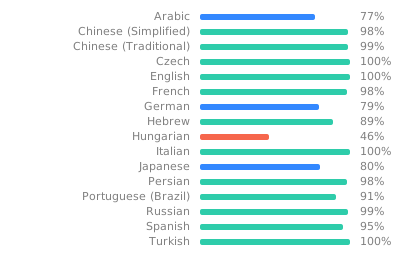
Translation status

Note: To avoid falling back to English, any gaps in the translations are filled in by machine translation until a human can contribute.

Supporting Saber

If you like Saber, please consider supporting it by:

  • Spreading the word!
  • Starring the project on GitHub
  • Sponsoring me on GitHub Sponsors
  • Donating via PayPal
  • Buying more storage on the Nextcloud server: see Pricing

Development notes

Please see Maintainer notes on the wiki.

Frequently asked questions

Is saber free to use?

saber is open source under the GPL-3.0 licence. There is no licence fee and no seat count — you can self-host it or, where the project offers one, pay a vendor for a managed version instead.

What does saber do?

The cross-platform open-source app built for handwriting

What is saber written in?

saber is primarily written in Dart. Its source is publicly available at https://github.com/saber-notes/saber, and it has 4,815 GitHub stars.