Reflex is an open-source Apache-2.0 Python library for building full-stack web apps and internal tools entirely in Python, aimed at Python developers who want a browser-based frontend without learning JavaScript.
What it is
Reflex is a full-stack web framework distributed as the reflex package on PyPI and hosted on GitHub, where it has collected 28,887 stars, 1,777 forks, and 346 open issues, with a last push dated 2026-09-16. It lives in the Python web ecosystem and is listed under the Developer Tools / Version Control & Collaboration category, with topics covering dashboards, data analysis, data science, data visualization, fullstack, GUI, and general web app development. The project describes itself as a library to build full-stack web apps in pure Python, and the README states directly that the frontend and backend are both written in Python, so there is no need to learn JavaScript. A hosted companion site at reflex.dev carries documentation, an AI Builder, an Agent Toolkit, and app hosting.
The concrete problem it solves is the split-stack tax on Python teams. Instead of maintaining a Python backend alongside a separate JavaScript or TypeScript frontend codebase, a developer defines the user interface and the application state in the same language and the same project. The thing it replaces is therefore the hand-written JavaScript layer that normally sits in front of a Python service. State is expressed as a class subclassing rx.State, UI is composed from components such as rx.vstack, rx.heading, rx.input, rx.button, and rx.image, and pages are registered on an application object with app.add_page(...), which accepts arguments such as title.
Key capabilities
- Pure Python frontend and backend, with no JavaScript required in the application source, as stated in the introduction.
- Declarative component composition using
rx.vstack, rx.heading, rx.input, rx.button, and rx.image.
- Server-side state management through classes that subclass
rx.State, with typed state fields such as prompt: str and processing: bool.
- Event handlers declared with the
@rx.event decorator, including async handlers that call external APIs, as shown by the generate handler calling an image model.
- Streaming and intermediate state updates from an event handler using
yield inside an async event, which lets the UI reflect partial progress.
- Page registration and routing via
app.add_page(index, title="Reflex:Image Generation") on an rx.App() instance.
- Command-line workflow through
reflex init and reflex run, with fast refresh so saved source changes appear instantly, and a development server bound to http://localhost:3000.
- Optional AI and agent integrations: an AI Builder for generating full-stack apps, and an Agent Toolkit that connects MCP and Skills to a coding assistant.
Who uses it and how
- Python data teams building dashboards and data visualization frontends, given the
dashboard, data-analysis, data-science, and data-visualization topics attached to the repository.
- Developers building internal tools and GUI-style applications who want a web UI but do not want a separate JavaScript project or a second build toolchain.
- Small teams that need one language across the stack, which removes the boundary between frontend and backend contributors and lets the same person own a feature end to end.
- Applications that range from simple to complex, since the README states Reflex is easy to get started with but can also scale to complex apps.
- Teams that prefer not to operate infrastructure themselves can deploy and manage apps through the App Management hosting option at reflex.dev/hosting.
Getting started
The README recommends a virtual environment, then creating a project with mkdir my_app_name, cd my_app_name, uv init, uv add reflex, uv run reflex init, and uv run reflex run. The app then serves at http://localhost:3000, and the source is edited in my_app_name/my_app_name.py. The package is also published on PyPI under the name reflex, and reflex.dev/hosting provides a managed deploy option.
How it compares
The facts available here do not name any paid products that Reflex replaces, and they do not name any competing framework either. Reflex therefore stands alone in this registry, with no directly comparable project listed alongside it, and the comparison axes of licence, self-hosting, data ownership, and cost model cannot be drawn against named alternatives.
When to use it — and when not
Reflex is Apache-2.0 licensed and actively pushed, so the licence is clear and the project is live, but a self-hoster still operates the Python application server and the frontend build that the framework produces, and the README excerpt gives no detail on databases, object storage, or mail configuration. Anyone who needs fine-grained control over the emitted JavaScript, or who already has a mature JavaScript stack and team, has little reason to adopt it. The repository also carries 346 open issues as of the last push, which is a large triage load and worth reviewing against your own risk tolerance before committing.
project readme (upstream, from github) — read inline

✨ Performant, customizable web apps in pure Python. Deploy in seconds. ✨






[!NOTE]
Build faster with Reflex:
Introduction
Reflex is a library to build full-stack web apps in pure Python.
Key features:
- Pure Python - Write your app's frontend and backend all in Python, no need to learn Javascript.
- Full Flexibility - Reflex is easy to get started with, but can also scale to complex apps.
See our architecture page to learn how Reflex works under the hood.
⚙️ Installation
Important: We strongly recommend using a virtual environment to ensure the reflex command is available in your PATH.
🥳 Create your first app
Create a project, add Reflex, and start the development server with uv:
mkdir my_app_name
cd my_app_name
uv init

uv add reflex
uv run reflex init
uv run reflex run
You should see your app running at http://localhost:3000.
Now you can modify the source code in my_app_name/my_app_name.py. Reflex has fast refreshes so you can see your changes instantly when you save your code.
🫧 Example App
Build an image generation app in Python with Reflex: define the UI, manage state in a class, and call an image model from an event handler.
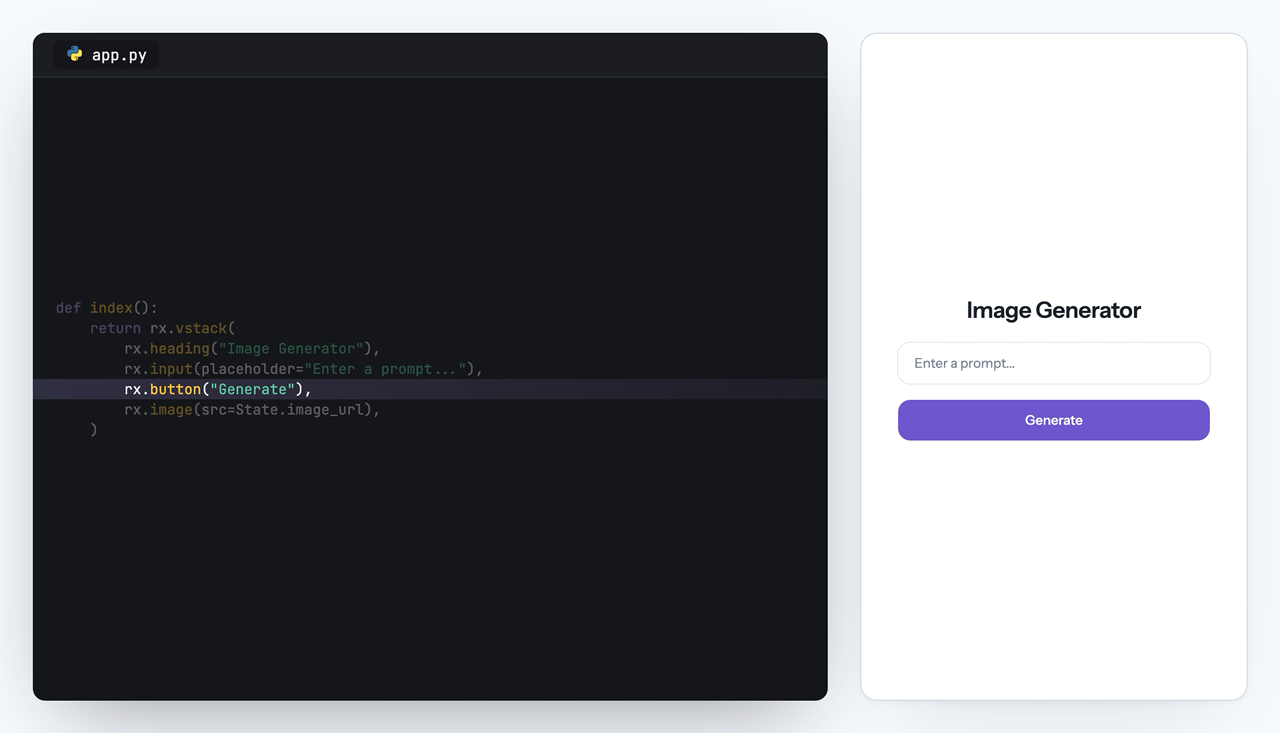
import reflex as rx
import openai

client = openai.AsyncOpenAI()


class State(rx.State):
    prompt: str = ""
    image_url: str = ""
    processing: bool = False

    @rx.event
    def set_prompt(self, value: str):
        self.prompt = value

    @rx.event
    async def generate(self):
        self.processing = True
        yield
        response = await client.images.generate(
            model="gpt-image-1.5",
            prompt=self.prompt,
        )
        self.image_url = f"data:image/png;base64,{response.data[0].b64_json}"
        self.processing = False


def index():
    return rx.vstack(
        rx.heading("Image Generator"),
        rx.input(placeholder="Enter a prompt...", on_change=State.set_prompt),
        rx.button("Generate", on_click=State.generate, loading=State.processing),
        rx.image(src=State.image_url),
    )


app = rx.App()
app.add_page(index, title="Reflex:Image Generation")
All Thanks To Our Contributors: