Designed for simplicity, customization, and developer productivity.

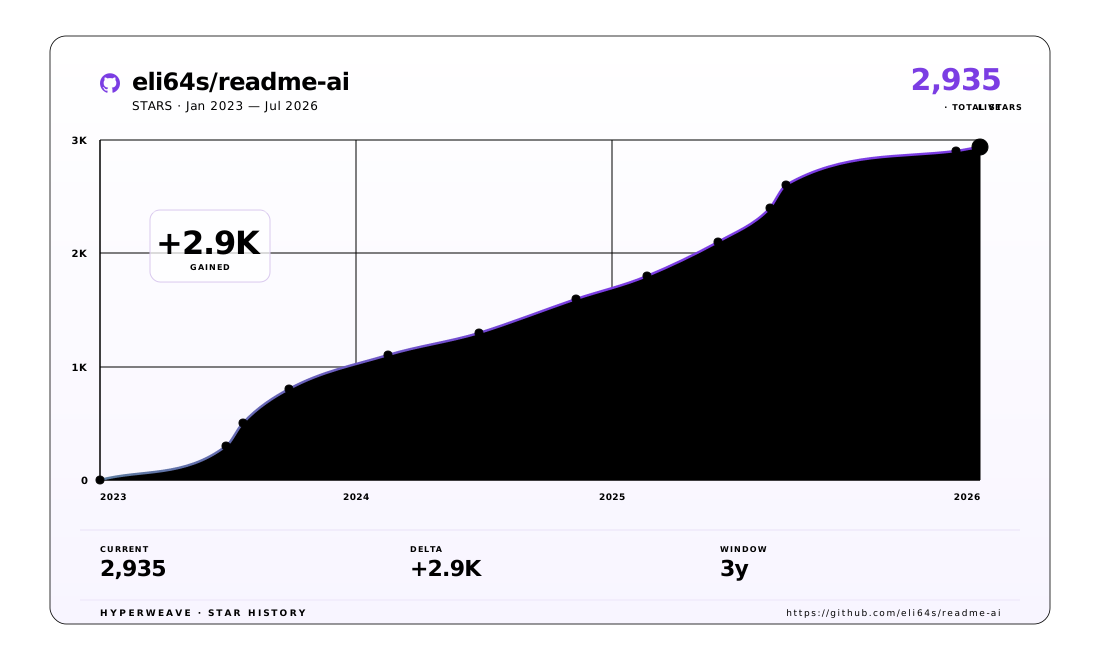
The metrics above are rendered with HyperWeave — an experimental SVG artifact layer for agents. Explore →

Quick Links
[!IMPORTANT] Explore the Official Documentation for a complete list of features, customization options, and examples.
Introduction
ReadmeAI is a developer tool that automatically generates README files using a robust repository processing engine and advanced language models. Simply provide a URL or path to your codebase, and a well-structured and detailed README will be generated.
Why Use ReadmeAI?
This project aims to streamline the process of creating and maintaining documentation across all technical disciplines and experience levels. The core principles include:
- 🔵 Automate: Generate detailed and structured README files with a single command.
- ⚫️ Customize: Select from a variety of templates, styles, badges, and much more.
- 🟣 Flexible: Switch between
OpenAI,Ollama,Anthropic, andGeminianytime. - 🟠 Language Agnostic: Compatible with a wide range of languages and frameworks.
- 🟡 Best Practices: Ensure clean and consistent documentation across all projects.
- 🟢 Smart Filtering: Intelligent file analysis with customizable
.readmeaiignorepatterns. - ⛔️ Offline Mode: Create README files offline, without using a LLM API service.
Demo
Run from your terminal:
Features
Customize Your README
Let's begin by exploring various customization options and styles supported by ReadmeAI:
Header Styles
 >
CLI Command:
|
 >
CLI Command:
|
 >
CLI Command:
|
Banner Styles
 >
CLI Command:
|
 >
CLI Command:
|
And More!
 >
CLI Command:
|
 >
CLI Command:
|
Generated Sections & Content
꩜ Expand to view more!
Project Introduction
|
|---|
|
Features Table
|
|---|
 |
Project Structure
|
|---|
 |
Project Index
|
 |
Getting Started Guides
|
|---|
 |
Installation, Usage, & Testing
|
 |
Community & Support
|
|---|
 |
Contribution Guides
|
 |
Getting Started
Prerequisites
ReadmeAI requires Python 3.10 or higher, and one of the following installation methods:
| Requirement | Details |
|---|---|
| • Python ≥3.10 | Core runtime |
| Installation Method (choose one) | |
| • pip | Default Python package manager |
| • pipx | Isolated environment installer |
| • uv | High-performance package manager |
| • docker | Containerized environment |
Supported Repository Platforms
To generate a README file, provide the source repository. ReadmeAI supports these platforms:
| Platform | Details |
|---|---|
| File System | Local repository access |
| GitHub | Industry-standard hosting |
| GitLab | Full DevOps integration |
| Bitbucket | Atlassian ecosystem |
Supported LLM API Services
ReadmeAI is model agnostic, with support for the following LLM API services:
| Provider | Best For | Details |
|---|---|---|
| OpenAI | General use | Industry-leading models |
| Anthropic | Advanced tasks | Claude language models |
| Google Gemini | Multimodal AI | Latest Google technology |
| Ollama | Open source | No API key needed |
| Offline Mode | Local operation | No internet required |
Installation
ReadmeAI is available on PyPI as readmeai and can be installed as follows:
 Pip
Pip
Install with pip (recommended for most users):
❯ pip install -U readmeai
 Pipx
Pipx
With pipx, readmeai will be installed in an isolated environment:
❯ pipx install readmeai
 Uv
Uv
The fastest way to install readmeai is with uv:
❯ uv tool install readmeai
 Docker
To run readmeai in a containerized environment, pull the latest image from [Docker Hub][dockerhub-link]:
❯ docker pull zeroxeli/readme-ai:latest
 From source
Click to build readmeai from source
Clone the repository:
❯ git clone https://github.com/eli64s/readme-aiNavigate to the project directory:
❯ cd readme-aiInstall dependencies:
❯ pip install -r setup/requirements.txt
Alternatively, use the [setup script][setup-script] to install dependencies:
 Bash
Bash
Run the setup script:
❯ bash setup/setup.sh
Or, use poetry to build and install project dependencies:
 Poetry
Install dependencies with poetry:
❯ poetry install
Additional Optional Dependencies
[!IMPORTANT] To use the Anthropic and Google Gemini clients, extra dependencies are required. Install the package with the following extras:
Anthropic:
❯ pip install "readmeai[anthropic]"Google Gemini:
❯ pip install "readmeai[google-generativeai]"Install Multiple Clients:
❯ pip install "readmeai[anthropic,google-generativeai]"
Usage
Set your API key
When running readmeai with a third-party service, you must provide a valid API key. For example, the OpenAI client is set as follows:
❯ export OPENAI_API_KEY=<your_api_key>

# For Windows users:
❯ set OPENAI_API_KEY=<your_api_key>
Click to view environment variables for - Ollama, Anthropic, Google Gemini
Ollama
Refer to the Ollama documentation for more information on setting up the Ollama server.
To start, follow these steps:
Pull your model of choice from the Ollama repository:
❯ ollama pull llama3.2:latestStart the Ollama server and set the
OLLAMA_HOSTenvironment variable:❯ export OLLAMA_HOST=127.0.0.1 && ollama serve
Anthropic
Export your Anthropic API key:
❯ export ANTHROPIC_API_KEY=
Google Gemini
Export your Google Gemini API key:
❯ export GOOGLE_API_KEY=
</details>
Using the CLI
Running with a LLM API service
Below is the minimal command required to run readmeai using the OpenAI client:
❯ readmeai --api openai -o readmeai-openai.md -r https://github.com/eli64s/readme-ai
[!IMPORTANT] The default model set is
gpt-3.5-turbo, offering the best balance between cost and performance.When using any model from thegpt-4series and up, please monitor your costs and usage to avoid unexpected charges.
ReadmeAI can easily switch between API providers and models. We can run the same command as above with the Anthropic client:
❯ readmeai --api anthropic -m claude-3-5-sonnet-20240620 -o readmeai-anthropic.md -r https://github.com/eli64s/readme-ai
And finally, with the Google Gemini client:
❯ readmeai --api gemini -m gemini-1.5-flash -o readmeai-gemini.md -r https://github.com/eli64s/readme-ai
Running with local models
We can also run readmeai with free and open-source locally hosted models using the Ollama:
❯ readmeai --api ollama --model llama3.2 -r https://github.com/eli64s/readme-ai
Running on a local codebase
To generate a README file from a local codebase, simply provide the full path to the project:
❯ readmeai --repository /users/username/projects/myproject --api openai
Adding more customization options:
❯ readmeai --repository https://github.com/eli64s/readme-ai \
           --output readmeai.md \
           --api openai \
           --model gpt-4 \
           --badge-color A931EC \
           --badge-style flat-square \
           --header-style compact \
           --navigation-style fold \
           --temperature 0.9 \
           --tree-depth 2
           --logo LLM \
           --emojis solar
Running in offline mode
ReadmeAI supports offline mode, allowing you to generate README files without using a LLM API service.
❯ readmeai --api offline -o readmeai-offline.md -r https://github.com/eli64s/readme-ai
Docker
Run the readmeai CLI in a Docker container:
❯ docker run -it --rm \
    -e OPENAI_API_KEY=$OPENAI_API_KEY \
    -v "$(pwd)":/app zeroxeli/readme-ai:latest \
    --repository https://github.com/eli64s/readme-ai \
    --api openai
 Streamlit
Try readme-ai directly in your browser on Streamlit Cloud, no installation required.

See the readme-ai-streamlit repository on GitHub for more details about the application.
[!WARNING] The readme-ai Streamlit web app may not always be up-to-date with the latest features. Please use the command-line interface (CLI) for the most recent functionality.
From source
Click to run readmeai from source
Bash
If you installed the project from source with the bash script, run the following command:
Activate the virtual environment:
❯ conda activate readmeaiRun the CLI:
❯ python3 -m readmeai.cli.main -r https://github.com/eli64s/readme-ai
Poetry
Activate the virtual environment:
❯ poetry shellRun the CLI:
❯ poetry run python3 -m readmeai.cli.main -r https://github.com/eli64s/readme-ai
Testing
The pytest and nox frameworks are used for development and testing.
Install the dependencies with uv:
❯ uv pip install --dev --group test --all-extras
Run the unit test suite using Pytest:
❯ make test
Using nox, test the app against Python versions 3.10, 3.11, 3.12, and 3.13:
❯ make test-nox
[!TIP] Nox is an automation tool for testing applications in multiple environments. This helps ensure your project is compatible with across Python versions and environments.
Configuration
Customize your README generation with a variety of options and style settings supported such as:
| Option | Description | Default |
|---|---|---|
--align |
Text alignment in header | center |
--api |
LLM API service provider | offline |
--badge-color |
Badge color name or hex code | 0080ff |
--badge-style |
Badge icon style type | flat |
--header-style |
Header template style | classic |
--navigation-style |
Table of contents style | bullet |
--emojis |
Emoji theme packs prefixed to section titles | None |
--logo |
Project logo image | blue |
--logo-size |
Logo image size | 30% |
--model |
Specific LLM model to use | gpt-3.5-turbo |
--output |
Output filename | readme-ai.md |
--repository |
Repository URL or local directory path | None |
--temperature |
Creativity level for content generation | 0.1 |
--tree-max-depth |
Maximum depth of the directory tree structure | 2 |
Run the following command to view all available options:
❯ readmeai --help
Visit the Official Documentation for a complete guide on configuring and customizing README files.
Example Gallery
This gallery showcases a diverse collection of README examples generated across various programming languages, frameworks, and project types.
| Tech | Repository | README | Project Description |
|---|---|---|---|
| Python | README-Python.md | readmeai | ReadmeAI's core project |
| Apache Flink | README-Flink.md | pyflink-poc | PyFlink proof of concept |
| Streamlit | README-Streamlit.md | readmeai-streamlit | Web application interface |
| Vercel & NPM | README-Vercel.md | github-readme-quotes | Deployment showcase |
| Go & Docker | README-DockerGo.md | docker-gs-ping | Containerized Golang app |
| FastAPI & Redis | README-FastAPI.md | async-ml-inference | ML inference service |
| Java | README-Java.md | minimal-todo | Minimalist To-Do app |
| PostgreSQL & DuckDB | README-PostgreSQL.md | buenavista | Database proxy server |
| Kotlin | README-Kotlin.md | android-client | Mobile client application |
| Offline Mode | README-Offline.md | litellm | Offline functionality demo |
Community Contribution
Share Your README Files
We invite developers to share their generated README files in our Show & Tell discussion category. Your contributions help:
- Showcase diverse documentation styles
- Provide real-world examples
- Help improve the ReadmeAI tool
Find additional README examples in our examples directory on GitHub.
Roadmap
- Release
readmeai 1.0.0with robust documentation creation and maintenance capabilities. - Extend template support for various
project typesandprogramming languages. - Develop
Vscode Extensionto generate README files directly in the editor. - Develop
GitHub Actionsto automate documentation updates. - Add
badge packsto provide additional badge styles and options.- Code coverage, CI/CD status, project version, and more.
Contributing
Contributions are welcome! Please read the Contributing Guide to get started.
- 💡 Contributing Guide: Learn about our contribution process and coding standards.
- 🐛 Report an Issue: Found a bug? Let us know!
- 💬 Start a Discussion: Have ideas or suggestions? We'd love to hear from you.
Acknowledgments
A big shoutout to the projects below for their awesome work and open-source contributions:


🎗 License
Copyright © 2023-2025 readme-ai.
Released under the MIT license.
