reaction is a free, open source e-commerce platforms project written in JavaScript and released under GPL-3.0. It has 12,399 GitHub stars, 2,176 forks and 96 open issues, and was last pushed 7 months ago. On this registry it ranks #5 of 30 tracked projects in E-commerce Platforms, with 5 head-to-head comparisons available. It gained 1 stars over the last 3 tracked days.

What is reaction?

Mailchimp Open Commerce, formerly Reaction Commerce, is an API-first, headless commerce platform built on Node.js, MongoDB, and GraphQL for development teams that want to run a custom storefront, marketplace, or multi-shop operation on their own infrastructure — and the project has been discontinued.

What it is

Mailchimp Open Commerce is an open-source commerce backend written in JavaScript and licensed under GPL-3.0. It is distributed through the Node.js ecosystem rather than as a hosted product: the README states that it plays nicely with npm, Docker, and Kubernetes, and MongoDB is the datastore behind its GraphQL API. The repository is reactioncommerce/reaction, with a separate command-line tool maintained at reactioncommerce/cli; the project has accumulated 12,398 stars, 2,177 forks, and 96 open issues, with the most recent push recorded on 2026-03-01. Its topic list places it squarely in headless commerce: cart, commerce, e-commerce, ecommerce-platform, headless, graphql, javascript, mongodb, docker, and marketplace. It ships an admin system alongside the API, and the README presents API, Admin, and Storefront projects as separate things a team creates and works with independently.

The concrete problem it solves is owning the commerce layer of a shop instead of assembling one or renting it. A team that needs cart, catalog, inventory, shipping rates, tax tables, fulfillment methods, order tracking, and transactional emails would otherwise build those subsystems from scratch or hand the whole layer to a vendor. Open Commerce supplies them as a headless GraphQL backend that a custom frontend can query, and it names "Open — Fully open source. Never be locked in again" as one of its features, framing the project as an escape from vendor lock-in rather than as a hosted service. Because the backend is separate from presentation, the storefront and the admin can each be replaced without touching the commerce core.

Key capabilities

  • API-first, headless architecture built on Node.js, MongoDB, and GraphQL, with API, Admin, and Storefront projects developed separately through the CLI.
  • Composable plugin system: a flexible set of integrations can be selected per installation, and new plugins are scaffolded with reaction create-plugin api into the custom-packages directory.
  • Multi-tenant hosting, allowing multiple shops to run from the same installation.
  • Product modelling with options and variants, plus inventory tracking that permits or disallows backorders.
  • Shipping and tax handling through either a third-party rate provider or a custom-built table, and a flexible fulfillment system for custom fulfillment methods.
  • Order tracking and management inside the included admin system, with customizable email templates for order confirmations.
  • Deployment via npm, Docker, and Kubernetes, scaling from a single server to hundreds; the README claims sites running tens of thousands of orders per day with hundreds of thousands of products.

Who uses it and how

  • High-volume merchants: the README positions the platform for sites handling tens of thousands of orders per day and hundreds of thousands of products, where query speed affects page speed.
  • Multi-tenant operators running several shops from one Open Commerce installation rather than one deployment per brand.
  • Frontend and storefront teams that treat Open Commerce purely as a GraphQL backend and build their own client against it.
  • Plugin authors who add integrations to an existing installation by creating a package under custom-packages and restarting the server.
  • Core platform developers working inside the reaction monorepo, using pnpm and Docker Compose to run the server and MongoDB locally.

Getting started

The README's recommended path for a project built on Open Commerce is the CLI: create the project, run npm install, then start it with reaction develop api, which launches the Open Commerce GraphQL server and MongoDB. Working on the core itself requires pnpm, Docker, and Docker Compose, then cloning reactioncommerce/reaction, running pnpm install, and copying apps/reaction/.env.example to apps/reaction/.env.

How it compares

No list of paid products that Open Commerce replaces is provided in the facts. No comparable headless commerce project is named in the supplied description or topic list either, so on this registry it stands alone rather than sitting in a documented field of alternatives.

When to use it — and when not to

Adopting it means operating your own stack: MongoDB, a Node.js runtime at 14.18.1 or above, and Docker with Docker Compose and pnpm if you intend to work on core plugins. The decisive limitation is upstream status — the repository description states plainly that the project has been discontinued, so a team picking it up should expect no further fixes from the maintainers and should weigh the 96 open issues accordingly. GPL-3.0 is also a copyleft licence, which matters if the plan is to ship a modified version under different terms. Anyone who needs a maintained platform with vendor support, or who does not want to run a database and container infrastructure, should choose something else.

project readme (upstream, from github) — read inline

Mailchimp Open Commerce (formerly Reaction Commerce)

Open Commerce Website | Twitter | Documentation | Discord | Discussions

Mailchimp Open Commerce is an API-first, headless commerce platform built using Node.js, MongoDB, and GraphQL. It plays nicely with npm, Docker and Kubernetes.
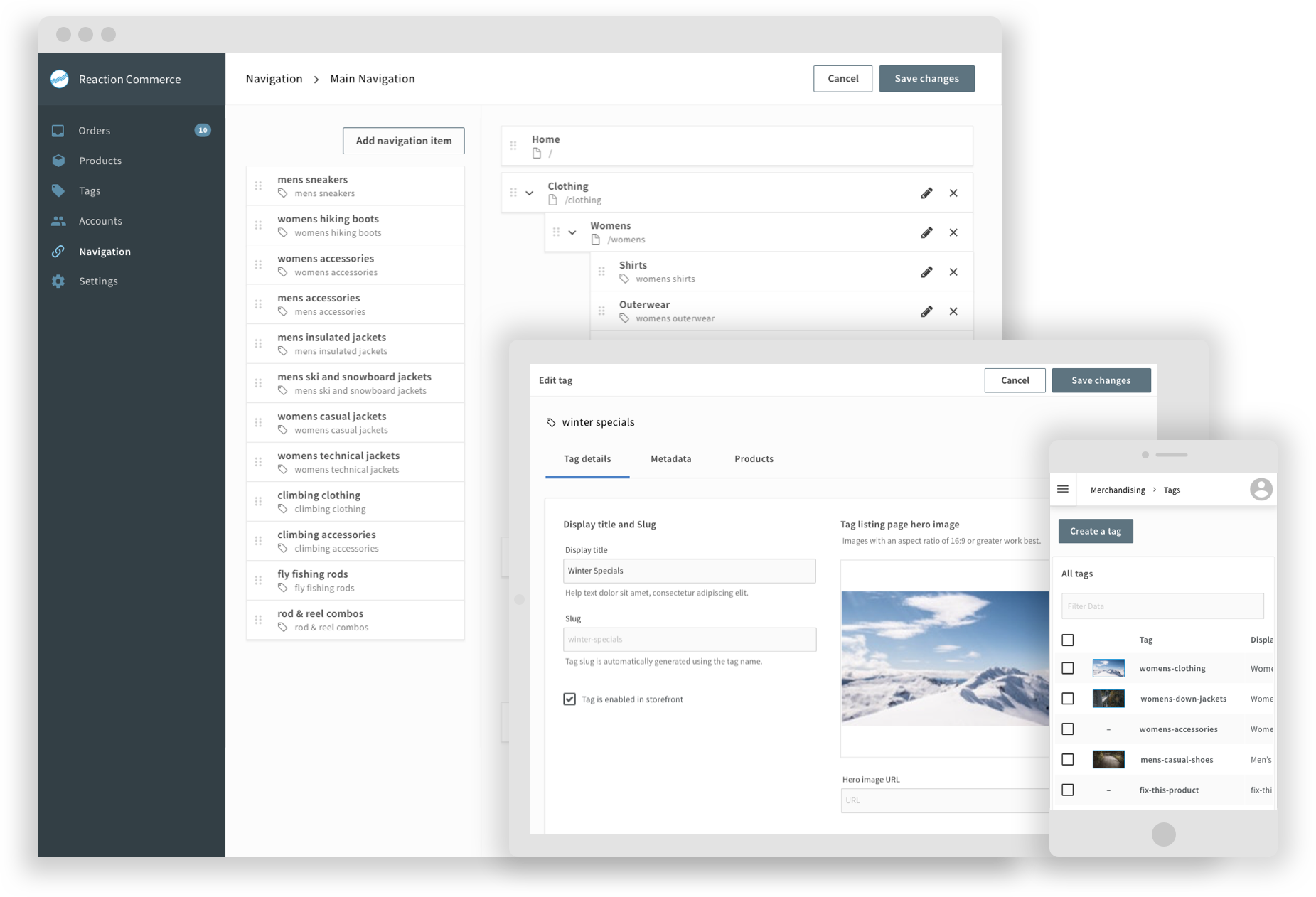
MOC Admin

Features

FastReturns data in split seconds, and faster queries mean faster web pages
ProvenOpen Commerce fuels sites doing 10's of thousands of orders per day with 100's of thousands of products
ComposableA flexible plugin system allows you to pick and choose which integrations work best for you
Multi-tenantHost multiple shops in the same installation
ScalableStart out with a single server and scale up to hundreds
Flexible ProductsAllows Products, with options and variants to fit a wide variety of needs
InventoryTrack inventory, allow or disallow backorders and more
ShippingIntegrate with a shipping rate provider or build your own custom table
TaxesIntegrate with a tax rate provider or build your own custom tax table
FulfillmentFlexible fulfillment system allows you create your own fulfillment methods
Order TrackingView and manage your orders in the included admin system
EmailsCustomizable templates for Order confirmations and more
OpenFully open source. Never be locked in again

Getting started

To start working with your own project built on Mailchimp Open Commerce you can start by using our new CLI. The CLI is the quickest and easiest way to develop on Open Commerce. It allows you to create and work with API, Admin, and Storefront projects all via the command line.

What you need

  • We recommend installing nvm
  • [14.18.1 ≤ Node version
Install the project dependencies:

npm install


Finally, start the server in development mode:

reaction develop api


Note: Optionally, from within the project-directory you may issue the above command without mentioning the project type and the CLI would check your package.json for the "projectType" and pick it up from there. This expects that the project itself was built using the latest version of the CLI as explained in the above steps.

Example, instead of the above command, you may skip mentioning 'api' and just use:

reaction develop


This will start the Open Commerce GraphQL server and Mongo Server. Press Ctrl+C to stop.

- A sample custom plugin has been installed, and you should see its output in the logs. (Your Sample Plugin)
- To add a new plugin based on our plugin template run:

reaction create-plugin api

Validate whether the plugin was created in the `custom-packages`

cd custom-packages

cd

npm install

You now need to change back up to the root:

cd ../../

now you can run:

reaction develop

This plugin will now be loaded the next time you start Open Commerce.

### Congratulations!! You're ready to start developing with Open Commerce

See the [Complete CLI instructions](https://github.com/reactioncommerce/cli) for how to create your local storefront and admin.


Go to the complete [installation instructions](https://mailchimp.com/developer/open-commerce/guides/quick-start/#access-the-dashboard-playground-and-storefront) to see how to set up your store

# API development
If you are working on core plugins (not developing plugins for your own installation) you should follow these 
instructions

## What you need

- [pnpm](https://pnpm.io/)
- [Docker](https://www.docker.com/get-started/)
- [Docker Compose](https://docs.docker.com/compose/)

## Install PNPM
```bash
npm i -g [email protected]

Clone and Start the source

git clone https://github.com/reactioncommerce/reaction.git
cd reaction
pnpm install
cp apps/reaction/.env.example apps/reaction/.env

Start dev-server with mongo on local:

## you must change MONGO_URL in the .env to mongodb://localhost:27017/reaction before start
pnpm run start:dev

Start dev-server with mongodb on docker

docker-compose up -d
pnpm run start:dev

Development Flow

  1. Make some changes in one or more packages.
  2. Add a changeset in that same PR.
  3. Repeat the process of making changes and adding changesets.
  4. Create PR

How to release

  1. Run release action to create Version PR. This PR will remove all changeset files, bump up packages versions, update CHANGELOG files.
  2. Merge Version PR into trunk, CircleCI will publish all the packages into npm.

Prerelease flows

  1. All PRs will be merged into prerelease branch before triggering PRERELEASE action.
  2. Before merging PRs into prerelease branch, please make sure that all the changesets are added.
  3. Manually trigger PRERELEASE action to create Version Packages (next) PR. After merged, the changeset/action will bump up packages versions as {next-version}-next.{number}, update CHANGELOG files.
  4. Merge Version Packages (next) PR into prerelease branch, action will publish all the packages into npm.

Get involved

Contribute

:star: If you like what you see, star us on GitHub.

Find a bug, a typo, or something that’s not documented well? We’d love for you to open an issue telling us what we can improve! This project uses commitlint, please use their commit message format.

We love your pull requests! Check out our Good First Issue and Help Wanted tags for good issues to tackle. Check out our contributors guide for more information

License

Reaction is GNU GPLv3 Licensed

Frequently asked questions

Is reaction free to use?

reaction is open source under the GPL-3.0 licence. There is no licence fee and no seat count — you can self-host it or, where the project offers one, pay a vendor for a managed version instead.

What does reaction do?

Project has been discontinued ////// Mailchimp Open Commerce is an API-first, headless commerce platform built using Node.js, React, GraphQL. Deployed via Docke

What is reaction written in?

reaction is primarily written in JavaScript. Its source is publicly available at https://github.com/reactioncommerce/reaction, and it has 12,399 GitHub stars.