QtPass




QtPass is a multi-platform GUI for pass, the standard Unix password manager, providing a secure and intuitive way to manage your passwords.
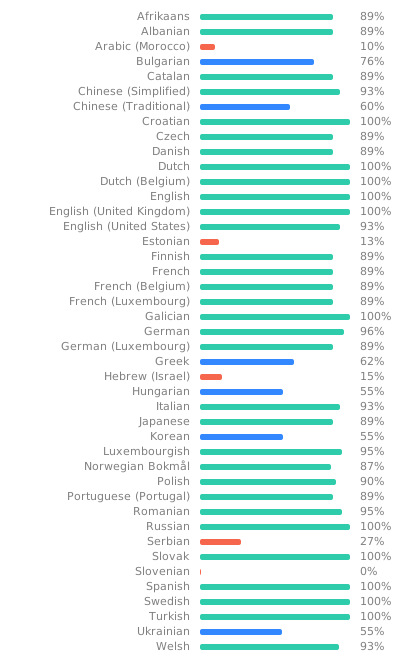
Available in over 60 languages
Project site: qtpass.org — downloads, getting started, FAQ and screenshots.
Features
- Using
passorgitandgpg2directly - Cross platform: Linux, BSD, macOS and Windows
- Native widgets and iconography where possible
- Per-folder user selection for multi-recipient encryption
- Multiple profiles support
- Built-in TOTP (One-Time Password) support, no external extension needed
- Password generation with configurable complexity
- Content search across decrypted entries (regular expression; opt-in)
- Git integration for version control
- Smartcard and USB token support (OpenPGP, YubiKey)
- Configurable shoulder surfing protection
- Share submenu: re-encrypt folder, export your public key, add recipients
- Import GPG keys from file or clipboard without leaving the app
- Process output panel with command labels, color-coded errors, and auto-scroll
- Easy onboarding for new users
How each of these works, from profiles and templates to OTP and Git sync, is described on qtpass.org/advanced.
Logo based on Heart-padlock by AnonMoos.

Installation
Every way to install QtPass, with the current version per platform, is on
qtpass.org/downloads; first-time setup of GnuPG
and pass is on qtpass.org/getting-started.
From package
OpenSUSE & Fedora
yum install qtpass
dnf install qtpass
Debian, Ubuntu and derivates like Mint, Kali & Raspbian
apt-get install qtpass
Arch Linux
pacman -S qtpass
Gentoo
emerge -atv qtpass
Sabayon
equo install qtpass
FreeBSD
pkg install qtpass
OpenBSD
pkg_add qtpass
macOS
Download the .dmg from the releases page
and clear the quarantine flag:
xattr -d com.apple.quarantine /Applications/QtPass.app
(the Homebrew cask was disabled in September 2026 because the app is not
notarized — see the macOS page on qtpass.org and
#1542)
Windows
choco install qtpass or winget install IJHack.QtPass
(the installer is not code-signed yet, so SmartScreen asks for
More info → Run anyway on first start; signing is being set up, see the
code signing policy)
Linux (AppImage)
Download QtPass--x86_64.AppImage from the
releases page, then:
chmod +x QtPass-*.AppImage && ./QtPass-*.AppImage
It bundles Qt only, and uses the pass, gpg2, git and gpg-agent already
installed on your system — so your existing ~/.password-store, pinentry and
smartcard all keep working, with no sandbox permissions to grant. Requires
glibc 2.39 or newer (Ubuntu 24.04+, Debian 13+, Fedora 40+) and libfuse2
(or run it with --appimage-extract-and-run on systems without it).

From Source
Dependencies
- QtPass requires Qt 6.8 or later (build with
qmake6); Qt 5 support ended with QtPass 1.8 - The Linguist package is required to compile translations
- For fallback icons, the SVG library is required
Runtime dependencies:
gpg2(GnuPG 2.2+) - requiredgit- optional, for repository syncpass(1.7+) - optional, can use native GPG/Git
Your GPG must be configured with a graphical pinentry when applicable. Same goes for Git authentication.
On macOS, pinentry-mac from Homebrew works best (gpgtools also works).
On most Unix systems all you need is:
qmake6 && make && make install
Windows
See Windows.md for Windows-specific installation and build instructions.
Using profiles
Profiles allow grouping passwords. Each profile might use a different Git repository and/or different gpg key. Each profile also can be associated with a GPG key to sign and verify the .gpg-id file for integrity. A typical use case is to separate personal and work passwords.
Hint
Instead of using different git repositories for the various profiles passwords could be synchronized with different branches from the same repository. Just clone the repository into the profile folders and checkout the related branch.
Example
The following commands set up two profile folders:
cd ~/.password-store/
# Replace these with your own repositories (HTTPS or SSH).
PERSONAL_REPO_URL="<your-personal-password-repository-url>"
WORK_REPO_URL="<your-work-password-repository-url>"

# Examples:
# git clone https://git.example.com/you/qtpass-personal.git personal
# git clone git@git.example.com:you/qtpass-work.git work

git clone "${PERSONAL_REPO_URL}" personal && echo "personal/" >> .gitignore
git clone "${WORK_REPO_URL}" work && echo "work/" >> .gitignore
pass init -p personal [personal GnuPG-ID] && git -C personal push
pass init -p work [work GnuPG-ID] && git -C work push
Note:
- Replace
PERSONAL_REPO_URLandWORK_REPO_URLwith repositories you own and control. - Replace
[personal GnuPG-ID]and[work GnuPG-ID]with the ID from the related GnuPG key. - The parts
echo ... >> .gitignoreare just needed in case there is a Git repository present in the base directory.
Once the repositories and GnuPG-ID's have been defined the profiles can be set up in QtPass.
Links of interest
Testing
This is done with make check
Codecoverage can be done with make lcov, make gcov, make coveralls and/or make codecov.
Be sure to first run: make distclean && qmake6 CONFIG+=coverage qtpass.pro
Security considerations
The threat model and how to report a vulnerability are on qtpass.org/security and in SECURITY.md.
Using this program will not magically keep your passwords secure against compromised computers even if you use it in combination with a smartcard.
It does protect future and changed passwords though against anyone with access to your password store only but not your keys. Used with a smartcard it also protects against anyone just monitoring/copying all files/keystrokes on that machine and such an attacker would only gain access to the passwords you actually use. Once you plug in your smartcard and enter your PIN (or due to CVE-2015-3298 even without your PIN) all your passwords available to the machine can be decrypted by it, if there is malicious software targeted specifically against it installed (or at least one that knows how to use a smartcard).
To get better protection when using a smartcard even against a targeted attack I can think of at least two options:
- The smartcard must require explicit confirmation for each decryption operation. Or if it just provides a counter for decrypted data you could at least notice an attack afterwards, though at quite some effort on your part.
- Use a different smartcard for each (group of) key.
Known issues
- Filtering (searching) breaks the tree/model sometimes
- Starting without a correctly set password-store folder gives weird results in the tree view
Planned features
- Plugins based on field name, plugins follow same format as password files
- Colour coding folders (possibly disabling folders you can't decrypt)
- Optional table view of decrypted folder contents
- Opening of (basic auth) URLs in default browser? Possibly with helper plugin for filling out forms?
- Some other form of remote storage that allows for accountability / auditing (web API to retrieve the .gpg files?)
Further reading
FAQ and CONTRIBUTING documentation. CHANGELOG
On qtpass.org: getting started, features in depth, FAQ, screenshots, security, privacy, code signing policy and changelog.
AI assistance
Parts of QtPass are developed with AI coding assistants — mainly Claude Code, earlier also OpenCode — and AI reviewers (CodeRabbit, GitHub Copilot) comment on pull requests. Commits made with an assistant carry aCo-Authored-By:trailer naming the model (or the pull request says so), so the history shows which changes were AI-assisted. Every change is reviewed, built and tested by a human maintainer before it is merged, and the maintainers take responsibility for it. Some translations are machine-drafted; they stay marked unfinished in the.tsfiles until a native speaker confirms them on Weblate. The application itself contains no AI features and talks to no AI service.
License
This repository follows the REUSE Specification v3.2.
Please see LICENSES/, REUSE.toml and
the individual *.license files (if any) for copyright and license information.
GNU General Public License v3.0