QOwnNotes
Installation | Changelog | Issues | Shortcuts | Documentation | Privacy Policy | Screenshots | Nextcloud API App | ownCloud API App | Matrix room | Telegram Group | IRC Chat | Mastodon | QOwnNotes Web Companion Firefox extension | QOwnNotes Web Companion Chrome extension | QOwnNotes Web App | QOwnNotes Tor Hidden Service






QOwnNotes is the open source notepad with Markdown support and todo list manager for GNU/Linux, macOS and Windows, that works together with Nextcloud Notes and ownCloud Notes.
You are able to write down your thoughts with QOwnNotes and edit or search for them later from your mobile device, like with QOwnNotes Android, the default Android app, or the Nextcloud / ownCloud web-service.
The notes are stored as plain text markdown files and are synced with Nextcloud's/ownCloud's file sync functionality. Of course other software, like Syncthing or Dropbox can be used too.
If you like the concept of having notes accessible in plain text files, like it is done in the Nextcloud / ownCloud notes apps to gain a maximum of freedom then QOwnNotes is for you.
Visit the project page here: QOwnNotes project page
To manage your todo lists in the web and on your mobile devices, you need to install the Tasks backend on Nextcloud or ownCloud.
To get more on-line features for your notes, like versioning and trash access, you might also want to install the QOwnNotesAPI app on your server.
To access your ownCloud notes from your mobile device you may want to get one of these:
- For Android (default): QOwnNotes Android
- For Android and OwnCloud: MyOwnNotes
- For Android and Nextcloud: Notes
- For iOS: CloudNotes
On Android you could also use any sync-tool like Synchronize Ultimate or FolderSync to sync your note files and use software like neutriNotes or Markor to edit your notes.
On iOS Notebooks may also work well (syncing notes via WebDAV).
Screenshot
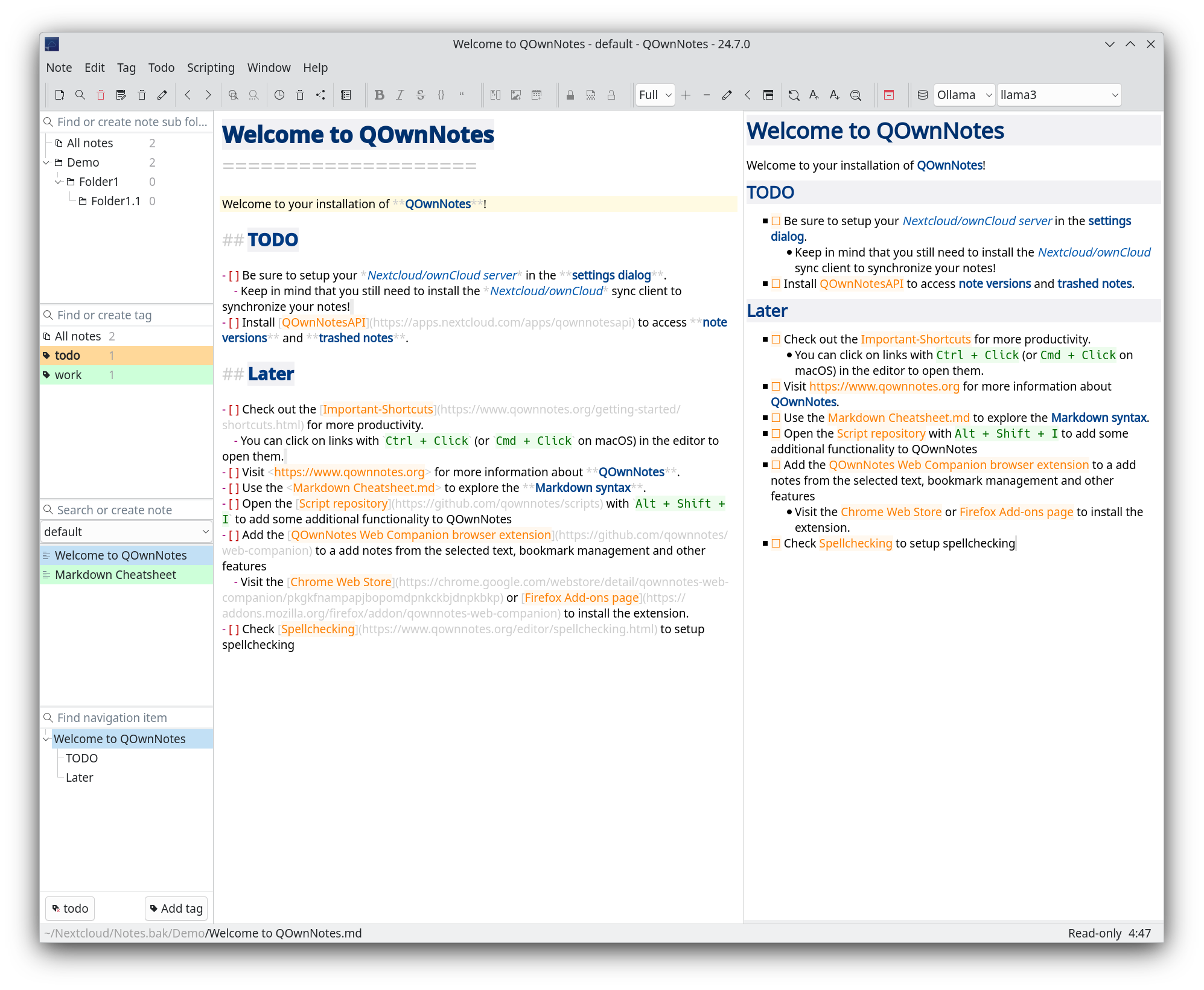
You can visit the QOwnNotes project page for more screenshots.
Features
- written in C++ and optimized for low resource consumption (no CPU and memory-hungry Electron app)
- multiple note folders can be used
- you can use your existing text or markdown files, no need for an import most of the time
- older versions of your notes can be restored from your Nextcloud / ownCloud server (install QOwnNotesAPI on your server)
- trashed notes can be restored from your Nextcloud / ownCloud server
(install QOwnNotesAPI on your server)
- there also are local trash and system trash modes
- sub-string searching of notes is possible and search results are highlighted in the notes
- application can be operated with customizable keyboard shortcuts
- supports global keyboard shortcuts on Wayland
- external changes of note files are watched (notes or note list are reloaded)
- differences between current note and externally changed note are shown in a dialog
- markdown highlighting of notes and a markdown preview
- includes inline image previews, heading folding, and optional hiding of Markdown formatting syntax
- optional wiki-style note links like
[[Note]]with auto-completion, heading anchors, aliases, backlinks, and refactoring support - spellchecking and optional LanguageTool grammar and style checking, Harper grammar and style checking, and Markdown LSP support (e.g. Marksman for completions and diagnostics, or Rumdl for linting)
- tabbing support for editing notes
- scripting support and an online script repository where you can install scripts inside the application
- built-in AI support with script integration for providers like OpenAI and Groq
- includes a built-in MCP server so external AI agents can search and fetch notes securely
- QOwnNotes Web Companion browser extension
to add notes from the selected text and other features
- visit the Chrome Web Store page to install the app on Google Chrome
- visit the Firefox Add-ons page to install the app on Mozilla Firefox
- notes are getting their name from the first line of the note text (just like
in the Nextcloud / ownCloud notes web-application) and the note text files are
automatically renamed, if the first line changes
- this feature can also be turned off, and you can use any filename you like
- manage your Nextcloud / ownCloud todo lists (ownCloud tasks or Tasks Plus / Calendar Plus), or use another CalDAV server
- create Nextcloud Deck cards and link to them in your notes
- encryption of notes (AES-256 is built in, or you can use custom encryption methods like Keybase.io (encryption-keybase.qml) or PGP (encryption-pgp.qml))
- dark mode theme support, live theme switching, and custom color modes
- all panels can be placed wherever you want, they can even float or stack (fully dockable)
- toolbars are fully customizable
- support for freedesktop theme icons, so you can use QOwnNotes with your native desktop icons and with your favorite dark desktop theme QOwnNotes supports Freedesktop icon themes
- support for hierarchical note tagging and note subfolders
- linked files and attachments can be managed from the Navigation panel
- support for sharing notes on your Nextcloud / ownCloud server
- portable mode for carrying QOwnNotes around on USB sticks
- Vim mode
- distraction free mode, full-screen mode, typewriter mode
- Evernote (now with large files and optional YAML front matter metadata) and Joplin import
- QOwnNotes is available in over 60 different languages like English, German, French, Polish, Chinese, Japanese, Russian, Portuguese, Hungarian, Dutch and Spanish
Installation

Please visit Installation for all the ways to install QOwnNotes.
Building QOwnNotes
To get the most current features you can build the application from the source code. Download the latest source here: QOwnNotes Source on GitHub as ZIP
Alternatively you can also check out the code directly from the git repository:
git clone https://github.com/pbek/QOwnNotes.git -b release --depth=1
cd QOwnNotes
git submodule update --init
Then download Qt Creator, you will also
need the packages qtwebsockets to build QOwnNotes with Qt6
(only qtwebsockets for Qt5). If you build under Windows, you want to stick to
MinGw 64-bit.
Afterward open the project file src/QOwnNotes.pro and click on
Build / Build Project QOwnNotes.
Or you can build it directly in your terminal:
cd src

# build binary translation files if you want another language than English
lrelease QOwnNotes.pro

# prepare build process and build the application
qmake
make -j4
Building QOwnNotes For Development
If you are going to work with the code, then you can do the following instead of the above:
cd src
qmake CONFIG+=DEV_MODE CONFIG+=debug ..
make -j4
The DEV_MODE variable enabled higher warning levels + precompiled headers.
Please feel free to contribute source code to this project, make suggestions or report troubles on the QOwnNotes issues page!
You can also visit QOwnNotes on GitHub.
Minimum software requirements
- A desktop operating system, that supports Qt
- Qt 5.5+ / Qt 6.0+
- gcc 4.8+
Disclaimer
This SOFTWARE PRODUCT is provided by THE PROVIDER "as is" and "with all faults." THE PROVIDER makes no representations or warranties of any kind concerning the safety, suitability, lack of viruses, inaccuracies, typographical errors, or other harmful components of this SOFTWARE PRODUCT.
There are inherent dangers in the use of any software, and you are solely responsible for determining whether this SOFTWARE PRODUCT is compatible with your equipment and other software installed on your equipment. You are also solely responsible for the protection of your equipment and backup of your data, and THE PROVIDER will not be liable for any damages you may suffer in connection with using, modifying, or distributing this SOFTWARE PRODUCT.